
6-3-Elasticsearch enrich processor
1. enrich processor 简介
ingest pipeline 可以在传入的文档被索引之前 , 对文档进行预处理 , 通过 processor 中定义的一系列规则来修改文档的内容( 例如大小写转换等) 。
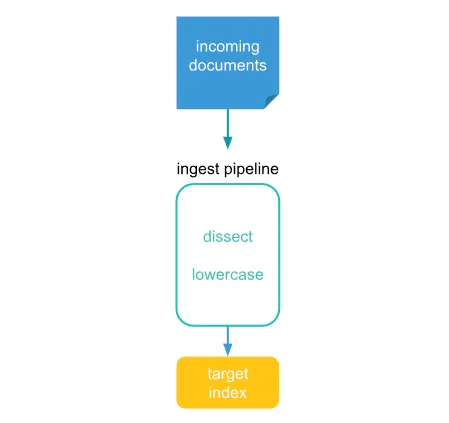
在 Elasticsearch 7.5 版本引入了 enrich processor , 可以将现有索引(source index)中的数据添加到传入的文档(incoming document)中。
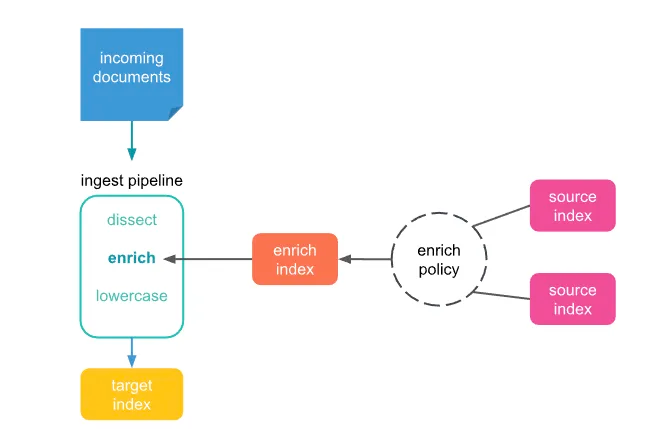
比如 , 你可以在如下的场景中用到:
根据已知的
IP地址识别Web服务或供应商。根据产品
ID将产品信息添加到零售订单中。根据电子邮件地址补充联系信息。
根据用户坐标添加邮政编码。
2. enrich processor 工作原理
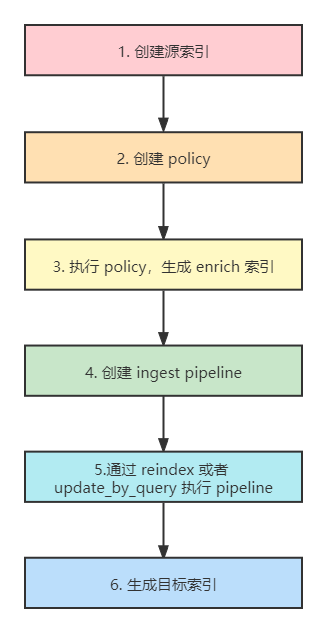
enrich policy: 对应上图中中间虚线框的圆圈部分 , 先上例子 , 建立下直观的认知。PUT /_enrich/policy/data-policy { "match": { "indices": "index_test_b", "match_field": "field_a", "enrich_fields": [ "author", "publisher" ] } }indices:一个或多个源索引的列表 , 存储的是待enrich扩展的数据。match: policy 类型 , 除了传统的match类型 , 还有应用于地理位置场景的:geo_match。match_field: 源索引中用于匹配传入文档的匹配字段。enrich_field: 源索引中的字段列表 , 用于添加到新传入的文档中。
source index源索引 : 用于丰富新写入文档 (incoming documents)的索引。它是目标索引中添加的待丰富数据的源头索引。没有了它 ,
enrich将无从谈起。enrich index丰富索引 :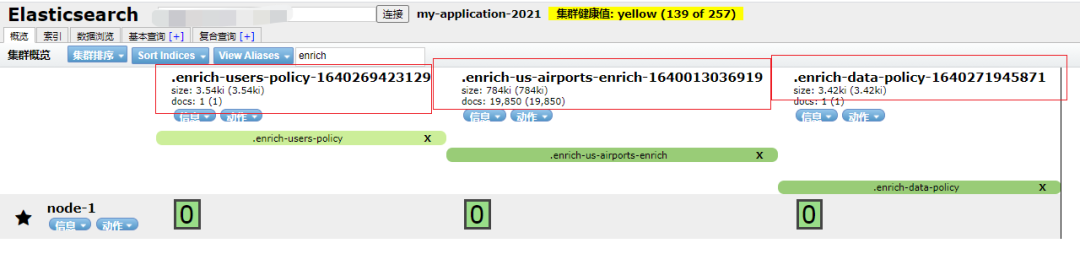
enrich index是执行enrich policy生成的索引。执行命令如下:
POST /_enrich/policy/data-policy/_executeenrich index特点如下:elasticsearch内部管理的系统级索引。目的很“单一”——仅用于
enrich processor。以
.enrich-*开头。只读 , 不支持人为修改。
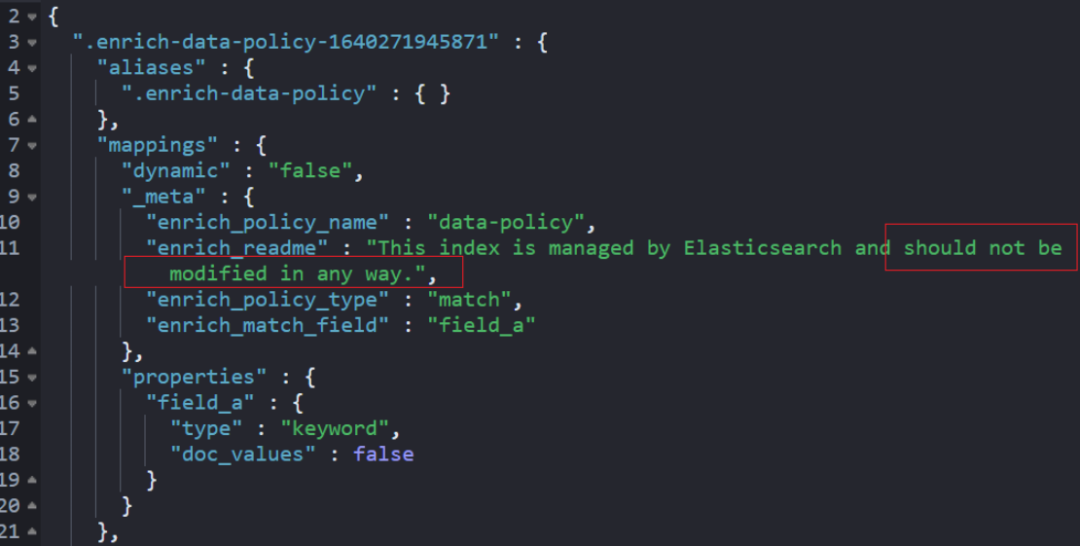

会被强制段合并 , 以实现快速检索。
直接用
source索引不香吗?费那劲干啥?原因 : 直接将传入文档与源索引中的文档进行匹配可能会很慢且需要大量资源。
为了加快速度 ,
enrich索引应运而生。如果再引申的话 ,
source源索引可能会有大量的增删改查操作 , 而enrich一经创建 , 便不允许更改。除非进行重新执行
policy。
2. 使用enrich processor
2.1 示例一
2.1.1 创建初始索引
DELETE index_test_a
PUT index_test_a
{
  "mappings":{
    "properties":{
      "field_a":{
        "type":"keyword"
      },
      "title":{
        "type":"keyword"
      },
      "publish_time":{
        "type":"date"
      }
    }
  }
}

POST index_test_a/_bulk
{"index":{"_id":1}}
{"field_a":"aaa", "title":"elasticsearch in action", "publish_time":"2017-07-01T00:00:00"}


DELETE index_test_b


PUT index_test_b
{
  "mappings": {
    "properties": {
      "field_a": {
        "type": "keyword"
      },
      "author": {
        "type": "keyword"
      },
      "publisher": {
        "type": "keyword"
      }
    }
  }
}

POST index_test_b/_bulk
{"index":{"_id":1}}
{"field_a":"aaa", "author":"jerry", "publisher":"Tsinghua"}
2.1.2 创建data-policy
DELETE _enrich/policy/data-policy
PUT /_enrich/policy/data-policy
{
  "match": {
    "indices": "index_test_b",
    "match_field": "field_a",
    "enrich_fields": ["author","publisher"]
  }
}
2.1.3 执行data-policy
POST /_enrich/policy/data-policy/_execute2.1.4 创建 pipeline
DELETE /_ingest/pipeline/data_lookup
PUT /_ingest/pipeline/data_lookup
{
  "processors": [
    {
      "enrich": {
        "policy_name": "data-policy",
        "field": "field_a",
        "target_field": "field_from_bindex",
        "max_matches": "1"
      }
    },
    {
      "append": {
        "field": "author",
        "value": "{{field_from_bindex.author}}"
      }
    },
    {
      "append": {
        "field": "publisher",
        "value": "{{field_from_bindex.publisher}}"
      }
    },
    {
      "remove": {
        "field": "field_from_bindex"
      }
    }
  ]
}
enrich processor:实现了将b索引的field_a相关联数据,和新写入索引数据融合,使得新索引“丰富”。append processor:实现了字段修改。remove processor:实现了删除不需要的中间字段数据。
2.1.5 reindex 索引
DELETE index_test_c
POST _reindex
{
  "source": {
    "index": "index_test_a"
  },
  "dest": {
    "index": "index_test_c",
    "pipeline": "data_lookup"
  }
}
2.1.6 检索结果
GET index_test_c/_search最终结果数据如下截图所示;
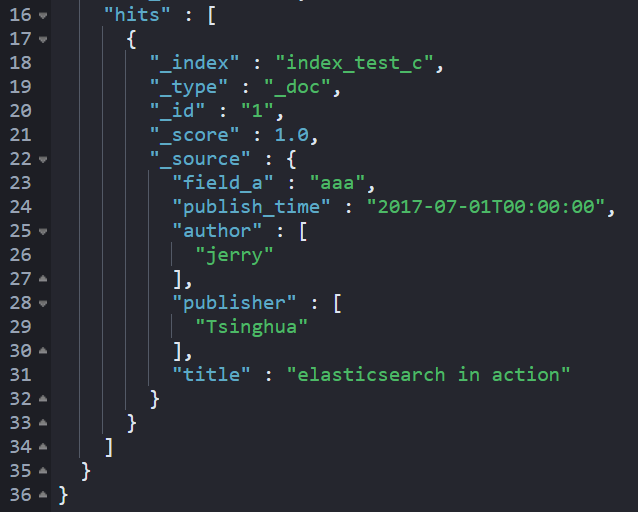
索引 c 实现了索引 a 和 索引 b 的融合,索引c 变得“丰富”。
2.2 示例二
使用 enrich processor 有如下几个步骤:
1.添加 enrich data: 添加
document(enrich data) 到一个或者多个的source index中 , 这些document中应包含之后要添加到incoming documents中的数据。2.创建 enrich policy:
enrich policy中应至少包含如下参数:指定
source index的。指定
incoming documents和source index用于匹配的属性。指定要添加到
incoming documents中的属性。
3.执行
enrich policy: 执行完后会自动创建相应的enrich index,enrich index和普通索引不同 , 进行了优化。4.在
ingest pipeline使用enrich processor:enrich processor使用enrich index来查询。
source index 的内容如下:
incoming document 传入的文档如下 , 通过 num 字段查到对应 source index 中的 loc 的值 , 添加到 incoming document 中新增 enrich_loc 属性中。
2.2.1 添加 enrich data
通过 _bulk API 批量添加文档到 location 索引 , 这些文档和普通的文档一样。
POST _bulk
{"index": {"_index":"location"}}
{"loc":"广东省","company":"腾讯","num":"A1001"}
{"index": {"_index":"location"}}
{"loc":"上海市","company":"Bilibili","num":"B1001"}
{"index": {"_index":"location"}}
{"loc":"浙江省","company":"阿里巴巴","num":"C1001"}
2.2.2 创建 enrich policy
enrich policy 一旦创建 , 就不能更新或者修改。
PUT /_enrich/policy/my-policy
{
  "match": {
    "indices": "location",  #incoming documents
    "match_field": "num", #incoming documents 和 source index 匹配的属性 , 属性名一样都要是 num
    "enrich_fields": ["loc"], #添加到 incoming documents 中的属性
    # 可选 , 过滤 source index 的文档 , 只有 loc.keyword 是上海市的 enrich data 才能将属性添加到 incoming documents 中
    "query": {
      "match": {
        "loc.keyword": "上海市"
      }
    }
  }
}
2.2.3 执行 enrich policy
当创建了 enrich policy 后 , 你可以通过 execute enrich policy API 去执行 enrich policy。当执行 enrich policy 后 , 会自动创建 enrich index。
直接将 incoming document 与 source index 中的文档匹配可能会很慢且占用大量资源。为了加快处理速度 , enrich processor 使用了 enrich index。enrich index 包含来自 source index 的 enrich data , enrich index 具有一些特殊属性可帮助简化它们:
它们是系统索引 , 这意味着它们由
Elasticsearch在内部进行管理 , 仅适用于enrich processor。它们始终以
.enrich- *开头。它们是只读的 , 这意味着你不能直接更改它们。
它们被强制合并以便快速检索。
当 source index 中新增或者修改了数据 , 只需要重新执行 enrich policy 就可以更改 enrich index , 从而更新 enrich processor。
通过以下命令执行 enrich policy:
PUT /_enrich/policy/my-policy/_execute查看自动创建的 enrich index:
GET _cat/indices/.enrich*

# 返回结果
green open .enrich-my-policy-1616136526661 Vxal9lLBSlKS5lmzMpFfwQ 1 3 1 0 13.4kb 3.3kb
我感觉 enrich policy 这里有个小 bug , 当删除 enrich policy 时 , 例如删除的 enrich policy 为 my-policy-1 , 会同时删除 my-policy-1 的 enrich index 和 enrich policy , 但是如果原先还有个 my-policy-2( 两个 enrich policy 在-之前是一样的) , 会把 my-policy-2 的 enrich index 也误删了( enrich policy 不删) 。
2.2.4 第四步: 在 ingest pipeline 使用 enrich processor
PUT _ingest/pipeline/loc-pipeline
{
  "processors": [
    {
      "enrich": {
        "policy_name": "my-policy",
        "field": "num",
        #在incoming document 中新增的属性 ,
        #包含在 enrich policy 中定义的 match_field 和 enrich_fields 的值
        "target_field": "enrich_loc"
      }
    }
  ]
}
验证
使用 simulate 用来调试 ingest pipeline的效果 , 由于 source index 中匹配到的 loc.keyword 不是上海市 , 不会对这个文档进行处理:
POST _ingest/pipeline/loc-pipeline/_simulate
{
  "docs": [
    {
      "_source": {
        "num": "A1001",
        "company": "腾讯"
      }
    }
  ]
}

# 返回结果
{
  "docs" : [
    {
      "doc" : {
        "_index" : "_index",
        "_type" : "_doc",
        "_id" : "_id",
        "_source" : {
          "company" : "腾讯",
          "num" : "A1001"
        },
        "_ingest" : {
          "timestamp" : "2021-03-19T06:56:45.754486259Z"
        }
      }
    }
  ]
}
这个文档的 loc.keyword 是上海市 , 因此会添加上 enrich data 中指定的属性:
POST _ingest/pipeline/loc-pipeline/_simulate
{
  "docs": [
    {
      "_source": {
        "num": "B1001",
        "company": "Bilibili"
      }
    }
  ]
}

# 返回结果
{
  "docs" : [
    {
      "doc" : {
        "_index" : "_index",
        "_type" : "_doc",
        "_id" : "_id",
        "_source" : {
          "company" : "Bilibili",
          "enrich_loc" : {
            "loc" : "上海市",
            "num" : "B1001"
          },
          "num" : "B1001"
        },
        "_ingest" : {
          "timestamp" : "2021-03-19T06:56:29.393585306Z"
        }
      }
    }
  ]
}
在 simulate 调试成功之后 , 我们在插入文档的时候指定 ingest pipeline:
# 方式一: 单条插入
POST origin-location/_doc?pipeline=loc-pipeline
{
  "num": "A1001",
  "company": "腾讯"
}

POST origin-location/_doc?pipeline=loc-pipeline
{
  "num": "B1001",
  "company": "Bilibili"
}

# 方式二: 批量插入
POST _bulk?pipeline=loc-pipeline
{"index":{"_index":"origin-location"}}
{"num":"A1001","company":"腾讯"}
{"index":{"_index":"origin-location"}}
{"num":"B1001","company":"Bilibili"}
查看插入的结果:
GET origin-location/_search

#返回结果
{
  "took" : 12,
  "timed_out" : false,
  "_shards" : {
    "total" : 1,
    "successful" : 1,
    "skipped" : 0,
    "failed" : 0
  },
  "hits" : {
    "total" : {
      "value" : 2,
      "relation" : "eq"
    },
    "max_score" : 1.0,
    "hits" : [
      {
        "_index" : "origin-location",
        "_type" : "_doc",
        "_id" : "zXxLSXgBUc4opBV-QiOv",
        "_score" : 1.0,
        "_source" : {
          "num" : "A1001",
          "company" : "腾讯"
        }
      },
      {
        "_index" : "origin-location",
        "_type" : "_doc",
        "_id" : "znxLSXgBUc4opBV-SCPk",
        "_score" : 1.0,
        "_source" : {
          "num" : "B1001",
          "company" : "Bilibili",
          "enrich_loc" : {
            "loc" : "上海市",
            "num" : "B1001"
          }
        }
      }
    ]
  }
}
也可以指定索引默认使用的 ingest pipeline , 这样就不用每次在插入文档的时候指定 ingest pipeline了:
# 指定索引默认使用的 ingest pipeline
PUT origin-location2
{
  "settings": {
    "default_pipeline": "loc-pipeline"
  }
}

# 插入数据
POST _bulk
{"index":{"_index":"origin-location2"}}
{"num":"A1001","company":"腾讯"}
{"index":{"_index":"origin-location2"}}
{"num":"B1001","company":"Bilibili"}

# 查看结果
GET origin-location2/_search

# 输出结果
{
  "took" : 8,
  "timed_out" : false,
  "_shards" : {
    "total" : 1,
    "successful" : 1,
    "skipped" : 0,
    "failed" : 0
  },
  "hits" : {
    "total" : {
      "value" : 2,
      "relation" : "eq"
    },
    "max_score" : 1.0,
    "hits" : [
      {
        "_index" : "origin-location2",
        "_type" : "_doc",
        "_id" : "CXxPSXgBUc4opBV-oyTJ",
        "_score" : 1.0,
        "_source" : {
          "num" : "A1001",
          "company" : "腾讯"
        }
      },
      {
        "_index" : "origin-location2",
        "_type" : "_doc",
        "_id" : "CnxPSXgBUc4opBV-oyTJ",
        "_score" : 1.0,
        "_source" : {
          "num" : "B1001",
          "company" : "Bilibili",
          "enrich_loc" : {
            "loc" : "上海市",
            "num" : "B1001"
          }
        }
      }
    ]
  }
}
另外还可以使用 index template , 通过正则表达式的方式匹配多个索引 , 来指定索引使用的 ingest pipeline:
# 使用 index template
PUT _template/my-template
{
  "index_patterns": ["origin-*"],
  "settings": {
   "default_pipeline": "loc-pipeline"
  }
}

# 插入数据
POST _bulk
{"index":{"_index":"origin-location3"}}
{"num":"A1001","company":"腾讯"}
{"index":{"_index":"origin-location3"}}
{"num":"B1001","company":"Bilibili"}

# 查看结果
GET origin-location3/_search

# 输出结果
{
  "took" : 2,
  "timed_out" : false,
  "_shards" : {
    "total" : 1,
    "successful" : 1,
    "skipped" : 0,
    "failed" : 0
  },
  "hits" : {
    "total" : {
      "value" : 2,
      "relation" : "eq"
    },
    "max_score" : 1.0,
    "hits" : [
      {
        "_index" : "origin-location3",
        "_type" : "_doc",
        "_id" : "XnxVSXgBUc4opBV-1yRp",
        "_score" : 1.0,
        "_source" : {
          "num" : "A1001",
          "company" : "腾讯"
        }
      },
      {
        "_index" : "origin-location3",
        "_type" : "_doc",
        "_id" : "X3xVSXgBUc4opBV-1yRp",
        "_score" : 1.0,
        "_source" : {
          "num" : "B1001",
          "company" : "Bilibili",
          "enrich_loc" : {
            "loc" : "上海市",
            "num" : "B1001"
          }
        }
      }
    ]
  }
}
参考链接
Enrich Processor——Elasticsearch 跨索引关联数据新方式-CSDN博客
Elasticsearch enrich processor (qq.com)