
6-2-使用 Ingest Pipeline 在 Elasticsearch 中对数据进行预处理
Ingest pipeline 允许文档在被索引之前对数据进行预处理, 将数据加工处理成我们需要的格式。例如, 可以使用 ingest pipeline添加或者删除字段, 转换类型, 解析内容等等。Pipeline 由一组处理器 Processor 构成, 每个处理器依次运行, 对传入的文档进行特定的更改。Ingest pipeline 和 Logstash 中的 filter 作用相似, 并且更加轻量和易于调试。
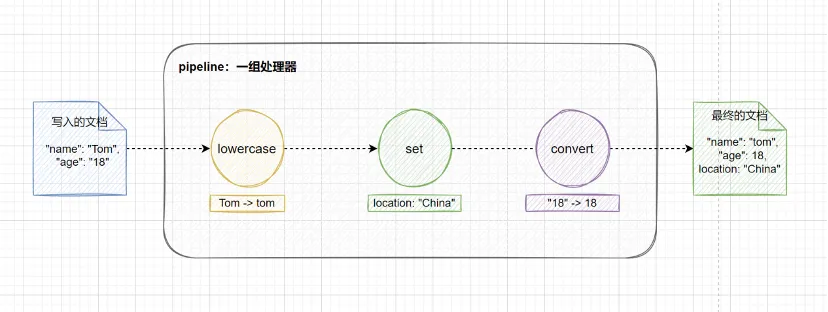
要使用 ingest pipeline, 集群中必须至少有一个具有 ingest 角色的节点。对于大量摄取负载, 建议设置专用的 ingest 节点, 要创建专用的 ingest 节点, 请设置 :
node.roles: [ ingest ]1. Ingest Pipeline 的基本用法
1.1 创建和使用 Ingest Pipeline
接下来介绍一下 ingest pipeline 的创建与使用 , 如下所示 , 使用 ingest API 创建一个名为 my-pipeline 的 ingest pipeline , 在 processors 参数中指定了两个处理器 , set 处理器为文档添加一个新的字段 location , 设置值为 China ; lowercase 处理器将 name 字段的所有字母转换为小写。
PUT _ingest/pipeline/my-pipeline
{
  "description": "My first Ingest Pipeline",
  "processors": [
    {
      "set": {
        "description": "Add a new field",
        "field": "location",
        "value": "China"
      }
    },
    {
      "lowercase": {
        "description": "Lowercase name",
        "field": "name"
      }
    }
  ]
}
然后往索引 my-index 中写入一条数据 , 通过 pipeline 参数指定使用刚刚创建的 my-pipeline。
PUT my-index/_doc/1?pipeline=my-pipeline
{
  "name": "Tom",
  "age": 18
}
查看 id 为 1 的文档 , 可以看到 name 字段由 Tom 转换为 tom , 并且新增了 location 字段 , 说明 my-pipeline 管道成功处理了摄入的数据。
GET my-index/_doc/1

# 返回结果
{
  "_index" : "my-index",
  "_type" : "_doc",
  "_id" : "1",
  "_version" : 1,
  "_seq_no" : 0,
  "_primary_term" : 1,
  "found" : true,
  "_source" : {
    "name" : "tom",
    "location" : "China",
    "age" : 18
  }
}
1.2 使用 Simulate API 测试 Pipeline
为了让开发者更好地了解和使用 pipeline 中的处理器 , Elasticsearch 提供了 simulate API 接口 , 方便我们对 pipeline 进行测试。如下所示 , 我们对 1.1 创建和使用 Ingest Pipeline 章节中创建的 my-pipeline 进行测试 , 在 docs 列表中我们可以填写多个原始文档。
返回结果如下 , 可以看到模拟的结果和实际创建的文档一致 , 只不过 simulate API 并不会真正地创建这个文档。
{
  "docs" : [
    {
      "doc" : {
        "_index" : "_index",
        "_type" : "_doc",
        "_id" : "_id",
        "_source" : {
          "name" : "tom",
          "location" : "China",
          "age" : 18
        },
        "_ingest" : {
          "timestamp" : "2022-03-03T14:04:15.941884826Z"
        }
      }
    }
  ]
}
除了在请求路径中指定 pipeline , 我们还可以在请求体中定义 pipeline 进行模拟 , 这样就不用预先创建好 pipeline , 而是等到测试成功后再去创建 pipeline。
POST _ingest/pipeline/_simulate
{
  "pipeline": {
    "processors": [
      {
        "set": {
          "description": "Add a new field",
          "field": "location",
          "value": "China"
        }
      },
      {
        "lowercase": {
          "description": "Lowercase name",
          "field": "name"
        }
      }
    ]
  },
  "docs": [
    {
      "_source": {
        "name": "Tom",
        "age": 18
      }
    }
  ]
}
1.3 异常处理
当我们使用 pipeline 处理一个文档的时候 , 有时并不是所有的文档都很规范 , 这个时候可能就会出现文档不能被正确解析或者发生异常的情况 , 此时 Elasticsearch 会返回给客户端一个错误的信息 , 表明文档不能被正确地处理。pipeline 中的处理器(processor)按照顺序依次执行 , 默认情况下 , 当处理器发生错误或者异常时 , 将会停止后续的处理。
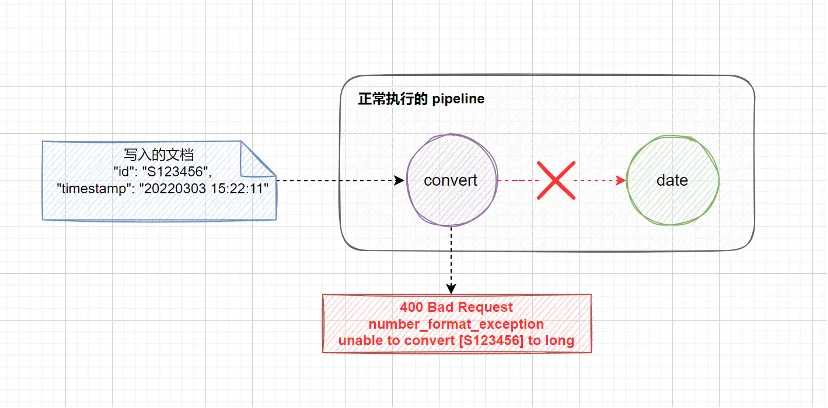
在 ingest pipeline 中 , 异常处理可以分为 3 种情况:
在处理器中设置
ignore_failure: true, 当该处理器发生异常时 , 允许忽略异常 , 继续执行后续的处理器。通过
on_failure参数定义发生异常时执行的处理器列表 , 该参数可以在processor级别中定义 , 也可以在pipeline级别中定义。使用
fail处理器主动抛出异常。
下面将会分别对上述 3 种情况进行演示 , 首先模拟 2 个异常:
convert处理器将id字段转换为long类型 , 由于传入文档的id字段值设置为S123456, 无法转换成long类型的数字 , 会产生number_format_exception的异常。date处理器解析timestamp字段的日期格式 ,formats参数要求输入的格式是yyyy-MM-dd HH:mm:ss, 例如2022-03-03 15:22:11, 解析出日期对应的年月日信息 , 以yyyy/MM/dd的格式输出到date字段中 , 例如2022/03/03。由于传入文档的timestamp字段的格式是20220303 15:22:11, 并不满足formats参数要求的日期格式 , 因此会产生date_time_parse_exception的异常。
执行以下 pipeline 测试语句 , 在请求路径中加上 verbose 可以看到每个处理器的执行情况。
POST _ingest/pipeline/_simulate?verbose
{
  "pipeline": {
    "processors": [
      {
        "convert": {
          "field": "id",
          "type": "long"
        }
      },
      {
        "date": {
          "field": "timestamp", // 解析的字段
          "formats": [
            "yyyy-MM-dd HH:mm:ss" // 解析的格式
          ],
          "output_format": "yyyy/MM/dd",  // 输出的格式
          "target_field": "date"  // 输出的字段
        }
      }
    ]
  },
  "docs": [
    {
      "_source": {
        "id": "S123456",
        "timestamp": "20220303 15:22:11",
        "message": "User login successfully"
      }
    }
  ]
}
返回结果如下 , 尽管我们人为制造了 2 个异常 , 但是只看到了 convert 处理器的异常报错 , 这是因为当处理器发生错误或者异常时 , 将会停止后续的处理 , 直接向客户端返回错误信息。
{
  "docs" : [
    {
      "processor_results" : [
        {
          "processor_type" : "convert",
          "status" : "error",
          "error" : {
            "root_cause" : [
              {
                "type" : "illegal_argument_exception",
                "reason" : "unable to convert [S123456] to long"
              }
            ],
            "type" : "illegal_argument_exception",
            "reason" : "unable to convert [S123456] to long",
            "caused_by" : {
              "type" : "number_format_exception",
              "reason" : "For input string: \"S123456\""
            }
          }
        }
      ]
    }
  ]
}
1.3.1 ignore_failure 忽略异常
在处理器中设置 ignore_failure 参数为 true , 当该处理器发生异常时 , 允许忽略异常 , 继续执行后续的处理器。
POST _ingest/pipeline/_simulate?verbose
{
  "pipeline": {
    "processors": [
      {
        "convert": {
          "field": "id",
          "type": "long",
          "ignore_failure": true // 忽略异常
        }
      },
      {
        "date": {
          "field": "timestamp",
          "formats": [
            "yyyy-MM-dd HH:mm:ss"
          ],
          "output_format": "yyyy/MM/dd",
          "target_field": "date"
        }
      }
    ]
  },
  "docs": [
    {
      "_source": {
        "id": "S123456",
        "timestamp": "2022/03/03 15:22:11",
        "message": "User login successfully"
      }
    }
  ]
}
这次在返回结果中可以看到有 2 个异常信息 , 其中 convert 处理器的 status 的值为 error_ignored , 表示该异常被忽略了 , 在 doc 中可以看到该处理器处理完毕后的结果 , 可以看到 id 字段的内容保留不变。接着 pipeline 继续往后执行 , 当执行到 date 处理器时 , 再次发生异常 , 由于 date 处理器中未对异常进行处理 , 此时向客户端返回异常信息。
{
  "docs" : [
    {
      "processor_results" : [
        {
          "processor_type" : "convert",
          "status" : "error_ignored", // 第 1 个异常 , 忽略异常
          "ignored_error" : {
            "error" : {
              "root_cause" : [
                {
                  "type" : "illegal_argument_exception",
                  "reason" : "unable to convert [S123456] to long"
                }
              ],
              "type" : "illegal_argument_exception",
              "reason" : "unable to convert [S123456] to long",
              "caused_by" : {
                "type" : "number_format_exception",
                "reason" : "For input string: \"S123456\""
              }
            }
          },
          "doc" : {
            "_index" : "_index",
            "_type" : "_doc",
            "_id" : "_id",
            "_source" : {
              "id" : "S123456",  // 跳过 convert 处理器对 id 字段的处理
              "message" : "User login successfully",
              "timestamp" : "2022/03/03 15:22:11"
            },
            "_ingest" : {
              "pipeline" : "_simulate_pipeline",
              "timestamp" : "2022-03-04T02:48:13.562353005Z"
            }
          }
        },
        {
          "processor_type" : "date",
          "status" : "error",  // 第 2 个异常
          "error" : {
            "root_cause" : [
              {
                "type" : "illegal_argument_exception",
                "reason" : "unable to parse date [2022/03/03 15:22:11]"
              }
            ],
            "type" : "illegal_argument_exception",
            "reason" : "unable to parse date [2022/03/03 15:22:11]",
            "caused_by" : {
              "type" : "illegal_argument_exception",
              "reason" : "failed to parse date field [2022/03/03 15:22:11] with format [yyyy-MM-dd HH:mm:ss]",
              "caused_by" : {
                "type" : "date_time_parse_exception",
                "reason" : "Text '2022/03/03 15:22:11' could not be parsed at index 4"
              }
            }
          }
        }
      ]
    }
  ]
}
1.3.2 on_failure 处理异常
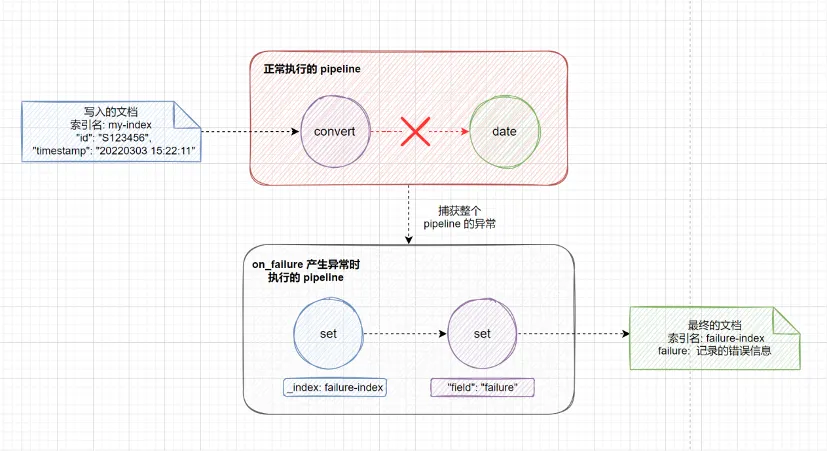
使用 on_failure 参数可以定义发生异常时执行的处理器列表 , 该参数允许在 processor 和 pipeline 级别中定义。在 pipeline 级别定义时 , on_failure 捕获整个 pipeline 发生的任何异常 , 当产生异常时直接执行 on_failure 中定义的处理器列表 , 不会再执行后续的处理器。
在 processor 级别定义时 , on_failure 参数可以针对单个处理器进行异常处理 , 会继续执行后续的处理器。
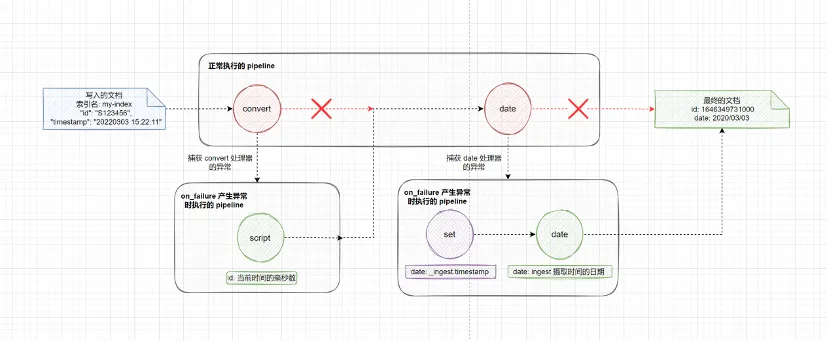
on_failure 参数可以同时在 pipeline 和 processor 中定义 , 这两者并不冲突 , 比较推荐的做法是 , 针对某些处理器设置 processor 级别的 on_failure 处理规则 , 另外设置 pipeline 级别的 on_failure 处理规则作为一条兜底的规则 , 当 processor 级别的 on_failure 处理规则也发生异常时或者没有设置异常处理的处理器发生异常时 , 就可以应用这条兜底的规则 , 这样做的好处就是可以尽可能地保证我们的 ingest pipeline 的健壮性。
如下所示 , 在 pipeline 级别设置了 on_failure 的处理规则 , 注意这里的 on_failure 参数和 processors 参数是处于同一层级的。当发生异常时 , on_failure 会执行里面的 set 处理器 , 将索引名改为 failure-index , 该索引专门用于记录 pipeline 处理异常的文档。之后我们就可以在 failure-index 索引中去查看哪些文档在预处理时发生了异常 , 方便后续实施相应的补救措施。
PUT _ingest/pipeline/failure-test-pipeline
{
  "processors": [
    {
      "convert": {
        "field": "id",
        "type": "long"
      }
    },
    {
      "date": {
        "field": "timestamp",
        "formats": [
          "yyyy-MM-dd HH:mm:ss"
        ],
        "output_format": "yyyy/MM/dd",
        "target_field": "date"
      }
    }
  ],
  "on_failure": [ // 发生异常时执行的处理器列表
    {
      "set": {
        "field": "_index", // 通过 _index 元数据字段 , 可以改变写入的索引
        "value": "failure-index"
      }
    }
  ]
}
然后往 my-index 索引中插入一条有错误的文档 , 将文档 _id 设置为 1。从返回结果来看 , 并没有异常报错 , 文档成功写入了。但是仔细观察可以发现 , 文档并没有写入 my-index 索引 , 而是写入了我们记录异常的索引 failure-index。
PUT my-index/_doc/1?pipeline=failure-test-pipeline
{
  "id": "S123456",
  "timestamp": "2022/03/03 15:22:11",
  "message": "User login successfully"
}

# 返回结果
{
  "_index" : "failure-index", // 写入了记录异常的索引
  "_type" : "_doc",
  "_id" : "1",
  "_version" : 1,
  "result" : "created",
  "_shards" : {
    "total" : 2,
    "successful" : 1,
    "failed" : 0
  },
  "_seq_no" : 0,
  "_primary_term" : 1
}
查询 my-index 文档 , 确实没有找到 _id 为 1 的这条文档。
GET my-index/_doc/1

# 返回结果
{
  "error" : {
    "root_cause" : [
      {
        "type" : "index_not_found_exception",
        "reason" : "no such index [my-index]",
        "resource.type" : "index_expression",
        "resource.id" : "my-index",
        "index_uuid" : "_na_",
        "index" : "my-index"
      }
    ],
    "type" : "index_not_found_exception",
    "reason" : "no such index [my-index]",
    "resource.type" : "index_expression",
    "resource.id" : "my-index",
    "index_uuid" : "_na_",
    "index" : "my-index"
  },
  "status" : 404
}
查询 failure-index 索引可以找到这条处理异常的文档
GET failure-index/_doc/1

# 返回结果
{
  "_index" : "failure-index",
  "_type" : "_doc",
  "_id" : "1",
  "_version" : 1,
  "_seq_no" : 0,
  "_primary_term" : 1,
  "found" : true,
  "_source" : {
    "id" : "S123456",
    "message" : "User login successfully",
    "timestamp" : "2022/03/03 15:22:11"
  }
}
对于我们来说 , 目前 failure-index 索引记录的信息十分有限 , 根据以上内容我们无法知道是哪个处理器在执行时产生了异常。在 on_failure 中提供了以下 4 个元数据字段方便我们进行故障定位:
on_failure_pipeline: 产生异常的pipeline类型的处理器中引用的pipeline。ingest pipeline中有一个pipeline类型的处理器 , 该处理器也可以指定使用其他的pipeline, 这里注意区分pipeline类型的处理器和pipeline管道。on_failure_message: 报错的内容。on_failure_processor_type: 产生异常的处理器的标签 , 标签可以在处理器中通过 tag 参数指定。当 pipeline 中使用了多个相同类型的处理器时 , 根据指定的标签可以方便我们进行区分。on_failure_processor_tag: 产生异常的处理器的类型。
如下所示 , 我们在 on_failure 参数新增了一个 set 处理器 , 将错误信息写入 failure-index 的 failure 字段中。
PUT _ingest/pipeline/failure-test-pipeline
{
  "processors": [
    {
      "convert": {
        "tag": "my-index-convert", // 设置处理器的标签 , 方便定位问题
        "field": "id",
        "type": "long"
      }
    },
    {
      "date": {
        "tag": "my-index-date", // 设置处理器的标签 , 方便定位问题
        "field": "timestamp",
        "formats": [
          "yyyy-MM-dd HH:mm:ss"
        ],
        "output_format": "yyyy/MM/dd",
        "target_field": "date"
      }
    }
  ],
  "on_failure": [
    {
      "set": {
        "field": "_index",
        "value": "failure-index"
      }
    },
    {
      "set": {
        "field": "failure",
        "value": {
          "on_failure_pipeline": "{{ _ingest.on_failure_pipeline }}",
          "on_failure_message": "{{_ingest.on_failure_message}}",
          "on_failure_processor_type": "{{_ingest.on_failure_processor_type}}",
          "on_failure_processor_tag": "{{ _ingest.on_failure_processor_tag }}"
        }
      }
    }
  ]
}
然后往 my-index 索引中插入一条有错误的文档 , 将文档 _id 设置为 2。
PUT my-index/_doc/2?pipeline=failure-test-pipeline
{
  "id": "S123456",
  "timestamp": "2022/03/03 15:22:11",
  "message": "User login successfully"
}
查看 failure-index 索引记录的错误信息 , 可以得知打了 my-index-convert 标签的 convert 类型的处理器在处理 S123456 字符串时引发了异常。细心的同学可能会注意到 , 在返回结果中 on_failure_pipeline 的内容为空 , 这是由于异常并不是由 pipeline 类型的处理器产生的 , 所以这里的结果是空值。如果只是想获取客户端直接调用的 ingest pipeline , 那么可以通过 _ingest.pipeline 来获取。
{
  "_index" : "failure-index",
  "_type" : "_doc",
  "_id" : "2",
  "_version" : 1,
  "_seq_no" : 1,
  "_primary_term" : 1,
  "found" : true,
  "_source" : {
    "failure" : {
      "on_failure_pipeline" : "", // 产生异常的 pipeline 类型的处理器中引用的 pipeline
      "on_failure_message" : "For input string: \\\"S123456\\\"", // 报错的内容
      "on_failure_processor_tag" : "my-index-convert", // 产生异常的处理器的标签
      "on_failure_processor_type" : "convert" // 产生异常的处理器的类型
    },
    "id" : "S123456",
    "message" : "User login successfully",
    "timestamp" : "2022/03/03 15:22:11"
  }
}
上面的示例介绍了 on_failure 参数在 pipeline 级别的处理 , 现在介绍下 on_failure 参数如何在 processor 级别进行处理。如下所示 , 在 convert 和 date 处理器中分别通过 on_failure 参数设置了发生异常时执行的处理器列表: 当convert 进行类型转换发生异常时 , 将当前时间的毫秒数设置 id 字段的值 ; 当 date 处理器解析时间发生异常时 , 使用 ingest 摄取时间的日期戳作为 date 字段的值。
PUT _ingest/pipeline/failure-test-pipeline
{
  "processors": [
    {
      "convert": {
        "field": "id",
        "type": "long",
        "on_failure": [ // 发生异常时将当前时间的毫秒数设置 id 字段的值
          {
            "script": {
              "source": """
                 long timeNow = Calendar.getInstance().getTimeInMillis();
                 ctx.id = timeNow;
              """
            }
          }
        ]
      }
    },
    {
      "date": {
        "field": "timestamp",
        "formats": [
          "yyyy-MM-dd HH:mm:ss"
        ],
        "output_format": "yyyy/MM/dd",
        "target_field": "date",
        "on_failure": [  // 发生异常时使用 ingest 摄取时间的日期戳作为 date 字段的值
          {
            "set": {
              "field": "date",
              "value": "{{_ingest.timestamp}}"
            }
          },
          {
            "date": {
              "field": "date",
              "formats": [
                "yyyy-MM-dd'T'HH:mm:ss.SSSZ"
              ],
              "output_format": "yyyy/MM/dd",
              "target_field": "date"
            }
          }
        ]
      }
    }
  ]
}
然后往 my-index 索引中插入一条有错误的文档 , 将文档 _id 设置为 3。文档正常写入 my-index 中 , 没有返回报错信息。
PUT my-index/_doc/3?pipeline=failure-test-pipeline
{
  "id": "S123456",
  "timestamp": "2022/03/03 15:22:11",
  "message": "User login successfully"
}

# 返回结果
{
  "_index" : "my-index",
  "_type" : "_doc",
  "_id" : "3",
  "_version" : 1,
  "result" : "created",
  "_shards" : {
    "total" : 2,
    "successful" : 1,
    "failed" : 0
  },
  "_seq_no" : 0,
  "_primary_term" : 1
}
获取 my-index 索引中 _id 为 3 的文档 , 可以看到 id 字段的值并不是传入的原始文档中的 S123456 , 而是当前时间对应的毫秒值 ; date 字段的值被设置为了 ingest 摄取时间的日期。
GET my-index/_doc/3

# 返回结果
{
  "_index" : "my-index",
  "_type" : "_doc",
  "_id" : "3",
  "_version" : 1,
  "_seq_no" : 0,
  "_primary_term" : 1,
  "found" : true,
  "_source" : {
    "date" : "2022/03/03",
    "id" : 1646349731000,
    "message" : "User login successfully",
    "timestamp" : "2022/03/03 15:22:11"
  }
}
1.3.3 fail 主动抛出异常
和 ignore_failure, on_failure 两种处理异常的方式不同 , 使用 fail 处理器可以基于某些条件主动抛出异常 , 当你想要主动让 pipeline 失败并且返回特定的报错信息给请求者时 , 可以使用这种方式。如下所示 , 当 tags 字段中不包含 production 时 , fail 处理器会主动抛出异常 , 在 message 参数中可以自定义相应的报错信息。
POST _ingest/pipeline/_simulate
{
  "pipeline": {
    "processors": [
      {
        "fail": {
          "if": "ctx.tags.contains('production') != true",
          "message": "The production tag is not present, found tags: {{{tags}}}"
        }
      }
    ]
  },
  "docs": [
    {
      "_source": {
        "tags": ["development"]
      }
    }
  ]
}

# 返回结果
{
  "docs" : [
    {
      "error" : {
        "root_cause" : [
          {
            "type" : "fail_processor_exception",
            // 自定义的报错信息
            "reason" : "The production tag is not present, found tags: {0=development}"
          }
        ],
        "type" : "fail_processor_exception",
        "reason" : "The production tag is not present, found tags: {0=development}"
      }
    }
  ]
}
1.4 执行条件判断
每种类型的处理器中都支持 if 参数判断执行处理器的条件 , 在 if 参数中使用 painless脚本进行逻辑判断 , 当 if 的判断结果为 true 时 , 相应的处理器才会执行。如下所示 , 创建了 if-test-pipeline , 我们只想日志级别是 error 的消息 , 当 level 字段的值是 notice 时 , 丢弃该文档。
PUT _ingest/pipeline/if-test-pipeline
{
  "processors": [
    {
      "drop": {
        "description": "Drop documents with level of notice",
        "if": "ctx.level == 'notice'"
      }
    }
  ]
}
然后往 log-index 索引中写入两条文档 , 指定使用 if-test-pipeline , 其中一条文档的 level 值等于 notice , 另一条的 level 值等于 error。
POST log-index/_doc?pipeline=if-test-pipeline
{
  "level": "notice",
  "message": "this is a notice log"
}
POST log-index/_doc?pipeline=if-test-pipeline
{
  "level": "error",
  "message": "this is a error log"
}
查询 log-index 索引 , 只返回了 1 条文档 , level 等于 notice 的文档被丢弃了。
GET log-index/_search

# 返回结果
{
  "took" : 1,
  "timed_out" : false,
  "_shards" : {
    "total" : 1,
    "successful" : 1,
    "skipped" : 0,
    "failed" : 0
  },
  "hits" : {
    "total" : {
      "value" : 1,
      "relation" : "eq"
    },
    "max_score" : 1.0,
    "hits" : [
      {
        "_index" : "log-index",
        "_type" : "_doc",
        "_id" : "fV9ET38BKRZVqZj9X8yC",
        "_score" : 1.0,
        "_source" : {
          "level" : "error",
          "message" : "this is a error log"
        }
      }
    ]
  }
}
接下来介绍一种高级的用法 , 将一个 pipeline 作为多个不同的索引或者数据流默认的 pipeline , 在这个 pipeline 中创建多个 pipeline 类型的处理器 , 每个处理器根据传入的文档选择后台真正要执行的 pipeline。这样做的好处就是 , 如果要更改后台使用的 pipeline , 只需要修改默认的 pipeline 中引用的 pipeline 即可 , 客户端的代码或者索引中的设置无需修改 , 可以做到业务无感知的切换。如下所示 , 先创建两个 pipeline , 其中 httpd_pipeline 用于处理 http 相关的日志 , syslog_pipeline 用于处理 syslog 相关的日志。
PUT _ingest/pipeline/httpd_pipeline
{
  "processors": [
    {
      "set": {
        "field": "message",
        "value": "this is a apache_httpd log"
      }
    }
  ]
}

PUT _ingest/pipeline/syslog_pipeline
{
  "processors": [
    {
      "set": {
        "field": "message",
        "value": "this is a syslog log"
      }
    }
  ]
}
接着创建一个 default_pipeline , 使用 if 参数进行判断 , 当 service 字段的值等于 apache_httpd 时 , 执行 httpd_pipeline , 当 service 字段的值等于 syslog 时 , 执行 syslog_pipeline。
PUT _ingest/pipeline/default_pipeline
{
  "processors": [
    {
      "pipeline": {
        "description": "If 'service' is 'apache_httpd', use 'httpd_pipeline'",
        "if": "ctx.service == 'apache_httpd'",
        "name": "httpd_pipeline"
      }
    },
    {
      "pipeline": {
        "description": "If 'service' is 'syslog', use 'syslog_pipeline'",
        "if": "ctx.service == 'syslog'",
        "name": "syslog_pipeline"
      }
    }
  ]
}
使用 simulate API 进行验证 , 可以看到由于传入的文档的 service 字段的值是 syslog , 因此这条文档被交给 syslog_pipeline 进行处理。
POST _ingest/pipeline/default_pipeline/_simulate
{
  "docs": [
    {
      "_source": {
        "service": "syslog"
      }
    }
  ]
}
# 返回结果
{
  "docs" : [
    {
      "doc" : {
        "_index" : "_index",
        "_type" : "_doc",
        "_id" : "_id",
        "_source" : {
          "message" : "this is a syslog log", // syslog_pipeline 添加的内容
          "service" : "syslog"
        },
        "_ingest" : {
          "timestamp" : "2022-03-04T07:18:53.531846541Z"
        }
      }
    }
  ]
}
2. Processor 处理器
下表列出了 Elasticsearch 所有 processor 处理器的类型 , 并且根据各个处理器的用途作了相应的分类。下面的小节中仅会演示说明一些常用的处理器 , 未介绍到的部分读者可以自行查阅官方文档。
2.1 Lowercase & Uppercase
lowercase 处理器可以将字符串转换为其等效的小写字母。如果该字段是一个字符串数组 , 则该数组的所有成员都将被转换。uppercase 处理器和 lowercase 相反 , 将字符串转换为大写字母。如下所示 , 使用 lowercase 处理器将 name 字段转换为小写字母。
POST _ingest/pipeline/_simulate
{
  "pipeline": {
    "processors": [
      {
        "lowercase": {
          "field": "name"
        }
      }
    ]
  },
  "docs": [
    {
      "_source": {
        "name": "Tom"
      }
    }
  ]
}

# 返回结果
{
  "docs" : [
    {
      "doc" : {
        "_index" : "_index",
        "_type" : "_doc",
        "_id" : "_id",
        "_source" : {
          "name" : "tom"
        },
        "_ingest" : {
          "timestamp" : "2022-02-27T10:43:11.718792423Z"
        }
      }
    }
  ]
}
2.2 Split
split 处理器可以根据指定的分隔符 , 将字符串拆分为数组。如下所示 , 以 _ 符号作为分隔符 , 将 num 字段拆分为数组。
POST _ingest/pipeline/_simulate
{
  "pipeline": {
    "processors": [
      {
        "split": {
          "field": "num",
          "separator": "_"
        }
      }
    ]
  },
  "docs": [
    {
      "_source": {
        "num": "111_222_333_444"
      }
    }
  ]
}

# 返回结果
{
  "docs" : [
    {
      "doc" : {
        "_index" : "_index",
        "_type" : "_doc",
        "_id" : "_id",
        "_source" : {
          "num" : [
            "111",
            "222",
            "333",
            "444"
          ]
        },
        "_ingest" : {
          "timestamp" : "2022-02-27T11:10:25.249883405Z"
        }
      }
    }
  ]
}
2.3 Trim
trim 处理器可以去掉字符串头尾的空格。如下所示 , 使用 trim 处理器去掉 message 字段头尾的空格。
POST _ingest/pipeline/_simulate
{
  "pipeline": {
    "processors": [
      {
        "trim": {
          "field": "message"
        }
      }
    ]
  },
  "docs": [
    {
      "_source": {
        "message": "    Elasticsearch is the distributed search and analytics engine    "
      }
    }
  ]
}

# 返回结果
{
  "docs" : [
    {
      "doc" : {
        "_index" : "_index",
        "_type" : "_doc",
        "_id" : "_id",
        "_source" : {
          "message" : "Elasticsearch is the distributed search and analytics engine"
        },
        "_ingest" : {
          "timestamp" : "2022-02-27T11:12:26.952402786Z"
        }
      }
    }
  ]
}
2.4 Join
join 处理器可以将数组中的每个元素拼接成单个字符串。如下所示 , 使用 _ 符号作为分隔符 , 将 animal 字段中的元素拼接成单个字符串。
POST _ingest/pipeline/_simulate
{
  "pipeline": {
    "processors": [
      {
        "join": {
          "field": "animal",
          "separator": "-"
        }
      }
    ]
  },
  "docs": [
    {
      "_source": {
        "animal": ["dog", "cat", "monkey"]
      }
    }
  ]
}

# 返回结果
{
  "docs" : [
    {
      "doc" : {
        "_index" : "_index",
        "_type" : "_doc",
        "_id" : "_id",
        "_source" : {
          "animal" : "dog-cat-monkey"
        },
        "_ingest" : {
          "timestamp" : "2022-02-27T10:33:39.63520118Z"
        }
      }
    }
  ]
}
2.5 Foreach
使用 foreach 处理器可以遍历数组 , 对其中的每个元素进行处理 , 使用 processor 参数指定一个处理器来处理数组中元素。在 foreach 处理器内引用的处理通过 _ingest._value 键来获取数组中每个元素的值。如下所示 , 将 values 字段中的每个元素转换为大写字母。
POST _ingest/pipeline/_simulate
{
  "pipeline": {
    "processors": [
      {
        "foreach": {
          "field": "values",
          "processor": {
            "uppercase": {
              "field": "_ingest._value"
            }
          }
        }
      }
    ]
  },
  "docs": [
    {
      "_source": {
         "values" : ["foo", "bar", "baz"]
      }
    }
  ]
}


# 返回结果
{
  "docs" : [
    {
      "doc" : {
        "_index" : "_index",
        "_type" : "_doc",
        "_id" : "_id",
        "_source" : {
          "values" : [
            "FOO",
            "BAR",
            "BAZ"
          ]
        },
        "_ingest" : {
          "_value" : null,
          "timestamp" : "2022-02-27T10:06:44.235660464Z"
        }
      }
    }
  ]
}
2.6 KV
kv 处理器可以以键值对的方式提取字段。如下所示 , 以空格作为不同键值对的分隔符 , 以 = 拆分每组键值对的键和值。
POST _ingest/pipeline/_simulate
{
  "pipeline": {
    "processors": [
      {
        "kv": {
          "field": "message",
          "field_split": " ", // 拆分键值对
          "value_split": "=" // 拆分键值对的键和值
        }
      }
    ]
  },
  "docs": [
    {
      "_source": {
        "message": "ip=1.2.3.4 error=REFUSED"
      }
    }
  ]
}

# 返回结果
{
  "docs" : [
    {
      "doc" : {
        "_index" : "_index",
        "_type" : "_doc",
        "_id" : "_id",
        "_source" : {
          "message" : "ip=1.2.3.4 error=REFUSED",
          "error" : "REFUSED",
          "ip" : "1.2.3.4"
        },
        "_ingest" : {
          "timestamp" : "2022-02-27T10:40:31.072140367Z"
        }
      }
    }
  ]
}
2.7 CSV
csv 处理器会将字段中的内容看作 csv 文本的一行 , 根据 separator 参数指定的分隔符 , 将拆分后的值赋值给 target_fields 列表中定义的字段。如下所示 , 将 person 字段按照 | 符号进行拆分 , 依次赋值给 name, age, country 字段。
POST _ingest/pipeline/_simulate
{
  "pipeline": {
    "processors": [
      {
        "csv": {
          "field": "person",
          "target_fields": [ // 指定每列的字段值
            "name",
            "age",
            "country"
          ],
          "separator": "|" // 字段间的分隔符
        }
      }
    ]
  },
  "docs": [
    {
      "_source": {
        "person": "zhangsan|18|china"
      }
    }
  ]
}

# 返回结果
{
  "docs" : [
    {
      "doc" : {
        "_index" : "_index",
        "_type" : "_doc",
        "_id" : "_id",
        "_source" : {
          "country" : "china",
          "person" : "zhangsan|18|china",
          "name" : "zhangsan",
          "age" : "18"
        },
        "_ingest" : {
          "timestamp" : "2022-02-24T09:39:48.708832221Z"
        }
      }
    }
  ]
}
2.8 Grok
grok 处理器可以使用正则表达式来提取字段 , 并且内置了许多常用的表达式 , 可以直接通过表达式别名进行使用。可以使用以下命令获取所有 grok 内置的表达式。
GET _ingest/processor/grok?s返回结果如下 , 例如我们想匹配 IP 地址就可以直接使用 %{IP} 进行匹配 , 想匹配 MAC 地址可以使用 %{MAC} 进行匹配。表达式别名还可以引用其他的表达式别名 , 比如表达式别名 IP 就引用了IPV4 和 IPV6 两个别名。
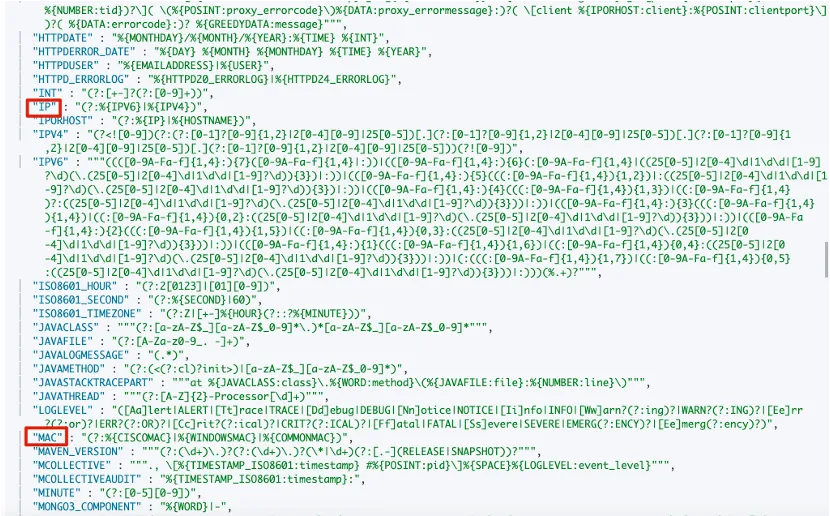
接下来我们尝试使用 grok 处理器解析一条日志。%{<expression>:<field>} 表示将表达式匹配的值赋值到指定的 field 字段中 , 表达式可以是我们自定义的表达式 , 也可以是表达式别名 ; %{<expression>} 表示只匹配不赋值。
55.3.244.1 GET /index.html 15824 0.043"在上面的日志中:
55.3.244.2是客户端的IP地址 , 使用%{IP:client}匹配 IP 地址 , 赋值到client字段中 ;GET是HTTP的请求方法 , 使用%{WORD:method}匹配数字和字母 , 赋值到method字段中 ;/index.html是请求的 URI 路径 , 使用%{URIPATHPARAM:request}匹配URI路径和参数 , 赋值到request字段中 ;15824是请求的字节大小 , 使用%{NUMBER:bytes:int}匹配数字 , 赋值到bytes字段中 , 并且将字段设置为int类型 ;0.043是请求的处理时间 , 使用%{NUMBER:duration:double}匹配数字 , 赋值到duration字段中 , 并且将字段设置为double类型。
上面用到的 IP, WORD, URIPATHPARAM, NUMBER 表达式都是 grok 内置的表达式别名 , 可以直接拿来使用。
POST _ingest/pipeline/_simulate
{
  "pipeline": {
    "processors": [
      {
        "grok": {
          "field": "message",
          "patterns": ["%{IP:client} %{WORD:method} %{URIPATHPARAM:request} %{NUMBER:bytes:int} %{NUMBER:duration:double}"]
        }
      }
    ]
  },
  "docs":[
    {
      "_source": {
        "message": "55.3.244.1 GET /index.html 15824 0.043"
      }
    }
  ]
}

# 返回结果
{
  "docs" : [
    {
      "doc" : {
        "_index" : "_index",
        "_type" : "_doc",
        "_id" : "_id",
        "_source" : {
          "duration" : 0.043,
          "request" : "/index.html",
          "method" : "GET",
          "bytes" : 15824,
          "client" : "55.3.244.1",
          "message" : "55.3.244.1 GET /index.html 15824 0.043"
        },
        "_ingest" : {
          "timestamp" : "2022-03-01T03:33:57.627169176Z"
        }
      }
    }
  ]
}
除了使用 grok 内置的表达式以外 , grok 处理器也允许我们自定义表达式。可以在 pattern_definitions 参数中进行设置 , 其中键是我们自定义表达式的别名 , 值是具体的正则表达式。如下所示 , 我们定义了两个表达式别名: FAVORITE_DOG 使用正则表达式 \w+ , 匹配数字和字母 , 注意这里需要额外使用一个 \ 来进行转义 ; RGB 可以匹配 RED,GREEN,BLUE 3 种颜色。
POST _ingest/pipeline/_simulate
{
  "pipeline": {
    "processors": [
      {
        "grok": {
          "field": "message",
          "patterns": [
            "my %{FAVORITE_DOG:dog} is colored %{RGB:color}"
          ],
          "pattern_definitions": { // 自定义表达式
            "FAVORITE_DOG": "\\w+",  // 匹配数字和字母
            "RGB": "RED|GREEN|BLUE"  // 匹配 3 个颜色
          }
        }
      }
    ]
  },
  "docs": [
    {
      "_source": {
        "message": "my beagle is colored BLUE"
      }
    }
  ]
}

# 返回结果
{
  "docs" : [
    {
      "doc" : {
        "_index" : "_index",
        "_type" : "_doc",
        "_id" : "_id",
        "_source" : {
          "message" : "my beagle is colored BLUE",
          "color" : "BLUE",
          "dog" : "beagle"
        },
        "_ingest" : {
          "timestamp" : "2022-03-01T03:34:33.933398405Z"
        }
      }
    }
  ]
}
有时候一种匹配规则可能难以匹配所有的内容 , 我们可以在正则表达式中通过或的逻辑进行判断 , 但是这样会使得写出来的表达式难以阅读。这里还有一种更好的方法 , 在 grok 处理器中 , patterns 参数允许填写多个表达式 , 这样我们的匹配规则看上去就一目了然 , 处理器会使用最先匹配到的表达式。如下所示 , 我们设置了 FAVORITE_DOG 和 FAVORITE_CAT 两个表达式都用于解析 pet 字段 , 如果想要知道是哪个表达式匹配了内容 , 可以设置参数 "trace_match": true , 这样在返回结果的 _grok_match_index 字段中可以看到匹配了哪个表达式 , 其中 1 表示匹配了第二个表达式。
POST _ingest/pipeline/_simulate
{
  "pipeline": {
    "description": "parse multiple patterns",
    "processors": [
      {
        "grok": {
          "field": "message",
          "patterns": [  // patterns 是数组, 可以填写多个表达式
            "%{FAVORITE_DOG:pet}",
            "%{FAVORITE_CAT:pet}"
          ],
          "pattern_definitions": {
            "FAVORITE_DOG": "beagle",
            "FAVORITE_CAT": "burmese"
          },
          "trace_match": true // 显示匹配了哪一个表达式, 第一个从 0 开始
        }
      }
    ]
  },
  "docs": [
    {
      "_source": {
        "message": "I love burmese cats!"
      }
    }
  ]
}
# 返回结果
{
  "docs" : [
    {
      "doc" : {
        "_index" : "_index",
        "_type" : "_doc",
        "_id" : "_id",
        "_source" : {
          "message" : "I love burmese cats!",
          "pet" : "burmese"
        },
        "_ingest" : {
          "_grok_match_index" : "1", // 匹配了第 2 个表达式
          "timestamp" : "2022-03-01T03:35:05.490483581Z"
        }
      }
    }
  ]
}
在 Kibana 的界面上还提供了 Grok Debugger 方便我们调试 grok 表达式。点击 Management -> Dev Tools -> Grok Gebugger 进入调试界面。
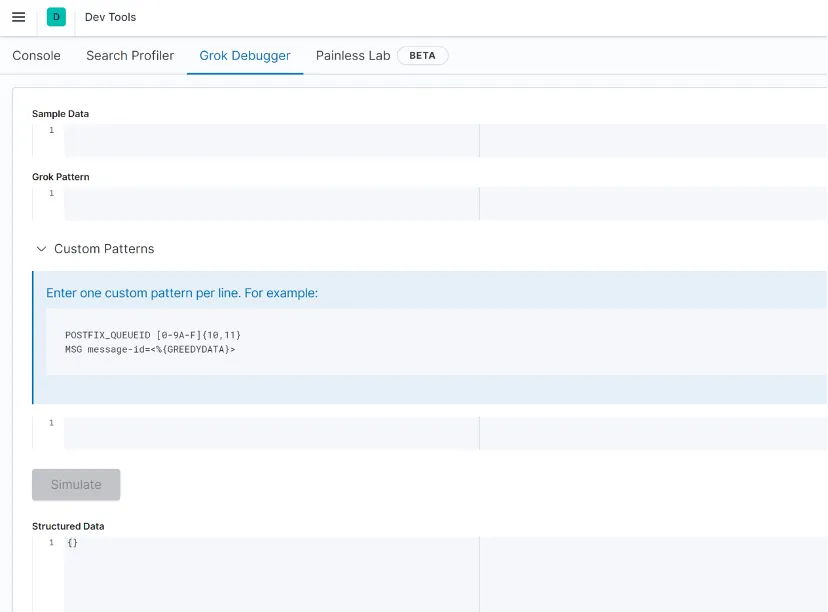
从上图可以看到 , 调试界面分为以下 4 个部分:
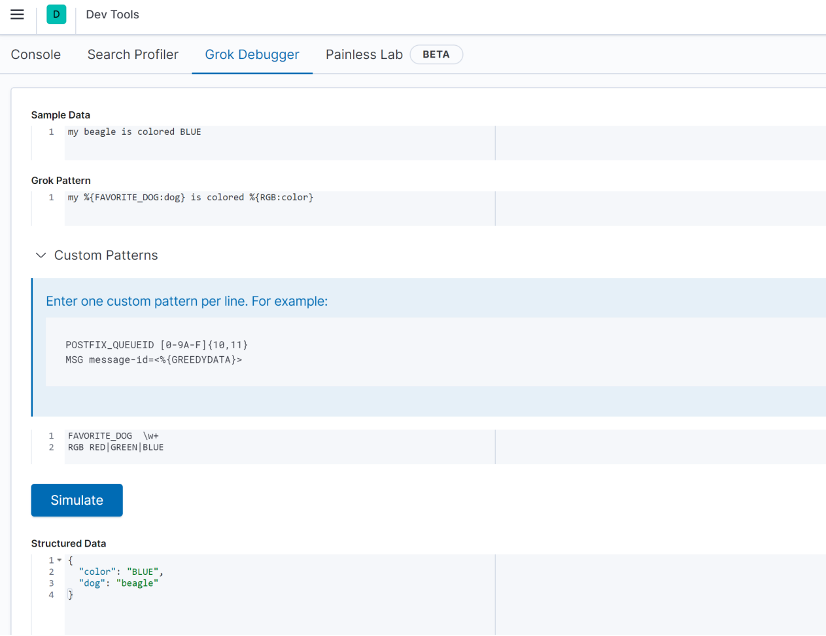
Sample Data: 填写测试的文本。Grok Pattern: 填写grok表达式 , 相当于grok处理器中patterns定义的内容。Custom Patterns: 自定义表达式 , 相当于grok处理器中pattern_definitions定义的内容。在Custom Patterns中每行表示一个自定义表达式 , 最左边的字符串表示我们自定义的表达式别名 , 右边内容是表达式的内容 , 不需要进行符号转义。Structured Data: 处理完的结果。
我们将示例中的内容按照上面的说明填写到相应的位置 , 点击 Simulate , 就可以看到解析完成后的结构化数据了。
2.9 Dissect
dissect 和 grok 处理器类似 , 都是用于从单个文本字段中提取结构化字段。与 grok 相比 , dissect 最大的优势就是简单和快速 , dissect 在解析时不使用正则表达式 , 这使得 dissect 的语法更加简单 , 并且执行速度比 grok 更快。当然 grok 也有自己的独到之处 , grok 可以同时使用多个 patterns 来对内容来进行匹配 , 这是 dissect 所不具备的能力。接下来首先介绍一下 dissect 处理器简单的使用方法 , 如下所示 , 我们要对一行日志内容进行解析 , %{<field>} 表示将匹配到的字符串作为 field 字段的值。
POST _ingest/pipeline/_simulate
{
  "pipeline": {
    "processors": [
      {
        "dissect": {
          "field": "message",
          "pattern": "%{clientip} %{ident} %{auth} [%{@timestamp}] \"%{verb} %{request} HTTP/%{httpversion}\" %{status} %{size}"
        }
      }
    ]
  },
  "docs": [
    {
      "_source": {
        "message": "1.2.3.4 - - [30/Apr/1998:22:00:52 +0000] \"GET /english/venues/cities/images/montpellier/18.gif HTTP/1.0\" 200 3171"
      }
    }
  ]
}

# 返回结果
{
  "docs" : [
    {
      "doc" : {
        "_index" : "_index",
        "_type" : "_doc",
        "_id" : "_id",
        "_source" : {
          "request" : "/english/venues/cities/images/montpellier/18.gif",
          "auth" : "-",
          "ident" : "-",
          "verb" : "GET",
          "message" : """1.2.3.4 - - [30/Apr/1998:22:00:52 +0000] "GET /english/venues/cities/images/montpellier/18.gif HTTP/1.0" 200 3171""",
          "@timestamp" : "30/Apr/1998:22:00:52 +0000",
          "size" : "3171",
          "clientip" : "1.2.3.4",
          "httpversion" : "1.0",
          "status" : "200"
        },
        "_ingest" : {
          "timestamp" : "2022-03-01T06:37:23.791866312Z"
        }
      }
    }
  ]
}
在 dissect 中可以使用修饰符改变默认的匹配规则 , 例如可以指定 dissect 忽略某些字段、拼接多个字符等等。dissect 的修饰符说明如下表所示。
dissect 默认的匹配算法非常严格 , 要求 pattern 中的所有字符都与源字符串完全匹配。例如 %{a} %{b} 只能匹配“字符串1 字符串2”( 中间 1 个空格) , 将无法匹配“字符串1 字符串2”( 中间 5 个空格) 。要处理这种情况就可以使用 -> 修饰符跳过箭头右边重复的字符 , 例如 %{a->} %{b} 就可以跳过字符串1 和字符串 2 中间的多个空格 , 只对空格匹配一次。要跳过的字符我们可以自由设置 , 如下所示 , 使用 -> 修饰符跳过重复的 ~ 字符。
POST _ingest/pipeline/_simulate
{
  "pipeline": {
    "processors": [
      {
        "dissect": {
          "field": "message",
          "pattern": "%{ts->}~%{level}" // 跳过重复的 ~ 字符
        }
      }
    ]
  },
  "docs": [
    {
      "_source": {
        "message": "1998-08-10T17:15:42,466~~~~~~~WARN"
      }
    }
  ]
}

# 返回结果
{
  "docs" : [
    {
      "doc" : {
        "_index" : "_index",
        "_type" : "_doc",
        "_id" : "_id",
        "_source" : {
          "message" : "1998-08-10T17:15:42,466~~~~~~~WARN",
          "level" : "WARN",
          "ts" : "1998-08-10T17:15:42,466"
        },
        "_ingest" : {
          "timestamp" : "2022-03-01T06:38:20.328535452Z"
        }
      }
    }
  ]
}
假如我们想将多个匹配的字符拼接为一个字段 , 可以使用 + 修饰符 , append_separator 参数可以指定分隔符, 默认以空格作为分隔符。如下所示 , 我们将匹配的多个字符串拼接为 name 字段 , 使用 , 作为分隔符。
POST _ingest/pipeline/_simulate
{
  "pipeline": {
    "processors": [
      {
        "dissect": {
          "field": "message",
          "pattern": "%{+name} %{+name} %{+name} %{+name}",
          "append_separator": ","
        }
      }
    ]
  },
  "docs": [
    {
      "_source": {
        "message": "john jacob jingleheimer schmidt"
      }
    }
  ]
}

# 返回结果
{
  "docs" : [
    {
      "doc" : {
        "_index" : "_index",
        "_type" : "_doc",
        "_id" : "_id",
        "_source" : {
          "name" : "john,jacob,jingleheimer,schmidt",
          "message" : "john jacob jingleheimer schmidt"
        },
        "_ingest" : {
          "timestamp" : "2022-03-02T13:41:40.058126802Z"
        }
      }
    }
  ]
}
如果我们想改变字符串拼接的顺序 , 可以同时使用 + 和 /n 修饰符指定顺序 , 其中 n 是顺序的数字。如下所示 , 可以看到返回结果中的 name 字段按照我们指定的顺序拼接。
POST _ingest/pipeline/_simulate
{
  "pipeline": {
    "processors": [
      {
        "dissect": {
          "field": "message",
          "pattern": "%{+name/2} %{+name/4} %{+name/3} %{+name/1}",
          "append_separator": ","
        }
      }
    ]
  },
  "docs": [
    {
      "_source": {
        "message": "john jacob jingleheimer schmidt"
      }
    }
  ]
}

# 返回结果
{
  "docs" : [
    {
      "doc" : {
        "_index" : "_index",
        "_type" : "_doc",
        "_id" : "_id",
        "_source" : {
          "name" : "schmidt,john,jingleheimer,jacob",
          "message" : "john jacob jingleheimer schmidt"
        },
        "_ingest" : {
          "timestamp" : "2022-03-02T13:47:44.332086601Z"
        }
      }
    }
  ]
}
在很多的情况下 , 我们甚至可以把很多的字段追加到一个字段中去 , 比如:
POST _ingest/pipeline/_simulate
{
  "pipeline": {
    "description": "Example using dissect processor",
    "processors": [
      {
        "dissect": {
          "field": "message",
          "pattern": "%{@timestamp} %{+@timestamp} %{+@timestamp} %{loglevel} %{status}",
          "append_separator": " "
        }
      }
    ]
  },
  "docs": [
    {
      "_source": {
        "message": "Oct 29 00:39:02 Debug MyApp stopped"
      }
    }
  ]
}
在上面,我们的时间表达式是 Oct 29 00:39:02。它是由三个字符串组成的。我们通过 %{@timestamp} %{+@timestamp} %{+@timestamp} 来把这三个字符串组合成一个 @timestamp 字段。运行上面的结果是:
{
  "docs" : [
    {
      "doc" : {
        "_index" : "_index",
        "_type" : "_doc",
        "_id" : "_id",
        "_source" : {
          "@timestamp" : "Oct 29 00:39:02",
          "loglevel" : "Debug",
          "message" : "Oct 29 00:39:02 Debug MyApp stopped",
          "status" : "MyApp stopped"
        },
        "_ingest" : {
          "timestamp" : "2020-12-09T05:27:29.785206Z"
        }
      }
    }
  ]
}
请注意在上面的例子中,我们使用了 append_separator,并配置它为空字符串。否则在我们的结果中三个字符串将被级联起来,从而变成 Oct2900:39:02。这个在实际的使用中,可能并不是我们想要的结果。
前面提到过 , dissect 要求 pattern 中的所有字符都与源字符串完全匹配 , 否则解析将不会成功。如果我们仅仅想让某些字符串在匹配时充当“占位”的角色 , 并不想让它出现在最终的文档中 , 那么就可以使用 ? 修饰符来忽略最终结果中的匹配项。除了使用 ? 修饰符以外 , 还可以用一个空键 %{} 实现相同的效果 , 但是为了便于阅读 , 建议还是使用 %{?<field>} 的方式。如下所示 , ident 和 auth 字段都不会出现在最终的结果中 , 仅用于字符串匹配。
POST _ingest/pipeline/_simulate
{
  "pipeline": {
    "processors": [
      {
        "dissect": {
          "field": "message",
          "pattern": "%{clientip} %{?ident} %{?auth} [%{@timestamp}]"
        }
      }
    ]
  },
  "docs": [
    {
      "_source": {
        "message": "1.2.3.4 - - [30/Apr/1998:22:00:52 +0000]"
      }
    }
  ]
}

# 返回结果
{
  "docs" : [
    {
      "doc" : {
        "_index" : "_index",
        "_type" : "_doc",
        "_id" : "_id",
        "_source" : {
          "@timestamp" : "30/Apr/1998:22:00:52 +0000",
          "message" : "1.2.3.4 - - [30/Apr/1998:22:00:52 +0000]",
          "clientip" : "1.2.3.4"
        },
        "_ingest" : {
          "timestamp" : "2022-03-02T13:50:56.099402273Z"
        }
      }
    }
  ]
}
* 和 & 修饰符可以用于解析包含键值对的内容 , 其中输出键设置为 * 的值 , 输出值设置为 & 的值。
POST _ingest/pipeline/_simulate
{
  "pipeline": {
    "processors": [
      {
        "dissect": {
          "field": "message",
          "pattern": "[%{ts}] [%{level}] %{*p1}:%{&p1} %{*p2}:%{&p2}"
        }
      }
    ]
  },
  "docs": [
    {
      "_source": {
        "message": "[2018-08-10T17:15:42,466] [ERR] ip:1.2.3.4 error:REFUSED"
      }
    }
  ]
}

# 返回结果
{
  "docs" : [
    {
      "doc" : {
        "_index" : "_index",
        "_type" : "_doc",
        "_id" : "_id",
        "_source" : {
          "level" : "ERR",
          "ip" : "1.2.3.4",
          "message" : "[2018-08-10T17:15:42,466] [ERR] ip:1.2.3.4 error:REFUSED",
          "error" : "REFUSED",
          "ts" : "2018-08-10T17:15:42,466"
        },
        "_ingest" : {
          "timestamp" : "2022-03-02T14:00:54.96982616Z"
        }
      }
    }
  ]
}
实际案例
POST _ingest/pipeline/_simulate
{
  "pipeline": {
    "processors": [
    ]
  },
  "docs": [
    {
      "_source": {
        "message": """Mar 22 01:27:39 localhost haproxy[14415]: Server updates /appServer02 is UP, reason: Layer7 check passed, code:2000, info:"OK", check duration:3ms."""
      }
    }
  ]
}
上面是一个 haproxy 的例子。信息很长。我们该如何使用 processor 来处理上面的信息并使之成为一个结构化的文档呢?
我们可以使用 dissect 处理器。按照我们上面所学的东西,我们可以先这么处理:
POST _ingest/pipeline/_simulate
{
  "pipeline": {
    "processors": [
      {
        "dissect": {
          "field": "message",
          "pattern": "%{timestamp} %{+timestamp} %{+timestamp}"
        }
      }
    ]
  },
  "docs": [
    {
      "_source": {
        "message": """Mar 22 01:27:39 localhost haproxy[14415]: Server updates /appServer02 is UP, reason: Layer7 check passed, code:2000, info:"OK", check duration:3ms."""
      }
    }
  ]
}

#在上面,我们把前面的三个字符串连接成为一个 timestamp 的字段。运行上面的命令:
{
  "docs" : [
    {
      "doc" : {
        "_index" : "_index",
        "_type" : "_doc",
        "_id" : "_id",
        "_source" : {
          "message" : """Mar 22 01:27:39 localhost haproxy[14415]: Server updates /appServer02 is UP, reason: Layer7 check passed, code:2000, info:"OK", check duration:3ms.""",
          "timestamp" : """Mar2201:27:39 localhost haproxy[14415]: Server updates /appServer02 is UP, reason: Layer7 check passed, code:2000, info:"OK", check duration:3ms."""
        },
        "_ingest" : {
          "timestamp" : "2020-12-09T05:38:44.674567Z"
        }
      }
    }
  ]
}
显然前面的三个字符串连成一个字符串,并且它很贪婪。它把后面所有的字符串都匹配到这个字符串中。我们需要重新进行修改;
POST _ingest/pipeline/_simulate
{
  "pipeline": {
    "processors": [
      {
        "dissect": {
          "field": "message",
          "pattern": "%{timestamp} %{+timestamp} %{+timestamp} %{host}",
          "append_separator": " "
        }
      }
    ]
  },
  "docs": [
    {
      "_source": {
        "message": """Mar 22 01:27:39 localhost haproxy[14415]: Server updates /appServer02 is UP, reason: Layer7 check passed, code:2000, info:"OK", check duration:3ms."""
      }
    }
  ]
}

#我们添加了 append_separator,并使用 %{host} 来匹配后面所有的字符串:
{
  "docs" : [
    {
      "doc" : {
        "_index" : "_index",
        "_type" : "_doc",
        "_id" : "_id",
        "_source" : {
          "host" : """localhost haproxy[14415]: Server updates /appServer02 is UP, reason: Layer7 check passed, code:2000, info:"OK", check duration:3ms.""",
          "message" : """Mar 22 01:27:39 localhost haproxy[14415]: Server updates /appServer02 is UP, reason: Layer7 check passed, code:2000, info:"OK", check duration:3ms.""",
          "timestamp" : "Mar 22 01:27:39"
        },
        "_ingest" : {
          "timestamp" : "2020-12-09T05:41:53.667182Z"
        }
      }
    }
  ]
}
显然这次,我们可以清楚地看到 timestamp 这个字段,但是 host 字段还是一个很长的字符串。我们接着处理:
POST _ingest/pipeline/_simulate
{
  "pipeline": {
    "processors": [
      {
        "dissect": {
          "field": "message",
          "pattern": "%{timestamp} %{+timestamp} %{+timestamp} %{host} %{process}[%{id}]:%{rest}",
          "append_separator": " "
        }
      }
    ]
  },
  "docs": [
    {
      "_source": {
        "message": """Mar 22 01:27:39 localhost haproxy[14415]: Server updates /appServer02 is UP, reason: Layer7 check passed, code:2000, info:"OK", check duration:3ms."""
      }
    }
  ]
}

#在上面,我们提取 process 以及其 id,并把其它的内容放入到 %{rest} 中去:
{
  "docs" : [
    {
      "doc" : {
        "_index" : "_index",
        "_type" : "_doc",
        "_id" : "_id",
        "_source" : {
          "rest" : """ Server updates /appServer02 is UP, reason: Layer7 check passed, code:2000, info:"OK", check duration:3ms.""",
          "process" : "haproxy",
          "host" : "localhost",
          "id" : "14415",
          "message" : """Mar 22 01:27:39 localhost haproxy[14415]: Server updates /appServer02 is UP, reason: Layer7 check passed, code:2000, info:"OK", check duration:3ms.""",
          "timestamp" : "Mar 22 01:27:39"
        },
        "_ingest" : {
          "timestamp" : "2020-12-09T05:46:11.833548Z"
        }
      }
    }
  ]
}
从上面的 rest 中,我们可以看出来前面的部分是一个 status,而后面的是一个 kv 类型的数据。我们可以使用 kv processor 来对它进行处理。
我们首先来提取 status:
POST _ingest/pipeline/_simulate
{
  "pipeline": {
    "processors": [
      {
        "dissect": {
          "field": "message",
          "pattern": "%{timestamp} %{+timestamp} %{+timestamp} %{host} %{process}[%{id}]:%{status}, %{rest}",
          "append_separator": " "
        }
      }
    ]
  },
  "docs": [
    {
      "_source": {
        "message": """Mar 22 01:27:39 localhost haproxy[14415]: Server updates /appServer02 is UP, reason: Layer7 check passed, code:2000, info:"OK", check duration:3ms."""
      }
    }
  ]
}

#运行上面的命令:
{
  "docs" : [
    {
      "doc" : {
        "_index" : "_index",
        "_type" : "_doc",
        "_id" : "_id",
        "_source" : {
          "rest" : """reason: Layer7 check passed, code:2000, info:"OK", check duration:3ms.""",
          "process" : "haproxy",
          "host" : "localhost",
          "id" : "14415",
          "message" : """Mar 22 01:27:39 localhost haproxy[14415]: Server updates /appServer02 is UP, reason: Layer7 check passed, code:2000, info:"OK", check duration:3ms.""",
          "status" : " Server updates /appServer02 is UP",
          "timestamp" : "Mar 22 01:27:39"
        },
        "_ingest" : {
          "timestamp" : "2020-12-09T05:50:18.300969Z"
        }
      }
    }
  ]
}
显然,我们可以得到 status 这个字段。在接下来的 rest 字段中显然是一个 key-value 这样的信息。我们可以使用 kv processor 来进行处理:
POST _ingest/pipeline/_simulate
{
  "pipeline": {
    "processors": [
      {
        "dissect": {
          "field": "message",
          "pattern": "%{timestamp} %{+timestamp} %{+timestamp} %{host} %{process}[%{id}]:%{status}, %{rest}",
          "append_separator": " "
        }
      },
      {
        "kv": {
          "field": "rest",
          "field_split": ", ",
          "value_split": ":"
        }
      }
    ]
  },
  "docs": [
    {
      "_source": {
        "message": """Mar 22 01:27:39 localhost haproxy[14415]: Server updates /appServer02 is UP, reason: Layer7 check passed, code:2000, info:"OK", check duration:3ms."""
      }
    }
  ]
}

#在上面我们添加了一个叫做 kv 的处理器:
{
  "docs" : [
    {
      "doc" : {
        "_index" : "_index",
        "_type" : "_doc",
        "_id" : "_id",
        "_source" : {
          "rest" : """reason: Layer7 check passed, code:2000, info:"OK", check duration:3ms.""",
          "reason" : " Layer7 check passed",
          "process" : "haproxy",
          "code" : "2000",
          "check duration" : "3ms.",
          "message" : """Mar 22 01:27:39 localhost haproxy[14415]: Server updates /appServer02 is UP, reason: Layer7 check passed, code:2000, info:"OK", check duration:3ms.""",
          "host" : "localhost",
          "id" : "14415",
          "status" : " Server updates /appServer02 is UP",
          "timestamp" : "Mar 22 01:27:39",
          "info" : "\"OK\""
        },
        "_ingest" : {
          "timestamp" : "2020-12-09T06:00:37.990909Z"
        }
      }
    }
  ]
}
从上面的结果中,我们可以看出来我们得到了所有的想要的字段。我们接下来删除那个不想要的 message 及 rest 字段:
POST _ingest/pipeline/_simulate
{
  "pipeline": {
    "processors": [
      {
        "dissect": {
          "field": "message",
          "pattern": "%{timestamp} %{+timestamp} %{+timestamp} %{host} %{process}[%{id}]:%{status}, %{rest}",
          "append_separator": " "
        }
      },
      {
        "kv": {
          "field": "rest",
          "field_split": ", ",
          "value_split": ":"
        }
      },
      {
        "remove": {
          "field": "message"
        }
      },
      {
        "remove": {
          "field": "rest"
        }
      }
    ]
  },
  "docs": [
    {
      "_source": {
        "message": """Mar 22 01:27:39 localhost haproxy[14415]: Server updates /appServer02 is UP, reason: Layer7 check passed, code:2000, info:"OK", check duration:3ms."""
      }
    }
  ]
}

#在上面,我运用 remove 处理器删除了 message 以及 rest 字段:
{
  "docs" : [
    {
      "doc" : {
        "_index" : "_index",
        "_type" : "_doc",
        "_id" : "_id",
        "_source" : {
          "reason" : " Layer7 check passed",
          "process" : "haproxy",
          "code" : "2000",
          "check duration" : "3ms.",
          "host" : "localhost",
          "id" : "14415",
          "status" : " Server updates /appServer02 is UP",
          "timestamp" : "Mar 22 01:27:39",
          "info" : "\"OK\""
        },
        "_ingest" : {
          "timestamp" : "2020-12-09T05:59:44.138394Z"
        }
      }
    }
  ]
}
2.10 Rename
rename 处理器用于重命名现有字段。如果该字段不存在或者重命名的字段已存在 , 则会引发异常。如下所示 , 将 provider 字段重命名为 cloud.provider。
POST _ingest/pipeline/_simulate
{
  "pipeline": {
    "processors": [
      {
        "rename": {
          "field": "provider",
          "target_field": "cloud.provider"
        }
      }
    ]
  },
  "docs": [
    {
      "_source": {
        "provider": "Aliyun"
      }
    }
  ]
}

# 返回结果
{
  "docs" : [
    {
      "doc" : {
        "_index" : "_index",
        "_type" : "_doc",
        "_id" : "_id",
        "_source" : {
          "cloud" : {
            "provider" : "Aliyun"
          }
        },
        "_ingest" : {
          "timestamp" : "2022-02-27T10:57:47.821558199Z"
        }
      }
    }
  ]
}
2.11 Remove
remove 处理器用于删除现有字段。如果删除的字段不存在 , 则会引发异常。如下所示 , 使用 remove 处理器删除文档中的 name 和 location 字段。
POST _ingest/pipeline/_simulate
{
  "pipeline": {
    "processors": [
      {
        "remove": {
          "field": ["age", "location"]
        }
      }
    ]
  },
  "docs": [
    {
      "_source": {
        "name": "tom",
        "age": 18,
        "location": "United States"
      }
    }
  ]
}

# 返回结果
{
  "docs" : [
    {
      "doc" : {
        "_index" : "_index",
        "_type" : "_doc",
        "_id" : "_id",
        "_source" : {
          "name" : "tom"
        },
        "_ingest" : {
          "timestamp" : "2022-02-27T10:56:05.119755281Z"
        }
      }
    }
  ]
}
2.12 Set
set 处理器用于为字段赋值 , 并且在赋值的时候还可以使用 {{{ }}} 符号从其他字段复制值 , 然后和指定字符串进行拼接。如下所示 , 将 version 字段的值设置为 2 , host.os.name 字段的值为 copy from 字符串拼接 os 字段的结果。
POST _ingest/pipeline/_simulate
{
  "pipeline": {
    "processors": [
      {
        "set": {
          "field": "host.os.name",
          "value": "copy from {{{os}}}" // 从 os 字段复制值进行拼接
        }
      },
      {
        "set": {
          "field": "version",
          "value": "2" // 设置静态值
        }
      }
    ]
  },
  "docs": [
    {
      "_source": {
        "os": "Ubuntu"
      }
    }
  ]
}

# 返回结果
{
  "docs" : [
    {
      "doc" : {
        "_index" : "_index",
        "_type" : "_doc",
        "_id" : "_id",
        "_source" : {
          "host" : {
            "os" : {
              "name" : "copy from Ubuntu"
            }
          },
          "os" : "Ubuntu",
          "version" : "2"
        },
        "_ingest" : {
          "timestamp" : "2022-02-28T13:39:31.035666829Z"
        }
      }
    }
  ]
}
2.13 Script
对于复杂的处理逻辑 , 如果使用 Elasticseach 其他自带的处理器无法实现 , 那么可以尝试在 script 处理器中编写脚本进行处理。在 script 处理器中通过 lang 参数可以指定脚本语言 , 通常我们使用 painless 作为脚本语言 , 这也是 Elasticsearch 中默认的脚本语言。在 script 处理器中 , 脚本在 ingest 上下文中运行 , 我们可以通过 ctx['field'] 或者ctx.field 语法来访问文档中的字段。如下所示 , 传入的文档中有一个数字类型的参数 num , 我们在脚本中通过 if else 条件语句进行判断 , 当 num 等于 7 时 , 将 result 的值设置为 happy ; 当 num 等于 4 时 , 将 result 的结果设置为 sad ; 当 num 是其他值时 , 将 result 的结果设置为 normal。
POST _ingest/pipeline/_simulate
{
  "pipeline": {
    "processors": [
      {
        "script": {
          "lang": "painless",
          "source": """
              if(ctx.num == 7){
                ctx.result = 'happy'
              }else if(ctx.num == 4){
                ctx.result = 'sad'
              }else {
                ctx.result = 'normal'
              }
          """
        }
      }
    ]
  },
  "docs": [
    {
      "_source": {
        "num": 7
      }
    }
  ]
}

# 返回结果
{
  "docs" : [
    {
      "doc" : {
        "_index" : "_index",
        "_type" : "_doc",
        "_id" : "_id",
        "_source" : {
          "result" : "happy",
          "num" : 7
        },
        "_ingest" : {
          "timestamp" : "2022-03-02T14:20:27.776240111Z"
        }
      }
    }
  ]
}
2.14 Drop
drop 处理器可以根据条件删除指定的文档。如下所示 , 删除 name 字段值为 tom 的文档。
POST _ingest/pipeline/_simulate
{
  "pipeline": {
    "processors": [
      {
        "drop": {
          "if": "ctx.name == 'tom'"
        }
      }
    ]
  },
  "docs": [
    {
      "_source": {
        "name": "tom",
        "age": 18
      }
    }
  ]
}


# 返回结果
{
  "docs" : [
    null
  ]
}
3. Ingest Pipeline 应用场景
Ingest Pipeline 主要有以下 4 类应用场景:
写入时指定
pipeline, 单条写入或者使用_bulk API批量写入时都可以使用。更新时指定
pipeline。定义索引或者模板时指定
pipeline, 有两个相关的参数:index.default_pipeline参数可以定义default pipeline(默认执行的pipeline) , 当请求中没有指定pipeline时执行 ;index.final_pipeline参数可以定义final pipeline(最终执行的pipeline) , 在所有pipeline执行完后再执行。
reindex时指定pipeline, 在重建索引或者数据迁移时使用。
3.1 写入时指定 Pipeline
首先创建一个名为 lowercase-pipeline 的 pipeline , 它的作用是将 name 字段转换为小写字母。
PUT _ingest/pipeline/lowercase-pipeline
{
  "processors": [
    {
      "lowercase": {
        "field": "name"
      }
    }
  ]
}
单条写入或者通过 _bulk API 批量写入时都可以通过 pipeline 参数指定使用的 pipeline。
# 写入单条数据时指定 pipelien
POST index-1/_doc?pipeline=lowercase-pipeline
{
  "name": "Tom",
  "age": 20
}

# _bulk 写入多条文档时指定 pipeline
PUT index-1/_bulk?pipeline=lowercase-pipeline
{"index":{ }}
{"name":"Peter","age":17}
{"index":{}}
{"name":"Mary","age":19}
查看写入的文档 , 可以看到所有文档的 name 字段都转换为了小写字母。
GET index-1/_search

# 返回结果
{
  "_index" : "index-1",
  "_type" : "_doc",
  "_id" : "g196X38BKRZVqZj9rsyn",
  "_score" : 1.0,
  "_source" : {
    "name" : "tom",
    "age" : 20
  }
},
{
  "_index" : "index-1",
  "_type" : "_doc",
  "_id" : "hF96X38BKRZVqZj9scwO",
  "_score" : 1.0,
  "_source" : {
    "name" : "peter",
    "age" : 17
  }
},
{
  "_index" : "index-1",
  "_type" : "_doc",
  "_id" : "hV96X38BKRZVqZj9scwO",
  "_score" : 1.0,
  "_source" : {
    "name" : "mary",
    "age" : 19
  }
}
3.2 更新时指定 Pipeline
使用 _update_by_query API 可以批量更新索引中的文档 , 通常会结合pipeline 来对文档进行更新。以下示例中我们对索引中的所有文档进行更新 , 也可以在 _update_by_query API 中使用 DSL 语句过滤出需要更新的文档。
# 往源索引中插入数据
PUT index-2/_doc/1
{
  "name": "Smith",
  "age": 18
}

PUT index-2/_doc/1
{
  "name": "Mike",
  "age": 16
}

# 使用 update_by_query 进行更新 , 可以写 DSL 语句过滤出需要更新的文档
POST index-2/_update_by_query?pipeline=lowercase-pipeline
3.3 定义索引或者模板时指定 Pipeline
在定义索引或者模板时可以使用 index.default_pipeline 参数指定 default pipeline( 默认执行的 pipeline) , index.final_pipeline 参数指定 final pipeline ( 最终执行的 pipeline) 。default pipeline 与 final pipeline 实际上都是普通的 ingest pipeline , 只是和一般的 pipeline 执行时机不同 ; default pipeline 执行的时机是当前写入请求没有指定 pipeline 时 , final pipeline 执行的时机是在所有 pipeline 执行完毕后。
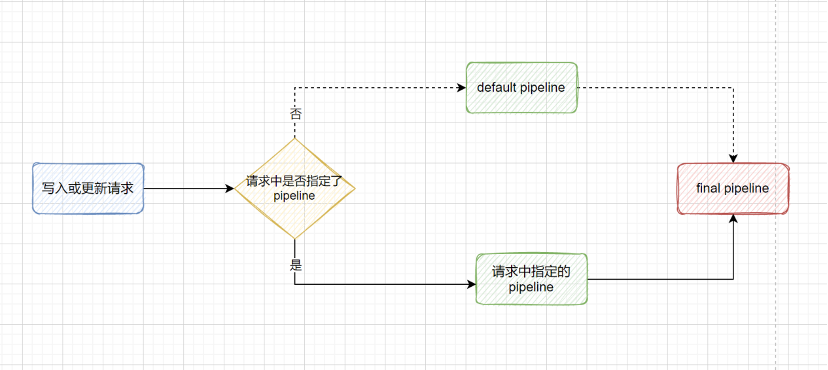
如上图所示 , 如果当前的写入或者更新请求中指定了 pipeline , 则会先执行自定义的 pipeline , 当所有的 pipeline 执行完毕后再执行 final pipeline( 如果索引显式设置了index.final_pipeline) ; 如果当前的写入或者更新请求中没有指定 pipeline , 并且索引显式设置了 index.default_pipeline 参数时 , 则会先执行 default pipeline , 最后再执行 final pipeline。
为了完成下面的演示 , 在前面 lowercase-pipeline 的基础上 , 现在再创建两个 pipeline , 其中 uppercase-pipeline 的作用是 name 字段转换为小写字母 , set-pipeline 的作用是为文档添加一个 message 字段。
PUT _ingest/pipeline/uppercase-pipeline
{
  "processors": [
    {
      "uppercase": {
        "field": "name"
      }
    }
  ]
}

PUT _ingest/pipeline/set-pipeline
{
  "processors": [
    {
      "set": {
        "field": "message",
        "value": "set by final pipeline"
      }
    }
  ]
}
接下来创建一个索引 index-3 , 在 settings 中指定索引的 default_pipeline 为 lowercase-pipeline , final_pipeline 为 set-pipeline。
PUT index-3
{
  "settings": {
    "index": {
      "default_pipeline": "lowercase-pipeline", // 默认执行的 pipeline
      "final_pipeline": "set-pipeline" // 最终执行的 pipeline
    }
  }
}
然后往索引中插入两条文档 , 其中 _id 为 1 的文档在写入时不指定 pipeline , _id 为 2 的文档在写入时指定使用 uppercase-pipeline。
PUT index-3/_doc/1
{
  "name": "Lisa",
  "age": 18
}

# 在写入时指定 pipeline 覆盖 default_pipeline
PUT index-3/_doc/2?pipeline=uppercase-pipeline
{
  "name": "Jerry",
  "age": 21
}
查询最终保存的文档 , 可以看到 final pipeline 始终会执行 , 2 个文档都添加了 message 字段 ; 由于写入 _id 为 2 的文档时指定使用了 uppercase-pipeline , 所以该文档没有执行 default pipeline , 而是执行了 uppercase-pipeline 将字母转换为大写。
GET index-3/_search

# 返回结果
{
  "_index" : "index-3",
  "_type" : "_doc",
  "_id" : "1",
  "_score" : 1.0,
  "_source" : {
    "name" : "lisa",
    "message" : "set by final pipeline",
    "age" : 18
  }
},
{
  "_index" : "index-3",
  "_type" : "_doc",
  "_id" : "2",
  "_score" : 1.0,
  "_source" : {
    "name" : "JERRY",
    "message" : "set by final pipeline",
    "age" : 21
  }
}
3.4 Reindex 时指定 Pipeline
Elasticsearch 提供了 reindex API 用于将文档从源索引复制到目标索引 , 在 reindex 时可以指定 pipeline 对复制的文档进行加工处理。如下所示 , 先创建源索引 source-index , 并插入 1 条文档。
PUT source-index/_doc/1
{
  "name": "Jack",
  "age": 18
}
然后在 reindex 时指定使用 lowercase-pipeline , 目标索引名设置为 dest-index。
POST _reindex
{
  "source": {
    "index": "source-index"
  },
  "dest": {
    "index": "dest-index",
    "pipeline": "lowercase-pipeline"
  }
}
查看目标索引 , name 字段已经成功转换为了小写字母。
GET dest-index/_search

# 返回结果
{
  "took" : 1,
  "timed_out" : false,
  "_shards" : {
    "total" : 1,
    "successful" : 1,
    "skipped" : 0,
    "failed" : 0
  },
  "hits" : {
    "total" : {
      "value" : 1,
      "relation" : "eq"
    },
    "max_score" : 1.0,
    "hits" : [
      {
        "_index" : "dest-index",
        "_type" : "_doc",
        "_id" : "1",
        "_score" : 1.0,
        "_source" : {
          "name" : "jack",
          "age" : "18"
        }
      }
    ]
  }
}
参考链接
使用 Ingest Pipeline 在 Elasticsearch 中对数据进行预处理 (qq.com)