
2-Openstack基础环境搭建
1. 基础环境准备
各服务器角色如下
这里因为Centos已经停止维护, 这里使用Rocky系统,安装openstack的caracal版本。两台或以上服务器,操作系统Rocky 9.4,最小化安装,安装完成之后进行基础配置如下:
修改
sshd配置文件[root@host-192-168-71-7 ~]# sed -i 's@#PermitRootLogin prohibit-password@PermitRootLogin yes@g' /etc/ssh/sshd_config 关闭
selinux[root@host-192-168-71-7 ~]# sed -i 's@SELINUX=enforcing@SELINUX=disabled@g' /etc/selinux/config关闭防火墙
[root@host-192-168-71-7 ~]# systemctl disable firewalld配置软件仓库。这里的仓库配置是按照阿里云镜像官网提供的配置
[root@host-192-168-71-7 ~]# sed -e 's|^mirrorlist=|#mirrorlist=|g' -e 's|^#baseurl=http://dl.rockylinux.org/$contentdir|baseurl=https://mirrors.aliyun.com/rockylinux|g' -i.bak /etc/yum.repos.d/rocky-*.repo [root@host-192-168-71-7 ~]# dnf install epel-release如果系统是最小化安装,这里还需要安装一些基础的包
yum install -y vim wget tree lrzsz gcc gcc-c++ automake pcre pcre-devel zlib zlib-devel openssl openssl-devel iproute net-tools iotop lsof ntpdate telnet bridge-utils dnf install -y vim wget tree lrzsz gcc gcc-c++ automake pcre pcre-devel zlib zlib-devel openssl openssl-devel iproute net-tools iotop lsof telnet bridge-utils ntpsec设置主机名
[root@host-192-168-71-11 ~]# hostnamectl set-hostname node01
[root@host-192-168-71-29 ~]# hostnamectl set-hostname node02
[root@host-192-168-71-30 ~]# hostnamectl set-hostname node03
时间同步配置,这里配置的同步时间源, 是本地设置的
ntp源。 这里测试可以使用互联网的ntp时间源。三个节点均按照以下方式配置[root@node01 ~]# grep server /etc/chrony.conf # Use public servers from the pool.ntp.org project. server 192.168.71.241 iburst # Use NTP servers from DHCP. [root@node01 ~]# systemctl restart chronyd [root@node01 ~]# chronyc sources MS Name/IP address Stratum Poll Reach LastRx Last sample =============================================================================== ^? 192.168.71.241 3 6 1 2 +1932us[+1932us] +/- 47ms [root@node01 ~]# chronyc sources MS Name/IP address Stratum Poll Reach LastRx Last sample =============================================================================== ^* 192.168.71.241 3 6 7 0 -18us[+1639us] +/- 47ms 主机名解析。所有节点均按照以下方式配置
[root@node01 ~]# cat /etc/hosts
127.0.0.1   localhost localhost.localdomain localhost4 localhost4.localdomain4
::1         localhost localhost.localdomain localhost6 localhost6.localdomain6
192.168.71.11 node01
192.168.71.29 node02
192.168.71.30 node03
192.168.71.250 openstack-vip.net
在各节点上配置
openstack B版的yum仓库dnf install centos-release-openstack-bobcat以上操作会在
/etc/yum.repos.d/目录下生成很多repo文件;[root@node01 ~]# ll /etc/yum.repos.d/ total 72 -rw-r--r-- 1 root root 893 Aug 8 2023 CentOS-Ceph-Reef.repo -rw-r--r-- 1 root root 795 Aug 30 2022 CentOS-Messaging-rabbitmq.repo -rw-r--r-- 1 root root 1288 May 10 2023 CentOS-NFV-OpenvSwitch.repo -rw-r--r-- 1 root root 4481 Aug 12 06:36 CentOS-OpenStack-bobcat.repo -rw-r--r-- 1 root root 369 Apr 8 2023 CentOS-Storage-common.repo -rw-r--r--. 1 root root 1142 Aug 28 2023 epel-cisco-openh264.repo -rw-r--r--. 1 root root 1453 Aug 28 2023 epel.repo -rw-r--r--. 1 root root 1552 Aug 28 2023 epel-testing.repo -rw-r--r--. 1 root root 6628 Sep 6 01:40 rocky-addons.repo -rw-r--r--. 1 root root 6610 May 1 08:29 rocky-addons.repo.bak -rw-r--r--. 1 root root 1168 Sep 6 01:40 rocky-devel.repo -rw-r--r--. 1 root root 1165 May 1 08:29 rocky-devel.repo.bak -rw-r--r--. 1 root root 2393 Sep 6 01:40 rocky-extras.repo -rw-r--r--. 1 root root 2387 May 1 08:29 rocky-extras.repo.bak -rw-r--r--. 1 root root 3417 May 1 08:29 rocky.repo在各节点安装
python3-openstackclient和openstack-selinux包[root@node01 ~]# dnf install python3-openstackclient openstack-selinux -y
2. 安装数据库
在
node02上部署mariadb-server[root@node02 ~]# yum install mariadb mariadb-server -y配置数据库
[root@node02 ~]# cat /etc/my.cnf.d/openstack.cnf
[mysqld]
bind-address = 0.0.0.0

default-storage-engine = innodb
innodb_file_per_table = on
max_connections = 4096
collation-server = utf8_general_ci
character-set-server = utf8
启动数据库服务
[root@node02 ~]# systemctl enable --now mariadb Created symlink /etc/systemd/system/mysql.service → /usr/lib/systemd/system/mariadb.service. Created symlink /etc/systemd/system/mysqld.service → /usr/lib/systemd/system/mariadb.service. Created symlink /etc/systemd/system/multi-user.target.wants/mariadb.service → /usr/lib/systemd/system/mariadb.service. [root@node02 ~]# ss -tnlp State Recv-Q Send-Q Local Address:Port Peer Address:Port Process LISTEN 0 869 0.0.0.0:3306 0.0.0.0:* users:(("mariadbd",pid=36723,fd=19)) LISTEN 0 128 0.0.0.0:22 0.0.0.0:* users:(("sshd",pid=977,fd=3)) LISTEN 0 128 [::]:22 [::]:* users:(("sshd",pid=977,fd=4)) [root@node02 ~]# systemctl status mariadb ● mariadb.service - MariaDB 10.5 database server Loaded: loaded (/usr/lib/systemd/system/mariadb.service; enabled; preset: disabled) Active: active (running) since Fri 2024-09-13 01:55:08 CST; 11s ago Docs: man:mariadbd(8) https://mariadb.com/kb/en/library/systemd/ Process: 36605 ExecStartPre=/usr/libexec/mariadb-check-socket (code=exited, status=0/SUCCESS) Process: 36630 ExecStartPre=/usr/libexec/mariadb-prepare-db-dir mariadb.service (code=exited, status=0/SUCCESS) Process: 36753 ExecStartPost=/usr/libexec/mariadb-check-upgrade (code=exited, status=0/SUCCESS) Main PID: 36723 (mariadbd) Status: "Taking your SQL requests now..." Tasks: 28 (limit: 177683) Memory: 85.6M CPU: 729ms CGroup: /system.slice/mariadb.service └─36723 /usr/libexec/mariadbd --basedir=/usr Sep 13 01:55:07 node02 mariadb-prepare-db-dir[36671]: The second is mysql@localhost, it has no password either, but Sep 13 01:55:07 node02 mariadb-prepare-db-dir[36671]: you need to be the system 'mysql' user to connect. Sep 13 01:55:07 node02 mariadb-prepare-db-dir[36671]: After connecting you can set the password, if you would need to be Sep 13 01:55:07 node02 mariadb-prepare-db-dir[36671]: able to connect as any of these users with a password and without sudo Sep 13 01:55:07 node02 mariadb-prepare-db-dir[36671]: See the MariaDB Knowledgebase at https://mariadb.com/kb Sep 13 01:55:07 node02 mariadb-prepare-db-dir[36671]: Please report any problems at https://mariadb.org/jira Sep 13 01:55:07 node02 mariadb-prepare-db-dir[36671]: The latest information about MariaDB is available at https://mariadb.org/. Sep 13 01:55:07 node02 mariadb-prepare-db-dir[36671]: Consider joining MariaDB's strong and vibrant community: Sep 13 01:55:07 node02 mariadb-prepare-db-dir[36671]: https://mariadb.org/get-involved/ Sep 13 01:55:08 node02 systemd[1]: Started MariaDB 10.5 database server. 数据库初始化设置
[root@node02 ~]# mysql_secure_installation NOTE: RUNNING ALL PARTS OF THIS SCRIPT IS RECOMMENDED FOR ALL MariaDB SERVERS IN PRODUCTION USE! PLEASE READ EACH STEP CAREFULLY! In order to log into MariaDB to secure it, we'll need the current password for the root user. If you've just installed MariaDB, and haven't set the root password yet, you should just press enter here. Enter current password for root (enter for none): OK, successfully used password, moving on... Setting the root password or using the unix_socket ensures that nobody can log into the MariaDB root user without the proper authorisation. You already have your root account protected, so you can safely answer 'n'. Switch to unix_socket authentication [Y/n] n ... skipping. You already have your root account protected, so you can safely answer 'n'. Change the root password? [Y/n] y New password: Re-enter new password: Password updated successfully! Reloading privilege tables.. ... Success! By default, a MariaDB installation has an anonymous user, allowing anyone to log into MariaDB without having to have a user account created for them. This is intended only for testing, and to make the installation go a bit smoother. You should remove them before moving into a production environment. Remove anonymous users? [Y/n] y ... Success! Normally, root should only be allowed to connect from 'localhost'. This ensures that someone cannot guess at the root password from the network. Disallow root login remotely? [Y/n] n ... skipping. By default, MariaDB comes with a database named 'test' that anyone can access. This is also intended only for testing, and should be removed before moving into a production environment. Remove test database and access to it? [Y/n] y - Dropping test database... ... Success! - Removing privileges on test database... ... Success! Reloading the privilege tables will ensure that all changes made so far will take effect immediately. Reload privilege tables now? [Y/n] y ... Success! Cleaning up... All done! If you've completed all of the above steps, your MariaDB installation should now be secure. Thanks for using MariaDB! 在
node01上安装python3-PyMySQL包,用于控制节点连接数据库驱动[root@node01 ~]# dnf install -y python3-PyMySQL
3. 安装memcached
在
node02上部署memcached[root@node02 ~]# dnf install memcached -y配置
memcached[root@node02 ~]# cat /etc/sysconfig/memcached PORT="11211" USER="memcached" MAXCONN="4096" CACHESIZE="1024" OPTIONS="-l 0.0.0.0,::1"设置
memcached开机启动 , 并启动memcached服务[root@node02 ~]# systemctl enable --now memcached [root@node02 ~]# systemctl status memcached ● memcached.service - memcached daemon Loaded: loaded (/usr/lib/systemd/system/memcached.service; enabled; preset: disabled) Active: active (running) since Fri 2024-09-13 02:34:18 CST; 18s ago Main PID: 37267 (memcached) Tasks: 10 (limit: 177683) Memory: 5.1M CPU: 29ms CGroup: /system.slice/memcached.service └─37267 /usr/bin/memcached -p 11211 -u memcached -m 1024 -c 4096 -l 0.0.0.0,::1 Sep 13 02:34:18 node02 systemd[1]: Started memcached daemon. [root@node02 ~]# ss -tnlp State Recv-Q Send-Q Local Address:Port Peer Address:Port Process LISTEN 0 1024 0.0.0.0:11211 0.0.0.0:* users:(("memcached",pid=37267,fd=26)) LISTEN 0 869 0.0.0.0:3306 0.0.0.0:* users:(("mariadbd",pid=36723,fd=19)) LISTEN 0 128 0.0.0.0:22 0.0.0.0:* users:(("sshd",pid=977,fd=3)) LISTEN 0 1024 [::1]:11211 [::]:* users:(("memcached",pid=37267,fd=27)) LISTEN 0 128 [::]:22 [::]:* users:(("sshd",pid=977,fd=4))在
node01上安装连接memcached驱动,python3-memcached[root@node01 ~]# dnf install python3-memcached
4. 安装 rabbitMQ 服务器
按照
rabbitmq官网配置rabbitmq仓库源[root@node02 ~]# cat /etc/yum.repos.d/rabbitmq-server.repo # In /etc/yum.repos.d/rabbitmq.repo ## ## Zero dependency Erlang RPM ## [modern-erlang] name=modern-erlang-el9 # Use a set of mirrors maintained by the RabbitMQ core team. # The mirrors have significantly higher bandwidth quotas. baseurl=https://yum1.rabbitmq.com/erlang/el/9/$basearch https://yum2.rabbitmq.com/erlang/el/9/$basearch repo_gpgcheck=1 enabled=1 gpgkey=https://github.com/rabbitmq/signing-keys/releases/download/3.0/cloudsmith.rabbitmq-erlang.E495BB49CC4BBE5B.key gpgcheck=1 sslverify=1 sslcacert=/etc/pki/tls/certs/ca-bundle.crt metadata_expire=300 pkg_gpgcheck=1 autorefresh=1 type=rpm-md [modern-erlang-noarch] name=modern-erlang-el9-noarch # Use a set of mirrors maintained by the RabbitMQ core team. # The mirrors have significantly higher bandwidth quotas. baseurl=https://yum1.rabbitmq.com/erlang/el/9/noarch https://yum2.rabbitmq.com/erlang/el/9/noarch repo_gpgcheck=1 enabled=1 gpgkey=https://github.com/rabbitmq/signing-keys/releases/download/3.0/cloudsmith.rabbitmq-erlang.E495BB49CC4BBE5B.key https://github.com/rabbitmq/signing-keys/releases/download/3.0/rabbitmq-release-signing-key.asc gpgcheck=1 sslverify=1 sslcacert=/etc/pki/tls/certs/ca-bundle.crt metadata_expire=300 pkg_gpgcheck=1 autorefresh=1 type=rpm-md [modern-erlang-source] name=modern-erlang-el9-source # Use a set of mirrors maintained by the RabbitMQ core team. # The mirrors have significantly higher bandwidth quotas. baseurl=https://yum1.rabbitmq.com/erlang/el/9/SRPMS https://yum2.rabbitmq.com/erlang/el/9/SRPMS repo_gpgcheck=1 enabled=1 gpgkey=https://github.com/rabbitmq/signing-keys/releases/download/3.0/cloudsmith.rabbitmq-erlang.E495BB49CC4BBE5B.key https://github.com/rabbitmq/signing-keys/releases/download/3.0/rabbitmq-release-signing-key.asc gpgcheck=1 sslverify=1 sslcacert=/etc/pki/tls/certs/ca-bundle.crt metadata_expire=300 pkg_gpgcheck=1 autorefresh=1 ## ## RabbitMQ Server ## [rabbitmq-el9] name=rabbitmq-el9 baseurl=https://yum2.rabbitmq.com/rabbitmq/el/9/$basearch https://yum1.rabbitmq.com/rabbitmq/el/9/$basearch repo_gpgcheck=1 enabled=1 # Cloudsmith's repository key and RabbitMQ package signing key gpgkey=https://github.com/rabbitmq/signing-keys/releases/download/3.0/cloudsmith.rabbitmq-server.9F4587F226208342.key https://github.com/rabbitmq/signing-keys/releases/download/3.0/rabbitmq-release-signing-key.asc gpgcheck=1 sslverify=1 sslcacert=/etc/pki/tls/certs/ca-bundle.crt metadata_expire=300 pkg_gpgcheck=1 autorefresh=1 type=rpm-md [rabbitmq-el9-noarch] name=rabbitmq-el9-noarch baseurl=https://yum2.rabbitmq.com/rabbitmq/el/9/noarch https://yum1.rabbitmq.com/rabbitmq/el/9/noarch repo_gpgcheck=1 enabled=1 # Cloudsmith's repository key and RabbitMQ package signing key gpgkey=https://github.com/rabbitmq/signing-keys/releases/download/3.0/cloudsmith.rabbitmq-server.9F4587F226208342.key https://github.com/rabbitmq/signing-keys/releases/download/3.0/rabbitmq-release-signing-key.asc gpgcheck=1 sslverify=1 sslcacert=/etc/pki/tls/certs/ca-bundle.crt metadata_expire=300 pkg_gpgcheck=1 autorefresh=1 type=rpm-md [rabbitmq-el9-source] name=rabbitmq-el9-source baseurl=https://yum2.rabbitmq.com/rabbitmq/el/9/SRPMS https://yum1.rabbitmq.com/rabbitmq/el/9/SRPMS repo_gpgcheck=1 enabled=1 gpgkey=https://github.com/rabbitmq/signing-keys/releases/download/3.0/cloudsmith.rabbitmq-server.9F4587F226208342.key gpgcheck=0 sslverify=1 sslcacert=/etc/pki/tls/certs/ca-bundle.crt metadata_expire=300 pkg_gpgcheck=1 autorefresh=1 type=rpm-md 在
node02上部署rabbitmq-server。[root@node02 ~]# dnf install rabbitmq-server -y设置
rabbitmq-server开机启动,并启动rabbitmq-server服务[root@node02 ~]# systemctl enable rabbitmq-server --now创建
openstack用户并设置密码为openstack123[root@node02 ~]# rabbitmqctl add_user openstack openstack123 Adding user "openstack" ... Done. Don't forget to grant the user permissions to some virtual hosts! See 'rabbitmqctl help set_permissions' to learn more. [root@node02 ~]# rabbitmqctl list_users Listing users ... user tags guest [administrator] openstack [] 授权
openstack用户对/下的所有文件有读写[root@node02 ~]# rabbitmqctl set_permissions openstack ".*" ".*" ".*" Setting permissions for user "openstack" in vhost "/" ... [root@node02 ~]# rabbitmqctl list_permissions Listing permissions for vhost "/" ... user configure write read guest .* .* .* openstack .* .* .* 打开
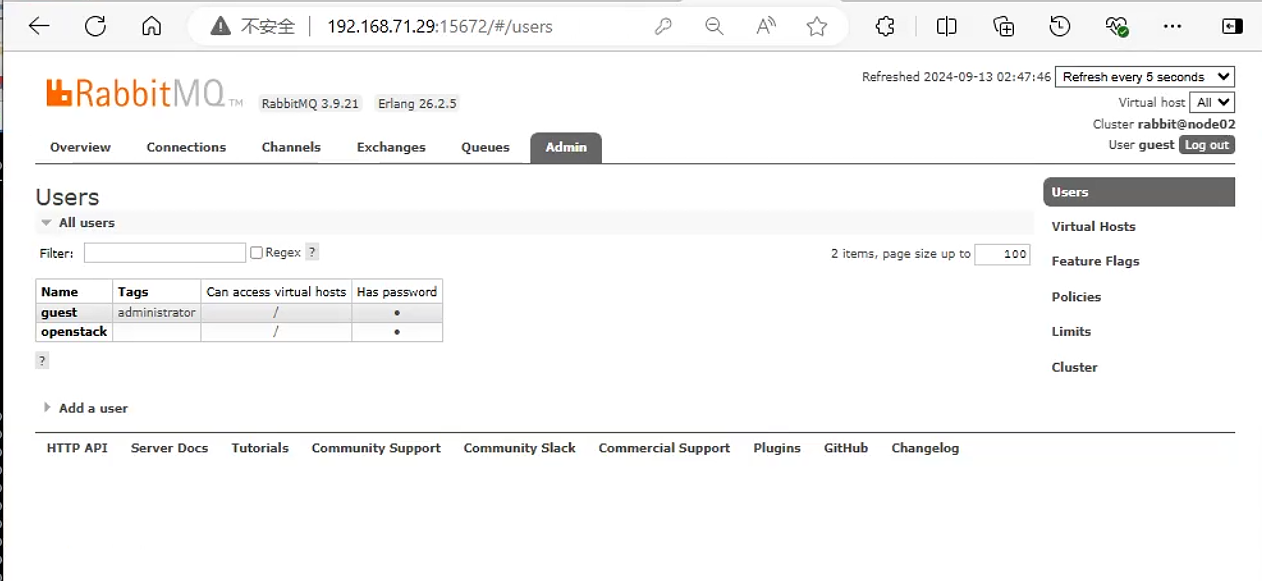
rabbitMQ的web插件[root@node02 ~]# rabbitmq-plugins enable rabbitmq_management Enabling plugins on node rabbit@node02: rabbitmq_management The following plugins have been configured: rabbitmq_management rabbitmq_management_agent rabbitmq_web_dispatch Applying plugin configuration to rabbit@node02... The following plugins have been enabled: rabbitmq_management rabbitmq_management_agent rabbitmq_web_dispatch started 3 plugins. [root@node02 ~]# rabbitmq-plugins list 访问
rabbitmq页面。用户名:guest/guest
5. 高可用环境准备
安装对应高可用软件
[root@ha2 ~]# dnf install haproxy keepalived [root@ha1 ~]# dnf install haproxy keepalived -y 配置
keepalived[root@ha1 ~]# cat /etc/keepalived/keepalived.conf ! Configuration File for keepalived global_defs { notification_email { acassen@firewall.loc failover@firewall.loc sysadmin@firewall.loc } notification_email_from Alexandre.Cassen@firewall.loc smtp_server 192.168.200.1 smtp_connect_timeout 30 router_id LVS_DEVEL vrrp_skip_check_adv_addr vrrp_garp_interval 0 vrrp_gna_interval 0 } vrrp_instance VI_1 { state MASTER interface ens3 virtual_router_id 51 priority 100 advert_int 1 authentication { auth_type PASS auth_pass 1111 } virtual_ipaddress { 192.168.71.250 dev ens3 lable ens3:1 } } [root@ha2 ~]# cat /etc/keepalived/keepalived.conf ! Configuration File for keepalived global_defs { notification_email { acassen@firewall.loc failover@firewall.loc sysadmin@firewall.loc } notification_email_from Alexandre.Cassen@firewall.loc smtp_server 192.168.200.1 smtp_connect_timeout 30 router_id LVS_DEVEL vrrp_skip_check_adv_addr vrrp_garp_interval 0 vrrp_gna_interval 0 } vrrp_instance VI_1 { state SLAVE interface ens3 virtual_router_id 51 priority 100 advert_int 1 authentication { auth_type PASS auth_pass 1111 } virtual_ipaddress { 192.168.71.250 dev ens3 lable ens3:1 } } 启动
keepalived服务[root@ha2 ~]# systemctl enable --now keepalived Created symlink /etc/systemd/system/multi-user.target.wants/keepalived.service → /usr/lib/systemd/system/keepalived.service. [root@ha1 ~]# systemctl enable --now keepalived Created symlink /etc/systemd/system/multi-user.target.wants/keepalived.service → /usr/lib/systemd/system/keepalived.service. 配置
haproxy内核参数[root@ha1 ~]# cat /etc/sysctl.conf # sysctl settings are defined through files in # /usr/lib/sysctl.d/, /run/sysctl.d/, and /etc/sysctl.d/. # # Vendors settings live in /usr/lib/sysctl.d/. # To override a whole file, create a new file with the same in # /etc/sysctl.d/ and put new settings there. To override # only specific settings, add a file with a lexically later # name in /etc/sysctl.d/ and put new settings there. # # For more information, see sysctl.conf(5) and sysctl.d(5). net.ipv4.ip_nonlocal_bind = 1 [root@ha1 ~]# sysctl -p net.ipv4.ip_nonlocal_bind = 1 [root@ha2 ~]# cat /etc/sysctl.conf # sysctl settings are defined through files in # /usr/lib/sysctl.d/, /run/sysctl.d/, and /etc/sysctl.d/. # # Vendors settings live in /usr/lib/sysctl.d/. # To override a whole file, create a new file with the same in # /etc/sysctl.d/ and put new settings there. To override # only specific settings, add a file with a lexically later # name in /etc/sysctl.d/ and put new settings there. # # For more information, see sysctl.conf(5) and sysctl.d(5). net.ipv4.ip_nonlocal_bind = 1 [root@ha2 ~]# sysctl -p net.ipv4.ip_nonlocal_bind = 1配置
haproxy,并监听mysql数据库和rabbit端口 :vim /etc/haproxy/haproxy.cfg[root@ha1 ~]# cat /etc/haproxy/haproxy.cfg #--------------------------------------------------------------------- # Example configuration for a possible web application. See the # full configuration options online. # # https://www.haproxy.org/download/1.8/doc/configuration.txt # #--------------------------------------------------------------------- #--------------------------------------------------------------------- # Global settings #--------------------------------------------------------------------- global # to have these messages end up in /var/log/haproxy.log you will # need to: # # 1) configure syslog to accept network log events. This is done # by adding the '-r' option to the SYSLOGD_OPTIONS in # /etc/sysconfig/syslog # # 2) configure local2 events to go to the /var/log/haproxy.log # file. A line like the following can be added to # /etc/sysconfig/syslog # # local2.* /var/log/haproxy.log # log 127.0.0.1 local2 chroot /var/lib/haproxy pidfile /var/run/haproxy.pid maxconn 4000 user haproxy group haproxy daemon # turn on stats unix socket stats socket /var/lib/haproxy/stats # utilize system-wide crypto-policies ssl-default-bind-ciphers PROFILE=SYSTEM ssl-default-server-ciphers PROFILE=SYSTEM #--------------------------------------------------------------------- # common defaults that all the 'listen' and 'backend' sections will # use if not designated in their block #--------------------------------------------------------------------- defaults mode http log global option httplog option dontlognull option http-server-close option forwardfor except 127.0.0.0/8 option redispatch retries 3 timeout http-request 10s timeout queue 1m timeout connect 10s timeout client 1m timeout server 1m timeout http-keep-alive 10s timeout check 10s maxconn 3000 listen stats mode http bind 0.0.0.0:9999 stats enable log global stats uri /haproxy-status stats auth admin:123456 listen openstack_web_port bind 192.168.71.250:3306 #监听后端数据库服务 mode tcp log global server 192.168.71.29 192.168.71.29:3306 check inter 3000 fall 3 rise 5 listen openstack_rabbitmq_port bind 192.168.71.250:5672 #监听后端rabbitmq服务 mode tcp log global server 192.168.71.29 192.168.71.29:5672 check inter 3000 fall 3 rise 5 listen openstack_memcache_port bind 192.168.71.250:11211 #监听后端memcached服务 mode tcp log global server 192.168.71.29 192.168.71.29:11211 check inter 3000 fall 3 rise 5