
6-7-k8s实际应用-单pod运行WordPress
1. WordPress架构
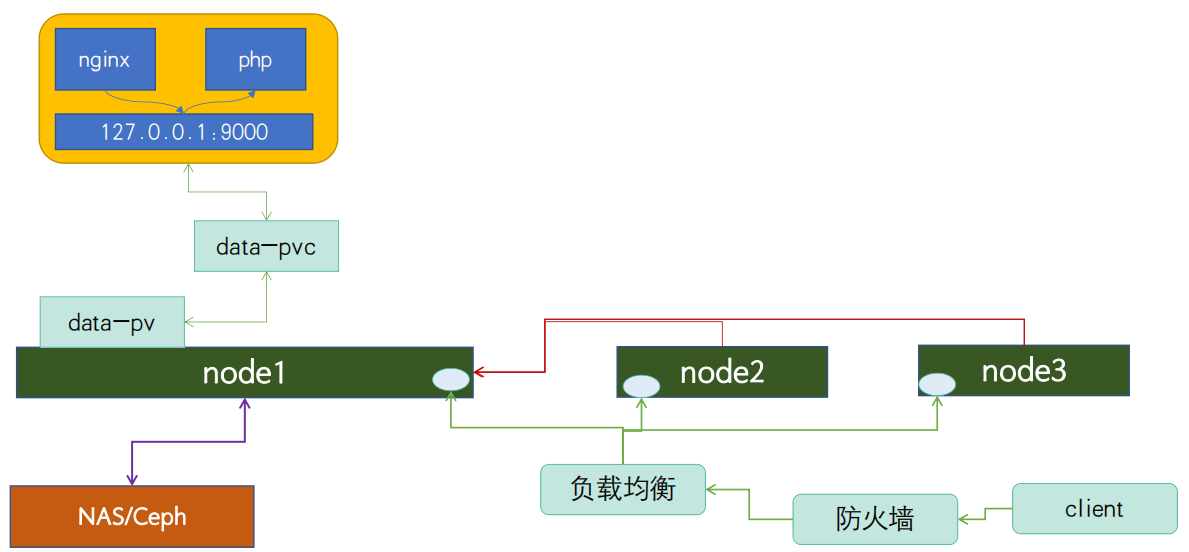
LNMP案例之基于Nginx+PHP实现WordPress博客站点,要求Nginx+PHP运行在同⼀个Pod的不同容器。nginx主要作用是接入站点请求,如果请求静态资源nginx就直接响应。如果请求的是一个动态php资源,就将对应请求转发给另一个php容器进行处理。在一个pod中运行多容器,网络名称空间是共享的,所以nginx可以将对应请求转发至127.0.0.1:9000这个端口来调用php来处理对应php请求。pod中如果有数据产生,pod通过pvc/pv将对应数据存储到远端存储上;客户端访问通过防火墙,负载均衡器将请求调度到后端node上处理,如果请求所在节点没有运行对应pod,那么对应node会根据路由来转发请求,最终会将请求转发给pod所在节点进行处理。
2. 镜像准备
2.1 准备php镜像
php镜像目录文件root@k8s-master01:/opt/k8s-data/dockerfile/cbear/wordpress/php# ll total 40 drwxr-xr-x 2 root root 4096 Jun 20 09:22 ./ drwxr-xr-x 3 root root 4096 Jun 20 09:11 ../ -rw-r--r-- 1 root root 240 Jun 20 09:22 build-command.sh -rw-r--r-- 1 root root 382 Jun 20 09:21 Dockerfile -rwxr-xr-x 1 root root 69 Jun 20 09:20 run_php.sh* -rw-r--r-- 1 root root 19222 Jun 20 09:19 www.conf 构建php镜像
Dockerfileroot@k8s-master01:/opt/k8s-data/dockerfile/cbear/wordpress/php# cat Dockerfile #PHP Base Image FROM harbor.cbear.top/baseimages/centos:7.9.2009 RUN yum install -y https://mirrors.tuna.tsinghua.edu.cn/remi/enterprise/remi-release-7.rpm && yum install php56-php-fpm php56-php-mysql -y ADD www.conf /opt/remi/php56/root/etc/php-fpm.d/www.conf #RUN useradd nginx -u 2019 ADD run_php.sh /usr/local/bin/run_php.sh EXPOSE 9000 CMD ["/usr/local/bin/run_php.sh"] 运行
php脚本root@k8s-master01:/opt/k8s-data/dockerfile/cbear/wordpress/php# chmod +x run_php.sh root@k8s-master01:/opt/k8s-data/dockerfile/cbear/wordpress/php# cat run_php.sh #!/bin/bash /opt/remi/php56/root/usr/sbin/php-fpm tail -f /etc/hosts 准备构建镜像脚本
root@k8s-master01:/opt/k8s-data/dockerfile/cbear/wordpress/php# cat build-command.sh #!/bin/bash TAG=$1 nerdctl build -t harbor.cbear.top/cbear/wordpress-php-5.6:${TAG} . echo "镜像制作完成,即将上传至Harbor服务器" sleep 1 nerdctl push harbor.cbear.top/cbear/wordpress-php-5.6:${TAG} echo "镜像上传完成" 准备
php配置文件www.confroot@k8s-master01:/opt/k8s-data/dockerfile/cbear/wordpress/php# cat run_php.sh ; Start a new pool named 'www'. ; the variable $pool can we used in any directive and will be replaced by the ; pool name ('www' here) [www] ; Per pool prefix ; It only applies on the following directives: ; - 'slowlog' ; - 'listen' (unixsocket) ; - 'chroot' ; - 'chdir' ; - 'php_values' ; - 'php_admin_values' ; When not set, the global prefix (or @php_fpm_prefix@) applies instead. ; Note: This directive can also be relative to the global prefix. ; Default Value: none ;prefix = /path/to/pools/$pool ; Unix user/group of processes ; Note: The user is mandatory. If the group is not set, the default user's group ; will be used. ; RPM: apache user chosen to provide access to the same directories as httpd user = nginx ; RPM: Keep a group allowed to write in log dir. group = nginx ; The address on which to accept FastCGI requests. ; Valid syntaxes are: ; 'ip.add.re.ss:port' - to listen on a TCP socket to a specific IPv4 address on ; a specific port; ; '[ip:6:addr:ess]:port' - to listen on a TCP socket to a specific IPv6 address on ; a specific port; ; 'port' - to listen on a TCP socket to all IPv4 addresses on a ; specific port; ; '[::]:port' - to listen on a TCP socket to all addresses ; (IPv6 and IPv4-mapped) on a specific port; ; '/path/to/unix/socket' - to listen on a unix socket. ; Note: This value is mandatory. listen = 0.0.0.0:9000 ; Set listen(2) backlog. ; Default Value: 65535 ;listen.backlog = 65535 ; Set permissions for unix socket, if one is used. In Linux, read/write ; permissions must be set in order to allow connections from a web server. ; Default Values: user and group are set as the running user ; mode is set to 0660 ;listen.owner = nobody ;listen.group = nobody ;listen.mode = 0660 ; When POSIX Access Control Lists are supported you can set them using ; these options, value is a comma separated list of user/group names. ; When set, listen.owner and listen.group are ignored ;listen.acl_users = apache ;listen.acl_groups = ; List of addresses (IPv4/IPv6) of FastCGI clients which are allowed to connect. ; Equivalent to the FCGI_WEB_SERVER_ADDRS environment variable in the original ; PHP FCGI (5.2.2+). Makes sense only with a tcp listening socket. Each address ; must be separated by a comma. If this value is left blank, connections will be ; accepted from any ip address. ; Default Value: any ; listen.allowed_clients = 127.0.0.1 ; Specify the nice(2) priority to apply to the pool processes (only if set) ; The value can vary from -19 (highest priority) to 20 (lower priority) ; Note: - It will only work if the FPM master process is launched as root ; - The pool processes will inherit the master process priority ; unless it specified otherwise ; Default Value: no set ; process.priority = -19 ; Set the process dumpable flag (PR_SET_DUMPABLE prctl) even if the process user ; or group is differrent than the master process user. It allows to create process ; core dump and ptrace the process for the pool user. ; Default Value: no ; process.dumpable = yes ; Choose how the process manager will control the number of child processes. ; Possible Values: ; static - a fixed number (pm.max_children) of child processes; ; dynamic - the number of child processes are set dynamically based on the ; following directives. With this process management, there will be ; always at least 1 children. ; pm.max_children - the maximum number of children that can ; be alive at the same time. ; pm.start_servers - the number of children created on startup. ; pm.min_spare_servers - the minimum number of children in 'idle' ; state (waiting to process). If the number ; of 'idle' processes is less than this ; number then some children will be created. ; pm.max_spare_servers - the maximum number of children in 'idle' ; state (waiting to process). If the number ; of 'idle' processes is greater than this ; number then some children will be killed. ; ondemand - no children are created at startup. Children will be forked when ; new requests will connect. The following parameter are used: ; pm.max_children - the maximum number of children that ; can be alive at the same time. ; pm.process_idle_timeout - The number of seconds after which ; an idle process will be killed. ; Note: This value is mandatory. pm = dynamic ; The number of child processes to be created when pm is set to 'static' and the ; maximum number of child processes when pm is set to 'dynamic' or 'ondemand'. ; This value sets the limit on the number of simultaneous requests that will be ; served. Equivalent to the ApacheMaxClients directive with mpm_prefork. ; Equivalent to the PHP_FCGI_CHILDREN environment variable in the original PHP ; CGI. The below defaults are based on a server without much resources. Don't ; forget to tweak pm.* to fit your needs. ; Note: Used when pm is set to 'static', 'dynamic' or 'ondemand' ; Note: This value is mandatory. pm.max_children = 50 ; The number of child processes created on startup. ; Note: Used only when pm is set to 'dynamic' ; Default Value: min_spare_servers + (max_spare_servers - min_spare_servers) / 2 pm.start_servers = 5 ; The desired minimum number of idle server processes. ; Note: Used only when pm is set to 'dynamic' ; Note: Mandatory when pm is set to 'dynamic' pm.min_spare_servers = 5 ; The desired maximum number of idle server processes. ; Note: Used only when pm is set to 'dynamic' ; Note: Mandatory when pm is set to 'dynamic' pm.max_spare_servers = 35 ; The number of seconds after which an idle process will be killed. ; Note: Used only when pm is set to 'ondemand' ; Default Value: 10s ;pm.process_idle_timeout = 10s; ; The number of requests each child process should execute before respawning. ; This can be useful to work around memory leaks in 3rd party libraries. For ; endless request processing specify '0'. Equivalent to PHP_FCGI_MAX_REQUESTS. ; Default Value: 0 ;pm.max_requests = 500 ; The URI to view the FPM status page. If this value is not set, no URI will be ; recognized as a status page. It shows the following informations: ; pool - the name of the pool; ; process manager - static, dynamic or ondemand; ; start time - the date and time FPM has started; ; start since - number of seconds since FPM has started; ; accepted conn - the number of request accepted by the pool; ; listen queue - the number of request in the queue of pending ; connections (see backlog in listen(2)); ; max listen queue - the maximum number of requests in the queue ; of pending connections since FPM has started; ; listen queue len - the size of the socket queue of pending connections; ; idle processes - the number of idle processes; ; active processes - the number of active processes; ; total processes - the number of idle + active processes; ; max active processes - the maximum number of active processes since FPM ; has started; ; max children reached - number of times, the process limit has been reached, ; when pm tries to start more children (works only for ; pm 'dynamic' and 'ondemand'); ; Value are updated in real time. ; Example output: ; pool: www ; process manager: static ; start time: 01/Jul/2011:17:53:49 +0200 ; start since: 62636 ; accepted conn: 190460 ; listen queue: 0 ; max listen queue: 1 ; listen queue len: 42 ; idle processes: 4 ; active processes: 11 ; total processes: 15 ; max active processes: 12 ; max children reached: 0 ; ; By default the status page output is formatted as text/plain. Passing either ; 'html', 'xml' or 'json' in the query string will return the corresponding ; output syntax. Example: ; http://www.foo.bar/status ; http://www.foo.bar/status?json ; http://www.foo.bar/status?html ; http://www.foo.bar/status?xml ; ; By default the status page only outputs short status. Passing 'full' in the ; query string will also return status for each pool process. ; Example: ; http://www.foo.bar/status?full ; http://www.foo.bar/status?json&full ; http://www.foo.bar/status?html&full ; http://www.foo.bar/status?xml&full ; The Full status returns for each process: ; pid - the PID of the process; ; state - the state of the process (Idle, Running, ...); ; start time - the date and time the process has started; ; start since - the number of seconds since the process has started; ; requests - the number of requests the process has served; ; request duration - the duration in µs of the requests; ; request method - the request method (GET, POST, ...); ; request URI - the request URI with the query string; ; content length - the content length of the request (only with POST); ; user - the user (PHP_AUTH_USER) (or '-' if not set); ; script - the main script called (or '-' if not set); ; last request cpu - the %cpu the last request consumed ; it's always 0 if the process is not in Idle state ; because CPU calculation is done when the request ; processing has terminated; ; last request memory - the max amount of memory the last request consumed ; it's always 0 if the process is not in Idle state ; because memory calculation is done when the request ; processing has terminated; ; If the process is in Idle state, then informations are related to the ; last request the process has served. Otherwise informations are related to ; the current request being served. ; Example output: ; ************************ ; pid: 31330 ; state: Running ; start time: 01/Jul/2011:17:53:49 +0200 ; start since: 63087 ; requests: 12808 ; request duration: 1250261 ; request method: GET ; request URI: /test_mem.php?N=10000 ; content length: 0 ; user: - ; script: /home/fat/web/docs/php/test_mem.php ; last request cpu: 0.00 ; last request memory: 0 ; ; Note: There is a real-time FPM status monitoring sample web page available ; It's available in: @EXPANDED_DATADIR@/fpm/status.html ; ; Note: The value must start with a leading slash (/). The value can be ; anything, but it may not be a good idea to use the .php extension or it ; may conflict with a real PHP file. ; Default Value: not set ;pm.status_path = /status ; The ping URI to call the monitoring page of FPM. If this value is not set, no ; URI will be recognized as a ping page. This could be used to test from outside ; that FPM is alive and responding, or to ; - create a graph of FPM availability (rrd or such); ; - remove a server from a group if it is not responding (load balancing); ; - trigger alerts for the operating team (24/7). ; Note: The value must start with a leading slash (/). The value can be ; anything, but it may not be a good idea to use the .php extension or it ; may conflict with a real PHP file. ; Default Value: not set ;ping.path = /ping ; This directive may be used to customize the response of a ping request. The ; response is formatted as text/plain with a 200 response code. ; Default Value: pong ;ping.response = pong ; The access log file ; Default: not set ;access.log = log/$pool.access.log ; The access log format. ; The following syntax is allowed ; %%: the '%' character ; %C: %CPU used by the request ; it can accept the following format: ; - %{user}C for user CPU only ; - %{system}C for system CPU only ; - %{total}C for user + system CPU (default) ; %d: time taken to serve the request ; it can accept the following format: ; - %{seconds}d (default) ; - %{miliseconds}d ; - %{mili}d ; - %{microseconds}d ; - %{micro}d ; %e: an environment variable (same as $_ENV or $_SERVER) ; it must be associated with embraces to specify the name of the env ; variable. Some exemples: ; - server specifics like: %{REQUEST_METHOD}e or %{SERVER_PROTOCOL}e ; - HTTP headers like: %{HTTP_HOST}e or %{HTTP_USER_AGENT}e ; %f: script filename ; %l: content-length of the request (for POST request only) ; %m: request method ; %M: peak of memory allocated by PHP ; it can accept the following format: ; - %{bytes}M (default) ; - %{kilobytes}M ; - %{kilo}M ; - %{megabytes}M ; - %{mega}M ; %n: pool name ; %o: output header ; it must be associated with embraces to specify the name of the header: ; - %{Content-Type}o ; - %{X-Powered-By}o ; - %{Transfert-Encoding}o ; - .... ; %p: PID of the child that serviced the request ; %P: PID of the parent of the child that serviced the request ; %q: the query string ; %Q: the '?' character if query string exists ; %r: the request URI (without the query string, see %q and %Q) ; %R: remote IP address ; %s: status (response code) ; %t: server time the request was received ; it can accept a strftime(3) format: ; %d/%b/%Y:%H:%M:%S %z (default) ; %T: time the log has been written (the request has finished) ; it can accept a strftime(3) format: ; %d/%b/%Y:%H:%M:%S %z (default) ; %u: remote user ; ; Default: "%R - %u %t \"%m %r\" %s" ;access.format = "%R - %u %t \"%m %r%Q%q\" %s %f %{mili}d %{kilo}M %C%%" ; The log file for slow requests ; Default Value: not set ; Note: slowlog is mandatory if request_slowlog_timeout is set slowlog = /opt/remi/php56/root/var/log/php-fpm/www-slow.log ; The timeout for serving a single request after which a PHP backtrace will be ; dumped to the 'slowlog' file. A value of '0s' means 'off'. ; Available units: s(econds)(default), m(inutes), h(ours), or d(ays) ; Default Value: 0 ;request_slowlog_timeout = 0 ; The timeout for serving a single request after which the worker process will ; be killed. This option should be used when the 'max_execution_time' ini option ; does not stop script execution for some reason. A value of '0' means 'off'. ; Available units: s(econds)(default), m(inutes), h(ours), or d(ays) ; Default Value: 0 ;request_terminate_timeout = 0 ; Set open file descriptor rlimit. ; Default Value: system defined value ;rlimit_files = 1024 ; Set max core size rlimit. ; Possible Values: 'unlimited' or an integer greater or equal to 0 ; Default Value: system defined value ;rlimit_core = 0 ; Chroot to this directory at the start. This value must be defined as an ; absolute path. When this value is not set, chroot is not used. ; Note: you can prefix with '$prefix' to chroot to the pool prefix or one ; of its subdirectories. If the pool prefix is not set, the global prefix ; will be used instead. ; Note: chrooting is a great security feature and should be used whenever ; possible. However, all PHP paths will be relative to the chroot ; (error_log, sessions.save_path, ...). ; Default Value: not set ;chroot = ; Chdir to this directory at the start. ; Note: relative path can be used. ; Default Value: current directory or / when chroot ;chdir = /var/www ; Redirect worker stdout and stderr into main error log. If not set, stdout and ; stderr will be redirected to /dev/null according to FastCGI specs. ; Note: on highloaded environement, this can cause some delay in the page ; process time (several ms). ; Default Value: no ;catch_workers_output = yes ; Clear environment in FPM workers ; Prevents arbitrary environment variables from reaching FPM worker processes ; by clearing the environment in workers before env vars specified in this ; pool configuration are added. ; Setting to "no" will make all environment variables available to PHP code ; via getenv(), $_ENV and $_SERVER. ; Default Value: yes ;clear_env = no ; Limits the extensions of the main script FPM will allow to parse. This can ; prevent configuration mistakes on the web server side. You should only limit ; FPM to .php extensions to prevent malicious users to use other extensions to ; exectute php code. ; Note: set an empty value to allow all extensions. ; Default Value: .php ;security.limit_extensions = .php .php3 .php4 .php5 ; Pass environment variables like LD_LIBRARY_PATH. All $VARIABLEs are taken from ; the current environment. ; Default Value: clean env ;env[HOSTNAME] = $HOSTNAME ;env[PATH] = /usr/local/bin:/usr/bin:/bin ;env[TMP] = /tmp ;env[TMPDIR] = /tmp ;env[TEMP] = /tmp ; Additional php.ini defines, specific to this pool of workers. These settings ; overwrite the values previously defined in the php.ini. The directives are the ; same as the PHP SAPI: ; php_value/php_flag - you can set classic ini defines which can ; be overwritten from PHP call 'ini_set'. ; php_admin_value/php_admin_flag - these directives won't be overwritten by ; PHP call 'ini_set' ; For php_*flag, valid values are on, off, 1, 0, true, false, yes or no. ; Defining 'extension' will load the corresponding shared extension from ; extension_dir. Defining 'disable_functions' or 'disable_classes' will not ; overwrite previously defined php.ini values, but will append the new value ; instead. ; Note: path INI options can be relative and will be expanded with the prefix ; (pool, global or @prefix@) ; Default Value: nothing is defined by default except the values in php.ini and ; specified at startup with the -d argument ;php_admin_value[sendmail_path] = /usr/sbin/sendmail -t -i -f www@my.domain.com ;php_flag[display_errors] = off php_admin_value[error_log] = /opt/remi/php56/root/var/log/php-fpm/www-error.log php_admin_flag[log_errors] = on ;php_admin_value[memory_limit] = 128M ; Set the following data paths to directories owned by the FPM process user. ; ; Do not change the ownership of existing system directories, if the process ; user does not have write permission, create dedicated directories for this ; purpose. ; ; See warning about choosing the location of these directories on your system ; at http://php.net/session.save-path php_value[session.save_handler] = files php_value[session.save_path] = /opt/remi/php56/root/var/lib/php/session php_value[soap.wsdl_cache_dir] = /opt/remi/php56/root/var/lib/php/wsdlcache构建对应
php镜像root@k8s-master01:/opt/k8s-data/dockerfile/cbear/wordpress/php# bash build-command.sh v1
2.2 准备nginx基础镜像
nginx镜像目录文件root@k8s-master01:/opt/k8s-data/dockerfile/cbear/wordpress/nginx# ls build-command.sh Dockerfile nginx-1.26.1.tar.gz 构建
nginx-wordpress镜像Dockerfileroot@k8s-master01:/opt/k8s-data/dockerfile/cbear/wordpress/nginx# cat Dockerfile #Nginx Base Image FROM harbor.cbear.top/baseimages/centos:7.9.2009 RUN yum install -y vim wget tree lrzsz gcc gcc-c++ automake pcre pcre-devel zlib zlib-devel openssl openssl-devel iproute net-tools iotop ADD nginx-1.26.1.tar.gz /usr/local/src/ RUN cd /usr/local/src/nginx-1.26.1 && ./configure --prefix=/apps/nginx && make && make install && ln -sv /apps/nginx/sbin/nginx /usr/sbin/nginx &&rm -rf /usr/local/src/nginx-1.26.1.tar.gz 该镜像主要做了安装编译环境,放
nginx源码包进去编译nginx;镜像构建脚本
root@k8s-master01:/opt/k8s-data/dockerfile/cbear/wordpress/nginx# cat build-command.sh
#!/bin/bash

nerdctl build -t  harbor.cbear.top/pub-images/nginx-base-wordpress:v1.26.1  .
nerdctl push harbor.cbear.top/pub-images/nginx-base-wordpress:v1.26.1
构建对应nginx镜像
root@k8s-master01:/opt/k8s-data/dockerfile/cbear/wordpress/nginx# bash build-command.sh
2.3 wordpress镜像
wordpress镜像目录文件root@k8s-master01:/opt/k8s-data/dockerfile/cbear/wordpress/wordpress# ll total 24 drwxr-xr-x 2 root root 4096 Jun 20 10:20 ./ drwxr-xr-x 5 root root 4096 Jun 20 10:16 ../ -rw-r--r-- 1 root root 237 Jun 20 10:17 build-command.sh -rw-r--r-- 1 root root 287 Jun 20 10:20 Dockerfile -rw-r--r-- 1 root root 3364 Jun 20 10:16 nginx.conf -rwxr-xr-x 1 root root 151 Jun 20 10:17 run_nginx.sh*镜像构建文件
root@k8s-master01:~/k8s-data/dockerfile/web/magedu/wordpress/nginx# cat Dockerfile
FROM harbor.cbear.top/pub-images/nginx-base-wordpress:v1.26.1

ADD nginx.conf /apps/nginx/conf/nginx.conf
ADD run_nginx.sh /apps/nginx/sbin/run_nginx.sh
RUN mkdir -pv /home/nginx/wordpress
RUN chown nginx.nginx /home/nginx/wordpress/ -R

EXPOSE 80 443

CMD ["/apps/nginx/sbin/run_nginx.sh"]
镜像运行脚本
root@k8s-master01:/opt/k8s-data/dockerfile/cbear/wordpress/wordpress# chmod +x run_nginx.sh
root@k8s-master01:/opt/k8s-data/dockerfile/cbear/wordpress/wordpress# cat run_nginx.sh
#!/bin/bash
/apps/nginx/sbin/nginx
tail -f /etc/hosts
镜像构建脚本
root@k8s-master01:~/k8s-data/dockerfile/web/magedu/wordpress/nginx# cat build-command.sh #!/bin/bash TAG=$1 nerdctl build -t harbor.cbear.top/cbear/wordpress-nginx:${TAG} . echo "镜像制作完成,即将上传至Harbor服务器" sleep 1 nerdctl push harbor.cbear.top/cbear/wordpress-nginx:${TAG} echo "镜像上传完成"nginx,conf配置文件user nginx nginx; worker_processes auto; #error_log logs/error.log; #error_log logs/error.log notice; #error_log logs/error.log info; #pid logs/nginx.pid; #daemon off; events { worker_connections 1024; } http { include mime.types; default_type application/octet-stream; #log_format main '$remote_addr - $remote_user [$time_local] "$request" ' # '$status $body_bytes_sent "$http_referer" ' # '"$http_user_agent" "$http_x_forwarded_for"'; #access_log logs/access.log main; sendfile on; #tcp_nopush on; keepalive_timeout 65; client_max_body_size 10M; client_body_buffer_size 16k; client_body_temp_path /apps/nginx/tmp 1 2 2; gzip on; server { listen 80; server_name localhost; #charset koi8-r; #access_log logs/host.access.log main; location / { root /home/nginx/wordpress; index index.php index.html index.htm; #if ($http_user_agent ~ "ApacheBench|WebBench|TurnitinBot|Sogou web spider|Grid Service") { # proxy_pass http://www.baidu.com; # #return 403; #} } location ~ \.php$ { root /home/nginx/wordpress; fastcgi_pass 127.0.0.1:9000; fastcgi_index index.php; #fastcgi_param SCRIPT_FILENAME /scripts$fastcgi_script_name; fastcgi_param SCRIPT_FILENAME $document_root$fastcgi_script_name; include fastcgi_params; } #error_page 404 /404.html; # redirect server error pages to the static page /50x.html # error_page 500 502 503 504 /50x.html; location = /50x.html { root html; } # proxy the PHP scripts to Apache listening on 127.0.0.1:80 # #location ~ \.php$ { # proxy_pass http://127.0.0.1; #} # pass the PHP scripts to FastCGI server listening on 127.0.0.1:9000 # #location ~ \.php$ { # root html; # fastcgi_pass 127.0.0.1:9000; # fastcgi_index index.php; # fastcgi_param SCRIPT_FILENAME /scripts$fastcgi_script_name; # include fastcgi_params; #} # deny access to .htaccess files, if Apache's document root # concurs with nginx's one # #location ~ /\.ht { # deny all; #} } # another virtual host using mix of IP-, name-, and port-based configuration # #server { # listen 8000; # listen somename:8080; # server_name somename alias another.alias; # location / { # root html; # index index.html index.htm; # } #} # HTTPS server # #server { # listen 443 ssl; # server_name localhost; # ssl_certificate cert.pem; # ssl_certificate_key cert.key; # ssl_session_cache shared:SSL:1m; # ssl_session_timeout 5m; # ssl_ciphers HIGH:!aNULL:!MD5; # ssl_prefer_server_ciphers on; # location / { # root html; # index index.html index.htm; # } #} }
3. 运行WordPress站点
3.1 准备nfs存储目录
在
nfs服务器准备存放wordpress代码文件目录root@harbor:~# mkdir /data/cbear/wordpress配置nfs并加载对应配置文件
root@harbor:~# cat /etc/exports
/data/cbear/wordpress/ *(rw,no_root_squash,no_subtree_check)

root@harbor:~# exportfs -rv
exporting *:/data/cbear/wordpress
3.2 运行wordpress的配置清单
准备对应配置清单
kind: Deployment
apiVersion: apps/v1
metadata:
  labels:
    app: wordpress-app
  name: wordpress-app-deployment
  namespace: cbear
spec:
  replicas: 1
  selector:
    matchLabels:
      app: wordpress-app
  template:
    metadata:
      labels:
        app: wordpress-app
    spec:
      containers:
      - name: wordpress-app-nginx
        image: harbor.cbear.top/cbear/wordpress-nginx:v1
        imagePullPolicy: Always
        ports:
        - containerPort: 80
          protocol: TCP
          name: http
        - containerPort: 443
          protocol: TCP
          name: https
        volumeMounts:
        - name: wordpress
          mountPath: /home/nginx/wordpress
          readOnly: false

      - name: wordpress-app-php
        image: harbor.cbear.top/cbear/wordpress-php-5.6:v1
        #imagePullPolicy: IfNotPresent
        imagePullPolicy: Always
        ports:
        - containerPort: 9000
          protocol: TCP
          name: http
        volumeMounts:
        - name: wordpress
          mountPath: /home/nginx/wordpress
          readOnly: false

      volumes:
      - name: wordpress
        nfs:
          server: 192.168.71.34
          path: /data/cbear/wordpress


---
kind: Service
apiVersion: v1
metadata:
  labels:
    app: wordpress-app
  name: wordpress-app-spec
  namespace: cbear
spec:
  type: NodePort
  ports:
  - name: http
    port: 80
    protocol: TCP
    targetPort: 80
    nodePort: 30031
  - name: https
    port: 443
    protocol: TCP
    targetPort: 443
    nodePort: 30033
  selector:
    app: wordpress-app
启用清单
root@k8s-master01:/opt/k8s-data/yaml/cbear/wordpress# kubectl apply -f ./
deployment.apps/wordpress-app-deployment created
service/wordpress-app-spec created
验证对应测试结果
root@k8s-master01:/opt/k8s-data/yaml/cbear/wordpress# kubectl get pods -n cbear
NAME                                        READY   STATUS    RESTARTS   AGE
wordpress-app-deployment-74bdb78887-gzk5t   2/2     Running   0          42s
root@k8s-master01:/opt/k8s-data/yaml/cbear/wordpress# kubectl get svc -n cbear
NAME                    TYPE        CLUSTER-IP      EXTERNAL-IP   PORT(S)                      AGE

wordpress-app-spec      NodePort    10.68.61.30     <none>        80:30031/TCP,443:30033/TCP   70s
3.3 验证
3.3.1 准备php测试页面
准备后台访问的php页面
root@harbor:/data/cbear/wordpress# cat test.php
<?php
phpinfo();
?>
访问
php测试页面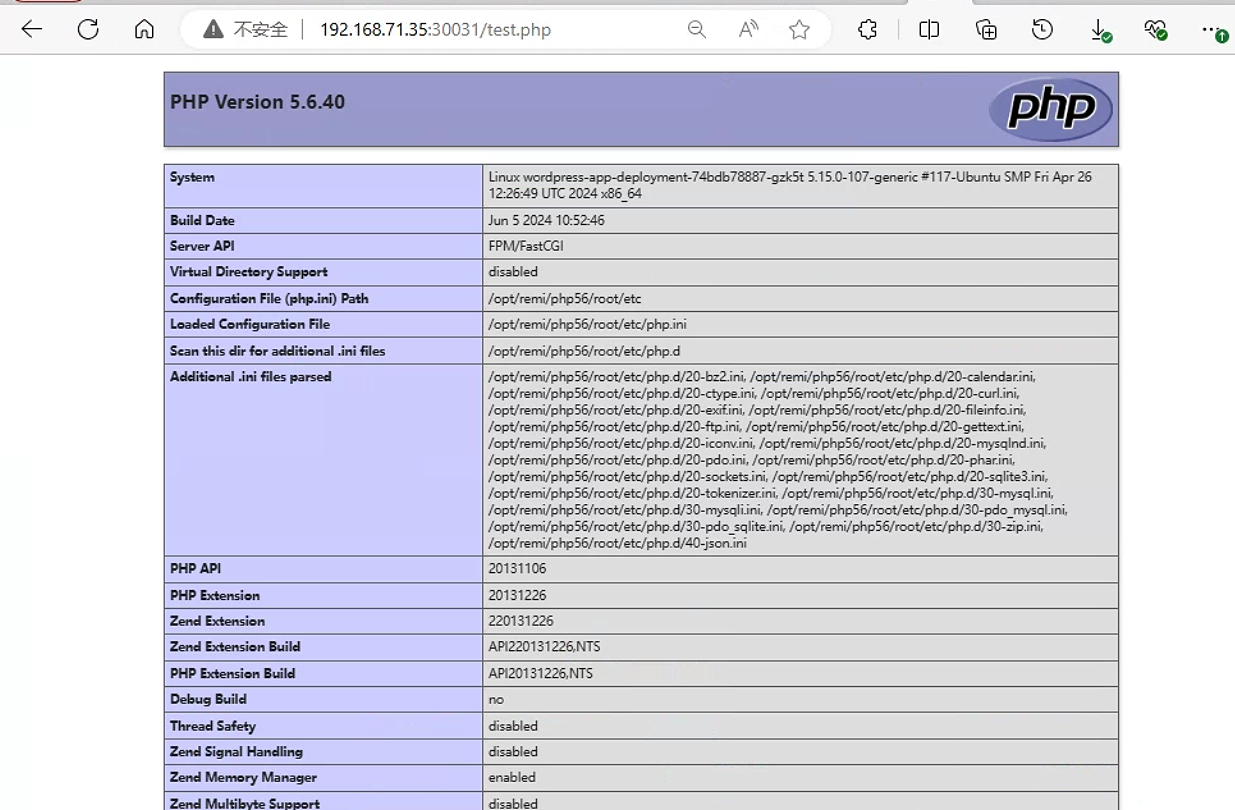
4. 初始化WordPress站点
k8s中MySQL创建数据库root@k8s-master01:/opt/k8s-data/yaml/cbear/wordpress# kubectl exec -it mysql-0 -n cbear -- bash Defaulted container "mysql" out of: mysql, xtrabackup, init-mysql (init), clone-mysql (init) root@mysql-0:/# mysql Welcome to the MySQL monitor. Commands end with ; or \g. Your MySQL connection id is 39823 Server version: 5.7.36-log MySQL Community Server (GPL) Copyright (c) 2000, 2021, Oracle and/or its affiliates. Oracle is a registered trademark of Oracle Corporation and/or its affiliates. Other names may be trademarks of their respective owners. Type 'help;' or '\h' for help. Type '\c' to clear the current input statement. mysql> CREATE DATABASE wordpress; Query OK, 1 row affected (0.03 sec) mysql> GRANT ALL PRIVILEGES ON wordpress.* TO "wordpress"@"%" IDENTIFIED BY "wordpress"; Query OK, 0 rows affected, 1 warning (0.01 sec) mysql> show databases; +------------------------+ | Database | +------------------------+ | information_schema | | mydb | | mysql | | performance_schema | | sys | | wordpress | | xtrabackup_backupfiles | +------------------------+ 7 rows in set (0.01 sec)下载并解压对应
wordpressroot@harbor:~# tar -xf wordpress-5.6.10-zh_CN.tar.gz -C /data/cbear/ root@harbor:/data/cbear/wordpress# ll total 228 drwxr-xr-x 5 1006 1006 4096 Oct 18 2022 ./ drwxr-xr-x 10 root root 4096 Jun 20 10:30 ../ -rw-r--r-- 1 1006 1006 405 Feb 6 2020 index.php -rw-r--r-- 1 1006 1006 19915 Oct 18 2022 license.txt -rw-r--r-- 1 1006 1006 7278 Oct 18 2022 readme.html -rw-r--r-- 1 root root 20 Jun 20 10:47 test.php -rw-r--r-- 1 1006 1006 7101 Jul 28 2020 wp-activate.php drwxr-xr-x 9 1006 1006 4096 Oct 18 2022 wp-admin/ -rw-r--r-- 1 1006 1006 351 Feb 6 2020 wp-blog-header.php -rw-r--r-- 1 1006 1006 2328 Oct 8 2020 wp-comments-post.php -rw-r--r-- 1 1006 1006 2913 Oct 18 2022 wp-config-sample.php drwxr-xr-x 5 1006 1006 4096 Oct 18 2022 wp-content/ -rw-r--r-- 1 1006 1006 3939 Jul 30 2020 wp-cron.php drwxr-xr-x 25 1006 1006 12288 Oct 18 2022 wp-includes/ -rw-r--r-- 1 1006 1006 2496 Feb 6 2020 wp-links-opml.php -rw-r--r-- 1 1006 1006 3300 Feb 6 2020 wp-load.php -rw-r--r-- 1 1006 1006 49831 Nov 9 2020 wp-login.php -rw-r--r-- 1 1006 1006 8454 Oct 17 2022 wp-mail.php -rw-r--r-- 1 1006 1006 20975 Nov 12 2020 wp-settings.php -rw-r--r-- 1 1006 1006 31337 Sep 30 2020 wp-signup.php -rw-r--r-- 1 1006 1006 4816 Oct 17 2022 wp-trackback.php -rw-r--r-- 1 1006 1006 3236 Jun 8 2020 xmlrpc.php修改
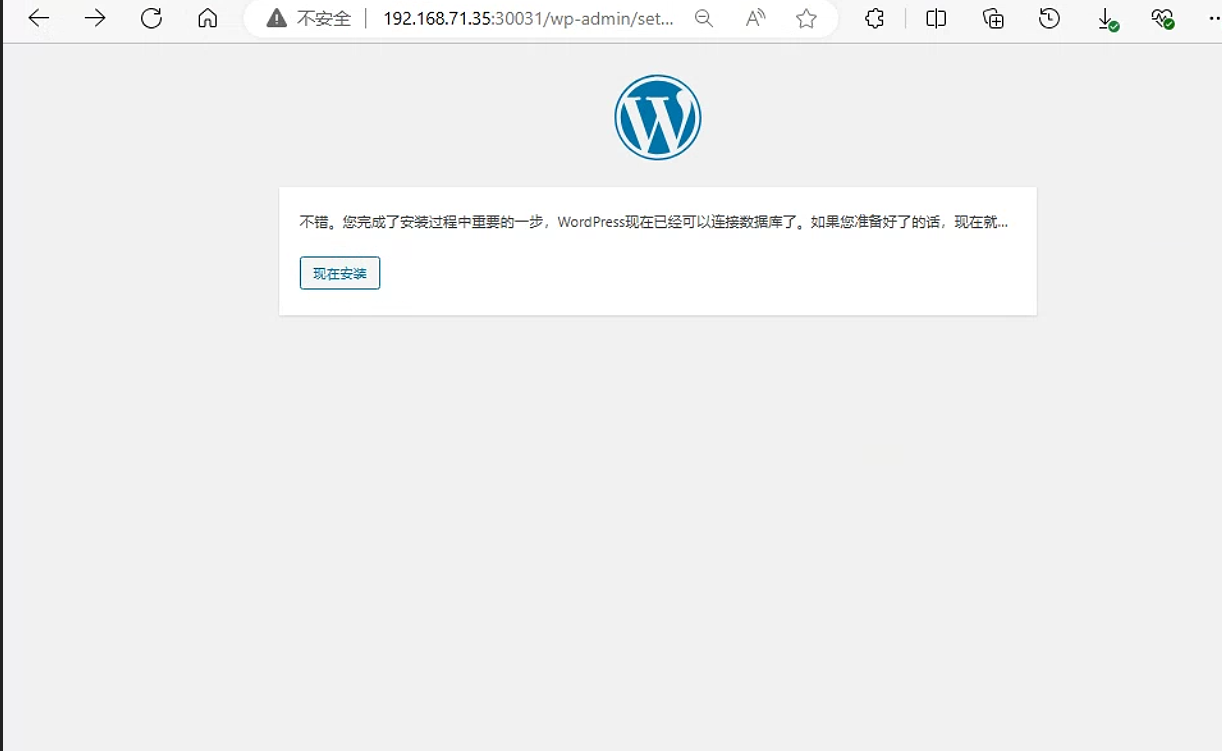
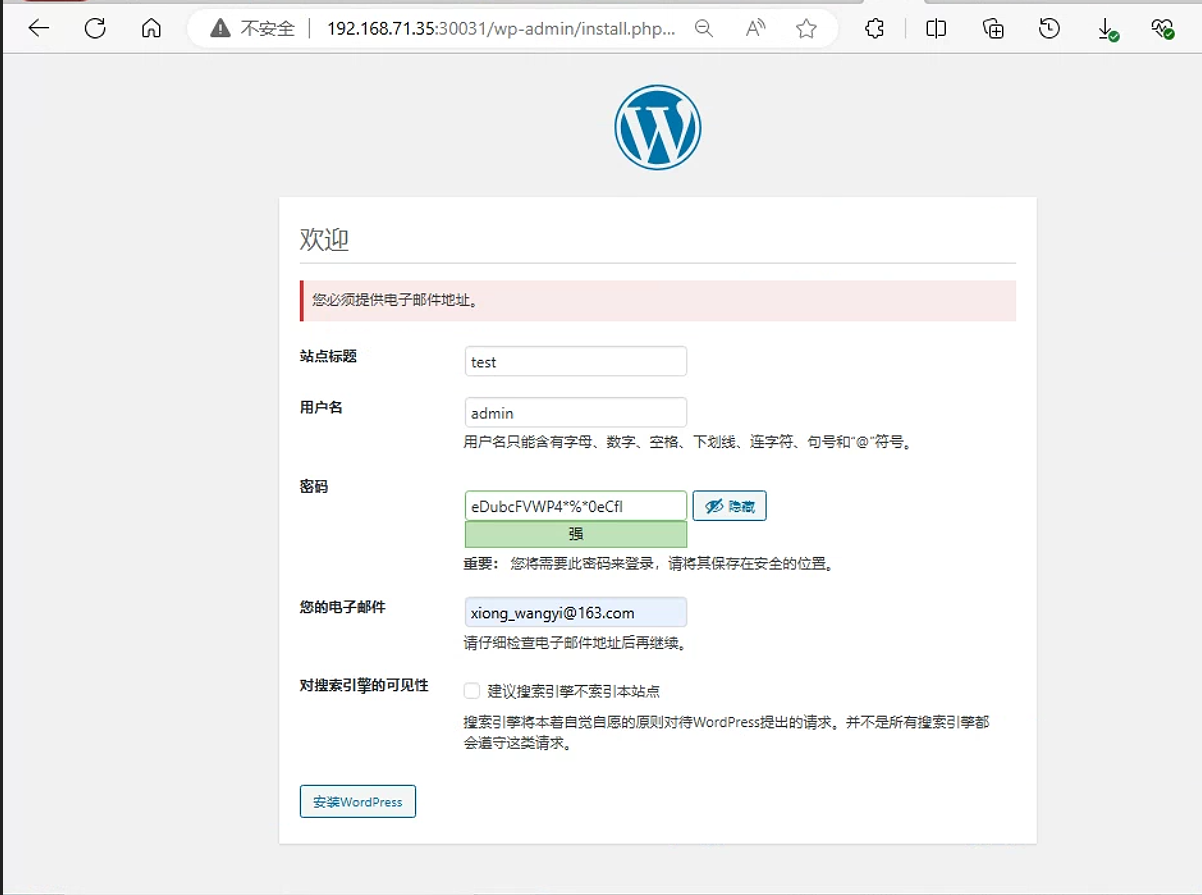
wordpress权限root@k8s-master01:/opt/k8s-data/yaml/cbear/wordpress# kubectl exec -it -n cbear wordpress-app-deployment-74bdb78887-gzk5t -- id nginx Defaulted container "wordpress-app-nginx" out of: wordpress-app-nginx, wordpress-app-php uid=2088(nginx) gid=2088(nginx) groups=2088(nginx) root@harbor:/data/cbear/wordpress# chown 2088.2088 /data/cbear/wordpress/ -R root@harbor:/data/cbear/wordpress# ll total 228 drwxr-xr-x 5 2088 2088 4096 Oct 18 2022 ./ drwxr-xr-x 10 root root 4096 Jun 20 10:30 ../ -rw-r--r-- 1 2088 2088 405 Feb 6 2020 index.php -rw-r--r-- 1 2088 2088 19915 Oct 18 2022 license.txt -rw-r--r-- 1 2088 2088 7278 Oct 18 2022 readme.html -rw-r--r-- 1 2088 2088 20 Jun 20 10:47 test.php -rw-r--r-- 1 2088 2088 7101 Jul 28 2020 wp-activate.php drwxr-xr-x 9 2088 2088 4096 Oct 18 2022 wp-admin/ -rw-r--r-- 1 2088 2088 351 Feb 6 2020 wp-blog-header.php -rw-r--r-- 1 2088 2088 2328 Oct 8 2020 wp-comments-post.php -rw-r--r-- 1 2088 2088 2913 Oct 18 2022 wp-config-sample.php drwxr-xr-x 5 2088 2088 4096 Oct 18 2022 wp-content/ -rw-r--r-- 1 2088 2088 3939 Jul 30 2020 wp-cron.php drwxr-xr-x 25 2088 2088 12288 Oct 18 2022 wp-includes/ -rw-r--r-- 1 2088 2088 2496 Feb 6 2020 wp-links-opml.php -rw-r--r-- 1 2088 2088 3300 Feb 6 2020 wp-load.php -rw-r--r-- 1 2088 2088 49831 Nov 9 2020 wp-login.php -rw-r--r-- 1 2088 2088 8454 Oct 17 2022 wp-mail.php -rw-r--r-- 1 2088 2088 20975 Nov 12 2020 wp-settings.php -rw-r--r-- 1 2088 2088 31337 Sep 30 2020 wp-signup.php -rw-r--r-- 1 2088 2088 4816 Oct 17 2022 wp-trackback.php -rw-r--r-- 1 2088 2088 3236 Jun 8 2020 xmlrpc.php通过页面初始化。直接访问
192.168.71.35:30031即可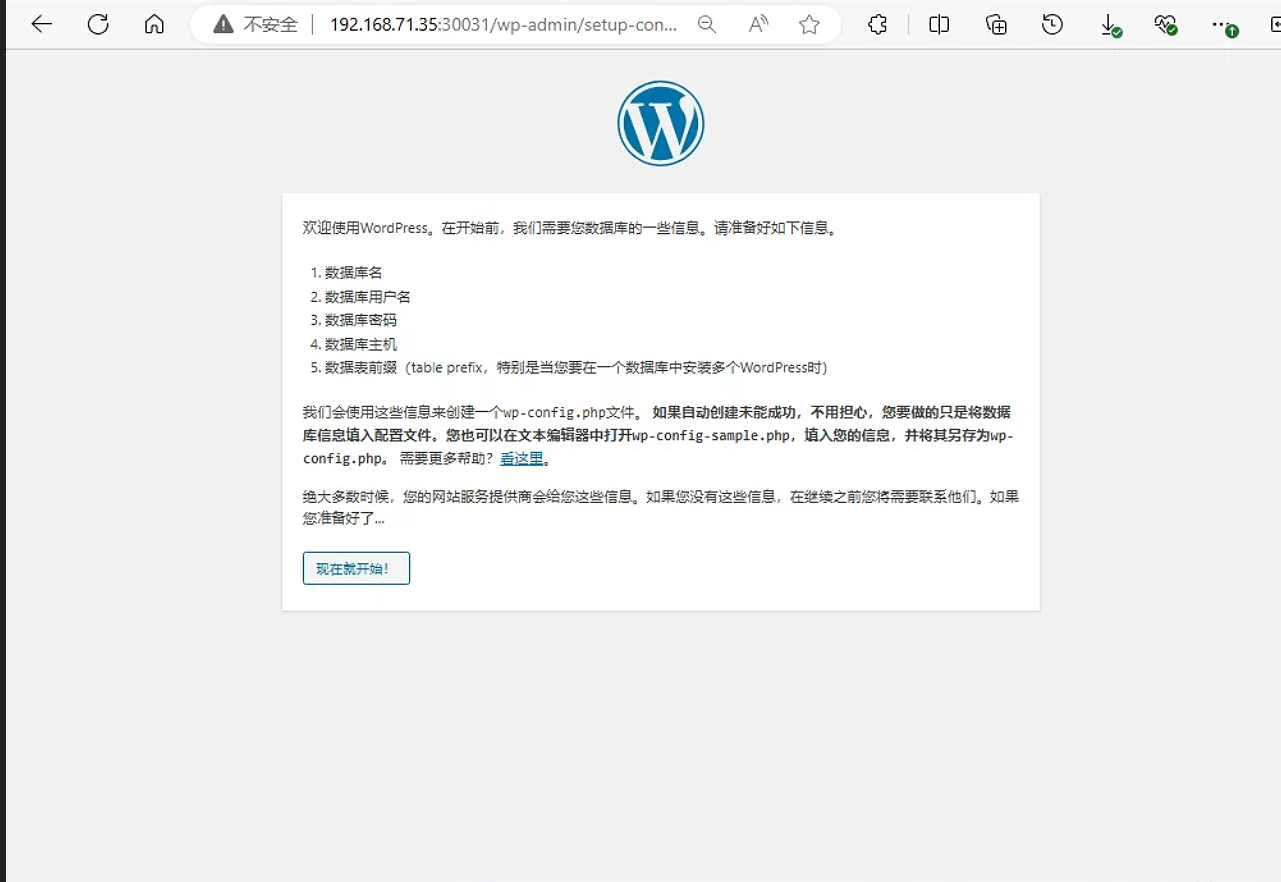
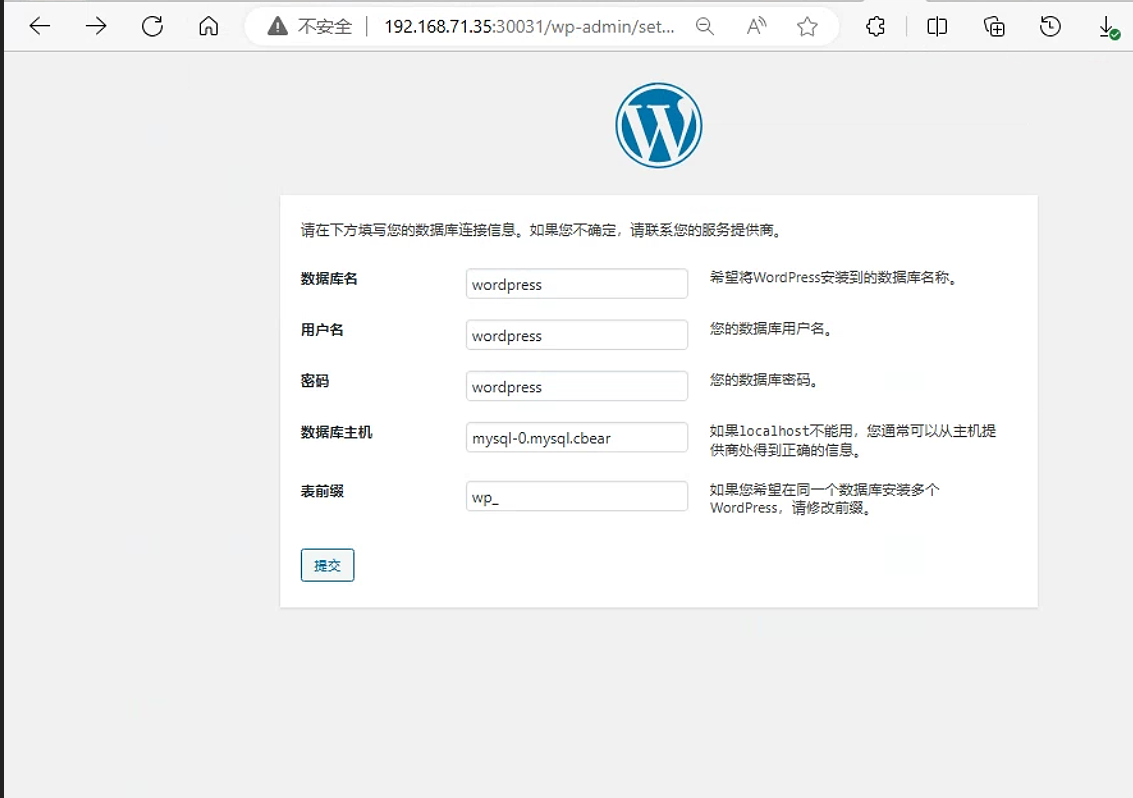
之后直接登录即可
参考链接
k8s实战案例之运行WordPress - Linux-1874 - 博客园 (cnblogs.com)