2-7-基于nerdctl+buildkitd+containerd实现镜像构建
1. 容器技术简介
容器技术除了的docker之外 , 还有coreOS的rkt、google的gvisor、以及docker开源的containerd、redhat的podman、阿⾥的pouch等 , 为了保证容器⽣态的标准性和健康可持续发展 , 包括Linux 基⾦会、Docker、微软、红帽、⾕歌和IBM等公司在2015年6⽉共同成⽴了⼀个叫open container(OCI)的组织 , 其⽬的就是制定开放的标准的容器规范 , ⽬前OCI⼀共发布了两个规范 , 分别是runtime spec和image format spec , 有了这两个规范 , 不同的容器公司开发的容器只要兼容这两个规范 , 就可以保证容器的可移植性和相互可操作性。 containerd官网:https://containerd.io/
gvisor官网:https://gvisor.dev/
podman官网:https://podman.io
pouch项目地址:https://github.com/alibaba/pouch
buildkit: 从Docker公司的开源出来的⼀个镜像构建⼯具包 , ⽀持OCI标准的镜像构建,项目地址https://github.com/moby/buildkit
2. buildkitd组成部分
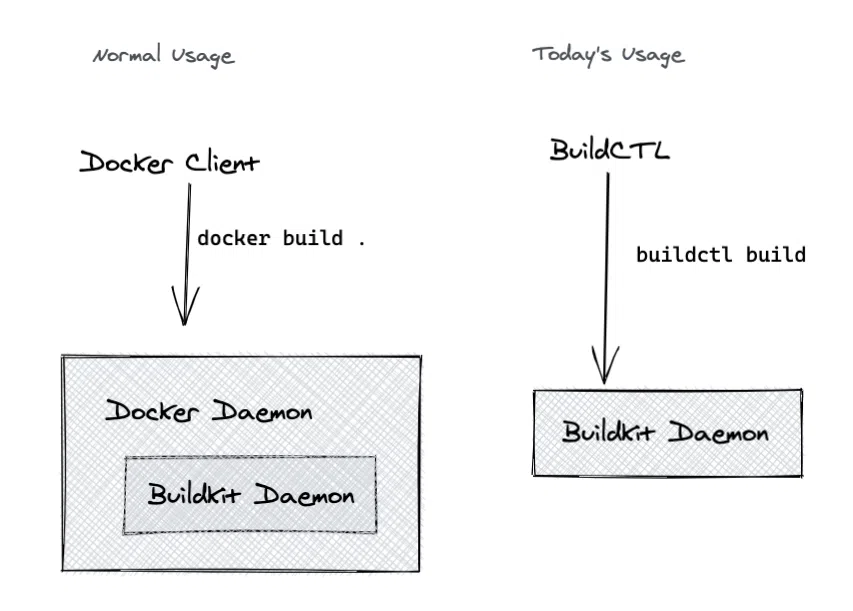
buildkitd(服务端) , ⽬前⽀持runc和containerd作为镜像构建环境 , 默认是runc , 可以更换为containerd。
buildctl(客户端) , 负责解析Dockerfile⽂件 , 并向服务端buildkitd发出构建请求。
3. 部署buildkitd
下载二进制包
wget https://github.com/moby/buildkit/releases/download/v0.11.6/buildkit-v0.11.6.linux-amd64.tar.gz解压压缩包 , 将二进制文件软连接至
path环境变量root@k8s-master01:/usr/local/src# ls buildkit-v0.11.6.linux-amd64.tar.gz root@k8s-master01:/usr/local/src# tar xf buildkit-v0.11.6.linux-amd64.tar.gz root@k8s-master01:/usr/local/src# ls bin buildkit-v0.11.6.linux-amd64.tar.gz root@k8s-master01:/usr/local/src# cd bin root@k8s-master01:/usr/local/src/bin# ls buildctl buildkit-qemu-arm buildkit-qemu-mips64 buildkit-qemu-ppc64le buildkit-qemu-s390x buildkitd buildkit-qemu-aarch64 buildkit-qemu-i386 buildkit-qemu-mips64el buildkit-qemu-riscv64 buildkit-runc root@k8s-master01:/usr/local/src/bin# ln -s /usr/local/src/bin/* /usr/local/bin/ root@k8s-master01:/usr/local/src/bin# buildctl --help NAME: buildctl - build utility USAGE: buildctl [global options] command [command options] [arguments...] VERSION: v0.11.6 COMMANDS: du disk usage prune clean up build cache build, b build debug debug utilities help, h Shows a list of commands or help for one command GLOBAL OPTIONS: --debug enable debug output in logs --addr value buildkitd address (default: "unix:///run/buildkit/buildkitd.sock") --tlsservername value buildkitd server name for certificate validation --tlscacert value CA certificate for validation --tlscert value client certificate --tlskey value client key --tlsdir value directory containing CA certificate, client certificate, and client key --timeout value timeout backend connection after value seconds (default: 5) --help, -h show help --version, -v print the version root@k8s-master01:/usr/local/src/bin# 注 : 能够正常在
bash中执行buildkit --help, 表示对应命令已经正常软连接至path环境中。提供
buildkit.socket文件root@k8s-master01:/usr/local/src/bin# cat /lib/systemd/system/buildkit.socket [Unit] Description=BuildKit Documentation=https://github.com/moby/buildkit [Socket] ListenStream=%t/buildkit/buildkitd.sock [Install] WantedBy=sockets.target root@k8s-master01:/usr/local/src/bin#提供
buildkit.service文件root@k8s-master01:/usr/local/src/bin# cat /lib/systemd/system/buildkitd.service [Unit] Description=BuildKit Requires=buildkit.socket After=buildkit.socketDocumentation=https://github.com/moby/buildkit [Service] ExecStart=/usr/local/bin/buildkitd --oci-worker=false --containerd-worker=true [Install] WantedBy=multi-user.target root@k8s-master01:/usr/local/src/bin#可以在对应的
github的目录中下载对应的service文件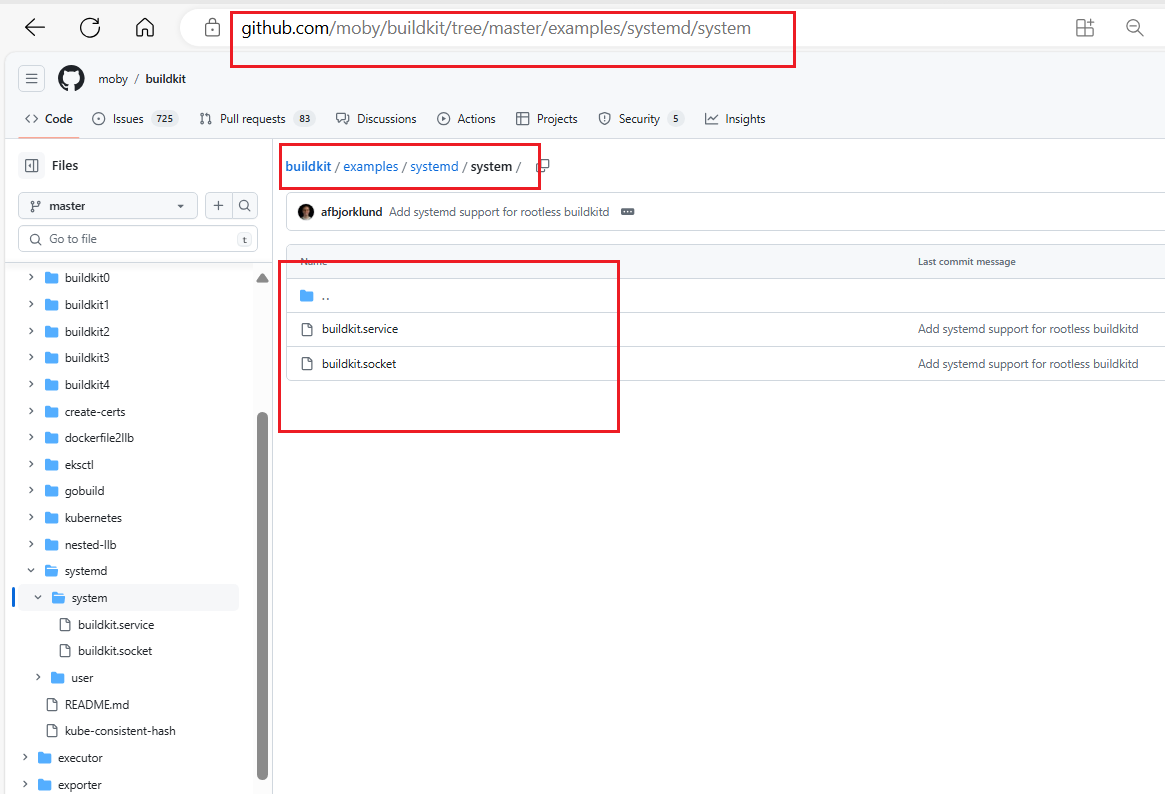
启动
buildiktd服务root@k8s-master01:/usr/local/src/bin# systemctl daemon-reload root@k8s-master01:/usr/local/src/bin# systemctl enable buildkitd Created symlink /etc/systemd/system/multi-user.target.wants/buildkitd.service → /lib/systemd/system/buildkitd.service. root@k8s-master01:/usr/local/src/bin# systemctl restart buildkitd root@k8s-master01:/usr/local/src/bin# systemctl status buildkitd ● buildkitd.service - BuildKit Loaded: loaded (/lib/systemd/system/buildkitd.service; enabled; vendor preset: enabled) Active: active (running) since Wed 2023-05-31 13:32:38 UTC; 4s ago Main PID: 12191 (buildkitd) Tasks: 9 (limit: 4571) Memory: 7.8M CPU: 125ms CGroup: /system.slice/buildkitd.service └─12191 /usr/local/bin/buildkitd --oci-worker=false --containerd-worker=true May 31 13:32:38 k8s-master01.ik8s.cc systemd[1]: Started BuildKit. May 31 13:32:38 k8s-master01.ik8s.cc buildkitd[12191]: time="2023-05-31T13:32:38Z" level=warning msg="using host network as the default" May 31 13:32:38 k8s-master01.ik8s.cc buildkitd[12191]: time="2023-05-31T13:32:38Z" level=warning msg="git source cannot be enabled: failed to find git binary: exec: \"git\": executable file not found in $PATH" May 31 13:32:38 k8s-master01.ik8s.cc buildkitd[12191]: time="2023-05-31T13:32:38Z" level=info msg="found worker \"kffvitvra0b27yi956wa4xcal\", labels=m ap[org.mobyproject.buildkit.worker.containerd.namespace:buildkit org.mobyproject.buildkit.worker.containerd.uuid:f27e8d21-8b1d-44ac-9233-f55b9b028fc0 o rg.mobyproject.buildkit.worker.executor:containerd org.mobyproject.buildkit.worker.hostname:k8s-master01.ik8s.cc org.mobyproject.buildkit.worker.networ k:host org.mobyproject.buildkit.worker.selinux.enabled:false org.mobyproject.buildkit.worker.snapshotter:overlayfs], platforms=[linux/amd64 linux/amd64 /v2 linux/386]" May 31 13:32:38 k8s-master01.ik8s.cc buildkitd[12191]: time="2023-05-31T13:32:38Z" level=info msg="found 1 workers, default=\"kffvitvra0b27yi956wa4xcal \"" May 31 13:32:38 k8s-master01.ik8s.cc buildkitd[12191]: time="2023-05-31T13:32:38Z" level=warning msg="currently, only the default worker can be used." May 31 13:32:38 k8s-master01.ik8s.cc buildkitd[12191]: time="2023-05-31T13:32:38Z" level=info msg="running server on /run/buildkit/buildkitd.sock" root@k8s-master01:/usr/local/src/bin# buildkitd配置文件root@k8s-master01:/usr/local/src/bin# cat /etc/buildkit/buildkitd.toml [registry."harbor.magedu.net"] http = true insecure = true root@k8s-master01: nerdctl配置⽂件root@k8s-master01:/usr/local/src/bin# cat /etc/nerdctl/nerdctl.toml namespace = "k8s.io" debug = false debug_full = false insecure_registry = true root@k8s-master01:/usr/local/src/bin#
4. 基于nginx代理⾃签名证书harbor并实现https
4.1 将harbor修改为http协议
停止
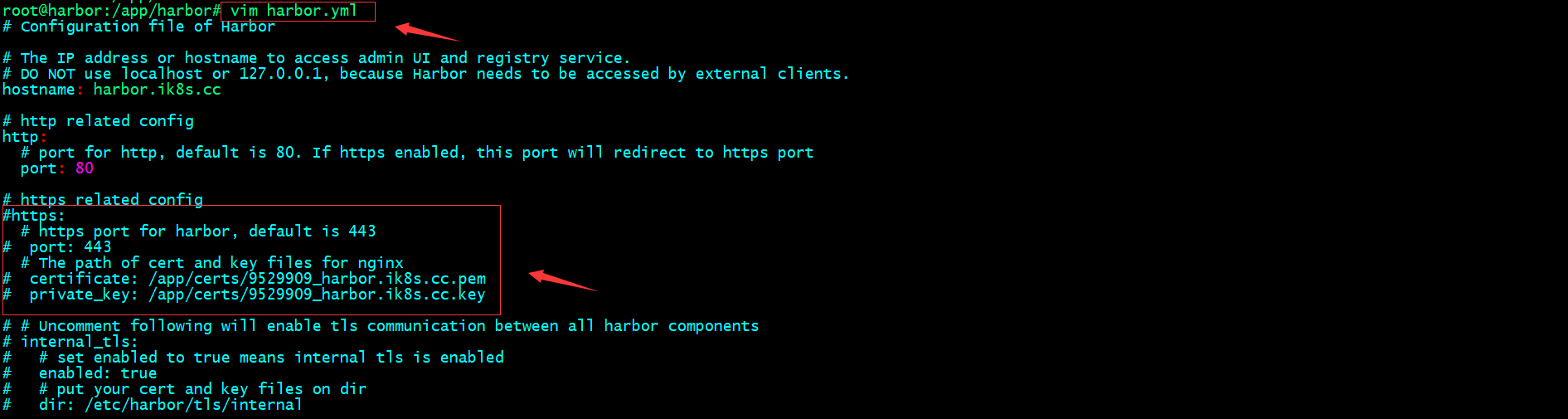
harbor服务root@harbor:/app/harbor# docker-compose down [+] Running 13/13 ✔ Container notary-server Removed 0.8s ✔ Container nginx Removed 1.7s ✔ Container harbor-jobservice Removed 0.7s ✔ Container trivy-adapter Removed 0.6s ✔ Container notary-signer Removed 0.5s ✔ Container harbor-portal Removed 0.3s ✔ Container harbor-core Removed 3.5s ✔ Container harbor-db Removed 0.7s ✔ Container registry Removed 0.5s ✔ Container redis Removed 0.5s ✔ Network harbor_notary-sig Removed 0.8s ✔ Network harbor_harbor Removed 0.2s ✔ Network harbor_harbor-notary Removed 0.5s root@harbor:/app/harbor# 修改harbor配置文件 , 注释https和证书的配置
重新
prepareroot@harbor:/app/harbor# ls LICENSE common common.sh docker-compose.yml harbor.v2.8.0.tar.gz harbor.yml harbor.yml.tmpl install.sh prepare root@harbor:/app/harbor# ./prepare prepare base dir is set to /app/harbor WARNING:root:WARNING: HTTP protocol is insecure. Harbor will deprecate http protocol in the future. Please make sure to upgrade to https Clearing the configuration file: /config/db/env Clearing the configuration file: /config/registry/passwd Clearing the configuration file: /config/registry/config.yml Clearing the configuration file: /config/registry/root.crt Clearing the configuration file: /config/notary/notary-signer-ca.crt Clearing the configuration file: /config/notary/notary-signer.key Clearing the configuration file: /config/notary/server-config.postgres.json Clearing the configuration file: /config/notary/server_env Clearing the configuration file: /config/notary/notary-signer.crt Clearing the configuration file: /config/notary/signer_env Clearing the configuration file: /config/notary/signer-config.postgres.json Clearing the configuration file: /config/notary/root.crt Clearing the configuration file: /config/trivy-adapter/env Clearing the configuration file: /config/core/env Clearing the configuration file: /config/core/app.conf Clearing the configuration file: /config/jobservice/env Clearing the configuration file: /config/jobservice/config.yml Clearing the configuration file: /config/registryctl/env Clearing the configuration file: /config/registryctl/config.yml Clearing the configuration file: /config/nginx/conf.d/notary.upstream.conf Clearing the configuration file: /config/nginx/conf.d/notary.server.conf Clearing the configuration file: /config/nginx/nginx.conf Clearing the configuration file: /config/log/rsyslog_docker.conf Clearing the configuration file: /config/log/logrotate.conf Clearing the configuration file: /config/portal/nginx.conf Generated configuration file: /config/portal/nginx.conf Generated configuration file: /config/log/logrotate.conf Generated configuration file: /config/log/rsyslog_docker.conf Generated configuration file: /config/nginx/nginx.conf Generated configuration file: /config/core/env Generated configuration file: /config/core/app.conf Generated configuration file: /config/registry/config.yml Generated configuration file: /config/registryctl/env Generated configuration file: /config/registryctl/config.yml Generated configuration file: /config/db/env Generated configuration file: /config/jobservice/env Generated configuration file: /config/jobservice/config.yml loaded secret from file: /data/secret/keys/secretkey Generated configuration file: /compose_location/docker-compose.yml Clean up the input dir root@harbor:/app/harbor# 启动
harborroot@harbor:/app/harbor# docker-compose up -d [+] Running 10/10 ✔ Network harbor_harbor Created 0.2s ✔ Container harbor-log Started 1.2s ✔ Container registry Started 2.5s ✔ Container harbor-portal Started 2.7s ✔ Container registryctl Started 2.7s ✔ Container harbor-db Started 2.7s ✔ Container redis Started 2.6s ✔ Container harbor-core Started 3.2s ✔ Container harbor-jobservice Started 4.2s ✔ Container nginx Started 4.3s root@harbor:/app/harbor# 注 : 如果你给
harbor添加的有service文件 , 也可以使用systemctl stop/start harbor来停止/启动harbor验证harbor是否可以正常登录
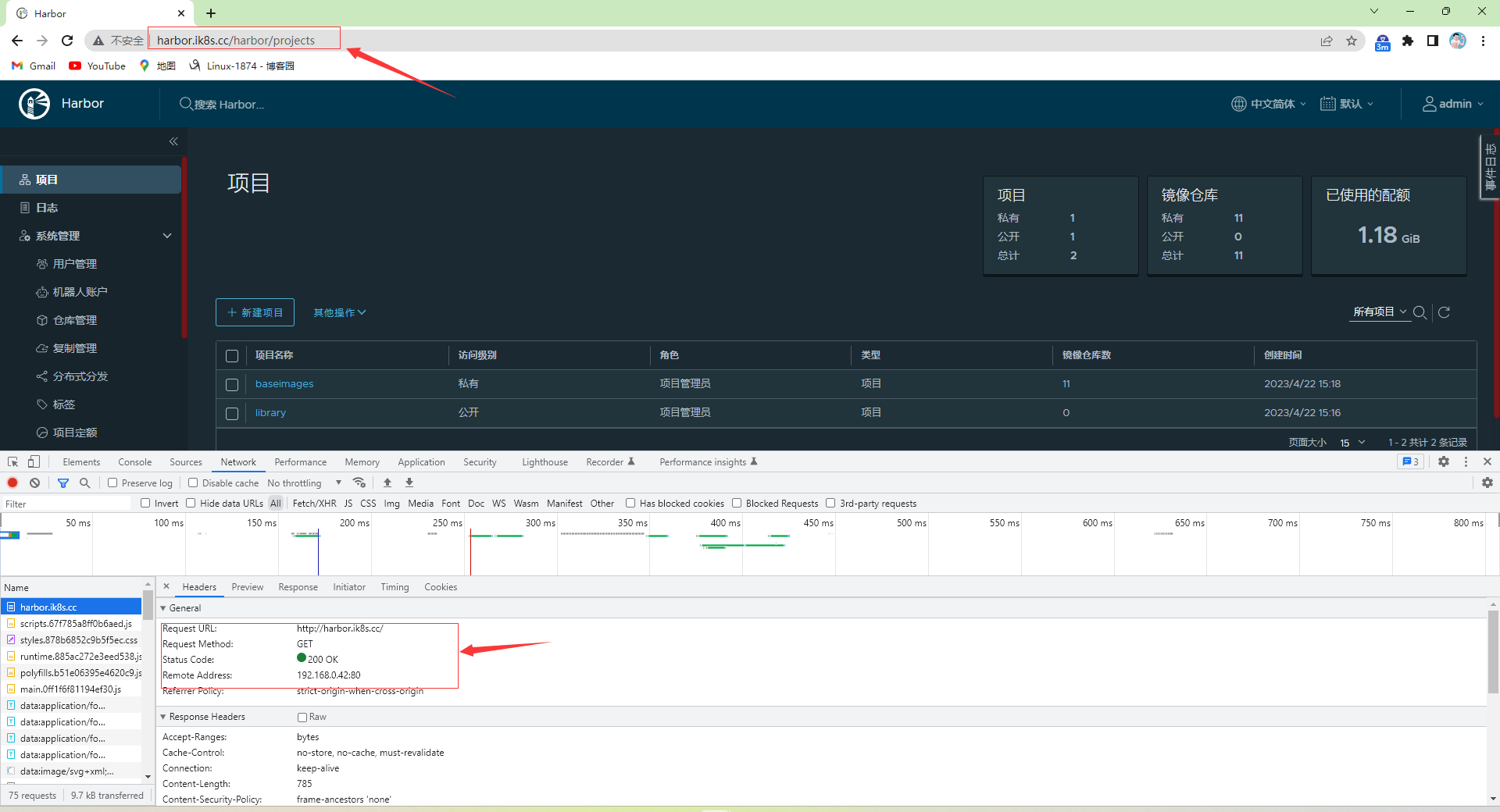
4.2 nginx实现harbor的反向代理
nginx安装及配置root@k8s-deploy:~# cd /usr/local/src/ root@k8s-deploy:/usr/local/src# wget https://nginx.org/download/nginx-1.22.0.tar.gz --2023-05-31 13:59:55-- https://nginx.org/download/nginx-1.22.0.tar.gz Resolving nginx.org (nginx.org)... 52.58.199.22, 3.125.197.172, 2a05:d014:edb:5704::6, ... Connecting to nginx.org (nginx.org)|52.58.199.22|:443... connected. HTTP request sent, awaiting response... 200 OK Length: 1073322 (1.0M) [application/octet-stream] Saving to: ‘nginx-1.22.0.tar.gz’ nginx-1.22.0.tar.gz 100%[=======================================================================================>] 1.02M 37.8KB/s in 27s 2023-05-31 14:00:23 (38.9 KB/s) - ‘nginx-1.22.0.tar.gz’ saved [1073322/1073322] root@k8s-deploy:/usr/local/src# tar xf nginx-1.22.0.tar.gz root@k8s-deploy:/usr/local/src# cd nginx-1.22.0 root@k8s-deploy:/usr/local/src/nginx-1.22.0# ./configure --prefix=/apps/nginx \ > --with-http_ssl_module \ > --with-http_v2_module \ > --with-http_realip_module \ > --with-http_stub_status_module \ > --with-http_gzip_static_module \ > --with-pcre \ > --with-stream \ > --with-stream_ssl_module \ > --with-stream_realip_module 
注 : 上述报错没有找到
http模块依赖的PCRE库解决办法:安装libpcre3 libpcre3-dev
root@k8s-deploy:/usr/local/src/nginx-1.22.0# apt install libpcre3 libpcre3-dev -y安装上述依赖后 , 重新
configure
上述报错没有找到
ssl模块依赖的openssl库解决办法:安装
openssl libssl-devroot@k8s-deploy:/usr/local/src/nginx-1.22.0# apt install openssl libssl-dev -y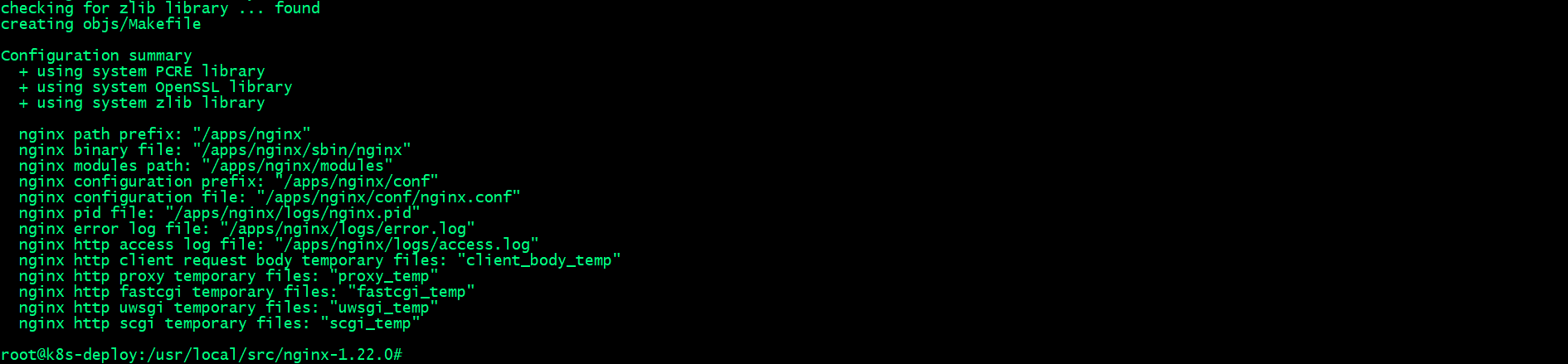
执行上述
./configure没有报错 , 并且能够看到上述截图 , 表示编译环境通过检查 , 可以进行下一步编译和安装编译安装nginx
root@k8s-deploy:/usr/local/src/nginx-1.22.0# make && make install创建证书⽬录 , 并生成私钥 , 证书
创建证书⽬录,并生成
ca私钥root@k8s-deploy:/apps/nginx/sbin# mkdir /apps/nginx/certs root@k8s-deploy:/apps/nginx/sbin# cd /apps/nginx/certs root@k8s-deploy:/apps/nginx/certs# openssl genrsa -out ca.key 4096用
ca私钥生成ca自签名证书root@k8s-deploy:/apps/nginx/certs# openssl req -x509 -new -nodes -sha512 -days 3650 \ > -subj "/C=CN/ST=Beijing/L=Beijing/O=Personal-CA/OU=Personal/CN=CA.com" \ > -key ca.key \ > -out ca.crt root@k8s-deploy:/apps/nginx/certs# ls ca.crt ca.key root@k8s-deploy:/apps/nginx/certs# 生成
harbor服务器私钥root@k8s-deploy:/apps/nginx/certs# openssl genrsa -out magedu.net.key 4096 root@k8s-deploy:/apps/nginx/certs# ls ca.crt ca.key magedu.net.key root@k8s-deploy:/apps/nginx/certs#用
harbor服务器私钥生成生成证书签名请求csr文件root@k8s-deploy:/apps/nginx/certs# openssl req -sha512 -new \ > -subj "/C=CN/ST=Beijing/L=Beijing/O=test/OU=Personal/CN=magedu.net" \ > -key magedu.net.key \ > -out magedu.net.csr root@k8s-deploy:/apps/nginx/certs# ls ca.crt ca.key magedu.net.csr magedu.net.key root@k8s-deploy:/apps/nginx/certs# 使用
ca证书和私钥为harbor服务器签发证书root@k8s-deploy:/apps/nginx/certs# openssl x509 -req -sha512 -days 3650 \ > -CA ca.crt -CAkey ca.key -CAcreateserial \ > -in magedu.net.csr \ > -out magedu.net.crt Certificate request self-signature ok subject=C = CN, ST = Beijing, L = Beijing, O = test, OU = Personal, CN = magedu.net root@k8s-deploy:/apps/nginx/certs# ls ca.crt ca.key magedu.net.crt magedu.net.csr magedu.net.key root@k8s-deploy:/apps/nginx/certs#
编辑
nginx配置文件 , 配置证书和反向代理harborroot@k8s-deploy:/apps/nginx/certs# cat /apps/nginx/conf/nginx.conf worker_processes 1; events { worker_connections 1024; } http { client_max_body_size 1000m; server { listen 80; listen 443 ssl; ssl_certificate /apps/nginx/certs/magedu.net.crt; ssl_certificate_key /apps/nginx/certs/magedu.net.key; ssl_session_cache shared:sslcache:20m; ssl_session_timeout 10m; location / { if ($scheme = http ){ rewrite / https://harbor.magedu.net permanent; } proxy_pass http://192.168.0.42; } } } root@k8s-deploy:/apps/nginx/certs# 检查
nginx配置文件语法root@k8s-deploy:/apps/nginx/certs# cd .. root@k8s-deploy:/apps/nginx# /apps/nginx/sbin/nginx -t nginx: the configuration file /apps/nginx/conf/nginx.conf syntax is ok nginx: configuration file /apps/nginx/conf/nginx.conf test is successful root@k8s-deploy:/apps/nginx#启动
nginxroot@k8s-deploy:/apps/nginx# /apps/nginx/sbin/nginx root@k8s-deploy:/apps/nginx# ss -tnl State Recv-Q Send-Q Local Address:Port Peer Address:Port Process LISTEN 0 511 0.0.0.0:80 0.0.0.0:* LISTEN 0 4096 127.0.0.53%lo:53 0.0.0.0:* LISTEN 0 128 0.0.0.0:22 0.0.0.0:* LISTEN 0 511 0.0.0.0:443 0.0.0.0:* root@k8s-deploy:/apps/nginx# 浏览器访问测试
nginx看看是否反向代理给harbor, 是否为https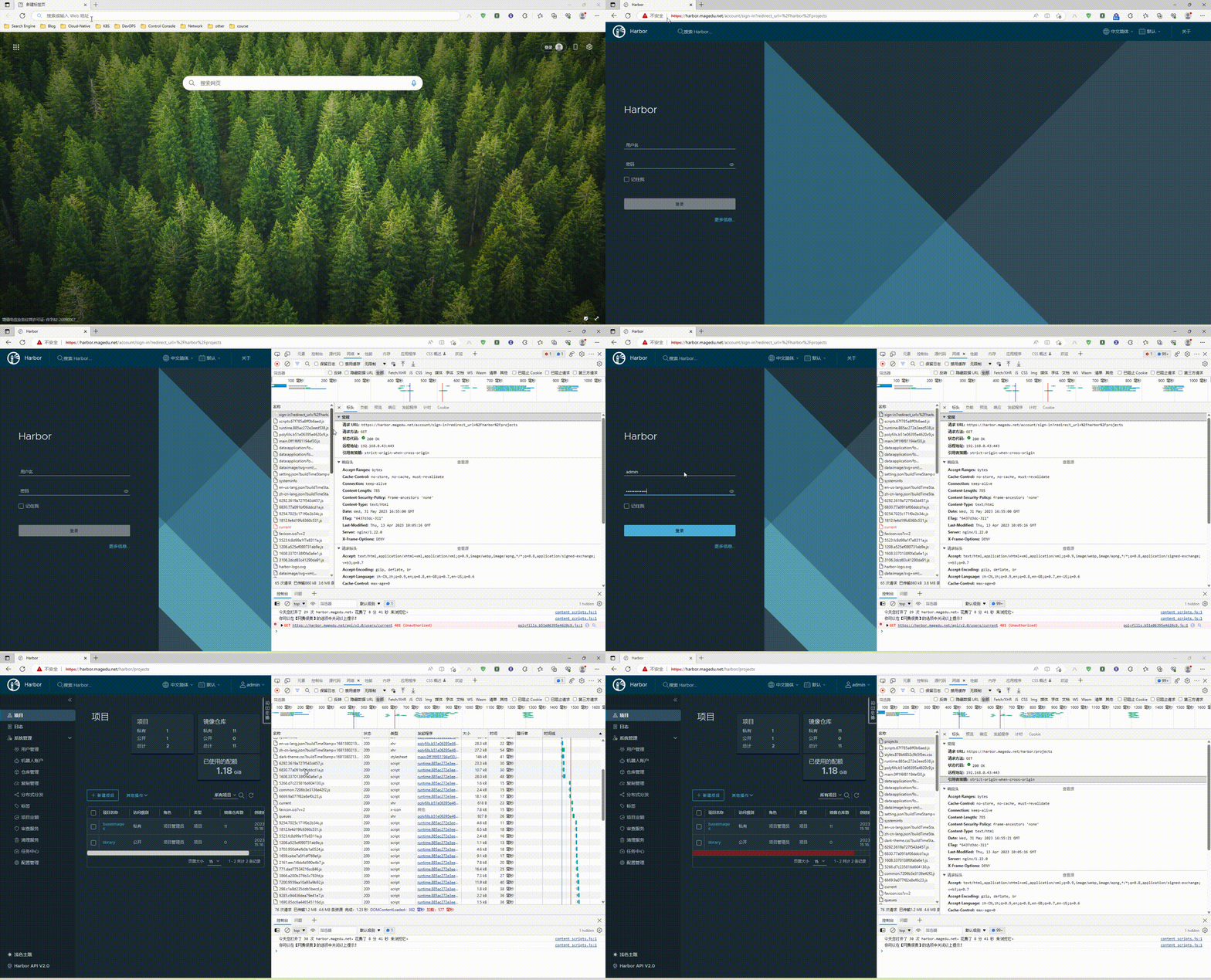
查看证书信息
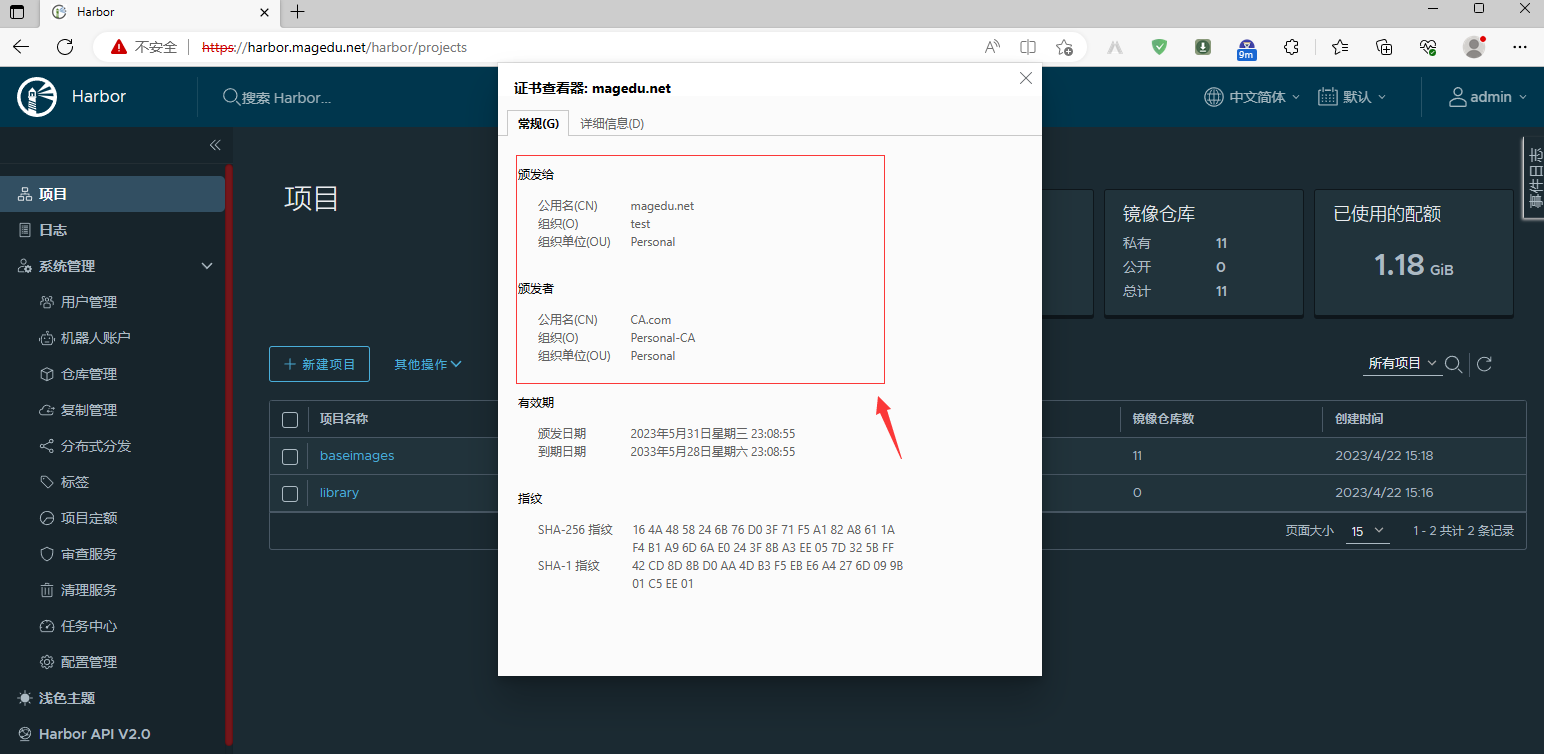
5. 测试镜像构建
5.1 nerdctl常⽤命令
给
nerdctl添加命令补全root@k8s-master01:~# echo "source <(nerdctl completion bash)" >> /etc/profile root@k8s-master01:~# cat /etc/profile # /etc/profile: system-wide .profile file for the Bourne shell (sh(1)) # and Bourne compatible shells (bash(1), ksh(1), ash(1), ...). if [ "${PS1-}" ]; then if [ "${BASH-}" ] && [ "$BASH" != "/bin/sh" ]; then # The file bash.bashrc already sets the default PS1. # PS1='\h:\w\$ ' if [ -f /etc/bash.bashrc ]; then . /etc/bash.bashrc fi else if [ "$(id -u)" -eq 0 ]; then PS1='# ' else PS1='$ ' fi fi fi if [ -d /etc/profile.d ]; then for i in /etc/profile.d/*.sh; do if [ -r $i ]; then . $i fi done unset i fi source <(nerdctl completion bash) root@k8s-master01:~# source /etc/profile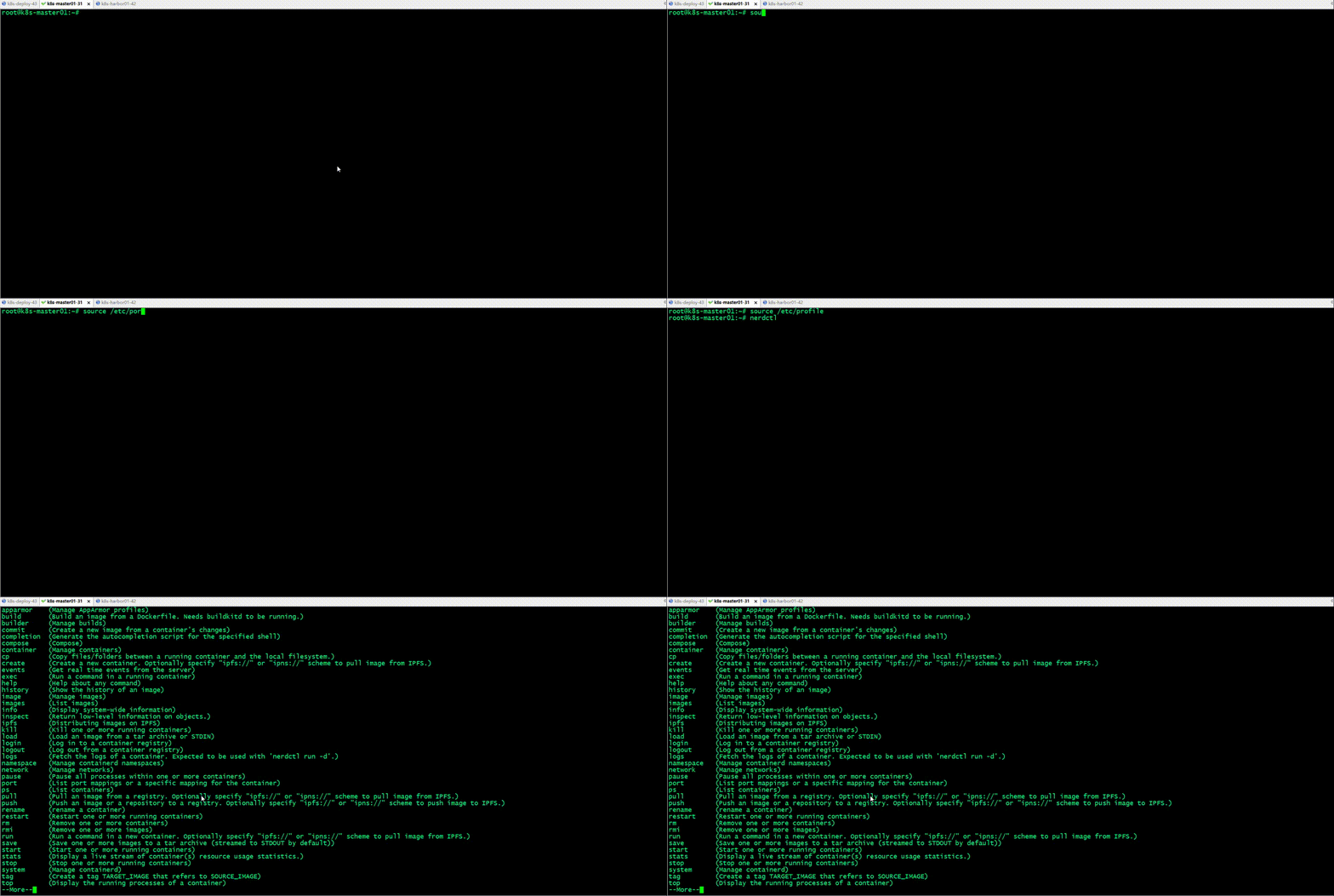
登录
harbor仓库root@k8s-master01:~# nerdctl login harbor.magedu.net Enter Username: admin Enter Password: WARN[0005] skipping verifying HTTPS certs for "harbor.magedu.net" WARNING: Your password will be stored unencrypted in /root/.docker/config.json. Configure a credential helper to remove this warning. See https://docs.docker.com/engine/reference/commandline/login/#credentials-store Login Succeeded root@k8s-master01:~# nerdctl login --insecure-registry https://harbor.magedu.net WARN[0000] skipping verifying HTTPS certs for "harbor.magedu.net" WARNING: Your password will be stored unencrypted in /root/.docker/config.json. Configure a credential helper to remove this warning. See https://docs.docker.com/engine/reference/commandline/login/#credentials-store Login Succeeded root@k8s-master01:~# 自签名证书一般通过
--insecure-registry选项来指定该仓库是一个不安全的仓库
5.2 自签名harbor证书分发
创建证书⽬录
root@k8s-master01:~# mkdir -pv /etc/containerd/certs.d/harbor.magedu.net
mkdir: created directory '/etc/containerd/certs.d'
mkdir: created directory '/etc/containerd/certs.d/harbor.magedu.net'
root@k8s-master01:~#
证书格式转换
root@k8s-deploy:~# cd /apps/nginx/certs/
root@k8s-deploy:/apps/nginx/certs# openssl x509 -inform PEM -in magedu.net.crt -out magedu.net.cert
root@k8s-deploy:/apps/nginx/certs#
开始分发证书至镜像构建服务器
root@k8s-deploy:/apps/nginx/certs# scp ca.crt magedu.net.cert magedu.net.key 192.168.0.31:/etc/containerd/certs.d/harbor.magedu.net/ ca.crt 100% 2041 1.5MB/s 00:00 magedu.net.cert 100% 1915 1.6MB/s 00:00 magedu.net.key 100% 3272 2.9MB/s 00:00 root@k8s-deploy:/apps/nginx/certs# 镜像构建服务器上验证证书
root@k8s-master01:~# cd /etc/containerd/certs.d/harbor.magedu.net root@k8s-master01:/etc/containerd/certs.d/harbor.magedu.net# ll total 20 drwxr-xr-x 2 root root 4096 May 31 17:49 ./ drwxr-xr-x 3 root root 4096 May 31 17:44 ../ -rw-r--r-- 1 root root 2041 May 31 17:49 ca.crt -rw-r--r-- 1 root root 1915 May 31 17:49 magedu.net.cert -rw------- 1 root root 3272 May 31 17:49 magedu.net.key root@k8s-master01:/etc/containerd/certs.d/harbor.magedu.net# 删除原有登录信息 , 重新登录
harborroot@k8s-master01:~# rm -rf .docker/config.json root@k8s-master01:~# nerdctl login harbor.magedu.net Enter Username: admin Enter Password: WARN[0005] skipping verifying HTTPS certs for "harbor.magedu.net" WARNING: Your password will be stored unencrypted in /root/.docker/config.json. Configure a credential helper to remove this warning. See https://docs.docker.com/engine/reference/commandline/login/#credentials-store Login Succeeded root@k8s-master01:~#
5.3 镜像构建
编写对应镜像构建文件。这里需要注意,
docker构建镜像时只要构建文件名dockerfile时直接设置为dockerfile即可。不要求大小写。nerdctl构建过程中,需要指定为固定的Dockerfile名称。这个名称时固定的。必须为这个名称:Dockerfileroot@k8s-master01:~/ubuntu# ll total 1120 drwxr-xr-x 3 root root 4096 May 31 18:40 ./ drwx------ 11 root root 4096 May 31 18:40 ../ -rw-r--r-- 1 root root 846 May 31 18:39 Dockerfile -rw-r--r-- 1 root root 266 May 31 18:40 build-command.sh -rw-r--r-- 1 root root 38751 Aug 5 2022 frontend.tar.gz drwxr-xr-x 3 root root 4096 May 31 18:37 html/ -rw-r--r-- 1 root root 1073322 May 24 2022 nginx-1.22.0.tar.gz -rw-r--r-- 1 root root 2812 Oct 3 2020 nginx.conf -rw-r--r-- 1 root root 1139 Aug 5 2022 sources.list # root@k8s-master01:~/ubuntu# cat Dockerfile FROM ubuntu:22.04 ADD sources.list /etc/apt/sources.list RUN apt update && apt install -y iproute2 ntpdate tcpdump telnet traceroute nfs-kernel-server nfs-common lrzsz tree openssl libssl-dev libpcre3 libpcre3-dev zlib1g-dev ntpdate tcpdump telnet traceroute gcc openssh-server lrzsz tree openssl libssl-dev libpcre3 libpcre3-dev zlib1g-dev ntpdate tcpdump telnet traceroute iotop unzip zip make ADD nginx-1.22.0.tar.gz /usr/local/src/ RUN cd /usr/local/src/nginx-1.22.0 && ./configure --prefix=/apps/nginx && make && make install && ln -sv /apps/nginx/sbin/nginx /usr/bin RUN groupadd -g 2088 nginx && useradd -g nginx -s /usr/sbin/nologin -u 2088 nginx && chown -R nginx.nginx /apps/nginx ADD nginx.conf /apps/nginx/conf/ ADD frontend.tar.gz /apps/nginx/html/ EXPOSE 80 443 #ENTRYPOINT ["nginx"] CMD ["nginx","-g","daemon off;"] root@k8s-master01:~/ubuntu# cat build-command.sh #!/bin/bash #docker build -t harbor.magedu.net/myserver/nginx:v1 . #docker push harbor.magedu.net/myserver/nginx:v1 /usr/local/bin/nerdctl build -t harbor.magedu.net/magedu/nginx-base:1.22.0 . /usr/local/bin/nerdctl push harbor.magedu.net/magedu/nginx-base:1.22.0 root@k8s-master01:~/ubuntu#通过脚本自动构建并把镜像上传到镜像仓库
root@k8s-master01:~/ubuntu# bash build-command.sh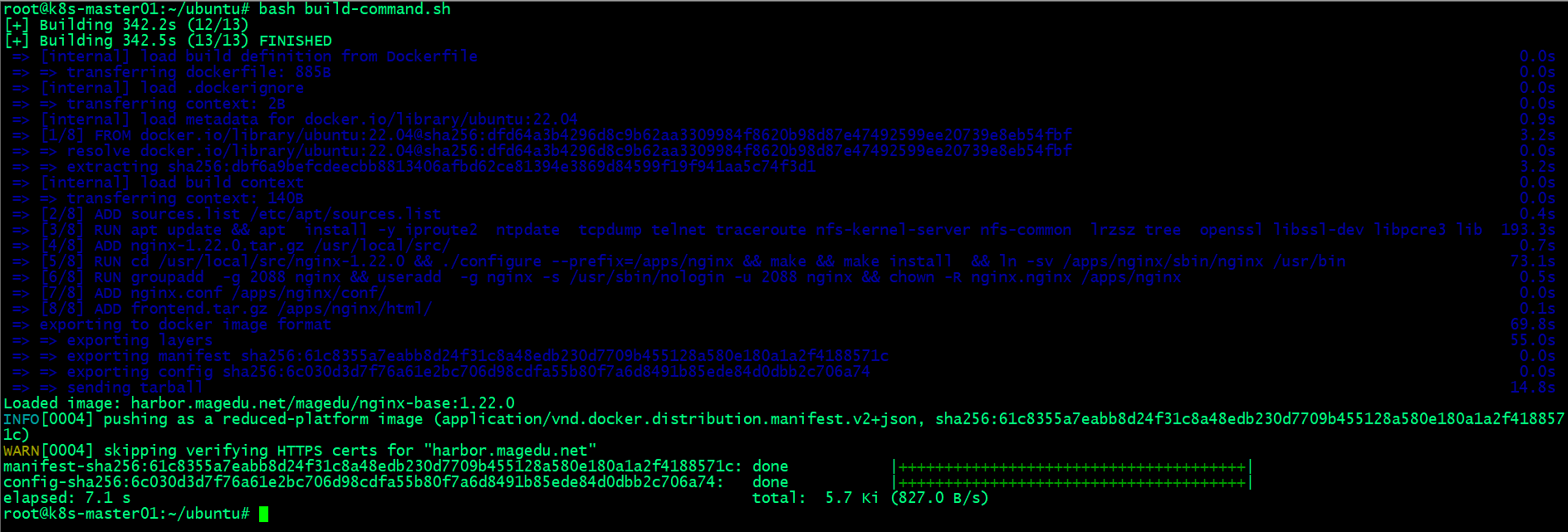
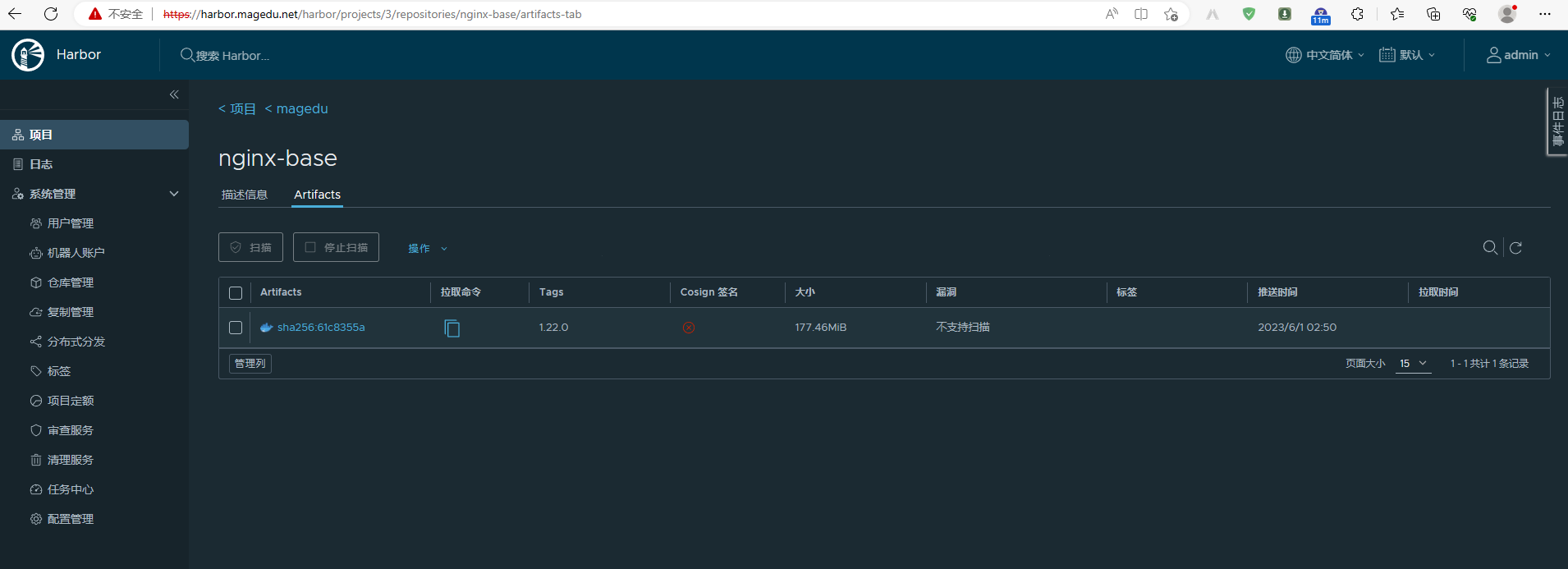
验证镜像是否上传到
harbor仓库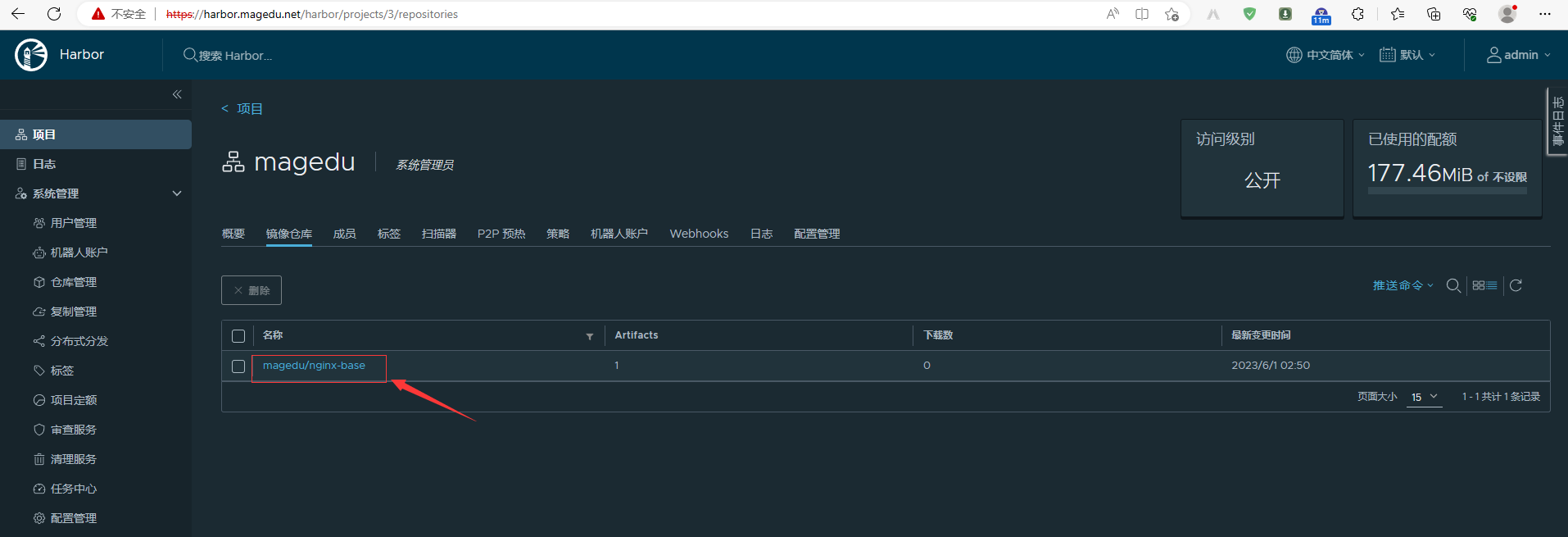
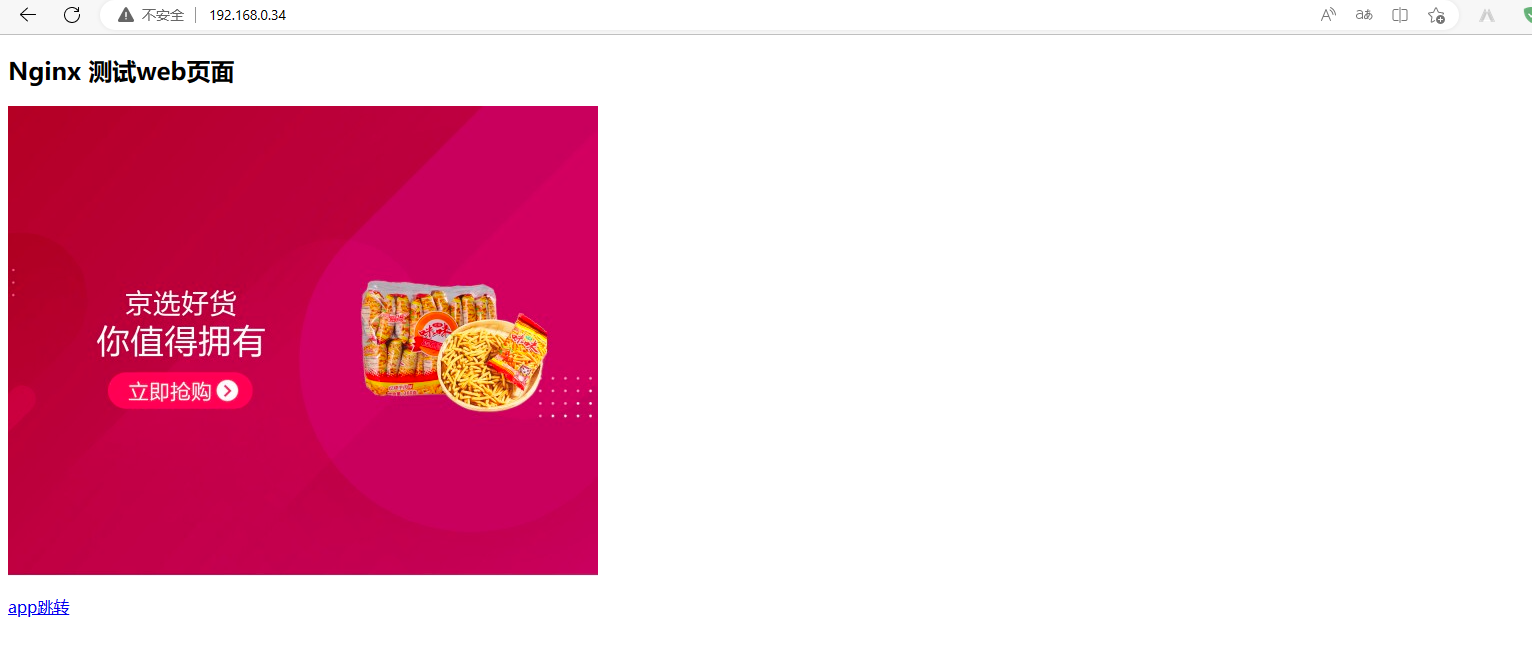
6. 基于⾃定义镜像创建测试容器
nerdctl命令root@k8s-node01:~# nerdctl run -d -p 80:80 harbor.magedu.net/magedu/nginx-base:1.22.0 WARN[0000] skipping verifying HTTPS certs for "harbor.magedu.net" harbor.magedu.net/magedu/nginx-base:1.22.0: resolved |++++++++++++++++++++++++++++++++++++++| manifest-sha256:61c8355a7eabb8d24f31c8a48edb230d7709b455128a580e180a1a2f4188571c: done |++++++++++++++++++++++++++++++++++++++| config-sha256:6c030d3d7f76a61e2bc706d98cdfa55b80f7a6d8491b85ede84d0dbb2c706a74: done |++++++++++++++++++++++++++++++++++++++| layer-sha256:4da3a93ac27213414b4de065a2603d7acbec5bd63d6198a62ad732fa7ac6afa0: done |++++++++++++++++++++++++++++++++++++++| layer-sha256:26039d49560ee304c7a41e00617e216bedb7e9c6b74263db5afe68a23425f286: done |++++++++++++++++++++++++++++++++++++++| layer-sha256:61967fbfff474bb397fbc7752b2097a1211fd9e22c85ce679d2b80c29477ca8d: done |++++++++++++++++++++++++++++++++++++++| layer-sha256:4179b69841babb645626f43f9f4eb8bf4fc9be92ef9819ea8d9335408178a497: done |++++++++++++++++++++++++++++++++++++++| layer-sha256:9e0da806173e5c7f5188ed9222e6caf214b43f6e0ed1f961ed8261cb4fbf9429: done |++++++++++++++++++++++++++++++++++++++| layer-sha256:1739bcae88003d009cb72941ca5085074a0d1257c971a3838e0d6402f010b38e: done |++++++++++++++++++++++++++++++++++++++| layer-sha256:f8a2ffd8882321b57192cce8fcaebab3657bb30e073e4f21eee91b3f44488809: done |++++++++++++++++++++++++++++++++++++++| elapsed: 18.6s total: 149.3 (8.0 MiB/s) af08bef4d635f3f888c87120cc830b37e3f53121012ad59500a30c20ac065319 root@k8s-node01:~# 访问容器
参考链接
基于nerdctl+buildkitd+containerd实现镜像构建 - Linux-1874 - 博客园 (cnblogs.com)