
2-6-Ubuntu2204部署容器引擎Containerd
为什么使用containerd?
使用containerd的原因主要有两点吧 , 第一个是docker在k8s1.24以后不再支持 , 如果需要在k8s中继续使用docker作为容器引擎 , 我们需要额外部署cri-dockerd ; 其次即便我们部署cri-dockerd , docker最后也是调用containerd ; 所以为了减少调用提高性能 , 我们直接使用containerd是最优选择 ;
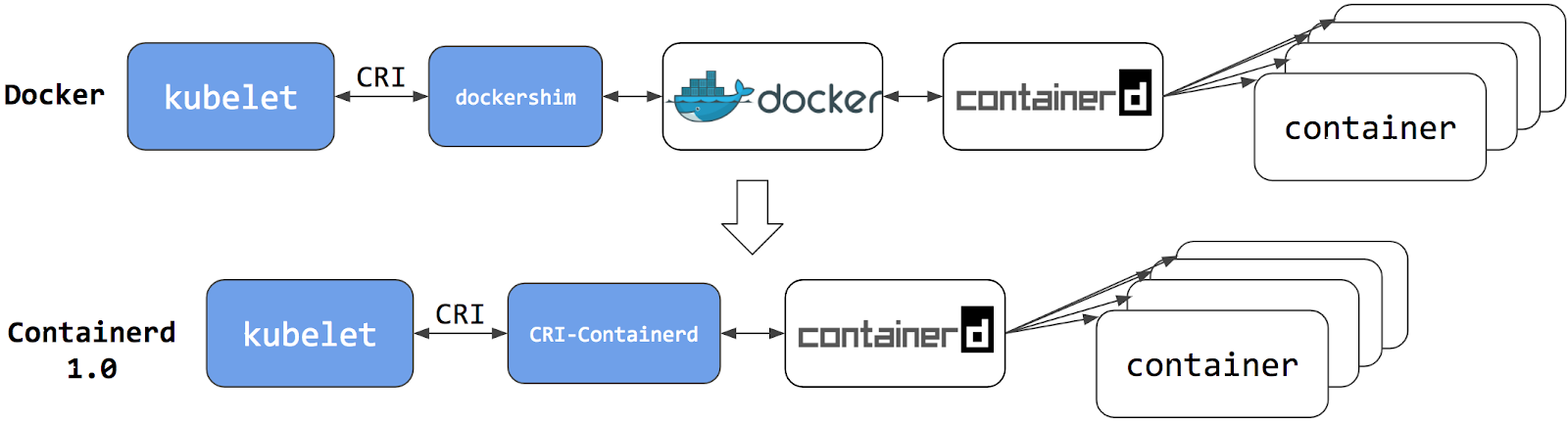
提示 : containerd1.0作为k8s容器引擎时它需要额外的一个cri-containerd的插件来实现kubelet和containerd交互 , 工作逻辑和dockers类似 , 但比docker要少调用一层 ; 使用docker作为容器引擎 , kubelet和containerd交互需要先和dockershim交互 , 然后对应dockershim再将对应消息传递给docker , 然后由docker和containerd交互 ; 很显然使用docker作为容器引擎 , 调用复杂且性能不高 ;
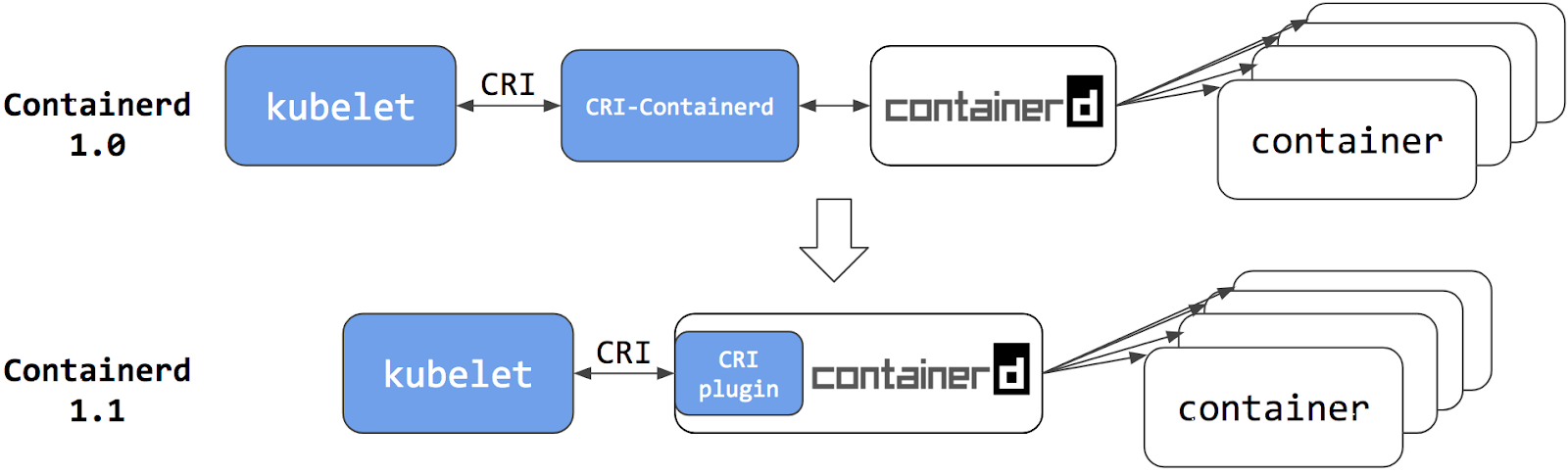
提示 : containerd1.1以后 , 对应cri-containerd插件直接内置在containerd中 , 并默认处于启用状态 ; 与cri-containerd不同 , cri插件通过直接函数调用与containerd交互。这种方式使得kubelet和containerd交互更加稳定和高效 , 中间不再需要专门的cri-containerd插件来传递消息 ;
安装containerd的方式通常有两种 , 一种是apt/yum安装 , 一种是二进制安装
1. 安装
1.1 apt 安装containerd
验证仓库版本
root@k8s-node02:~# apt-cache madison containerd
containerd | 1.6.12-0ubuntu1~22.04.1 | http://mirrors.aliyun.com/ubuntu jammy-updates/main amd64 Packages
containerd | 1.5.9-0ubuntu3.1 | http://mirrors.aliyun.com/ubuntu jammy-security/main amd64 Packages
containerd | 1.5.9-0ubuntu3 | http://mirrors.aliyun.com/ubuntu jammy/main amd64 Packages
containerd | 1.5.9-0ubuntu3 | http://mirrors.aliyun.com/ubuntu jammy/main Sources
containerd | 1.5.9-0ubuntu3.1 | http://mirrors.aliyun.com/ubuntu jammy-security/main Sources
containerd | 1.6.12-0ubuntu1~22.04.1 | http://mirrors.aliyun.com/ubuntu jammy-updates/main Sources
root@k8s-node02:~#
安装
containerdroot@k8s-node02:~# apt install containerd=1.6.12-0ubuntu1~22.04.1 Reading package lists... Done Building dependency tree... Done Reading state information... Done The following additional packages will be installed: runc The following NEW packages will be installed: containerd runc 0 upgraded, 2 newly installed, 0 to remove and 51 not upgraded. Need to get 38.6 MB of archives. After this operation, 145 MB of additional disk space will be used. Do you want to continue? [Y/n] y查看
service⽂件root@k8s-node02:~# cat /usr/lib/systemd/system/containerd.service # Copyright The containerd Authors. # # Licensed under the Apache License, Version 2.0 (the "License"); # you may not use this file except in compliance with the License. # You may obtain a copy of the License at # # http://www.apache.org/licenses/LICENSE-2.0 # # Unless required by applicable law or agreed to in writing, software # distributed under the License is distributed on an "AS IS" BASIS, # WITHOUT WARRANTIES OR CONDITIONS OF ANY KIND, either express or implied. # See the License for the specific language governing permissions and # limitations under the License. [Unit] Description=containerd container runtime Documentation=https://containerd.io After=network.target local-fs.target [Service] ExecStartPre=-/sbin/modprobe overlay ExecStart=/usr/bin/containerd Type=notify Delegate=yes KillMode=process Restart=always RestartSec=5 # Having non-zero Limit*s causes performance problems due to accounting overhead # in the kernel. We recommend using cgroups to do container-local accounting. LimitNPROC=infinity LimitCORE=infinity LimitNOFILE=infinity # Comment TasksMax if your systemd version does not supports it. # Only systemd 226 and above support this version. TasksMax=infinity OOMScoreAdjust=-999 [Install] WantedBy=multi-user.target root@k8s-node02:~#验证
runc和containerd环境root@k8s-node02:~# runc -v runc version 1.1.4-0ubuntu1~22.04.1 spec: 1.0.2-dev go: go1.18.1 libseccomp: 2.5.3 root@k8s-node02:~# containerd -v containerd github.com/containerd/containerd 1.6.12-0ubuntu1~22.04.1 root@k8s-node02:~#生成
containerd配置⽂件root@k8s-node02:~# containerd --help |grep config by using this command. If none of the *config*, *publish*, or *help* commands A default configuration is used if no TOML configuration is specified or located at the default file location. The *containerd config* command can be used to generate the default configuration for containerd. The output of that command can be used and modified as necessary as a custom configuration. config information on the containerd config --config value, -c value path to the configuration file (default: "/etc/containerd/config.toml") root@k8s-node02:~# mkdir -p /etc/containerd/ root@k8s-node02:~# containerd config default > /etc/containerd/config.toml root@k8s-node02:~# ll /etc/containerd/config.toml -rw-r--r-- 1 root root 6994 Apr 9 13:36 /etc/containerd/config.toml root@k8s-node02:~#启动
containerdroot@k8s-node02:~# systemctl start containerd root@k8s-node02:~# systemctl status containerd ● containerd.service - containerd container runtime Loaded: loaded (/lib/systemd/system/containerd.service; enabled; vendor preset: enabled) Active: active (running) since Sun 2023-04-09 13:32:10 UTC; 5min ago Docs: https://containerd.io Process: 1073 ExecStartPre=/sbin/modprobe overlay (code=exited, status=0/SUCCESS) Main PID: 1075 (containerd) Tasks: 10 Memory: 13.7M CPU: 2.766s CGroup: /system.slice/containerd.service └─1075 /usr/bin/containerd Apr 09 13:32:10 k8s-node02.ik8s.cc containerd[1075]: time="2023-04-09T13:32:10.638730092Z" level=info msg=serving... address=/run/containerd/containerd.sock.ttrpc Apr 09 13:32:10 k8s-node02.ik8s.cc containerd[1075]: time="2023-04-09T13:32:10.638832460Z" level=info msg=serving... address=/run/containerd/containerd.sock Apr 09 13:32:10 k8s-node02.ik8s.cc containerd[1075]: time="2023-04-09T13:32:10.638982310Z" level=info msg="containerd successfully booted in 0.020303s" Apr 09 13:32:10 k8s-node02.ik8s.cc systemd[1]: Started containerd container runtime. Apr 09 13:32:10 k8s-node02.ik8s.cc containerd[1075]: time="2023-04-09T13:32:10.639510934Z" level=info msg="Start subscribing containerd event" Apr 09 13:32:10 k8s-node02.ik8s.cc containerd[1075]: time="2023-04-09T13:32:10.639631535Z" level=info msg="Start recovering state" Apr 09 13:32:10 k8s-node02.ik8s.cc containerd[1075]: time="2023-04-09T13:32:10.639738452Z" level=info msg="Start event monitor" Apr 09 13:32:10 k8s-node02.ik8s.cc containerd[1075]: time="2023-04-09T13:32:10.639821525Z" level=info msg="Start snapshots syncer" Apr 09 13:32:10 k8s-node02.ik8s.cc containerd[1075]: time="2023-04-09T13:32:10.639936969Z" level=info msg="Start cni network conf syncer for default" Apr 09 13:32:10 k8s-node02.ik8s.cc containerd[1075]: time="2023-04-09T13:32:10.640051290Z" level=info msg="Start streaming server" root@k8s-node02:~#通过命令行测试下载镜像
containerd的命令⾏客户端有ctr、crictl、nerdctl等 ,containerd相⽐docker多了⼀个命名空间的逻辑概念 , ⾃身的命令⾏客户端ctr命令默认是在default命名空间⾥、nerdctl也是在default, 当使⽤crictl命令的时候 , 是在k8s.io这个命名空间 , ⽽k8s的创建的pod也是在k8s.io命名空间 , 因此在使⽤nerdctl管理kubernetes环境的pod的时候要指定命名空间为k8s.io, 否则看不到kubernetes环境中的pod;
验证镜像
root@k8s-node02:~# ctr images ls REF TYPE DIGEST SIZE PLATFORMS LABELS docker.io/library/alpine:latest application/vnd.docker.distribution.manifest.list.v2+json sha256:124c7d2707904eea7431fffe91522a01e5a861a624ee31d03372cc1d138a3126 3.2 MiB linux/386,linux/amd64,linux/arm/v6,linux/arm/v7,linux/arm64/v8,linux/ppc64le,linux/s390x - root@k8s-node02:~#ctr客户端创建测试容器root@k8s-node02:~# ctr run -t --net-host docker.io/library/alpine:latest testcontainer sh / # ifconfig ens33 Link encap:Ethernet HWaddr 00:0C:29:73:67:C2 inet addr:192.168.0.75 Bcast:192.168.0.255 Mask:255.255.255.0 inet6 addr: fe80::20c:29ff:fe73:67c2/64 Scope:Link UP BROADCAST RUNNING MULTICAST MTU:1500 Metric:1 RX packets:33342 errors:0 dropped:48 overruns:0 frame:0 TX packets:22887 errors:0 dropped:0 overruns:0 carrier:0 collisions:0 txqueuelen:1000 RX bytes:44009320 (41.9 MiB) TX bytes:1665243 (1.5 MiB) lo Link encap:Local Loopback inet addr:127.0.0.1 Mask:255.0.0.0 inet6 addr: ::1/128 Scope:Host UP LOOPBACK RUNNING MTU:65536 Metric:1 RX packets:42 errors:0 dropped:0 overruns:0 frame:0 TX packets:42 errors:0 dropped:0 overruns:0 carrier:0 collisions:0 txqueuelen:1000 RX bytes:4562 (4.4 KiB) TX bytes:4562 (4.4 KiB) / # ^C / # exit root@k8s-node02:~# ctr containers ls CONTAINER IMAGE RUNTIME testcontainer docker.io/library/alpine:latest io.containerd.runc.v2 root@k8s-node02:~#
1.2 ⼆进制安装containerd
1.2.1 安装配置containerd
下载二进制包
root@k8s-node03:~# wget https://github.com/containerd/containerd/releases/download/v1.6.20/containerd-1.6.20-linux-amd64.tar.gz解压二进制包
root@k8s-node03:~# ls
containerd-1.6.20-linux-amd64.tar.gz
root@k8s-node03:~# tar xf containerd-1.6.20-linux-amd64.tar.gz
root@k8s-node03:~# ls
bin  containerd-1.6.20-linux-amd64.tar.gz
root@k8s-node03:~#
复制二进制文件至用户环境变量目录
root@k8s-node03:~# ls
bin  containerd-1.6.20-linux-amd64.tar.gz
root@k8s-node03:~# ls bin
containerd       containerd-shim-runc-v1  containerd-stress
containerd-shim  containerd-shim-runc-v2  ctr
root@k8s-node03:~# cp bin/* /usr/local/bin/
root@k8s-node03:~#
验证
containerd版本信息root@k8s-node03:~# containerd -v containerd github.com/containerd/containerd v1.6.20 2806fc1057397dbaeefbea0e4e17bddfbd388f38 root@k8s-node03:~#准备
service文件root@k8s-node03:~# cat /usr/lib/systemd/system/containerd.service [Unit] Description=containerd container runtime Documentation=https://containerd.io After=network.target local-fs.target [Service] ExecStartPre=-/sbin/modprobe overlay ExecStart=/usr/local/bin/containerd Type=notify Delegate=yes KillMode=process Restart=always RestartSec=5 # Having non-zero Limit*s causes performance problems due to accounting overhead # in the kernel. We recommend using cgroups to do container-local accounting. LimitNPROC=infinity LimitCORE=infinity LimitNOFILE=infinity # Comment TasksMax if your systemd version does not supports it. # Only systemd 226 and above support this version. TasksMax=infinity OOMScoreAdjust=-999 [Install] WantedBy=multi-user.target root@k8s-node03:~#提示 : 注意
containerd的目录 ;生成配置文件
root@k8s-node03:~# mkdir -p /etc/containerd/
root@k8s-node03:~# containerd config default > /etc/containerd/config.toml
root@k8s-node03:~# ll /etc/containerd/config.toml
-rw-r--r-- 1 root root 6994 Apr  9 14:08 /etc/containerd/config.toml
root@k8s-node03:~#
提示 :
containerd的配置文件默认是/etc/containerd/config.toml; 我们可以通过containerd --help|grep config命令得到该信息 ;
编辑配置文件配置底层
pause镜像地址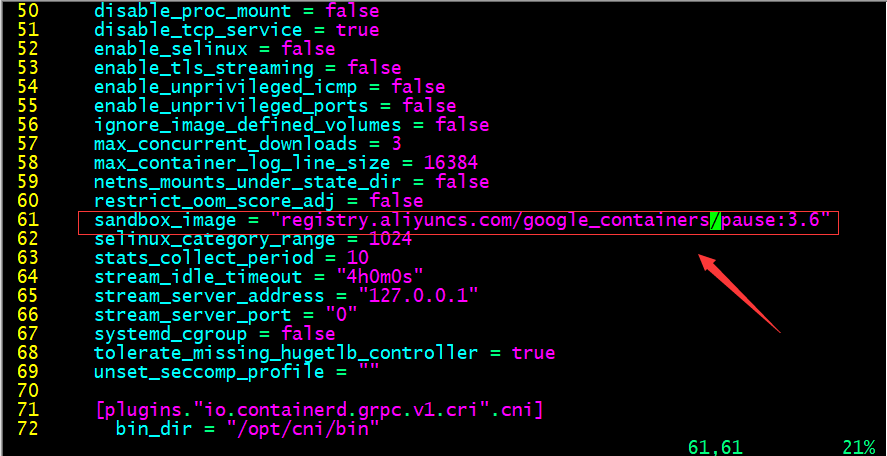
提示:默认
pause镜像地址是registry.k8s.io/pause:3.6, 该仓库在google, 一般需要借助科学上问工具才能正常访问 , 所以这里我们换成国内的镜像地址 ;配置镜像加速器
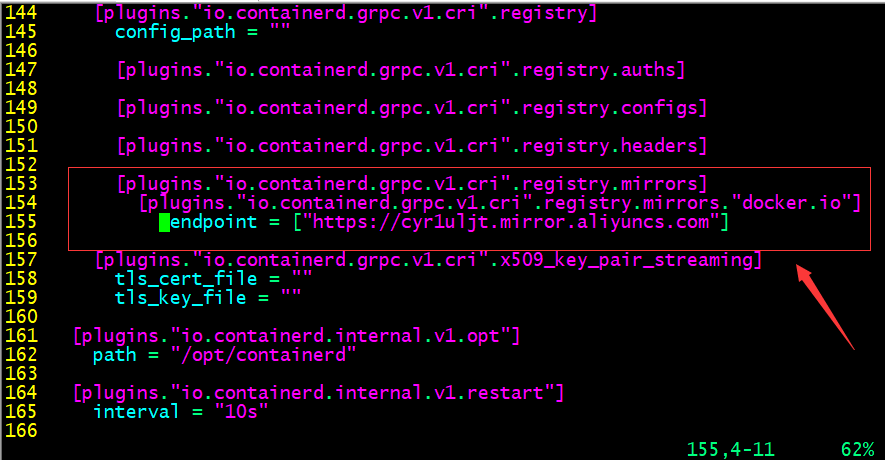
配置
systemd驱动器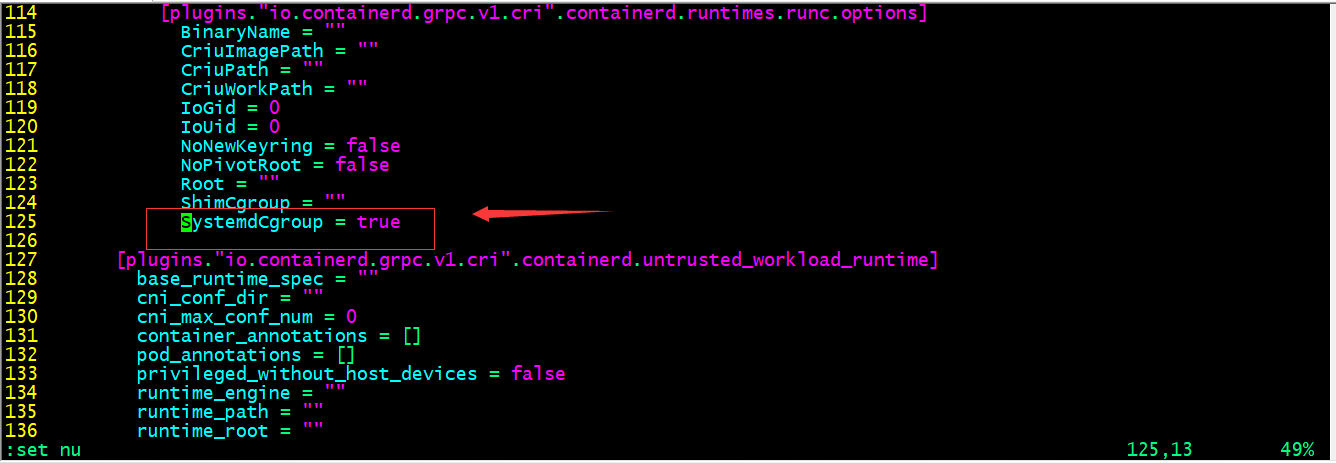
提示:
cgroup是用来对容器的资源做限制的 , 默认containerd没有开启SystemdCgroup, 在systemd初始化的系统上 , 建议开启 ; 特别注意containerd如果作为k8s集群的容器引擎 , 这个驱动器需要和kubelet保持一致 ; 否则会出现初始化k8s集群 , 容器自动重建的现象 ;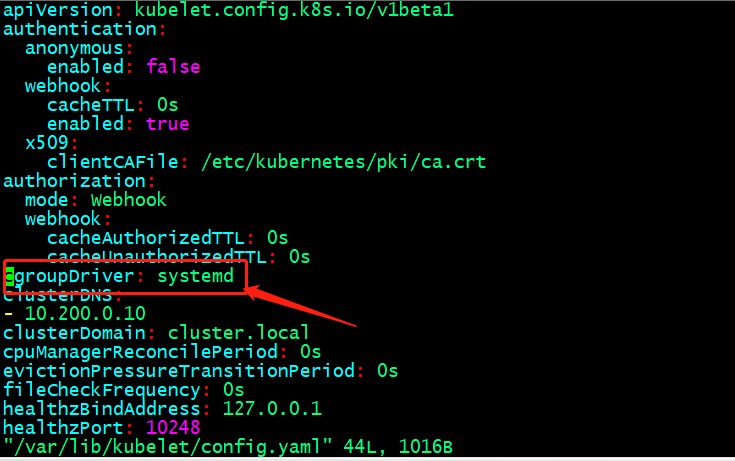
启动
containerd并设置为开机启动root@k8s-node03:~# systemctl start containerd && systemctl enable containerd Created symlink /etc/systemd/system/multi-user.target.wants/containerd.service → /lib/systemd/system/containerd.service. root@k8s-node03:~# systemctl status containerd ● containerd.service - containerd container runtime Loaded: loaded (/lib/systemd/system/containerd.service; enabled; vendor preset: enabled) Active: active (running) since Sun 2023-04-09 14:27:39 UTC; 58s ago Docs: https://containerd.io Main PID: 34424 (containerd) Tasks: 10 Memory: 13.1M CPU: 551ms CGroup: /system.slice/containerd.service └─34424 /usr/local/bin/containerd Apr 09 14:27:39 k8s-node03.ik8s.cc containerd[34424]: time="2023-04-09T14:27:39.401494614Z" level=info msg="Start subscribing containerd event" Apr 09 14:27:39 k8s-node03.ik8s.cc containerd[34424]: time="2023-04-09T14:27:39.401622138Z" level=info msg="Start recovering state" Apr 09 14:27:39 k8s-node03.ik8s.cc containerd[34424]: time="2023-04-09T14:27:39.401749630Z" level=info msg="Start event monitor" Apr 09 14:27:39 k8s-node03.ik8s.cc containerd[34424]: time="2023-04-09T14:27:39.401832242Z" level=info msg="Start snapshots syncer" Apr 09 14:27:39 k8s-node03.ik8s.cc containerd[34424]: time="2023-04-09T14:27:39.401909113Z" level=info msg="Start cni network conf syncer for default" Apr 09 14:27:39 k8s-node03.ik8s.cc containerd[34424]: time="2023-04-09T14:27:39.401984359Z" level=info msg="Start streaming server" Apr 09 14:27:39 k8s-node03.ik8s.cc containerd[34424]: time="2023-04-09T14:27:39.402288194Z" level=info msg=serving... address=/run/containerd/containerd.sock.ttrpc Apr 09 14:27:39 k8s-node03.ik8s.cc containerd[34424]: time="2023-04-09T14:27:39.402424377Z" level=info msg=serving... address=/run/containerd/containerd.sock Apr 09 14:27:39 k8s-node03.ik8s.cc systemd[1]: Started containerd container runtime. Apr 09 14:27:39 k8s-node03.ik8s.cc containerd[34424]: time="2023-04-09T14:27:39.403282275Z" level=info msg="containerd successfully booted in 0.032541s" root@k8s-node03:~#
2. 部署客户端
2.1 部署runc
下载
runcroot@k8s-node03:~# wget https://github.com/opencontainers/runc/releases/download/v1.1.5/runc.amd64给二进制文件添加执行权限 , 并将其移动至
/usr/bin/目录并改名为runcroot@k8s-node03:~# ll total 52332 drwx------ 5 root root 4096 Apr 9 14:35 ./ drwxr-xr-x 19 root root 4096 Apr 9 03:29 ../ -rw------- 1 root root 1363 Apr 9 06:09 .bash_history -rw-r--r-- 1 root root 3106 Oct 15 2021 .bashrc drwx------ 3 root root 4096 Apr 9 03:38 .cache/ -rw-r--r-- 1 root root 161 Jul 9 2019 .profile drwx------ 2 root root 4096 Apr 9 05:46 .ssh/ -rw------- 1 root root 12827 Apr 9 14:27 .viminfo drwxr-xr-x 2 root root 4096 Mar 30 20:51 bin/ -rw-r--r-- 1 root root 44102774 Apr 9 13:58 containerd-1.6.20-linux-amd64.tar.gz -rw-r--r-- 1 root root 9431456 Apr 9 12:29 runc.amd64 root@k8s-node03:~# chmod a+x runc.amd64 root@k8s-node03:~# mv runc.amd64 /usr/bin/runc root@k8s-node03:~#下载测试镜像并验证
root@k8s-node03:~# ctr images pull docker.io/library/alpine:latest docker.io/library/alpine:latest: resolved |++++++++++++++++++++++++++++++++++++++| index-sha256:124c7d2707904eea7431fffe91522a01e5a861a624ee31d03372cc1d138a3126: done |++++++++++++++++++++++++++++++++++++++| manifest-sha256:b6ca290b6b4cdcca5b3db3ffa338ee0285c11744b4a6abaa9627746ee3291d8d: done |++++++++++++++++++++++++++++++++++++++| layer-sha256:f56be85fc22e46face30e2c3de3f7fe7c15f8fd7c4e5add29d7f64b87abdaa09: done |++++++++++++++++++++++++++++++++++++++| config-sha256:9ed4aefc74f6792b5a804d1d146fe4b4a2299147b0f50eaf2b08435d7b38c27e: done |++++++++++++++++++++++++++++++++++++++| elapsed: 11.3s total: 2.0 Mi (181.5 KiB/s) unpacking linux/amd64 sha256:124c7d2707904eea7431fffe91522a01e5a861a624ee31d03372cc1d138a3126... done: 121.740597ms root@k8s-node03:~# ctr images ls REF TYPE DIGEST SIZE PLATFORMS LABELS docker.io/library/alpine:latest application/vnd.docker.distribution.manifest.list.v2+json sha256:124c7d2707904eea7431fffe91522a01e5a861a624ee31d03372cc1d138a3126 3.2 MiB linux/386,linux/amd64,linux/arm/v6,linux/arm/v7,linux/arm64/v8,linux/ppc64le,linux/s390x - root@k8s-node03:~#ctr客户端创建测试容器root@k8s-node03:~# ctr run -t --net-host docker.io/library/alpine:latest test sh / # ifconfig ens33 Link encap:Ethernet HWaddr 00:0C:29:EB:68:C7 inet addr:192.168.0.76 Bcast:192.168.0.255 Mask:255.255.255.0 inet6 addr: fe80::20c:29ff:feeb:68c7/64 Scope:Link UP BROADCAST RUNNING MULTICAST MTU:1500 Metric:1 RX packets:150682 errors:0 dropped:98 overruns:0 frame:0 TX packets:47714 errors:0 dropped:0 overruns:0 carrier:0 collisions:0 txqueuelen:1000 RX bytes:204871097 (195.3 MiB) TX bytes:3518180 (3.3 MiB) lo Link encap:Local Loopback inet addr:127.0.0.1 Mask:255.0.0.0 inet6 addr: ::1/128 Scope:Host UP LOOPBACK RUNNING MTU:65536 Metric:1 RX packets:233 errors:0 dropped:0 overruns:0 frame:0 TX packets:233 errors:0 dropped:0 overruns:0 carrier:0 collisions:0 txqueuelen:1000 RX bytes:20170 (19.6 KiB) TX bytes:20170 (19.6 KiB) / # exit root@k8s-node03:~# ctr containers ls CONTAINER IMAGE RUNTIME test docker.io/library/alpine:latest io.containerd.runc.v2 root@k8s-node03:~#提示 : 默认我们不指定名称空间对应容器都运行在
default名称空间下 ; 我们可以使用-n选项来指定对应名称空间信息 ;
2.2 container客户都安工具扩展
2.2.1 crictl客户端工具部署
crictl客户端工具部署root@k8s-node03:~# wget https://github.com/kubernetes-sigs/cri-tools/releases/download/v1.26.1/crictl-v1.26.1-linux-amd64.tar.gz解压压缩包并将其移动至用户环境变量目录中去
root@k8s-node03:~# ls
bin  containerd-1.6.20-linux-amd64.tar.gz  crictl-v1.26.1-linux-amd64.tar.gz
root@k8s-node03:~# tar xf crictl-v1.26.1-linux-amd64.tar.gz
root@k8s-node03:~# ls
bin  containerd-1.6.20-linux-amd64.tar.gz  crictl  crictl-v1.26.1-linux-amd64.tar.gz
root@k8s-node03:~# mv crictl /usr/local/bin/
root@k8s-node03:~# ls /usr/local/bin/
containerd  containerd-shim  containerd-shim-runc-v1  containerd-shim-runc-v2  containerd-stress  crictl  ctr
root@k8s-node03:~#
验证
crictl是否可正常运行root@k8s-node03:~# crictl -v crictl version v1.26.1 root@k8s-node03:~#查看
crictl默认配置文件路径root@k8s-node03:~# crictl --help |grep config config Get and set crictl client configuration options --config value, -c value Location of the client config file. If not specified and the default does not exist, the program's directory is searched as well (default: "/etc/crictl.yaml") [$CRI_CONFIG_FILE] root@k8s-node03:~#查看
containerd sock文件路径root@k8s-node03:~# cat /etc/containerd/config.toml |grep sock address = "/run/containerd/containerd.sock" root@k8s-node03:~#配置
crictl运行时环境root@k8s-node03:~# cat /etc/crictl.yaml runtime-endpoint: "unix:///run/containerd/containerd.sock" image-endpoint: "unix:///run/containerd/containerd.sock" timeout: 10 debug: false root@k8s-node03:~#测试 : 下载并验证镜像
root@k8s-node03:~# crictl pull nginx:1.20.2
Image is up to date for sha256:50fe74b50e0d0258922495297efbb9ebc3cbd5742103df1ca54dc21c07d24575
root@k8s-node03:~# crictl images
IMAGE                     TAG                 IMAGE ID            SIZE
docker.io/library/nginx   1.20.2              50fe74b50e0d0       56.7MB
root@k8s-node03:~#
提示 : 该工具不是特别好用 , 用的人相对较少 , 也不推荐使用 ;
2.2.2 nerdctl客户端工具安装
下载对应二进制包
root@k8s-node03:~# wget https://github.com/containerd/nerdctl/releases/download/v1.3.0/nerdctl-1.3.0-linux-amd64.tar.gz解压包至
/usr/local/bin/root@k8s-node03:~# ls bin crictl-v1.26.1-linux-amd64.tar.gz containerd-1.6.20-linux-amd64.tar.gz nerdctl-1.3.0-linux-amd64.tar.gz root@k8s-node03:~# tar xf nerdctl-1.3.0-linux-amd64.tar.gz -C /usr/local/bin/ root@k8s-node03:~# ll /usr/local/bin/nerdctl -rwxr-xr-x 1 root root 24920064 Apr 5 12:22 /usr/local/bin/nerdctl* root@k8s-node03:~#验证
nerdctl是否可以正常执行root@k8s-node03:~# nerdctl version WARN[0000] unable to determine buildctl version: exec: "buildctl": executable file not found in $PATH Client: Version: v1.3.0 OS/Arch: linux/amd64 Git commit: c6ddd63dea9aa438fdb0587c0d3d9ae61a60523e buildctl: Version: Server: containerd: Version: v1.6.20 GitCommit: 2806fc1057397dbaeefbea0e4e17bddfbd388f38 runc: Version: 1.1.5 GitCommit: v1.1.5-0-gf19387a6 root@k8s-node03:~#
提示 :
nerdctl工具和crictl一样 , 默认不指定名称空间就是default名称空间 ;为
nerdctl提供一个配置文件来指定默认名称空间root@k8s-node03:~# cat /etc/nerdctl/nerdctl.toml namespace = "k8s.io" debug = false debug_full = false insecure_registry = true root@k8s-node03:~#测试 : 不指定名称空间 , 看看对应配置是否生效
root@k8s-node03:~# nerdctl images
REPOSITORY    TAG       IMAGE ID        CREATED           PLATFORM       SIZE         BLOB SIZE
nginx         1.20.2    03f3cb0afb7b    12 minutes ago    linux/amd64    149.1 MiB    54.1 MiB
nginx         <none>    03f3cb0afb7b    12 minutes ago    linux/amd64    149.1 MiB    54.1 MiB
<none>        <none>    03f3cb0afb7b    12 minutes ago    linux/amd64    149.1 MiB    54.1 MiB
root@k8s-node03:~#
提示 : 可以看到现在我们不指定名称空间 , 对应就是显示
k8s.io名称空间下镜像 ; 说明我们给的配置生效了 ;
3. 安装CNI(Container networking interface)
查看
containerd cni插件目录和nerdctl cni插件位置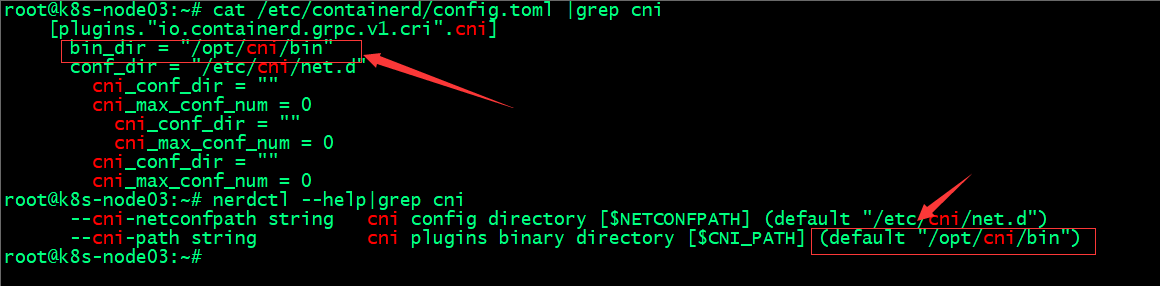
下载对应二进制包
root@k8s-node03:~# wget https://github.com/containernetworking/plugins/releases/download/v1.2.0/cni-plugins-linux-amd64-v1.2.0.tgz确认
cni插件路径是否存在root@k8s-node03:~# ll /opt/cni/bin ls: cannot access '/opt/cni/bin': No such file or directory root@k8s-node03:~# mkdir -p /opt/cni/bin root@k8s-node03:~# ll /opt/cni/bin total 8 drwxr-xr-x 2 root root 4096 Apr 9 15:16 ./ drwxr-xr-x 3 root root 4096 Apr 9 15:16 ../ root@k8s-node03:~#解压二进制包至
/opt/cni/bin/目录下root@k8s-node03:~# tar xf cni-plugins-linux-amd64-v1.2.0.tgz -C /opt/cni/bin/ root@k8s-node03:~# ll /opt/cni/bin/ total 68944 drwxrwxr-x 2 root root 4096 Jan 16 21:42 ./ drwxr-xr-x 3 root root 4096 Apr 9 15:16 ../ -rwxr-xr-x 1 root root 3859475 Jan 16 21:42 bandwidth* -rwxr-xr-x 1 root root 4299004 Jan 16 21:42 bridge* -rwxr-xr-x 1 root root 10167415 Jan 16 21:42 dhcp* -rwxr-xr-x 1 root root 3986082 Jan 16 21:42 dummy* -rwxr-xr-x 1 root root 4385098 Jan 16 21:42 firewall* -rwxr-xr-x 1 root root 3870731 Jan 16 21:42 host-device* -rwxr-xr-x 1 root root 3287319 Jan 16 21:42 host-local* -rwxr-xr-x 1 root root 3999593 Jan 16 21:42 ipvlan* -rwxr-xr-x 1 root root 3353028 Jan 16 21:42 loopback* -rwxr-xr-x 1 root root 4029261 Jan 16 21:42 macvlan* -rwxr-xr-x 1 root root 3746163 Jan 16 21:42 portmap* -rwxr-xr-x 1 root root 4161070 Jan 16 21:42 ptp* -rwxr-xr-x 1 root root 3550152 Jan 16 21:42 sbr* -rwxr-xr-x 1 root root 2845685 Jan 16 21:42 static* -rwxr-xr-x 1 root root 3437180 Jan 16 21:42 tuning* -rwxr-xr-x 1 root root 3993252 Jan 16 21:42 vlan* -rwxr-xr-x 1 root root 3586502 Jan 16 21:42 vrf* root@k8s-node03:~#提示 :
nerdctl在创建容器时 , 它依赖cni插件来给容器创建网络 ;测试 : 创建
Nginx测试容器并指定端口root@k8s-node03:~# nerdctl images REPOSITORY TAG IMAGE ID CREATED PLATFORM SIZE BLOB SIZE nginx 1.20.2 03f3cb0afb7b About an hour ago linux/amd64 149.1 MiB 54.1 MiB nginx latest 2ab30d6ac535 50 minutes ago linux/amd64 149.7 MiB 54.4 MiB nginx <none> 03f3cb0afb7b About an hour ago linux/amd64 149.1 MiB 54.1 MiB <none> <none> 2ab30d6ac535 50 minutes ago linux/amd64 149.7 MiB 54.4 MiB <none> <none> 03f3cb0afb7b About an hour ago linux/amd64 149.1 MiB 54.1 MiB root@k8s-node03:~# nerdctl run -d -p 80:80 nginx FATA[0000] failed to create shim task: OCI runtime create failed: runc create failed: unable to start container process: error during container init: error running hook #0: error running hook: exit status 1, stdout: , stderr: time="2023-04-09T16:11:40Z" level=fatal msg="failed to call cni.Setup: plugin type=\"bridge\" failed (add): failed to locate iptables: exec: \"iptables\": executable file not found in $PATH" Failed to write to log, write /var/lib/nerdctl/1935db59/containers/k8s.io/bf9d980bbed0d28778a3e0f21ad380df1b712841b6887792ce1fa0f483bf9a7d/oci-hook.createRuntime.log: file already closed: unknown root@k8s-node03:~# nerdctl ps -a CONTAINER ID IMAGE COMMAND CREATED STATUS PORTS NAMES bf9d980bbed0 docker.io/library/nginx:latest "/docker-entrypoint.…" 6 seconds ago Created 0.0.0.0:80->80/tcp nginx-bf9d9 root@k8s-node03:~#提示 : 这里容器虽然创建了没有运行 , 给我们报了一个错 , 意思就是在
path环境变量中没有找到iptables, 无法执行iptables命令 ; 解决办法就是安装iptables工具(我这里是最小化安装的ubuntu2204的版本 , 好多命令都没有) ;安装
iptables工具root@k8s-node03:~# apt-get install iptables -y再次运行容器 , 看看对应容器是否能够正常运行?
root@k8s-node03:~# nerdctl run -d -p 80:80 nginx
f3c40d58c1b98e90ef37da97b7fa6f5b8e9f44e7e40ba973678d53fef79b723f
root@k8s-node03:~# nerdctl ps -a
CONTAINER ID    IMAGE                             COMMAND                   CREATED           STATUS     PORTS                 NAMES
bf9d980bbed0    docker.io/library/nginx:latest    "/docker-entrypoint.…"    57 seconds ago    Created    0.0.0.0:80->80/tcp    nginx-bf9d9
f3c40d58c1b9    docker.io/library/nginx:latest    "/docker-entrypoint.…"    3 seconds ago     Up         0.0.0.0:80->80/tcp    nginx-f3c40
root@k8s-node03:~#
提示 : 安装了
iptables工具以后 , 再次运行容器 , 对应容器就跑起来了 ;验证 : 访问对应
niginx是否可以正常访问?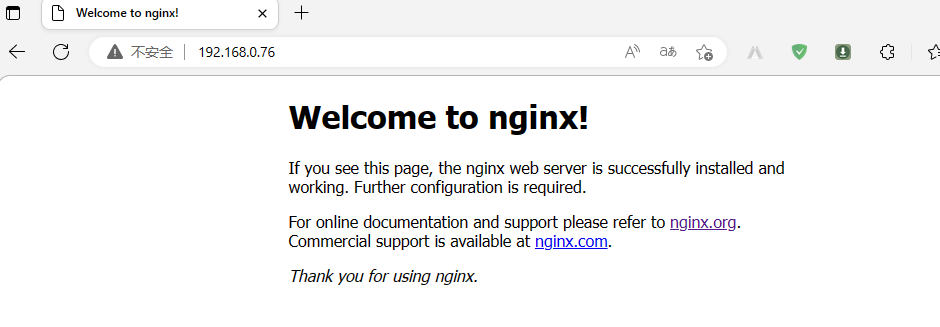
提示 : 可以看到
nginx可以正常暴露给容器外部网络访问 ;
ok , 基于ubuntu2204部署containerd和客户端工具的测试就到此为止 ; 推荐使用nerdctl客户端工具 , 这个工具的命令和docker非常相似 , 熟悉docker命令的使用 , nerdctl也就不难使用了 ;
参考链接
Ubuntu2204部署容器引擎Containerd - Linux-1874 - 博客园 (cnblogs.com)