
4-1-Elasticsearch:inverted index,doc_values 及 source
1. Inverted index
在Elasticsearch中 , 最基本的数据存储单位是shard。 但是 , 通过Lucene镜头看 , 情况会有所不同。 在这里 , 每个Elasticsearch分片都是一个 Lucene 索引 (index) , 每个Lucene索引都包含几个 Lucene segments。 一个Segment包含映射到文档里的所有术语(terms)及 一个倒排索引 (inverted index)。
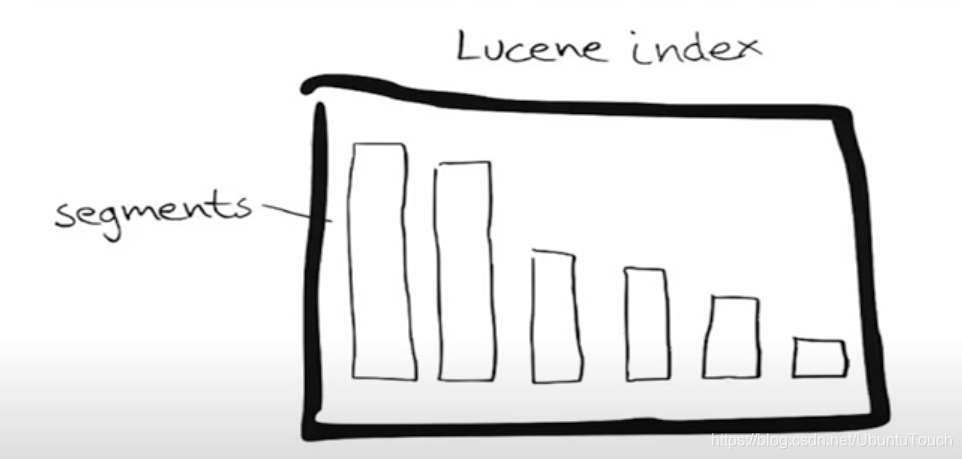
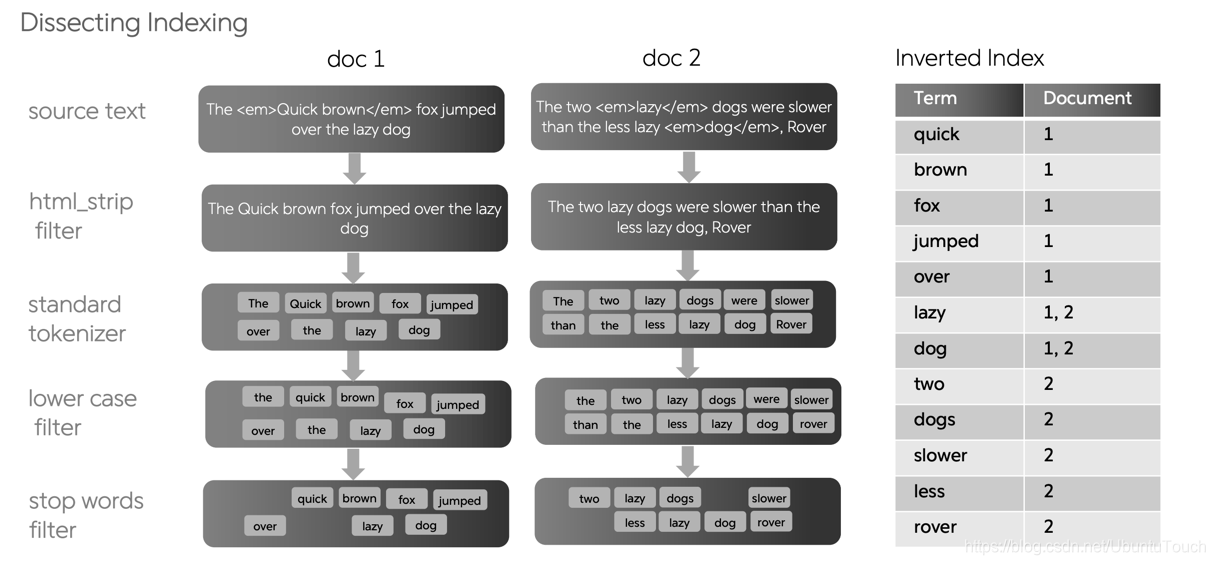
Inverted index(也叫倒排索引)是Elasticsearch和任何其他支持全文搜索的系统的核心数据结构。当一段文字从最原始的文字导入到 Elasticsearch 中 , 需要经过一个叫做indexing的过程。
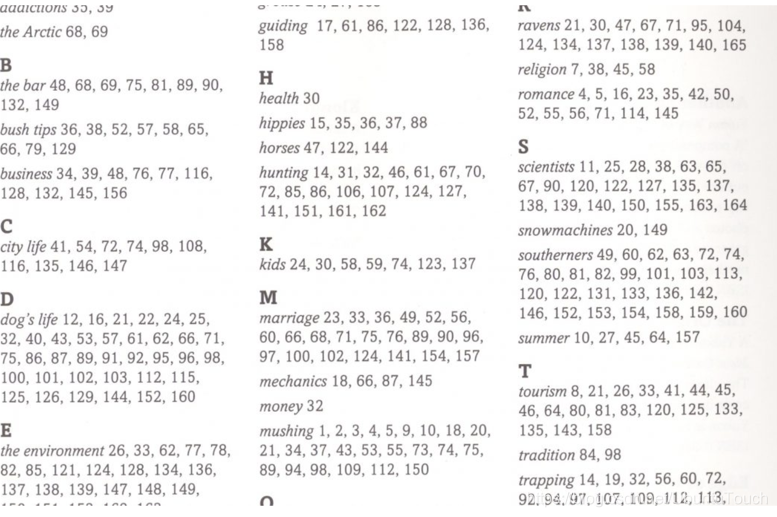
倒排索引类似于你在任何书籍结尾处看到的索引。 它将出现在文档中的术语映射到文档。通过这个索引 , 我们可以很快地查找到术语所在的页面。这个术语在索引中也是按照字母的先后顺序来进行排序的。
例如 , 你可以从以下字符串构建倒排索引:

Elasticsearch从已建立索引的三个文档中构建数据结构。 以下数据结构称为倒排索引 (inverted index):
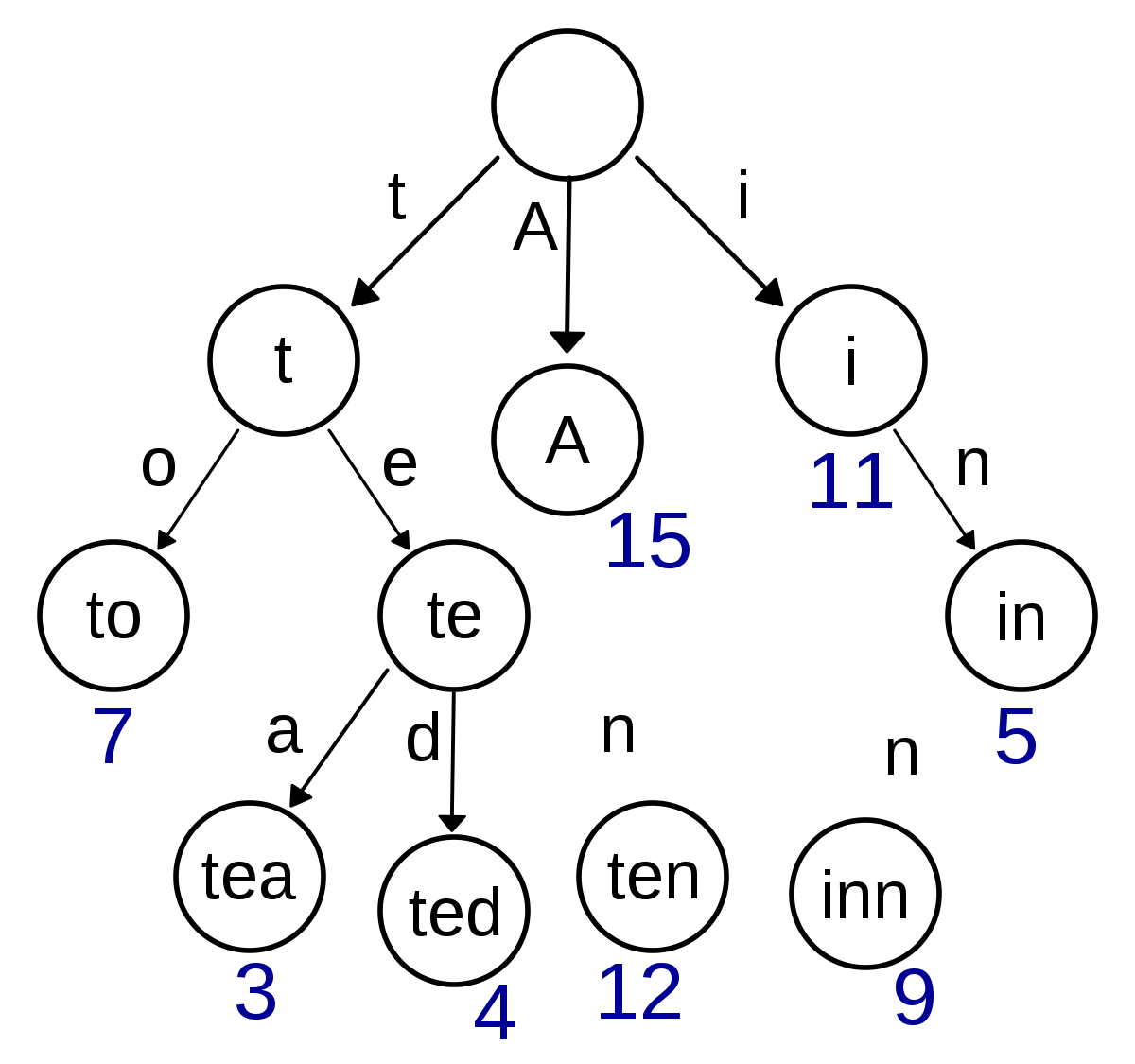
在这里倒排索引指的的是 , 我们根据term来寻找相应的文档IDs。这和常规的根据文档ID来寻找 term相反。如果我们搜索sunday , 那么文档1 和2将被同时搜到。如果你搜索last day of the week , 那么根据上面的表格 , 我们可以看出来文档 2 和 3 将被搜索出来。其中文档 3 被搜索到的原因是因为the也出现在文档 3 里面。请不要将此数据结构混淆为哈希表。 在Elasticsearch 下 , Apache Lucene使用一种特殊的数据结构 , 称为BlockTree术语字典。BlockTree 术语词典帮助我们使用前缀树通过前缀查找术语。
请注意以下几点:
删除标点符号并将其小写后 , 文档会按术语进行细分。
术语按字母顺序排序
“
Frequency” 列捕获该术语在整个文档集中出现的次数第三列捕获了在其中找到该术语的文档。 此外 , 它还可能包含找到该术语的确切位置(文档中的偏移)
在文档中搜索术语时 , 查找给定术语出现在其中的文档非常快捷。 如果用户搜索术语 “sunday” , 那么从 “Term” 列中查找 sunday 将非常快 , 因为这些术语在索引中进行了排序。 即使有数百万个术语 , 也可以在对术语进行排序时快速查找它们。
随后 , 考虑一种情况 , 其中用户搜索两个单词 , 例如 last sunday。 倒排索引可用于分别搜索last和 sunday 的发生; 文档 2 包含这两个术语 , 因此比仅包含一个术语的文档 1 更好。
倒排索引是执行快速搜索的基础。 同样 , 很容易查明索引中出现了多少次术语。 这是一个简单的计数汇总。 当然 , Elasticsearch 在我们在这里解释的简单的倒排排索引的基础上使用了很多创新。 它兼顾搜索和分析。
默认情况下 , Elasticsearch 在文档中的所有字段上构建一个倒排索引 , 指向该字段所在的 Elasticsearch 文档。也就是说在每个Elasticsearch的Lucene里 , 有一个位置存放这个 inverted index。如果你的索引包含包含五个全文字段的文档 , 你将有五个倒排索引。
在 Kibana 中 , 我们建立一个如下的文档:
PUT twitter/_doc/1
{
  "user" : "双榆树-张三",
  "message" : "今儿天气不错啊 , 出去转转去",
  "uid" : 2,
  "age" : 20,
  "city" : "北京",
  "province" : "北京",
  "country" : "中国",
  "name": {
    "firstname": "三",
    "surname": "张"
  },
  "address" : [
    "中国北京市海淀区",
    "中关村29号"
  ],
  "location" : {
    "lat" : "39.970718",
    "lon" : "116.325747"
  }
}
当这个文档被建立好以后 , Elastic 就已经帮我们建立好了相应的inverted index 供我们进行搜索 , 比如:
GET twitter/_search
{
  "query": {
    "match": {
      "user": "张三"
    }
  }
}
我们可与得到相应的搜索结果:
{
  "took" : 0,
  "timed_out" : false,
  "_shards" : {
    "total" : 1,
    "successful" : 1,
    "skipped" : 0,
    "failed" : 0
  },
  "hits" : {
    "total" : {
      "value" : 1,
      "relation" : "eq"
    },
    "max_score" : 0.5753642,
    "hits" : [
      {
        "_index" : "twitter",
        "_type" : "_doc",
        "_id" : "1",
        "_score" : 0.5753642,
        "_source" : {
          "user" : "双榆树-张三",
          "message" : "今儿天气不错啊 , 出去转转去",
          "uid" : 2,
          "age" : 20,
          "city" : "北京",
          "province" : "北京",
          "country" : "中国",
          "name" : {
            "firstname" : "三",
            "surname" : "张"
          },
          "address" : [
            "中国北京市海淀区",
            "中关村29号"
          ],
          "location" : {
            "lat" : "39.970718",
            "lon" : "116.325747"
          }
        }
      }
    ]
  }
}
如果我们想不让我们的某个字段不被搜索 , 也就是说不想为这个字段建立inverted index , 那么我们可以这么做:
DELETE twitter
PUT twitter
{
  "mappings": {
    "properties": {
      "city": {
        "type": "keyword",
        "ignore_above": 256
      },
      "address": {
        "type": "text",
        "fields": {
          "keyword": {
            "type": "keyword",
            "ignore_above": 256
          }
        }
      },
      "age": {
        "type": "long"
      },
      "country": {
        "type": "text",
        "fields": {
          "keyword": {
            "type": "keyword",
            "ignore_above": 256
          }
        }
      },
      "location": {
        "properties": {
          "lat": {
            "type": "text",
            "fields": {
              "keyword": {
                "type": "keyword",
                "ignore_above": 256
              }
            }
          },
          "lon": {
            "type": "text",
            "fields": {
              "keyword": {
                "type": "keyword",
                "ignore_above": 256
              }
            }
          }
        }
      },
      "message": {
        "type": "text",
        "fields": {
          "keyword": {
            "type": "keyword",
            "ignore_above": 256
          }
        }
      },
      "name": {
        "properties": {
          "firstname": {
            "type": "text",
            "fields": {
              "keyword": {
                "type": "keyword",
                "ignore_above": 256
              }
            }
          },
          "surname": {
            "type": "text",
            "fields": {
              "keyword": {
                "type": "keyword",
                "ignore_above": 256
              }
            }
          }
        }
      },
      "province": {
        "type": "text",
        "fields": {
          "keyword": {
            "type": "keyword",
            "ignore_above": 256
          }
        }
      },
      "uid": {
        "type": "long"
      },
      "user": {
        "type": "object",
        "enabled": false
      }
    }
  }
}

PUT twitter/_doc/1
{
  "user" : "双榆树-张三",
  "message" : "今儿天气不错啊 , 出去转转去",
  "uid" : 2,
  "age" : 20,
  "city" : "北京",
  "province" : "北京",
  "country" : "中国",
  "name": {
    "firstname": "三",
    "surname": "张"
  },
  "address" : [
    "中国北京市海淀区",
    "中关村29号"
  ],
  "location" : {
    "lat" : "39.970718",
    "lon" : "116.325747"
  }
}
在上面 , 我们通过mapping 对 user 字段进行了修改:
 "user": {
        "type": "object",
        "enabled": false
  }
也就是说这个字段将不被建立索引 , 同时也不会建立doc values。这个字段将不能被用于搜索和做聚合。我们如果使用这个字段进行搜索的话 , 不会产生任何的结果:
GET twitter/_search
{
  "query": {
    "match": {
      "user": "张三"
    }
  }
}
搜索的结果为:
{
  "took" : 0,
  "timed_out" : false,
  "_shards" : {
    "total" : 1,
    "successful" : 1,
    "skipped" : 0,
    "failed" : 0
  },
  "hits" : {
    "total" : {
      "value" : 0,
      "relation" : "eq"
    },
    "max_score" : null,
    "hits" : [ ]
  }
}
显然是没有任何的结果。但是如果我们对这个文档进行查询的话:
GET twitter/_doc/1显示的结果是:
{
  "_index" : "twitter",
  "_type" : "_doc",
  "_id" : "1",
  "_version" : 1,
  "_seq_no" : 0,
  "_primary_term" : 1,
  "found" : true,
  "_source" : {
    "user" : "双榆树-张三",
    "message" : "今儿天气不错啊 , 出去转转去",
    "uid" : 2,
    "age" : 20,
    "city" : "北京",
    "province" : "北京",
    "country" : "中国",
    "name" : {
      "firstname" : "三",
      "surname" : "张"
    },
    "address" : [
      "中国北京市海淀区",
      "中关村29号"
    ],
    "location" : {
      "lat" : "39.970718",
      "lon" : "116.325747"
    }
  }
}显然user的信息是存放于 source 里的。只是它不被我们所搜索而已。
如果我们不想我们的整个文档被搜索 , 我们甚至可以直接采用如下的方法:
DELETE twitter

PUT twitter
{
  "mappings": {
    "enabled": false
  }
}那么整个twitter索引将不建立任何的inverted index , 那么我们通过如下的命令:
PUT twitter/_doc/1
{
  "user" : "双榆树-张三",
  "message" : "今儿天气不错啊 , 出去转转去",
  "uid" : 2,
  "age" : 20,
  "city" : "北京",
  "province" : "北京",
  "country" : "中国",
  "name": {
    "firstname": "三",
    "surname": "张"
  },
  "address" : [
    "中国北京市海淀区",
    "中关村29号"
  ],
  "location" : {
    "lat" : "39.970718",
    "lon" : "116.325747"
  }
}

GET twitter/_search
{
  "query": {
    "match": {
      "city": "北京"
    }
  }
}
上面的命令执行的结果是 , 没有任何搜索的结果。
我们也可以使用如下的方式来使得我们禁止对一个字段进行查询:
{
  "mappings": {
    "properties": {
      "http_version": {
        "type": "keyword",
        "index": false
      }
     ...
    }
  }
}上面的设置使得http_version不被索引。上面的mapping使得我们不能对http_version字段进行搜索 , 从而节省磁盘空间 , 但是它并不妨碍我们对该字段进行aggregation及对 source 的访问。我们不能对上面的字段进行如下的查询:
GET _search
{
    “query": {
       "match": {
         "http_version": "1.2"
        }
    }
}
2. Source
在 Elasticsearch中 , 通常每个文档的每一个字段都会被存储在 shard 里存放 source 的地方 , 比如:
PUT twitter/_doc/2
{
  "user" : "双榆树-张三",
  "message" : "今儿天气不错啊 , 出去转转去",
  "uid" : 2,
  "age" : 20,
  "city" : "北京",
  "province" : "北京",
  "country" : "中国",
  "name": {
    "firstname": "三",
    "surname": "张"
  },
  "address" : [
    "中国北京市海淀区",
    "中关村29号"
  ],
  "location" : {
    "lat" : "39.970718",
    "lon" : "116.325747"
  }
}
在这里 , 我们创建了一个id 为2的文档。我们可以通过如下的命令来获得它的所有的存储的信息。
GET twitter/_doc/2它将返回:
{
  "_index" : "twitter",
  "_type" : "_doc",
  "_id" : "2",
  "_version" : 1,
  "_seq_no" : 1,
  "_primary_term" : 1,
  "found" : true,
  "_source" : {
    "user" : "双榆树-张三",
    "message" : "今儿天气不错啊 , 出去转转去",
    "uid" : 2,
    "age" : 20,
    "city" : "北京",
    "province" : "北京",
    "country" : "中国",
    "name" : {
      "firstname" : "三",
      "surname" : "张"
    },
    "address" : [
      "中国北京市海淀区",
      "中关村29号"
    ],
    "location" : {
      "lat" : "39.970718",
      "lon" : "116.325747"
    }
  }
}在上面的_source里我们可以看到Elasticsearch为我们所存下的所有的字段。如果我们不想存储任何的字段 , 那么我们可以做如下的设置:
DELETE twitter

PUT twitter
{
  "mappings": {
    "_source": {
      "enabled": false
    }
  }
}那么我们使用如下的命令来创建一个id 为 1 的文档:
PUT twitter/_doc/1
{
  "user" : "双榆树-张三",
  "message" : "今儿天气不错啊 , 出去转转去",
  "uid" : 2,
  "age" : 20,
  "city" : "北京",
  "province" : "北京",
  "country" : "中国",
  "name": {
    "firstname": "三",
    "surname": "张"
  },
  "address" : [
    "中国北京市海淀区",
    "中关村29号"
  ],
  "location" : {
    "lat" : "39.970718",
    "lon" : "116.325747"
  }
}
那么同样地 , 我们来查询一下这个文档:
GET twitter/_doc/1显示的结果为:
{
  "_index" : "twitter",
  "_type" : "_doc",
  "_id" : "1",
  "_version" : 1,
  "_seq_no" : 0,
  "_primary_term" : 1,
  "found" : true
}
显然我们的文档是被找到了 , 但是我们看不到任何的source。那么我们能对这个文档进行搜索吗?尝试如下的命令:
GET twitter/_search
{
  "query": {
    "match": {
      "city": "北京"
    }
  }
}
显示的结果为:
{
  "took" : 0,
  "timed_out" : false,
  "_shards" : {
    "total" : 1,
    "successful" : 1,
    "skipped" : 0,
    "failed" : 0
  },
  "hits" : {
    "total" : {
      "value" : 1,
      "relation" : "eq"
    },
    "max_score" : 0.5753642,
    "hits" : [
      {
        "_index" : "twitter",
        "_type" : "_doc",
        "_id" : "1",
        "_score" : 0.5753642
      }
    ]
  }
}显然这个文档id为 1 的文档可以被正确地搜索 , 也就是说它有完好的 inverted index 供我们查询 , 虽然它没有它的 source。
那么我们如何有选择地进行存储我们想要的字段呢?这种情况适用于我们想节省自己的存储空间 , 只存储那些我们需要的字段到 source 里去。我们可以做如下的设置
DELETE twitter

PUT twitter
{
  "mappings": {
    "_source": {
      "includes": [
        "*.lat",
        "address",
        "name.*"
      ],
      "excludes": [
        "name.surname"
      ]
    }
  }
}
在上面 , 我们使用include来包含我们想要的字段 , 同时我们通过 exclude 来去除那些不需要的字段。我们尝试如下的文档输入:
PUT twitter/_doc/1
{
  "user" : "双榆树-张三",
  "message" : "今儿天气不错啊 , 出去转转去",
  "uid" : 2,
  "age" : 20,
  "city" : "北京",
  "province" : "北京",
  "country" : "中国",
  "name": {
    "firstname": "三",
    "surname": "张"
  },
  "address" : [
    "中国北京市海淀区",
    "中关村29号"
  ],
  "location" : {
    "lat" : "39.970718",
    "lon" : "116.325747"
  }
}
通过如下的命令来进行查询 , 我们可以看到:
GET twitter/_doc/1结果是:
{
  "_index" : "twitter",
  "_type" : "_doc",
  "_id" : "1",
  "_version" : 1,
  "_seq_no" : 0,
  "_primary_term" : 1,
  "found" : true,
  "_source" : {
    "address" : [
      "中国北京市海淀区",
      "中关村29号"
    ],
    "name" : {
      "firstname" : "三"
    },
    "location" : {
      "lat" : "39.970718"
    }
  }
}
显然 , 我们只有很少的几个字段被存储下来了。通过这样的方法 , 我们可以有选择地存储我们想要的字段。
在实际的使用中 , 我们在查询文档时 , 也可以有选择地进行显示我们想要的字段 , 尽管有很多的字段被存于 source 中:
GET twitter/_doc/1?_source=name,location在这里 , 我们只想显示和 name 及 location 相关的字段 , 那么显示的结果为:
{
  "_index" : "twitter",
  "_type" : "_doc",
  "_id" : "1",
  "_version" : 1,
  "_seq_no" : 0,
  "_primary_term" : 1,
  "found" : true,
  "_source" : {
    "name" : {
      "firstname" : "三"
    },
    "location" : {
      "lat" : "39.970718"
    }
  }
}
3. Doc_values
默认情况下 , 大多数字段都已编入索引 , 这使它们可搜索。倒排索引允许查询在唯一的术语排序列表中查找搜索词 , 并从中立即访问包含该词的文档列表。
sort , aggregtion 和访问脚本中的字段值需要不同的数据访问模式。除了查找术语和查找文档外 , 我们还需要能够查找文档并查找其在字段中具有的术语。
Doc values是在文档索引时构建的磁盘数据结构 , 这使这种数据访问模式成为可能。它们存储与 _source相同的值 , 但以面向列(column)的方式存储 , 这对于排序和聚合而言更为有效。几乎所有字段类型都支持doc值 , 但对字符串字段除外 (text 及 annotated_text)。Doc values 告诉你对于给定的文档ID , 字段的值是什么。比如 , 当我们向Elasticsearch中加入如下的文档:
PUT cities
{
  "mappings": {
    "properties": {
      "city": {
        "type": "keyword"
      }
    }
  }
}

PUT cities/_doc/1
{
  "city": "Wuhan"
}

PUT cities/_doc/2
{
  "city": "Beijing"
}

PUT cities/_doc/3
{
  "city": "Shanghai"
}那么将在在Elasticsearch中将创建像如下的doc_values的一个列存储(Columnar store)表格:
默认情况下 , 所有支持doc 值的字段均已启用它们。如果你确定不需要对字段进行排序或汇总 , 也不需要通过脚本访问字段值 , 则可以禁用doc值以节省磁盘空间:
比如我们可以通过如下的方式来使得city字段不可以做sort 或aggregation:
DELETE twitter
PUT twitter
{
  "mappings": {
    "properties": {
      "city": {
        "type": "keyword",
        "doc_values": false,
        "ignore_above": 256
      },
      "address": {
        "type": "text",
        "fields": {
          "keyword": {
            "type": "keyword",
            "ignore_above": 256
          }
        }
      },
      "age": {
        "type": "long"
      },
      "country": {
        "type": "text",
        "fields": {
          "keyword": {
            "type": "keyword",
            "ignore_above": 256
          }
        }
      },
      "location": {
        "properties": {
          "lat": {
            "type": "text",
            "fields": {
              "keyword": {
                "type": "keyword",
                "ignore_above": 256
              }
            }
          },
          "lon": {
            "type": "text",
            "fields": {
              "keyword": {
                "type": "keyword",
                "ignore_above": 256
              }
            }
          }
        }
      },
      "message": {
        "type": "text",
        "fields": {
          "keyword": {
            "type": "keyword",
            "ignore_above": 256
          }
        }
      },
      "name": {
        "properties": {
          "firstname": {
            "type": "text",
            "fields": {
              "keyword": {
                "type": "keyword",
                "ignore_above": 256
              }
            }
          },
          "surname": {
            "type": "text",
            "fields": {
              "keyword": {
                "type": "keyword",
                "ignore_above": 256
              }
            }
          }
        }
      },
      "province": {
        "type": "text",
        "fields": {
          "keyword": {
            "type": "keyword",
            "ignore_above": 256
          }
        }
      },
      "uid": {
        "type": "long"
      },
      "user": {
        "type": "text",
        "fields": {
          "keyword": {
            "type": "keyword",
            "ignore_above": 256
          }
        }
      }
    }
  }
}
在上面 , 我们把city 字段的doc_values设置为false。
      "city": {
        "type": "keyword",
        "doc_values": false,
        "ignore_above": 256
      },
我们通过如下的方法来创建一个文档:
PUT twitter/_doc/1
{
  "user" : "双榆树-张三",
  "message" : "今儿天气不错啊 , 出去转转去",
  "uid" : 2,
  "age" : 20,
  "city" : "北京",
  "province" : "北京",
  "country" : "中国",
  "name": {
    "firstname": "三",
    "surname": "张"
  },
  "address" : [
    "中国北京市海淀区",
    "中关村29号"
  ],
  "location" : {
    "lat" : "39.970718",
    "lon" : "116.325747"
  }
}
那么 , 当我们使用如下的方法来进行aggregation 时:
GET twitter/_search
{
  "size": 0,
  "aggs": {
    "city_bucket": {
      "terms": {
        "field": "city",
        "size": 10
      }
    }
  }
}
在我们的 Kibana 上我们可以看到:
{
  "error": {
    "root_cause": [
      {
        "type": "illegal_argument_exception",
        "reason": "Can't load fielddata on [city] because fielddata is unsupported on fields of type [keyword]. Use doc values instead."
      }
    ],
    "type": "search_phase_execution_exception",
    "reason": "all shards failed",
    "phase": "query",
    "grouped": true,
    "failed_shards": [
      {
        "shard": 0,
        "index": "twitter",
        "node": "IyyZ30-hRi2rnOpfx4n1-A",
        "reason": {
          "type": "illegal_argument_exception",
          "reason": "Can't load fielddata on [city] because fielddata is unsupported on fields of type [keyword]. Use doc values instead."
        }
      }
    ],
    "caused_by": {
      "type": "illegal_argument_exception",
      "reason": "Can't load fielddata on [city] because fielddata is unsupported on fields of type [keyword]. Use doc values instead.",
      "caused_by": {
        "type": "illegal_argument_exception",
        "reason": "Can't load fielddata on [city] because fielddata is unsupported on fields of type [keyword]. Use doc values instead."
      }
    }
  },
  "status": 400
}
显然 , 我们的操作是失败的。尽管我们不能做aggregation及sort , 但是我们还是可以通过如下的命令来得到它的source:
GET twitter/_doc/1显示结果为:
{
  "_index" : "twitter",
  "_type" : "_doc",
  "_id" : "1",
  "_version" : 1,
  "_seq_no" : 0,
  "_primary_term" : 1,
  "found" : true,
  "_source" : {
    "user" : "双榆树-张三",
    "message" : "今儿天气不错啊 , 出去转转去",
    "uid" : 2,
    "age" : 20,
    "city" : "北京",
    "province" : "北京",
    "country" : "中国",
    "name" : {
      "firstname" : "三",
      "surname" : "张"
    },
    "address" : [
      "中国北京市海淀区",
      "中关村29号"
    ],
    "location" : {
      "lat" : "39.970718",
      "lon" : "116.325747"
    }
  }
}
4. 禁用字段
场景: 如果不需要查询或聚合某个字段 , 可以完全禁用该字段。
好处: 该字段不会被索引或存储在
Doc Values中 , 但仍会存储在_source中。
例子:
PUT my_logs/_mapping
{
  "properties": {
    "http_version": {
      "enabled": false
    }
  }
}
通过此设置 , http_version既不会被索引也不会存储在doc Values 中 , 但仍然可以在_source 中使用。
其实在实际的 Elasticsearch存储中 , 还有一类存储。它就是store。
参考链接
Elasticsearch:inverted index,doc_values 及 source_earlier search engines: inverted index-CSDN博客