
3-2-Beats processors
我们通常的做法是使用 Elasticsearch的 ingest node 或者 Logstash 来对数据进行清洗。这其中包括删除 , 添加 , 丰富 , 转换等等。但是针对每个 beat 来讲 , 它们也分别有自己的一组 processors 来可以帮我们处理数据。
我们可以访问 Elastic 的官方网站来查看针对 filebeat 的所有 processors。 也就是说 , 我们可以在配置 beats 的时候并同时配置相应的 processors 来对数据进行处理。每个 processor 能够修改经过它的事件。
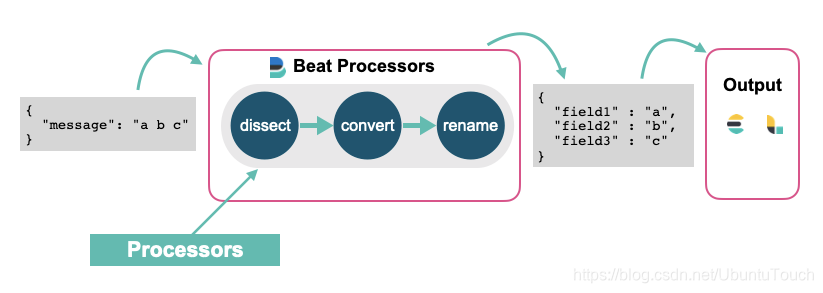
你可以在配置中定义 processors 以在将事件发送到配置的输出之前对其进行处理。 libbeat 库提供以下处理器:
减少导出字段的数量
使用附加元数据增强事件
执行额外的处理和解码
每个处理器接收一个事件 , 将定义的操作应用于该事件 , 然后返回该事件。 如果你定义处理器列表 , 它们将按照在 Beats 配置文件中定义的顺序执行。
event -> processor 1 -> event1 -> processor 2 -> event2 ...在今天的实验中 , 我们将使用如下是例子来进行。我们创建一个叫做 sample.log 的文件 , 其内容如下
sample.log
"321 - App01 - WebServer is starting"
"321 - App01 - WebServer is up and running"
"321 - App01 - WebServer is scaling 2 pods"
"789 - App02 - Database is will be restarted in 5 minutes"
"789 - App02 - Database is up and running"
"789 - App02 - Database is refreshing tables"
由于 Filebeat 是以换行符来识别每一行的数据的 , 所以我在文件的最后一行也加上了一个换行符以确保最后一行的数据能被导入。
我们创建一个叫做 filebeat_processors.yml 的 filebeat 配置文件:
filebeat_processors.yml
它的内容如下:
filebeat.inputs:
- type: log
  enabled: true
  paths:
    - /Users/liuxg/data/beatsprocessors/sample.log

processors:
 - dissect:
     tokenizer: '"%{pid|integer} - %{service.name} - %{service.status}"'
     field: "message"
     target_prefix: ""
     trim_values: "all"
 - drop_fields:
     fields: ["ecs", "agent", "log", "input", "host"]

setup.template.enabled: false
setup.ilm.enabled: false

output.elasticsearch:
  hosts: ["localhost:9200"]
  index: "sample"
  bulk_max_size: 1000
请注意你需要依据自己 sample.log 的位置修改上面的 paths 中的路径。请注意在上面 , 我们在 tokenizer 中是这样定义的:
'"%{pid|integer} - %{service.name} - %{service.status}"'我们使用了 ' 字符来定义字符串。我们也可以使用 " 符号来定义字符串。在这种情况下 , 我们必须使用 \" 来进行 escape(转义):
"\"%{pid|integer} - %{service.name} - %{service.status}\""上面的两种选择完全依赖于你自己的喜好。我个人比较喜欢第一种的写法。它显得比较干净 , 整洁!
另外 , 如果我们不想要其中的一个字段 , 那么我们可以使用 %{} , 或者更加易懂的方式 %{?field} , 比如 , 在上面的例子中 , 我们不想要 service.name 这个字段 , 我们可以使用如下的方法:
'"%{pid|integer} - %{?service.name} - %{service.status}"'那么经过 Beats processor 的处理过后 , 我们将看不到 service.name 这个字段了。
在实际的使用中 , 有时我们甚至想丢掉一些满足条件的事件。在这种情况下 , 我们把整个的事件都可以去掉 , 比如:
filebeat_processors.yml
filebeat.inputs:
- type: log
  enabled: true
  paths:
    - /Users/liuxg/data/beatsprocessors/sample.log

processors:
 - dissect:
     tokenizer: '"%{pid|integer} - %{service.name} - %{service.status}"'
     field: "message"
     target_prefix: ""
     trim_values: "all"
 - drop_fields:
     fields: ["ecs", "agent", "log", "input", "host"]
 - drop_event:
     when:
       equals:
         pid: 789

setup.template.enabled: false
setup.ilm.enabled: false

output.elasticsearch:
  hosts: ["localhost:9200"]
  index: "sample"
  bulk_max_size: 1000
我们使用了 drop_event 这个 processor。当这个事件的 pid 的值为 789 时 , 那么整个事件将被删除 , 从而我们在 Elasticsearch 中看不到这个事件。
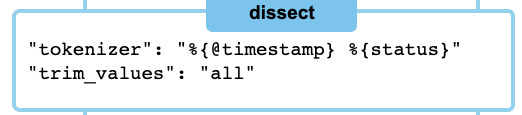
在上面 , 我们使用了 drop_fields , dissect 及 drop_event 三个 processors。当我们使用 dissect 处理器时 , 有时我们的日志里的空格是不规整的 , 比如有的是一个 , 有的是两个空格:

针对这种情况 , 我们可以使用 trim_values 来除去多余的空格:
我们使用如下的命令来运行 filebeat:
./filebeat -e -c ~/data/beatsprocessors/filebeat_processors.yml 同样地 , 我们需要根据自己的配置文件路径修改上面的路径。
运行完上面的命令后 , 我们可以在 Kibana 中进行查询 sample 索引的内容:
GET sample/_search{
"took" : 0,
"timed_out" : false,
"_shards" : {
"total" : 1,
"successful" : 1,
"skipped" : 0,
"failed" : 0
},
"hits" : {
"total" : {
"value" : 6,
"relation" : "eq"
},
"max_score" : 1.0,
"hits" : [
{
"_index" : "sample",
"_type" : "_doc",
"_id" : "qrBscHYBpymojx8hDWuV",
"_score" : 1.0,
"_source" : {
"@timestamp" : "2020-12-17T11:18:16.540Z",
"message" : "\"321 - App01 - WebServer is starting\"",
"service" : {
"name" : "App01",
"status" : "WebServer is starting"
},
"pid" : 321
}
},
{
"_index" : "sample",
"_type" : "_doc",
"_id" : "q7BscHYBpymojx8hDWuV",
"_score" : 1.0,
"_source" : {
"@timestamp" : "2020-12-17T11:18:16.541Z",
"pid" : 321,
"message" : "\"321 - App01 - WebServer is up and running\"",
"service" : {
"name" : "App01",
"status" : "WebServer is up and running"
}
}
},
{
"_index" : "sample",
"_type" : "_doc",
"_id" : "rLBscHYBpymojx8hDWuV",
"_score" : 1.0,
"_source" : {
"@timestamp" : "2020-12-17T11:18:16.541Z",
"message" : "\"321 - App01 - WebServer is scaling 2 pods\"",
"service" : {
"name" : "App01",
"status" : "WebServer is scaling 2 pods"
},
"pid" : 321
}
},
{
"_index" : "sample",
"_type" : "_doc",
"_id" : "rbBscHYBpymojx8hDWuV",
"_score" : 1.0,
"_source" : {
"@timestamp" : "2020-12-17T11:18:16.541Z",
"message" : "\"789 - App02 - Database is will be restarted in 5 minutes\"",
"pid" : 789,
"service" : {
"name" : "App02",
"status" : "Database is will be restarted in 5 minutes"
}
}
},
{
"_index" : "sample",
"_type" : "_doc",
"_id" : "rrBscHYBpymojx8hDWuV",
"_score" : 1.0,
"_source" : {
"@timestamp" : "2020-12-17T11:18:16.541Z",
"service" : {
"name" : "App02",
"status" : "Database is up and running"
},
"pid" : 789,
"message" : "\"789 - App02 - Database is up and running\""
}
},
{
"_index" : "sample",
"_type" : "_doc",
"_id" : "r7BscHYBpymojx8hDWuV",
"_score" : 1.0,
"_source" : {
"@timestamp" : "2020-12-17T11:18:16.541Z",
"service" : {
"status" : "Database is refreshing tables",
"name" : "App02"
},
"message" : "\"789 - App02 - Database is refreshing tables\"",
"pid" : 789
}
}
]
}
}显然 , 我们得到了一个结构化的索引。在上面 , 我们对 pid 还进行了从字符串到整型值的转换。
我们甚至可以重新对一个字段命名 , 比如:
filebeat_processors.yml
filebeat.inputs:
- type: log
  enabled: true
  paths:
    - /Users/liuxg/data/beatsprocessors/sample.log

processors:
 - drop_fields:
     fields: ["ecs", "agent", "log", "input", "host"]
 - dissect:
     tokenizer: '"%{pid|integer} - %{service.name} - %{service.status}"'
     field: "message"
     target_prefix: ""
 - rename:
     fields:
        - from: "pid"
          to: "PID"
     ignore_missing: false
     fail_on_error: true

setup.template.enabled: false
setup.ilm.enabled: false

output.elasticsearch:
  hosts: ["localhost:9200"]
  index: "sample"
  bulk_max_size: 1000
重新运行上面的配置文件, 我们发现:
{
  "took" : 0,
  "timed_out" : false,
  "_shards" : {
    "total" : 1,
    "successful" : 1,
    "skipped" : 0,
    "failed" : 0
  },
  "hits" : {
    "total" : {
      "value" : 6,
      "relation" : "eq"
    },
    "max_score" : 1.0,
    "hits" : [
      {
        "_index" : "sample",
        "_type" : "_doc",
        "_id" : "UrB5cHYBpymojx8h7oCK",
        "_score" : 1.0,
        "_source" : {
          "@timestamp" : "2020-12-17T11:33:26.114Z",
          "service" : {
            "status" : "WebServer is starting",
            "name" : "App01"
          },
          "message" : "\"321 - App01 - WebServer is starting\"",
          "PID" : 321
        }
      },
   ...
之前的 pid 已经转换为 PID 字段。
我们还可以通过脚本来实现对事件的处理 , 比如:
filebeat_processors.yml
filebeat.inputs:
- type: log
  enabled: true
  paths:
    - /Users/liuxg/data/beatsprocessors/sample.log

processors:
 - drop_fields:
     fields: ["ecs", "agent", "log", "input", "host"]
 - dissect:
     tokenizer: '"%{pid|integer} - %{service.name} - %{service.status}"'
     field: "message"
     target_prefix: ""
 - rename:
     fields:
        - from: "pid"
          to: "PID"
     ignore_missing: false
     fail_on_error: true
 - script:
     lang: javascript
     id: my_filter
     params:
        pid: 789
     source: >
       var params = {pid: 0};
       function register(scriptParams) {
          params = scriptParams;
       }
       function process(event) {
          if (event.Get("PID") == params.pid) {
              event.Cancel();
          }
       }

setup.template.enabled: false
setup.ilm.enabled: false

output.elasticsearch:
  hosts: ["localhost:9200"]
  index: "sample"
  bulk_max_size: 1000
在上面,当 PID 的值为 789 时,我们将过滤这个事件。重新运行 filebeat:
{
  "took" : 0,
  "timed_out" : false,
  "_shards" : {
    "total" : 1,
    "successful" : 1,
    "skipped" : 0,
    "failed" : 0
  },
  "hits" : {
    "total" : {
      "value" : 3,
      "relation" : "eq"
    },
    "max_score" : 1.0,
    "hits" : [
      {
        "_index" : "sample",
        "_type" : "_doc",
        "_id" : "5bCBcHYBpymojx8hrIup",
        "_score" : 1.0,
        "_source" : {
          "@timestamp" : "2020-12-17T11:41:53.478Z",
          "PID" : 321,
          "service" : {
            "status" : "WebServer is starting",
            "name" : "App01"
          },
          "message" : "\"321 - App01 - WebServer is starting\""
        }
      },
      {
        "_index" : "sample",
        "_type" : "_doc",
        "_id" : "5rCBcHYBpymojx8hrIup",
        "_score" : 1.0,
        "_source" : {
          "@timestamp" : "2020-12-17T11:41:53.479Z",
          "message" : "\"321 - App01 - WebServer is up and running\"",
          "service" : {
            "status" : "WebServer is up and running",
            "name" : "App01"
          },
          "PID" : 321
        }
      },
      {
        "_index" : "sample",
        "_type" : "_doc",
        "_id" : "57CBcHYBpymojx8hrIup",
        "_score" : 1.0,
        "_source" : {
          "@timestamp" : "2020-12-17T11:41:53.479Z",
          "service" : {
            "status" : "WebServer is scaling 2 pods",
            "name" : "App01"
          },
          "message" : "\"321 - App01 - WebServer is scaling 2 pods\"",
          "PID" : 321
        }
      }
    ]
  }
}
我们发现所有关于 PID 为789 的事件都被过滤掉了。
我们设置可以通过 script 的方法为事件添加一个 tag。当然由于这是一种 Javascript 的脚本编程,我们甚至可以依据一些条件对事件添加不同的 tag。
filebeat_processors.yml
filebeat.inputs:
- type: log
  enabled: true
  paths:
    - /Users/liuxg/data/beatsprocessors/sample.log

processors:
 - drop_fields:
     fields: ["ecs", "agent", "log", "input", "host"]
 - dissect:
     tokenizer: '"%{pid|integer} - %{service.name} - %{service.status}"'
     field: "message"
     target_prefix: ""
 - rename:
     fields:
        - from: "pid"
          to: "PID"
     ignore_missing: false
     fail_on_error: true
 - script:
     lang: javascript
     id: my_filter
     params:
        pid: 789
     source: >
       var params = {pid: 0};
       function register(scriptParams) {
          params = scriptParams;
       }
       function process(event) {
          if (event.Get("PID") == params.pid) {
              event.Cancel();
          }

          event.Tag("myevent")
       }

setup.template.enabled: false
setup.ilm.enabled: false

output.elasticsearch:
  hosts: ["localhost:9200"]
  index: "sample"
  bulk_max_size: 1000
在上面,我们添加了 event.Tag("myevent")。重新运行我们可以看到:
    "hits" : [
      {
        "_index" : "sample",
        "_type" : "_doc",
        "_id" : "C7CScHYBpymojx8hkKVy",
        "_score" : 1.0,
        "_source" : {
          "@timestamp" : "2020-12-17T12:00:20.365Z",
          "message" : "\"321 - App01 - WebServer is starting\"",
          "PID" : 321,
          "service" : {
            "name" : "App01",
            "status" : "WebServer is starting"
          },
          "tags" : [
            "myevent"
          ]
        }
      },
在上面,我们可以看到 tags 字段里有一个叫做 myevent 的值。
参考链接
Beats: Beats processors_filebeat processor-CSDN博客