
3-1-beats
1. Beats基础
Beats是轻量级(资源高效 , 无依赖性 , 小型)和开放源代码日志发送程序的集合 , 这些日志发送程序充当安装在基础结构中不同服务器上的代理 , 用于收集日志或指标(metrics)。这些可以是日志文件(Filebeat) , 网络数据(Packetbeat) , 服务器指标(Metricbeat)或 Elastic和社区开发的越来越多的Beats可以收集的任何其他类型的数据。 收集后 , 数据将直接发送到Elasticsearch或Logstash中进行其他处理。Beats 建立在名为libbeat的Go框架之上 , 该框架用于数据转发 , 这意味着社区一直在开发和贡献新的 Beats。
Filebeat顾名思义 ,Filebeat用于收集和传送日志文件 , 它也是最常用的Beat。Filebeat如此高效的事实之一就是它处理背压的方式-因此 , 如果Logstash繁忙 ,Filebeat会减慢其读取速率 , 并在减速结束后加快节奏。Filebeat几乎可以安装在任何操作系统上 , 包括作为Docker容器安装 , 还随附用于特定平台(例如Apache,MySQL,Docker等)的内部模块 , 其中包含这些平台的默认配置和Kibana对象。Packetbeat网络数据包分析器Packetbeat是第一个引入的Beat。Packetbeat捕获服务器之间的网络流量 , 因此可用于应用程序和性能监视。Packetbeat可以安装在受监视的服务器上 , 也可以安装在其专用服务器上。Packetbeat跟踪网络流量 , 解码协议并记录每笔交易的数据。Packetbeat支持的协议包括:DNS,HTTP,ICMP,Redis,MySQL,MongoDB,Cassandra等。MetricbeatMetricbeat是一种非常受欢迎的Beat, 它收集并报告各种系统和平台的各种系统级度量。Metricbeat还支持用于从特定平台收集统计信息的内部模块。你可以使用这些模块和称为指标集的metricsets来配置Metricbeat收集指标的频率以及要收集哪些特定指标。HeartbeatHeartbeat是用于“uptime monitoring”的。本质上 ,Heartbeat是探测服务以检查它们是否可访问的功能 , 例如 , 它可以用来验证服务的正常运行时间是否符合你的SLA。 你要做的就是为Heartbeat提供URL和正常运行时间指标的列表 , 以直接发送到Elasticsearch或Logstash以便在建立索引之前发送到你的堆栈。AuditbeatAuditbeat可用于审核Linux服务器上的用户和进程活动。 与其他传统的系统审核工具(systemd,auditd)类似 ,Auditbeat可用于识别安全漏洞-文件更改 , 配置更改 , 恶意行为等。WinlogbeatWinlogbeat仅会引起Windows系统管理员或工程师的兴趣 , 因为它是专门为收集Windows事件日志而设计的节拍。 它可用于分析安全事件 , 已安装的更新等。FunctionbeatFunctionbeat被定义为 “serverless” 的发件人 , 可以将其部署为收集数据并将其发送到ELK堆栈的功能。Functionbeat专为监视云环境而设计 , 目前已针对Amazon设置量身定制 , 可以部署为Amazon Lambda函数 , 以从Amazon CloudWatch,Kinesis和SQS收集数据。
2. Metricbeat
在最新版本的ELk中, kibana页面中有两个Mertic页面查看位置 :1. dashboard中查看远程监控节点的性能视图 , 2. elasticsearch集群中每个节点安装Metricbeat 以此保证kibana可以监控底层的elasticsearch节点的性能
官方下载地址: Past Releases of Elastic Stack Software | Elastic
2.1 远程节点监控配置
下载并安装对应的
Metricbeat包root@nginx:~# dpkg -i metricbeat-8.13.2-amd64.deb修改
metricbeat配置文件root@nginx:~# cat /etc/metricbeat/metricbeat.yml # ================================= Dashboards ================================= # These settings control loading the sample dashboards to the Kibana index. Loading # the dashboards is disabled by default and can be enabled either by setting the # options here or by using the `setup` command. #setup.dashboards.enabled: false setup.dashboards.enabled: true #第一次使用时, 需要打开这个, 设置是否加载metricbeat提供的kibana dashboard到kibana服务器中 # The URL from where to download the dashboard archive. By default, this URL # has a value that is computed based on the Beat name and version. For released # versions, this URL points to the dashboard archive on the artifacts.elastic.co # website. #setup.dashboards.url: # =================================== Kibana =================================== # Starting with Beats version 6.0.0, the dashboards are loaded via the Kibana API. # This requires a Kibana endpoint configuration. setup.kibana: # Kibana Host # Scheme and port can be left out and will be set to the default (http and 5601) # In case you specify and additional path, the scheme is required: http://localhost:5601/path # IPv6 addresses should always be defined as: https://[2001:db8::1]:5601 host: "192.168.71.34:5601" #加载dashboard过程中,需要指定kibana的IP # Kibana Space ID # ID of the Kibana Space into which the dashboards should be loaded. By default, # the Default Space will be used. #space.id: # ---------------------------- Elasticsearch Output ---------------------------- output.elasticsearch: # Array of hosts to connect to. hosts: ["192.168.71.29:9200"] #指定elasticsearch的IP地址 # Performance preset - one of "balanced", "throughput", "scale", # "latency", or "custom". preset: balanced #设置平衡模式, 如果设置多个elasticsearch的主机IP, 可以通过设置balanced进行轮询 # Protocol - either `http` (default) or `https`. #protocol: "https" # Authentication credentials - either API key or username/password. #api_key: "id:api_key" username: "elastic" #设置elasticsearch的用户名 password: "123456" #设置elasticsearch的密码这里需要注意, 如果整体架构是通过
metricbeat-->logstash-->elasticsearch这里
metricbeat配置如下root@nginx:~# cat /etc/metricbeat/metricbeat.yml output.logstash: # The Logstash hosts hosts: ["192.168.71.32:5044"]logstash配置如下root@logstash01:~# cat /etc/logstash/conf.d/metricbeat-to-locallogstash.conf input { beats { port => 5044 } } output { elasticsearch { hosts => ["http://192.168.71.29:9200"] index => "metricbeat-%{[agent.version]}-%{+yyyy.MM.dd}" #这个索引名是Metricbeat 直接导入elasticsearch 中的默认索引名 user => "elastic" password => "123456" } } #由于dashboard 默认适配索引信息是metricbeat-* 所以配置类似索引即可直接启动
metricbeat服务即可root@nginx:~# systemctl restart metricbeat访问
kibana页面, 访问仪表盘。可以看到新加载了很多Metricbeat仪表盘。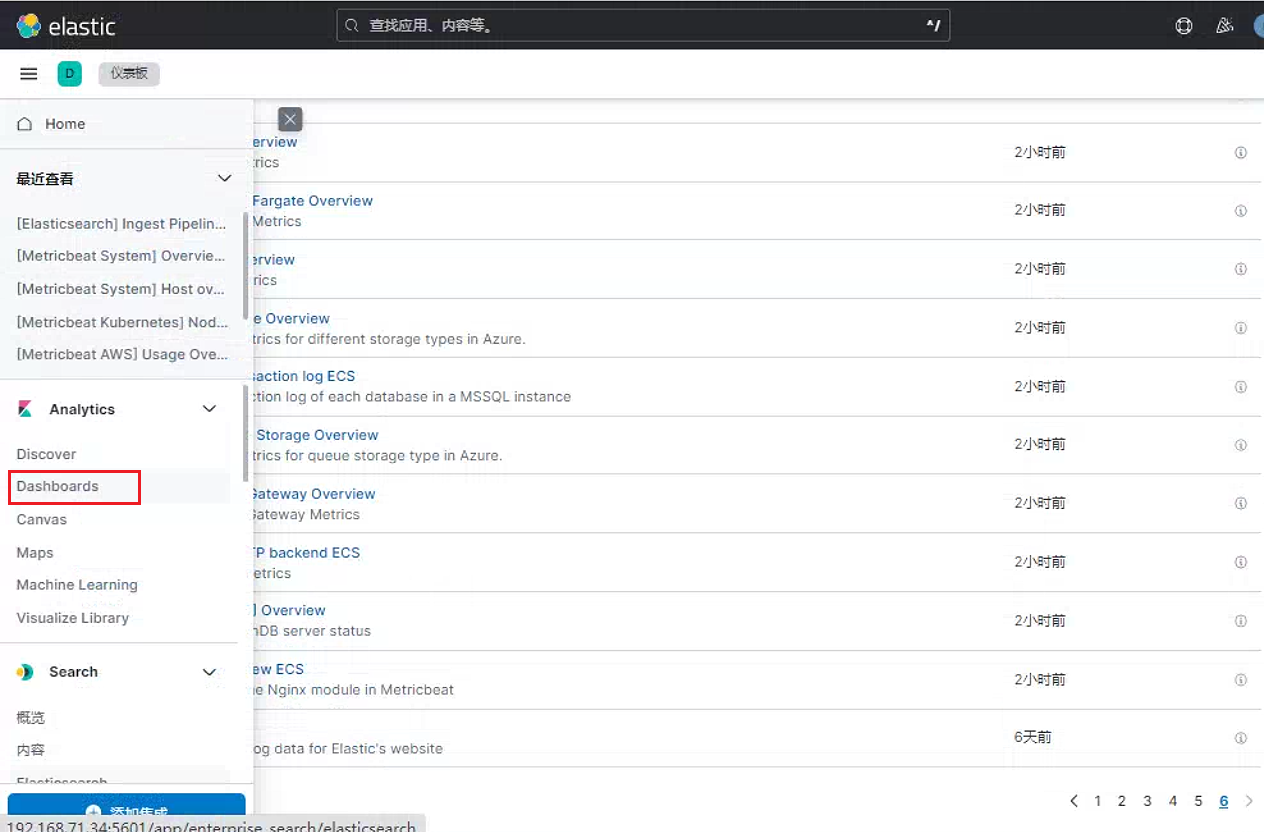
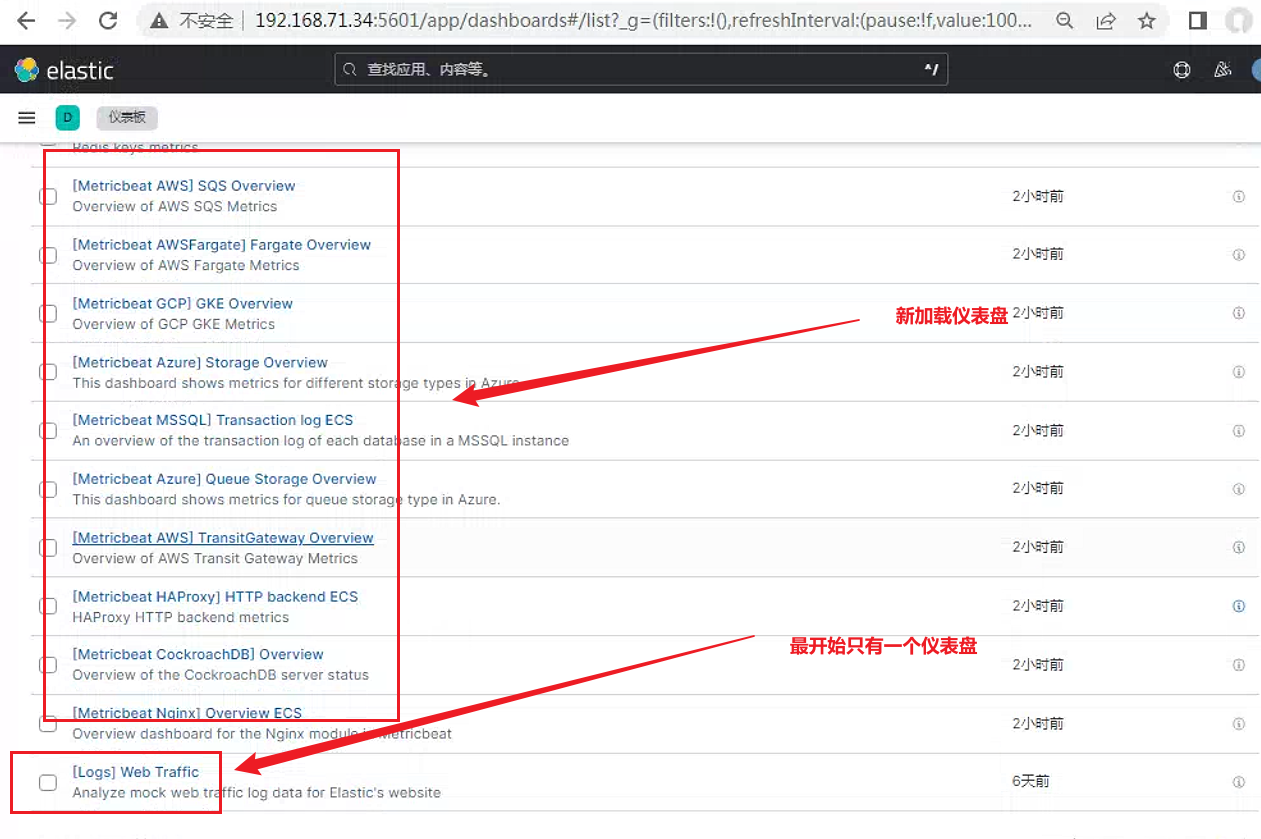
搜索
System仪表盘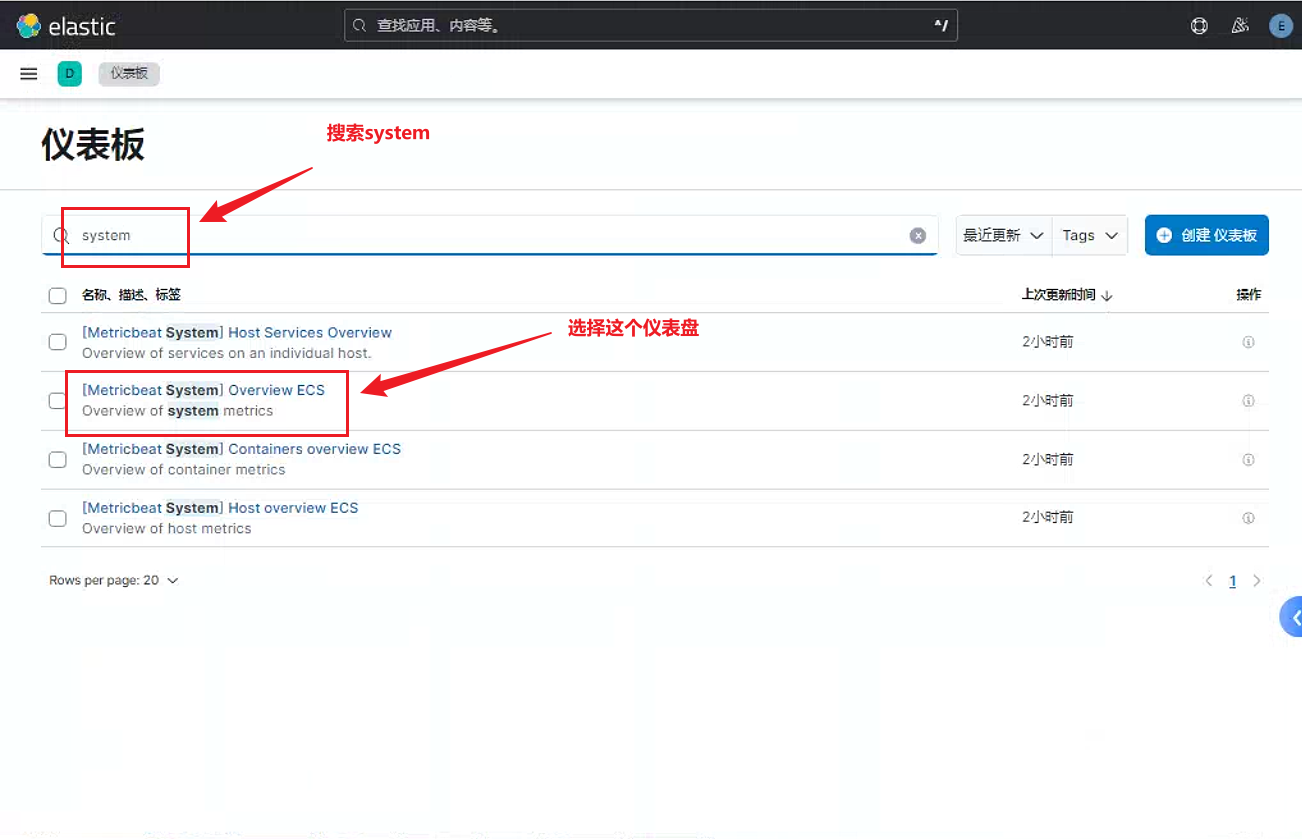
这里可以看到节点基础性能
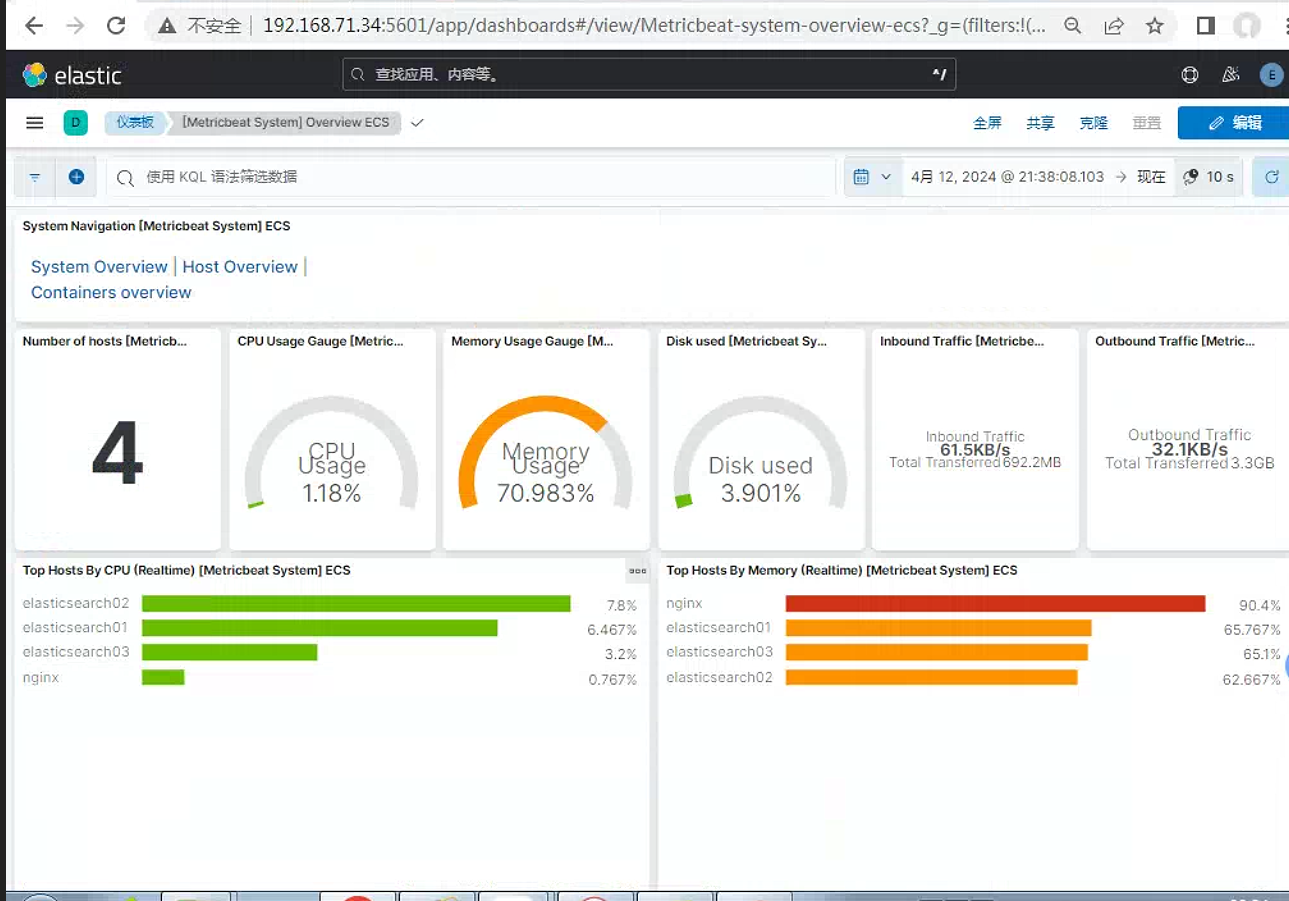
选择
Host oerview仪表盘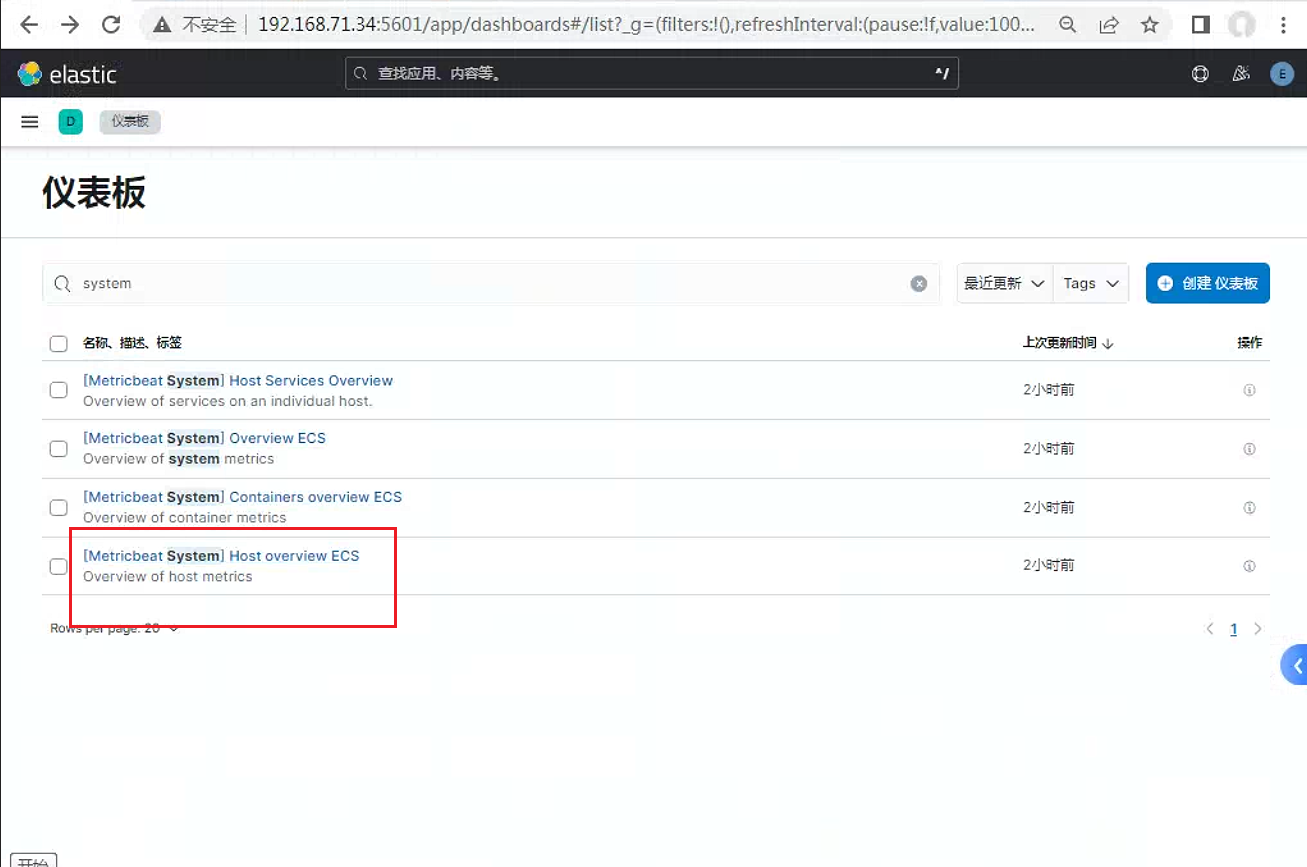
Host overview视图具体显示如下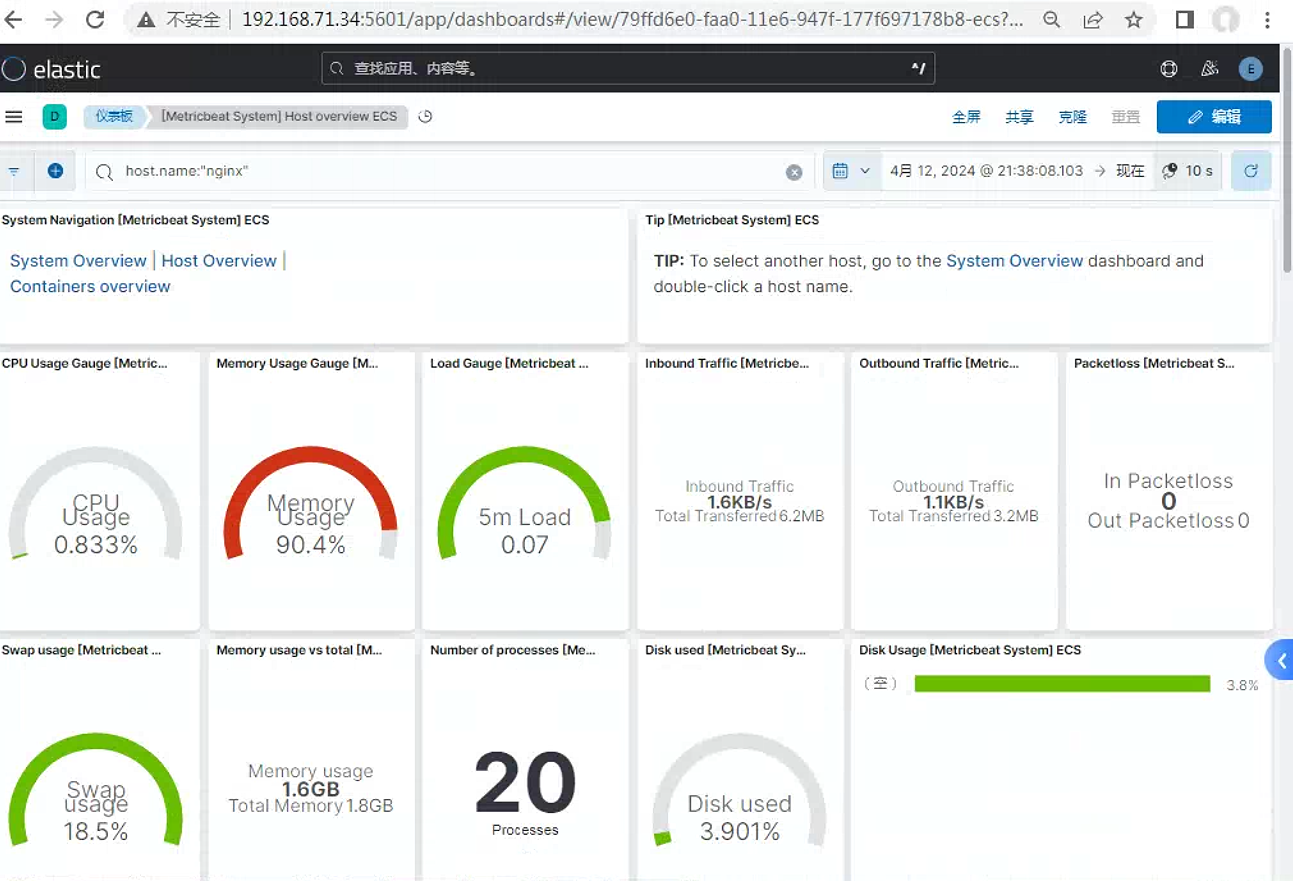
这里需要单独说明的一点, 如果是beat直接传递日志信息给elasticsearch, 则配置的索引是隐藏起来的。只有通过传给logstash然后再传给elasticsearch的日志索引才是显示的
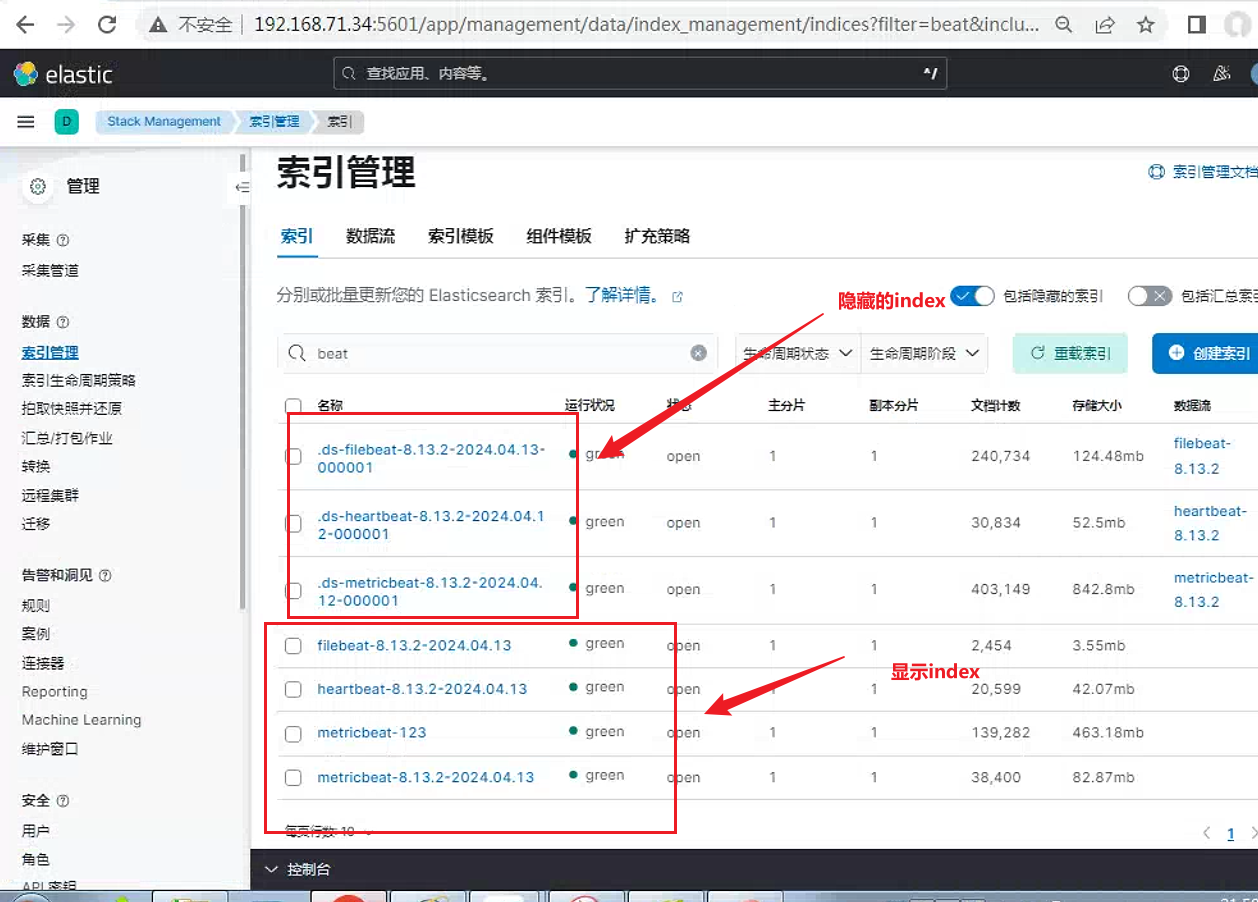
2.2 elasticsearch节点监控配置
这里页面中具体的配置位置如下:
进入如图所示。
Stack Monitoring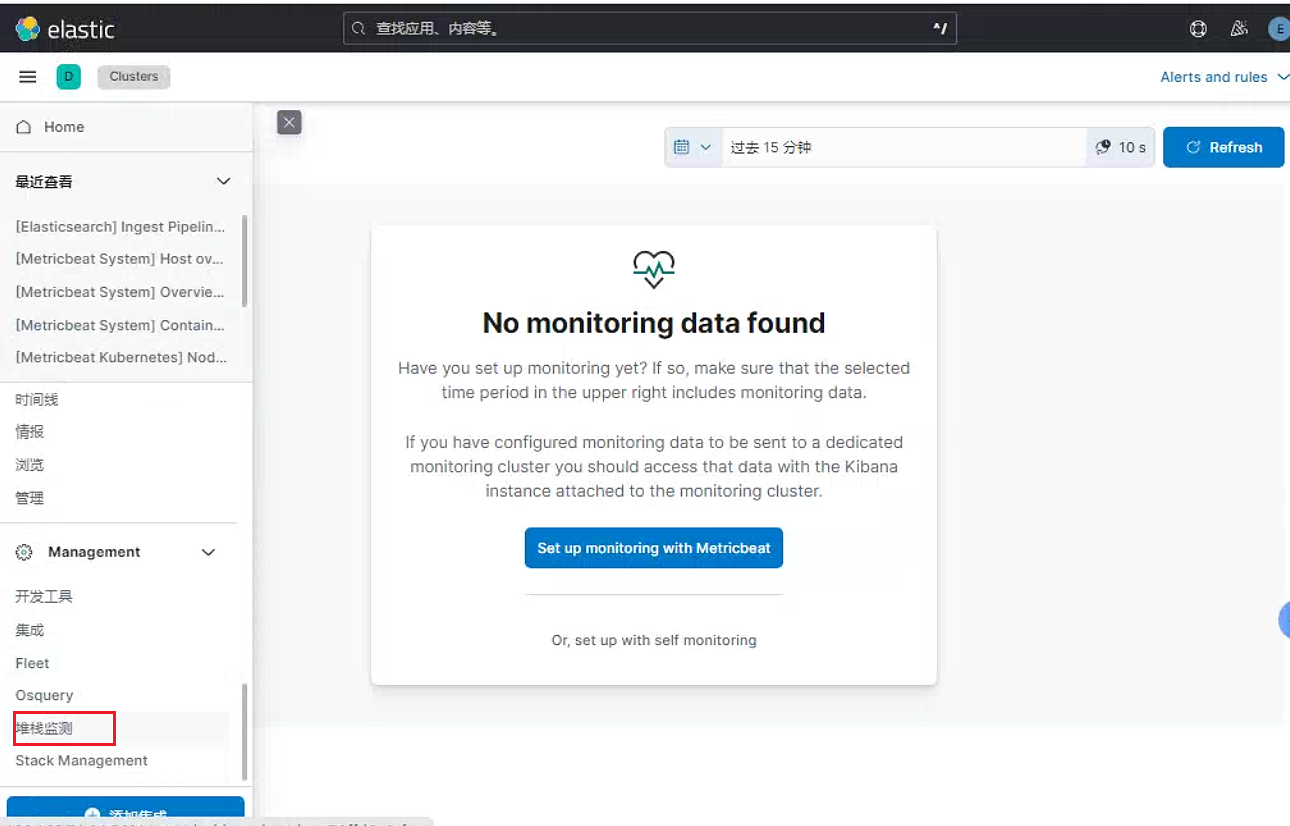
选择
Set up monitoring with Metricbeat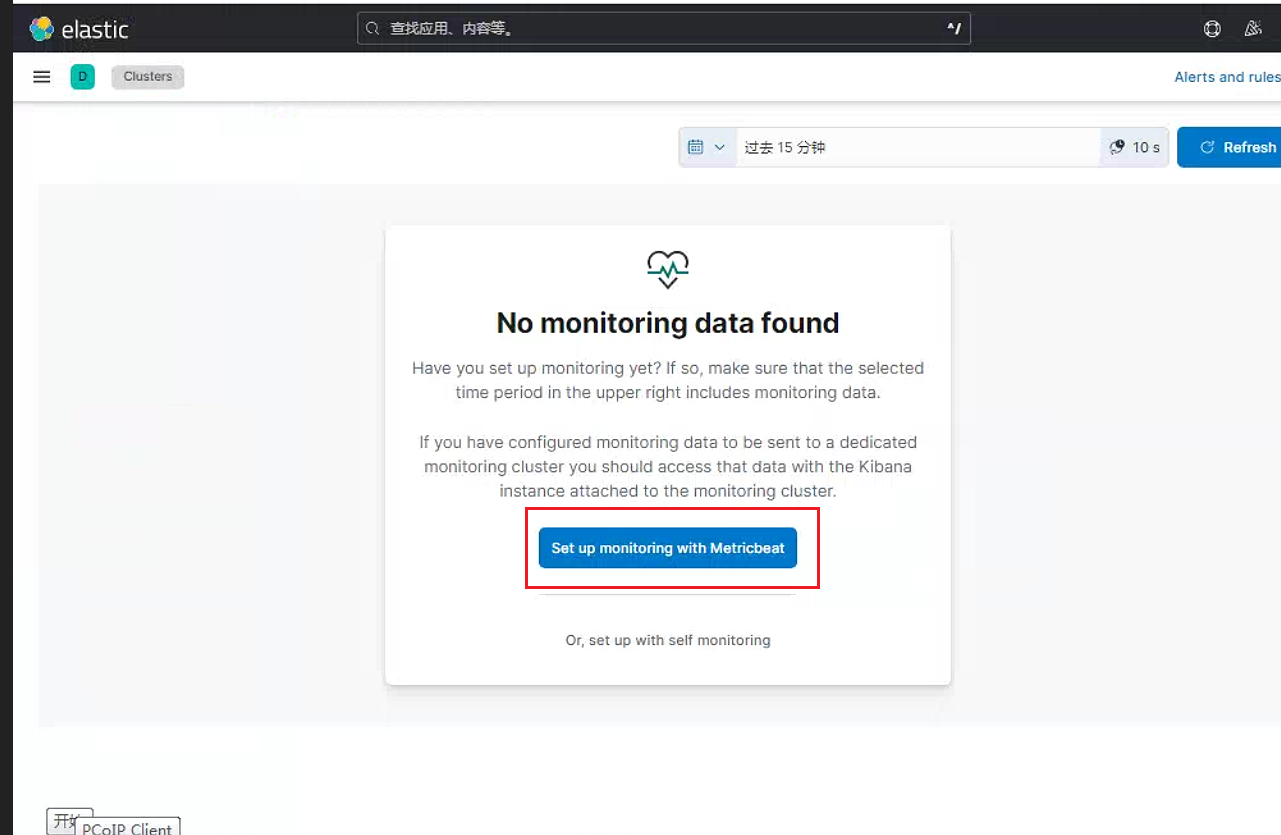
点击
Monitor with Metricbeat链接: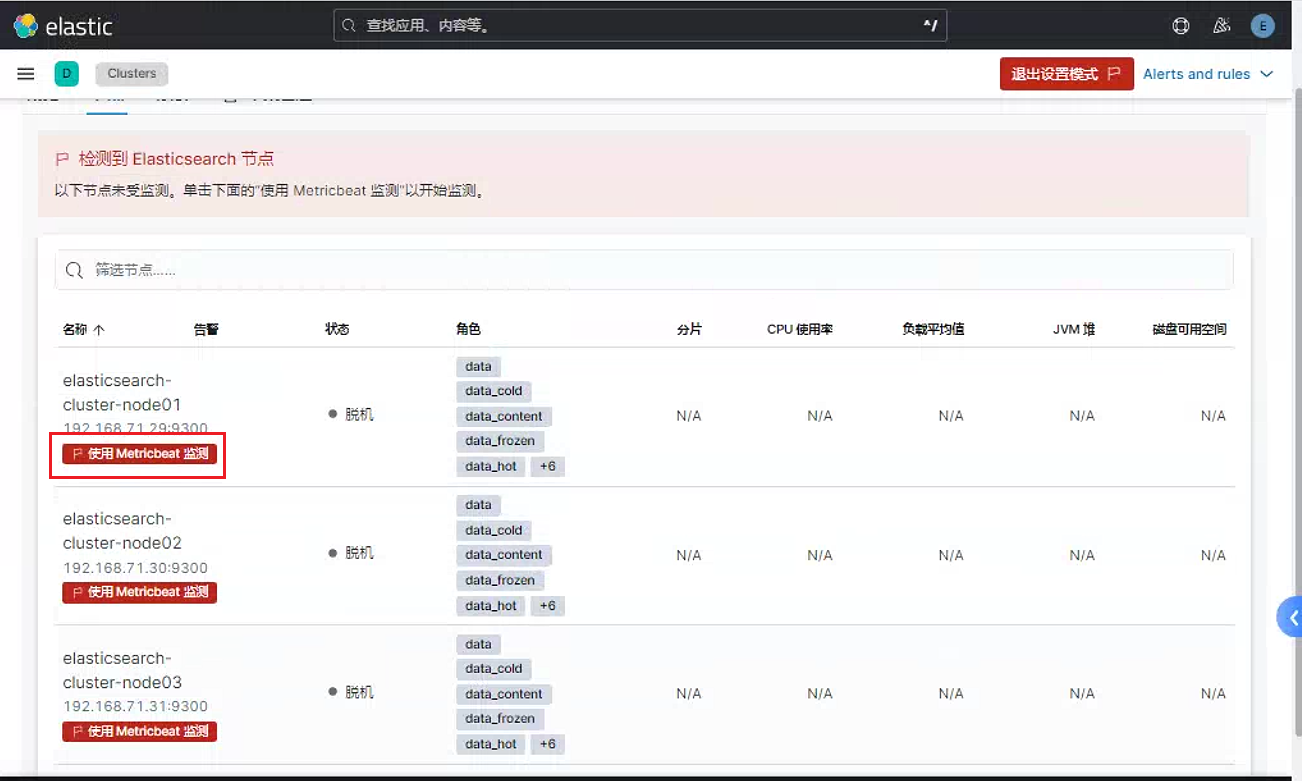
直接点击下一步
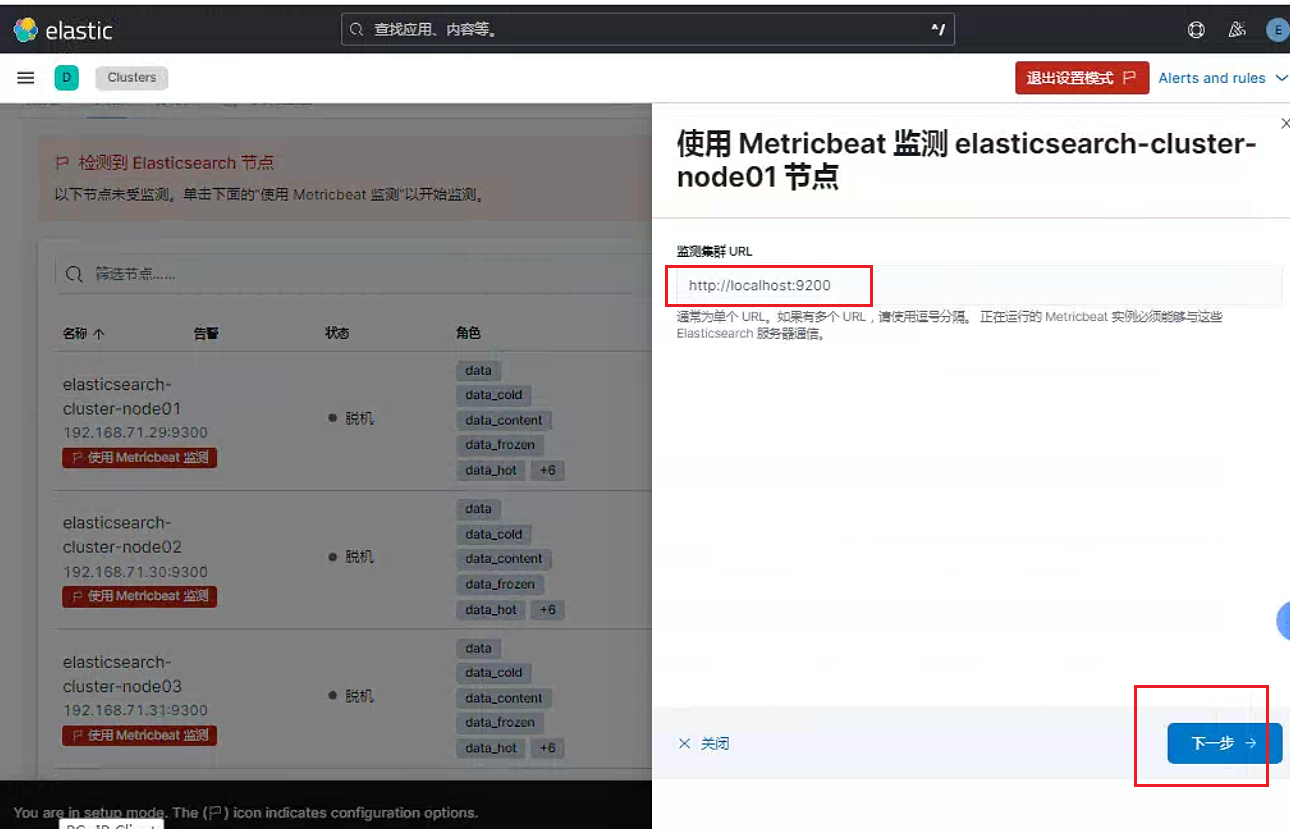
会提示大致配置的具体流程
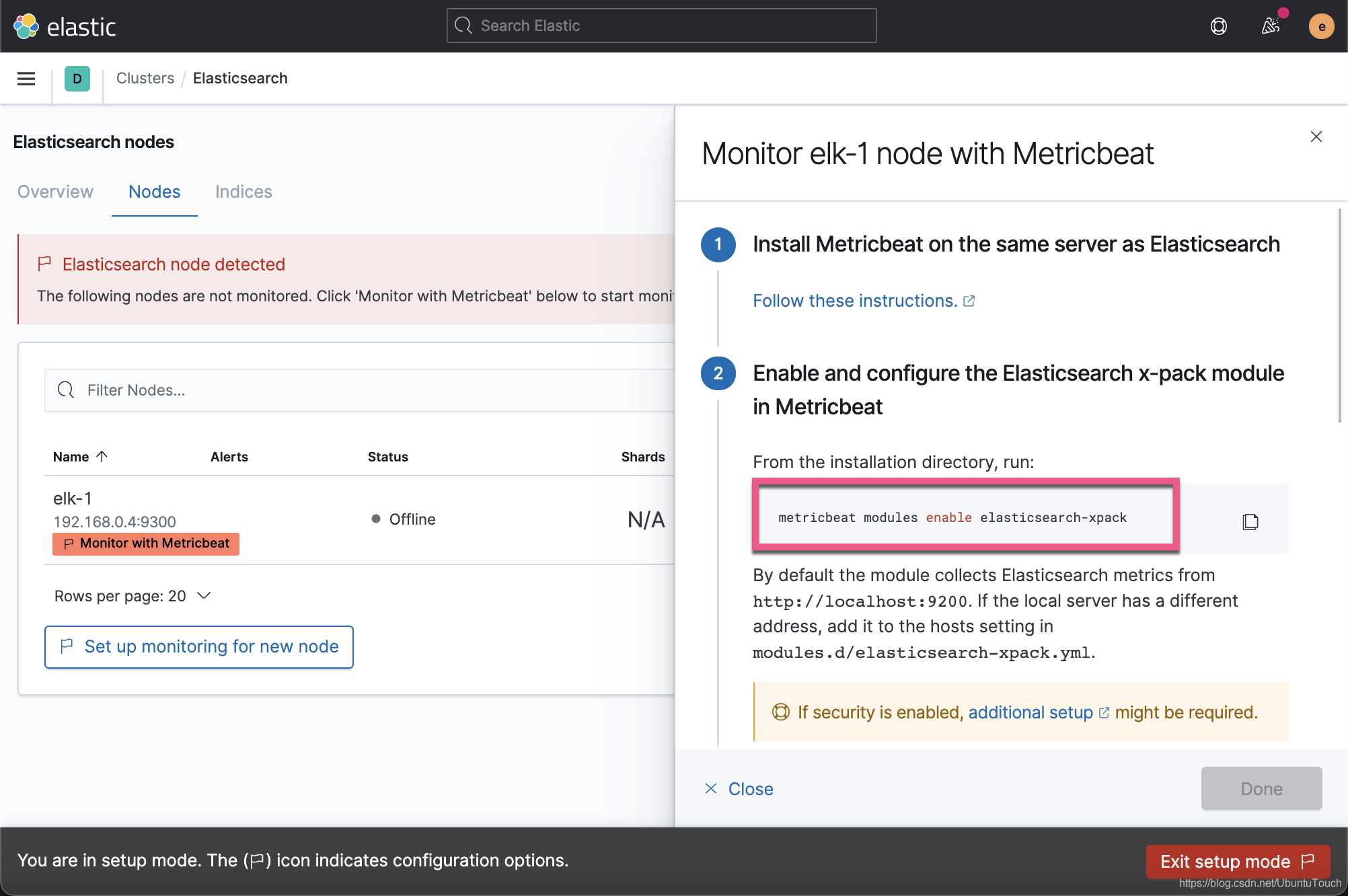
这里可以看到基本所有的配置流程均在后台配置即可
三个
elasticsearch节点安装metricbeat软件,root@elasticsearch01:~# dpkg -i metricbeat-8.13.2-amd64.deb Selecting previously unselected package metricbeat. (Reading database ... 126416 files and directories currently installed.) Preparing to unpack metricbeat-8.13.2-amd64.deb ... Unpacking metricbeat (8.13.2) ... Setting up metricbeat (8.13.2) ...三个
elsticsearch节点调整metricbeat软件配置。主要是设置用户名和密码root@elasticsearch01:~# cat /etc/metricbeat/metricbeat.yml output.elasticsearch: # Array of hosts to connect to. hosts: ["localhost:9200"] # Performance preset - one of "balanced", "throughput", "scale", # "latency", or "custom". preset: balanced # Protocol - either `http` (default) or `https`. #protocol: "https" # Authentication credentials - either API key or username/password. #api_key: "id:api_key" username: "elastic" password: "123456"三个
elasticsearch节点, 在Metricbeat中启用并配置Elasticsearch x-pack模块root@elasticsearch01:/usr/share/metricbeat# metricbeat modules enable elasticsearch-xpack三个节点通过配置文件
/etc/metricbeat/modules.d/elasticsearch-xpack.yml。这里需要使用一个内置用户remote_monitoring_user。另外可以手动创建一个含有remote_monitoring_collector角色功能的用户。root@elasticsearch01:~# cat /etc/metricbeat/modules.d/elasticsearch-xpack.yml # Module: elasticsearch # Docs: https://www.elastic.co/guide/en/beats/metricbeat/8.13/metricbeat-module-elasticsearch.html - module: elasticsearch xpack.enabled: true period: 10s hosts: ["http://localhost:9200"] username: "remote_monitoring_user" password: "123456" #api_key: "foo:bar"三个节点同时重置
remote_monitoring_user用户密码root@elasticsearch01:~# /usr/share/elasticsearch/bin/elasticsearch-reset-password -u remote_monitoring_user -i This tool will reset the password of the [remote_monitoring_user] user. You will be prompted to enter the password. Please confirm that you would like to continue [y/N]y Enter password for [remote_monitoring_user]: Re-enter password for [remote_monitoring_user]: Password for the [remote_monitoring_user] user successfully reset.三个
elasticsearch节点开启Metricbeats服务root@elasticsearch01:~# systemctl start metricbeat刷新
kibana可以看到三个集群节点已经联机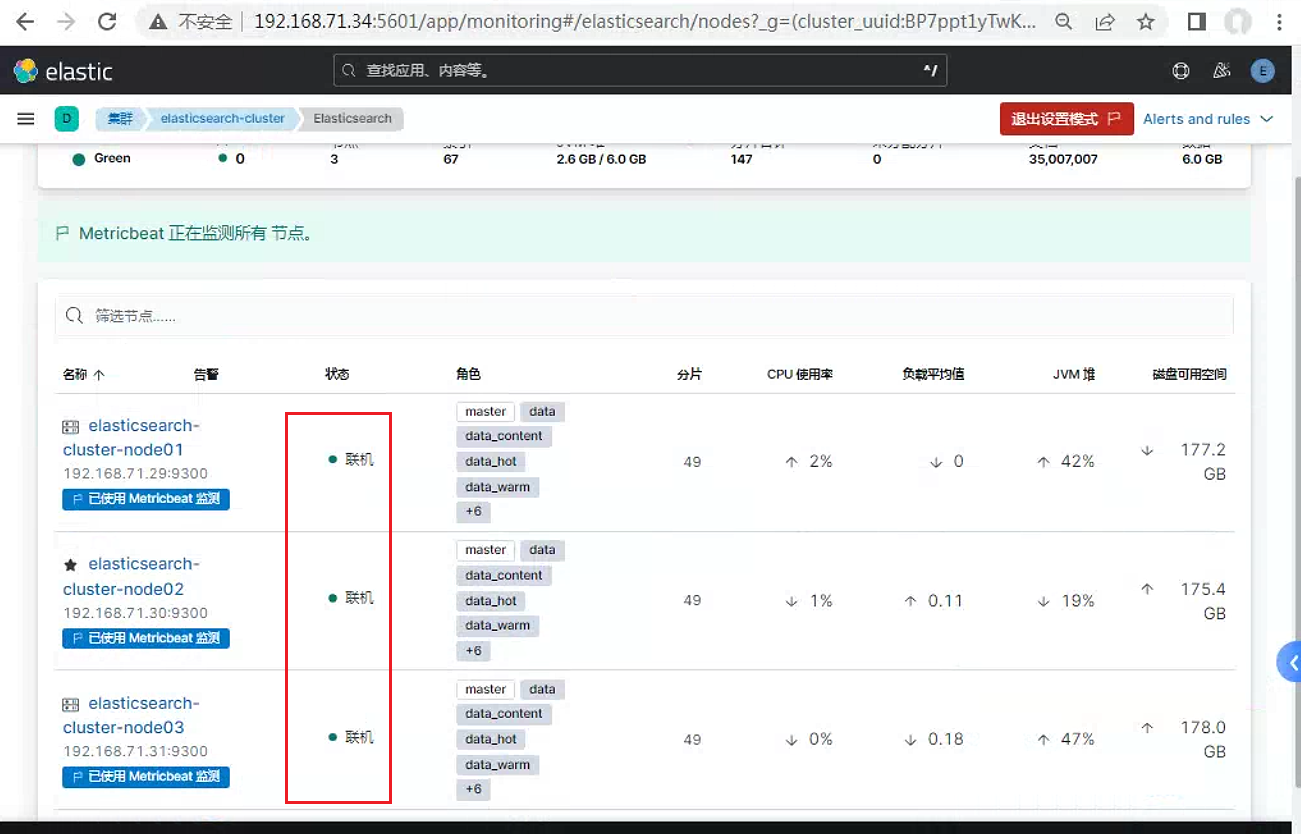
重新进入堆栈页面, 可以看到的页面信息
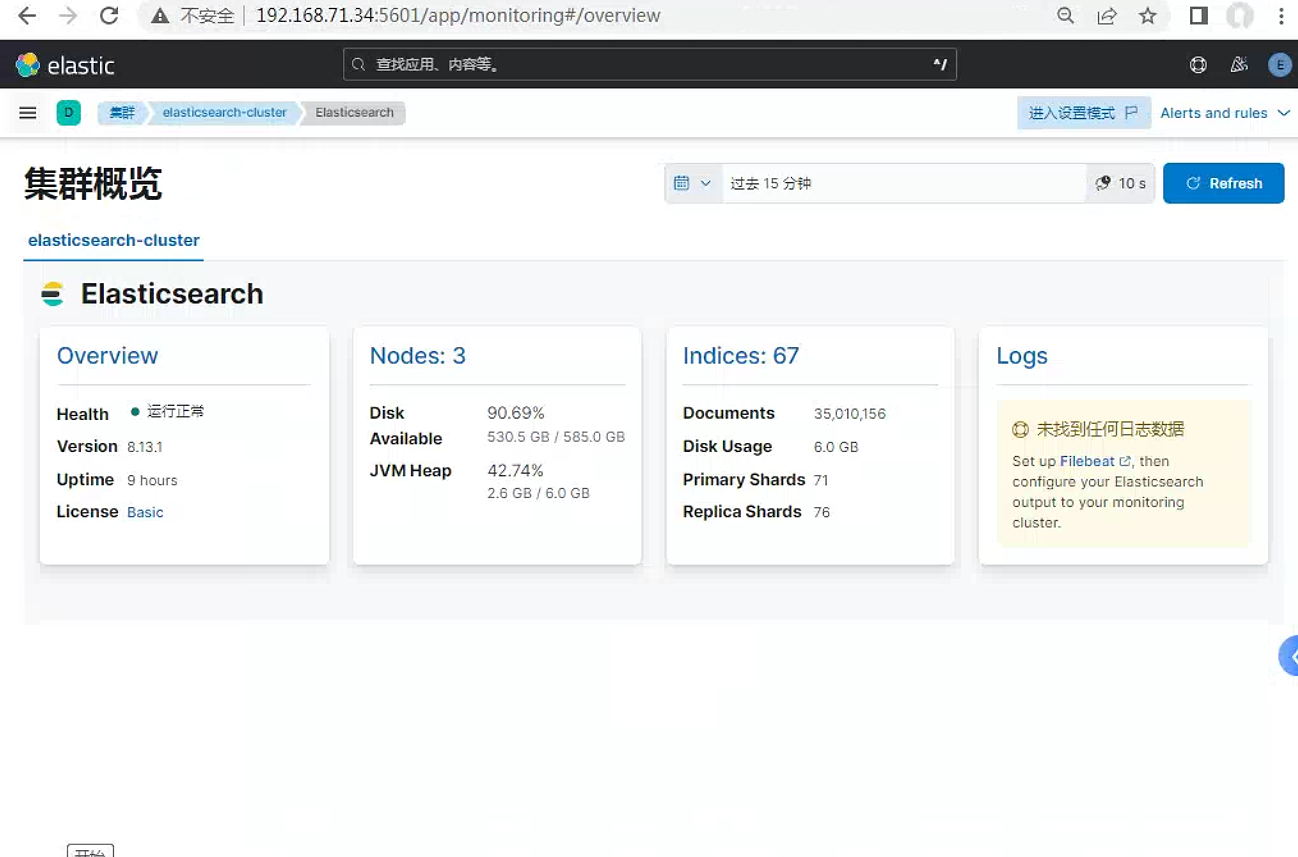
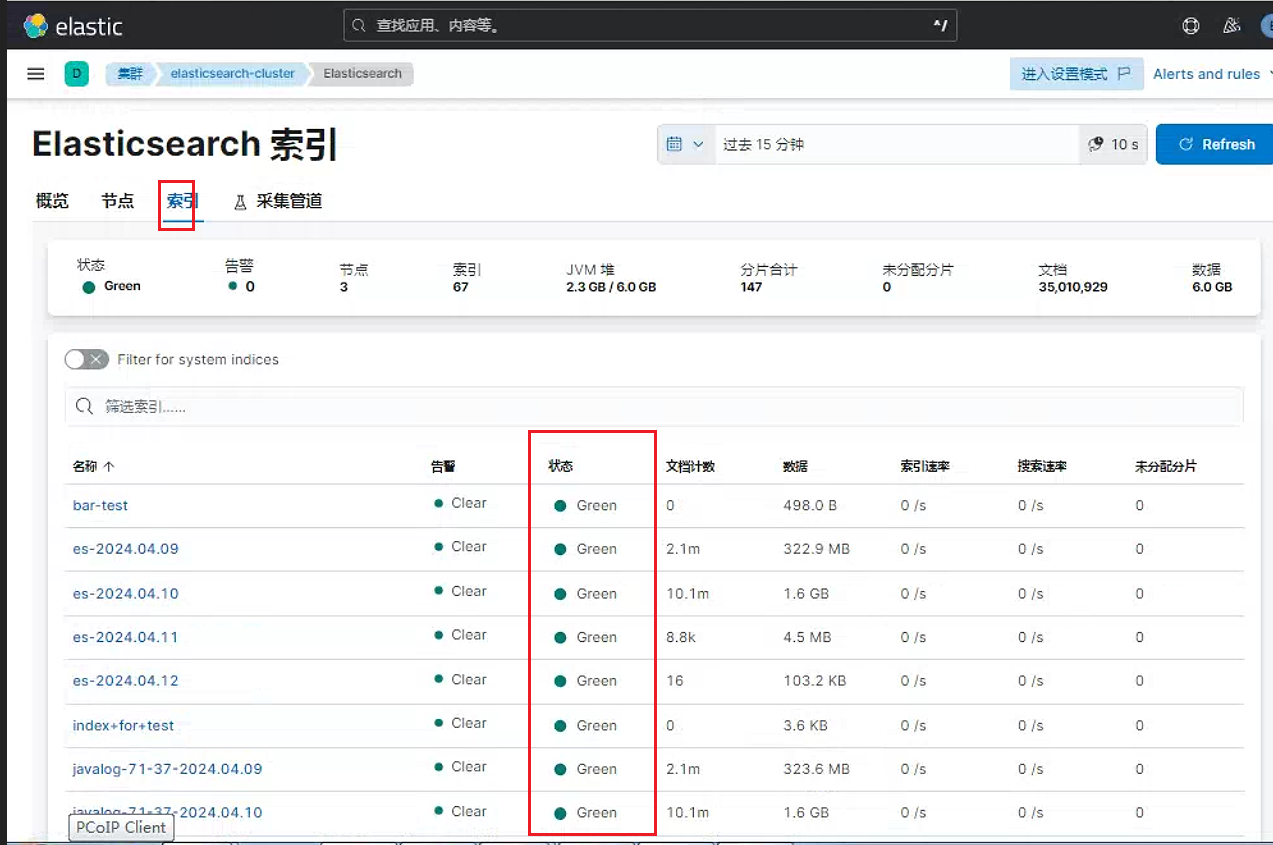
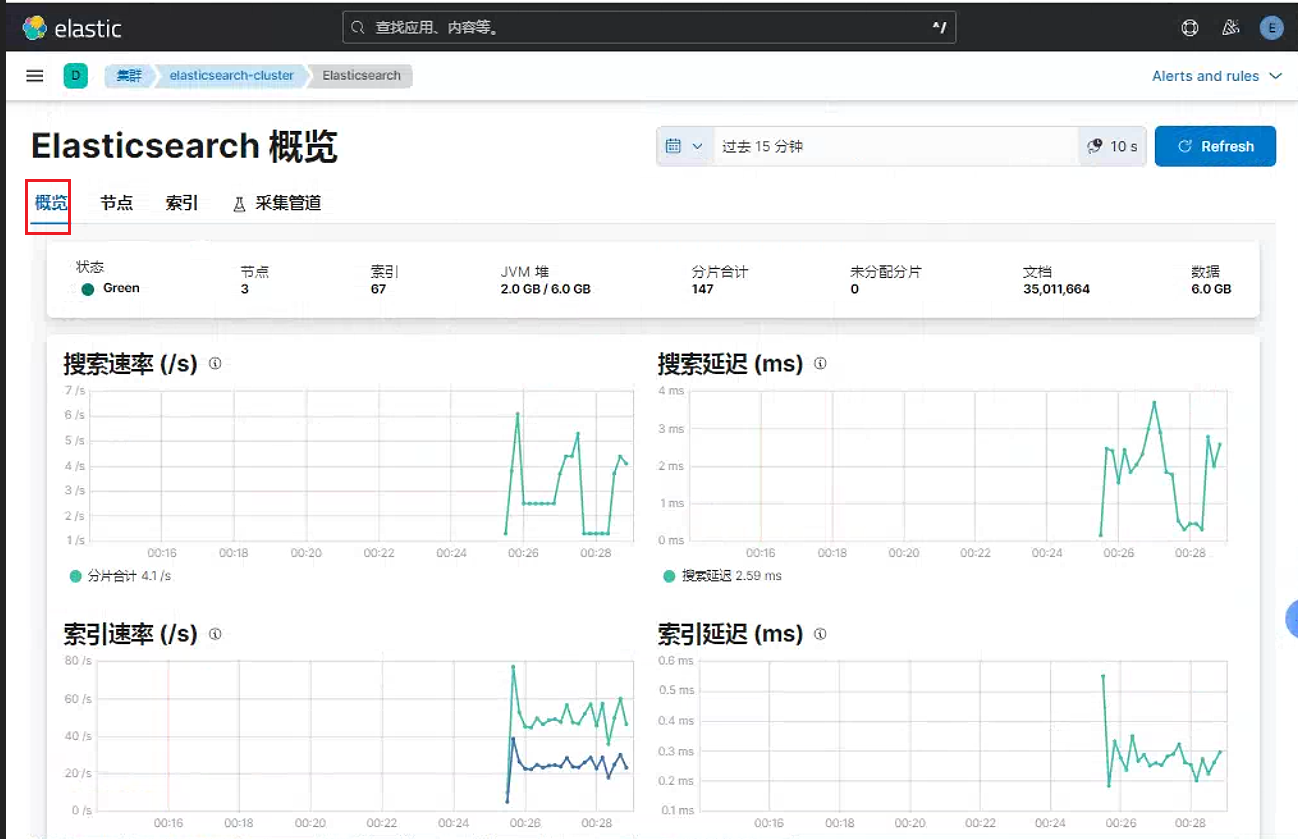
另外如果需要单独监听kibana节点 , 同样可以用这个功能。上面已经配置了output.elasticsearch。因此只需要在已经安装metricbeat的任意一个elasticsearch集群中的节点, 开启kibana-xpack 模块即可
另外beat的监控可以参考链接: Elastic : 监控 Beats 及 APM Server_elasticsearch apm server-CSDN博客
开启
kibana-xpack模块root@elasticsearch01:~# metricbeat modules enable kibana-xpack Enabled kibana-xpack配置
metricbeat服务中的kibana-xpack模块root@elasticsearch01:~# cat /etc/metricbeat/modules.d/kibana-xpack.yml # Module: kibana # Docs: https://www.elastic.co/guide/en/beats/metricbeat/8.13/metricbeat-module-kibana.html - module: kibana xpack.enabled: true period: 10s hosts: ["192.168.71.34:5601"] #basepath: "" username: "remote_monitoring_user" password: "123456"重启
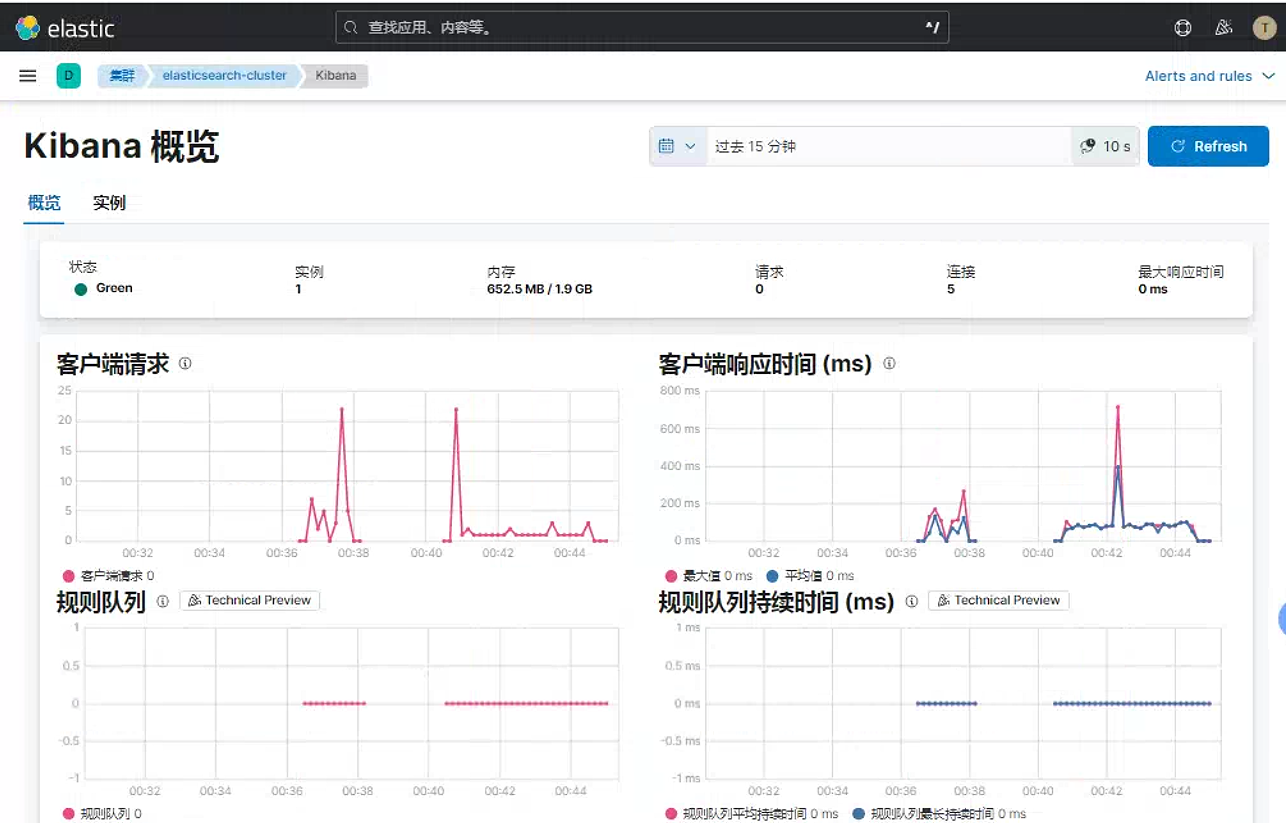
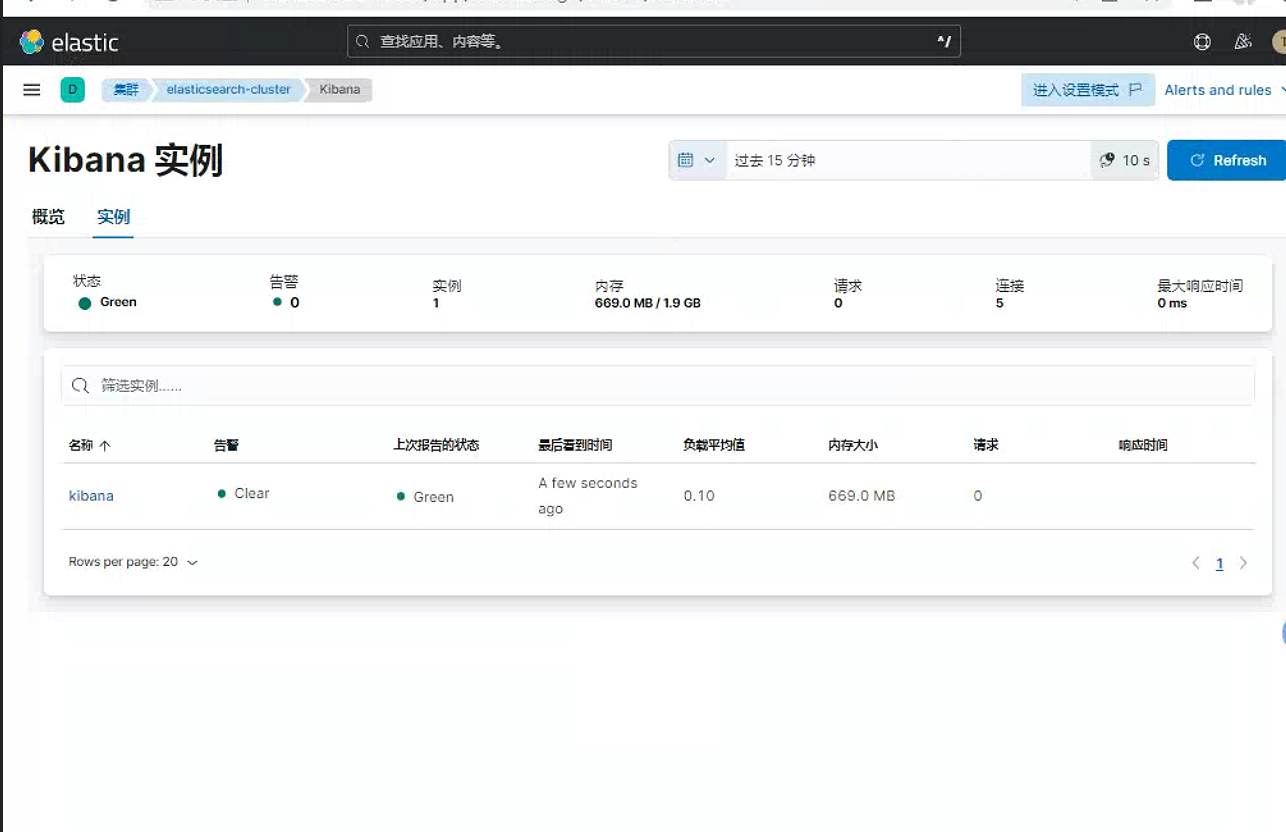
metircbeat服务查看
kibana页面。可以看到多个一个kibana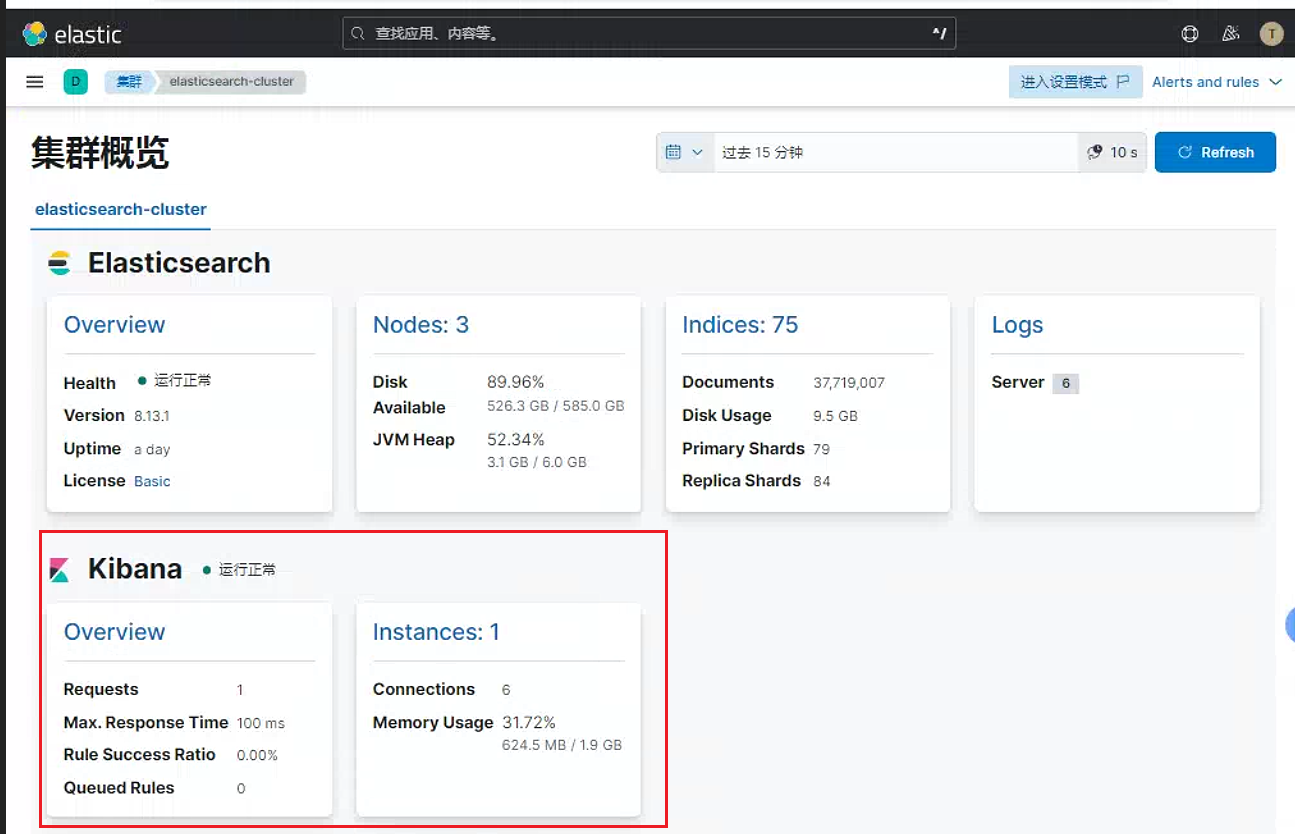
3. heartbeat
3.1 heartbeat基础
Heartbeat既可以从网络内部运行 , 也可以从网络外部运行。它只需获得所需 HTTP、TCP 或 ICMP 端点的网络访问权限即可。配置也非常简单 , 只需向 Heartbeat 提供要监测的 URL 列表就足够了。Heartbeat 会执行定期检查来验证端点是处于运行还是关闭状态 , 然后将此信息以及其他有用的指标报告给 ElasticSearch。此信息将自动显示在预构建的 Kibana 仪表板中 , 以便进行统包运行时间监测。
检测信号当前支持监视器通过以下方式检查主机:
ICMP(v4和v6)回显请求。当您只是想检查服务是否可用时 , 请使用icmp监视器。此监视器需要root访问权限。TCP: 使用tcp监视器通过tcp进行连接。您可以选择配置此监视器 , 以便通过发送和/或接收自定义负载来验证端点。HTTP: 使用http监视器通过http进行连接。您可以选择性地配置此监视器 , 以验证服务是否返回预期的响应 , 例如特定的状态代码、响应标头或内容。
官方下载地址: https://www.elastic.co/cn/downloads/past-releases#heartbeat
3.2 基础配置步骤
配置步骤如下:
安装
heartbeatroot@nginx:~# dpkg -i heartbeat-8.13.2-amd64.deb Selecting previously unselected package heartbeat-elastic. (Reading database ... 126442 files and directories currently installed.) Preparing to unpack heartbeat-8.13.2-amd64.deb ... Unpacking heartbeat-elastic (8.13.2) ... Setting up heartbeat-elastic (8.13.2) ...调整
heartbeat配置文件root@nginx:~# cat /etc/heartbeat/heartbeat.yml ################### Heartbeat Configuration Example ######################### # This file is an example configuration file highlighting only some common options. # The heartbeat.reference.yml file in the same directory contains all the supported options # with detailed comments. You can use it for reference. # # You can find the full configuration reference here: # https://www.elastic.co/guide/en/beats/heartbeat/index.html ############################# Heartbeat ###################################### # Define a directory from which to load monitor definitions. Definitions take the form # of individual yaml files. heartbeat.config.monitors: # Directory + glob pattern to search for configuration files path: ${path.config}/monitors.d/*.yml # If enabled, heartbeat will periodically check the config.monitors path for changes reload.enabled: false # How often to check for changes reload.period: 5s # Configure monitors inline heartbeat.monitors: - type: http # Set enabled to true (or delete the following line) to enable this monitor enabled: true # ID used to uniquely identify this monitor in Elasticsearch even if the config changes id: http-monitor # Human readable display name for this service in Uptime UI and elsewhere name: http Monitor # List of URLs to query urls: ["http://192.168.71.37"] # Configure task schedule schedule: '@every 10s' # Total test connection and data exchange timeout #timeout: 16s # Name of corresponding APM service, if Elastic APM is in use for the monitored service. #service.name: my-apm-service-name - type: icmp enabled: true id: elasticserch01-icmp name: elasticsearch01 icmp schedule: '*/5 * * * * * *' hosts: 192.168.71.29 - type: tcp id: kibana-hosts name: kibana hosts schedule: '@every 5s' ports: [5601,22] - type: http id: baidu-com name: baidu https check schedule: '@every 10s' urls: ["https://www.baidu.com"] # Experimental: Set this to true to run heartbeat monitors exactly once at startup #heartbeat.run_once: true # ======================= Elasticsearch template setting ======================= setup.template.settings: index.number_of_shards: 1 #设置分配信息 index.codec: best_compression #_source.enabled: false # ================================== Outputs =================================== # Configure what output to use when sending the data collected by the beat. # ---------------------------- Elasticsearch Output ---------------------------- output.elasticsearch: # Array of hosts to connect to. hosts: ["192.168.71.29:9200","192.168.71.30:9200","192.168.71.31:9200"] #设置elasticsearch主机 # Performance preset - one of "balanced", "throughput", "scale", # "latency", or "custom". preset: balanced #api_key: "id:api_key" username: "elastic" #设置elasticsearch用户名和密码 password: "123456"开启
heartbeat服务root@nginx:~# systemctl start heartbeat-elastic检查
kibana的uptime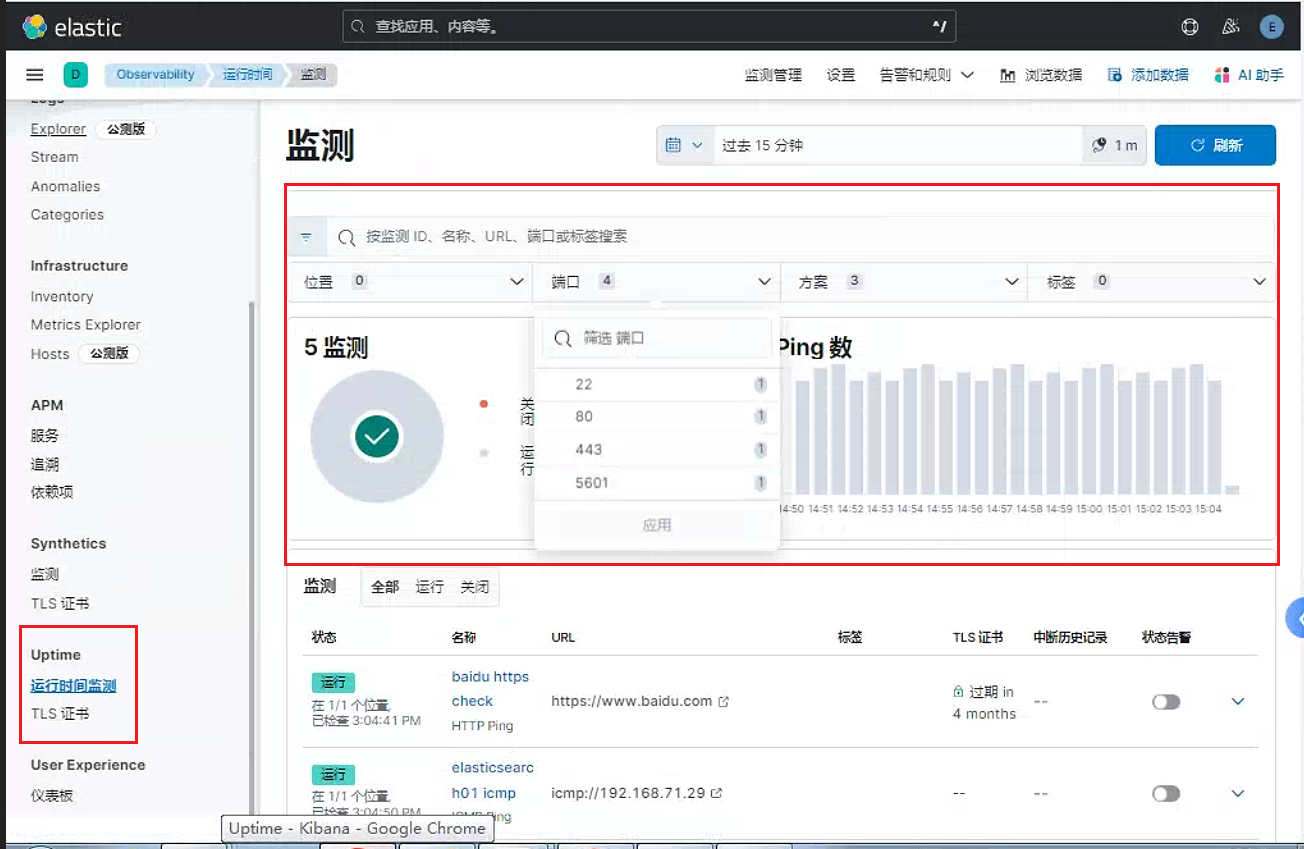
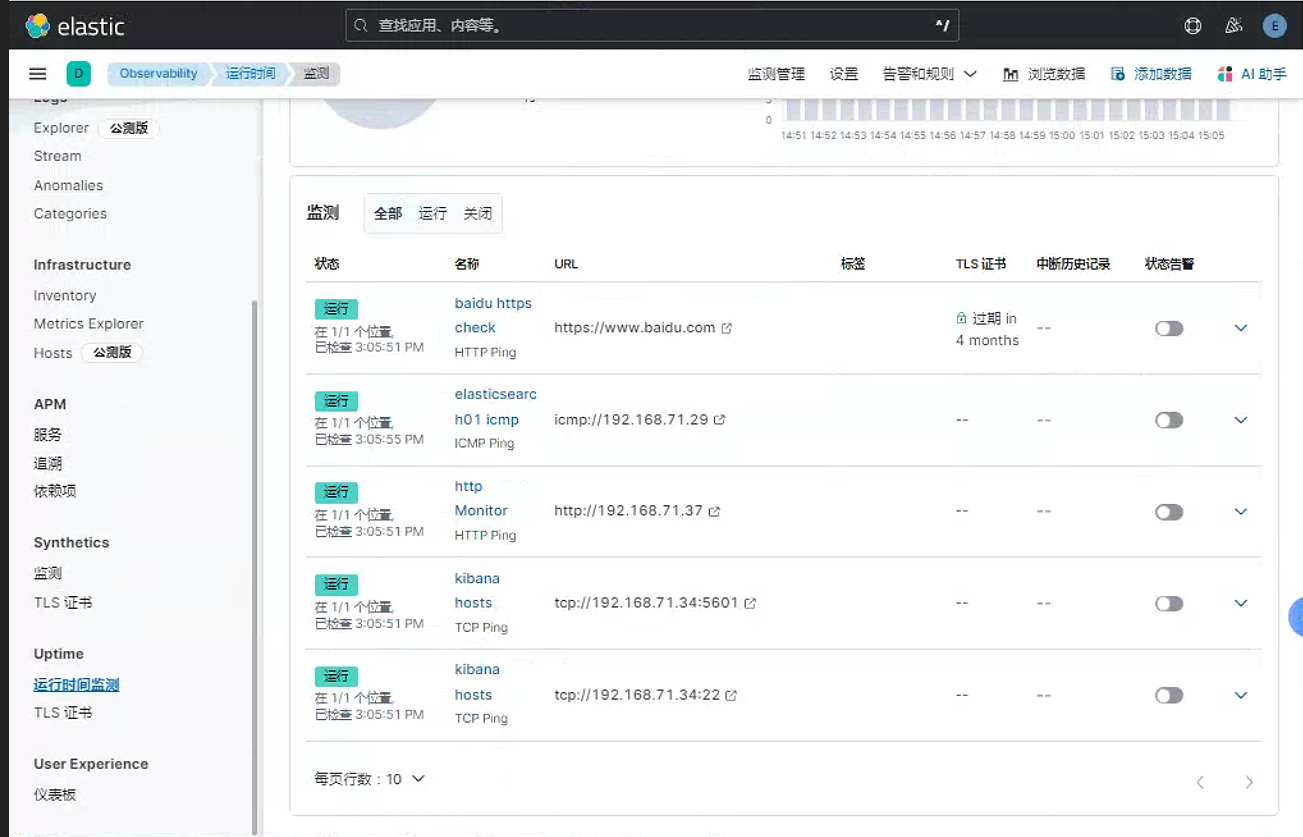
这里面可以看到可以验证
baidu.com页面的TLS证书。由于
heartbeat8之后软件包没有dashboard。因此可以在githab下载对应的仪表盘下载地址: uptime-contrib/dashboards/7.x at master · elastic/uptime-contrib · GitHub
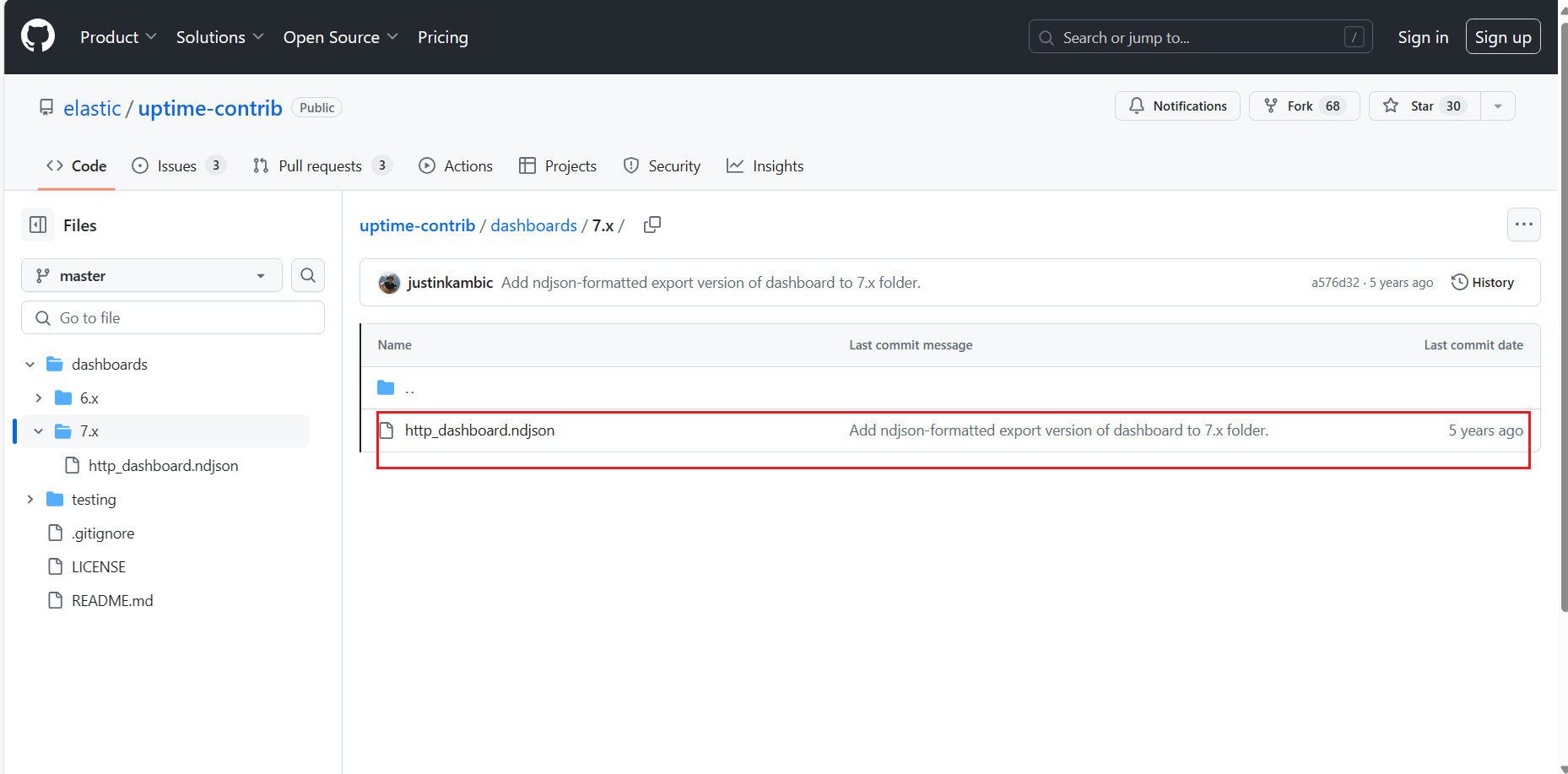
在
stack management的kibana中的已保存对象中, 导入刚下载的.ndjson文件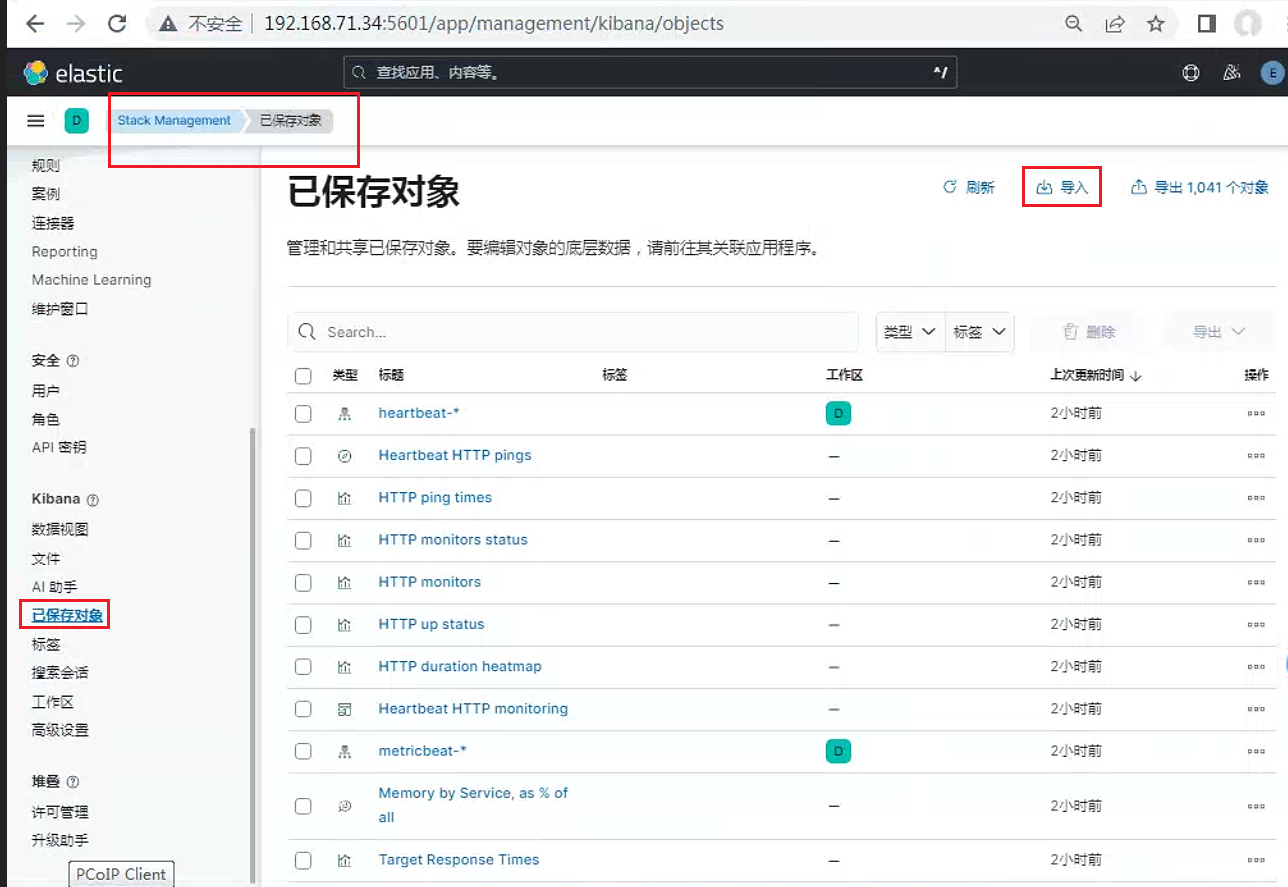
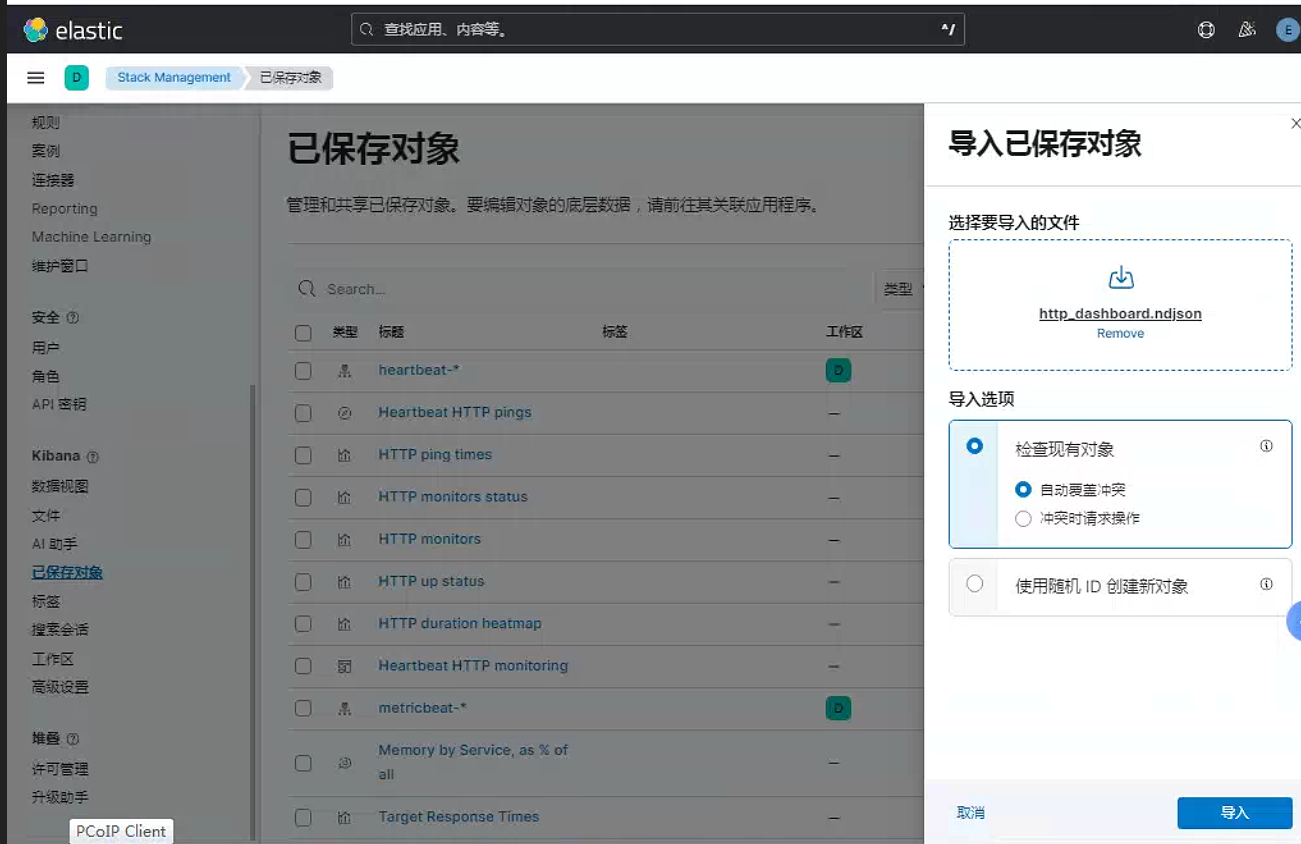
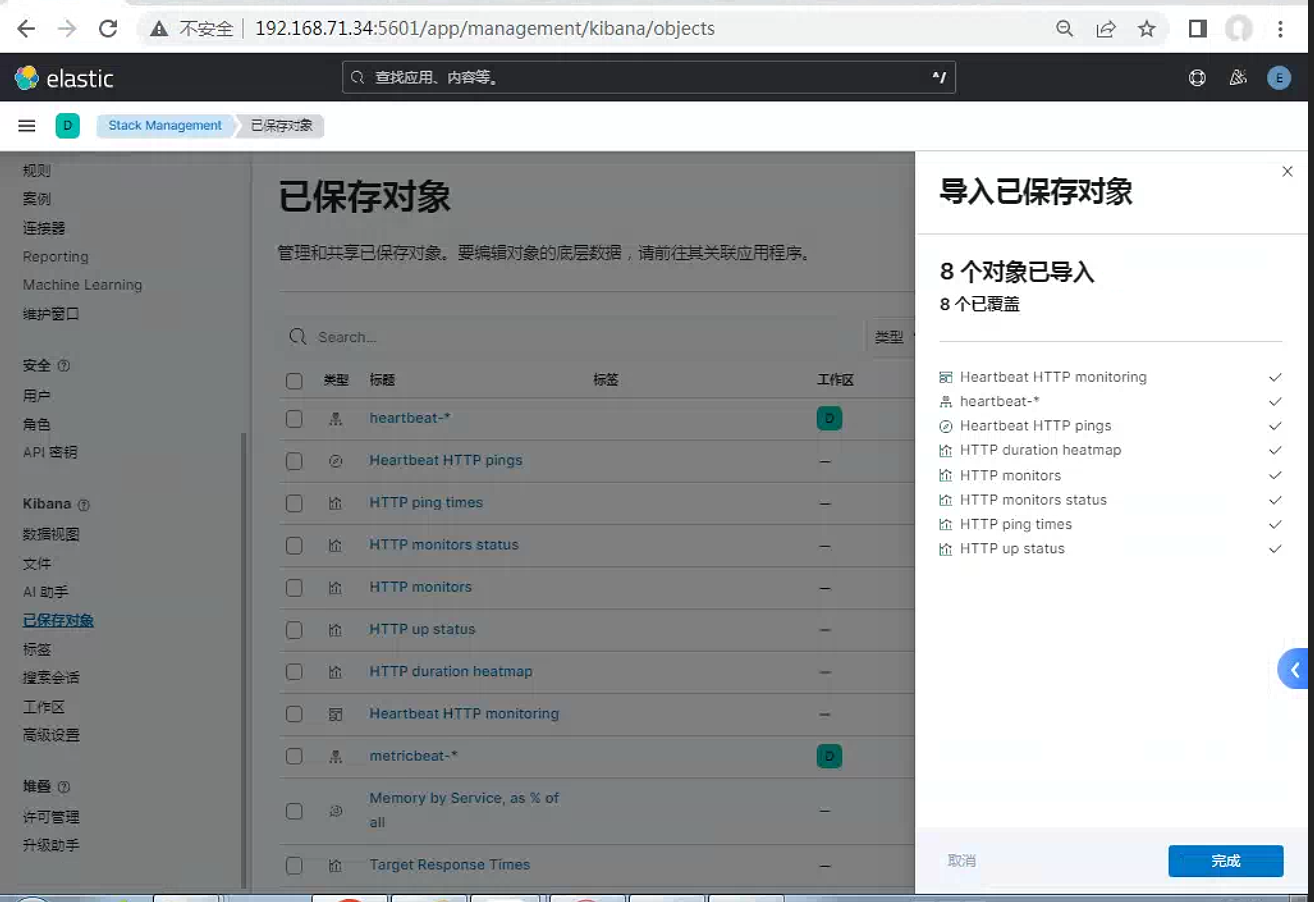
选择刚导入的
dashboard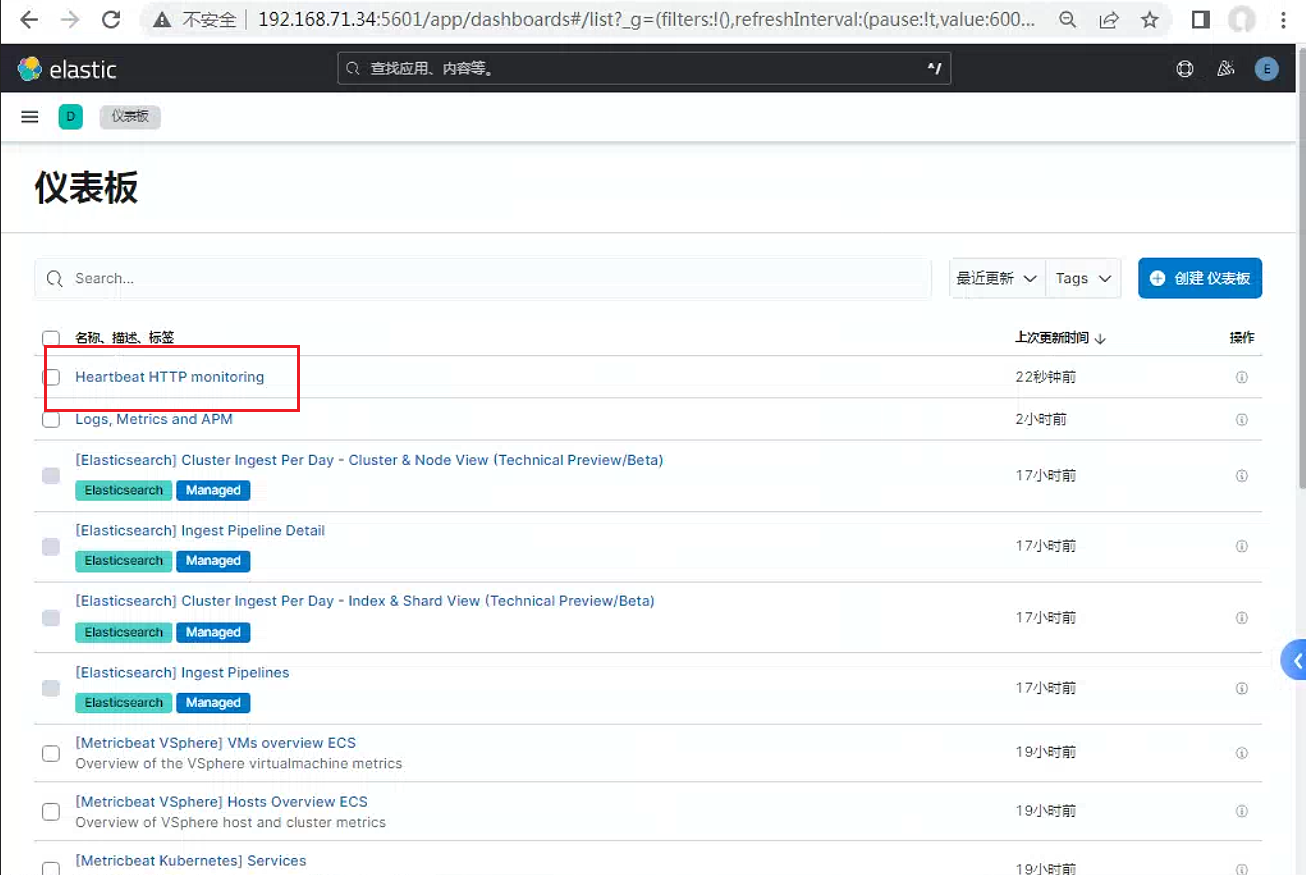
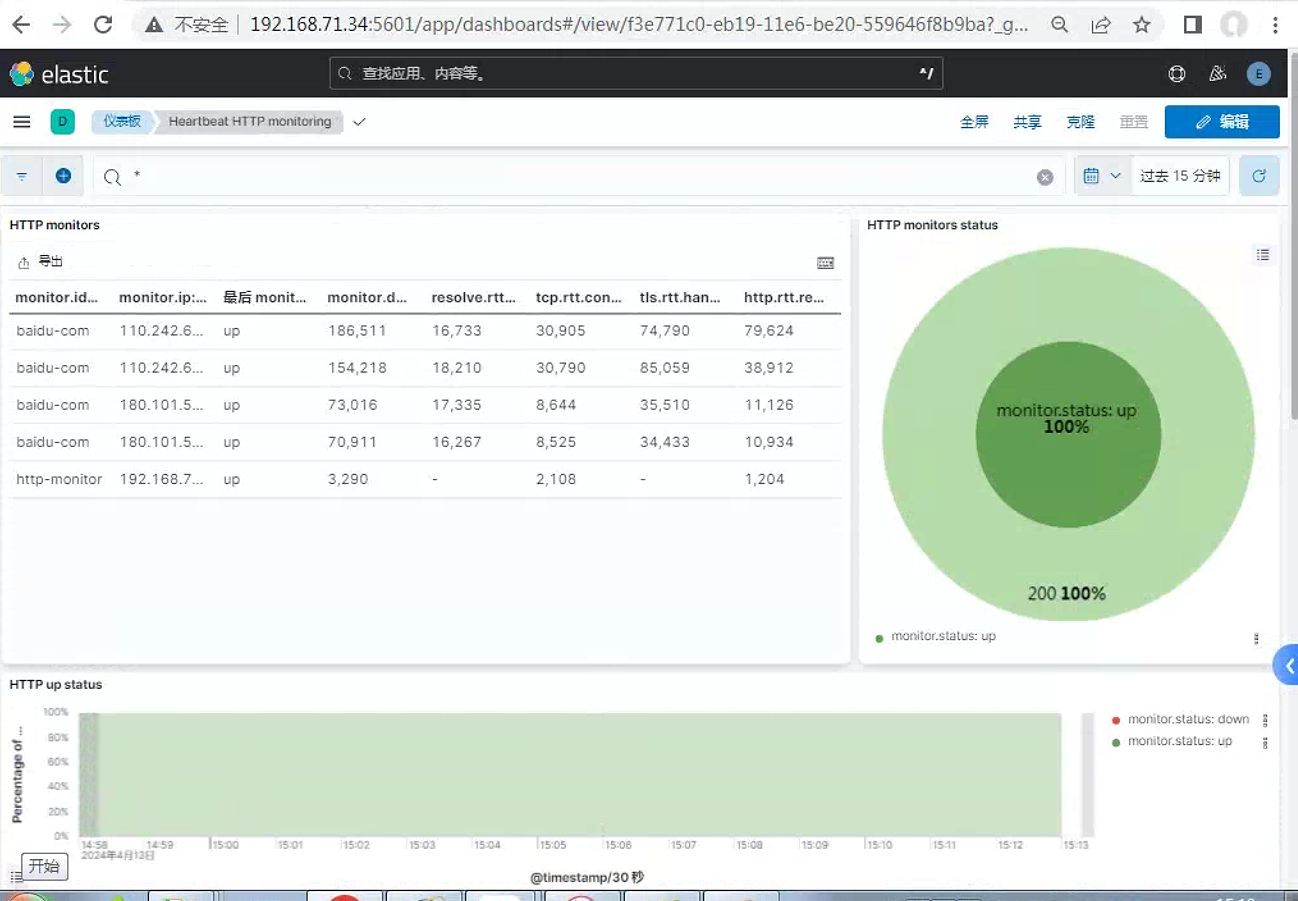
3.3 logstash配置
修改heartbeat配置文件
root@nginx:~# cat /etc/heartbeat/heartbeat.yml
################### Heartbeat Configuration Example #########################

# This file is an example configuration file highlighting only some common options.
# The heartbeat.reference.yml file in the same directory contains all the supported options
# with detailed comments. You can use it for reference.
#
# You can find the full configuration reference here:
# https://www.elastic.co/guide/en/beats/heartbeat/index.html

############################# Heartbeat ######################################

# Define a directory from which to load monitor definitions. Definitions take the form
# of individual yaml files.
heartbeat.config.monitors:
  # Directory + glob pattern to search for configuration files
  path: ${path.config}/monitors.d/*.yml
  # If enabled, heartbeat will periodically check the config.monitors path for changes
  reload.enabled: false
  # How often to check for changes
  reload.period: 5s

# Configure monitors inline
heartbeat.monitors:
- type: http
  # Set enabled to true (or delete the following line) to enable this monitor
  enabled: true
  # ID used to uniquely identify this monitor in Elasticsearch even if the config changes
  id: http-monitor
  # Human readable display name for this service in Uptime UI and elsewhere
  name: http Monitor
  # List of URLs to query
  urls: ["http://192.168.71.37"]
  # Configure task schedule
  schedule: '@every 10s'
  # Total test connection and data exchange timeout
  #timeout: 16s
  # Name of corresponding APM service, if Elastic APM is in use for the monitored service.
  #service.name: my-apm-service-name
- type: icmp
  enabled: true
  id: elasticserch01-icmp
  name: elasticsearch01 icmp
  schedule: '*/5 * * * * * *'
  hosts: 192.168.71.29
- type: tcp
  id: kibana-hosts
  name: kibana hosts
  schedule: '@every 5s'
  ports: [5601,22]
  hosts: 192.168.71.34
- type: http
  id: baidu-com
  name: baidu https check
  schedule: '@every 10s'
  urls: ["https://www.baidu.com"]


# ======================= Elasticsearch template setting =======================

setup.template.settings:
  index.number_of_shards: 1
  index.codec: best_compression
  #_source.enabled: false


# ------------------------------ Logstash Output -------------------------------
output.logstash:
  # The Logstash hosts
  hosts: ["192.168.71.32:5045"]

  # Optional SSL. By default is off.
  # List of root certificates for HTTPS server verifications
  #ssl.certificate_authorities: ["/etc/pki/root/ca.pem"]

  # Certificate for SSL client authentication
  #ssl.certificate: "/etc/pki/client/cert.pem"

  # Client Certificate Key
  #ssl.key: "/etc/pki/client/cert.key"
配置
logstashroot@logstash01:/etc/logstash/conf.d# cat heartbeat-to-es.conf input { beats { port => 5045 } } output { elasticsearch { hosts => ["http://192.168.71.29:9200"] index => "%{[@metadata][beat]}-%{[@metadata][version]}-%{+YYYY.MM.dd}" #这索引名为官方默认推荐的索引名 user => "elastic" password => "123456" } }重启
heartbeat和logstash服务之后可以在
kibana中看到对应索引信息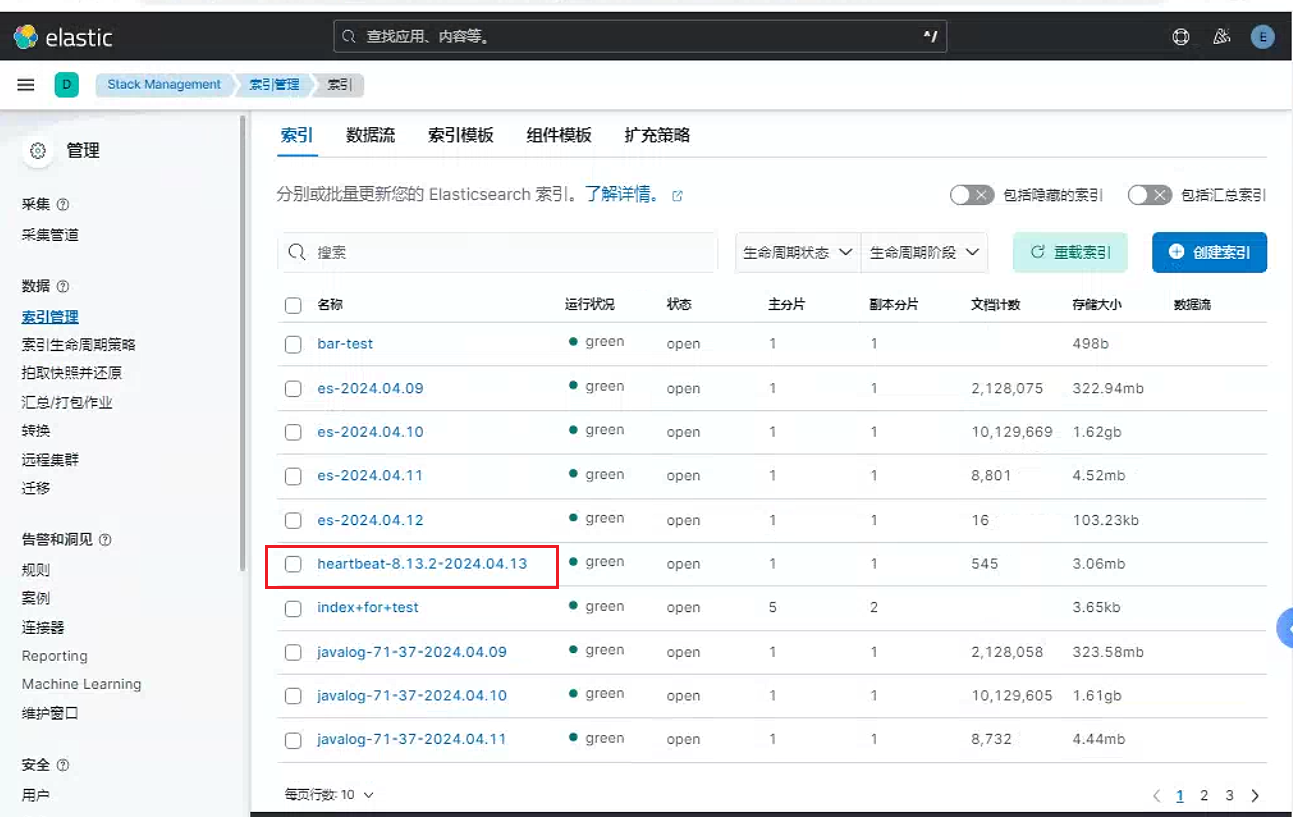
3. filebeat
3.1 filebeat基础
3.1.1 filebeat介绍
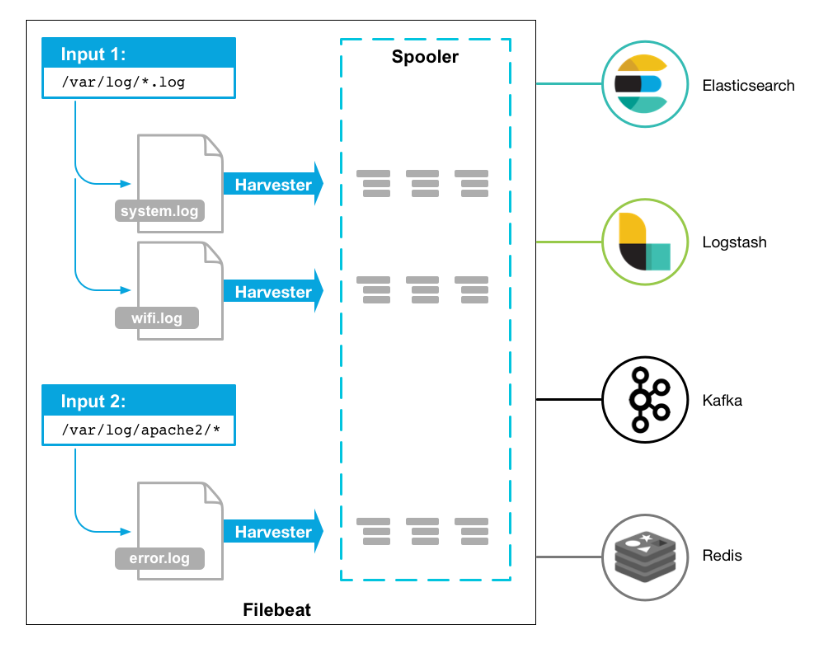
Filebeat是用于转发和集中日志数据的轻量级传送工具。Filebeat监视您指定的日志文件或位置 , 收集日志事件 , 并将它们转发到Elasticsearch或Logstash进行索引。
Filebeat的工作方式如下: 启动Filebeat时 , 它将启动一个或多个输入 , 这些输入将在为日志数据指定的位置中查找。对于Filebeat所找到的每个日志 , Filebeat都会启动收集器。每个收集器都读取单个日志以获取新内容 , 并将新日志数据发送到libbeat , libbeat将聚集事件 , 并将聚集的数据发送到为Filebeat配置的输出。
3.1.2 filebeat和logstash的关系
因为logstash是jvm跑的 , 资源消耗比较大 , 所以后来作者又用golang写了一个功能较少但是资源消耗也小的轻量级的logstash-forwarder。不过作者只是一个人 , 加入http://elastic.co公司以后 , 因为es公司本身还收购了另一个开源项目packetbeat , 而这个项目专门就是用golang的 , 有整个团队 , 所以es公司干脆把logstash-forwarder的开发工作也合并到同一个golang团队来搞 , 于是新的项目就叫filebeat了。
在Filebeat和Logstash之间做出决定取决于您的特定日志管理需求。
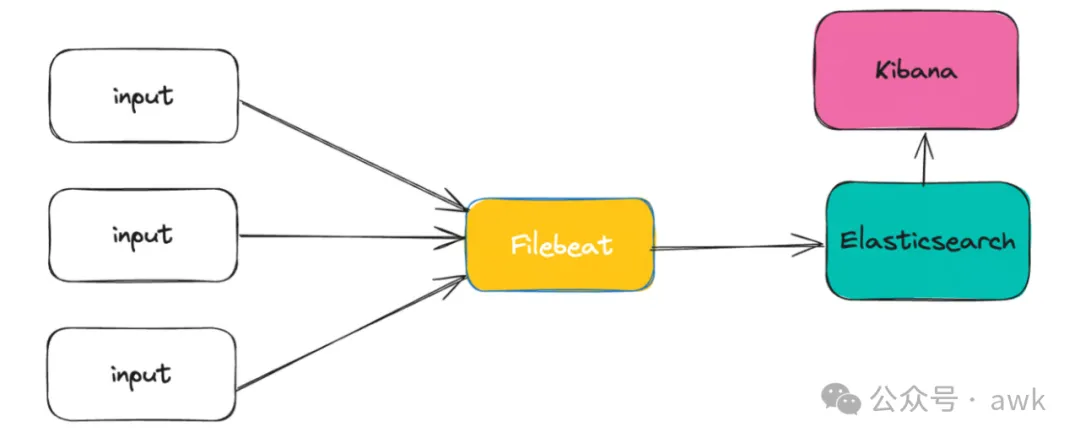
当您的主要需求是从各种来源收集日志并将其定向到Elasticsearch或云存储等单一目标时 , Filebeat是一个理想的选择。其他理想的情况是 , 您的日志需要基本解析 , 例如处理Nginx日志或管理不需要复杂处理的syslog输入。
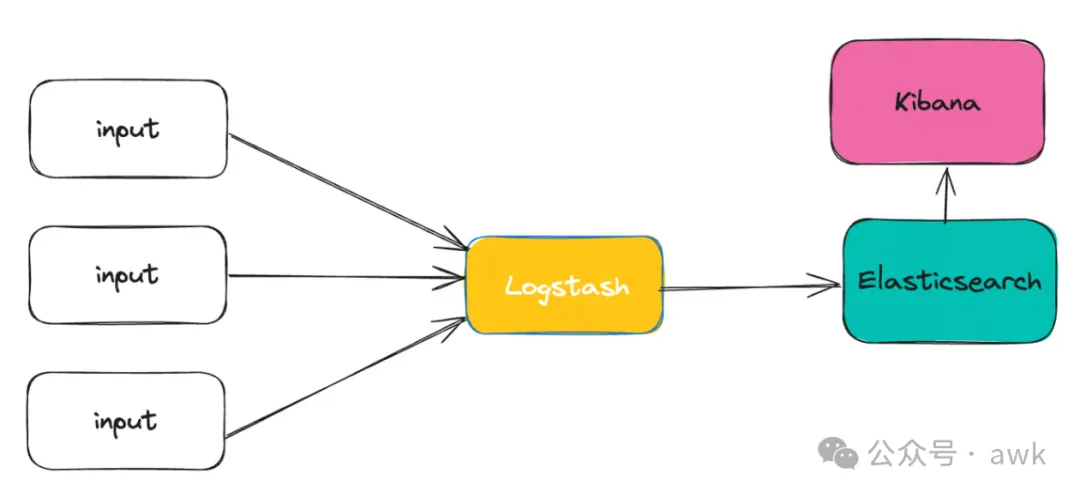
另一方面 , 如果您正在处理需要复杂操作、扩充或过滤的半结构化或非结构化日志 , 那么Logstash更合适。当您的目标是将日志事件路由到多个目标时 , 它也是首选工具。
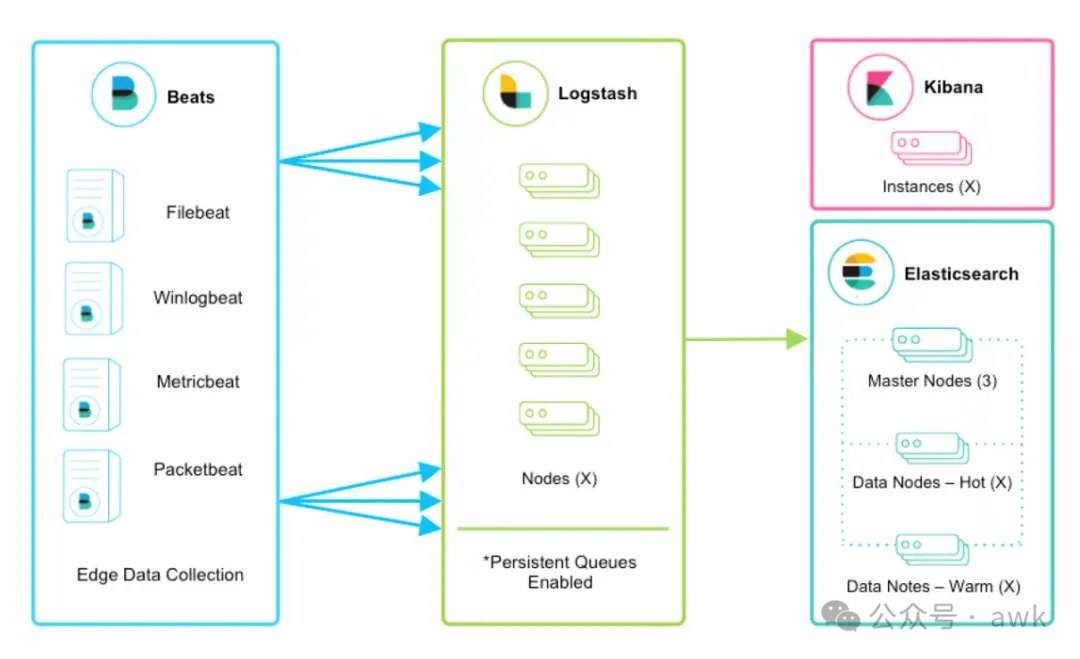
更有效的策略是结合使用Filebeat和Logstash , 特别是用于管理来自不同来源的日志。通常 , 由于Filebeat的效率 , 您可以使用 Filebeat来收集日志。然后 , 收集的日志将转发到Logstash进行更复杂的处理。Logstash可以配置为将日志分发到不同的目的地 , 或者将它们转发到Elasticsearch进行索引 , 然后转发到Kibana进行可视化。这种组合方法有效地利用了 Filebeat 和 Logstash 的优势。
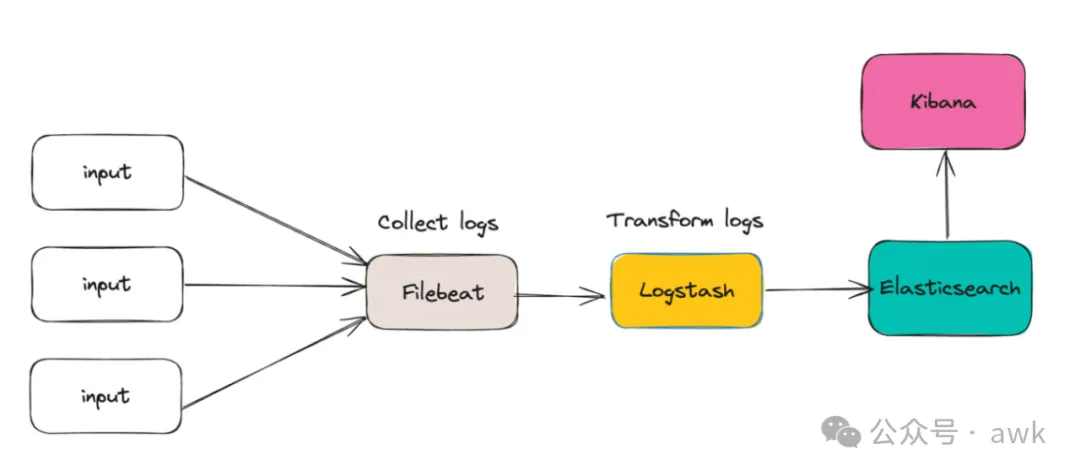
有关更具可伸缩性的设置 , 请参阅下图:
3.2 filebeat原理
3.2.1 filebeat构成
filebeat结构: 由两个组件构成 , 分别是inputs(输入)和harvesters(收集器) , 这些组件一起工作来跟踪文件并将事件数据发送到您指定的输出 , harvester负责读取单个文件的内容。harvester逐行读取每个文件 , 并将内容发送到输出。为每个文件启动一个harvester。harvester负责打开和关闭文件 , 这意味着文件描述符在harvester运行时保持打开状态。如果在收集文件时删除或重命名文件 ,Filebeat将继续读取该文件。这样做的副作用是 , 磁盘上的空间一直保留到harvester关闭。默认情况下 , Filebeat保持文件打开 , 直到达到close_inactive
关闭harvester可以会产生的结果:
文件处理程序关闭 , 如果
harvester仍在读取文件时被删除 , 则释放底层资源。只有在
scan_frequency结束之后 , 才会再次启动文件的收集。如果该文件在
harvester关闭时被移动或删除 , 该文件的收集将不会继续
一个input负责管理harvesters和寻找所有来源读取。如果input类型是log , 则input将查找驱动器上与定义的路径匹配的所有文件 , 并为每个文件启动一个harvester。每个input在它自己的Go进程中运行 ,Filebeat当前支持多种输入类型。每个输入类型可以定义多次。日志输入检查每个文件 , 以查看是否需要启动harvester、是否已经在运行harvester或是否可以忽略该文件
3.2.2 filebeat如何保存文件的状态
Filebeat保留每个文件的状态 , 并经常将状态刷新到磁盘中的注册表文件中。该状态用于记住harvester读取的最后一个偏移量 , 并确保发送所有日志行。如果无法访问输出(如Elasticsearch或Logstash) , Filebeat将跟踪最后发送的行 , 并在输出再次可用时继续读取文件。当Filebeat运行时 , 每个输入的状态信息也保存在内存中。当Filebeat重新启动时 , 来自注册表文件的数据用于重建状态 , Filebeat在最后一个已知位置继续每个harvester。对于每个输入 , Filebeat都会保留它找到的每个文件的状态。由于文件可以重命名或移动 , 文件名和路径不足以标识文件。对于每个文件 , Filebeat存储唯一的标识符 , 以检测文件是否以前被捕获。
3.2.3 filebeat何如保证至少一次数据消费
Filebeat保证事件将至少传递到配置的输出一次 , 并且不会丢失数据。是因为它将每个事件的传递状态存储在注册表文件中。在已定义的输出被阻止且未确认所有事件的情况下 , Filebeat将继续尝试发送事件 , 直到输出确认已接收到事件为止。如果Filebeat在发送事件的过程中关闭 , 它不会等待输出确认所有事件后再关闭。当Filebeat重新启动时 , 将再次将Filebeat关闭前未确认的所有事件发送到输出。这样可以确保每个事件至少发送一次 , 但最终可能会有重复的事件发送到输出。通过设置shutdown_timeout选项 , 可以将Filebeat配置为在关机前等待特定时间
3.3 filebeat使用
软件包下载地址:Past Releases of Elastic Stack Software | Elastic
3.3.1 基本命令
export   #导出
run      #执行(默认执行)
test     #测试配置文件是否正常
keystore #秘钥存储
modules  #模块配置管理
setup    #设置初始环境
例如: ./filebeat test config 用来测试配置文件是否正确
keystore : keystore主要是防止敏感信息被泄露 , 比如密码等 , 像ES的密码 , 这里可以生成一个key为ES_PWD , 值为es的password的一个对应关系 , 在使用es的密码的时候就可以使用${ES_PWD}使用
创建一个存储密码的keystore : filebeat keystore create
然后往其中添加键值对 , 例如 : filebeat keystore add ES_PWD
使用覆盖原来键的值 : filebeat key store add ES_PWD–force
删除键值对 : filebeat key store remove ES_PWD
查看已有的键值对 : filebeat keystore list
示例:
root@nginx:~# filebeat keystore create
Created filebeat keystore
root@nginx:~# filebeat keystore add ES_PASS
Enter value for ES_PASS:
Successfully updated the keystore

root@nginx:~# filebeat keystore list
ES_PASS后期就可以通过${ES_PWD}使用其值 , 例如:
output.elasticsearch.password:"${ES_PASS}"
3.3.2 配置文件说明
type: log #input类型为log
enable: true #表示是该log类型配置生效
paths :      #指定要监控的日志 , 目前按照Go语言的glob函数处理。没有对配置目录做递归处理 , 比如配置的如果是 :
- /var/log/* /*.log  #则只会去/var/log目录的所有子目录中寻找以".log"结尾的文件 , 而不会寻找/var/log目录下以".log"结尾的文件。
recursive_glob.enabled: #启用全局递归模式 , 例如/foo/**包括/foo, /foo/*, /foo/*/*
encoding : #指定被监控的文件的编码类型 , 使用plain和utf-8都是可以处理中文日志的
exclude_lines: ['^DBG'] #不包含匹配正则的行
include_lines: ['^ERR', '^WARN']  #包含匹配正则的行
harvester_buffer_size: 16384 #每个harvester在获取文件时使用的缓冲区的字节大小
max_bytes: 10485760 #单个日志消息可以拥有的最大字节数。max_bytes之后的所有字节都被丢弃而不发送。默认值为10MB (10485760)
exclude_files: ['\.gz$']  #用于匹配希望Filebeat忽略的文件的正则表达式列表
ingore_older: 0 #默认为0 , 表示禁用 , 可以配置2h , 2m等 , 注意ignore_older必须大于close_inactive的值.表示忽略超过设置值未更新的
文件或者文件从来没有被harvester收集
close_* #close_ *配置选项用于在特定标准或时间之后关闭harvester。 关闭harvester意味着关闭文件处理程序。 如果在harvester关闭
后文件被更新 , 则在scan_frequency过后 , 文件将被重新拾取。 但是 , 如果在harvester关闭时移动或删除文件 , Filebeat将无法再次接收文件
 , 并且harvester未读取的任何数据都将丢失。
close_inactive  #启动选项时 , 如果在制定时间没有被读取 , 将关闭文件句柄
读取的最后一条日志定义为下一次读取的起始点 , 而不是基于文件的修改时间
如果关闭的文件发生变化 , 一个新的harverster将在scan_frequency运行后被启动
建议至少设置一个大于读取日志频率的值 , 配置多个prospector来实现针对不同更新速度的日志文件
使用内部时间戳机制 , 来反映记录日志的读取 , 每次读取到最后一行日志时开始倒计时使用2h 5m 来表示
close_rename #当选项启动 , 如果文件被重命名和移动 , filebeat关闭文件的处理读取
close_removed #当选项启动 , 文件被删除时 , filebeat关闭文件的处理读取这个选项启动后 , 必须启动clean_removed
close_eof #适合只写一次日志的文件 , 然后filebeat关闭文件的处理读取
close_timeout #当选项启动时 , filebeat会给每个harvester设置预定义时间 , 不管这个文件是否被读取 , 达到设定时间后 , 将被关闭
close_timeout 不能等于ignore_older,会导致文件更新时 , 不会被读取如果output一直没有输出日志事件 , 这个timeout是不会被启动的 ,
至少要要有一个事件发送 , 然后haverter将被关闭
设置0 表示不启动
clean_inactived #从注册表文件中删除先前收获的文件的状态
设置必须大于ignore_older+scan_frequency , 以确保在文件仍在收集时没有删除任何状态
配置选项有助于减小注册表文件的大小 , 特别是如果每天都生成大量的新文件
此配置选项也可用于防止在Linux上重用inode的Filebeat问题
clean_removed #启动选项后 , 如果文件在磁盘上找不到 , 将从注册表中清除filebeat
如果关闭close removed 必须关闭clean removed
scan_frequency #prospector检查指定用于收获的路径中的新文件的频率,默认10s
tail_files : #如果设置为true , Filebeat从文件尾开始监控文件新增内容 , 把新增的每一行文件作为一个事件依次发送 ,
而不是从文件开始处重新发送所有内容。
symlinks : #符号链接选项允许Filebeat除常规文件外,可以收集符号链接。收集符号链接时 , 即使报告了符号链接的路径 ,
Filebeat也会打开并读取原始文件。
backoff :  #backoff选项指定Filebeat如何积极地抓取新文件进行更新。默认1s , backoff选项定义Filebeat在达到EOF之后
再次检查文件之间等待的时间。
max_backoff :  #在达到EOF之后再次检查文件之前Filebeat等待的最长时间
backoff_factor :  #指定backoff尝试等待时间几次 , 默认是2
harvester_limit : #harvester_limit选项限制一个prospector并行启动的harvester数量 , 直接影响文件打开数

tags #列表中添加标签 , 用过过滤 , 例如 : tags: ["json"]
fields #可选字段 , 选择额外的字段进行输出可以是标量值 , 元组 , 字典等嵌套类型
默认在sub-dictionary位置
filebeat.inputs:
fields:
app_id: query_engine_12
fields_under_root #如果值为ture , 那么fields存储在输出文档的顶级位置

multiline.pattern #必须匹配的regexp模式
multiline.negate #定义上面的模式匹配条件的动作是 否定的 , 默认是false
假如模式匹配条件'^b' , 默认是false模式 , 表示讲按照模式匹配进行匹配 将不是以b开头的日志行进行合并
如果是true , 表示将不以b开头的日志行进行合并
multiline.match # 指定Filebeat如何将匹配行组合成事件,在之前或者之后 , 取决于上面所指定的negate
multiline.max_lines #可以组合成一个事件的最大行数 , 超过将丢弃 , 默认500
multiline.timeout #定义超时时间 , 如果开始一个新的事件在超时时间内没有发现匹配 , 也将发送日志 , 默认是5s
max_procs #设置可以同时执行的最大CPU数。默认值为系统中可用的逻辑CPU的数量。
name #为该filebeat指定名字 , 默认为主机的hostname
3.3.3 安装配置流程
3.3.3.1 elasticsearch作为输出
安装软件包
root@nginx:~# dpkg -i filebeat-8.13.2-amd64.deb调整
filebeat配置文件root@nginx:~# cat /etc/filebeat/filebeat.yml ###################### Filebeat Configuration Example ######################### # This file is an example configuration file highlighting only the most common # options. The filebeat.reference.yml file from the same directory contains all the # supported options with more comments. You can use it as a reference. # # You can find the full configuration reference here: # https://www.elastic.co/guide/en/beats/filebeat/index.html # For more available modules and options, please see the filebeat.reference.yml sample # configuration file. # ============================== Filebeat inputs =============================== filebeat.inputs: # Each - is an input. Most options can be set at the input level, so # you can use different inputs for various configurations. # Below are the input-specific configurations. - type: log #设置类型为log # Unique ID among all inputs, an ID is required. id: var-log # Change to true to enable this input configuration. enabled: true #开启这个类型功能 # Paths that should be crawled and fetched. Glob based paths. paths: - /var/log/syslog #- c:\programdata\elasticsearch\logs\* # Exclude lines. A list of regular expressions to match. It drops the lines that are # matching any regular expression from the list. # Line filtering happens after the parsers pipeline. If you would like to filter lines # before parsers, use include_message parser. #exclude_lines: ['^DBG'] # Include lines. A list of regular expressions to match. It exports the lines that are # matching any regular expression from the list. # Line filtering happens after the parsers pipeline. If you would like to filter lines # before parsers, use include_message parser. #include_lines: ['^ERR', '^WARN'] # Exclude files. A list of regular expressions to match. Filebeat drops the files that # are matching any regular expression from the list. By default, no files are dropped. #prospector.scanner.exclude_files: ['.gz$'] # Optional additional fields. These fields can be freely picked # to add additional information to the crawled log files for filtering #fields: # level: debug # review: 1 - type: filestream #使用新版本的类型测试 id: filestream-var-log-all enabled: true paths: - /var/log/*.log # ============================== Filebeat modules ============================== filebeat.config.modules: # Glob pattern for configuration loading path: ${path.config}/modules.d/*.yml # Set to true to enable config reloading reload.enabled: false # Period on which files under path should be checked for changes #reload.period: 10s # ======================= Elasticsearch template setting ======================= setup.template.settings: index.number_of_shards: 1 #设置分片数量 #index.codec: best_compression #_source.enabled: false # ================================= Dashboards ================================= # These settings control loading the sample dashboards to the Kibana index. Loading # the dashboards is disabled by default and can be enabled either by setting the # options here or by using the `setup` command. setup.dashboards.enabled: true #导入filebeat的仪表盘 # The URL from where to download the dashboard archive. By default, this URL # has a value that is computed based on the Beat name and version. For released # versions, this URL points to the dashboard archive on the artifacts.elastic.co # website. #setup.dashboards.url: # =================================== Kibana =================================== # Starting with Beats version 6.0.0, the dashboards are loaded via the Kibana API. # This requires a Kibana endpoint configuration. setup.kibana: # Kibana Host # Scheme and port can be left out and will be set to the default (http and 5601) # In case you specify and additional path, the scheme is required: http://localhost:5601/path # IPv6 addresses should always be defined as: https://[2001:db8::1]:5601 #host: "localhost:5601" host: "192.168.71.34:5601" # ================================== Outputs =================================== # Configure what output to use when sending the data collected by the beat. # ---------------------------- Elasticsearch Output ---------------------------- output.elasticsearch: # Array of hosts to connect to. hosts: ["192.168.71.29:9200","192.168.71.30:9200","192.168.71.31:9200"] # Performance preset - one of "balanced", "throughput", "scale", # "latency", or "custom". preset: balanced #balance:总体效率的良好起点 #throughput:适合高数据量 , 可能会增加CPU和内存需求 #scale :在大型低吞吐量部署中减少环境资源使用 #latency:最小化新数据在Elasticsearch中可见的时间 #custom:直接应用用户配置 , 不覆盖 # Protocol - either `http` (default) or `https`. #protocol: "https" # Authentication credentials - either API key or username/password. #api_key: "id:api_key" username: "elastic" password: "${ES_PASS}" #设置用户名和密码,这里的密码是之前通过keystore设置的密码7.16版本已经将Log类型弃用了, 需要使用filestream类型。只不过8版本还能使用log类型查看
kibana页面信息。可以看到收集了所有日志信息。这个视图是自动创建的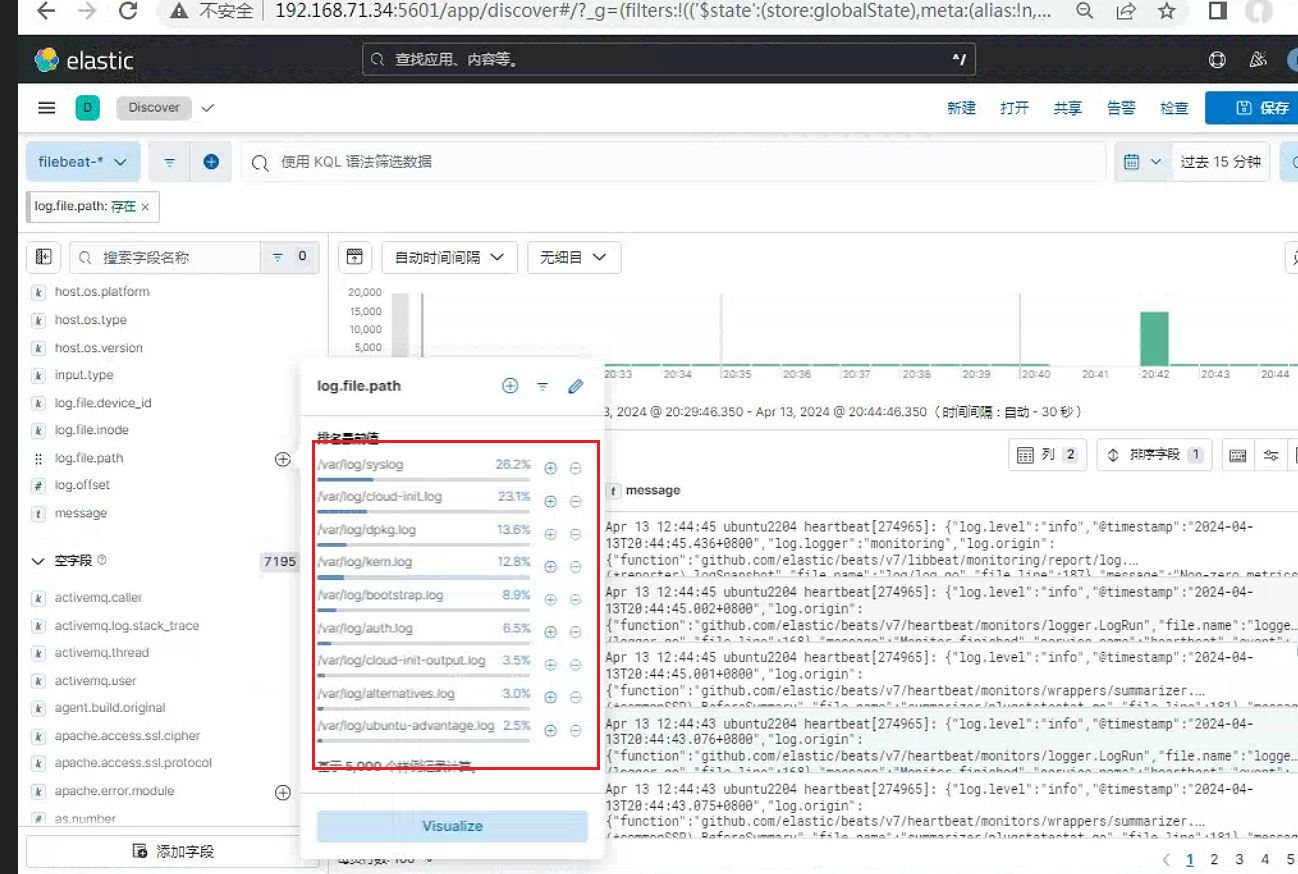
3.3.3.2 logstash作为输出
调整
filebeat配置root@nginx:/var/log/filebeat# cat /etc/filebeat/filebeat.yml ###################### Filebeat Configuration Example ######################### # This file is an example configuration file highlighting only the most common # options. The filebeat.reference.yml file from the same directory contains all the # supported options with more comments. You can use it as a reference. # # You can find the full configuration reference here: # https://www.elastic.co/guide/en/beats/filebeat/index.html # For more available modules and options, please see the filebeat.reference.yml sample # configuration file. # ============================== Filebeat inputs =============================== filebeat.inputs: # Each - is an input. Most options can be set at the input level, so # you can use different inputs for various configurations. # Below are the input-specific configurations. # filestream is an input for collecting log messages from files. - type: log # Unique ID among all inputs, an ID is required. id: var-log # Change to true to enable this input configuration. enabled: true # Paths that should be crawled and fetched. Glob based paths. paths: - /var/log/syslog #- c:\programdata\elasticsearch\logs\* # review: 1 - type: filestream id: filestream-var-log-all enabled: true paths: - /var/log/*.log # ================================== Outputs =================================== # ------------------------------ Logstash Output ------------------------------- output.logstash: # The Logstash hosts hosts: ["192.168.71.32:5045"] #如果有多台logstash, 同样可以使用loadbalance。所有outpu插件都支持这个功能调整
logstash配置。这里的这个配置和heartbeat中的logstash配置一样。使用同样的即可root@logstash01:/etc/logstash/conf.d# cat heartbeat-to-es.conf input { beats { port => 5045 } } output { elasticsearch { hosts => ["http://192.168.71.29:9200"] index => "%{[@metadata][beat]}-%{[@metadata][version]}-%{+YYYY.MM.dd}" user => "elastic" password => "123456" } }检查
kibana页面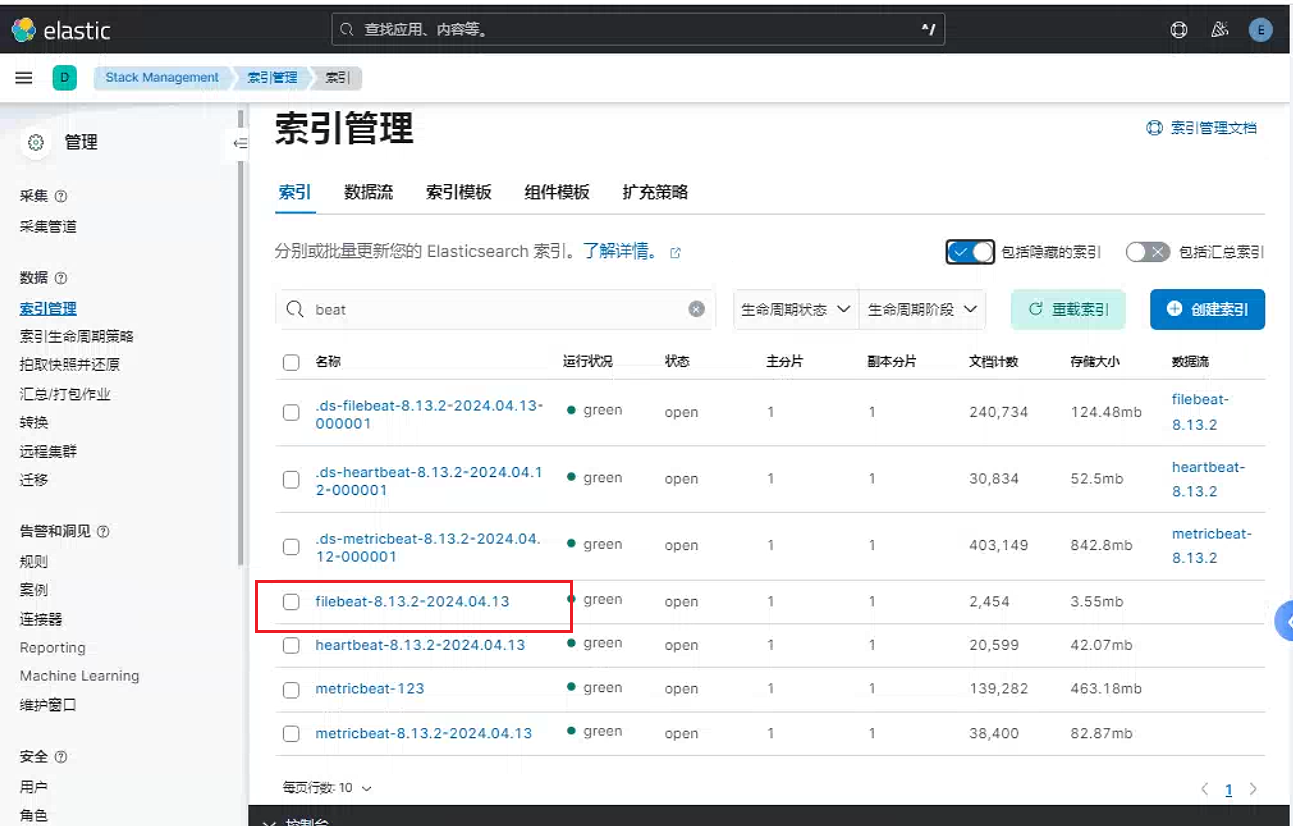
3.3.3.3 多行匹配
涉及的参数说明
multiline.typepattern: 默认的模式count: 允许聚会恒定的行数while_pattern: 禁用match选项
multiline.pattern: 指定要匹配的正则表达式模式multiline.negate: 是否设置为否定模式。默认值为false。multiline.match: 指定Filebeat如何将匹配的行组合到事件中。设置after或before。这些设置的行为取决于您为否定指定的内容 :multiline.flush_pattern:当匹配到指定的正则表达式 , 将从内存中刷新当前多行 , 结束多行消息。multiline.max_lines: 一个事件中允许的最大行。默认为500multiline.timeout: 在指定的超时之后 , 即使没有找到启动新事件的新模式 ,Filebeat也会发送多行事件。缺省值是5s。multiline.count_lines: 要聚合为单个事件的行数。multiline.skip_newline: 设置后 , 将多行事件连接起来 , 而不需要行分隔符。




示例
[root@ELK101 apache-tomcat-9.0.75]# cat logs/catalina.out
......
01-Jun-2023 18:59:45.297 SEVERE [main] org.apache.tomcat.util.digester.Digester.fatalError Parse fatal error at line [161] column [4]
	org.xml.sax.SAXParseException; systemId: file:/koten/softwares/apache-tomcat-9.0.75/conf/server.xml; lineNumber: 161; columnNumber: 4; The content of elements must consist of well-formed character data or markup.
		at com.sun.org.apache.xerces.internal.util.ErrorHandlerWrapper.createSAXParseException(ErrorHandlerWrapper.java:204)
		at com.sun.org.apache.xerces.internal.util.ErrorHandlerWrapper.fatalError(ErrorHandlerWrapper.java:178)
		at com.sun.org.apache.xerces.internal.impl.XMLErrorReporter.reportError(XMLErrorReporter.java:400)
		at com.sun.org.apache.xerces.internal.impl.XMLErrorReporter.reportError(XMLErrorReporter.java:327)
		at com.sun.org.apache.xerces.internal.impl.XMLScanner.reportFatalError(XMLScanner.java:1472)
		at com.sun.org.apache.xerces.internal.impl.XMLDocumentFragmentScannerImpl$FragmentContentDriver.startOfMarkup(XMLDocumentFragmentScannerImpl.java:2637)
		at com.sun.org.apache.xerces.internal.impl.XMLDocumentFragmentScannerImpl$FragmentContentDriver.next(XMLDocumentFragmentScannerImpl.java:2734)
		at com.sun.org.apache.xerces.internal.impl.XMLDocumentScannerImpl.next(XMLDocumentScannerImpl.java:605)
		at com.sun.org.apache.xerces.internal.impl.XMLDocumentFragmentScannerImpl.scanDocument(XMLDocumentFragmentScannerImpl.java:507)
		at com.sun.org.apache.xerces.internal.parsers.XML11Configuration.parse(XML11Configuration.java:867)
		at com.sun.org.apache.xerces.internal.parsers.XML11Configuration.parse(XML11Configuration.java:796)
		at com.sun.org.apache.xerces.internal.parsers.XMLParser.parse(XMLParser.java:142)
		at com.sun.org.apache.xerces.internal.parsers.AbstractSAXParser.parse(AbstractSAXParser.java:1216)
		at com.sun.org.apache.xerces.internal.jaxp.SAXParserImpl$JAXPSAXParser.parse(SAXParserImpl.java:644)
		at org.apache.tomcat.util.digester.Digester.parse(Digester.java:1535)
		at org.apache.catalina.startup.Catalina.parseServerXml(Catalina.java:617)
		at org.apache.catalina.startup.Catalina.load(Catalina.java:709)
		at org.apache.catalina.startup.Catalina.load(Catalina.java:746)
		at sun.reflect.NativeMethodAccessorImpl.invoke0(Native Method)
		at sun.reflect.NativeMethodAccessorImpl.invoke(NativeMethodAccessorImpl.java:62)
		at sun.reflect.DelegatingMethodAccessorImpl.invoke(DelegatingMethodAccessorImpl.java:43)
		at java.lang.reflect.Method.invoke(Method.java:498)
		at org.apache.catalina.startup.Bootstrap.load(Bootstrap.java:307)
		at org.apache.catalina.startup.Bootstrap.main(Bootstrap.java:477)
......
匹配模式如下:
[root@ELK101 config]# cat 10-tomcat-to-es.yaml
filebeat.inputs:
- type: log
  paths:
  - "/koten/softwares/apache-tomcat-9.0.75/logs/catalina.out*"
  # 表示指定多行匹配的类型
  multiline.type: pattern
  # 指定多行匹配的模式
  multiline.pattern: '^[0-9]{2}'
  # 匹配方式 , 匹配内容在前面 , 其他内容在后面 , 遇到下一个匹配内容前换行
  multiline.negate: true
  multiline.match: after

output.console:
  pretty: true
示例二:
[root@ELK101 ~]# cat /tmp/hobby.txt
{
  "name": "koten1",
  "hobby": ["nginx","tomcat","apache"]
}
{
  "name": "koten2",
  "hobby": ["zabbix","jenkins","sonarqube"]
}
{
  "name": "koten3",
  "hobby": ["elk","docker","k8s"]
}
#以{开头匹配
[root@ELK101 ~]# cat config/05-01-pattern.yaml
filebeat.inputs:
- type: log
paths:
- "/tmp/hobby.txt"
multiline.type: pattern
multiline.pattern: '^{'
multiline.negate: true
multiline.match: after
output.console:
pretty: true
[root@ELK101 ~]# rm -rf /var/lib/filebeat/*
[root@ELK101 ~]# filebeat -e -c config/05-pattern.yaml | grep message
......
"message": "{\n \"name\": \"koten1\",\n \"hobby\": [\"nginx\",\"tomcat\",\"apache\"]\n}"
"message": "{\n \"name\": \"koten2\",\n \"hobby\": [\"zabbix\",\"jenkins\",\"sonarqube\"]\n}",
"message": "{\n \"name\": \"koten3\",\n \"hobby\": [\"elk\",\"docker\",\"k8s\"]\n}"
#以}结尾匹配 , 以}开头的也可以 , 把negate改为true , match改为before即可
[root@ELK101 ~]# cat config/05-02-pattern.yaml
filebeat.inputs:
- type: log
paths:
- "/tmp/hobby.txt"
multiline.type: pattern
multiline.pattern: '}$'
multiline.negate: true
multiline.match: before
output.console:
pretty: true
[root@ELK101 ~]# rm -rf /var/lib/filebeat/*
[root@ELK101 ~]# filebeat -e -c config/05-02-pattern.yaml | grep message
......
"message": "{\n \"name\": \"koten1\",\n \"hobby\": [\"nginx\",\"tomcat\",\"apache\"]\n}",
"message": "{\n \"name\": \"koten2\",\n \"hobby\": [\"zabbix\",\"jenkins\",\"sonarqube\"]\n}",
"message": "{\n \"name\": \"koten3\",\n \"hobby\": [\"elk\",\"docker\",\"k8s\"]\n}",
.....
#以{开头 , }结尾的匹配到 , 此匹配方法效率最高 , 速度最快
[root@ELK101 ~]# cat config/05-03-pattern.yaml
filebeat.inputs:
- type: log
paths:
- /tmp/hobby.txt
multiline.type: pattern
multiline.pattern: '{'
multiline.negate: true
multiline.match: after
multiline.flush_pattern: '}'
output.console:
pretty: true
[root@ELK101 ~]# rm -rf /var/lib/filebeat/*
[root@ELK101 ~]# filebeat -e -c config/05-03-pattern.yaml |grep message
......
"message": "{\n \"name\": \"koten1\",\n \"hobby\": [\"nginx\",\"tomcat\",\"apache\"]\n}",
"message": "{\n \"name\": \"koten2\",\n \"hobby\": [\"zabbix\",\"jenkins\",\"sonarqube\"]\n}",
"message": "{\n \"name\": \"koten3\",\n \"hobby\": [\"elk\",\"docker\",\"k8s\"]\n}",
......
#四行一匹配 , 此方法速度也快 , 但容易受局限 , 若json文本为一行显示 , 就无法把json列为一行了
[root@ELK101 ~]# cat config/05-04-pattern.yaml
filebeat.inputs:
- type: log
paths:
- /tmp/hobby.txt
multiline:
type: count
count_lines: 4
output.console:
pretty: true
[root@ELK101 ~]# rm -rf /var/lib/filebeat/*
[root@ELK101 ~]# filebeat -e -c config/05-04-pattern.yaml |grep message
......
"message": "{\n \"name\": \"koten1\",\n \"hobby\": [\"nginx\",\"tomcat\",\"apache\"]\n}"
"message": "{\n \"name\": \"koten2\",\n \"hobby\": [\"zabbix\",\"jenkins\",\"sonarqube\"]\n}",
"message": "{\n \"name\": \"koten3\",\n \"hobby\": [\"elk\",\"docker\",\"k8s\"]\n}",
......
3.3.3.5 json解析
多行匹配可以和ndjson一起使用
filebeat.inputs:
- type: filestream
  ...
  parsers:
    - ndjson:
        target: ""
        message_key: msg
    - multiline:
        type: count
        count_lines: 3
在这个例子中 , Filebeat正在读取由3行组成的多行消息 , 这些消息被封装在单行JSON对象中。多行消息存储在键msg下。
这些选项使Filebeat能够解码结构为JSON消息的日志。Filebeat逐行处理日志 , 因此JSON解码仅在每个消息有一个JSON对象时才有效。
解码发生在行过滤之前。如果设置message_key选项 , 可以将JSON解码与过滤结合起来。
target: 应该包含解析后的键值对的新JSON对象的名称。如果您将其保留为空 , 则新key将放在根目录下。overwrite_keys: 在发生冲突的情况下 , 来自解码JSON对象的值覆盖Filebeat通常添加的字段(类型 , 来源 , 偏移量等)。如果希望保留以前添加的值 , 请禁用它。expand_keys:如果启用此设置 ,
Filebeat将递归地在解码的JSON中去点键 , 并将它们展开为分层对象结构。例如,{"a.b.c": 123}将扩展到{"a":{"b":{"c":123}}}。add_error_key如果启用了此设置 , 在
json解组错误的情况下,或者当'message_key'在配置中定义但不能使用时。 ,Filebeat将添加一个 "error.message" 和"error.type: json",message_key一个可选的配置设置 , 它指定一个
JSON键 , 在该键上应用行过滤和多行设置。如果指定了键 , 则键必须位于JSON对象的顶层 , 并且与键关联的值必须是字符串 , 否则不会发生过滤或多行聚合。document_id选项配置设置 , 指定用于设置
document_id的JSON键。如果配置 , 该字段将从原始JSON文档中删除并存储在'@metadata._id'中。ignore_decoding_error: 一个可选的配置设置 , 指定是否应该记录JSON解码错误。如果设置为true, 则不会记录错误。默认为false。
由于 Filebeat 天生就具有 JSON 处理器,Filebeat 能够很轻松地将 JSON 日志直接传送到 Elasticsearch 中。 为此,我们只需要创建一个 Filebeat 的配置文件 :
filebeat_python_logging.yml
filebeat.inputs:
- type: log
  enabled: true
  paths:
    - /Users/liuxg/python/python_logging/application.log
  json:
    keys_under_root: true
    overwrite_keys: true
    message_key: 'message'
    add_error_key: true

output.elasticsearch:
  hosts: ["localhost:9200"]
  index: "python_logs"

processors:
 - decode_json_fields:
     fields: ['message']
     target: json
 - drop_fields:
     fields: ["ecs", "agent", "log", "input", "host"]

setup.ilm.enabled: false
setup.template.name: python_logs
setup.template.pattern: python_logs
上面的 paths 路径需要依据你自己的 log 路径改变而改变。在上面我定义了一个特定的索引名称 python_logs。在 filebeat 的安装目录中,我们运行如下的命令:
./filebeat -e -c filebeat_python_logging.yml 运行完上面的命令后,我们可以在 Kibana 中使用如下的命令进行查看:
GET _cat/indicesyellow open twitter ztCFdrdbTHuooTkIdaDcjw 1 1 6 0 10.3kb 10.3kb
green open .apm-custom-link p18qhpfTRP6I0xDBjW9Asw 1 0 0 0 208b 208b
green open .kibana_task_manager_1 nvc7Qkt4RdaCaqClux2G1Q 1 0 5 310 403.5kb 403.5kb
yellow open python_logs RihQ0eqIS1ivAtHvC5B_DQ 1 1 1 0 4.5kb 4.5kb
green open .apm-agent-configuration hC534SjHSIKdmyH910AVhA 1 0 0 0 208b 208b
green open kibana_sample_data_logs QtVaJBiLRc-qj_A0pqlzKw 1 0 14074 0 10.4mb 10.4mb
green open .kibana-event-log-7.10.0-000001 16sjjPW9QaKsxGw52Snstw 1 0 3 0 16.4kb 16.4kb
green open .async-search i7qc9VdhTlOvBjAbgYTuKQ 1 0 0 0 228b 228b
green open .kibana_1 VTuPMA6TRr-vLIRqQFh64g 1 0 97 25 10.4mb 10.4mb我们可以发现一个新生成的 python_logs 文件已经生成了。我们可以通过如下的命令来查看文档的内容:
GET python_logs/_search{
"took" : 1,
"timed_out" : false,
"_shards" : {
"total" : 1,
"successful" : 1,
"skipped" : 0,
"failed" : 0
},
"hits" : {
"total" : {
"value" : 1,
"relation" : "eq"
},
"max_score" : 1.0,
"hits" : [
{
"_index" : "python_logs",
"_type" : "_doc",
"_id" : "oOTH1XYBli_HPhP3ZESw",
"_score" : 1.0,
"_source" : {
"@timestamp" : "2021-01-06T03:39:12.846Z",
"level" : "INFO",
"logger" : "root",
"message" : "Application running!"
}
}
]
}
}显然,我们把之前的 application.log 的内容已经成功地导入到 Elasticsearch 之中了。
3.3.4 配置elasticsearch集群
在配置Merticbeat时, 集群概述这里需要收集日志信息。 这里单独说明这个地方的配置方式
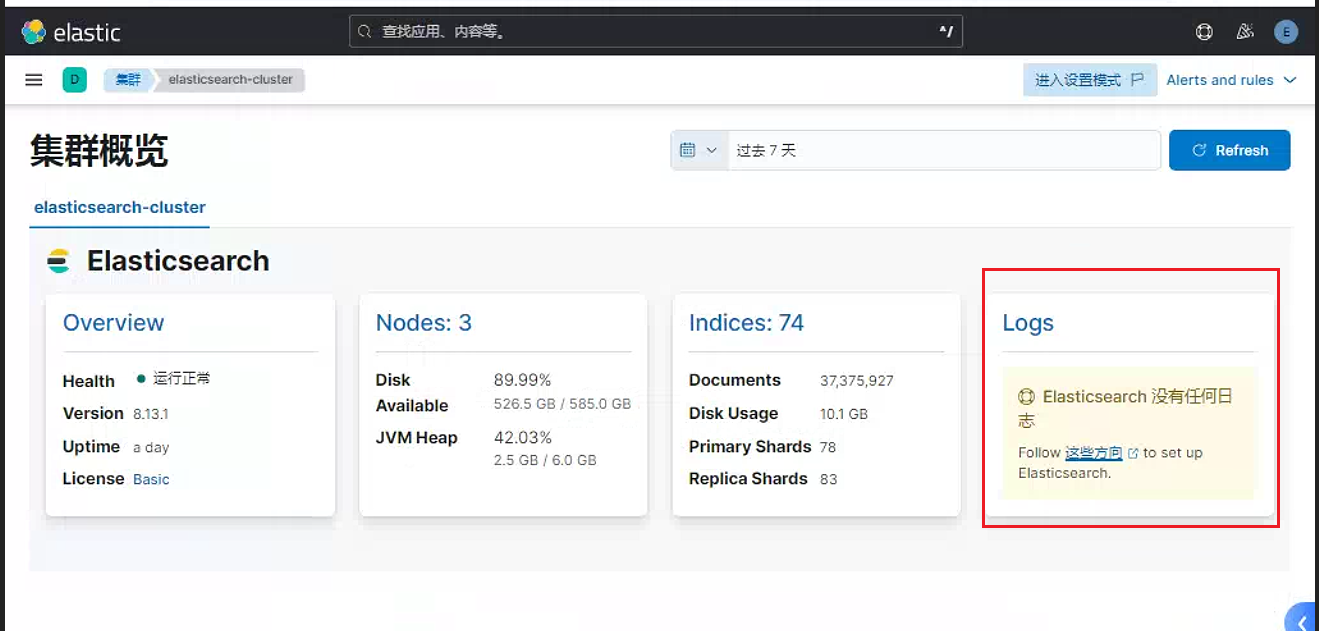
所有
elasicesearch节点安装filebeat软件包root@elasticsearch01:~# dpkg -i filebeat-8.13.2-amd64.deb Selecting previously unselected package filebeat. (Reading database ... 127688 files and directories currently installed.) Preparing to unpack filebeat-8.13.2-amd64.deb ... Unpacking filebeat (8.13.2) ... Setting up filebeat (8.13.2) ...所有
elasticsearch节点启用elasticsearch模块root@elasticsearch01:~# filebeat modules enable elasticsearch Enabled elasticsearch所有
elasticsearch节点调整配置文件 ,单独启用用户名和密码即可root@elasticsearch01:~# cat /etc/filebeat/filebeat.yml output.elasticsearch: # Array of hosts to connect to. hosts: ["localhost:9200"] # Performance preset - one of "balanced", "throughput", "scale", # "latency", or "custom". preset: balanced # Protocol - either `http` (default) or `https`. #protocol: "https" # Authentication credentials - either API key or username/password. #api_key: "id:api_key" username: "elastic" password: "123456"调整
elasticsearch模块的配置文件。这个配置文件配置可以参考官方链接: Elasticsearch module | Filebeat Reference 8.13\ | Elasticroot@elasticsearch01:~# cat /etc/filebeat/modules.d/elasticsearch.yml # Module: elasticsearch # Docs: https://www.elastic.co/guide/en/beats/filebeat/8.13/filebeat-module-elasticsearch.html - module: elasticsearch # Server log server: enabled: true # Set custom paths for the log files. If left empty, # Filebeat will choose the paths depending on your OS. var.paths: - /data/eslog/*.log - /data/eslog/*_server.json gc: enabled: true # Set custom paths for the log files. If left empty, # Filebeat will choose the paths depending on your OS. var.paths: - /var/log/elasticsearch/gc.log.[0-9]* - /var/log/elasticsearch/gc.log audit: enabled: true # Set custom paths for the log files. If left empty, # Filebeat will choose the paths depending on your OS. var.paths: - /data/eslog/*_access.log - /data/eslog/*_audit.json slowlog: enabled: true # Set custom paths for the log files. If left empty, # Filebeat will choose the paths depending on your OS. var.paths: - /data/eslog/*_index_search_slowlog.log - /data/eslog/*_index_indexing_slowlog.log - /data/eslog/*_index_search_slowlog.json - /data/eslog/*_index_indexing_slowlog.json deprecation: enabled: true # Set custom paths for the log files. If left empty, # Filebeat will choose the paths depending on your OS. var.paths: - /data/eslog/*_deprecation.log - /data/eslog/*_deprecation.json所有
elasticsearch启动filebeat服务root@elasticsearch02:~# systemctl start filebeat查看
kibana页面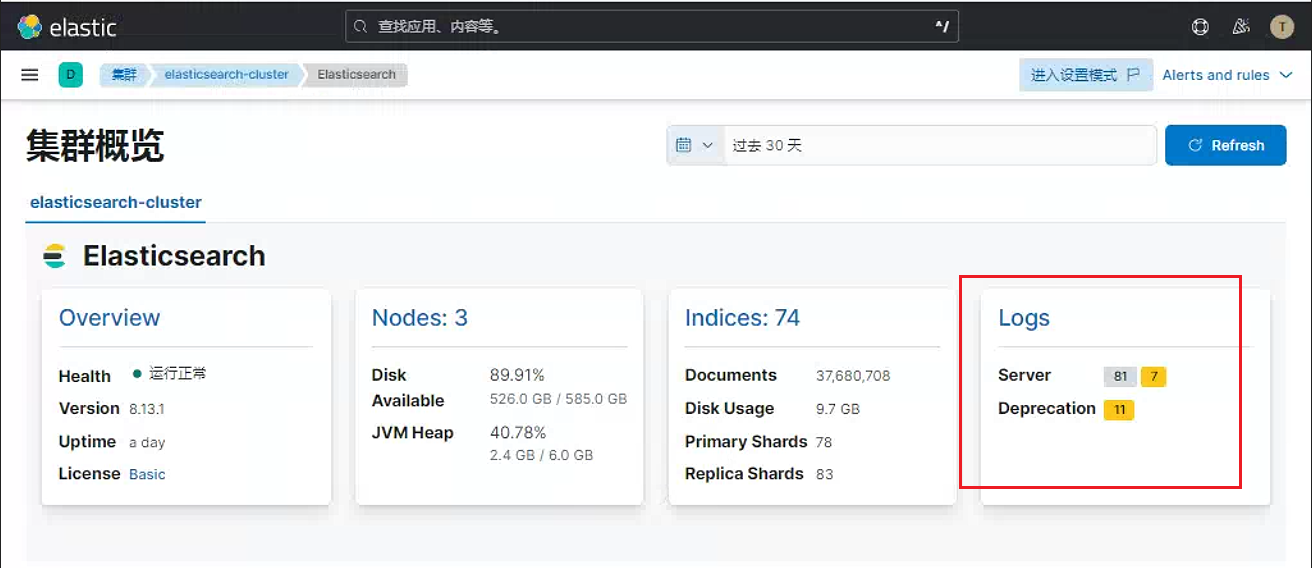
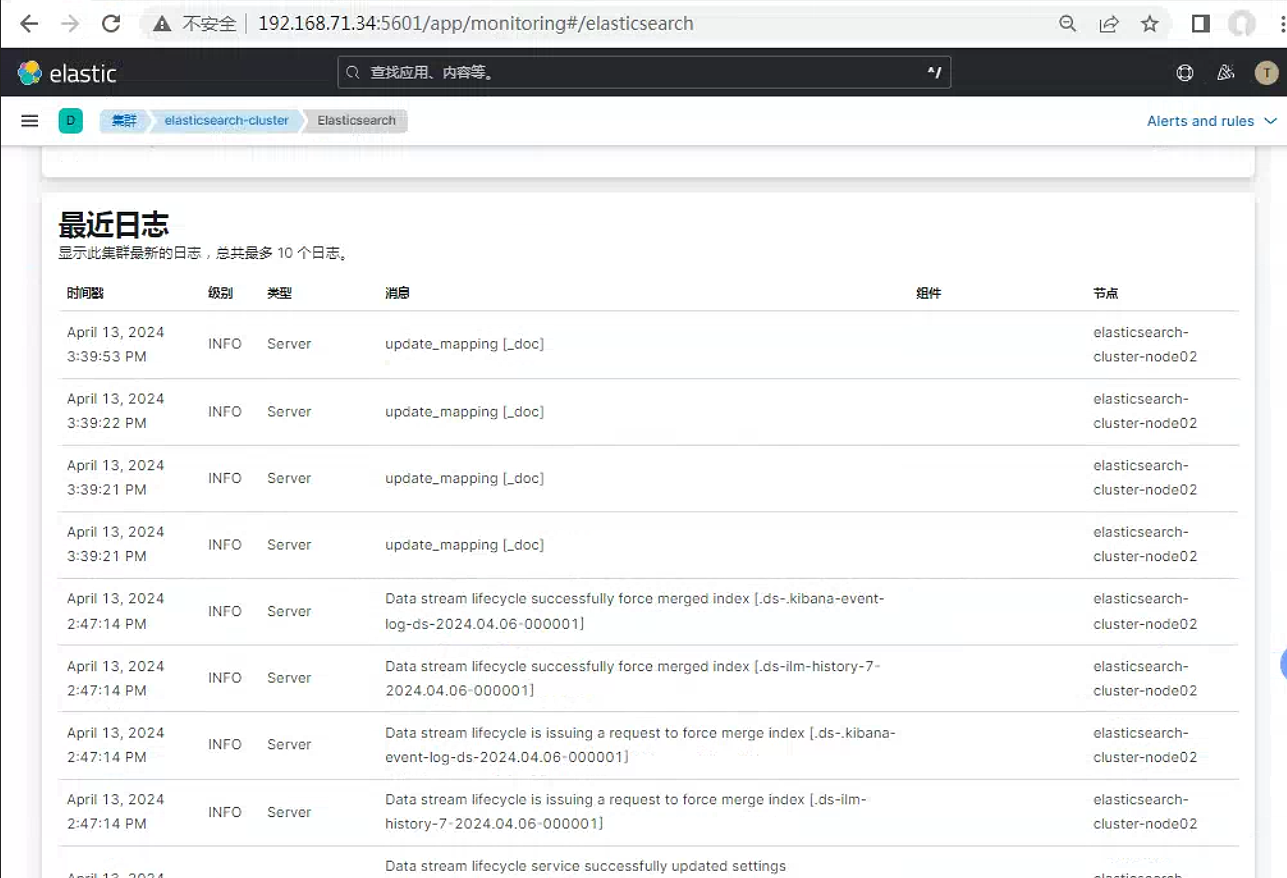
4.logstash结合redis收集系统日志和nginx访问日志
在Logstash中 , Redis可以作为队列(Queue)来使用 , 主要用于在Logstash的输入(Input ) 和过滤( Filter) 组件之间传递事件( Events) 。Redis作为一个高速、可扩展的键值存储数据库 , 非常适合用于这种场景。以下是使用Redis作为队列在Logstash中的作用和优势 :
事件缓冲 : 当
Logstash处理大量日志数据时 ,Redis可以作为一个缓冲区 , 存储尚未处理的事件。这有助于平滑处理过程中的波动 , 防止数据丢失。提高吞吐量 : 通过使用
Redis队列 ,Logstash可以更有效地管理事件流 , 从而提高整体的数据处理吞吐量。解耦输入和过滤 :
Redis队列使得Logstash的输入和过滤组件之间的耦合度降低。输入组件可以将事件推送到队列中 , 而过滤组件可以从队列中拉取事件进行处理 , 两者可以独立扩展和优化。容错和恢复 : 如果
Logstash的某个部分( 如过滤组件) 暂时不可用 ,Redis队列可以存储待处理的事件 , 待组件恢复后继续处理 , 从而提高系统的容错能力。分布式处理 : 在分布式
Logstash环境中 ,Redis队列可以被多个Logstash实例共享 , 实现负载均衡和并行处理。灵活性 :
Redis提供了丰富的数据结构支持 , 如列表(List) 、集合(Set) 和有序集合(Sorted Set) , 可以根据不同的使用场景选择合适的数据结构来优化Logstash的性能。
在Logstash的配置文件中 , 可以通过定义Redis作为队列的输入(input) 和输出(output) 插件来实现这一功能。例如 , 可以在输入插件中使用Redis队列来接收事件 , 然后在输出插件中将事件发送到下一个处理环节或存储系统。
总之 , Redis在Logstash中扮演着重要角色 , 通过提供高效、可靠的事件队列机制 , 有助于提高Logstash处理日志数据的性能和稳定性。
配置架构图如下, 按照生产环境搭建集群
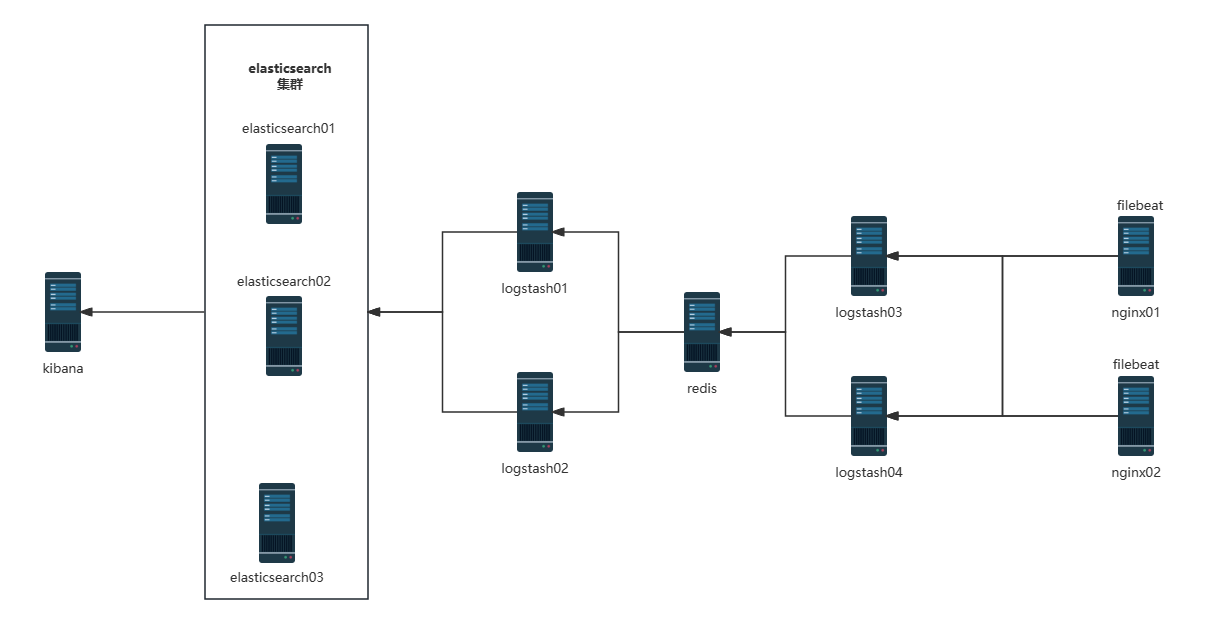
4.1 redis配置
安装配置redis
[root@redis ~]# yum install redis -y
[root@redis ~]# cat /etc/redis.conf
bind 0.0.0.0  # 监听本地的所有地址
requirepass 123456  #为了redis安全 , 设置一个密码

[root@redis ~]# systemctl restart redis
#监控redis服务状态
#!/usr/bin/env python
#coding:utf-8
#Author Zhang Jie
import smtplib
from email.mime.text import MIMEText
from email.utils import formataddr
import subprocess
body = ""
false="false"
obj= subprocess.Popen(("curl -sXGET http://192.168.15.211:9200/_cluster/health?pretty=true"),shell=True,stdout=subprocess.PIPE)
data = obj.stdout.read()
data1 = eval(data)
status = data1.get("status")
if status == "green":
print("50")
else:
print("100")
#因为redis利用内存存储数据, 数据存储过多, 会导致内存溢出, 所以希望通过这个脚本, 对数据长度进行监控
#监控数据长度
#!/usr/bin/env python
#coding:utf-8
#Author Zhang jie
import redis
def redis_conn():
pool=redis.ConnectionPool(host="192.168.15.12",port=6379,db=0,password=123456)
conn = redis.Redis(connection_pool=pool)
data = conn.llen('tomcat-accesslog-1512')
print(data)
redis_conn() 4.2 nginx节点配置
两个nginx节点安装
nginx服务, 并配置页面root@nginx02:~# apt install nginx root@nginx01:~# echo "192.168.71.37 nginx01" > /var/www/html/index.html root@nginx02:~# echo "192.168.71.44 nginx02" > /var/www/html/index.html root@nginx02:~# systemctl restart nginx root@nginx01:~# systemctl restart nginx两个
nginx配置filebeat服务。通过filebeat收集节点中的日志信息root@nginx02:~# dpkg -i filebeat-8.13.2-amd64.deb Selecting previously unselected package filebeat. (Reading database ... 74792 files and directories currently installed.) Preparing to unpack filebeat-8.13.2-amd64.deb ... Unpacking filebeat (8.13.2) ... Setting up filebeat (8.13.2) ...配置两个节点中的
filebeat配置文件, 同时将收集到的文件导入到logstash03和logstash04节点中root@nginx01:~# cat /etc/filebeat/filebeat.yml # ============================== Filebeat inputs =============================== filebeat.inputs: - type: filestream id: var-log enabled: true paths: - /var/log/syslog fields: app: syslog host: "192.168.71.37" type: "filebeat-nginx01-syslog-71.37" #通过fileds,在后续logstash中实现分类功能 - type: filestream id: nginx enabled: true paths: - /var/log/nginx/access.log fields: app: nginx host: "192.168.71.37" type: "filebeat-nginx01-nginx-71.37" # ------------------------------ Logstash Output ------------------------------- output.logstash: # The Logstash hosts hosts: ["192.168.71.41:5044","192.168.71.42:5044"] loadbalance: true #loadbalance设置为true时: Filebeat连接到所有配置的主机 , 并通过所有连接并行发送数据。如果连接失败 , 数据将被发送到剩余的主机 , 直到可以重新建立连接。只要Filebeat可以连接到至少一个配置好的主机 , 数据仍然会被发送。 #当设置loadbalance: false时 , Filebeat一次向单个主机发送数据。从配置的主机列表中随机选择目标主机 , 并将所有数据发送到该目标 , 直到选择新目标时连接失败。只要Filebeat可以连接到至少一个配置好的主机 , 数据仍然会被发送。 #output.console: #用这个output, 会直接输出, 用journalctl -fu filebeat, 查看输出信息 以此排查信息 #调整nginx02节点配置 root@nginx02:~# cat /etc/filebeat/filebeat.yml filebeat.inputs: - type: filestream id: var-log enabled: true paths: - /var/log/syslog fileds: app: syslog host: "192.168.71.44" type: "filebeat-nginx02-syslog-71.44" - type: filestream id: nginx enabled: true paths: - /var/log/nginx/access.log fileds: app: nginx host: "192.168.71.44" type: "filebeat-nginx02-nginx-71.44" # ------------------------------ Logstash Output ------------------------------- output.logstash: hosts: ["192.168.71.41:5044","192.168.71.42:5044"] loadbalance: true #这里同样可以直接输出到redis里面 output.redis: hosts: ["192.168.71.43"] # 写入redis服务器主机IP地址 port: 6379 # redis监听的端口号 password: "123456" # redis密码 key: "filebeat-log-7-103" # 自定义的key db: 0 # 选择默认的数据库 timeout: 5 #超时时长,可以修改再大点检查配置文件是否正常
root@nginx02:~# filebeat  test config /etc/filebeat/filebeat.yml
Config OK
root@nginx01:~# filebeat  test config /etc/filebeat/filebeat.yml
Config OK
开启
filebeat服务root@nginx01:~# systemctl restart filebeat root@nginx02:~# systemctl restart filebeat
4.3 调整logstash03 , logstash04配置
调整配置如下, 两个节点配置一样
root@logstash03:~# cat  /etc/logstash/conf.d/nginx-to-redis.conf
input {
  beats {
    port => 5044
  }
}

output {
  if [fields][app] == "syslog" {
   redis {
     host => "192.168.71.43"
     port => "6379"
     password => "123456"
     db => "1"
     key => "linux-syslog-key"
     data_type => "list"
   }
  #stdout{}
  }
  if [fields][app] == "nginx" {
   redis {
     host => "192.168.71.43"
     port => "6379"
     password => "123456"
     db => "2"
     key => "linux-nginx-key"
     data_type => "list"
   }
   #stdout {}

  }

}之后切换到redis中查看对应的key 。这里可以看到可以通过key的名称和存放的数据库位置, 来对日志存储进行分类
[root@redis ~]# redis-cli -h 192.168.71.43 -a 123456
192.168.71.43:6379[2]> select 1
OK
192.168.71.43:6379[1]> keys *
1) "linux-syslog-key"
192.168.71.43:6379[1]> llen linux-syslog-key
(integer) 277
192.168.71.43:6379[1]> select 2
OK
192.168.71.43:6379[2]> keys *
1) "linux-nginx-key"
192.168.71.43:6379[2]> llen linux-nginx-key
(integer) 20
4.4 调整logstash01,logstash02配置
这两个节点的配置一样。这里有一个实验过程中出现的错误点, 就是按照以下配置之后, 两个索引里面指定的内容没有实现分类。即syslog的索引里面有syslog和nginx的两个日志。判断导致的结果, 输出内容并不会因为分配到多个文件而区分开。哪怕真的按照文件配置。同样每个文件之间的输出同样会受到影响。因此多个配置文件都需要配置if语句, 以便实现分类功能
root@logstash02:~# cat /etc/logstash/conf.d/redis-nginx-to-elastic.conf
input {
  redis {
    host => "192.168.71.43"
    port => "6379"
    password => "123456"
    db => "2"
    key => "linux-nginx-key"
    data_type => "list"
  }
}
output {
  elasticsearch {
    hosts => ["192.168.71.29:9200","192.168.71.30:9200","192.168.71.31:9200"]
    index => "nginx-cluster-%{+YYYY.MM.dd}"
    user => "elastic"
    password => "123456"
  }
}
root@logstash02:~# cat /etc/logstash/conf.d/redis-to-elastic.conf
input {
  redis {
    host => "192.168.71.43"
    port => "6379"
    password => "123456"
    db => "1"
    key => "linux-syslog-key"
    data_type => "list"
  }
}
output {
  elasticsearch {
    hosts => ["192.168.71.29:9200","192.168.71.30:9200","192.168.71.31:9200"]
    index => "syslog--cluster-%{+YYYY.MM.dd}"
    user => "elastic"
    password => "123456"
  }
}
正常情况下配置如下
root@logstash01:/etc/logstash/conf.d# cat redis-to-elastic.conf
input {
  redis {
    host => "192.168.71.43"
    port => "6379"
    password => "123456"
    db => "1"
    key => "linux-syslog-key"
    data_type => "list"
  }
}
output {
  if [fields][app] == "syslog"{
  #stdout{}
  elasticsearch {
    hosts => ["192.168.71.29:9200","192.168.71.30:9200","192.168.71.31:9200"]
    index => "syslog--cluster-%{+YYYY.MM.dd}"
    user => "elastic"
    password => "123456"
  }
  }
}
root@logstash01:/etc/logstash/conf.d# cat redis-nginx-to-elastic.conf
input {
  redis {
    host => "192.168.71.43"
    port => "6379"
    password => "123456"
    db => "2"
    key => "linux-nginx-key"
    data_type => "list"
  }
}
output {
  if [fields][app] == "nginx"{
  elasticsearch {
    hosts => ["192.168.71.29:9200","192.168.71.30:9200","192.168.71.31:9200"]
    index => "nginx-cluster-%{+YYYY.MM.dd}"
    user => "elastic"
    password => "123456"
  }
  }
}
4.5 kibana页面调整
这里可以看到已经识别到了创建的索引
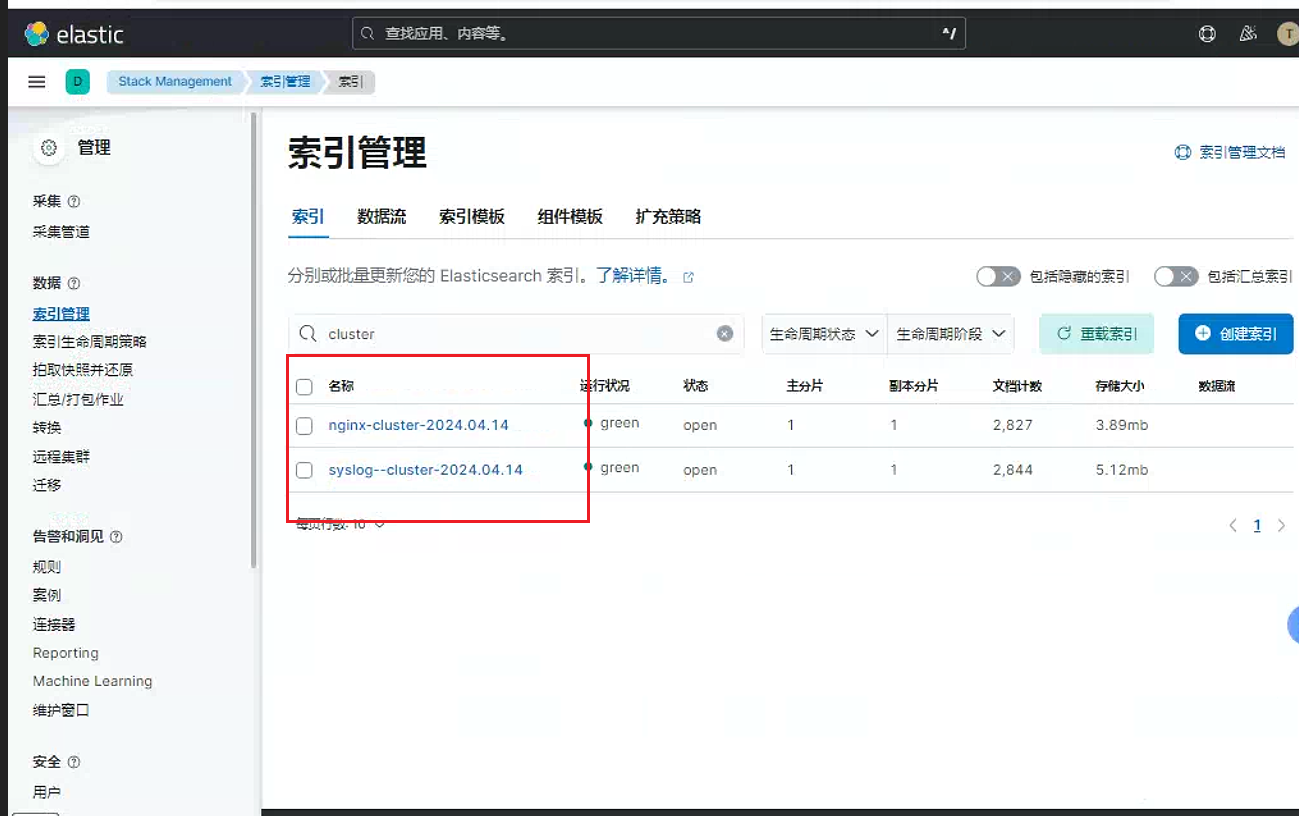
创建对应的索引视图
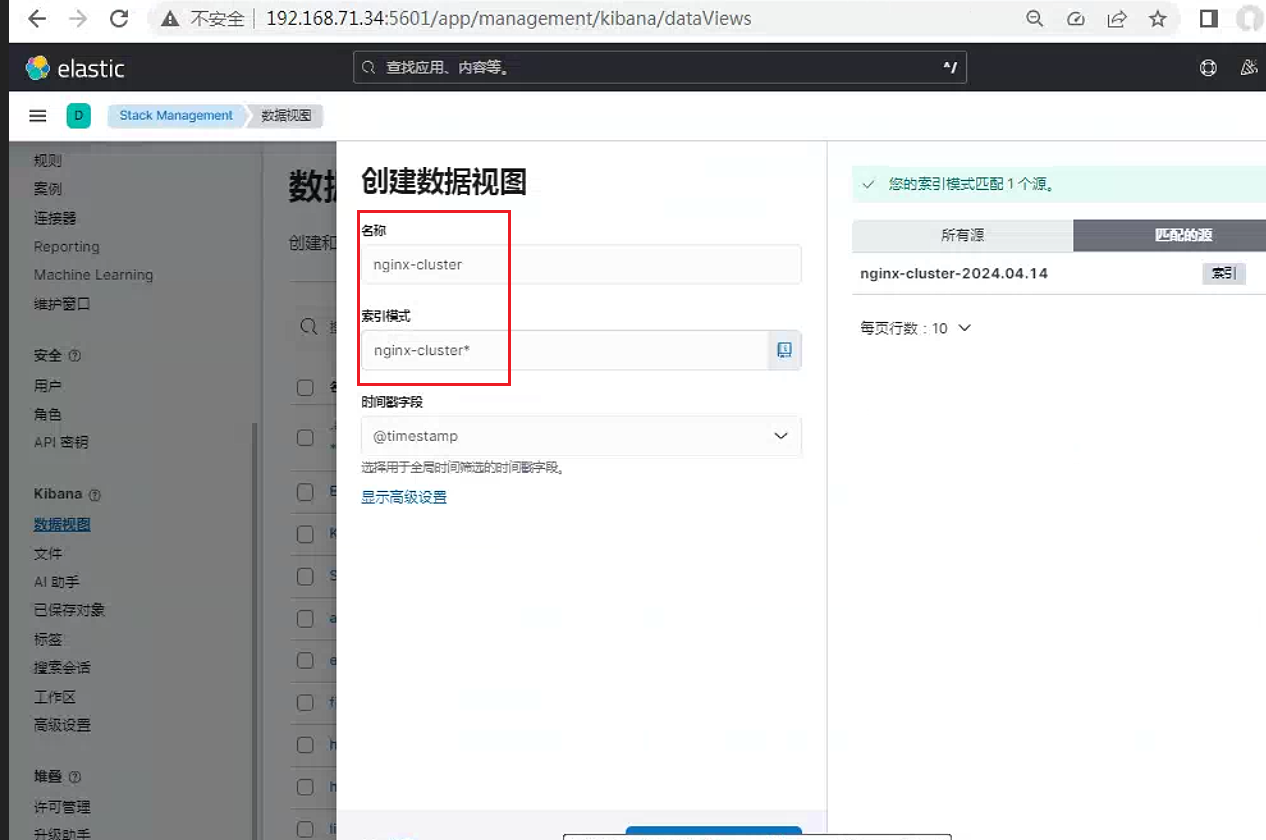
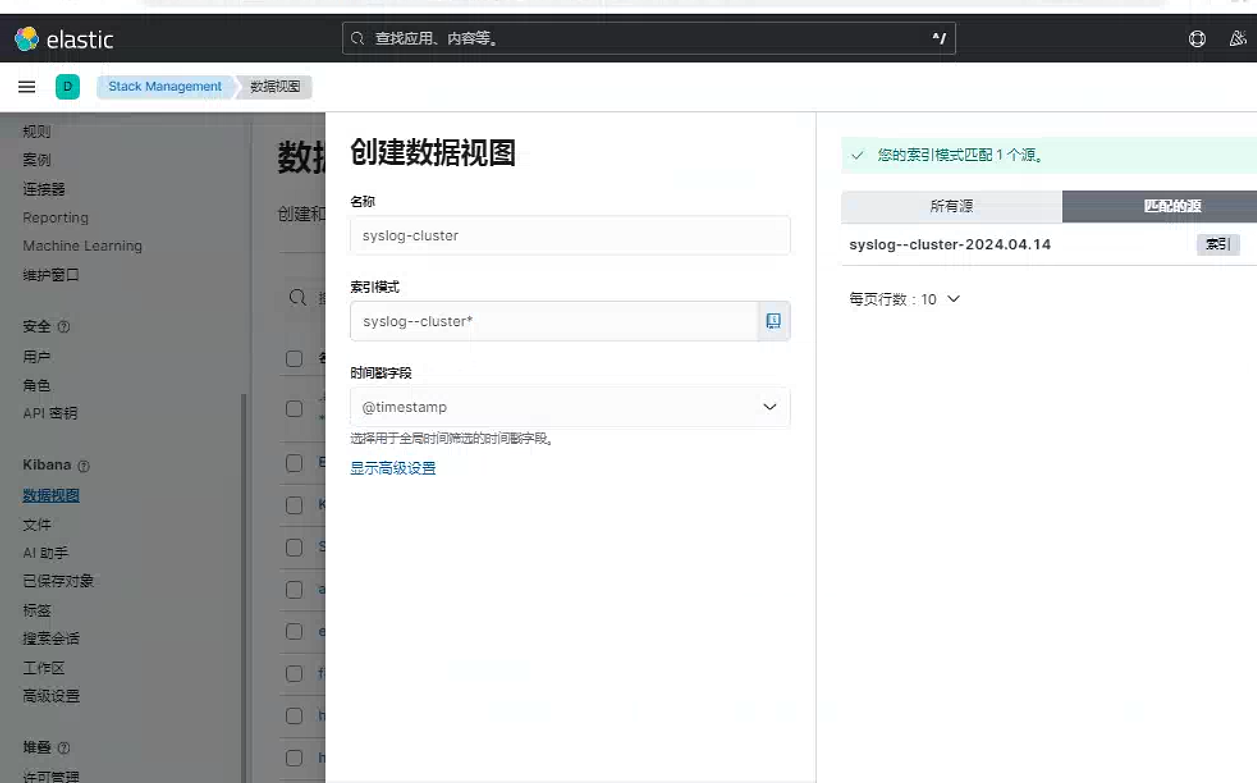
查看数据
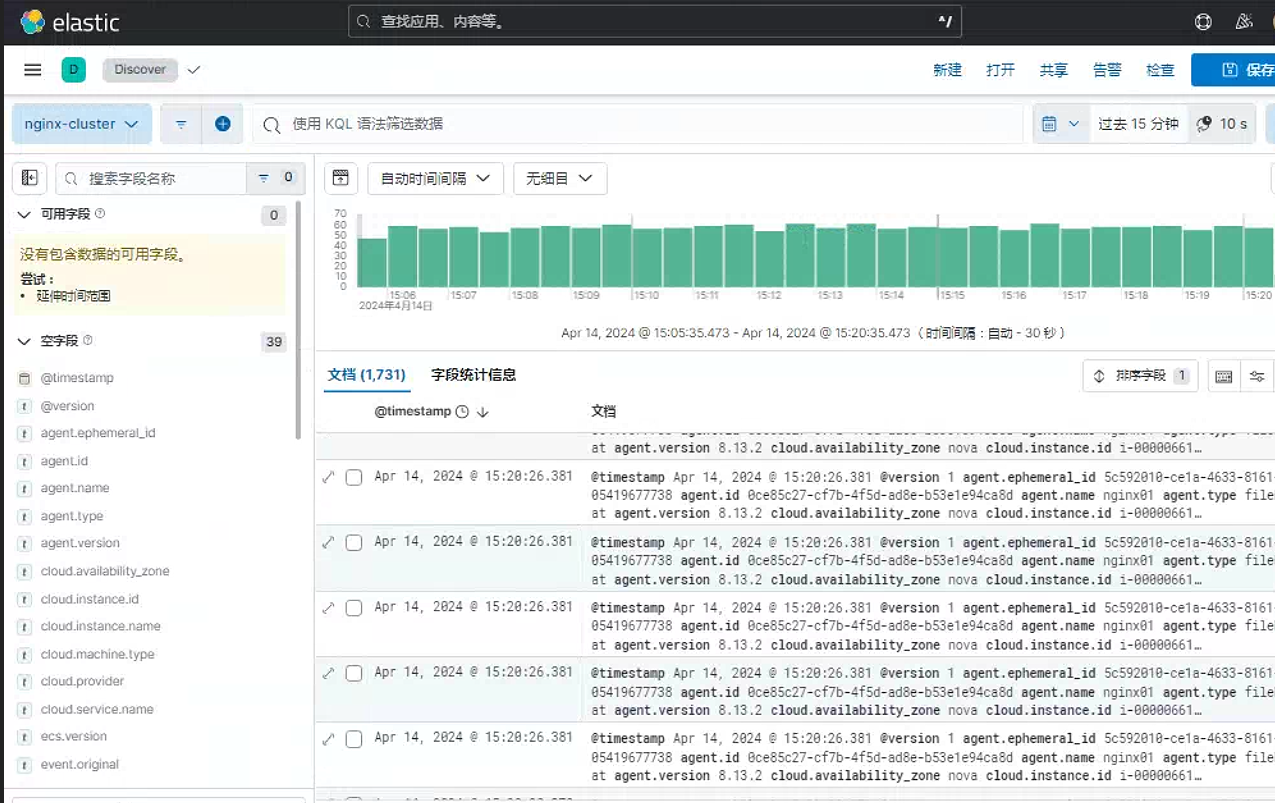
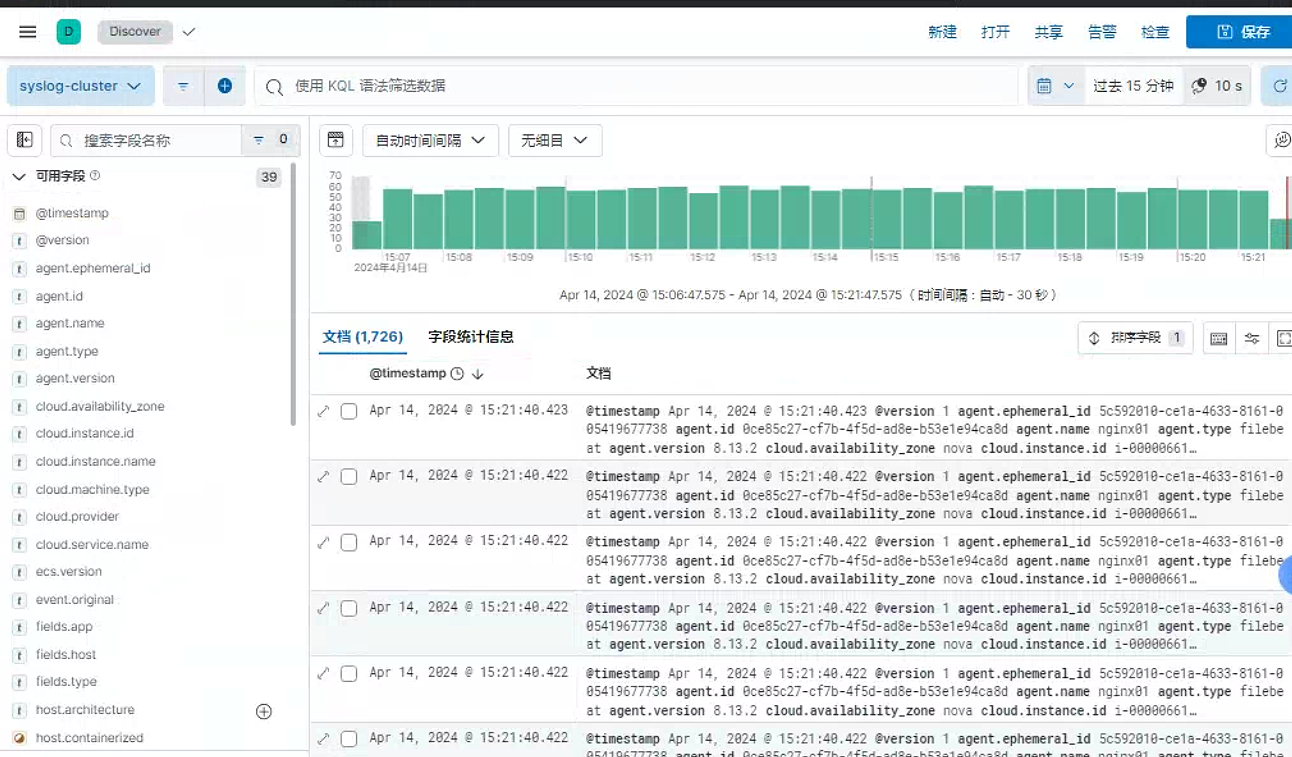
4.6 调整nginx日志为json格式
配置文件中添加以下内容
        log_format access_json '{"@timestamp":"$time_iso8601",'
        '"host":"$server_addr",'
        '"clientip":"$remote_addr",'
        '"size":$body_bytes_sent,'
        '"responsetime":$request_time,'
        '"upstreamtime":"$upstream_response_time",'
        '"upstreamhost":"$upstream_addr",'
        '"http_host":"$host",'
        '"url":"$uri",'
        '"domain":"$host",'
        '"xff":"$http_x_forwarded_for",'
        '"referer":"$http_referer",'
        '"status":"$status"}';

        access_log  /var/log/nginx/access.log  access_json;
如果需要后台识别为
json,可以通过filebeat的配置文件中识别为json,或者通过logstash识别为json#filebeat配置 filebeat.inputs: - type: filestream id: var-log enabled: true paths: - /var/log/syslog fileds: app: syslog host: "192.168.71.44" type: "filebeat-nginx02-syslog-71.44" - type: filestream id: nginx enabled: true paths: - /var/log/nginx/access.log fileds: app: nginx host: "192.168.71.44" type: "filebeat-nginx02-nginx-71.44" parsers: - ndjson: target: "" add_error_key: true检查页面
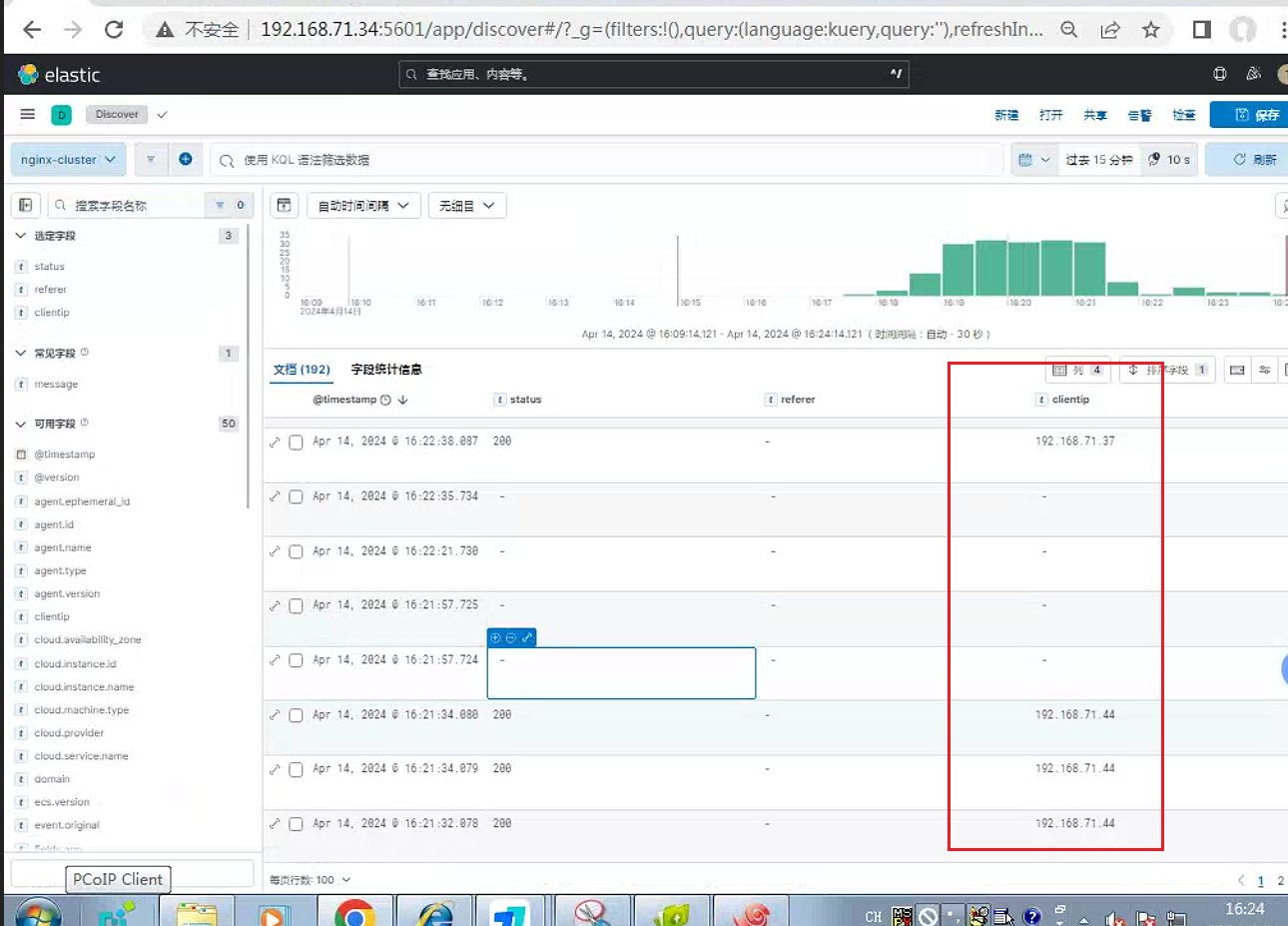
另外可以通过调整
logstash配置文件, 这里需要注意该实验中只有input的beat插件支持codec功能,因此只需要在logstash03、logstash04节点配置root@logstash03:/etc/logstash/conf.d# cat nginx-to-redis.conf input { beats { port => 5044 codec => json } } output { if [fields][app] == "syslog" { redis { host => "192.168.71.43" port => "6379" password => "123456" db => "1" key => "linux-syslog-key" data_type => "list" } #stdout{} } if [fields][app] == "nginx" { redis { host => "192.168.71.43" port => "6379" password => "123456" db => "2" key => "linux-nginx-key" data_type => "list" } #stdout {} } }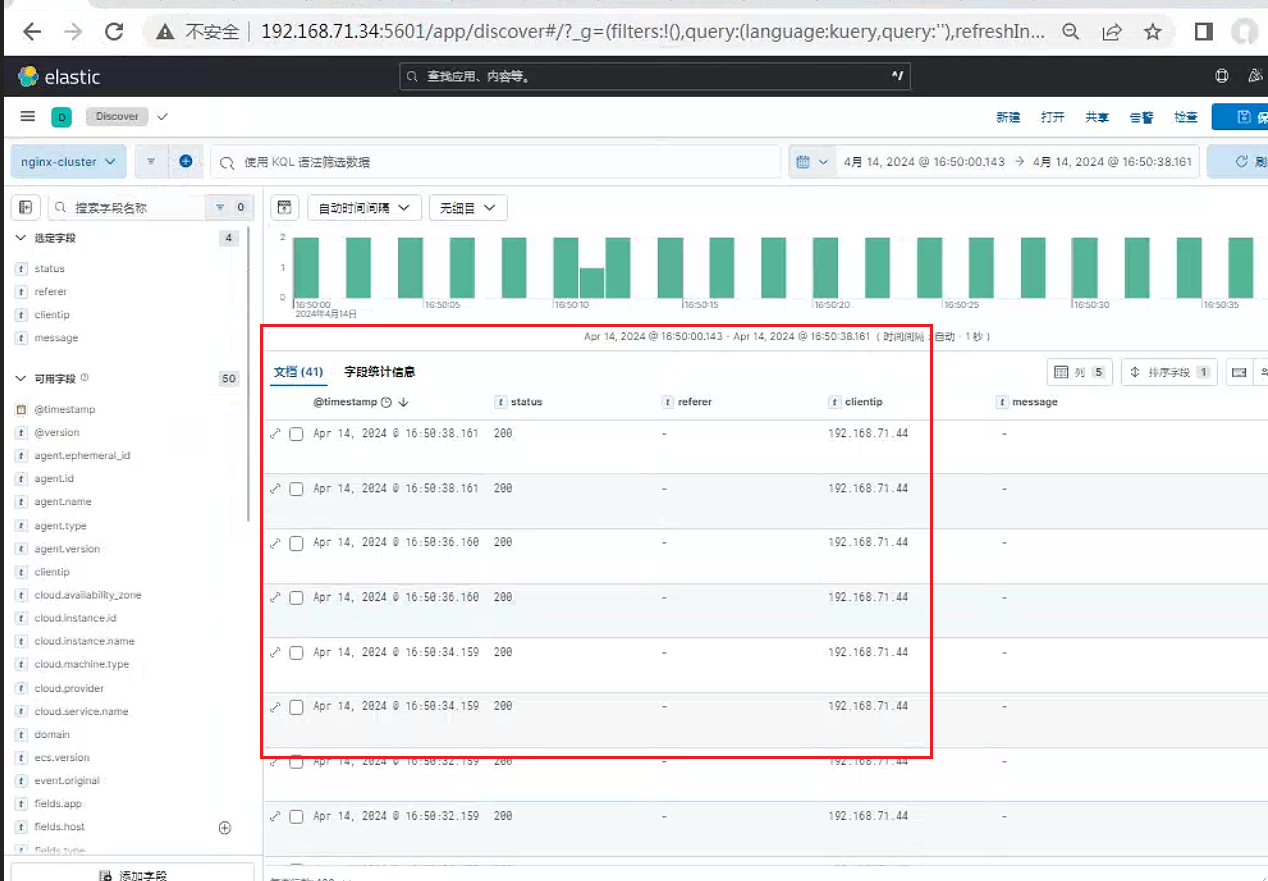
5. 结合kafka使用
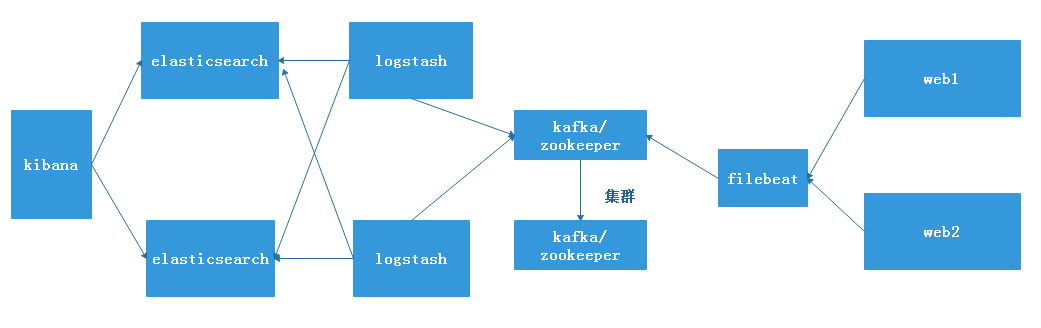
A主机:elasticsearch主机,IP地址:192.168.7.100
B主机:logstash主机:IP地址:192.168.7.102
C主机:filebeat主机, IP地址:192.168.7.103
D主机:kafka/zookeeper IP地址:192.168.7.104
E主机:kafka/zookeeper IP地址:192.168.7.105
5.1 配置filebeat
修改
filebeat配置文件[root@filebate tmp]# vim /etc/filebeat/filebeat.yml filebeat.inputs: - type: log enabled: true - /var/log/messages fields: host: "192.168.7.103" type: "filebeat-syslog-7-103" app: "syslog" #-------------------------- Elasticsearch output ------------------------------ #output.elasticsearch: #注释掉此行 # Array of hosts to connect to. #hosts: ["192.168.7.100:9200"] # 注释掉此行 output.kafka: # 写入到kafka主机内 hosts: ["192.168.7.104:9092","192.168.7.105:9092"] # 写入kafka的IP地址 topic: "filebeat-systemlog-7-103" partition.round_robin: reachable_only: true #如果 reachable_only 设置为 true,则事件将仅发布到可用分区,false将发送到所有分区 required_acks: 1 # 本地写入完成 #broker要求的ACK可靠性级别。0=无响应,1=等待本地提交,-1=等待所有副本提交。默认值为1。注意:如果设置为0,则Kafka不会返回ACK。出现错误时,消息可能会以静默方式丢失。 compression: gzip # 开启压缩 max_message_bytes: 1000000 # 消息最大值启动
filebeat服务[root@filebate tmp]# systemctl start filebeat [root@filebate tmp]# systemctl status filebeat [root@filebate tmp]# ps -ef |grep filebeat root 5464 1 0 23:11 ? 00:00:00 /usr/share/filebeat/bin/filebeat -c /etc/filebeat/filebeat.yml -path.home /usr/share/filebeat -path.config /etc/filebeat -path.data /var/lib/filebeat -path.logs /var/log/filebeat root 5488 1299 0 23:33 pts/0 00:00:00 grep --color=auto filebeat
5.2 在kafka集群主机上进行测试
测试
kafka集群主机是否已经写入数据[root@web1 ~]# /usr/local/kafka/bin/kafka-topics.sh --list --zookeeper 192.168.7.104:2181 192.168.7.105:2181 __consumer_offsets connect-test filebeat-systemlog-7-103 filebeat-systemlog-7-108 hello kafka-nginx-access-log-7-101 kafka-syslog-log-7-101 logstash [root@tomcat-web2 ~]# /usr/local/kafka/bin/kafka-topics.sh --list --zookeeper 192.168.7.104:2181 192.168.7.105:2181 __consumer_offsets connect-test filebeat-systemlog-7-103 filebeat-systemlog-7-108 hello kafka-nginx-access-log-7-101 kafka-syslog-log-7-101 logstash
5.3 修改logstash主机的配置文件
在
/etc/logstash/conf.d目录下创建一个配置文件,采集kafka的日志[root@logstash conf.d]# vim kafa-to-es.conf input { kafka { topics => "filebeat-systemlog-7-103" # 与filebeat的配置文件对应 bootstrap_servers => "192.168.7.105:9092" # 与filebeat集群主机的leader主机IP地址对应 codec => "json" consumer_threads => 1 #理想情况下,您应该拥有与分区数量一样多的线程,以实现完美的平衡 — 线程多于分区意味着一些线程将处于空闲状态 }} output { if [fields][app] == "syslog" { # app类型要与filebeat主机的app对用。 elasticsearch { hosts => ["192.168.7.100:9200"] # 转发到elasticsearch服务器上 index => "filebeat-syslog-7-103-%{+YYYY.MM.dd}" }} }重新启动
logstash服务# systemctl restart logstash
参考链接
Beats: Elastic Beats 介绍 及和 Logstash 的比较-CSDN博客
一篇文章搞懂filebeat(ELK) - 一寸HUI - 博客园 (cnblogs.com)
Filebeat vs Logstash: 日志采集工具对比 (qq.com)
Beats : 使用 Elastic Stack 记录 Python 应用日志_beats python-CSDN博客
ELK之九----logstash结合filebeat经过kafka收集系统及nginx日志 - 一叶知秋~~ - 博客园 (cnblogs.com)