
5-Prometheus Exporter 原理与实践
随着Prometheus的流行 , 很多系统都已经自带了用于Prometheus监控的接口 , 例如etcd、Kubernetes、coreDNS等 , 所以这些系统可以直接被Prometheus所监控。但是 , 有很多应用目前还没有提供用于Prometheus监控的接口 , 针对这这类应用 , Prometheus提出了Exporter的解决方案。
1. Exporter 简介
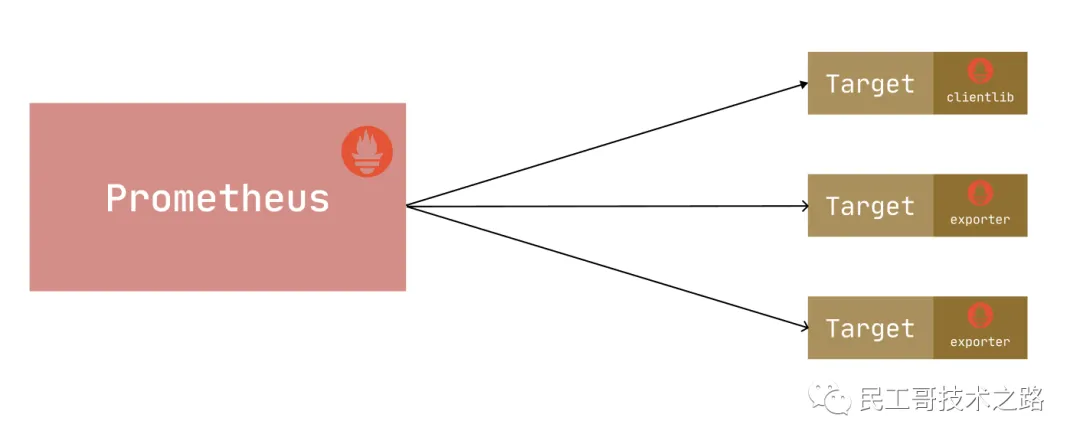
Exporter 是一个采集被监控系统的监控数据 , 通过Prometheus监控规范对外提供数据的组件。简单来说 , 为了采集被监控系统的监控样本数据 , 需要安装一个程序 , 该程序对外暴露了一个用于获取当前监控样本数据的HTTP访问地址 , 这样的一个程序称为Exporter。Prometheus通过轮询的方式定时从Target中获取监控数据样本 , 并且存储在数据库当中。
我们可以通过一个 metrics 接口为 Prometheus 提供监控指标 , 最好的方式就是直接在目标应用中集成该接口 ( 有些应用集成了metrics 接口) , 但是有的应用并没有内置支持 metrics 接口 , 比如 linux 系统、mysql、redis、kafka 等应用 , 这种情况下我们就可以单独开发一个应用来专门提供 metrics 服务 , 这就是我们这里说的 Exporter , 广义上讲所有可以向 Prometheus 提供监控样本数据的程序都可以被称为一个 Exporter , Exporter 的一个实例就是我们要监控的 target。
Prometheus 社区提供了丰富的 Exporter 实现 , 涵盖了从基础设施、中间件以及网络等各个方面的监控实现 , 当然社区也出现了很多其他的 Exporter , 如果有必要 , 我们也可以完全根据自己的需求开发一个 Exporter , 但是最好以官方的 Exporter 开发的最佳实践文档作为参考实现方式。
由于 Exporter 是用于提供监控指标的独立服务 , 所以我们需要单独部署该服务来提供指标服务 , 比如 Node Exporter 就需要在操作系统上独立运行来收集系统的相关监控数据转换为 Prometheus 能够识别的 metrics 接口。
2. Exporter 运行方式
独立运行
由于操作系统本身并不直接支持
Prometheus, 因此 , 只能通过一个独立运行的程序 , 从操作系统提供的相关接口将系统的状态参数转换为可供Prometheus读取的监控指标。除了操作系统外 , 如
Mysql、kafka、Redis等介质 , 都是通过这种方式实现的。这类Exporter承担了一个中间代理的角色。应用集成
由于
Prometheus项目的火热 , 目前有部分开源产品直接在代码层面使用Prometheus的Client Library, 提供了在监控上的直接支持 , 如kubernetes、ETCD等产品。这类产品自身提供对应的
metrics接口 ,Prometheus可通过接口直接获取相关的系统指标数据。这种方式打破了监控的界限 , 应用程序本身做为一个Exporter提供功能。
3. 常用的Exporter
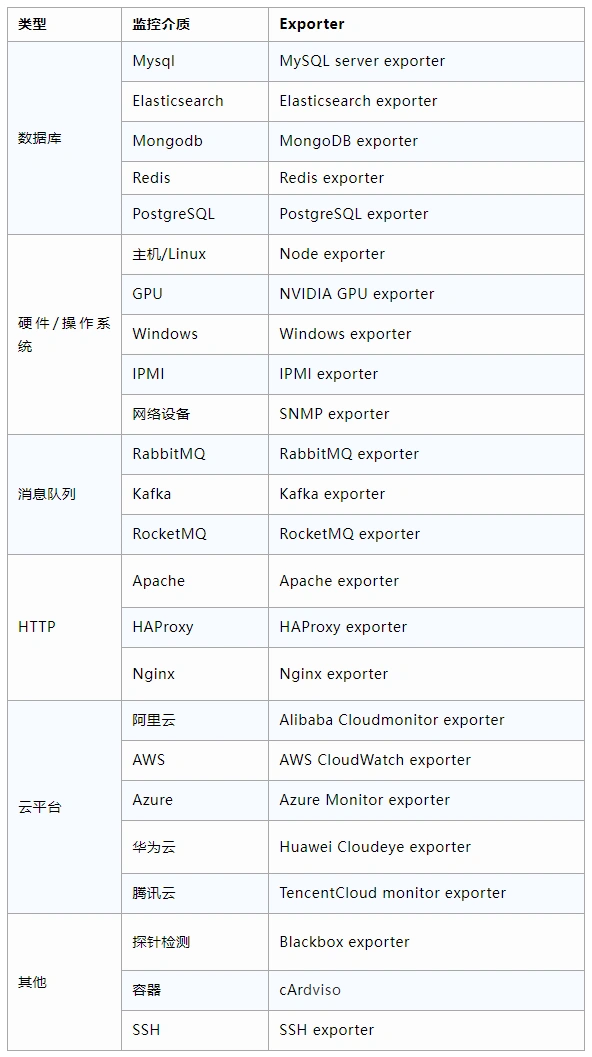
这些Exporter主要通过被监控对象提供的监控相关的接口获取监控数据 , 通过例如以下几种方式获取到被监控对象的监控指标:
HTTP/HTTPs, 例如Rabbitmq Exporter通过HTTPs接口获取监控数据。TCP, 例如Redis Exporter通过Redis提供的系统监控相关命令获取监控指标 ,MySQL Server Exporter通过MySQL开放的监控相关的表获取监控指标。本地文件 , 例如
Node Exporter通过读取整个proc文件系统下的文件 , 得到整个系统的当前状态。标准协议 , 例如
IPMI Exporter通过IPMI协议获取硬件相关信息 , 并将这些信息的格式进行转化 , 输出为Prometheus能够识别的监控数据格式 , 从而扩大Prometheus的数据采集能力。
所有的Exporter程序都需要按照Prometheus的规范返回监控的样本数据。
4. 自定义export
尽管Promethesu社区提供了丰富多样的Exporter给用户使用 , 但业务特点 , 有时候可能无法在现有资源中找到合适的工具。对此 , 可以利用Prometheus的Clinet Libraries , 开发符合实际需要的自定义Exporter。
Clinet Libraries支持的语言版本非常丰富 , 除了官方提供了Go、Java or Scala、Python和Ruby几种外 , 还有很多第三方开发的其他语言版本。
本文以go为例 , 演示Exporter的开发。

4.1 Gauge指标类型
不带
label的基本案例package main import ( "net/http" "github.com/prometheus/client_golang/prometheus" "github.com/prometheus/client_golang/prometheus/promhttp" ) func main() { // 定义指标 cpuUsage := prometheus.NewGauge(prometheus.GaugeOpts{ Name: "cpu_usage", // 指标名称 Help: "this is test metrics cpu usage", // 帮助信息 }) // 给指标设置值 cpuUsage.Set(89.56) // 注册指标 prometheus.MustRegister(cpuUsage) // 暴露指标 http.Handle("/metrics", promhttp.Handler()) http.ListenAndServe(":9900", nil) }
带有固定
label指标的案例package main import ( "net/http" "github.com/prometheus/client_golang/prometheus" "github.com/prometheus/client_golang/prometheus/promhttp" ) func main() { // 定义指标 cpuUsage := prometheus.NewGauge(prometheus.GaugeOpts{ Name: "cpu_usage", // 指标名称 Help: "this is test metrics cpu usage", // 帮助信息 ConstLabels: prometheus.Labels{"MachineType": "host"}, // label }) // 给指标设置值 cpuUsage.Set(89.56) // 注册指标 prometheus.MustRegister(cpuUsage) // 暴露指标 http.Handle("/metrics", promhttp.Handler()) http.ListenAndServe(":9900", nil) }带有非固定
label指标的案例package main import ( "net/http" "github.com/prometheus/client_golang/prometheus" "github.com/prometheus/client_golang/prometheus/promhttp" ) func main() { //定义带有不固定label的指标 mtu := prometheus.NewGaugeVec(prometheus.GaugeOpts{ Name: "interface_mtu", Help: "网卡接口MTU", }, []string{"interface", "Machinetype"}) // 给指标设置值 mtu.WithLabelValues("lo", "host").Set(1500) mtu.WithLabelValues("ens32", "host").Set(1500) mtu.WithLabelValues("eth0", "host").Set(1500) // 注册指标 prometheus.MustRegister(mtu) // 暴露指标 http.Handle("/metrics", promhttp.Handler()) http.ListenAndServe(":9900", nil) }
4.2 Counter指标类型
不带
label的基本案例package main import ( "net/http" "github.com/prometheus/client_golang/prometheus" "github.com/prometheus/client_golang/prometheus/promhttp" ) func main() { // 定义指标 reqTotal := prometheus.NewCounter(prometheus.CounterOpts{ Name: "current_request_total", Help: "当前请求总数", }) // 注册指标 prometheus.MustRegister(reqTotal) // 设置值 reqTotal.Add(10) // 暴露指标 http.Handle("/metrics", promhttp.Handler()) http.ListenAndServe(":9900", nil) }
带有固定
label指标的案例package main import ( "net/http" "github.com/prometheus/client_golang/prometheus" "github.com/prometheus/client_golang/prometheus/promhttp" ) func main() { // 定义指标 suceReqTotal := prometheus.NewCounter(prometheus.CounterOpts{ Name: "sucess_request_total", Help: "请求成功的总数", ConstLabels: prometheus.Labels{"StatusCode": "200"}, }) // 注册指标 prometheus.MustRegister(suceReqTotal) // 设置值 suceReqTotal.Add(5675) // 暴露指标 http.Handle("/metrics", promhttp.Handler()) http.ListenAndServe(":9900", nil) }带有非固定
label指标的案例package main import ( "net/http" "github.com/prometheus/client_golang/prometheus" "github.com/prometheus/client_golang/prometheus/promhttp" ) func main() { // 定义指标 pathReqTotal := prometheus.NewCounterVec(prometheus.CounterOpts{ Name: "path_request_total", Help: "path请求总数", }, []string{"path"}) // 注册指标 prometheus.MustRegister(pathReqTotal) // 设置值 pathReqTotal.WithLabelValues("/token").Add(37) pathReqTotal.WithLabelValues("/auth").Add(23) pathReqTotal.WithLabelValues("/user").Add(90) pathReqTotal.WithLabelValues("/api").Add(67) // 暴露指标 http.Handle("/metrics", promhttp.Handler()) http.ListenAndServe(":9900", nil) }
4.3 Counter指标类型
不带
label的案例package main import ( "net/http" "github.com/prometheus/client_golang/prometheus" "github.com/prometheus/client_golang/prometheus/promhttp" ) func main() { // 定义指标 reqDelay := prometheus.NewHistogram(prometheus.HistogramOpts{ Name: "request_delay", Help: "请求延迟 , 单位秒", Buckets: prometheus.LinearBuckets(0, 3, 6), // 调用LinearBuckets生成区间 , 从0开始 , 宽度3 , 共6个Bucket }) // 注册指标 prometheus.MustRegister(reqDelay) // 设置值 reqDelay.Observe(6) // 暴露指标 http.Handle("/metrics", promhttp.Handler()) http.ListenAndServe(":9900", nil) }带固定
label的案例package main import ( "net/http" "github.com/prometheus/client_golang/prometheus" "github.com/prometheus/client_golang/prometheus/promhttp" ) func main() { // 定义指标 reqDelay := prometheus.NewHistogram(prometheus.HistogramOpts{ Name: "request_delay", Help: "请求延迟 , 单位秒", Buckets: prometheus.LinearBuckets(0, 3, 6), // 调用LinearBuckets生成区间 , 从0开始 , 宽度3 , 共6个Bucket ConstLabels: prometheus.Labels{"path": "/api"}, }) // 注册指标 prometheus.MustRegister(reqDelay) // 设置值 reqDelay.Observe(6) // 暴露指标 http.Handle("/metrics", promhttp.Handler()) http.ListenAndServe(":9900", nil) }带有非固定
label的案例package main import ( "net/http" "github.com/prometheus/client_golang/prometheus" "github.com/prometheus/client_golang/prometheus/promhttp" ) func main() { // 定义指标 reqDelay := prometheus.NewHistogramVec(prometheus.HistogramOpts{ Name: "request_delay", Help: "请求延迟 , 单位秒", Buckets: prometheus.LinearBuckets(0, 3, 6), // 调用LinearBuckets生成区间 , 从0开始 , 宽度3 , 共6个Bucket }, []string{"path"}) // 注册指标 prometheus.MustRegister(reqDelay) // 设置值 reqDelay.WithLabelValues("/api").Observe(6) reqDelay.WithLabelValues("/user").Observe(3) reqDelay.WithLabelValues("/delete").Observe(2) reqDelay.WithLabelValues("/get_token").Observe(13) // 暴露指标 http.Handle("/metrics", promhttp.Handler()) http.ListenAndServe(":9900", nil) }
4.4 Summary指标类型
不带
label的案例package main import ( "net/http" "github.com/prometheus/client_golang/prometheus" "github.com/prometheus/client_golang/prometheus/promhttp" ) func main() { // 定义指标 reqDelay := prometheus.NewSummary(prometheus.SummaryOpts{ Name: "request_delay", Help: "请求延迟", Objectives: map[float64]float64{0.5: 0.05, 0.90: 0.01, 0.99: 0.001}, // 百分比:精度 }) // 注册指标 prometheus.MustRegister(reqDelay) // 设置值 reqDelay.Observe(4) // 暴露指标 http.Handle("/metrics", promhttp.Handler()) http.ListenAndServe(":9900", nil) }带有固定
label的案例package main import ( "net/http" "github.com/prometheus/client_golang/prometheus" "github.com/prometheus/client_golang/prometheus/promhttp" ) func main() { // 定义指标 reqDelay := prometheus.NewSummary(prometheus.SummaryOpts{ Name: "request_delay", Help: "请求延迟", Objectives: map[float64]float64{0.5: 0.05, 0.90: 0.01, 0.99: 0.001}, // 百分比:精度 ConstLabels: prometheus.Labels{"path": "/api"}, }) // 注册指标 prometheus.MustRegister(reqDelay) // 设置值 reqDelay.Observe(4) // 暴露指标 http.Handle("/metrics", promhttp.Handler()) http.ListenAndServe(":9900", nil) }带有非固定
label的案例package main import ( "net/http" "github.com/prometheus/client_golang/prometheus" "github.com/prometheus/client_golang/prometheus/promhttp" ) func main() { // 定义指标 reqDelay := prometheus.NewSummaryVec(prometheus.SummaryOpts{ Name: "request_delay", Help: "请求延迟", Objectives: map[float64]float64{0.5: 0.05, 0.90: 0.01, 0.99: 0.001}, // 百分比:精度 }, []string{"path"}) // 注册指标 prometheus.MustRegister(reqDelay) // 设置值 reqDelay.WithLabelValues("/api").Observe(4) reqDelay.WithLabelValues("/token").Observe(2) reqDelay.WithLabelValues("/user").Observe(3) // 暴露指标 http.Handle("/metrics", promhttp.Handler()) http.ListenAndServe(":9900", nil) }
4.5. 值的修改
基于事件的触发来修改值 , 比如每访问
1次/api就增1基于事件的触发对指标的值进行修改 , 通常大多数是来自业务方面的指标需求 , 如自研的应用需要暴露相关指标给
promethus进行监控、展示 , 那么指标采集的代码 ( 指标定义、设置值) 就要嵌入到自研应用代码里了。package main import ( "fmt" "net/http" "github.com/prometheus/client_golang/prometheus" "github.com/prometheus/client_golang/prometheus/promhttp" ) func main() { urlRequestTotal := prometheus.NewCounterVec(prometheus.CounterOpts{ Name: "urlRequestTotal", Help: "PATH请求累计 单位 次", }, []string{"path"}) http.HandleFunc("/api", func(w http.ResponseWriter, r *http.Request) { urlRequestTotal.WithLabelValues(r.URL.Path).Inc() // 使用Inc函数进行增1 fmt.Fprintf(w, "Welcome to the api") }) prometheus.MustRegister(urlRequestTotal) http.Handle("/metrics", promhttp.Handler()) http.ListenAndServe(":9900", nil) }基于时间周期的触发来修改值 , 比如下面的示例中 , 是每间隔
1秒获取cpu负载指标 。基于时间周期的触发 , 可以是多少秒、分、时、日、月、周。
package main

import (
 "net/http"
 "time"

 "github.com/prometheus/client_golang/prometheus"
 "github.com/prometheus/client_golang/prometheus/promhttp"
 "github.com/shirou/gopsutil/load"
)

func main() {

 cpuUsage := prometheus.NewGaugeVec(prometheus.GaugeOpts{
  Name: "CpuLoad",
  Help: "CPU负载",
 }, []string{"time"})

 // 开启一个子协程执行该匿名函数内的逻辑来给指标设置值 , 且每秒获取一次
 go func() {
  for range time.Tick(time.Second) {
   info, _ := load.Avg()
   cpuUsage.WithLabelValues("Load1").Set(float64(info.Load1))
   cpuUsage.WithLabelValues("Load5").Set(float64(info.Load5))
   cpuUsage.WithLabelValues("Load15").Set(float64(info.Load15))
  }
 }()

 prometheus.MustRegister(cpuUsage)

 http.Handle("/metrics", promhttp.Handler())
 http.ListenAndServe(":9900", nil)
}
基于每访问一次获取指标的
URI才修改值 , 比如每次访问/metrics才去修改某些指标的值案例是每访问一次
/metrics就获取一次内存总容量。package main import ( "fmt" "net/http" "github.com/prometheus/client_golang/prometheus" "github.com/prometheus/client_golang/prometheus/promhttp" "github.com/shirou/gopsutil/mem" ) func main() { MemTotal := prometheus.NewGaugeFunc(prometheus.GaugeOpts{ Name: "MemTotal", Help: "内存总容量 单位 GB", }, func() float64 { fmt.Println("call MemTotal ...") info, _ := mem.VirtualMemory() return float64(info.Total / 1024 / 1024 / 1024) }) prometheus.MustRegister(MemTotal) http.Handle("/metrics", promhttp.Handler()) http.ListenAndServe(":9900", nil) }
目前只有Gauge和Counter的指标类型有对应的函数 , 分别是NewGaugeFunc和NewCounterFunc , 而且是固定的label。
5. Exporter规范
所有的Exporter程序都需要按照Prometheus的规范 , 返回监控的样本数据。以Node Exporter为例 , 当访问/metrics地址时会返回以下内容:
# HELP node_cpu Seconds the cpus spent in each mode.
# TYPE node_cpu counter
node_cpu{cpu="cpu0",mode="idle"} 362812.7890625
# HELP node_load1 1m load average.
# TYPE node_load1 gauge
node_load1 3.0703125
这是一种基于文本的格式规范 , 在Prometheus 2.0之前的版本还支持Protocol buffer规范。相比于Protocol buffer文本具有更好的可读性 , 以及跨平台性。Prometheus 2.0的版本也已经不再支持Protocol buffer , 这里就不对Protocol buffer规范做详细的阐述。
Exporter返回的样本数据 , 主要由三个部分组成:样本的一般注释信息 ( HELP) , 样本的类型注释信息 ( TYPE) 和样本。Prometheus会对Exporter响应的内容逐行解析:
如果当前行以# HELP开始 , Prometheus将会按照以下规则对内容进行解析 , 得到当前的指标名称以及相应的说明信息:
# HELP <metrics_name> <doc_string>如果当前行以# TYPE开始 , Prometheus会按照以下规则对内容进行解析 , 得到当前的指标名称以及指标类型:
# TYPE <metrics_name> <metrics_type>TYPE注释行必须出现在指标的第一个样本之前。如果没有明确的指标类型需要返回为untyped。 除了# 开头的所有行都会被视为是监控样本数据。 每一行样本需要满足以下格式规范:
metric_name [
  "{" label_name "=" `"` label_value `"` { "," label_name "=" `"` label_value `"` } [ "," ] "}"
] value [ timestamp ]其中metric_name和label_name必须遵循PromQL的格式规范要求。value是一个float格式的数据 , timestamp的类型为int64 ( 从1970-01-01 00:00:00以来的毫秒数) , timestamp为可选默认为当前时间。具有相同metric_name的样本必须按照一个组的形式排列 , 并且每一行必须是唯一的指标名称和标签键值对组合。
需要特别注意的是对于histogram和summary类型的样本。需要按照以下约定返回样本数据:
类型为
summary或者histogram的指标x, 该指标所有样本的值的总和需要使用一个单独的x_sum指标表示。类型为
summary或者histogram的指标x, 该指标所有样本的总数需要使用一个单独的x_count指标表示。对于类型为
summary的指标x, 其不同分位数quantile所代表的样本 , 需要使用单独的x{quantile=“y”}表示。对于类型
histogram的指标x为了表示其样本的分布情况 , 每一个分布需要使用x_bucket{le=“y”}表示 , 其中y为当前分布的上位数。同时必须包含一个样本x_bucket{le="+Inf"}, 并且其样本值必须和x_count相同。对于
histogram和summary的样本 , 必须按照分位数quantile和分布le的值的递增顺序排序。
以下是类型为histogram和summary的样本输出示例:
# A histogram, which has a pretty complex representation in the text format:
# HELP http_request_duration_seconds A histogram of the request duration.
# TYPE http_request_duration_seconds histogram
http_request_duration_seconds_bucket{le="0.05"} 24054
http_request_duration_seconds_bucket{le="0.1"} 33444
http_request_duration_seconds_bucket{le="0.2"} 100392
http_request_duration_seconds_bucket{le="+Inf"} 144320
http_request_duration_seconds_sum 53423
http_request_duration_seconds_count 144320

# Finally a summary, which has a complex representation, too:
# HELP rpc_duration_seconds A summary of the RPC duration in seconds.
# TYPE rpc_duration_seconds summary
rpc_duration_seconds{quantile="0.01"} 3102
rpc_duration_seconds{quantile="0.05"} 3272
rpc_duration_seconds{quantile="0.5"} 4773
rpc_duration_seconds_sum 1.7560473e+07
rpc_duration_seconds_count 2693对于某些Prometheus还没有提供支持的编程语言 , 用户只需要按照以上规范返回响应的文本数据即可。
指定样本格式的版本
在Exporter响应的HTTP头信息中 , 可以通过Content-Type指定特定的规范版本 , 例如:
HTTP/1.1 200 OK
Content-Encoding: gzip
Content-Length: 2906
Content-Type: text/plain; version=0.0.4
Date: Sat, 17 Mar 2018 08:47:06 GMT其中version用于指定Text-based的格式版本 , 当没有指定版本的时候 , 默认使用最新格式规范的版本。同时HTTP响应头还需要指定压缩格式为gzip。
参考链接
构建企业级监控平台系列 ( 十五) :Prometheus Exporter 原理与实践 (qq.com)