
13-应用案例
1. 主机聚合
Availability Zones 通常是对 computes 节点上的资源在小的区域内进行逻辑上的分组和隔离。
例如在同一个数据中心 , 我们可以将 Availability Zones 规划到不同的机房 , 或者在同一机房的几个相邻的机架 , 从而保障如果某个 Availability Zone 的节点发生故障(如供电系统或网络) , 而不影响其他的 Availability Zones 上节点运行的虚拟机 , 通过这种划分来提高 OpenStack 的可用性。目前 OpenStack 默认的安装是把所有的 computes 节点划分到 nova 的 Availability Zone 上 , 但我们可以通过对 nova.conf 文件的配置来定义不同的 Availability zones。
Host Aggregates 是在 Availability Zones 的基础上更进一步地进行逻辑的分组和隔离。例如我们可以根据不同的 computes 节点的物理硬件配置将具有相同共性的物理资源规划在同一 Host Aggregate 之下 , 或者根据用户的具体需求将几个 computes 节点规划在具有相同用途的同一 Host Aggregate 之下 , 通过这样的划分有利于提高 OpenStack 资源的使用效率。Host Aggregates 可以通过 nova client 或 API 来创建和配置。
默认情况下,对Nova的服务分为两类: 一类使Controller节点的服务进程, 如nova-api, nova-scheduler, nova-conductor等,另一类使计算节点的进程, 如nova-computer。对于第一类服务,默认的zone配置项由internal_service_availability_zone决定, 而nova-computer所属的zone配置项由default_available_zone决定。
控制节点默认可用域为
internal, 而计算节点可用域默认为nova。一个
nova-compute节点只能在一个az(可用域)内 , 但是可以存在多个aggregate(主机聚合)中。一个计算节点属于多个
aggregate,并且具有相同的metadata key, 那么这个host的key对应的值为set集合 , 匹配规则为任一个满足即可。在创建主机聚合的时候可以同时定义一个新的可用域,但是在这个主机聚合中想要添加要管理的计算节点主机时,首先要将所需的计算节点从
nova可用域中剔除,否则会报409错误。错误如下:ERROR (Conflict): Cannot add host to aggregate 12. Reason: One or more hosts already in availability zone(s) [u'nova']. (HTTP 409) (Request-ID: req-81aa55b5-0bb2-47e1-89c2-4d64ac9c9a8c)
在OpenStack中 , 主机聚合(Host Aggregates)是一种用于逻辑上分组主机(物理服务器)的方法 , 通常是基于它们的物理位置、硬件特性或性能能力。这种分组允许云管理员对虚拟机实例的调度进行更精细的控制。以下是主机聚合的详细解释:
1.1 概念
主机聚合 : 主机聚合是一组具有相同特性的主机的集合。这些特性可以是地理位置、硬件配置、网络隔离等。
可用区 : 可用区是主机聚合的逻辑表示 , 对用户可见。用户可以在创建实例时选择一个可用区 , 但无法看到可用区内的具体主机。
元数据 : 主机聚合可以包含元数据 , 这些元数据可以用于调度决策。例如 , 可以将具有
SSD存储的主机聚合标记为ssd=True。
1.2 作用
资源池: 主机聚合定义了资源池 , 可以在创建实例时指定要在其上调度的资源池。
性能优化: 可以将高性能主机分到一个聚合中 , 以确保资源密集型实例能够调度到这些主机上。
硬件隔离: 可以将特定硬件配置的主机分到一个聚合中 , 以确保对硬件有特殊要求的实例能够满足需求。
地理位置: 如果数据中心分布在不同地理位置 , 可以将地理位置作为一个调度因子。
维护和升级: 可以将需要同时维护或升级的主机分到一个聚合中 , 以便于管理。
1.3 创建和使用
创建主机聚合: 使用命令行或
Horizon Dashboard创建一个新的主机聚合。openstack aggregate create --zone <availability_zone> <aggregate_name> nova aggregate-create <aggregate_name> <availability_zone> [root@node01 ~]# nova aggregate-create projectA nova CLI is deprecated and will be removed in a future release +----+----------+-------------------+-------+----------+--------------------------------------+ | Id | Name | Availability Zone | Hosts | Metadata | UUID | +----+----------+-------------------+-------+----------+--------------------------------------+ | 6 | projectA | - | | | 531bd0a8-881f-469f-a6ca-9d7cc8af746f | +----+----------+-------------------+-------+----------+--------------------------------------+ [root@node01 ~]# nova aggregate-create projectB B nova CLI is deprecated and will be removed in a future release +----+----------+-------------------+-------+-----------------------+--------------------------------------+ | Id | Name | Availability Zone | Hosts | Metadata | UUID | +----+----------+-------------------+-------+-----------------------+--------------------------------------+ | 7 | projectB | B | | 'availability_zone=B' | d6604c36-8c0e-4a87-9083-5021cfd756c4 | +----+----------+-------------------+-------+-----------------------+--------------------------------------+ [root@node01 ~]# openstack aggregate create --zone C ProjectC +-------------------+--------------------------------------+ | Field | Value | +-------------------+--------------------------------------+ | availability_zone | C | | created_at | 2024-10-03T12:24:01.027242 | | deleted_at | None | | hosts | None | | id | 8 | | is_deleted | False | | name | ProjectC | | properties | None | | updated_at | None | | uuid | 8b57da55-66b5-4215-bcec-d909cda9ad44 | +-------------------+--------------------------------------+ [root@node01 ~]# openstack aggregate create ProjectD +-------------------+--------------------------------------+ | Field | Value | +-------------------+--------------------------------------+ | availability_zone | None | | created_at | 2024-10-03T12:24:12.113099 | | deleted_at | None | | hosts | None | | id | 9 | | is_deleted | False | | name | ProjectD | | properties | None | | updated_at | None | | uuid | 6c13278b-e1e0-4c31-a5c8-c9286b8da40e | +-------------------+--------------------------------------+ [root@node01 ~]# openstack aggregate list +----+----------+-------------------+ | ID | Name | Availability Zone | +----+----------+-------------------+ | 7 | projectB | B | | 8 | ProjectC | C | | 6 | projectA | None | | 9 | ProjectD | None | +----+----------+-------------------+ [root@node01 ~]# nova aggregate-list nova CLI is deprecated and will be removed in a future release +----+----------+-------------------+--------------------------------------+ | Id | Name | Availability Zone | UUID | +----+----------+-------------------+--------------------------------------+ | 7 | projectB | B | d6604c36-8c0e-4a87-9083-5021cfd756c4 | | 8 | ProjectC | C | 8b57da55-66b5-4215-bcec-d909cda9ad44 | | 6 | projectA | - | 531bd0a8-881f-469f-a6ca-9d7cc8af746f | | 9 | ProjectD | - | 6c13278b-e1e0-4c31-a5c8-c9286b8da40e | +----+----------+-------------------+--------------------------------------+ 设置元数据: 为主机聚合设置元数据 , 这些元数据可以在调度时使用。
openstack aggregate set --property <key>=<value> <aggregate_id> nova aggregate-set-metadata <aggregate> <key=value> [<key=value> ...] [root@node01 ~]# openstack aggregate set --property availability_zone=A 6 [root@node01 ~]# nova aggregate-list nova CLI is deprecated and will be removed in a future release +----+----------+-------------------+--------------------------------------+ | Id | Name | Availability Zone | UUID | +----+----------+-------------------+--------------------------------------+ | 7 | projectB | B | d6604c36-8c0e-4a87-9083-5021cfd756c4 | | 8 | ProjectC | C | 8b57da55-66b5-4215-bcec-d909cda9ad44 | | 6 | projectA | A | 531bd0a8-881f-469f-a6ca-9d7cc8af746f | | 9 | ProjectD | - | 6c13278b-e1e0-4c31-a5c8-c9286b8da40e | +----+----------+-------------------+--------------------------------------+ [root@node01 ~]# nova aggregate-set-metadata 9 ssd=true nova CLI is deprecated and will be removed in a future release Metadata has been successfully updated for aggregate 9. +----+----------+-------------------+-------+------------+--------------------------------------+ | Id | Name | Availability Zone | Hosts | Metadata | UUID | +----+----------+-------------------+-------+------------+--------------------------------------+ | 9 | ProjectD | - | | 'ssd=true' | 6c13278b-e1e0-4c31-a5c8-c9286b8da40e | +----+----------+-------------------+-------+------------+--------------------------------------+ 添加主机到聚合: 将特定的主机添加到主机聚合中。
openstack aggregate add host <aggregate_id> <host_name> nova aggregate-add-host <aggregate> <host> [root@node01 ~]# openstack aggregate add host 6 node03 +-------------------+----------------------------+ | Field | Value | +-------------------+----------------------------+ | availability_zone | A | | created_at | 2024-10-03T12:21:47.000000 | | deleted_at | None | | hosts | node03 | | id | 6 | | is_deleted | False | | name | projectA | | properties | availability_zone='A' | | updated_at | None | | uuid | None | +-------------------+----------------------------+ [root@node01 ~]# nova aggregate-add-host 7 node05 nova CLI is deprecated and will be removed in a future release Host node05 has been successfully added for aggregate 7 +----+----------+-------------------+----------+-----------------------+--------------------------------------+ | Id | Name | Availability Zone | Hosts | Metadata | UUID | +----+----------+-------------------+----------+-----------------------+--------------------------------------+ | 7 | projectB | B | 'node05' | 'availability_zone=B' | d6604c36-8c0e-4a87-9083-5021cfd756c4 | +----+----------+-------------------+----------+-----------------------+--------------------------------------+ 移除主机从聚合: 从主机聚合中移除主机。
openstack aggregate remove host <aggregate_id> <host_name> nova aggregate-remove-host <aggregate> <host> [root@node01 ~]# openstack aggregate add host 8 node08 +-------------------+----------------------------+ | Field | Value | +-------------------+----------------------------+ | availability_zone | C | | created_at | 2024-10-03T12:24:01.000000 | | deleted_at | None | | hosts | node08 | | id | 8 | | is_deleted | False | | name | ProjectC | | properties | availability_zone='C' | | updated_at | None | | uuid | None | +-------------------+----------------------------+ [root@node01 ~]# openstack aggregate remove host 8 node08 +-------------------+----------------------------+ | Field | Value | +-------------------+----------------------------+ | availability_zone | C | | created_at | 2024-10-03T12:24:01.000000 | | deleted_at | None | | hosts | | | id | 8 | | is_deleted | False | | name | ProjectC | | properties | availability_zone='C' | | updated_at | None | | uuid | None | +-------------------+----------------------------+ 删除主机聚合: 删除不再需要的主机聚合。
openstack aggregate delete <aggregate_id>创建实例时指定聚合: 在创建实例时 , 可以指定要在其上调度的主机聚合。
openstack server create --flavor <flavor_id> --image <image_id> --availability-zone <availability_zone> <instance_name> [root@node01 ~]# openstack server create --flavor m1.nano --image cirros --availability-zone A:node03 --nic net-id=84d97504-ffd7-4c4e-b5b6-1066a7b1b97b nova-test +-------------------------------------+-----------------------------------------------+ | Field | Value | +-------------------------------------+-----------------------------------------------+ | OS-DCF:diskConfig | MANUAL | | OS-EXT-AZ:availability_zone | A | | OS-EXT-SRV-ATTR:host | None | | OS-EXT-SRV-ATTR:hypervisor_hostname | None | | OS-EXT-SRV-ATTR:instance_name | | | OS-EXT-STS:power_state | NOSTATE | | OS-EXT-STS:task_state | scheduling | | OS-EXT-STS:vm_state | building | | OS-SRV-USG:launched_at | None | | OS-SRV-USG:terminated_at | None | | accessIPv4 | | | accessIPv6 | | | addresses | | | adminPass | y4W9Fw2kojXb | | config_drive | | | created | 2024-10-03T14:19:43Z | | flavor | m1.nano (0) | | hostId | | | id | 76c847f2-3204-4888-91a1-fb22f17d5cf1 | | image | cirros (514c6db8-1866-4ee4-b464-2c9eca88f0f9) | | key_name | None | | name | nova-test | | progress | 0 | | project_id | d2dd7a9d467a4c5dbd2faf6944986d1b | | properties | | | security_groups | name='default' | | status | BUILD | | updated | 2024-10-03T14:19:43Z | | user_id | c4c0a73ca297489c9771b3d7e7814b53 | | volumes_attached | | +-------------------------------------+-----------------------------------------------+
使用 Horizon Dashboard: 如果你更喜欢图形界面 , 也可以登录到
OpenStack的Horizon Dashboard来查看主机聚合。在Dashboard中 , 导航到“Admin”( 管理员) > “Compute”(计算) > “Host Aggregates”( 主机聚合) 来查看和管理聚合。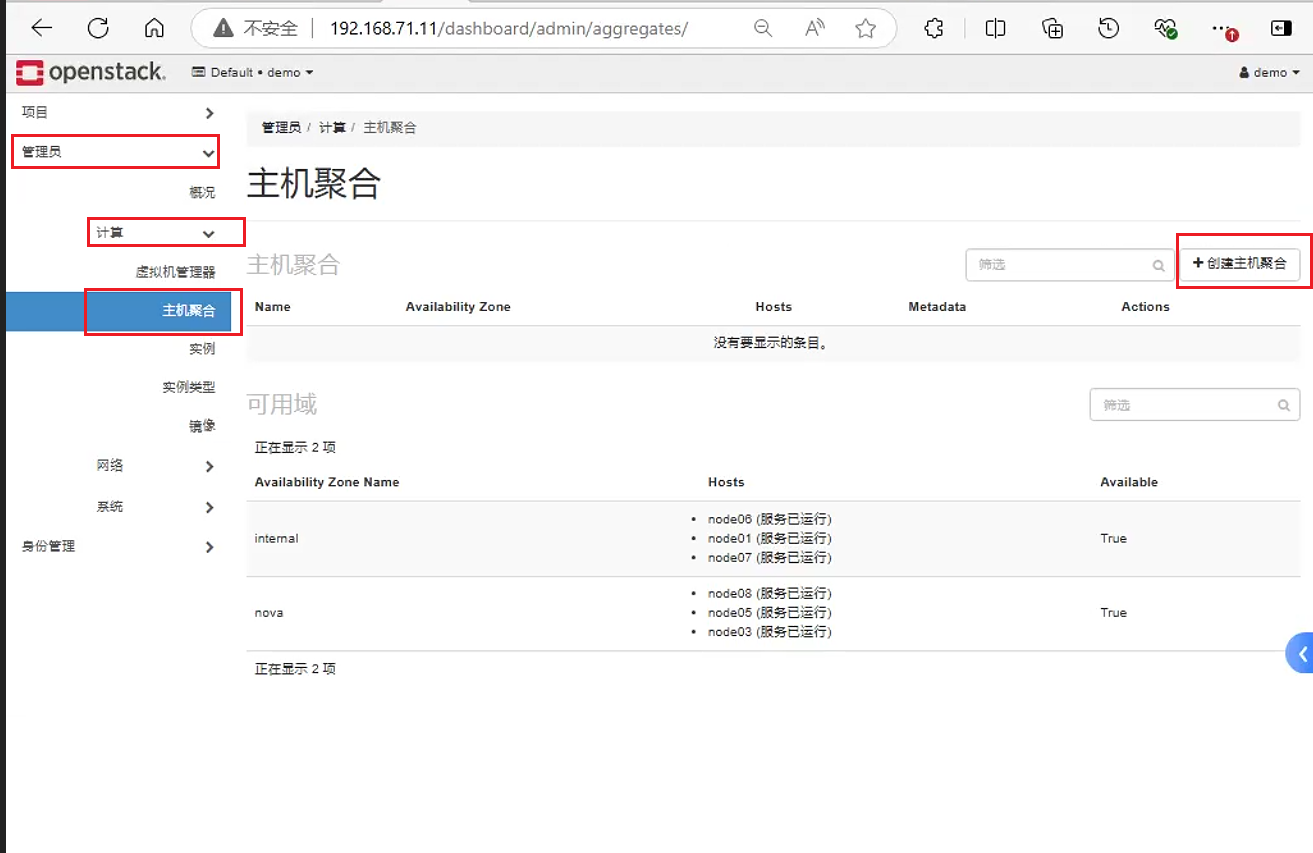
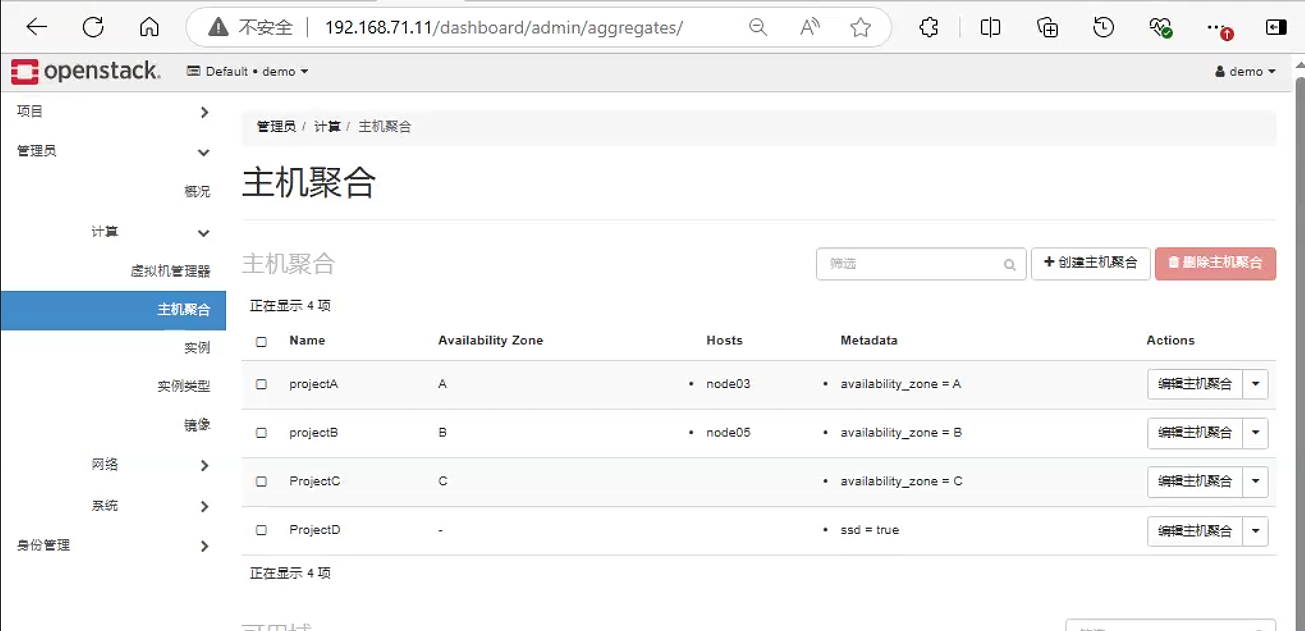
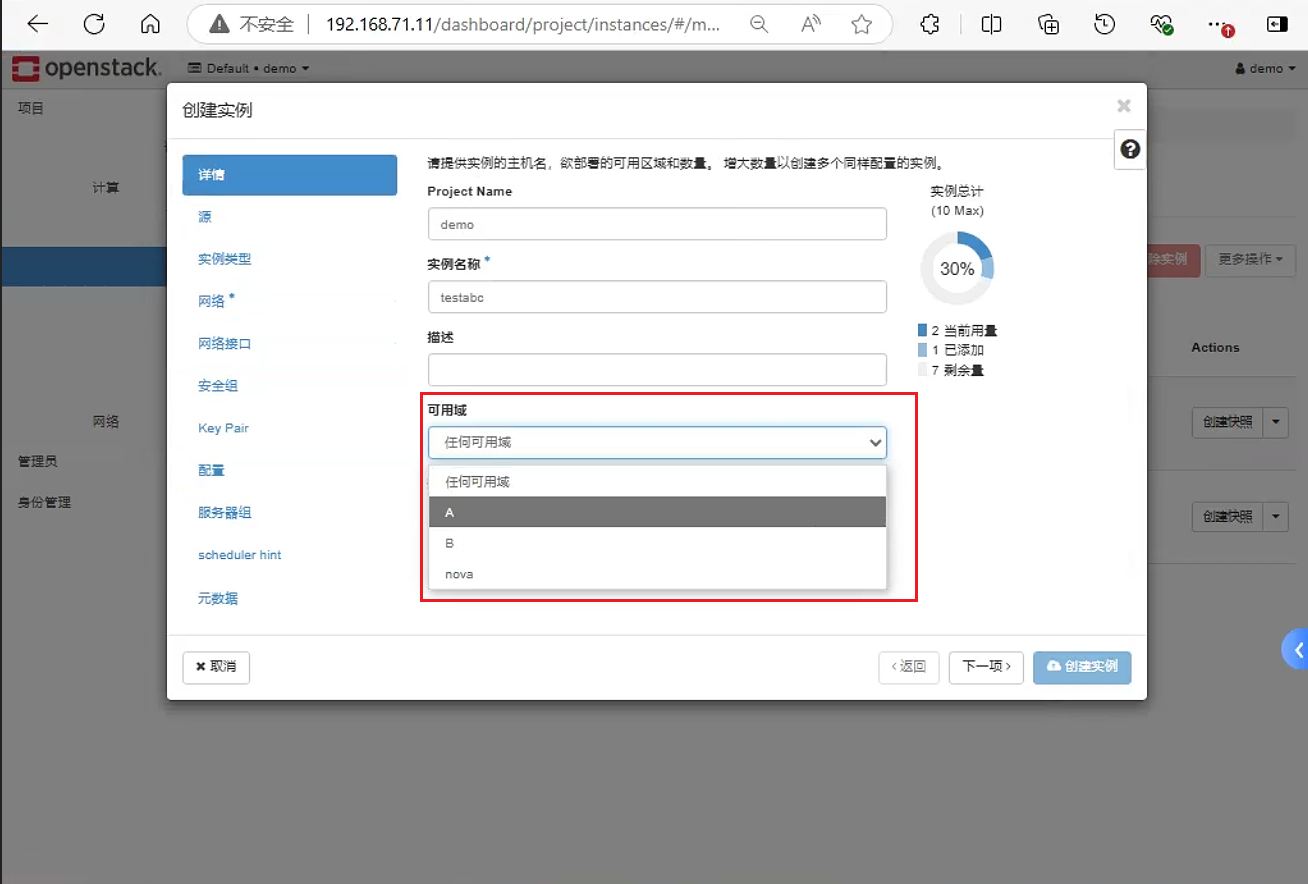
之后创建dashboard创建对应虚拟机时, 页面可以选择对应的可用域。可以发现 , 页面展示的不是针对 aggregate而是 availability_zones。
2. 创建虚拟机指定IP
默认情况下, 通过dashboard页面创建虚拟机的过程中。创建虚拟机时的IP是子网中随机的。因此这里说明如何通过后台命令 , 创建虚拟机的时候指定固定的IP
创建虚拟机的命令如下
openstack server create --flavor <flavor_id> --image <image_id> --nic <net-id=net-uuid,port-id=port-uuid,v4-fixed-ip=ip-addr,v6-fixed-ip=ip-addr,tag=tag,auto,none>] --availability-zone <availability_zone> <instance_name>通过--nic v4-fixed-ip=ipaddr 这个选项来指定虚拟机创建时具体的IP地址
[root@node01 ~]# openstack server create  --flavor m1.nano --image cirros --availability-zone A:node03 --nic net-id=84d97504-ffd7-4c4e-b5b6-1066a7b1b97b,v4-fixed-ip=192.168.71.117  fix-port-test
+-------------------------------------+-----------------------------------------------+
| Field                               | Value                                         |
+-------------------------------------+-----------------------------------------------+
| OS-DCF:diskConfig                   | MANUAL                                        |
| OS-EXT-AZ:availability_zone         | A                                             |
| OS-EXT-SRV-ATTR:host                | None                                          |
| OS-EXT-SRV-ATTR:hypervisor_hostname | None                                          |
| OS-EXT-SRV-ATTR:instance_name       |                                               |
| OS-EXT-STS:power_state              | NOSTATE                                       |
| OS-EXT-STS:task_state               | scheduling                                    |
| OS-EXT-STS:vm_state                 | building                                      |
| OS-SRV-USG:launched_at              | None                                          |
| OS-SRV-USG:terminated_at            | None                                          |
| accessIPv4                          |                                               |
| accessIPv6                          |                                               |
| addresses                           |                                               |
| adminPass                           | WnGL84d5D8Tf                                  |
| config_drive                        |                                               |
| created                             | 2024-10-03T14:27:46Z                          |
| flavor                              | m1.nano (0)                                   |
| hostId                              |                                               |
| id                                  | 9176cb10-1c35-4af0-8750-5f8a2f37ce9d          |
| image                               | cirros (514c6db8-1866-4ee4-b464-2c9eca88f0f9) |
| key_name                            | None                                          |
| name                                | fix-port-test                                 |
| progress                            | 0                                             |
| project_id                          | d2dd7a9d467a4c5dbd2faf6944986d1b              |
| properties                          |                                               |
| security_groups                     | name='default'                                |
| status                              | BUILD                                         |
| updated                             | 2024-10-03T14:27:46Z                          |
| user_id                             | c4c0a73ca297489c9771b3d7e7814b53              |
| volumes_attached                    |                                               |
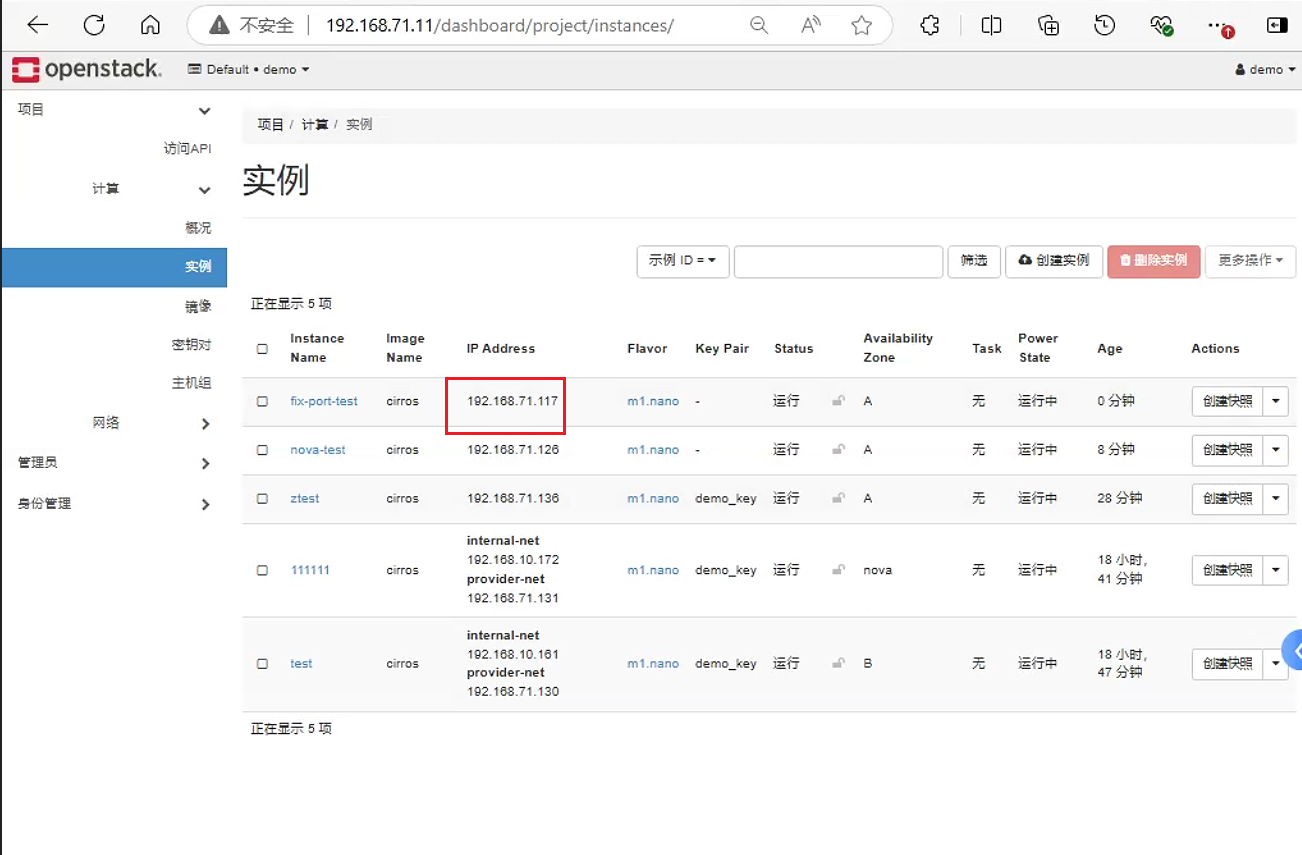
+-------------------------------------+-----------------------------------------------+之后页面上可以看到对应虚拟机的Ip为192.168.71.117
3. Openstack配置优化
nova.conf官方文档: Sample Configuration File — nova 30.1.0.dev3 documentation (openstack.org)
配置虚拟机自启动
控制端和计算节点的
/etc/nova/nova.conf进行以下配置 ,当宿主机启动后 , 把虚拟机恢复到之前的状态 , 如果虚拟机之前是关机 , 则宿主机启动后 , 虚拟机也是关机状态;如果虚拟机之前是开机状态 , 则宿主机启动后 , 虚拟机还是开机状态[DEFAULT] resume_guests_state_on_host_boot=true配置
CPU超限使用默认为
16, 即允许开启16倍于物理CPU的虚拟CPU个数。推荐使用4[DEFAULT] cpu_allocation_ratio=16配置内存超限使用
配置允许
1.5倍于物理内存的虚拟内存。这里需要说明, 内存本身并不推荐这种超限使用。因为不管怎么超限使用, 宿主机的内存时固定的。因此除非是openstack集群里面部分虚拟机暂时不用,临时关机了。不然即使复用了 , 宿主机内存不够还是会导致出现OOM情况[DEFAULT] ram_allocation_ratio=1.5配置硬盘超限使用
磁盘尽量不要超限 , 可能会导致数据出现丢失。
[DEFAULT]
disk_allocation_ratio=1.0
配置保留磁盘空间。即会预留一部分磁盘空间给系统使用
[DEFAULT]
reserved_host_disk_mb=20480
配置预留内存给系统使用。预留一定的内存给系统使用
[DEFAULT]
reserved_host_memory_mb=4096
4. 配置虚拟机类型动态调整
在有些时候 , 创建完成的虚拟机因业务需求需要变更内存或 CPU 或磁盘 , 因此需要配置允 许后期类型调整
[DEFAULT]
allow_resize_to_same_host=true
baremetal_enabled_filters=RetryFilter,AvailabilityZoneFilter,ComputeFilter,ComputeCapabilitiesFilter,ImagePropertiesFilter,ExactRamFilter,ExactDiskFilter,ExactCoreFilter这里需要在每个计算节点中配置nova用户免密互通
将
nova用户的shell改为/bin/bash[root@node03 ~]# usermod nova -s /bin/bash设置
nova用户密码[root@node03 ~]#echo 1234 | passwd --stdin nova切换到
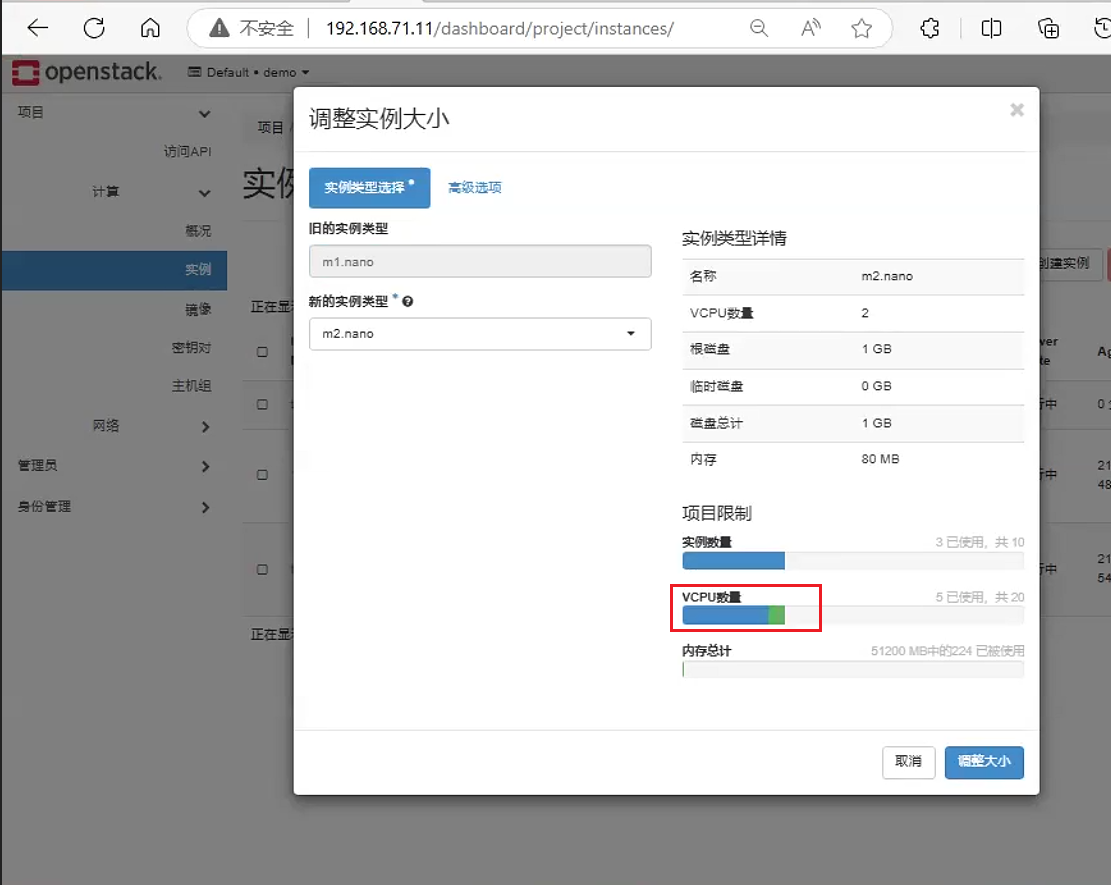
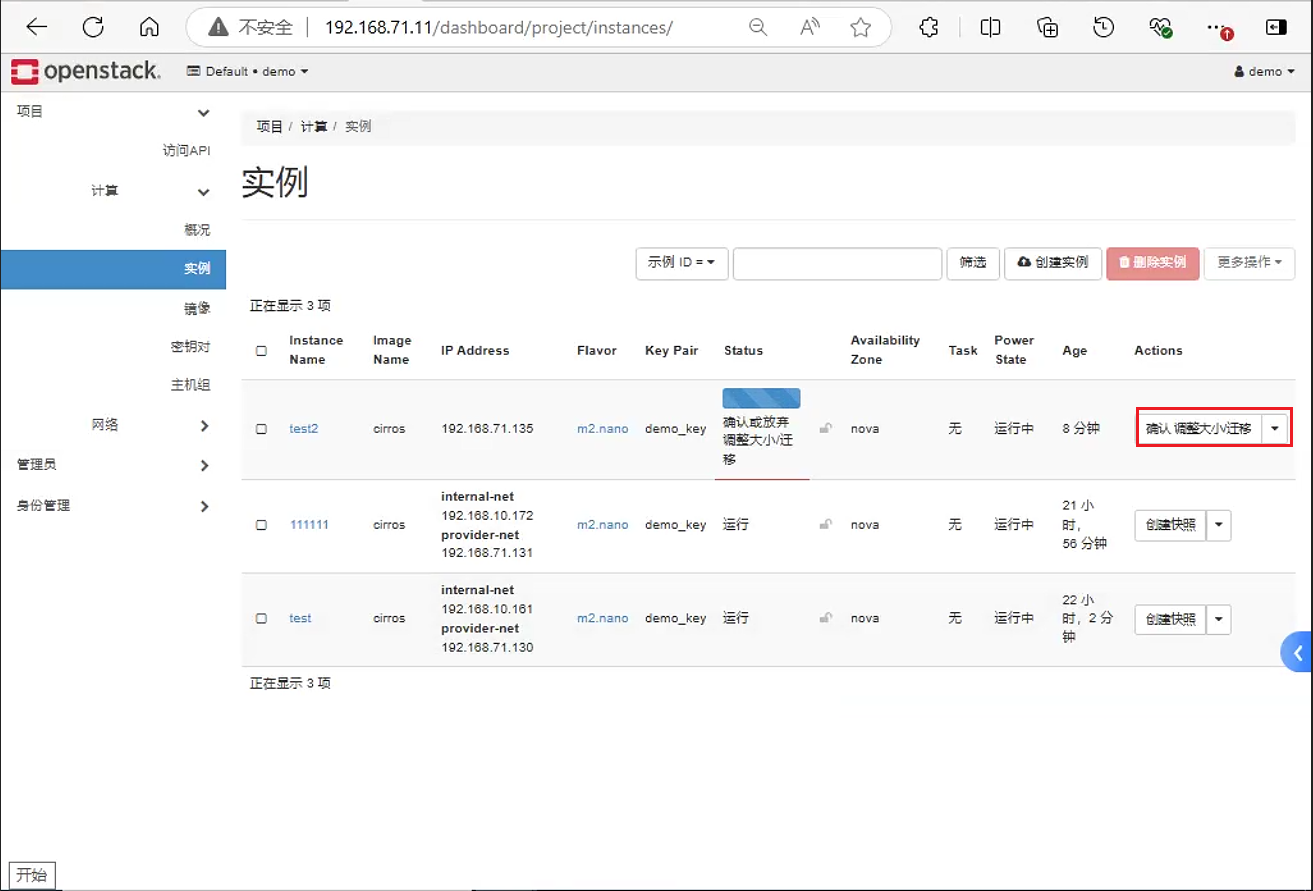
nova用户获取密钥, 并将公钥相互拷贝到各个计算节点中[root@node03 ~]# su nova bash-5.1$ ssh-keygen Generating public/private rsa key pair. Enter file in which to save the key (/var/lib/nova/.ssh/id_rsa): Created directory '/var/lib/nova/.ssh'. Enter passphrase (empty for no passphrase): Enter same passphrase again: Your identification has been saved in /var/lib/nova/.ssh/id_rsa Your public key has been saved in /var/lib/nova/.ssh/id_rsa.pub The key fingerprint is: SHA256:D76BeASVbS2HZSf1M6TuvuzhzMTIsmviDDzJSLCGqlc nova@node03 The key's randomart image is: +---[RSA 3072]----+ | .o ++.o . | | .. =.oo + | |. . . o . + | |.o . . o | |o.. . S . | |o. +E+ o + + | |. ..B o + + = | |. . =. .= B . | |.. .oo+. .O. | +----[SHA256]-----+ bash-5.1$ ssh-copy-id node05 bash-5.1$ ssh-copy-id node08 bash-5.1$ ssh-copy-id node03直接点击页面调整实例大小进行设置。这里新类型的中的磁盘只能增大不能减小, 但
CPU和内存可以增大也可以减小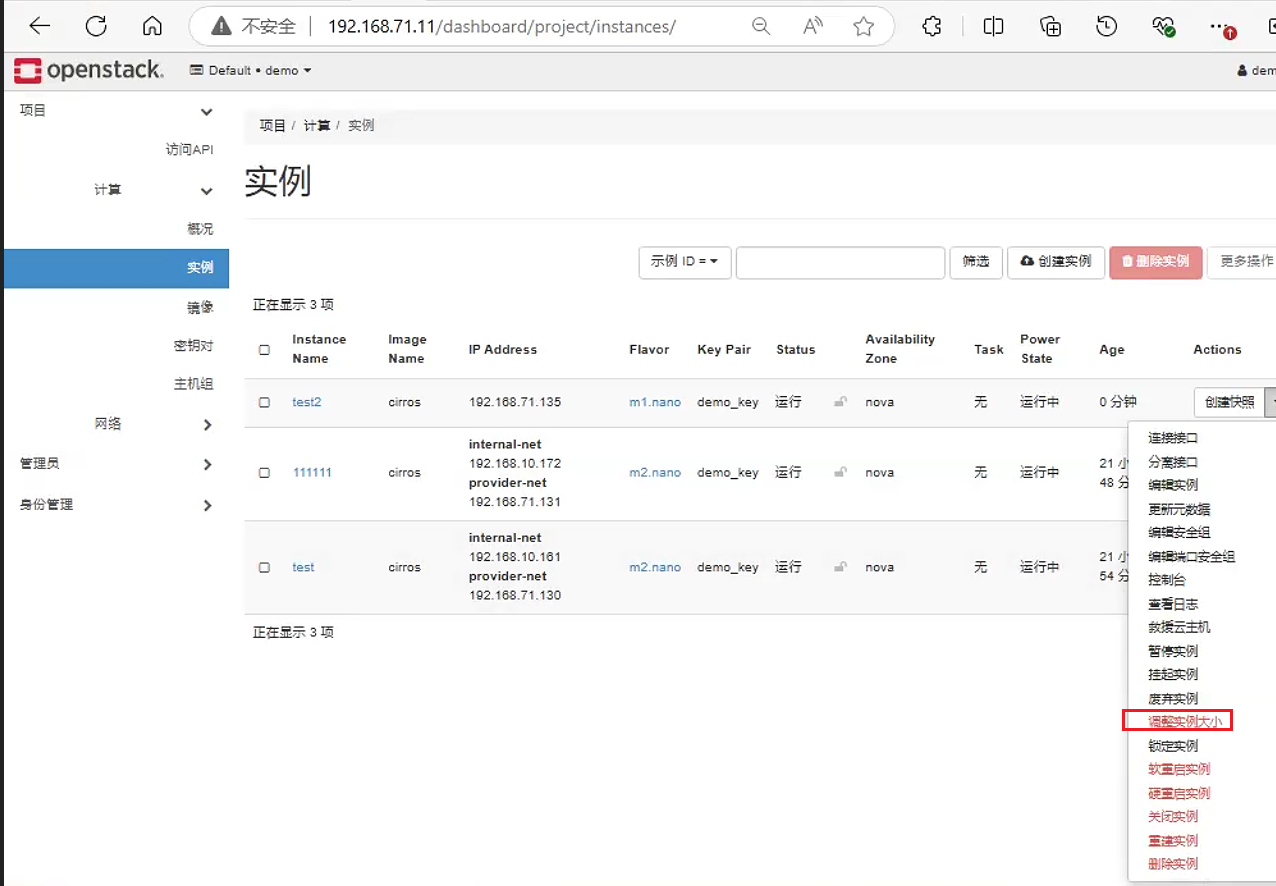
5. Openstack配额详解
Quota , 即配额管理 , 是OpenStack中用于限制用户或项目在云平台上可以创建和使用的资源数量的机制。这些资源包括但不限于虚拟机(instances)、核心数(cores)、内存(ram)、存储卷(volumes)以及网络资源等。通过Quota , 管理员可以更好地管理和优化资源的使用 , 确保云平台的可靠性和性能。
Openstack本身有默认的配额限制。设置过程中控制节点和计算节点均需要设置。
在
horizon配置启动web端的配额限制。将/etc/openstack-dashboard/local_settings配置文件中的enable_quotas设置为trueOPENSTACK_NEUTRON_NETWORK = { 'enable_router': False, 'enable_quotas': True, 'enable_distributed_router': False, 'enable_ha_router': False, 'enable_fip_topology_check': False, }/etc/nova/nova.conf中quota部分的默认配置如下[quota] instances = 10 cores = 20 ram = 51200 metadata_items = 128 injected_files = 5 injected_file_content_bytes = 10240 injected_file_path_length = 255 key_pairs = 100 server_groups = 10 server_group_members = 10 driver = nova.quota.DbQuotaDriver #在资源创建后重新检查配额,以防止配额被超出 recheck_quota = true #从placemnt服务计算配额使用情况 count_usage_from_placement = false/etc/neutron/neutron.conf中quota部分相关参数如下[quotas] quota_network = 10 quota_subnet = 10 quota_port = 5000 quota_driver = neutron.db.quota.driver_nolock.DbQuotaNoLockDriver #当设置为True时,配额使用情况将在Neutron数据库中为每种资源进行跟踪,通过直接映射到数据模型类,例如网络、子网、端口等。当设置为False时,配额使用情况将由配额引擎直接作为对象类型的计数进行跟踪。 track_quota_usage = true quota_router = 10 quota_floatingip = 1000 quota_security_group = 10 quota_security_group_rule = 100
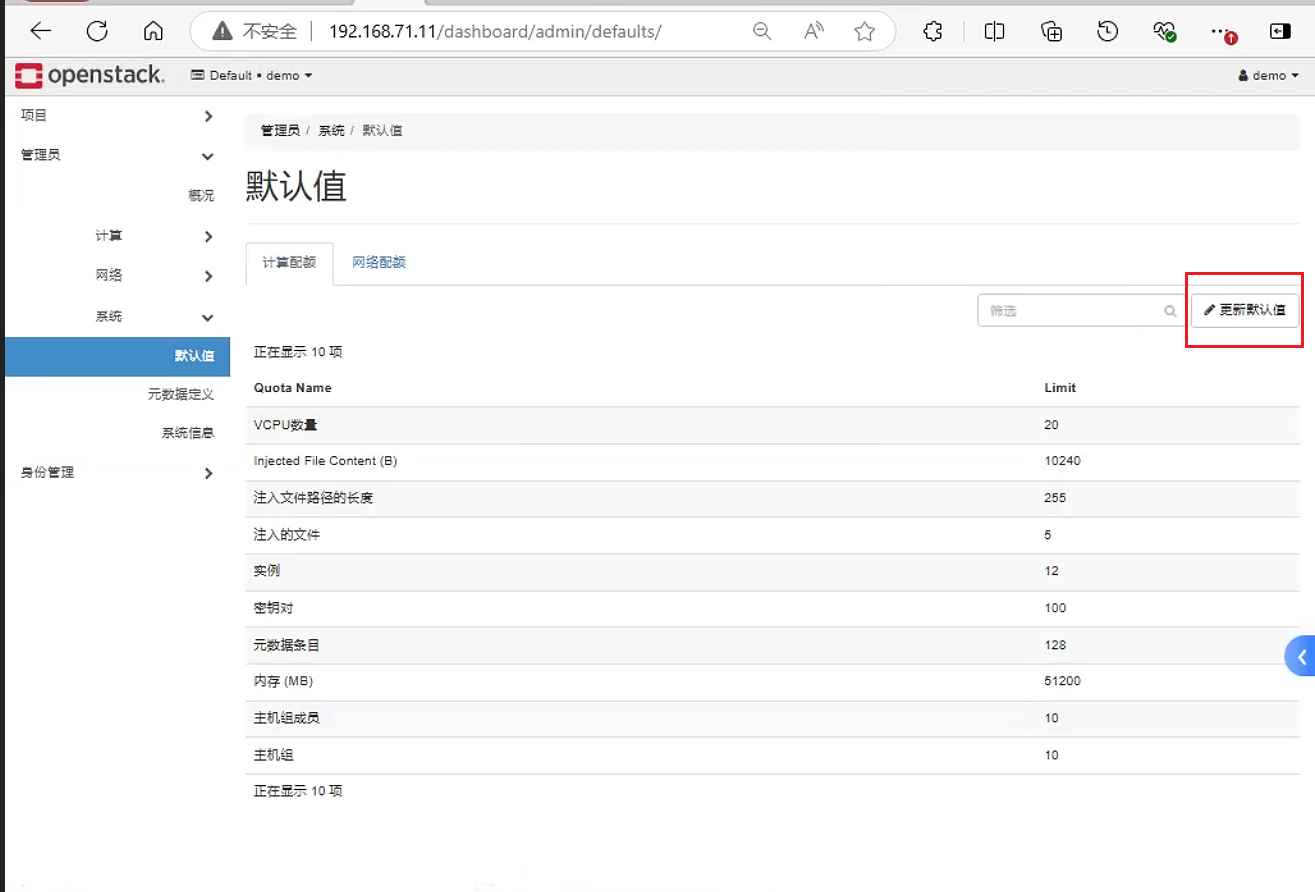
之后涉及到修改配额。修改配额共有两种方法: 其中一种是通过页面配置, 另外一种便是通过命令
页面中修改配额的位置如下:
以下说明命令使用。需要说明,以前版本各个服务的配额的设置,需要对应的命令。
[root@node01 ~]# nova help | grep quota
    quota-class-show            List the quotas for a quota class.
    quota-class-update          Update the quotas for a quota class.
    quota-defaults              List the default quotas for a tenant.
    quota-delete                Delete quota for a tenant/user so their quota
    quota-show                  List the quotas for a tenant/user.
    quota-update                Update the quotas for a tenant/user.
[root@node01 ~]# cinder help | grep quota
    quota-class-show    Lists quotas for a quota class.
    quota-class-update  Updates quotas for a quota class.
    quota-defaults      Lists default quotas for a tenant.
    quota-delete        Delete the quotas for a tenant.
    quota-show          Lists quotas for a tenant.
    quota-update        Updates quotas for a tenant.
    quota-usage         Lists quota usage for a tenant.
[root@node01 ~]# neutron help | grep quota
  quota-default-show                 Show default quotas for a given tenant.
  quota-delete                       Delete defined quotas of a given tenant.
  quota-list                         List quotas of all tenants who have non-default quota values.
  quota-show                         Show quotas for a given tenant.
quota-update Define tenant's quotas not to use defaults.后续可以直接使用openstack quota的方式修改所有配额。
[root@node01 ~]# openstack quota set
usage: openstack quota set [-h] [--class] [--cores <cores>] [--fixed-ips <fixed-ips>] [--injected-file-size <injected-file-size>]
                           [--injected-path-size <injected-path-size>] [--injected-files <injected-files>] [--instances <instances>]
                           [--key-pairs <key-pairs>] [--properties <properties>] [--ram <ram>] [--server-groups <server-groups>]
                           [--server-group-members <server-group-members>] [--backups <backups>] [--backup-gigabytes <backup-gigabytes>]
                           [--gigabytes <gigabytes>] [--per-volume-gigabytes <per-volume-gigabytes>] [--snapshots <snapshots>]
                           [--volumes <volumes>] [--floating-ips <floating-ips>] [--secgroup-rules <secgroup-rules>]
                           [--secgroups <secgroups>] [--networks <networks>] [--subnets <subnets>] [--ports <ports>] [--routers <routers>]
                           [--rbac-policies <rbac-policies>] [--subnetpools <subnetpools>] [--volume-type <volume-type>]
                           [--force | --no-force]
                           <project/class>
6. 修改实例IP地址
找到对应端口的
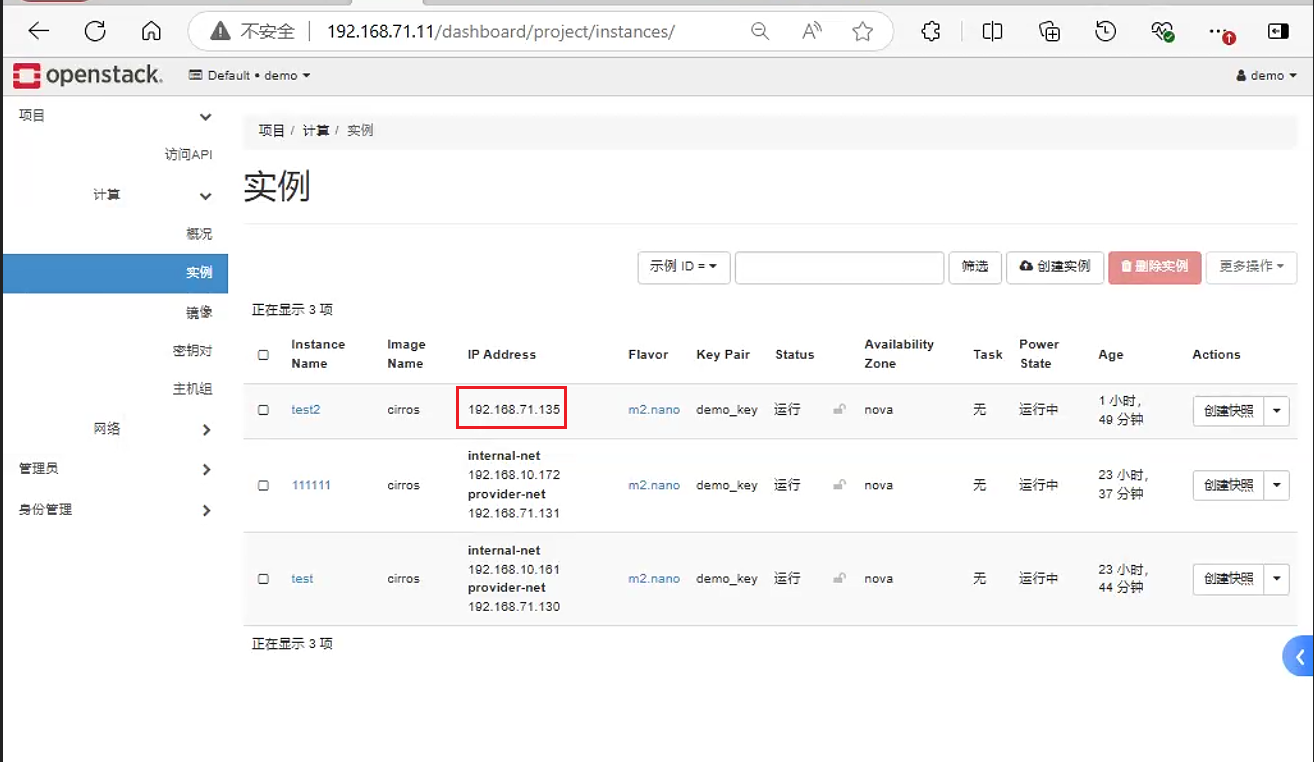
ID[root@node01 ~]# openstack port list | grep 192.168.71.135 | 93a1eb7d-36dd-4afa-b561-b9e6e2061e47 | | fa:16:3e:3e:2f:20 | ip_address='192.168.71.135', subnet_id='c4485771-22be-4bed-8514-b87c14bbf1c9' | ACTIVE |进入数据库中直接修改对应端口的
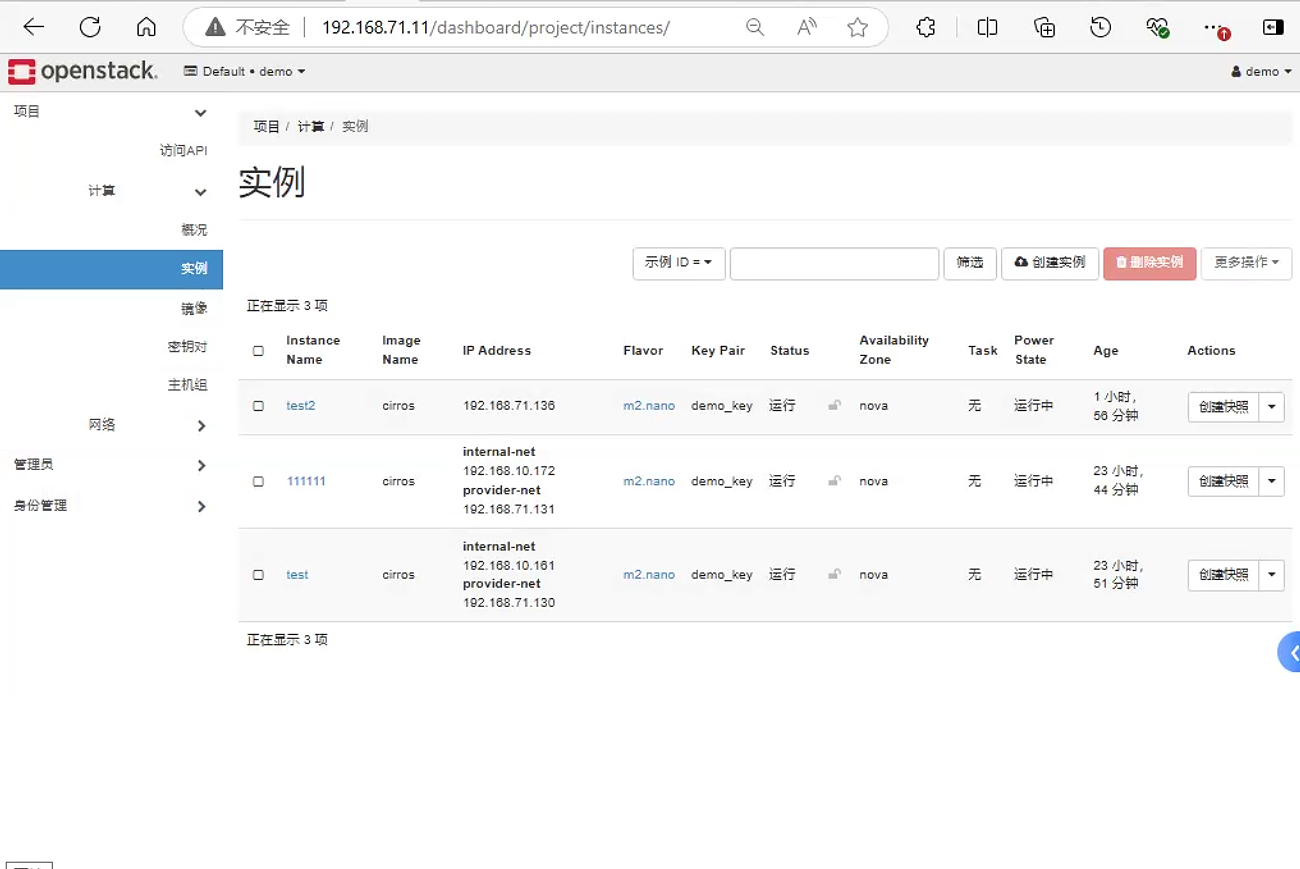
IP[root@node02 ~]# mysql Welcome to the MariaDB monitor. Commands end with ; or \g. Your MariaDB connection id is 36605 Server version: 10.5.22-MariaDB MariaDB Server Copyright (c) 2000, 2018, Oracle, MariaDB Corporation Ab and others. Type 'help;' or '\h' for help. Type '\c' to clear the current input statement. MariaDB [(none)]> use neutron; Reading table information for completion of table and column names You can turn off this feature to get a quicker startup with -A Database changed MariaDB [neutron]> select * from ipallocations where port_id="93a1eb7d-36dd-4afa-b561-b9e6e2061e47"; +--------------------------------------+----------------+--------------------------------------+----------------------------- | port_id | ip_address | subnet_id | network_id +--------------------------------------+----------------+--------------------------------------+----------------------------- | 93a1eb7d-36dd-4afa-b561-b9e6e2061e47 | 192.168.71.135 | c4485771-22be-4bed-8514-b87c14bbf1c9 | 84d97504-ffd7-4c4e-b5b6-1066 +--------------------------------------+----------------+--------------------------------------+----------------------------- 1 row in set (0.001 sec) MariaDB [neutron]> update ipallocations set ip_address="192.168.71.136" where port_id="93a1eb7d-36dd-4afa-b561-b9e6e2061e47" ; Query OK, 1 row affected (0.004 sec) Rows matched: 1 Changed: 1 Warnings: 0 MariaDB [neutron]> select * from ipallocations where port_id="93a1eb7d-36dd-4afa-b561-b9e6e2061e47"; +--------------------------------------+----------------+--------------------------------------+--------------------------------------+ | port_id | ip_address | subnet_id | network_id | +--------------------------------------+----------------+--------------------------------------+--------------------------------------+ | 93a1eb7d-36dd-4afa-b561-b9e6e2061e47 | 192.168.71.136 | c4485771-22be-4bed-8514-b87c14bbf1c9 | 84d97504-ffd7-4c4e-b5b6-1066a7b1b97b | +--------------------------------------+----------------+--------------------------------------+--------------------------------------+ 1 row in set (0.001 sec)再访问页面查看对应虚拟机绑定的
IP修改前
修改后
7. 端口安全
在OpenStack网络中,端口安全(Port Security)是一种安全特性,用于限制可以连接到特定网络端口的物理设备的数量。这是通过跟踪端口的MAC地址来实现的。端口安全可以帮助防止未经授权的设备接入网络,从而提高网络的安全性。
端口安全性是一种反欺骗措施,阻止任何与原始网络端口的源 IP 和源 MAC 地址不匹配的出口流量。您不能使用安全组规则查看或修改此行为。也就是这里OpenStack默认其实不支持一张网口多个IP的应用,类似于keepalived的vip。所以这种情况需要关闭端口安全功能。
默认情况下,在 OpenStack 中新创建的 Neutron 网络上会将 port_security_enabled 参数设置为 enabled。新创建的端口从创建它们的网络中复制 port_security_enabled 参数的值。
端口安全的主要特点:
MAC地址绑定:端口安全允许管理员将特定的
MAC地址与网络端口关联起来。只有这些MAC地址的设备才能通过该端口进行通信。保护网络不受未授权访问:通过限制可以连接到网络的设备数量,端口安全有助于防止未授权的设备接入网络。
防止MAC地址泛洪攻击:端口安全通过限制每个端口上的
MAC地址数量,可以减少MAC地址泛洪攻击的风险。
要在单一端口上禁用端口安全性,请运行以下命令:
openstack port set --disable-port-security <port-id>要防止端口安全性在网络上任何新创建的端口上启用,请运行以下命令:
openstack network set --disable-port-security <network-id>处理端口安全有两种处理方式:1. 直接关闭对应端口或者网段的端口安全功能;2. 通过命令允许网口上的指定IP通信
关闭端口安全命令。这里需要注意, 关闭网口的端口安全功能需要卸载对应网口的安全组需要注意一点, 这里禁用端口安全需要先去掉对应安全组。
openstack port set --no-security-group <port>
openstack port --disable-port-security <port>
neutron port-update --no-security-groups  <port>
neutron port-update --port_security_enabled=False <port>

[root@node01 ~]# neutron port-update --no-security-groups a29193aa-77c1-435e-bb66-f24f741980fe
Updated port: a29193aa-77c1-435e-bb66-f24f741980fe
[root@node01 ~]# neutron port-update --port_security_enabled=False  a29193aa-77c1-435e-bb66-f24f741980fe
Updated port: a29193aa-77c1-435e-bb66-f24f741980fe
开启端口安全
openstack port set --enable-port-security <port>
openstack port set --security-group <security-group> <port>

neutron port-update --security-groups <security-group>  <port>
neutron port-update --port_security_enabled=True <port>
或者直接关闭对应网络的端口安全
openstack network set --disable-port-security <network-id>
openstack network set --enable-port-security <network-id>
也可以直接通过页面关闭端口安全
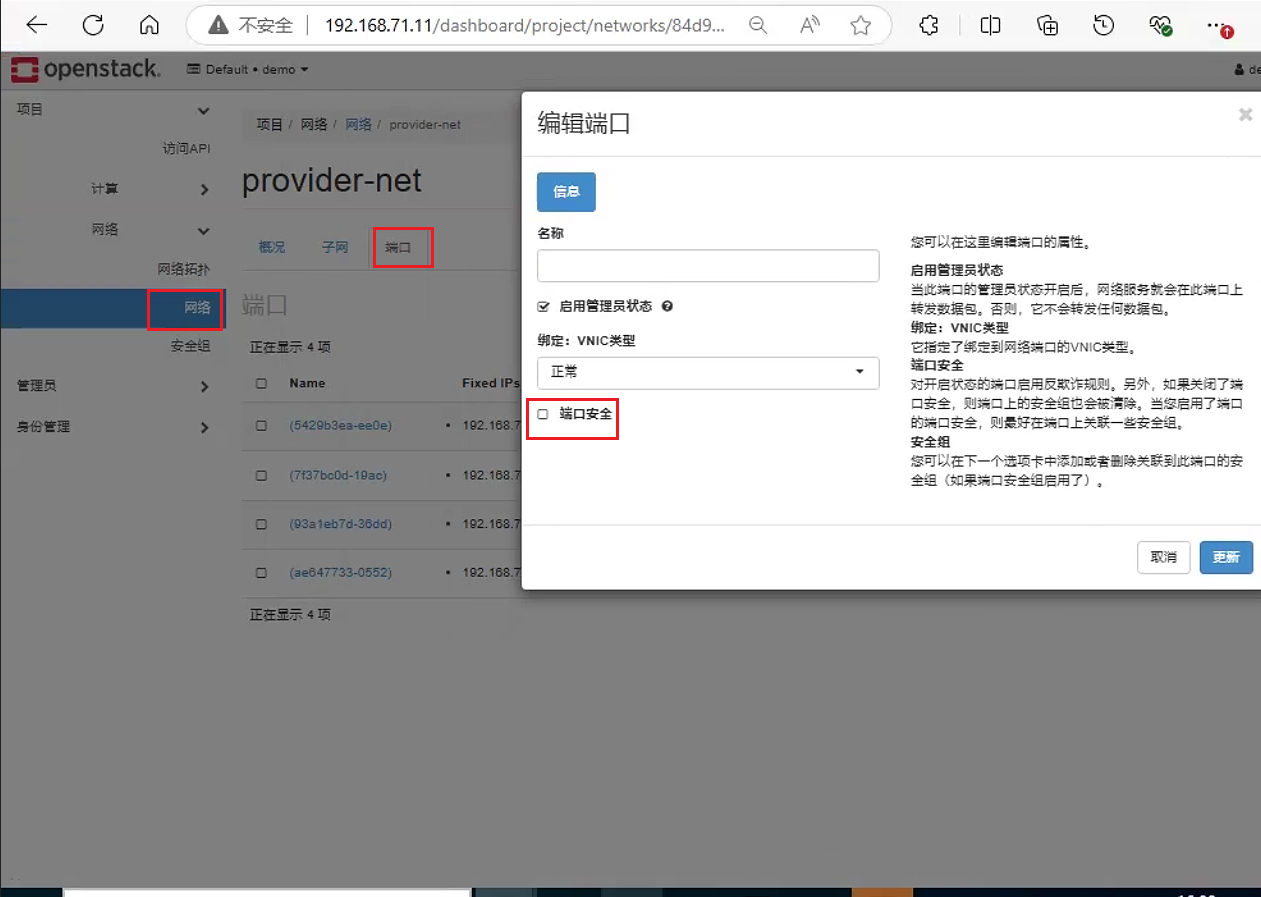
可以单独创建一个端口, 并将这个端口绑定到指定网口上
#这里不创建这个端口其实也可以, 只是为了 不让其他虚拟机创建过程中占用这个IP
openstack port create --fixed-ip subnet=<subnet>,ip-address=<ip-address> --security-group <security-group> --network <network> <name>

openstack port set --allowed-address ip-address=<ip-address>[,mac-address=<mac-address> <port>
演示
通过命令关闭端口安全。
[root@node01 ~]# openstack port list | grep 192.168.71.129
| 96969f5f-b9f6-4334-8a61-3691f19d7311 |      | fa:16:3e:1e:70:a1 | ip_address='192.168.71.129', subnet_id='c4485771-22be-4bed-8514-b87c14bbf1c9' | ACTIVE |

[root@node01 ~]# openstack port set --no-security-group 96969f5f-b9f6-4334-8a61-3691f19d7311
[root@node01 ~]# openstack port set --disable-port-security 96969f5f-b9f6-4334-8a61-3691f19d7311
[root@node01 ~]# openstack port show 96969f5f-b9f6-4334-8a61-3691f19d7311
关闭之后, 进入虚拟机中, 修改虚拟机IP,然后测试网络通信 发现正常
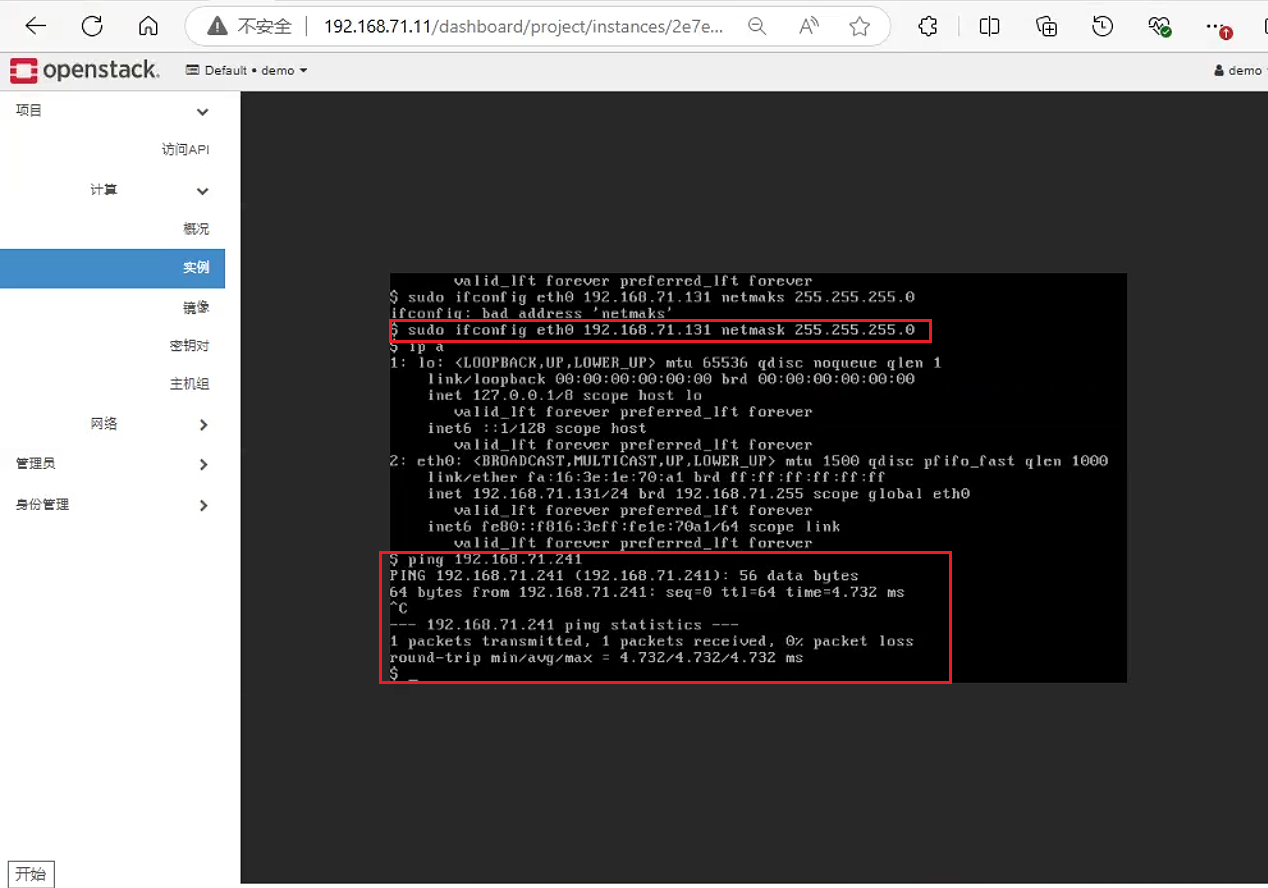
单独创建一个端口
[root@node01 ~]# openstack port create --fixed-ip ip-address=192.168.71.132 --network 84d97504-ffd7-4c4e-b5b6-1066a7b1b97b   ports
+-------------------------+-------------------------------------------------------------------------------+
| Field                   | Value                                                                         |
+-------------------------+-------------------------------------------------------------------------------+
| admin_state_up          | UP                                                                            |
| allowed_address_pairs   |                                                                               |
| binding_host_id         |                                                                               |
| binding_profile         |                                                                               |
| binding_vif_details     |                                                                               |
| binding_vif_type        | unbound                                                                       |
| binding_vnic_type       | normal                                                                        |
| created_at              | 2024-10-04T09:42:00Z                                                          |
| data_plane_status       | None                                                                          |
| description             |                                                                               |
| device_id               |                                                                               |
| device_owner            |                                                                               |
| device_profile          | None                                                                          |
| dns_assignment          | None                                                                          |
| dns_domain              | None                                                                          |
| dns_name                | None                                                                          |
| extra_dhcp_opts         |                                                                               |
| fixed_ips               | ip_address='192.168.71.132', subnet_id='c4485771-22be-4bed-8514-b87c14bbf1c9' |
| id                      | 72c0ae81-c807-4d1a-b296-70dc7500c26e                                          |
| ip_allocation           | None                                                                          |
| mac_address             | fa:16:3e:f6:84:d7                                                             |
| name                    | ports                                                                         |
| network_id              | 84d97504-ffd7-4c4e-b5b6-1066a7b1b97b                                          |
| numa_affinity_policy    | None                                                                          |
| port_security_enabled   | True                                                                          |
| project_id              | d2dd7a9d467a4c5dbd2faf6944986d1b                                              |
| propagate_uplink_status | None                                                                          |
| qos_network_policy_id   | None                                                                          |
| qos_policy_id           | None                                                                          |
| resource_request        | None                                                                          |
| revision_number         | 1                                                                             |
| security_group_ids      | bb511975-5f8d-4a08-8775-c4ac29f6c7a5                                          |
| status                  | DOWN                                                                          |
| tags                    |                                                                               |
| trunk_details           | None                                                                          |
| updated_at              | 2024-10-04T09:42:00Z                                                          |
+-------------------------+-------------------------------------------------------------------------------+

[root@node01 ~]# openstack port set --allowed-address ip-address=192.168.71.132 96969f5f-b9f6-4334-8a61-3691f19d7311
之后在虚拟机中测试网络通信
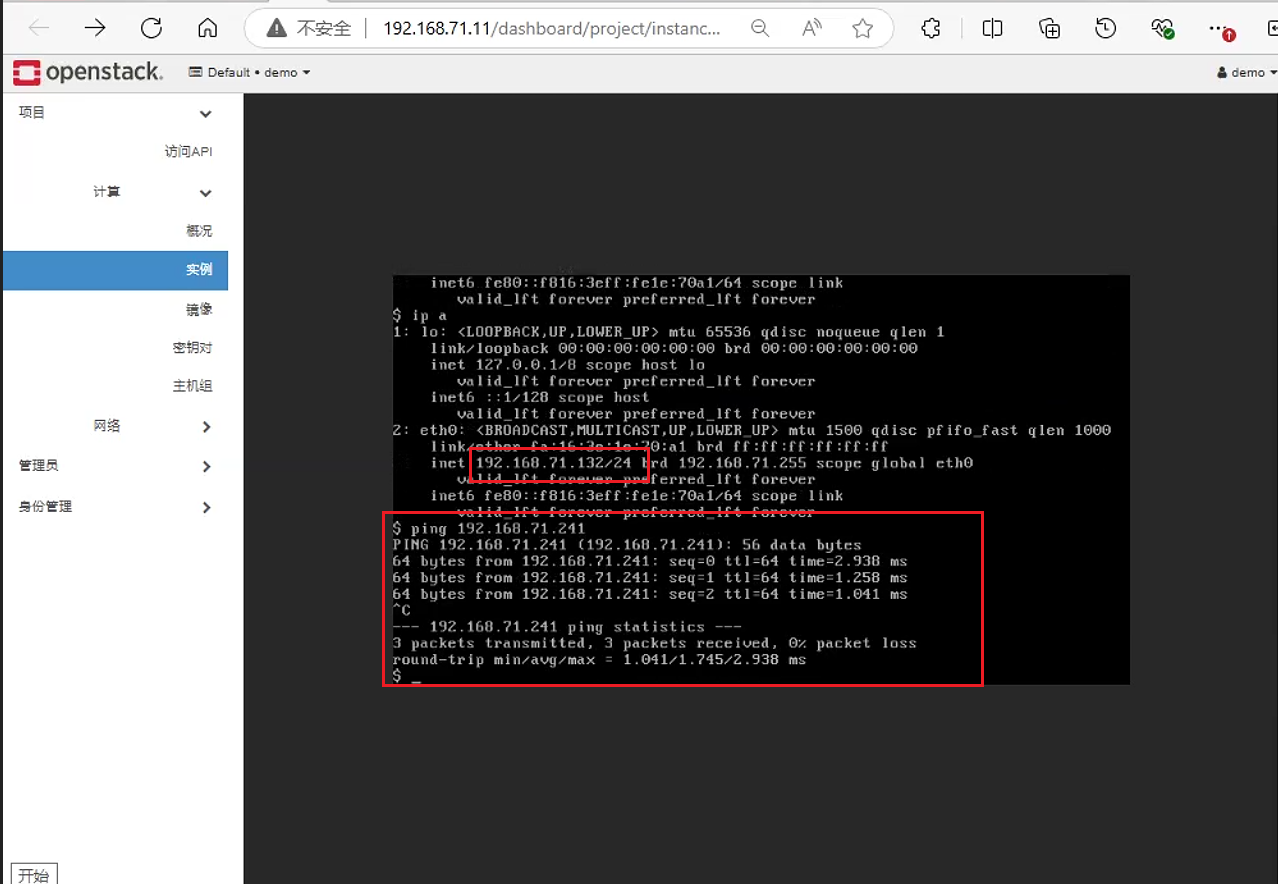
后续如果希望允许新的IP地址, 直接运行同样命令即可
[root@node01 ~]# openstack port set --allowed-address ip-address=192.168.71.133 96969f5f-b9f6-4334-8a61-3691f19d7311这里检查网口允许的ip ,可以发现允许已经设置的两个IP
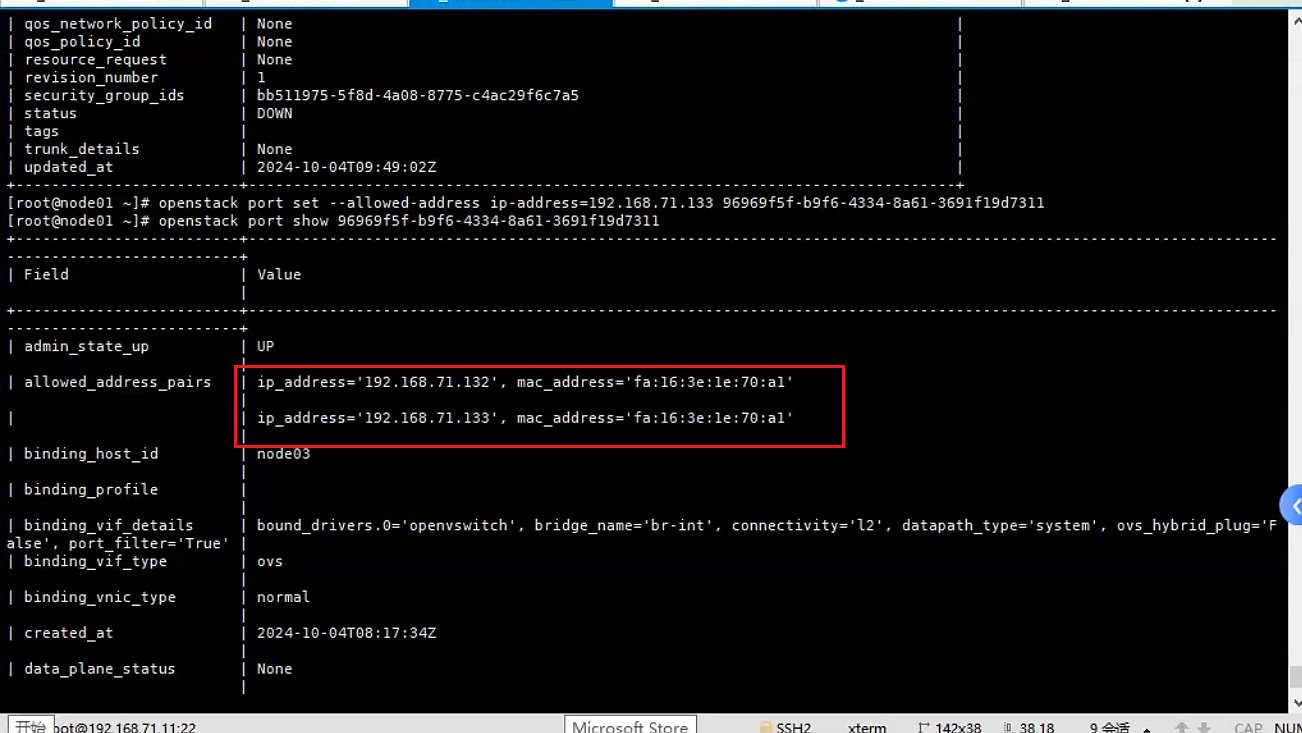
后续可以通过以下命令删掉所有允许的IP
[root@node01 ~]# openstack port set --no-allowed-address 96969f5f-b9f6-4334-8a61-3691f19d7311
8. 关闭网段dhcp
网段开启关闭dhcp
neutron subnet-update --disbale-dhcp SUBNET