5-Openstack Placement服务
OpenStack Placement组件是一个重要的服务,它在OpenStack平台中扮演着监控和管理资源使用情况的关键角色。以下是对OpenStack Placement组件的详细解析 :
1. 概述
OpenStack Placement服务是一个用于跟踪和监控平台中所有硬件资源(如计算节点、存储资源池、网络资源池等)使用情况的组件。它的主要作用是将这些资源的统计信息写入数据库中,以便其他OpenStack服务能够调用这些信息来更好地管理和分配资源。
在
OpenStack的Stein版本之前,Placement是Nova计算服务的一部分,负责资源监控和云主机资源的选择。从
OpenStack的Stein版本开始,Placement被独立出来,成为了一个单独的服务。这使得资源监控功能更加专注于其本职工作,提高了系统的整体性能和可维护性。
主要功能和作用
资源监控 :
Placement服务能够跟踪各种资源的使用情况,包括计算节点的CPU、内存、磁盘等资源,以及外部共享存储池和IP地址等资源。数据统计 : 它将监控到的资源使用情况统计信息写入数据库中,为其他服务提供数据支持。
资源管理 : 通过
RESTful API,Placement服务可以与其他OpenStack服务进行通信,共同实现资源的有效管理和分配。自定义资源类 :
Placement提供了一组标准资源类(如DISK_GB、MEMORY_MB和VCPU) , 并允许根据需要定义自定义资源类 , 以满足特定场景下的资源需求。
2. 安装配置
2.1 环境准备
创建数据库, 这里密码设置为
placement123[root@node02 ~]# mysql -u root -p Enter password: Welcome to the MariaDB monitor. Commands end with ; or \g. Your MariaDB connection id is 273 Server version: 10.5.22-MariaDB MariaDB Server Copyright (c) 2000, 2018, Oracle, MariaDB Corporation Ab and others. Type 'help;' or '\h' for help. Type '\c' to clear the current input statement. MariaDB [(none)]> CREATE DATABASE placement; Query OK, 1 row affected (0.002 sec) MariaDB [(none)]> GRANT ALL PRIVILEGES ON placement.* TO 'placement'@'%' IDENTIFIED BY 'placement123'; Query OK, 0 rows affected (0.009 sec) 在别的主机上使用
placement用户连接数据库,看看是否能够正常连接[root@node01 ~]# mysql -uplacement -pplacement123 -hnode02; Welcome to the MariaDB monitor. Commands end with ; or \g. Your MariaDB connection id is 275 Server version: 10.5.22-MariaDB MariaDB Server Copyright (c) 2000, 2018, Oracle, MariaDB Corporation Ab and others. Type 'help;' or '\h' for help. Type '\c' to clear the current input statement. MariaDB [(none)]> show databases; +--------------------+ | Database | +--------------------+ | information_schema | | placement | +--------------------+ 2 rows in set (0.002 sec) 导出
admin用户的环境变量,创建placement用户并设置其密码为placement[root@node01 ~]# . keystone_admin.rc [root@node01 ~]# openstack user create --domain default --password-prompt placement User Password: Repeat User Password: +---------------------+----------------------------------+ | Field | Value | +---------------------+----------------------------------+ | domain_id | default | | enabled | True | | id | 6555d2b2a49749299fc539c61bcae07e | | name | placement | | options | {} | | password_expires_at | None | +---------------------+----------------------------------+ 将
placement用户授权为admin角色,并将其添加到service项目中[root@node01 ~]# openstack role add --project service --user placement admin创建
placement服务实体[root@node01 ~]# openstack service create --name placement \ --description "Placement API" placement +-------------+----------------------------------+ | Field | Value | +-------------+----------------------------------+ | description | Placement API | | enabled | True | | id | f31d4e0fa4ca417da54601358d12a54c | | name | placement | | type | placement | +-------------+----------------------------------+创建
placement endport(服务端点,注册服务)公共端点
[root@node01 ~]# openstack endpoint create --region RegionOne placement public http://openstack-vip.net:8778
+--------------+----------------------------------+
| Field        | Value                            |
+--------------+----------------------------------+
| enabled      | True                             |
| id           | d4b958a5dff14b6daddfbf9022c241aa |
| interface    | public                           |
| region       | RegionOne                        |
| region_id    | RegionOne                        |
| service_id   | f31d4e0fa4ca417da54601358d12a54c |
| service_name | placement                        |
| service_type | placement                        |
| url          | http://openstack-vip.net:8778    |
+--------------+----------------------------------+
私有端点
[root@node01 ~]# openstack endpoint create --region RegionOne placement internal http://openstack-vip.net:8778
+--------------+----------------------------------+
| Field        | Value                            |
+--------------+----------------------------------+
| enabled      | True                             |
| id           | 3f183f4d61a8494194d2b32b41a1a4b6 |
| interface    | internal                         |
| region       | RegionOne                        |
| region_id    | RegionOne                        |
| service_id   | f31d4e0fa4ca417da54601358d12a54c |
| service_name | placement                        |
| service_type | placement                        |
| url          | http://openstack-vip.net:8778    |
+--------------+----------------------------------+
管理端点
[root@node01 ~]# openstack endpoint create --region RegionOne placement admin http://openstack-vip.net:8778
+--------------+----------------------------------+
| Field        | Value                            |
+--------------+----------------------------------+
| enabled      | True                             |
| id           | 3303518602584d8bb34495a297cfe847 |
| interface    | admin                            |
| region       | RegionOne                        |
| region_id    | RegionOne                        |
| service_id   | f31d4e0fa4ca417da54601358d12a54c |
| service_name | placement                        |
| service_type | placement                        |
| url          | http://openstack-vip.net:8778    |
+--------------+----------------------------------+
2.2 安装配置组件
安装软件包
[root@node01 ~]# dnf install openstack-placement-api编辑
/etc/placement/placement.conf文件并完成以下操作:在
[placement_database]部分,配置数据库访问:[placement_database] # ... connection = mysql+pymysql://placement:placement123@openstack-vip.net/placement在
[api]和[keystone_authtoken]部分,配置身份服务访问:[api] # ... auth_strategy = keystone [keystone_authtoken] # ... auth_url = http://openstack-vip.net:5000/v3 memcached_servers = openstack-vip.net:11211 auth_type = password project_domain_name = Default user_domain_name = Default project_name = service username = placement password = placement填充
Placement数据库:[root@node01 ~]# su -s /bin/sh -c "placement-manage db sync" placement #进入数据库验证是否有对应table生成 [root@node01 ~]# mysql -uplacement -pplacement123 -hnode02; Welcome to the MariaDB monitor. Commands end with ; or \g. Your MariaDB connection id is 321 Server version: 10.5.22-MariaDB MariaDB Server Copyright (c) 2000, 2018, Oracle, MariaDB Corporation Ab and others. Type 'help;' or '\h' for help. Type '\c' to clear the current input statement. MariaDB [(none)]> show databases; +--------------------+ | Database | +--------------------+ | information_schema | | placement | +--------------------+ 2 rows in set (0.001 sec) MariaDB [(none)]> use placement Reading table information for completion of table and column names You can turn off this feature to get a quicker startup with -A Database changed MariaDB [placement]> show tables; +------------------------------+ | Tables_in_placement | +------------------------------+ | alembic_version | | allocations | | consumer_types | | consumers | | inventories | | placement_aggregates | | projects | | resource_classes | | resource_provider_aggregates | | resource_provider_traits | | resource_providers | | traits | | users | +------------------------------+ 13 rows in set (0.001 sec)重启
httpd服务systemctl restart httpd对应高可用节点中的
haproxy配置文件添加如下内容listen openstack_placement_port bind 192.168.71.250:8778 mode tcp log global server 192.168.71.11 192.168.71.11:8778 check inter 3000 fall 3 rise 5校验是否安装成功
[root@node01 ~]# . keystone_admin.rc
[root@node01 ~]# placement-status upgrade check
+-------------------------------------------+
| Upgrade Check Results                     |
+-------------------------------------------+
| Check: Missing Root Provider IDs          |
| Result: Success                           |
| Details: None                             |
+-------------------------------------------+
| Check: Incomplete Consumers               |
| Result: Success                           |
| Details: None                             |
+-------------------------------------------+
| Check: Policy File JSON to YAML Migration |
| Result: Success                           |
| Details: None                             |
+-------------------------------------------+
这里需要注意, 直接运行上面的命令会出现如下报错, 这里提示
JSON格式已经被弃用了。[root@node01 ~]# placement-status upgrade check +----------------------------------------------------------------------+ | Upgrade Check Results | +----------------------------------------------------------------------+ | Check: Missing Root Provider IDs | | Result: Success | | Details: None | +----------------------------------------------------------------------+ | Check: Incomplete Consumers | | Result: Success | | Details: None | +----------------------------------------------------------------------+ | Check: Policy File JSON to YAML Migration | | Result: Failure | | Details: Your policy file is JSON-formatted which is deprecated. You | | need to switch to YAML-formatted file. Use the | | ``oslopolicy-convert-json-to-yaml`` tool to convert the | | existing JSON-formatted files to YAML in a backwards- | | compatible manner: https://docs.openstack.org/oslo.policy/ | | latest/cli/oslopolicy-convert-json-to-yaml.html. | +----------------------------------------------------------------------+这里需要将对应的
JSON格式转换为yaml格式。在新的版本中,oslo策略将移除对JSON格式的策略文件的支持,为了顺利迁移到YAML格式的策略文件,您可以使用oslopolicy-convert-json-to-yaml工具将现有的 JSON 格式的文件转换为YAML文件。备份对应的
JSON文件[root@node01 ~]# cp /etc/placement/policy.json /etc/placement/policy.json.backup使用
oslopolicy-convert-json-to-yaml命令, 将对应格式转换为JSON[root@node01 ~]# oslopolicy-convert-json-to-yaml --namespace placement --policy-file /etc/placement/policy.json --output-file /etc/placement/policy.yaml修改配置文件
/etc/placement/placement.conf,从policy.json改为policy.yaml。[oslo_policy] policy_file = policy.yaml之后重启
httpd服务然后再检测即可
处理
bug。这里这个placement服务直接通过httpd访问。OpenStack Docs: Install and configure controller node for Red Hat Enterprise Linux and CentOS
[1430540 – Ocata] openstack-nova-placement-api-15.0.0-1.el7.noarch missing parameter (redhat.com)
这个是一致存在的
bug。访问页面时,日志报错如下。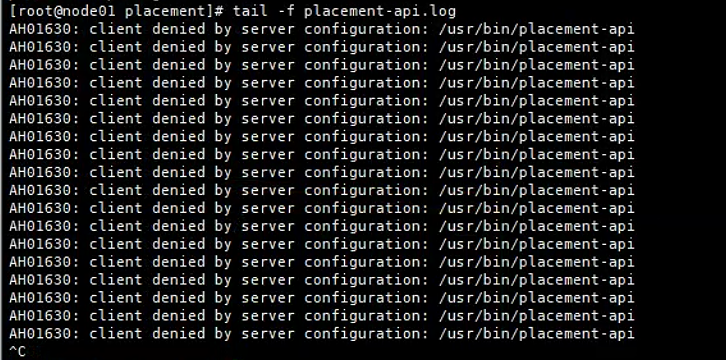
解决方案: 直接在文件
/etc/httpd/conf.d/00-placement-api.conf中加入以下内容即可<Directory /usr/bin> <IfVersion >= 2.4> Require all granted </IfVersion> <IfVersion < 2.4> Order allow,deny Allow from all </IfVersion> </Directory>之后直接重启
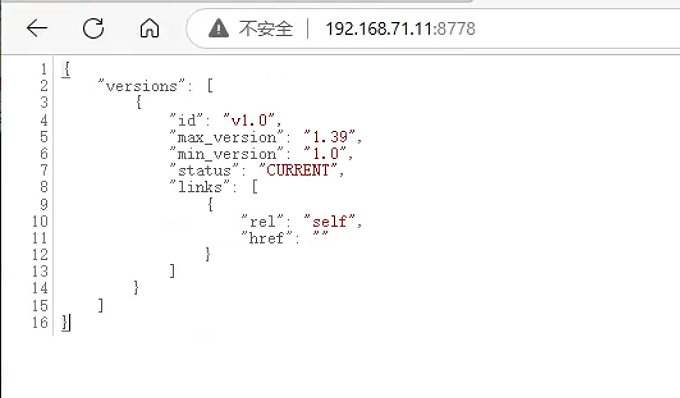
httpd服务systemctl restart httpd之后直接访问页面 , 就可以发现可以正常访问