
6-4-k8s实际应用-基于StatefulSet控制器运行MySQL一主多从
Pod调度运⾏时,如果应⽤不需要任何稳定的标示、有序的部署、删除和扩展,则应该使⽤⼀组⽆状态副本的控制器来部署应⽤,例如 Deployment 或 ReplicaSet更适合⽆状态服务需求,而StatefulSet适合管理所有有状态的服务,⽐如MySQL、MongoDB集群等。
1. StatefulSet控制器运行MySQL一主多从架构图
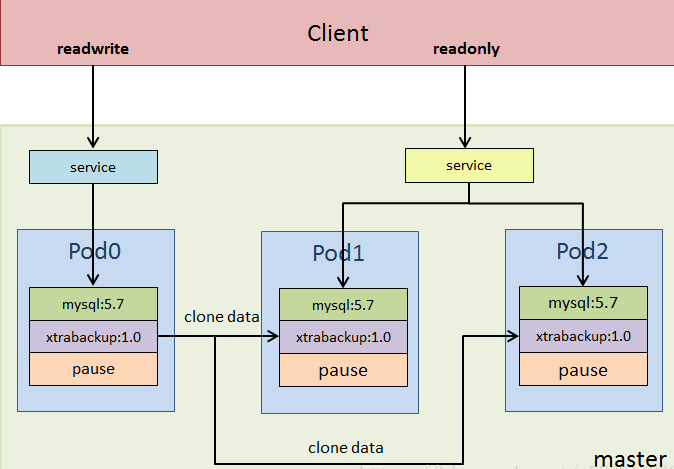
StatefulSet本质上是Deployment的⼀种变体,在v1.9版本中已成为GA版本,它为了解决有状态服务的问题,它所管理的Pod拥有固定的Pod名称,启停顺序,在StatefulSet中,Pod名字称为网络标识(hostname),还必须要⽤到共享存储。 在Deployment中,与之对应的服务是service,⽽在StatefulSet中与之对应的headless service,headless service,即⽆头服务,与service的区别就是它没有Cluster IP,解析它的名称时将返回该Headless Service对应的全部Pod的Endpoint列表。
StatefulSet控制器特点给每个
pod分配固定且唯⼀的⽹络标识符给每个
pod分配固定且持久化的外部存储对
pod进⾏有序的部署和扩展对
pod进有序的删除和终⽌对
pod进有序的⾃动滚动更新
StatefulSet的组成部分Headless Service: ⽤来定义Pod⽹络标识(DNS domain),指的是短的service(丢失了domainname)。StatefulSet: 定义具体应⽤,有多少个Pod副本,并为每个Pod定义了⼀个域名。volumeClaimTemplates: 存储卷申请模板,创建PVC,指定pvc名称大小,将⾃动创建pvc,且pvc必须由存储类供应。
2. 在k8s上部署mysql一主多从
2.1 基础镜像准备
下载镜像。因为下载地址在国外, 先下载到了阿里云上,再转存至本地镜像仓库
nerdctl pull mysql:5.7.36
merdctl pull ikubernetes/xtrabackup:1.0
上传镜像到仓库
root@k8s-master01:/opt/k8s-data/yaml/cbear/mysql# nerdctl push harbor.cbear.top/cbear/xtrabackup:1.0
root@k8s-master01:/opt/k8s-data/yaml/cbear/mysql# nerdctl push harbor.cbear.top/cbear/mysql:5.7.36
2.2 准备pv存储
在
nfs服务器上创建数据存储目录root@harbor:/usr/local/harbor# mkdir -pv /data/cbear/mysql-datadir-{1..5} mkdir: created directory '/data/cbear' mkdir: created directory '/data/cbear/mysql-datadir-1' mkdir: created directory '/data/cbear/mysql-datadir-2' mkdir: created directory '/data/cbear/mysql-datadir-3' mkdir: created directory '/data/cbear/mysql-datadir-4' mkdir: created directory '/data/cbear/mysql-datadir-5'配置
nfs共享, 并重载对应nfs配置root@harbor:/usr/local/harbor# cat /etc/exports /data/cbear/mysql-datadir-1 *(rw,no_root_squash,no_subtree_check) /data/cbear/mysql-datadir-2 *(rw,no_root_squash,no_subtree_check) /data/cbear/mysql-datadir-3 *(rw,no_root_squash,no_subtree_check) /data/cbear/mysql-datadir-4 *(rw,no_root_squash,no_subtree_check) /data/cbear/mysql-datadir-5 *(rw,no_root_squash,no_subtree_check) root@harbor:/usr/local/harbor# exportfs -rv exporting *:/data/cbear/mysql-datadir-5 exporting *:/data/cbear/mysql-datadir-4 exporting *:/data/cbear/mysql-datadir-3 exporting *:/data/cbear/mysql-datadir-2 exporting *:/data/cbear/mysql-datadir-1 创建
pv配置清单root@k8s-master01:/opt/k8s-data/yaml/cbear/mysql# cat mysql-pv.yaml --- apiVersion: v1 kind: PersistentVolume metadata: name: mysql-datadir-1 namespace: cbear spec: capacity: storage: 50Gi accessModes: - ReadWriteOnce nfs: path: /data/cbear/mysql-datadir-1 server: 192.168.71.34 --- apiVersion: v1 kind: PersistentVolume metadata: name: mysql-datadir-2 namespace: cbear spec: capacity: storage: 50Gi accessModes: - ReadWriteOnce nfs: path: /data/cbear/mysql-datadir-2 server: 192.168.71.34 --- apiVersion: v1 kind: PersistentVolume metadata: name: mysql-datadir-3 namespace: cbear spec: capacity: storage: 50Gi accessModes: - ReadWriteOnce nfs: path: /data/cbear/mysql-datadir-3 server: 192.168.71.34 --- apiVersion: v1 kind: PersistentVolume metadata: name: mysql-datadir-4 namespace: cbear spec: capacity: storage: 50Gi accessModes: - ReadWriteOnce nfs: path: /data/cbear/mysql-datadir-4 server: 192.168.71.34 --- apiVersion: v1 kind: PersistentVolume metadata: name: mysql-datadir-5 namespace: cbear spec: capacity: storage: 50Gi accessModes: - ReadWriteOnce nfs: path: /data/cbear/mysql-datadir-5 server: 192.168.71.34 启用并验证
pvroot@k8s-master01:/opt/k8s-data/yaml/cbear/mysql# kubectl apply -f mysql-pv.yaml persistentvolume/mysql-datadir-1 created persistentvolume/mysql-datadir-2 created persistentvolume/mysql-datadir-3 created persistentvolume/mysql-datadir-4 created persistentvolume/mysql-datadir-5 created root@k8s-master01:/opt/k8s-data/yaml/cbear/mysql# kubectl get pv NAME CAPACITY ACCESS MODES RECLAIM POLICY STATUS CLAIM STORAGECLASS VOLUMEATTRIBUTESCLASS REASON AGE mysql-datadir-1 50Gi RWO Retain Available <unset> 12s mysql-datadir-2 50Gi RWO Retain Available <unset> 12s mysql-datadir-3 50Gi RWO Retain Available <unset> 12s mysql-datadir-4 50Gi RWO Retain Available <unset> 12s mysql-datadir-5 50Gi RWO Retain Available <unset> 12s
2.3 运行mysql服务
2.3.1 准备mysql配置清单
MySQL CONFIGMAP配置清单apiVersion: v1 kind: ConfigMap metadata: name: mysql namespace: cbear labels: app: mysql data: master.cnf: | # Apply this config only on the master. [mysqld] log-bin log_bin_trust_function_creators=1 lower_case_table_names=1 slave.cnf: | # Apply this config only on slaves. [mysqld] super-read-only log_bin_trust_function_creators=1 MySQL POD配置清单apiVersion: apps/v1 kind: StatefulSet metadata: name: mysql namespace: cbear spec: selector: matchLabels: app: mysql serviceName: mysql replicas: 3 template: metadata: labels: app: mysql spec: initContainers: - name: init-mysql #初始化容器1、基于当前pod name匹配角色是master还是slave,并动态生成相对应的配置文件 image: harbor.cbear.top/cbear/mysql:5.7.36 command: - bash - "-c" - | set -ex # Generate mysql server-id from pod ordinal index. [[ `hostname` =~ -([0-9]+)$ ]] || exit 1 #匹配hostname的最后一位、最后是一个顺序叠加的整数 ordinal=${BASH_REMATCH[1]} echo [mysqld] > /mnt/conf.d/server-id.cnf # Add an offset to avoid reserved server-id=0 value. echo server-id=$((100 + $ordinal)) >> /mnt/conf.d/server-id.cnf # Copy appropriate conf.d files from config-map to emptyDir. if [[ $ordinal -eq 0 ]]; then #如果是master、则cpmaster配置文件 cp /mnt/config-map/master.cnf /mnt/conf.d/ else #否则cp slave配置文件 cp /mnt/config-map/slave.cnf /mnt/conf.d/ fi volumeMounts: - name: conf #临时卷、emptyDir mountPath: /mnt/conf.d - name: config-map mountPath: /mnt/config-map - name: clone-mysql #初始化容器2、用于生成mysql配置文件、并从上一个pod完成首次的全量数据clone(slave 3从slave2 clone,而不是每个slave都从master clone实现首次全量同步,但是后期都是与master实现增量同步) image: harbor.cbear.top/cbear/xtrabackup:1.0 command: - bash - "-c" - | set -ex # Skip the clone if data already exists. [[ -d /var/lib/mysql/mysql ]] && exit 0 # Skip the clone on master (ordinal index 0). [[ `hostname` =~ -([0-9]+)$ ]] || exit 1 ordinal=${BASH_REMATCH[1]} [[ $ordinal -eq 0 ]] && exit 0 #如果最后一位是0(master)则退出clone过程 # Clone data from previous peer. ncat --recv-only mysql-$(($ordinal-1)).mysql 3307 | xbstream -x -C /var/lib/mysql #从上一个pod执行clone(binlog),xbstream为解压缩命令 # Prepare the backup.xue xtrabackup --prepare --target-dir=/var/lib/mysql #通过xtrabackup恢复binlog volumeMounts: - name: data mountPath: /var/lib/mysql subPath: mysql - name: conf mountPath: /etc/mysql/conf.d containers: - name: mysql #业务容器1(mysql主容器) image: harbor.cbear.top/cbear/mysql:5.7.36 env: - name: MYSQL_ALLOW_EMPTY_PASSWORD value: "1" ports: - name: mysql containerPort: 3306 volumeMounts: - name: data #挂载数据目录至/var/lib/mysql mountPath: /var/lib/mysql subPath: mysql - name: conf #配置文件/etc/mysql/conf.d mountPath: /etc/mysql/conf.d resources: #资源限制 requests: cpu: 500m memory: 1Gi livenessProbe: #存活探针 exec: command: ["mysqladmin", "ping"] initialDelaySeconds: 30 periodSeconds: 10 timeoutSeconds: 5 readinessProbe: #就绪探针 exec: # Check we can execute queries over TCP (skip-networking is off). command: ["mysql", "-h", "127.0.0.1", "-e", "SELECT 1"] initialDelaySeconds: 5 periodSeconds: 2 timeoutSeconds: 1 - name: xtrabackup #业务容器2(xtrabackup),用于后期同步master 的binglog并恢复数据 image: harbor.cbear.top/cbear/xtrabackup:1.0 ports: - name: xtrabackup containerPort: 3307 command: - bash - "-c" - | set -ex cd /var/lib/mysql # Determine binlog position of cloned data, if any. if [[ -f xtrabackup_slave_info ]]; then # XtraBackup already generated a partial "CHANGE MASTER TO" query # because we're cloning from an existing slave. mv xtrabackup_slave_info change_master_to.sql.in # Ignore xtrabackup_binlog_info in this case (it's useless). rm -f xtrabackup_binlog_info elif [[ -f xtrabackup_binlog_info ]]; then # We're cloning directly from master. Parse binlog position. [[ `cat xtrabackup_binlog_info` =~ ^(.*?)[[:space:]]+(.*?)$ ]] || exit 1 rm xtrabackup_binlog_info echo "CHANGE MASTER TO MASTER_LOG_FILE='${BASH_REMATCH[1]}',\ MASTER_LOG_POS=${BASH_REMATCH[2]}" > change_master_to.sql.in #生成CHANGE MASTER命令 fi # Check if we need to complete a clone by starting replication. if [[ -f change_master_to.sql.in ]]; then echo "Waiting for mysqld to be ready (accepting connections)" until mysql -h 127.0.0.1 -e "SELECT 1"; do sleep 1; done echo "Initializing replication from clone position" # In case of container restart, attempt this at-most-once. mv change_master_to.sql.in change_master_to.sql.orig #执行CHANGE MASTER操作并启动SLAVE mysql -h 127.0.0.1 <<EOF $(<change_master_to.sql.orig), MASTER_HOST='mysql-0.mysql', MASTER_USER='root', MASTER_PASSWORD='', MASTER_CONNECT_RETRY=10; START SLAVE; EOF fi # Start a server to send backups when requested by peers. #监听在3307端口,用于为下一个pod同步全量数据 exec ncat --listen --keep-open --send-only --max-conns=1 3307 -c \ "xtrabackup --backup --slave-info --stream=xbstream --host=127.0.0.1 --user=root" volumeMounts: - name: data mountPath: /var/lib/mysql subPath: mysql - name: conf mountPath: /etc/mysql/conf.d resources: requests: cpu: 100m memory: 100Mi volumes: - name: conf emptyDir: {} - name: config-map configMap: name: mysql volumeClaimTemplates: - metadata: name: data spec: accessModes: ["ReadWriteOnce"] resources: requests: storage: 10Gi 上述配置清单主要定义三个
mysqlPod,其中每个pod中运行4个容器第一个容器
init容器主要目的是通过sts控制器创建pod的名称id来确定挂载master和slave配置第二个初始化容器主要目的是用于克隆上一个
pod的数据,即salve1从master上克隆数据,slave2从slave1克隆数据,以此类推第三个就是
mysql主容器,运行mysql实例第四个容器主要用于给
mysql主容器同步后期的增量数据的;
MySQL SERVICE配置清单# Headless service for stable DNS entries of StatefulSet members. apiVersion: v1 kind: Service metadata: namespace: cbear name: mysql labels: app: mysql spec: ports: - name: mysql port: 3306 clusterIP: None selector: app: mysql --- # Client service for connecting to any MySQL instance for reads. # For writes, you must instead connect to the master: mysql-0.mysql. apiVersion: v1 kind: Service metadata: name: mysql-read namespace: cbear labels: app: mysql spec: ports: - name: mysql port: 3306 selector: app: mysql上述配置清单主要创建了两个
service,第一个是一个无头service用户返回后端所有pod端点;第二个service是一个默认clusterip类型service,这两个service都是可以的;
2.3.2 启用清单
创建
mysql podroot@k8s-master01:/opt/k8s-data/yaml/cbear/mysql# kubectl apply -f ./ configmap/mysql created persistentvolume/mysql-datadir-1 unchanged persistentvolume/mysql-datadir-2 unchanged persistentvolume/mysql-datadir-3 unchanged persistentvolume/mysql-datadir-4 unchanged persistentvolume/mysql-datadir-5 unchanged service/mysql created service/mysql-read created statefulset.apps/mysql created root@k8s-master01:/opt/k8s-data/yaml/cbear/mysql# ls mysql-configmap.yaml mysql-pv.yaml mysql-service.yaml mysql-statefulset.yaml验证
Pod状态root@k8s-master01:/opt/k8s-data/yaml/cbear# kubectl get pods -n cbear NAME READY STATUS RESTARTS AGE mysql-0 2/2 Running 0 3m mysql-1 2/2 Running 0 110s mysql-2 0/2 Init:1/2 0 44s root@k8s-master01:/opt/k8s-data/yaml/cbear# kubectl get pods -n cbear NAME READY STATUS RESTARTS AGE mysql-0 2/2 Running 0 3m1s mysql-1 2/2 Running 0 111s mysql-2 0/2 Init:1/2 0 45s root@k8s-master01:/opt/k8s-data/yaml/cbear# kubectl get pods -n cbear NAME READY STATUS RESTARTS AGE mysql-0 2/2 Running 0 3m40s mysql-1 2/2 Running 0 2m30s mysql-2 2/2 Running 0 84s root@k8s-master01:/opt/k8s-data/yaml/cbear/mysql# kubectl get pods -n cbear NAME READY STATUS RESTARTS AGE mysql-0 2/2 Running 0 16m mysql-1 2/2 Running 0 15m mysql-2 2/2 Running 0 14m
2.4 验证MySQL主从同步是否正常
验证
master状态root@k8s-master01:/opt/k8s-data/yaml/cbear/mysql# kubectl exec -it mysql-0 -n cbear -- bash Defaulted container "mysql" out of: mysql, xtrabackup, init-mysql (init), clone-mysql (init) root@mysql-0:/# mysql Welcome to the MySQL monitor. Commands end with ; or \g. Your MySQL connection id is 983 Server version: 5.7.36-log MySQL Community Server (GPL) Copyright (c) 2000, 2021, Oracle and/or its affiliates. Oracle is a registered trademark of Oracle Corporation and/or its affiliates. Other names may be trademarks of their respective owners. Type 'help;' or '\h' for help. Type '\c' to clear the current input statement. mysql> show master status\G; *************************** 1. row *************************** File: mysql-0-bin.000003 Position: 154 Binlog_Do_DB: Binlog_Ignore_DB: Executed_Gtid_Set: 1 row in set (0.00 sec) ERROR: No query specified mysql> exit Bye root@mysql-0:/# exit exit验证
slave状态root@k8s-master01:/opt/k8s-data/yaml/cbear/mysql# kubectl exec -it mysql-1 -n cbear -- bash Defaulted container "mysql" out of: mysql, xtrabackup, init-mysql (init), clone-mysql (init) root@mysql-1:/# mysql Welcome to the MySQL monitor. Commands end with ; or \g. Your MySQL connection id is 1003 Server version: 5.7.36 MySQL Community Server (GPL) Copyright (c) 2000, 2021, Oracle and/or its affiliates. Oracle is a registered trademark of Oracle Corporation and/or its affiliates. Other names may be trademarks of their respective owners. Type 'help;' or '\h' for help. Type '\c' to clear the current input statement. mysql> show slave status\G; *************************** 1. row *************************** Slave_IO_State: Waiting for master to send event Master_Host: mysql-0.mysql Master_User: root Master_Port: 3306 Connect_Retry: 10 Master_Log_File: mysql-0-bin.000003 Read_Master_Log_Pos: 154 Relay_Log_File: mysql-1-relay-bin.000002 Relay_Log_Pos: 322 Relay_Master_Log_File: mysql-0-bin.000003 Slave_IO_Running: Yes Slave_SQL_Running: Yes Replicate_Do_DB: Replicate_Ignore_DB: Replicate_Do_Table: Replicate_Ignore_Table: Replicate_Wild_Do_Table: Replicate_Wild_Ignore_Table: Last_Errno: 0 Last_Error: Skip_Counter: 0 Exec_Master_Log_Pos: 154 Relay_Log_Space: 531 Until_Condition: None Until_Log_File: Until_Log_Pos: 0 Master_SSL_Allowed: No Master_SSL_CA_File: Master_SSL_CA_Path: Master_SSL_Cert: Master_SSL_Cipher: Master_SSL_Key: Seconds_Behind_Master: 0 Master_SSL_Verify_Server_Cert: No Last_IO_Errno: 0 Last_IO_Error: Last_SQL_Errno: 0 Last_SQL_Error: Replicate_Ignore_Server_Ids: Master_Server_Id: 100 Master_UUID: c8723463-2e53-11ef-8f21-9a9b7c4bb9b7 Master_Info_File: /var/lib/mysql/master.info SQL_Delay: 0 SQL_Remaining_Delay: NULL Slave_SQL_Running_State: Slave has read all relay log; waiting for more updates Master_Retry_Count: 86400 Master_Bind: Last_IO_Error_Timestamp: Last_SQL_Error_Timestamp: Master_SSL_Crl: Master_SSL_Crlpath: Retrieved_Gtid_Set: Executed_Gtid_Set: Auto_Position: 0 Replicate_Rewrite_DB: Channel_Name: Master_TLS_Version: 1 row in set (0.00 sec) ERROR: No query specified root@k8s-master01:/opt/k8s-data/yaml/cbear/mysql# kubectl exec -it mysql-2 -n cbear -- bash Defaulted container "mysql" out of: mysql, xtrabackup, init-mysql (init), clone-mysql (init) root@mysql-2:/# mysql Welcome to the MySQL monitor. Commands end with ; or \g. Your MySQL connection id is 1005 Server version: 5.7.36 MySQL Community Server (GPL) Copyright (c) 2000, 2021, Oracle and/or its affiliates. Oracle is a registered trademark of Oracle Corporation and/or its affiliates. Other names may be trademarks of their respective owners. Type 'help;' or '\h' for help. Type '\c' to clear the current input statement. mysql> show slave status\G ; *************************** 1. row *************************** Slave_IO_State: Waiting for master to send event Master_Host: mysql-0.mysql Master_User: root Master_Port: 3306 Connect_Retry: 10 Master_Log_File: mysql-0-bin.000003 Read_Master_Log_Pos: 154 Relay_Log_File: mysql-2-relay-bin.000002 Relay_Log_Pos: 322 Relay_Master_Log_File: mysql-0-bin.000003 Slave_IO_Running: Yes Slave_SQL_Running: Yes Replicate_Do_DB: Replicate_Ignore_DB: Replicate_Do_Table: Replicate_Ignore_Table: Replicate_Wild_Do_Table: Replicate_Wild_Ignore_Table: Last_Errno: 0 Last_Error: Skip_Counter: 0 Exec_Master_Log_Pos: 154 Relay_Log_Space: 531 Until_Condition: None Until_Log_File: Until_Log_Pos: 0 Master_SSL_Allowed: No Master_SSL_CA_File: Master_SSL_CA_Path: Master_SSL_Cert: Master_SSL_Cipher: Master_SSL_Key: Seconds_Behind_Master: 0 Master_SSL_Verify_Server_Cert: No Last_IO_Errno: 0 Last_IO_Error: Last_SQL_Errno: 0 Last_SQL_Error: Replicate_Ignore_Server_Ids: Master_Server_Id: 100 Master_UUID: c8723463-2e53-11ef-8f21-9a9b7c4bb9b7 Master_Info_File: /var/lib/mysql/master.info SQL_Delay: 0 SQL_Remaining_Delay: NULL Slave_SQL_Running_State: Slave has read all relay log; waiting for more updates Master_Retry_Count: 86400 Master_Bind: Last_IO_Error_Timestamp: Last_SQL_Error_Timestamp: Master_SSL_Crl: Master_SSL_Crlpath: Retrieved_Gtid_Set: Executed_Gtid_Set: Auto_Position: 0 Replicate_Rewrite_DB: Channel_Name: Master_TLS_Version: 1 row in set (0.00 sec) ERROR: No query specified mysql>能够在
slave上看到IO和SQL线程正常running,说明slave状态没有问题。进入mysql-0创建数据库
root@k8s-master01:/opt/k8s-data/yaml/cbear/mysql# kubectl exec -it mysql-0 -n cbear  -- bash
Defaulted container "mysql" out of: mysql, xtrabackup, init-mysql (init), clone-mysql (init)
root@mysql-0:/# mysql
Welcome to the MySQL monitor.  Commands end with ; or \g.
Your MySQL connection id is 1144
Server version: 5.7.36-log MySQL Community Server (GPL)

Copyright (c) 2000, 2021, Oracle and/or its affiliates.

Oracle is a registered trademark of Oracle Corporation and/or its
affiliates. Other names may be trademarks of their respective
owners.

Type 'help;' or '\h' for help. Type '\c' to clear the current input statement.

mysql> show databases;
+------------------------+
| Database               |
+------------------------+
| information_schema     |
| mysql                  |
| performance_schema     |
| sys                    |
| xtrabackup_backupfiles |
+------------------------+
5 rows in set (0.02 sec)

mysql> create database mydb;
Query OK, 1 row affected (0.03 sec)

mysql> show databases;
+------------------------+
| Database               |
+------------------------+
| information_schema     |
| mydb                   |
| mysql                  |
| performance_schema     |
| sys                    |
| xtrabackup_backupfiles |
+------------------------+
6 rows in set (0.00 sec)

mysql>
在slave pod中验证数据是否同步
root@k8s-master01:/opt/k8s-data/yaml/cbear/mysql# kubectl exec -it mysql-1 -n cbear  -- bash
Defaulted container "mysql" out of: mysql, xtrabackup, init-mysql (init), clone-mysql (init)
root@mysql-1:/# mysql
Welcome to the MySQL monitor.  Commands end with ; or \g.
Your MySQL connection id is 1156
Server version: 5.7.36 MySQL Community Server (GPL)

Copyright (c) 2000, 2021, Oracle and/or its affiliates.

Oracle is a registered trademark of Oracle Corporation and/or its
affiliates. Other names may be trademarks of their respective
owners.

Type 'help;' or '\h' for help. Type '\c' to clear the current input statement.

mysql> show databases;
+------------------------+
| Database               |
+------------------------+
| information_schema     |
| mydb                   |
| mysql                  |
| performance_schema     |
| sys                    |
| xtrabackup_backupfiles |
+------------------------+
6 rows in set (0.01 sec)

mysql> exit
Bye
root@mysql-1:/# exit
exit
root@k8s-master01:/opt/k8s-data/yaml/cbear/mysql# kubectl exec -it mysql-2 -n cbear  -- bash
Defaulted container "mysql" out of: mysql, xtrabackup, init-mysql (init), clone-mysql (init)
root@mysql-2:/# mysql
Welcome to the MySQL monitor.  Commands end with ; or \g.
Your MySQL connection id is 1123
Server version: 5.7.36 MySQL Community Server (GPL)

Copyright (c) 2000, 2021, Oracle and/or its affiliates.

Oracle is a registered trademark of Oracle Corporation and/or its
affiliates. Other names may be trademarks of their respective
owners.

Type 'help;' or '\h' for help. Type '\c' to clear the current input statement.

mysql> show databases;
+------------------------+
| Database               |
+------------------------+
| information_schema     |
| mydb                   |
| mysql                  |
| performance_schema     |
| sys                    |
| xtrabackup_backupfiles |
+------------------------+
6 rows in set (0.01 sec)
能够通过上述在主库创建数据库,从库能够正常同步,则说明
mysql主从同步没有问题。
2.5 mysql高可用测试
删除
master pod验证mysql高可用性root@k8s-master01:/opt/k8s-data/yaml/cbear/mysql# kubectl get pods -n cbear NAME READY STATUS RESTARTS AGE mysql-0 2/2 Running 0 36m mysql-1 2/2 Running 0 35m mysql-2 2/2 Running 0 34m redis-0 1/1 Running 0 21h redis-1 1/1 Running 0 21h redis-2 1/1 Running 0 21h redis-3 1/1 Running 0 21h redis-4 1/1 Running 0 21h redis-5 1/1 Running 0 21h root@k8s-master01:/opt/k8s-data/yaml/cbear/mysql# kubectl delete pods mysql-0 -n cbear pod "mysql-0" deleted ^Croot@k8s-master01:/opt/k8s-data/yaml/cbear/mysql# kubectl get pods -n cbear NAME READY STATUS RESTARTS AGE mysql-0 2/2 Terminating 0 36m mysql-1 2/2 Running 0 35m mysql-2 2/2 Running 0 34m redis-0 1/1 Running 0 21h redis-1 1/1 Running 0 21h redis-2 1/1 Running 0 21h redis-3 1/1 Running 0 21h redis-4 1/1 Running 0 21h redis-5 1/1 Running 0 21h root@k8s-master01:/opt/k8s-data/yaml/cbear/mysql# kubectl get pods -n cbear NAME READY STATUS RESTARTS AGE mysql-0 1/2 Terminating 0 36m mysql-1 2/2 Running 0 35m mysql-2 2/2 Running 0 34m redis-0 1/1 Running 0 21h redis-1 1/1 Running 0 21h redis-2 1/1 Running 0 21h redis-3 1/1 Running 0 21h redis-4 1/1 Running 0 21h redis-5 1/1 Running 0 21h root@k8s-master01:/opt/k8s-data/yaml/cbear/mysql# kubectl get pods -n cbear NAME READY STATUS RESTARTS AGE mysql-0 0/2 Init:1/2 0 2s mysql-1 2/2 Running 0 36m mysql-2 2/2 Running 0 34m redis-0 1/1 Running 0 21h redis-1 1/1 Running 0 21h redis-2 1/1 Running 0 21h redis-3 1/1 Running 0 21h redis-4 1/1 Running 0 21h redis-5 1/1 Running 0 21h root@k8s-master01:/opt/k8s-data/yaml/cbear/mysql# kubectl get pods -n cbear NAME READY STATUS RESTARTS AGE mysql-0 0/2 PodInitializing 0 3s mysql-1 2/2 Running 0 36m mysql-2 2/2 Running 0 34m redis-0 1/1 Running 0 21h redis-1 1/1 Running 0 21h redis-2 1/1 Running 0 21h redis-3 1/1 Running 0 21h redis-4 1/1 Running 0 21h redis-5 1/1 Running 0 21h root@k8s-master01:/opt/k8s-data/yaml/cbear/mysql# kubectl get pods -n cbear NAME READY STATUS RESTARTS AGE mysql-0 2/2 Running 0 29s mysql-1 2/2 Running 0 36m mysql-2 2/2 Running 0 35m redis-0 1/1 Running 0 21h redis-1 1/1 Running 0 21h redis-2 1/1 Running 0 21h redis-3 1/1 Running 0 21h redis-4 1/1 Running 0 21h redis-5 1/1 Running 0 21h进入master,验证master数据是否丢失?
root@k8s-master01:/opt/k8s-data/yaml/cbear/mysql# kubectl exec -it mysql-0 -n cbear  -- bash
Defaulted container "mysql" out of: mysql, xtrabackup, init-mysql (init), clone-mysql (init)
root@mysql-0:/# mysql
Welcome to the MySQL monitor.  Commands end with ; or \g.
Your MySQL connection id is 144
Server version: 5.7.36-log MySQL Community Server (GPL)

Copyright (c) 2000, 2021, Oracle and/or its affiliates.

Oracle is a registered trademark of Oracle Corporation and/or its
affiliates. Other names may be trademarks of their respective
owners.

Type 'help;' or '\h' for help. Type '\c' to clear the current input statement.

mysql> show databases;
+------------------------+
| Database               |
+------------------------+
| information_schema     |
| mydb                   |
| mysql                  |
| performance_schema     |
| sys                    |
| xtrabackup_backupfiles |
+------------------------+
6 rows in set (0.01 sec)
能够看到
master数据并未丢失,这是因为该数据存放至远端nfs存储之上。删除
slave pod验证mysql高可用性root@k8s-master01:/opt/k8s-data/yaml/cbear/mysql# kubectl delete pods mysql-1 -n cbear pod "mysql-1" deleted ^Croot@k8s-master01:/opt/k8s-data/yaml/cbear/mysql# kubectl get pods -n cbear NAME READY STATUS RESTARTS AGE mysql-0 2/2 Running 0 6m26s mysql-1 2/2 Terminating 0 42m mysql-2 2/2 Running 0 41m redis-0 1/1 Running 0 21h redis-1 1/1 Running 0 21h redis-2 1/1 Running 0 21h redis-3 1/1 Running 0 21h redis-4 1/1 Running 0 21h redis-5 1/1 Running 0 21h root@k8s-master01:/opt/k8s-data/yaml/cbear/mysql# kubectl get pods -n cbear NAME READY STATUS RESTARTS AGE mysql-0 2/2 Running 0 7m34s mysql-1 2/2 Running 0 57s mysql-2 2/2 Running 0 42m redis-0 1/1 Running 0 21h redis-1 1/1 Running 0 21h redis-2 1/1 Running 0 21h redis-3 1/1 Running 0 21h redis-4 1/1 Running 0 21h redis-5 1/1 Running 0 21h root@k8s-master01:/opt/k8s-data/yaml/cbear/mysql# kubectl exec -it mysql-1 -n cbear -- bash Defaulted container "mysql" out of: mysql, xtrabackup, init-mysql (init), clone-mysql (init) root@mysql-1:/# mysql Welcome to the MySQL monitor. Commands end with ; or \g. Your MySQL connection id is 36 Server version: 5.7.36 MySQL Community Server (GPL) Copyright (c) 2000, 2021, Oracle and/or its affiliates. Oracle is a registered trademark of Oracle Corporation and/or its affiliates. Other names may be trademarks of their respective owners. Type 'help;' or '\h' for help. Type '\c' to clear the current input statement. mysql> show databases; +------------------------+ | Database | +------------------------+ | information_schema | | mydb | | mysql | | performance_schema | | sys | | xtrabackup_backupfiles | +------------------------+ 6 rows in set (0.03 sec)
参考链接
k8s实战案例之基于StatefulSet控制器运行MySQL一主多从 - Linux-1874 - 博客园 (cnblogs.com)