
4-1-k8s组件-dns
1. DNS服务概述
service发现是k8s中的一个重要机制 , 其基本功能为: 在集群内通过服务名对服务进行访问 , 即需要完成从服务名到ClusterIP的解析。 k8s主要有两种service发现机制: 环境变量和DNS。没有DNS服务的时候 , k8s会采用环境变量的形式 , 但一旦有多个service , 环境变量会变复杂 , 为解决该问题 , 我们使用DNS服务。
DNS服务在kubernetes中经历了三个阶段 ( SkyDNS -->KubeDNS-->CoreDNS ) :
【第一阶段】在kubernetes
1.2版本时 ,dns服务使用的是由SkyDNS提供的 , 由4个容器组成:kube2sky、skydns、etcd和healthz。etcd存储dns记录 ;kube2sky监控service变化 , 生成dns记录 ;skydns读取服务 , 提供查询服务 ;healthz提供健康检查。【第二阶段】在
kubernetes 1.4版本开始使用KubeDNS, 有3个容器组成:kubedns、dnsmasq和sidecar。kubedns监控service变化 , 并记录到内存 ( 存到内存提高性能) 中 ;dnsmasq获取dns记录 , 提供dns缓存 , 提供dns查询服务 ;sidecar提供健康检查。【第三阶段】从
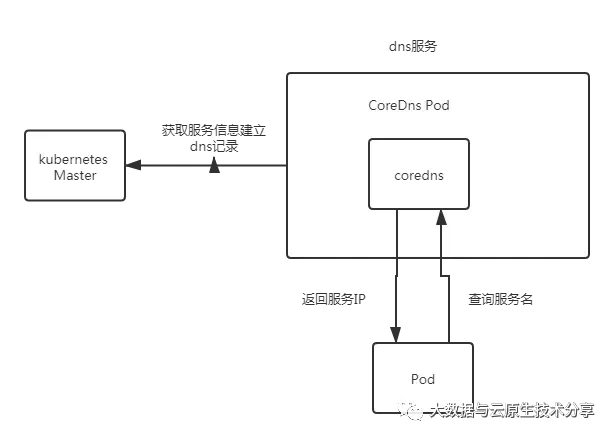
kubernetes >=1.11版本开始 ,dns服务有CoreDNS提供 ,coredns支持自定义dns记录及配置upstream dns server, 可以统一管理内部dns和物理dns。coredns只有一个coredns容器。下面是coredns的架构。
2. CoreDNS基础
2.1 CoreDNS简介
CoreDNS 是一个 Go 语言编写的灵活可扩展的 DNS 服务器, 在 Kubernetes 中, 作为一个服务发现的配置中心, 在 Kubernetes 中创建的 Service 和 Pod 都会在其中自动生成相应的 DNS 记录。Kubernetes 服务发现的特性, 使 CoreDNS 很适合作为企业云原生环境的 DNS 服务器, 保障企业容器化和非容器化业务服务的稳定运行。
构建企业 DNS 服务器时, 一般会有以下需求:
用户外网域名访问服务 ;
混合云业务迁移、数据共享、容灾 ;
开发代码
IP写死导致架构可用性、弹性无法实现 ;统一
DNS管理需求, 含上下级平台对接 ;DNS劫持等网络安全风险 ;存量代码固定域名访问 ;
集群外域名访问 ;
相比于 Bind 开源方案或 Windows Server DNS 商业 DNS 服务器, CoreDNS 有以下优势:
无商业许可要求, 降低投资成本 ;
轻量化, 通过插件实现功能添加 ;
支持
DNS,DNS over TLS,DNS over HTTP/2,DNS over gRPC协议 ;提供
kubernetes服务发现 ;支持对接
Route53/Google Cloud DNS/AzureDNS;支持集成
Prometheus,OpenTracing,OPA, 带来更全面的运维体验 ;支持整合容器管理平台, 提供统一
DNS系统运维。
2.2 CoreDNS 运行原理与插件介绍
CoreDNS 基于 Caddy 框架实现模块化设计, 每个插件承载相应的具体功能, 对于 DNS 系统而言, CoreDNS 使用 File, ETCD 插件等加载 DNS 记录, 使用 Kubernetes 插件实现集群服务发现, 外部 DNS 请求到达 CoreDNS 后, 根据插件调用链依次处理 DNS 请求。
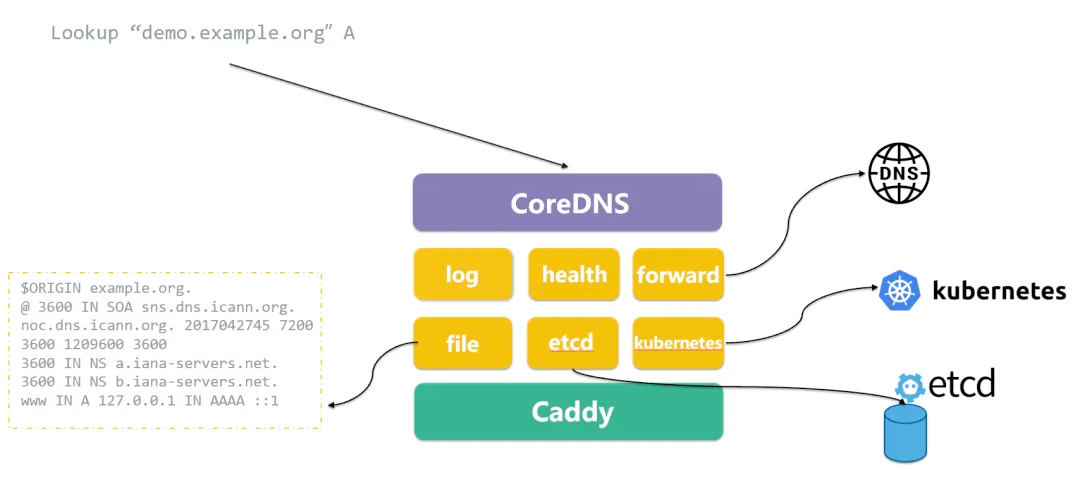
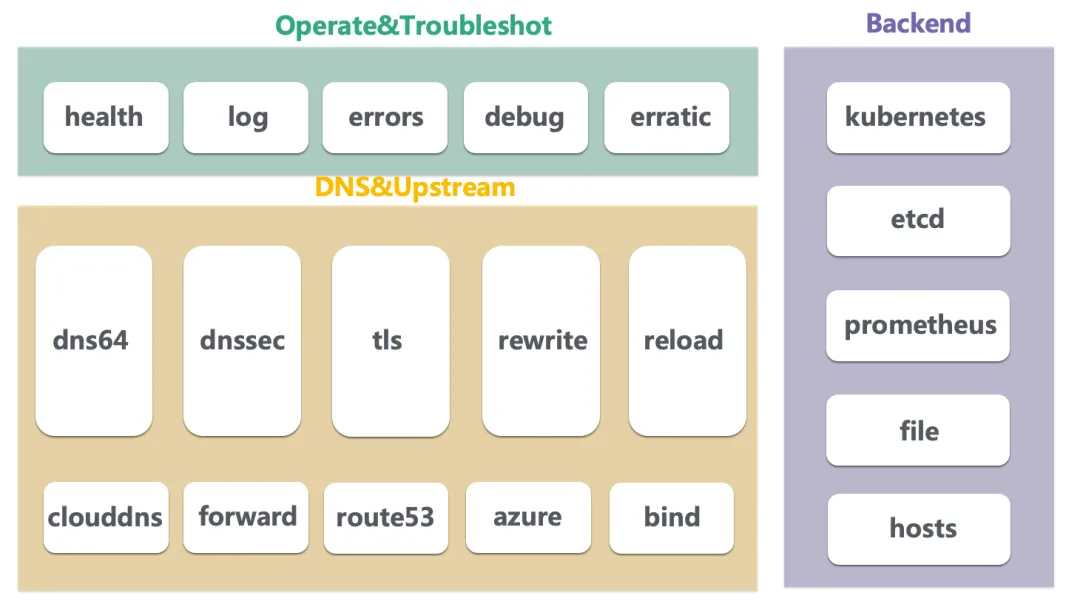
CoreDNS 社区官方提供了 50 多种插件, 开发者亦可根据需求开发个性化的外部插件。CoreDNS 常用插件如下图, 根据使用场景, 可分为运维、DNS 处理、后端数据存储等三个类别。
CoreDNS 定义 Corefile 配置文件, 服务器在加载 Corefile 后处理 DNS 请求, 对于以下插件, 只需在 Corefile 中引用即可, 之后 CoreDNS 会使用插件链进行调用, 插件链可参考以下链接: https://github.com/coredns/coredns/blob/master/plugin.cfg
3. 服务发现与 DNS 配置
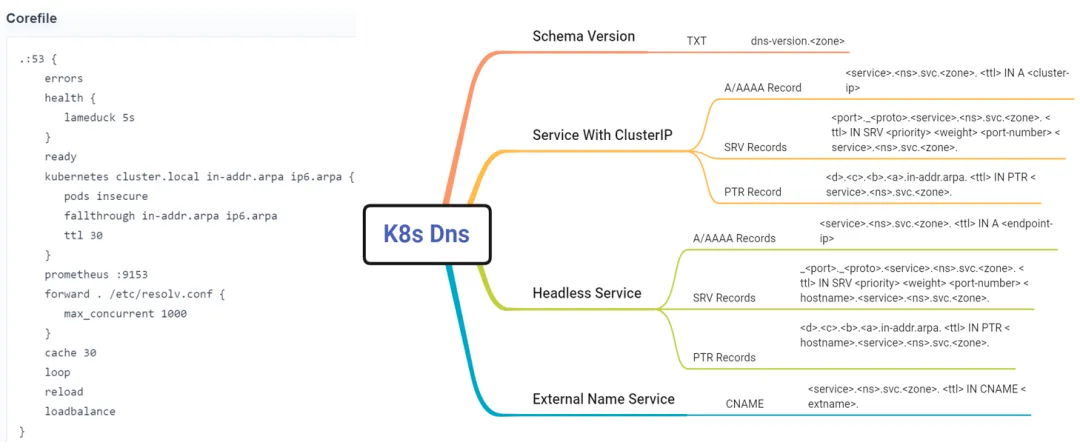
部署 CoreDNS 后, 对于运维人员来说, CoreDNS 的配置大体分为两类: 一类为 Kubernetes 配置, 一类为 DNS 配置。CoreDNS 提供了 Kubernetes 插件, 支持在 kubernetes 集群中读取区域数据, 并根据 Pod 和 Service 的域名记载相应的 A 记录和 PTR 记录。
这是一个 Kubernetes 集群中的 CoreDNS corefile 默认配置, CoreDNS 会在 53 端口读取 cluster.local 后缀的 Kubernetes 集群 A 记录和 PTR 记录。并将 CoreDNS 收集到的监控指标通过 9153 端口输出到集群内的 Prometheus。而 Kubernetes 不同类型 Service 的 DNS 记录格式, CoreDNS 也有相应标准进行记录。
设置完 Kubernetes 后, 可以设置其他业务需求的 DNS 配置, 如:
设置不同的存根域 ;
设置存根域静态
DNS条目 ;面对存量代码, 设置域名重写 ;
面对集群外服务, 设置
DNS转发 ;设置日志和监控集成 ;
设置缓存、健康、就绪检查及链路追踪 ;
根据以上配置, 就构建了一个基础的企业云原生 DNS 系统:
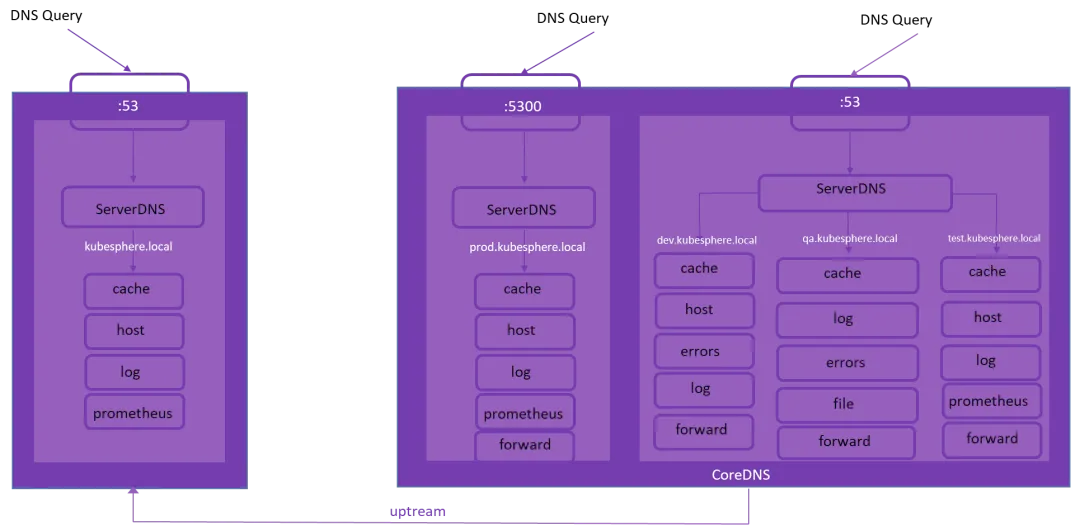
3.1 Corefile介绍
Corefile 是 CoreDNS 的配置文件(源于Caddy框架的配置文件Caddyfile) , 它定义了:
server以什么协议监听在哪个端口(可以同时定义多个server监听不同端口)server负责哪个zone的权威(authoritative)DNS解析server将加载哪些插件
常见地 , 一个典型的 Corefile 格式如下所示:
ZONE:[PORT] {
    [PLUGIN] ...
}ZONE: 定义server负责的zone,PORT是可选项 , 默认为53;PLUGIN: 定义server所要加载的plugin。每个plugin可以有多个参数 ;
比如:
. {
    whoami
}
上述配置文件表达的是 : server 负责根域 . 的解析("."表示所有的域名都会匹配),其中 plugin 是 whoami 且没有参数。
3.1.1 定义 DNS server
一个最简单的配置文件可以为:
.{}即 server 监听 53 端口并不使用插件。如果此时在定义其他 server , 要保证监听端口不冲突 ; 如果是在原来 server 增加 zone , 则要保证 zone 之间不冲突 , 如:
# 多个server的话需要保证监听端口不冲突
.    {}
.:54 {}
另一个 server 运行于 54 端口并负责根域 . 的解析。
又如:
#同一server的话需要保证zone不冲突
example.org {
    whoami
}
org {
    whoami
}
同一个 server 但是负责不同 zone 的解析 , 有不同插件链。
3.1.2 定义 Reverse Zone
跟其他 DNS 服务器类似 , Corefile 也可以定义 Reverse Zone(反向解析 IP 地址对应的域名):
0.0.10.in-addr.arpa {
    whoami
}
或者简化版本:
10.0.0.0/24 {
    whoami
}
可以通过 dig 进行反向查询:
$ dig -x 10.0.0.13.1.3 使用不同的通信协议
CoreDNS 除了支持 DNS 协议 , 也支持 TLS 和 gRPC , 即 DNS-over-TLS 和 DNS-over-gRPC 模式:
tls://example.org:1443 {
#...
}
3.2 插件的工作模式
当 CoreDNS 启动后 , 它将根据配置文件启动不同 server (假设配置文件中配置了多个DNS Server) , 每台server都拥有自己的插件链。当有 DNS 请求时 , 它将依次经历如下 3 步逻辑:
如果有当前请求的
server有多个zone, 将采用贪心原则选择最匹配的zone, 例如当前server含有com和baidu.com这两个zone,当客户端请求当前server解析域名www.baidu.com的话 , 根据贪心原则会选择baidu.com这个zone;一旦找到匹配的
server, 按照plugin.cfg定义的顺序执行插件链上的插件 ( 目前可用插件列表) ;每个插件将判断当前请求是否应该处理 , 将有以下几种可能:
请求被当前插件处理
插件将生成对应的响应并回给客户端 , 此时请求结束 , 下一个插件将不会被调用 , 如
whoami插件 ;请求不被当前插件处理
直接调用下一个插件。如果最后一个插件执行错误 , 服务器返回
SERVFAIL响应 ;请求被当前插件以
Fallthrough形式处理如果请求在该插件处理过程中有可能将跳转至下一个插件 , 该过程称为
fallthrough, 并以关键字fallthrough来决定是否允许此项操作 , 例如host插件 , 当查询域名未位于/etc/hosts, 则调用下一个插件 ;请求在处理过程被携带
Hint请求被插件处理 , 并在其响应中添加了某些信息 (
hint) 后继续交由下一个插件处理。这些额外的信息将组成对客户端的最终响应 , 如metric插件 ;
3.3 CoreDNS 如何处理 DNS 请求
如果 Corefile 为:
coredns.io:5300 {
    file db.coredns.io
}

example.io:53 {
    log
    file db.example.io
    errors
}

example.net:53 {
    file db.example.net
}

.:53 {
    log
    errors
    cache
    kubernetes
    health
    proxy . 8.8.8.8
}
从配置文件来看 , 我们定义了两个 server(其中监听5300端口的server仅配置了coredns.io这一个zone , 监听53端口的server配置了example.io、example.net和.三个zone) , 分别监听在 5300 和 53 端口。其逻辑图可如下所示:
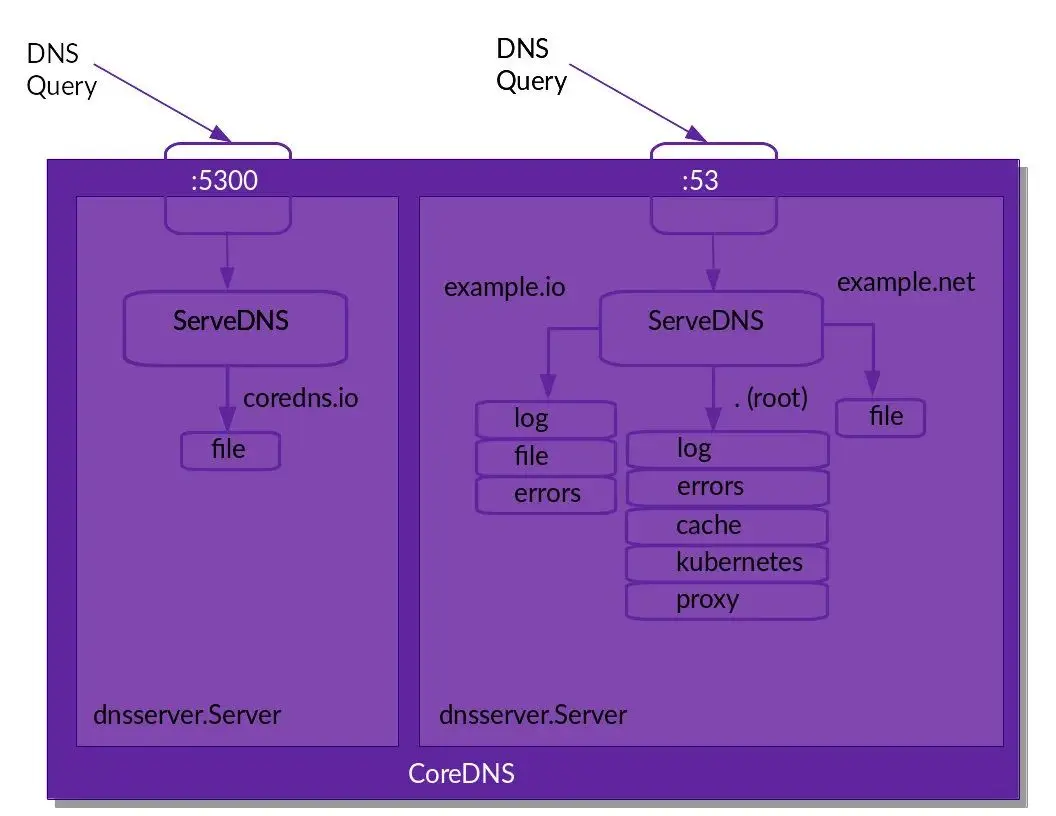
每个进入到某个 server 的请求将按照 plugin.cfg 定义顺序执行其已经加载的插件。
从上图 , 我们需要注意的是尽管在 .:53 配置了 health 插件 , 但是它并未在上面的逻辑图中出现 , 原因是: 该插件并未参与请求相关的逻辑 ( 即并没有在插件链上) , 只是修改了 server 配置。更一般地 , 我们可以将插件分为两种:
Normal插件: 参与请求相关的逻辑 , 且插入到插件链中 ;其他插件 : 不参与请求相关的逻辑 , 也不出现在插件链中 , 只是用于修改 server 的配置 , 如
health,tls等插件 ;
3.4 Kubernetes中CoreDNS配置详解
通过下面命令查看当前Kubernetes集群coredns配置
kubectl get configmaps -n=kube-system coredns -o yaml结果如下 :
apiVersion: v1
data:
  Corefile: |
    .:53 {
        errors
        health {
            lameduck 5s
        }
        ready
        kubernetes cbear.local in-addr.arpa ip6.arpa {
            pods insecure
            fallthrough in-addr.arpa ip6.arpa
            ttl 30
        }
        prometheus :9153
        forward . /etc/resolv.conf {
            max_concurrent 1000
        }
        cache 30
        reload
        loadbalance
    }
kind: ConfigMap
metadata:
  annotations:
    kubectl.kubernetes.io/last-applied-configuration: |
      {"apiVersion":"v1","data":{"Corefile":".:53 {\n    errors\n    health {\n        lameduck 5s\n    }\n    ready\n    kubernetes cbear.local in-addr.arpa ip6.arpa {\n        pods insecure\n        fallthrough in-addr.arpa ip6.arpa\n        ttl 30\n    }\n    prometheus :9153\n    forward . /etc/resolv.conf {\n        max_concurrent 1000\n    }\n    cache 30\n    reload\n    loadbalance\n}\n"},"kind":"ConfigMap","metadata":{"annotations":{},"labels":{"addonmanager.kubernetes.io/mode":"EnsureExists"},"name":"coredns","namespace":"kube-system"}}
  creationTimestamp: "2024-05-21T10:12:52Z"
  labels:
    addonmanager.kubernetes.io/mode: EnsureExists
  name: coredns
  namespace: kube-system
  resourceVersion: "1214"
uid: 59e59bf5-16fc-4255-a9f6-76386b949931下面是coredns的配置模板
apiVersion: v1
kind: ConfigMap
metadata:
  name: coredns
  namespace: namespace-test
data:
  Corefile: |
    .:53 {
        errors
        health
        ready
        kubernetes cluster.local  10.200.0.0/16 {
          pods insecure
          upstream 114.114.114.114
          fallthrough in-addr.arpa ip6.arpa
          namespaces namespace-test
        }
        prometheus :9153
        forward . /etc/resolv.conf
        cache 30
        loop
        reload
        loadbalance
}CoreDNS的主要功能是通过插件系统实现的。它实现了一种链式插件的结构 , 将dns的逻辑抽象成了一个个插件。常见的插件如下:
loadbalance: 提供基于dns的负载均衡功能loop: 检测在dns解析过程中出现的简单循环问题cache: 提供前端缓存功能health: 对Endpoint进行健康检查kubernetes: 从kubernetes中读取zone数据etcd: 从etcd读取zone数据 , 可以用于自定义域名记录file: 从文件中读取zone数据hosts: 使用/etc/hosts文件或者其他文件读取zone数据 , 可以用于自定义域名记录auto: 从磁盘中自动加载区域文件reload: 定时自动重新加载Corefile配置文件的内容forward: 转发域名查询到上游dns服务器proxy: 转发特定的域名查询到多个其他dns服务器 , 同时提供到多个dns服务器的负载均衡功能prometheus: 为prometheus系统提供采集性能指标数据的URLpprof: 在URL路径/debug/pprof下提供运行是的西能数据log: 对dns查询进行日志记录errors: 对错误信息镜像日志记录
讲一下我自己的理解:
配置文件类似于
nginx配置文件的格式 ;最外面一级的大括号 , 对应‘服务’的概念。多个服务可以共用一个端口 ;
往里面一级的大括号 , 对应
plugins的概念 , 每一个大括号都是一个plugin。这里可以看出 ,plugins是CoreDNS的一等公民 ;服务之间顺序有无关联没有感觉 , 但
plugins之间是严重顺序相关的。某些plugin必须用fallthrough关键字流向下一个plugin;plugin内部的配置选项是顺序无关的 ;从
CoreDNS的性能指标看 , 适合做大型服务。
4. Pod的dns策略
4.1 Pod dns策略
dnsPolicy 配置 DNS 查询解析在 Pod 级别的工作方式。它决定了 Pod 如何定位集群内外的服务并与之通信。
使用 dnsPolicy , 您可以设置用于解析容器的 DNS 请求的规则 - 是使用集群的内部 DNS 服务、遵循节点的 DNS 设置 , 还是使用自定义配置。
此策略有四个可能的值。让我们看看它们是如何工作的 , 以及它们之间的区别。
这里有一个简短的总结。
Default: 继承Pod所在宿主机的DNS设置ClusterFirst: 优先使用kubernetes环境的dns服务 , 将无法解析的域名转发到从宿主机继承的dns服务器ClusterFirstWithHostNet: 和ClusterFirst相同 , 对于以hostNetwork模式运行的Pod应明确知道使用该策略None: 忽略kubernetes环境的dns配置 , 通过spec.dnsConfig自定义DNS配置自定义
Dns配置可以通过spec.dnsConfig字段进行设置 , 可以设置如下信息nameservers: 一组dns服务器的列表 , 最多可设置3个searchs: 一组用于域名搜索的dns域名后缀 , 最多6个options: 配置其他可选参数 , 例如ndots、timeout等
例如:
spec:
  dnsPolicy: "None"
  dnsConfig:
    nameservers:
      - 1.2.3.4
    searchs:
      - xx.ns1.svc.cluster.local
      - xx.daemon.com
    options:
      - name: ndots
        values: "2"
pod被创建后 , 容器内的/etc/resolv.conf会根据这个信息进行配置。
4.2 测试解析结果
创建nslookup服务
$ cat >busybox.yaml<<EOF
apiVersion: v1
kind: Pod
metadata:
  name: busybox
  namespace: default
spec:
  containers:
  - name: busybox
    image: busybox:1.28
    command:
      - sleep
      - "3600"
    imagePullPolicy: IfNotPresent
  restartPolicy: Always
EOF
查看并验证
root@harbor:~# kubectl create -f busybox.yaml
pod/busybox created
root@harbor:~# kubectl get pods busybos
Error from server (NotFound): pods "busybos" not found
root@harbor:~# kubectl get pods busybox
NAME      READY   STATUS    RESTARTS   AGE
busybox   1/1     Running   0          17s
root@harbor:~# kubectl exec busybox -- cat /etc/resolv.conf
search default.svc.cbear.local svc.cbear.local cbear.local openstacklocal
nameserver 169.254.20.10
options ndots:5
ndots:5 : 如果查询的域名包含的点 “.” 不到 5 个 , 那么进行 DNS 查找 , 将使用非完全限定名称(或者叫绝对域名) , 如果你查询的域名包含点数大于等于 5 , 那么 DNS 查询 , 默认会使用绝对域名进行查询。
Kubernetes 域名的全称 , 必须是service-name.namespace.svc.cluster.local这种模式 , 服务名。
root@harbor:~# kubectl exec -ti busybox -- nslookup kubernetes.default
Server:    169.254.20.10
Address 1: 169.254.20.10

Name:      kubernetes.default
Address 1: 10.68.0.1 kubernetes.default.svc.cbear.local
5. 测试CoreDNS
5.1 pod验证
现在我们来创建一个busybox的pod , 测试一下pod内是否可以解析
$ cat >busybox.yaml<<EOF
apiVersion: v1
kind: Pod
metadata:
  name: busybox
  namespace: default
spec:
  containers:
  - name: busybox
    image: busybox:1.28
    command:
      - sleep
      - "3600"
    imagePullPolicy: IfNotPresent
  restartPolicy: Always
EOF创建并测试解析kubernetes.default
$ kubectl apply -f busybox.yaml
$ kubectl get pods busybox
$ kubectl exec busybox -- cat /etc/resolv.conf
$ kubectl exec -ti busybox -- nslookup kubernetes.default
$ kubectl exec -ti busybox -- nslookup kubernetes.default.svc.cluster.local
5.2 创建service和Deployment来验证
cat >dns-Service-Deployment-test001.yaml<<EOF
apiVersion: v1
kind: Service
metadata:
  name: nginx-svc-old
  labels:
    app: nginx-svc
spec:
  selector:
    app: nginx
  ports:
  - protocol: TCP
    port: 80
    targetPort: 80
---
apiVersion: apps/v1
kind: Deployment
metadata:
  name: nginx-old
spec:
  replicas: 1
  selector:
    matchLabels:
     app: nginx
  template:
    metadata:
      labels:
        app: nginx
    spec:
      containers:
      - name: nginx
        image: nginx
        ports:
        - containerPort: 80
EOF
创建
root@harbor:~# kubectl apply -f dns-Service-Deployment-test001.yaml
service/nginx-svc-old created
deployment.apps/nginx-old created
root@harbor:~# kubectl get pod|grep  nginx-old
nginx-old-7c5ddbdf54-qz52b   1/1     Running   0          43s
root@harbor:~# kubectl get svc nginx-svc-old
NAME            TYPE        CLUSTER-IP   EXTERNAL-IP   PORT(S)   AGE
nginx-svc-old ClusterIP 10.68.12.0 <none> 80/TCP 77s发现直接在宿主机上是不能解析域名的。然后用以下yaml创建了一个busybox作为调试工具 :
$ cat >dns-Deployment-test002.yaml<<EOF
apiVersion: apps/v1
kind: Deployment
metadata:
  name: busybox-deployment
spec:
  replicas: 1
  selector:
    matchLabels:
     app: busybox
  template:
    metadata:
      labels:
        app: busybox
    spec:
      restartPolicy: Always
      containers:
      - name: busybox
        command:
        - sleep
        - "3600"
        image: busybox
EOF
创建好之后 , exec进入容器 , 执行测试命令。
root@harbor:~# kubectl apply -f dns-Deployment-test002.yaml
deployment.apps/busybox-deployment created
root@harbor:~# kubectl get pod|grep busybox-deployment
busybox-deployment-6fc6c44c5b-p785n   1/1     Running   0               13s
root@harbor:~# kubectl exec -it busybox-deployment-6fc6c44c5b-p785n -- nslookup nginx-svc-old.default.svc
Server:		169.254.20.10
Address:	169.254.20.10:53

** server can't find nginx-svc-old.default.svc: NXDOMAIN

** server can't find nginx-svc-old.default.svc: NXDOMAIN

command terminated with exit code 1
发现也是无法解析。 根据coredns解析集群内域名原理可知 :
服务
a访问服务b, 对于同一个Namespace下 , 可以直接在pod中 , 通过curl b来访问。对于跨Namespace的情况 , 服务名后边对应Namespace即可 , 比如curl b.default。DNS如何解析 , 依赖容器内resolv文件的配置。
查看busybox容器内的resolve.conf文件 :
root@harbor:~# kubectl exec -it busybox-deployment-6fc6c44c5b-p785n -- sh
/ #
/ # nslookup nginx-svc-old.default
Server:		169.254.20.10
Address:	169.254.20.10:53

** server can't find nginx-svc-old.default: NXDOMAIN

** server can't find nginx-svc-old.default: NXDOMAIN

/ # cat /etc/resolv.conf
search default.svc.cbear.local svc.cbear.local cbear.local openstacklocal
nameserver 169.254.20.10
options ndots:5
这个文件中 , 配置的 DNS Server , 一般就是 K8S 中 , coredns的 Service 的 ClusterIP , 这个IP是虚拟IP , 无法ping , 但可以访问。
在容器内发请求时 , 会根据 /etc/resolv.conf 进行解析流程。选择 nameserver 10.1.0.10 进行解析 , 然后用nginx-svc-old , 依次带入 /etc/resolve.conf 中的 search 域 , 进行DNS查找 , 分别是 : search 内容类似如下 ( 不同的pod , 第一个域会有所不同)
search default.svc.cbear.local svc.cbear.local cbear.local openstacklocal

nginx-svc-old.default.svc.cbear.local -> nginx-svc-old.svc.cbear.local -> nginx-svc-old.cbear.local这下更加怀疑core-dns有问题了。 但查看coredns日志 , 可以看到并没有报错 :
root@harbor:~# kubectl get pod -n kube-system  | grep dns
coredns-64f7575f5c-4x7vx                     1/1     Running            0          28h
coredns-64f7575f5c-fm9k2                     1/1     Running            0          28h
node-local-dns-7vml4                         1/1     Running            0          39h
node-local-dns-8gsdm                         1/1     Running            0          43h
node-local-dns-j2cjr                         1/1     Running            0          43h
node-local-dns-ls827                         1/1     Running            0          43h
node-local-dns-ps2m4                         1/1     Running            0          43h
node-local-dns-vs5kl                         1/1     Running            0          39h
root@harbor:~# kubectl logs -f coredns-64f7575f5c-4x7vx -n kube-system
.:53
[INFO] plugin/reload: Running configuration SHA512 = 89fa5715d77e9eec22921c1378e00639f6792aa14fdb18902fdd1c189282fa0ee7d9093626a7079f3ed3c8d6cc14c88ddd792b229ac19ecba7172b8d36a282c1
CoreDNS-1.11.1
linux/amd64, go1.20.7, ae2bbc2
^C
root@harbor:~# kubectl logs -f coredns-64f7575f5c-fm9k2  -n kube-system
.:53
[INFO] plugin/reload: Running configuration SHA512 = 89fa5715d77e9eec22921c1378e00639f6792aa14fdb18902fdd1c189282fa0ee7d9093626a7079f3ed3c8d6cc14c88ddd792b229ac19ecba7172b8d36a282c1
CoreDNS-1.11.1
linux/amd64, go1.20.7, ae2bbc2
^C那就说明不是coredns问题了。。 经过一番查找 , 发现是busybox版本问题。busybox<=1.28.4
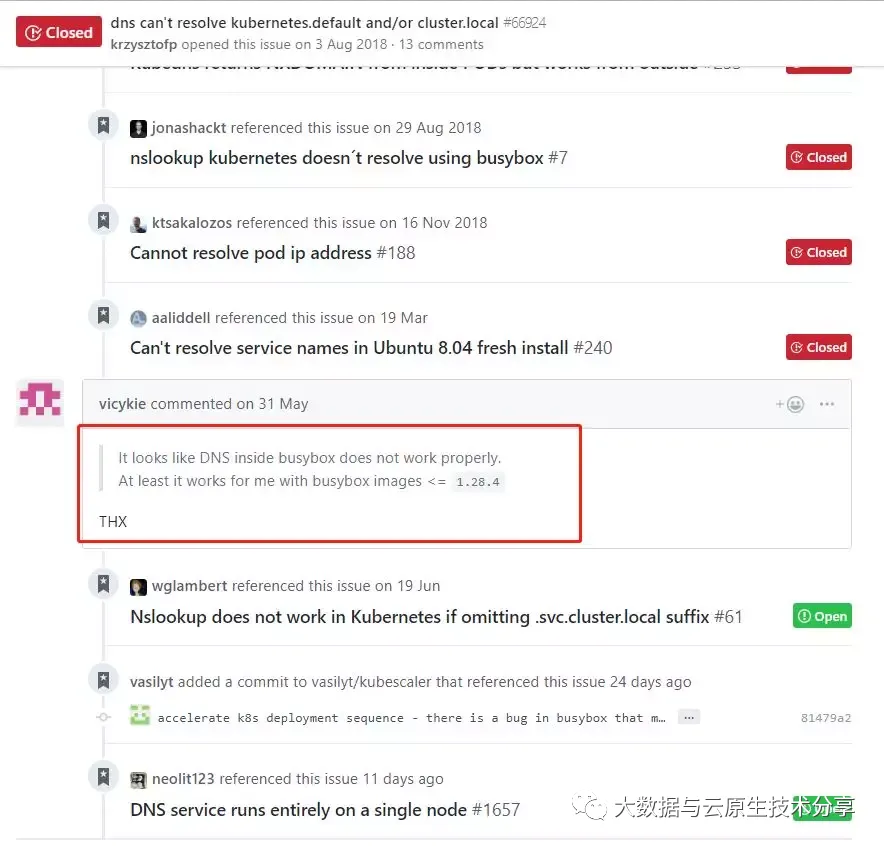
发现都说是busybox镜像的问题 , 从1.28.4以后的镜像都存在这问题。把镜像换成1.28.4试试?修改yaml版本号:
$ kubectl apply -f dns-Deployment-test002.yaml
$ kubectl get pod|grep busybox-deployment
$ kubectl exec  -ti busybox-deployment-564c775bbd-g6228 -- sh
$ nslookup nginx-svc-old.default.svc
# exit
$ kubectl get svc

root@harbor:~# kubectl get pod|grep busybox-deployment
busybox-deployment-7bb59c97cf-dcd6l   1/1     Running   0             12s
root@harbor:~# kubectl exec -it busybox-deployment-7bb59c97cf-dcd6l   -- sh
/ # nslookup nginx-svc-old.default.svc
Server:    169.254.20.10
Address 1: 169.254.20.10

Name:      nginx-svc-old.default.svc
Address 1: 10.68.12.0 nginx-svc-old.default.svc.cbear.local确实可以成功解析域名了。所以这样看还真是busybox版本问题了。
5.3 宿主机上解析域名验证
nameserver关键字 , 如果没指定nameserver就找不到DNS服务器 , 其它关键字是可选的。nameserver表示解析域名时使用该地址指定的主机为域名服务器。其中域名服务器是按照文件中出现的顺序来查询的 , 且只有当第一个nameserver没有反应时才查询下面的nameserver , 一般不要指定超过3个服务器。
在宿主上/etc/resolv.conf中nameserver如下 :
$ kubectl get svc -n kube-system
$ kubectl get pod -n kube-system -o wide|grep dns
$ kubectl exec  -ti busybox-deployment-564c775bbd-g6228 -- cat /etc/resolv.conf
$ cat /etc/resolv.conf

root@harbor:~# kubectl get svc -n kube-system
NAME                        TYPE        CLUSTER-IP      EXTERNAL-IP   PORT(S)                  AGE
dashboard-metrics-scraper   ClusterIP   10.68.139.177   <none>        8000/TCP                 44h
kube-dns                    ClusterIP   10.68.0.2       <none>        53/UDP,53/TCP,9153/TCP   44h
kube-dns-upstream           ClusterIP   10.68.210.31    <none>        53/UDP,53/TCP            44h
kubernetes-dashboard        NodePort    10.68.66.135    <none>        443:30741/TCP            44h
metrics-server              ClusterIP   10.68.166.80    <none>        443/TCP                  24h
node-local-dns              ClusterIP   None            <none>        9253/TCP                 44h
root@harbor:~# kubectl get pod -n kube-system -o wide|grep dns
coredns-64f7575f5c-4x7vx                     1/1     Running            0          28h   10.88.0.3       k8s-node03.cbear.top     <none>           <none>
coredns-64f7575f5c-fm9k2                     1/1     Running            0          28h   10.88.0.9       k8s-node02.cbear.top     <none>           <none>
node-local-dns-7vml4                         1/1     Running            0          39h   192.168.71.37   k8s-node03.cbear.top     <none>           <none>
node-local-dns-8gsdm                         1/1     Running            0          44h   192.168.71.35   k8s-node01.cbear.top     <none>           <none>
node-local-dns-j2cjr                         1/1     Running            0          44h   192.168.71.29   k8s-master01.cbear.top   <none>           <none>
node-local-dns-ls827                         1/1     Running            0          44h   192.168.71.30   k8s-master02.cbear.top   <none>           <none>
node-local-dns-ps2m4                         1/1     Running            0          44h   192.168.71.36   k8s-node02.cbear.top     <none>           <none>
node-local-dns-vs5kl                         1/1     Running            0          39h   192.168.71.31   k8s-master03.cbear.top   <none>           <none>
root@harbor:~# kubectl exec  -ti busybox-deployment-7bb59c97cf-dcd6l -- cat /etc/resolv.conf
search default.svc.cbear.local svc.cbear.local cbear.local openstacklocal
nameserver 169.254.20.10
options ndots:5
root@harbor:~# cat /etc/resolv.conf
# This is /run/systemd/resolve/stub-resolv.conf managed by man:systemd-resolved(8).
# Do not edit.
#
# This file might be symlinked as /etc/resolv.conf. If you're looking at
# /etc/resolv.conf and seeing this text, you have followed the symlink.
#
# This is a dynamic resolv.conf file for connecting local clients to the
# internal DNS stub resolver of systemd-resolved. This file lists all
# configured search domains.
#
# Run "resolvectl status" to see details about the uplink DNS servers
# currently in use.
#
# Third party programs should typically not access this file directly, but only
# through the symlink at /etc/resolv.conf. To manage man:resolv.conf(5) in a
# different way, replace this symlink by a static file or a different symlink.
#
# See man:systemd-resolved.service(8) for details about the supported modes of
# operation for /etc/resolv.conf.

nameserver 127.0.0.53
options edns0 trust-ad
search openstacklocal后面四个是k8s dns的配置 , 把后面四个都放到前面来 , 再验证 :
nameserver 10.68.0.2
search default.svc.cbear.local svc.cbear.local cbear.local openstacklocal
6. NodeLocalDns
NodeLocal DNSCache 通过在集群节点上运行一个 DaemonSet 来提高 clusterDNS 性能和可靠性。处于 ClusterFirst 的 DNS 模式下的 Pod 可以连接到 kube-dns 的 serviceIP 进行 DNS 查询。通过 kube-proxy 组件添加的 iptables 规则将其转换为 CoreDNS 端点。通过在每个集群节点上运行 DNS 缓存 , NodeLocal DNSCache 可以缩短 DNS 查找的延迟时间、使 DNS 查找时间更加一致 , 以及减少发送到 kube-dns 的 DNS 查询次数。
借助这种新架构 , Pod 将可以访问在同一节点上运行的 DNS 缓存代理 , 从而避免 iptables DNAT 规则和连接跟踪。 本地缓存代理将查询 kube-dns 服务以获取集群主机名的缓存缺失 ( 默认为 "cluster.local" 后缀) 。
6.1 使用NodeLocal DNS原因
使用当前的
DNS体系结构 , 如果没有本地kube-dns/CoreDNS实例 , 则具有最高DNS QPS的Pod可能必须延伸到另一个节点。 在这种场景下 , 拥有本地缓存将有助于改善延迟。跳过
iptables DNAT和连接跟踪将有助于减少conntrack竞争并避免UDP DNS条目填满conntrack表。从本地缓存代理到
kube-dns服务的连接可以升级为TCP。TCP conntrack条目将在连接关闭时被删除 , 相反UDP条目必须超时 ( 默认nf_conntrack_udp_timeout是30秒) 。将
DNS查询从UDP升级到TCP将减少由于被丢弃的UDP包和DNS超时而带来的尾部等待时间 ; 这类延时通常长达30秒 (3次重试+10秒超时) 。 由于nodelocal缓存监听UDP DNS查询 , 应用不需要变更。在节点级别对
DNS请求的度量和可见性。可以重新启用负缓存 , 从而减少对
kube-dns服务的查询数量。避免
IPVS缺陷导致的DNS概率性解析超时问题默认解析使用
UDP,UDP默认返回报文长度为512字节 , 大于512字节后就会将包丢弃 , 升级为TCP协议可以解决这个问题。TCP可以进行数据包的切片可以完整的得到返回的response
6.2 工作原理
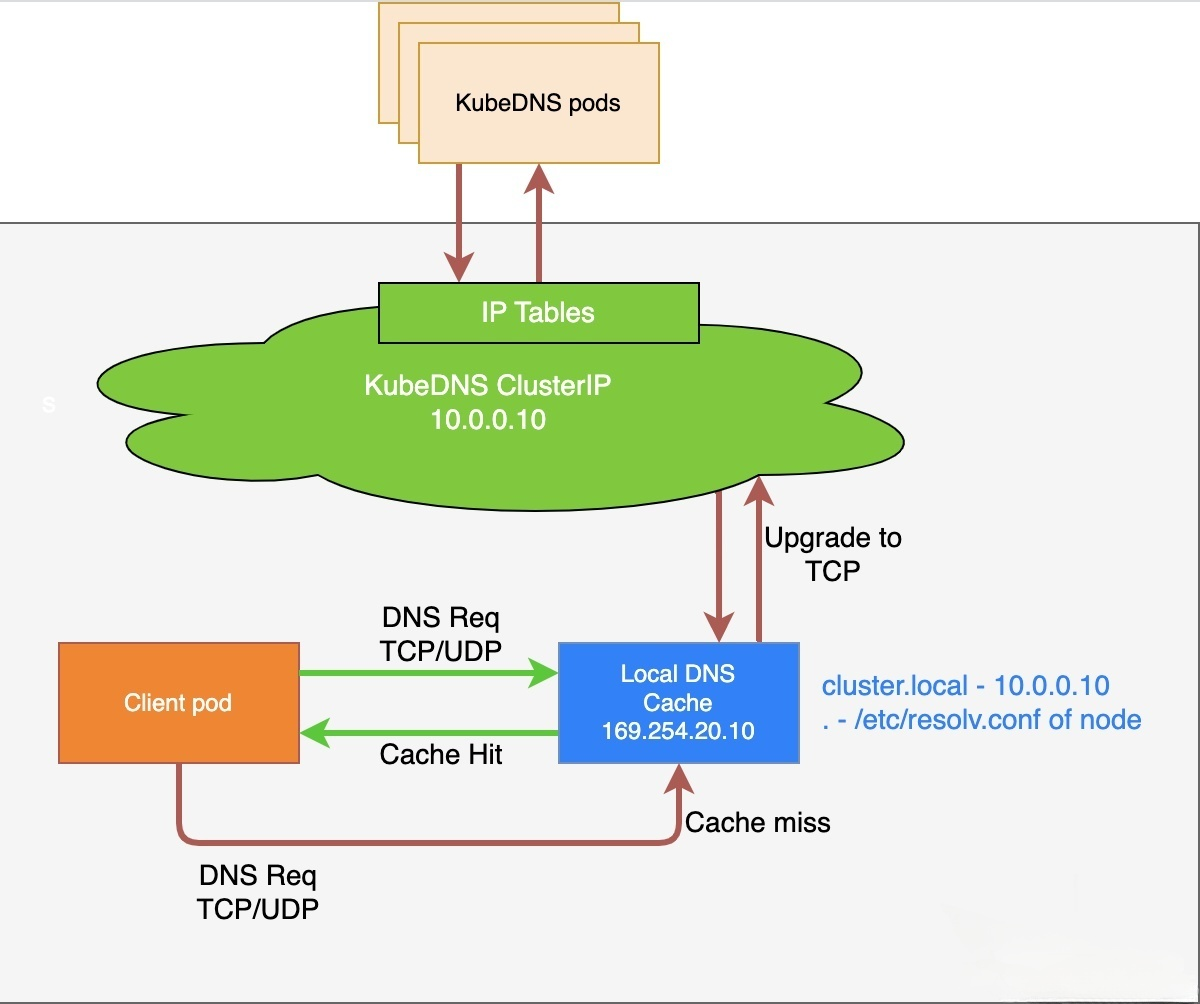
配置了
NodeLocal DNS本地缓存的Pod, 默认会通过NodeLocal DNSCache监听于节点上的IP(169.254.20.10)解析域名。NodeLocal DNSCache本地若无缓存应答解析请求 , 则会通过kube-dns服务请求CoreDNS进行解析CoreDNS对于非集群内域名 , 会通过VPC DNS服务器进行解析已注入
DNS本地缓存的Pod, 当无法连通NodeLocal DNSCache时 , 会继而直接通过kube-dns服务连接到CoreDNS进行解析 , 此链路为备用链路未注入
DNS本地缓存的Pod, 会通过标准的kube-dns服务链路连接到CoreDNS进行解析
6.3 安装Node Local DNS
获取文件将文件保存为
nodelocaldns.yaml如果使用
IPv6, 在使用 'IP:Port' 格式的时候需要把CoreDNS配置文件里的所有IPv6地址用方括号包起来。 如果你使用上述的示例清单 , 需要把配置行L70修改为 : "health [__PILLAR__LOCAL__DNS__]:8080"。把清单里的变量更改为正确的值:
获取coredns的IP
kubedns=`kubectl get svc coredns -n kube-system -o jsonpath={.spec.clusterIP}`

# 表示集群域 , 默认就是 cluster.local
domain=cluster.local

# 表示 DNSCache 本地的 IP , 默认为169.254.20.10
localdns=169.254.20.10

<cluster-domain> 的默认值是 "cluster.local"。
<localdns> 是 NodeLocal DNSCache 选择的本地侦听 IP 地址。
如果
kube-proxy运行在IPTABLES模式:sed -i "s/__PILLAR__LOCAL__DNS__/$localdns/g; s/__PILLAR__DNS__DOMAIN__/$domain/g; s/__PILLAR__DNS__SERVER__/$kubedns/g" nodelocaldns.yamlnode-local-dns Pod会设置__PILLAR__CLUSTER__DNS__和__PILLAR__UPSTREAM__SERVERS__。 在此模式下,node-local-dns Pod会同时侦听kube-dns服务的IP地址和<node-local-address>的地址 , 以便Pod可以使用其中任何一个IP地址来查询DNS记录。如果
kube-proxy运行在IPVS模式:sed -i "s/__PILLAR__LOCAL__DNS__/$localdns/g; s/__PILLAR__DNS__DOMAIN__/$domain/g; s/,__PILLAR__DNS__SERVER__//g; s/__PILLAR__CLUSTER__DNS__/$kubedns/g" nodelocaldns.yaml在此模式下 ,
node-local-dns Pod只会侦听<node-local-address>的地址。node-local-dns接口不能绑定kube-dns的集群IP地址 , 因为IPVS负载均衡使用的接口已经占用了该地址。node-local-dns Pod会设置__PILLAR__UPSTREAM__SERVERS__将
NodeLocalDNS部署到集群1. 如果是线上集群 , 推荐不要直接apply 文件 , 采用灰度的方式部署。我们可以在yaml中增加配置如下 spec: nodeSelector: nodelocaldns: "true" 2. 挑选集群的一些机器打上nodelocaldns=true的标签 for i in `cat 1.txt`; do kubectl label node $i nodelocaldns=true;done 3. apply 文件 kubectl apply -f nodelocaldns.yaml 4. 这个时候我们需要进入到pod内验证服务是否有异常 (这些打了标签的node 上面的pod) 验证方式: 1) pod内是否可以解析外网域名(前提条件 node节点可以访问域名) 2) pod内解析内网域名 2) pod内解析集群service name 如果都没有问题 , 说明部署NodeLocalDNS后并没有影响我们集群现有的服务 5. 将yaml中NodeSelect 配置注释 , 重新apply kubectl apply -f nodelocaldns.yaml 6. 查看kube-system 命名空间下的node-local-dns pod kubectl get pod -n kube-system | grep node-local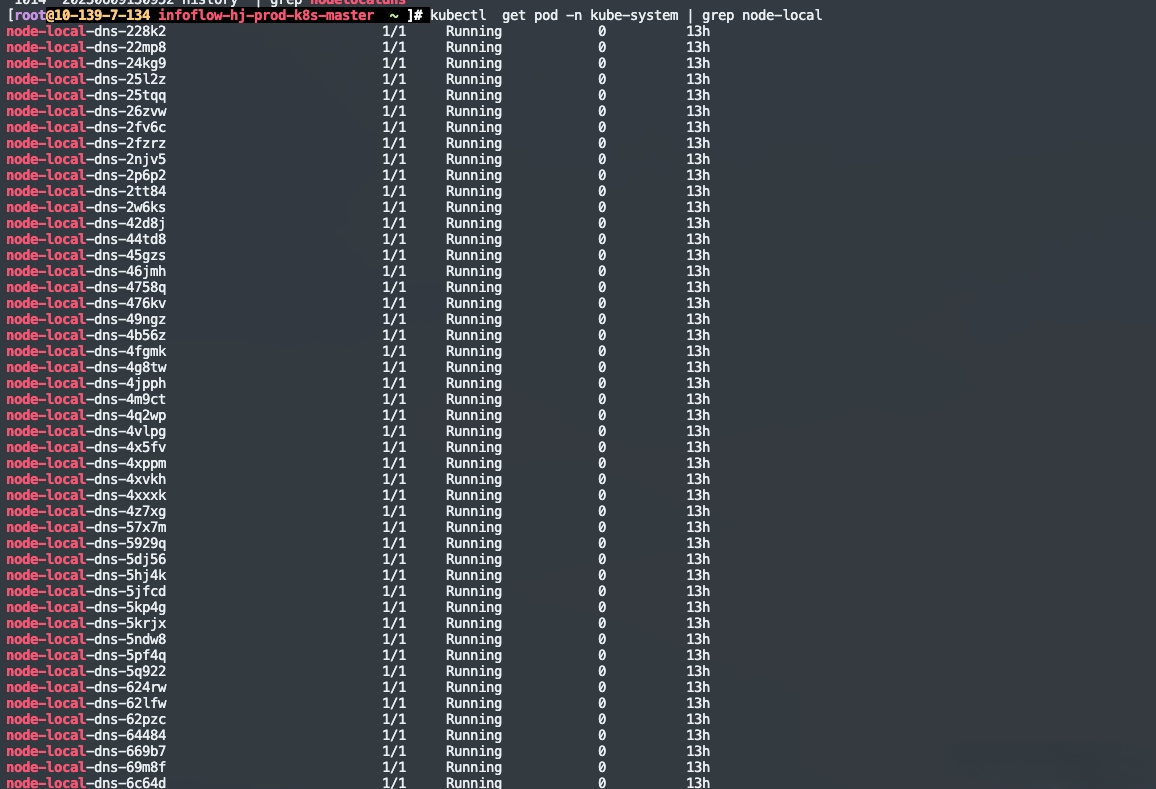
自此
NodeLocalDNS就部署完成了 , 但是还没有应用到它
6.4 在应用中使用NodeLocal DNSCache
为了能使应用原本请求CoreDNS的流量改为由DNS缓存DaemonSet代理 , 需要使Pod内部的中nameservers配置成169.254.20.10和kube-dns对应的IP地址 , 您有以下几种方式可以选择:
方式一:借助
DNSConfig动态注入控制器在Pod创建时配置DNSConfig自动注入。方式二:创建
Pod时手动指定DNSConfig。方式三:修改
kubelet参数 , 并重启节点kubelet。存在业务中断风险 , 不推荐使用此方式。
第一种方式 :
需要集群具备adminssion webhook功能 , 或者可以使用第三方的一些插件完成部署
adminssion webhook:基于Admission Webhook机制拦截Pod创建的请求 , 自动注入使用DNS缓存的Pod DNSConfig信息。
第二种方式 :
由于我用了原生的部署方式 , 在我们生产环境我采用了是第二种应用方式
背景:我们的每一个服务都是通过helm 模板渲染生成一个chart, 我们gitlab代码仓库会管理一个helm 模板 , 所以我只要修改helm 模板 , 服务重新发布即可使用NodeLocal DNSCache了。你也可以手动修改yaml文件具体方式看你们当前环境是怎么部署的服务了。下面是我的配置
{{-if eq .Values.cluster "offline" }}
      dnsPolicy: None
      dnsConfig:
        nameservers: ["169.254.20.10","10.11.128.10"]
        searches:
        - yidian-prod.svc.cluster.local
        - default.svc.cluster.local
        - svc.cluster.local
        - cluster.local
        - yidian.com
        - yidian-inc.com
        options:
        - name: ndots
          value: "3"
        - name: attempts
          value: "2"
        - name: timeout
          value: "1"
{{- end }}
第三种方式:
不建议使用尤其是生产环境禁止使用
如果是二进制部署的集群 , 需要修改/etc/systemd/system/kubelet.service.d/10-kubeadm.conf 文件中的--cluster-dns=xxx.xxx.xxx.xxx参数。
查看kbuelet启动依赖的配置文件
ps -elf | grep kubelet | grep cluster-dns
systemctl status kubelet如果是kubeadm部署的集群 , 修改/var/lib/kubelet/config.yaml文件中的clusterDNS参数
6.5 验证
上面说到由于我们是使用的第二种方式 , 需要重新发布才可以生效。下图是发布后pod内部的状况,可以看到我们的pod内有两行nameserver信息第一行为NodeLocalDNS的IP , 第二行是coreDNS的IP。

验证方式:
pod内是否可以解析外网域名(前提条件node节点可以访问域名)pod内解析内网域名pod内解析集群service name
下面是我的nodelocaldns.yaml , 也可以使用我的yaml , 需要注意的是对应的那些变量要做变更 , 一定要改coredns的ip
apiVersion: v1
kind: ServiceAccount
metadata:
  name: node-local-dns
  namespace: kube-system
  labels:
    kubernetes.io/cluster-service: "true"
    addonmanager.kubernetes.io/mode: Reconcile
---
apiVersion: v1
kind: Service
metadata:
  name: kube-dns-upstream
  namespace: kube-system
  labels:
    k8s-app: kube-dns
    kubernetes.io/cluster-service: "true"
    addonmanager.kubernetes.io/mode: Reconcile
    kubernetes.io/name: "KubeDNSUpstream"
spec:
  ports:
  - name: dns
    port: 53
    protocol: UDP
    targetPort: 53
  - name: dns-tcp
    port: 53
    protocol: TCP
    targetPort: 53
  selector:
    k8s-app: coredns
---
apiVersion: v1
kind: ConfigMap
metadata:
  name: node-local-dns
  namespace: kube-system
  labels:
    addonmanager.kubernetes.io/mode: Reconcile
data:
  Corefile: |
    cluster.local:53 {
        errors
        cache {
                success 9984 30
                denial 9984 5
        }
        reload
        loop
        bind 169.254.20.10 __PILLAR__DNS__SERVER__
        forward . 10.11.128.10 {
                force_tcp
        }
        prometheus :9253
        health 169.254.20.10:8080
        }
    in-addr.arpa:53 {
        errors
        cache 30
        reload
        loop
        bind 169.254.20.10 __PILLAR__DNS__SERVER__
        forward . 10.11.128.10 {
                force_tcp
        }
        prometheus :9253
        }
    ip6.arpa:53 {
        errors
        cache 30
        reload
        loop
        bind 169.254.20.10 __PILLAR__DNS__SERVER__
        forward . 10.11.128.10 {
                force_tcp
        }
        prometheus :9253
        }
    .:53 {
        errors
        cache 30
        reload
        loop
        bind 169.254.20.10 __PILLAR__DNS__SERVER__
        forward . __PILLAR__UPSTREAM__SERVERS__ {
               force_tcp
        }
        prometheus :9253
        }
---
apiVersion: apps/v1
kind: DaemonSet
metadata:
  name: node-local-dns
  namespace: kube-system
  labels:
    k8s-app: node-local-dns
    kubernetes.io/cluster-service: "true"
    addonmanager.kubernetes.io/mode: Reconcile
spec:
  updateStrategy:
    rollingUpdate:
      maxUnavailable: 10%
  selector:
    matchLabels:
      k8s-app: node-local-dns
  template:
    metadata:
      labels:
        k8s-app: node-local-dns
      annotations:
        prometheus.io/port: "9253"
        prometheus.io/scrape: "true"
    spec:
      priorityClassName: system-node-critical
      serviceAccountName: node-local-dns
      hostNetwork: true
      dnsPolicy: Default  # Don't use cluster DNS.
      tolerations:
      - key: "CriticalAddonsOnly"
        operator: "Exists"
      - effect: "NoExecute"
        operator: "Exists"
      - effect: "NoSchedule"
        operator: "Exists"
      containers:
      - name: node-cache
        image: hub.kce.ksyun.com/ksyun/k8s-dns-node-cache:1.22.8
        resources:
          requests:
            cpu: 25m
            memory: 5Mi
        args: [ "-localip", "169.254.20.10", "-conf", "/etc/Corefile", "-upstreamsvc", "kube-dns-upstream" ]
        securityContext:
          privileged: true
        ports:
        - containerPort: 53
          name: dns
          protocol: UDP
        - containerPort: 53
          name: dns-tcp
          protocol: TCP
        - containerPort: 9253
          name: metrics
          protocol: TCP
        livenessProbe:
          httpGet:
            host: 169.254.20.10
            path: /health
            port: 8080
          initialDelaySeconds: 60
          timeoutSeconds: 5
        volumeMounts:
        - mountPath: /run/xtables.lock
          name: xtables-lock
          readOnly: false
        - name: config-volume
          mountPath: /etc/coredns
        - name: kube-dns-config
          mountPath: /etc/kube-dns
      volumes:
      - name: xtables-lock
        hostPath:
          path: /run/xtables.lock
          type: FileOrCreate
      - name: kube-dns-config
        configMap:
          name: coredns
          optional: true
      - name: config-volume
        configMap:
          name: node-local-dns
          items:
            - key: Corefile
              path: Corefile.base
---
# A headless service is a service with a service IP but instead of load-balancing it will return the IPs of our associated Pods.
# We use this to expose metrics to Prometheus.
apiVersion: v1
kind: Service
metadata:
  annotations:
    prometheus.io/port: "9253"
    prometheus.io/scrape: "true"
  labels:
    k8s-app: node-local-dns
  name: node-local-dns
  namespace: kube-system
spec:
  clusterIP: None
  ports:
    - name: metrics
      port: 9253
      targetPort: 9253
  selector:
    k8s-app: node-local-dns
参考链接
Kubernetes ( k8s) DNS ( CoreDNS) 介绍 (qq.com)
基于 CoreDNS 和 K8s 构建云原生场景下的企业级 DNS (qq.com)
Kubernetes系列 ( 一四七) 访问其它服务的 Pod 策略 — dnsPolicy (qq.com)
CoreDNS和NodeLocalDNS配置详解 - 人艰不拆_zmc - 博客园 (cnblogs.com)
NodeLocal DNS介绍及部署应用_nodelocaldns-CSDN博客