
10-Prometheus Pushgateway 详解
1. Pushgateway 介绍
Pushgateway为Prometheus整体监控方案的功能组件之一 , 并做为一个独立的工具存在。它主要用于Prometheus无法直接拿到监控指标的场景 , 如监控源位于防火墙之后 , Prometheus无法穿透防火墙。目标服务没有可抓取监控数据的端点等多种情况。在类似场景中 , 可通过部署Pushgateway的方式解决问题。
当部署该组件后 , 监控源通过主动发送监控数据到Pushgateway , 再由Prometheus定时获取信息 , 实现资源的状态监控。
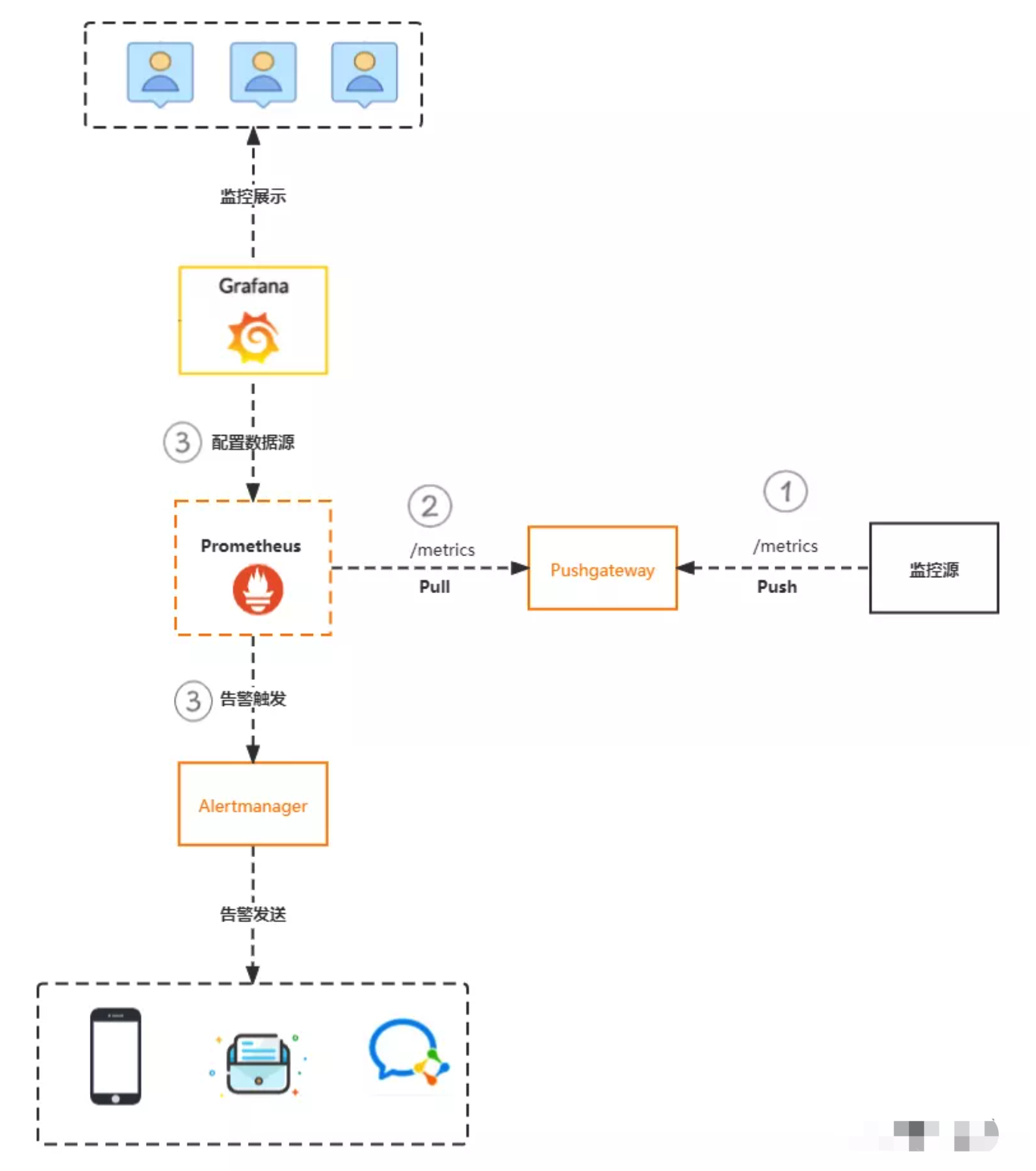
工作流程
在应用
App通过脚本采集数据 , 监控源通过Post方式 , 发送数据到Pushgateway, 路径为/metrics。pushgateway接收数据并存在内存中(数据默认存放在内存中 , 服务器重启 , 数据会丢失 , 可通过配置文件修改数据存储位置 , 保证数据安全性)Prometheus服务端设置任务 , 定时获取Pushgateway上面的监控数据。将数据存储在本地磁盘或远端存储中Prometheus获取监控指标后 , 会根据告警规则进行计算 , 如果匹配将触发告警到Alertmanager。同时 ,Grafana可配置数据源调用Prometheus数据 , 做为数据展示。
pushgateway是采用被动推送的方式 , 而不是类似于 prometheus server 主动连接 exporter 获取监控数据。
pushgateway可以单独运行在一个节点 , 然后需要自定义监控脚本把需要监控的主动推送给 pushgateway的 API 接口 , 然后 pushgateway 再等待 prometheus server 抓取数据 , 即 pushgateway 本身没有任何抓取监控数据的功能 , 目前 pushgateway 只是被动的等待数据从客户端推送过来。
常用参数:
--persistence.file="": 指定数据保存的文件 , 默认只保存在内存中--persistence.interval=5m: 数据持久化的间隔时间 , 即多久时间将内存中的数据保存在文件中
2. Pushgateway 优缺点介绍
Pushgateway优点
Prometheus默认采用定时pull模式拉取targets数据 , 但是如果不在一个子网或者防火墙 ,prometheus就拉取不到targets数据(普罗米修斯和target不在一个网段 , 那么是拉取不到的) , 所以可以采用各个target往pushgateway上push数据 , 然后prometheus去pushgateway上定时pull数据。在监控业务数据的时候 , 需要将不同数据汇总, 汇总之后的数据可以由
pushgateway统一收集 , 然后由Prometheus统一拉取。
解决不在同一网段的问题 , pushgateway就相当于一个中间网关。相当于pushgateway要和target可以通同时和普罗米修斯也可以通。
Pushgateway 缺点
Prometheus拉取状态只针对pushgateway, 不能对每个节点都有效Pushgateway出现问题 , 整个采集到的数据都会出现问题监控下线 ,
prometheus还会拉取到旧的监控数据 , 需要手动清理pushgateway不要的数据。
3. Pushgateway 安装部署
下载安装包
github下载地址: prometheus/pushgateway: Push acceptor for ephemeral and batch jobs. (github.com)官网下载地址: Download | Prometheus
wget https://github.com/prometheus/pushgateway/releases/download/v1.9.0/pushgateway-1.9.0.linux-amd64.tar.gz root@prometheus03:~# tar -xf pushgateway-1.9.0.linux-amd64.tar.gz -C /usr/local/src/ root@prometheus03:~# ln -sv /usr/local/src/pushgateway-1.9.0.linux-amd64/ /usr/local/src/pushgateway '/usr/local/src/pushgateway' -> '/usr/local/src/pushgateway-1.9.0.linux-amd64/' root@prometheus03:~# cd /usr/local/src/pushgateway root@prometheus03:/usr/local/src/pushgateway# ls LICENSE NOTICE pushgateway root@prometheus03:/usr/local/src/pushgateway# ./pushgateway -h usage: pushgateway [<flags>] The Pushgateway Flags: -h, --[no-]help Show context-sensitive help (also try --help-long and --help-man). --[no-]web.systemd-socket Use systemd socket activation listeners instead of port listeners (Linux only). --web.listen-address=:9091 ... Addresses on which to expose metrics and web interface. Repeatable for multiple addresses. --web.config.file="" Path to configuration file that can enable TLS or authentication. See: https://github.com/prometheus/exporter-toolkit/blob/master/docs/web-configuration.md --web.telemetry-path="/metrics" Path under which to expose metrics. --web.external-url= The URL under which the Pushgateway is externally reachable. --web.route-prefix="" Prefix for the internal routes of web endpoints. Defaults to the path of --web.external-url. --[no-]web.enable-lifecycle Enable shutdown via HTTP request. --[no-]web.enable-admin-api Enable API endpoints for admin control actions. --persistence.file="" File to persist metrics. If empty, metrics are only kept in memory. --persistence.interval=5m The minimum interval at which to write out the persistence file. --[no-]push.disable-consistency-check Do not check consistency of pushed metrics. DANGEROUS. --log.level=info Only log messages with the given severity or above. One of: [debug, info, warn, error] --log.format=logfmt Output format of log messages. One of: [logfmt, json] --[no-]version Show application version. 常用参数:
--web.listen-address=":9091"         #配置监听地址和端口
--web.telemetry-path="/metrics"       #暴露metrics指标路径,用于prometheus抓取数据,默认开启
--persistence.file=""                 #pushgateway数据持久化路径,默认保存在内存中,通过该参数将数据保存在磁盘文件中
准备
service文件root@prometheus03:/usr/local/src/pushgateway# cat /lib/systemd/system/pushgateway.service [Unit] Description=Prometheus Pushgateway After=network.target [Service] Type=simple User=root Group=root ExecStart=/usr/local/src/pushgateway/pushgateway --web.listen-address=:9091 Restart=on-failure [Install] WantedBy=multi-user.target 启动服务
root@prometheus03:/usr/local/src/pushgateway# systemctl daemon-reload
root@prometheus03:/usr/local/src/pushgateway# systemctl enable --now pushgateway
Created symlink /etc/systemd/system/multi-user.target.wants/pushgateway.service → /lib/systemd/system/pushgateway.service.
root@prometheus03:/usr/local/src/pushgateway# systemctl status pushgateway
访问
pushgateway界面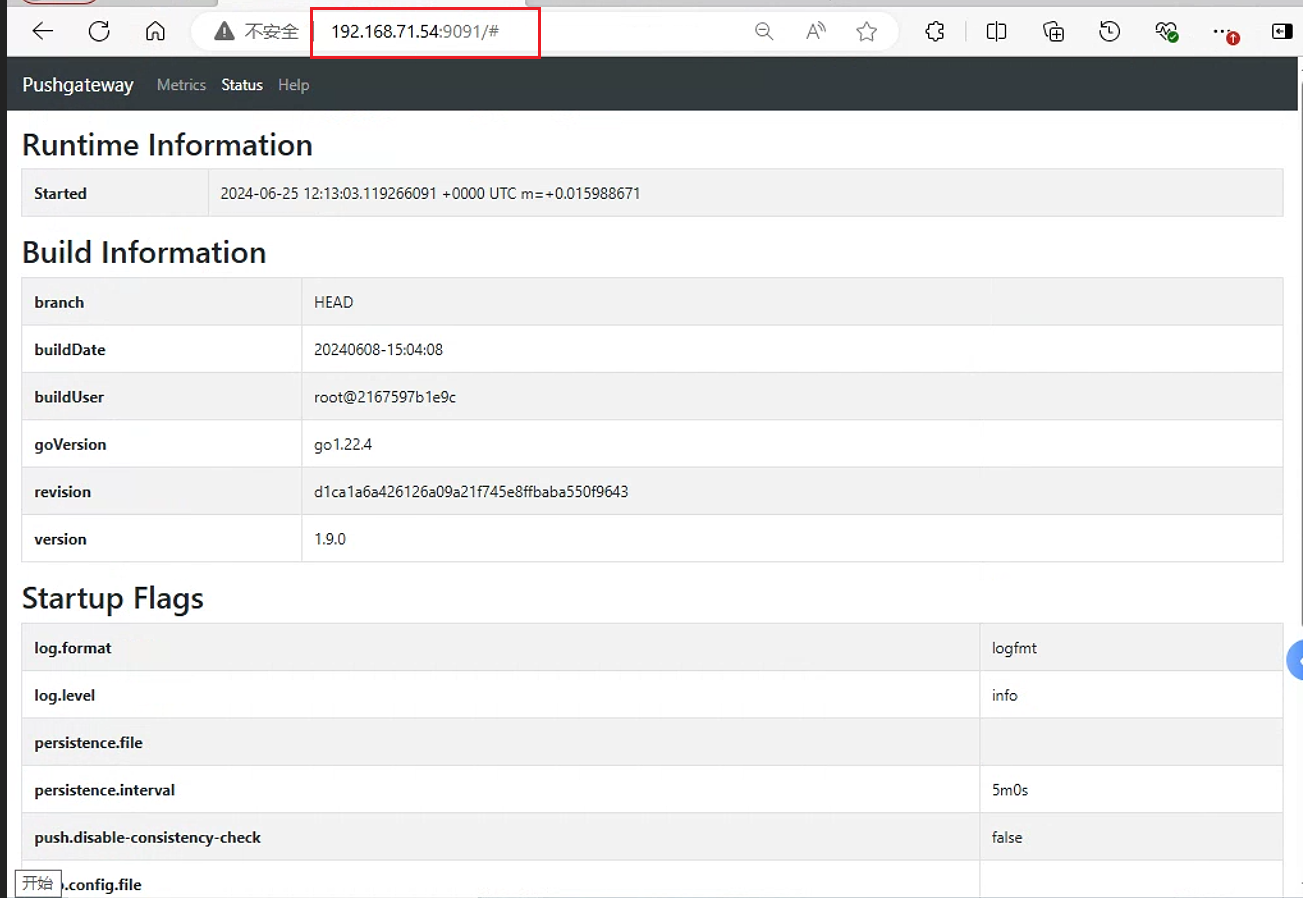
访问
pushgateway metrics页面:192.168.71.54:9091/metrics此时该页面展示的仅是
pushgateway默认自带的数据,还需要通过脚本将数据上传给pushgateway,prometheus才可以从pushgateway抓取数据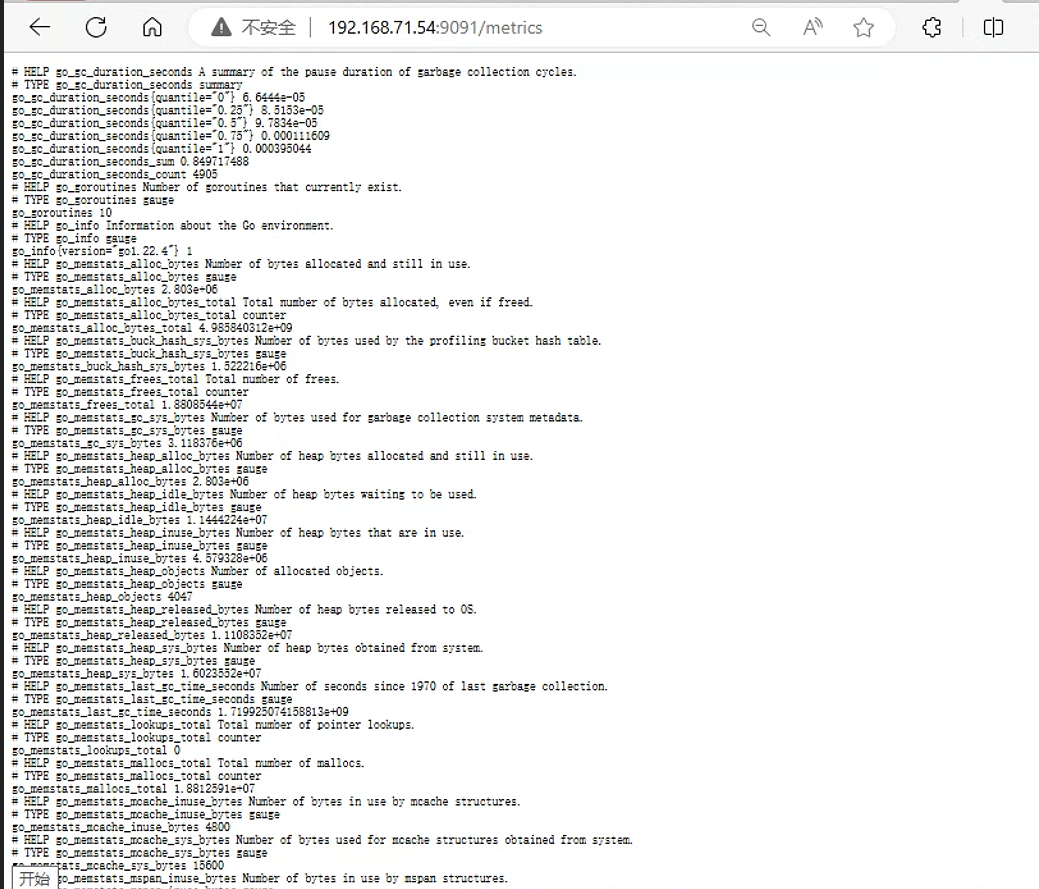
4.配置Prometheus抓取数据
在prometheus配置中添加job , 抓取pushgateway数据 , 内容如下:
- job_name: pushgateway
  honor_labels: true             #保留数据源标签
  static_configs:
- targets: ["192.168.71.54:9091"]配置修改完成后重启Prometheus。然后在Prometheus界面查看target状态
root@prometheus01:/usr/local/src/prometheus# curl -X POST http://192.168.71.47:9090/-/reload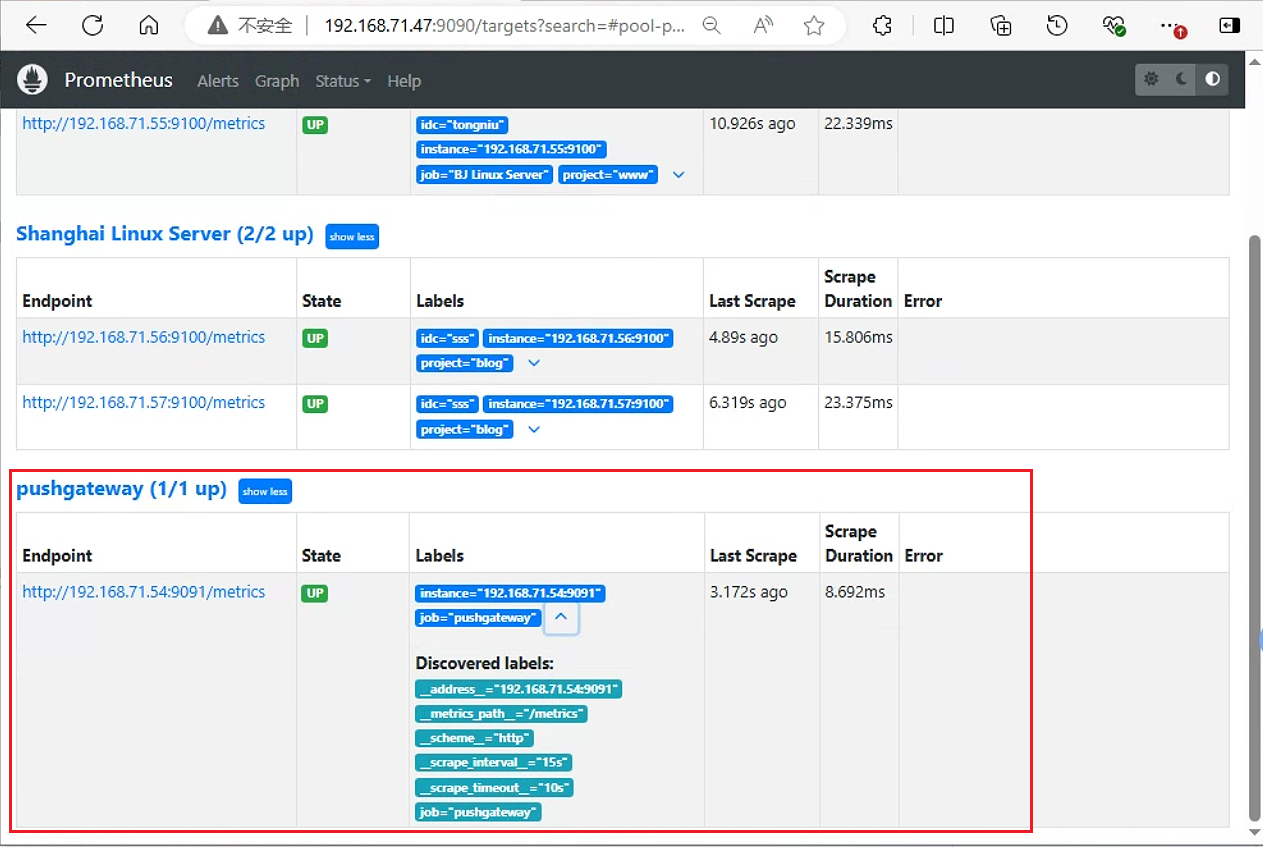
5. 测试从客户端推送单条数据
要推送数据到Pushgateway中 , 可以其提供的API接口来添加 , 默认URL地址为http://<ip>:9091/metrics/job/<job-name>/<label-name>/<label-value> 其中job-name是必填项 , 是job标签的值 , 后边可以跟任意数量的标签&标签值对 , 一般会添加一个instance/<instance-name>标签来区分指标数据来源
url地址每级目录说明: 以该url为例 : http://<ip>:9091/metrics/job/<JOBNAME>{/<LABEL_NAME>/<LABEL_VALUE>}
<ip>是指pushgateway的服务器地址<JOBNAME>是指prometheus配置文件中的jobname<LABEL_NAME>是指指标数据名称(如CPU、内存等)<LABEL_VALUE>是指指标数据的值
4.1 测试向Pushgateway推送单条数据
执行如下命令进行单条数据推送
#my_metric表示指标名称 , 2022表示指标值
echo "my_metric 2022"| curl --data-binary @- http://192.168.71.54:9091/metrics/job/test-job/instance/192.168.71.55
#再执行一次推送 , 将值改为2023
echo "my_metric 2023"| curl --data-binary @- http://192.168.71.54:9091/metrics/job/test-job/instance/192.168.71.55curl命令参数说明:
--data-binary: 以二进制方式上传@-: 指定上传地址echo命令上传指标数据的key和value,然后管道通过curl命令上传给pushgateway的url地址
在Pushgateway界面查看数据 , 如下图 , 可以看到只显示了最新值。
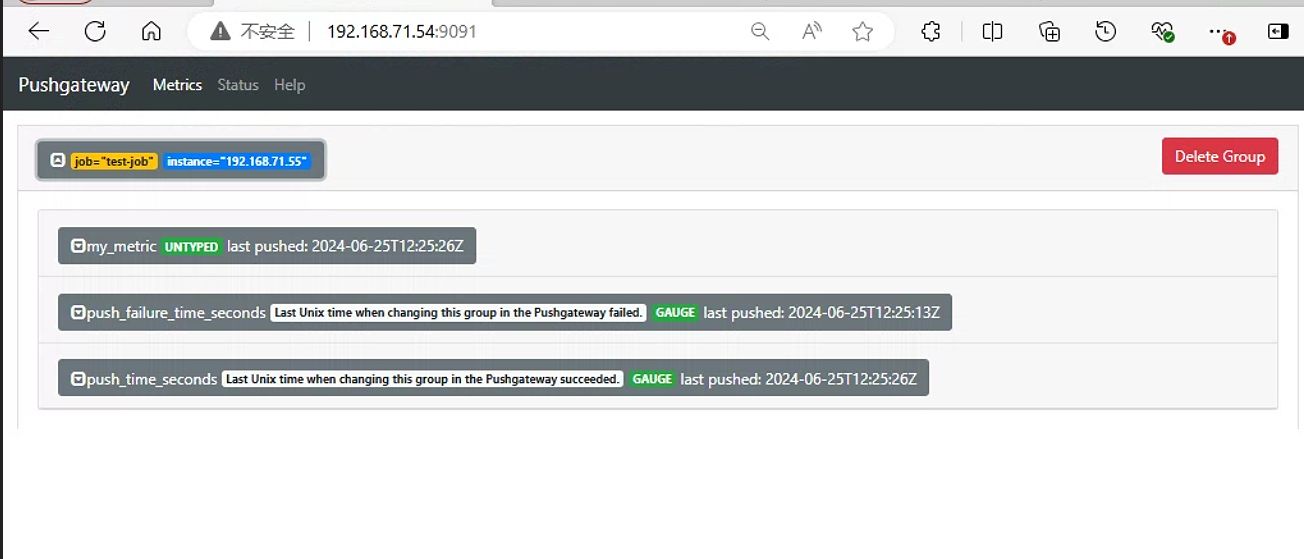
除了 mytest_metric 外,同时还新增了 push_time_seconds 和 push_failure_time_seconds 两个指标,这两个是 PushGateway 自动生成的指标, 分别用于记录指标数据的成功上传时间和失败上传时间。
4.2 Prometheus控制台查看数据
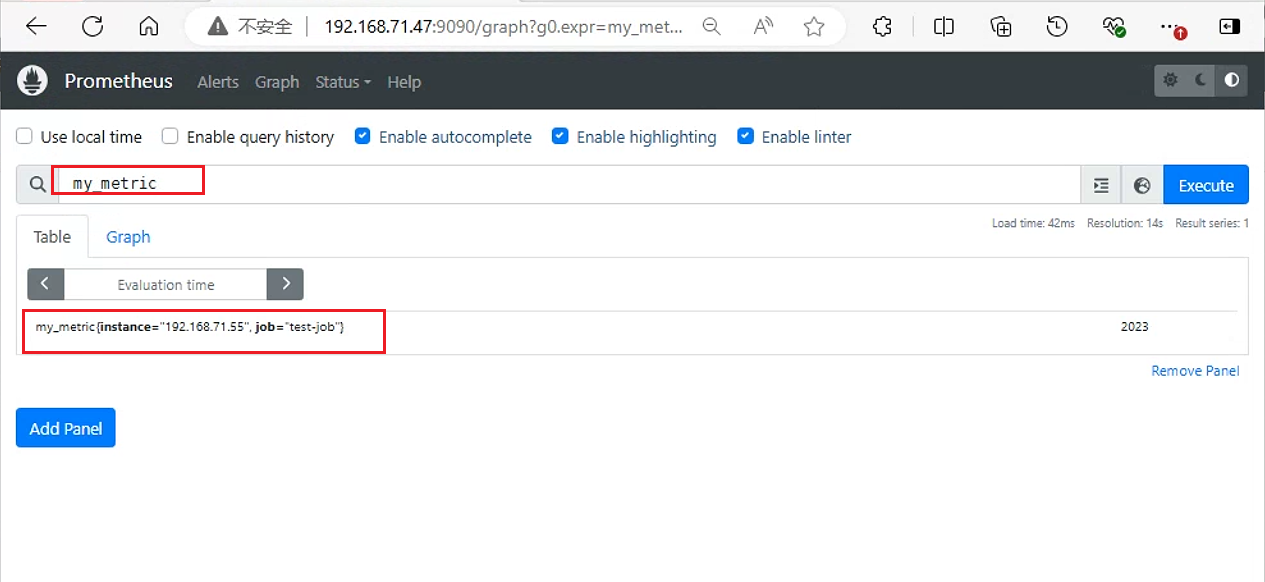
在Prometheus中查询my_metric , 验证是否获取到数据。
4.3 测试向Pushgateway推送多条数据
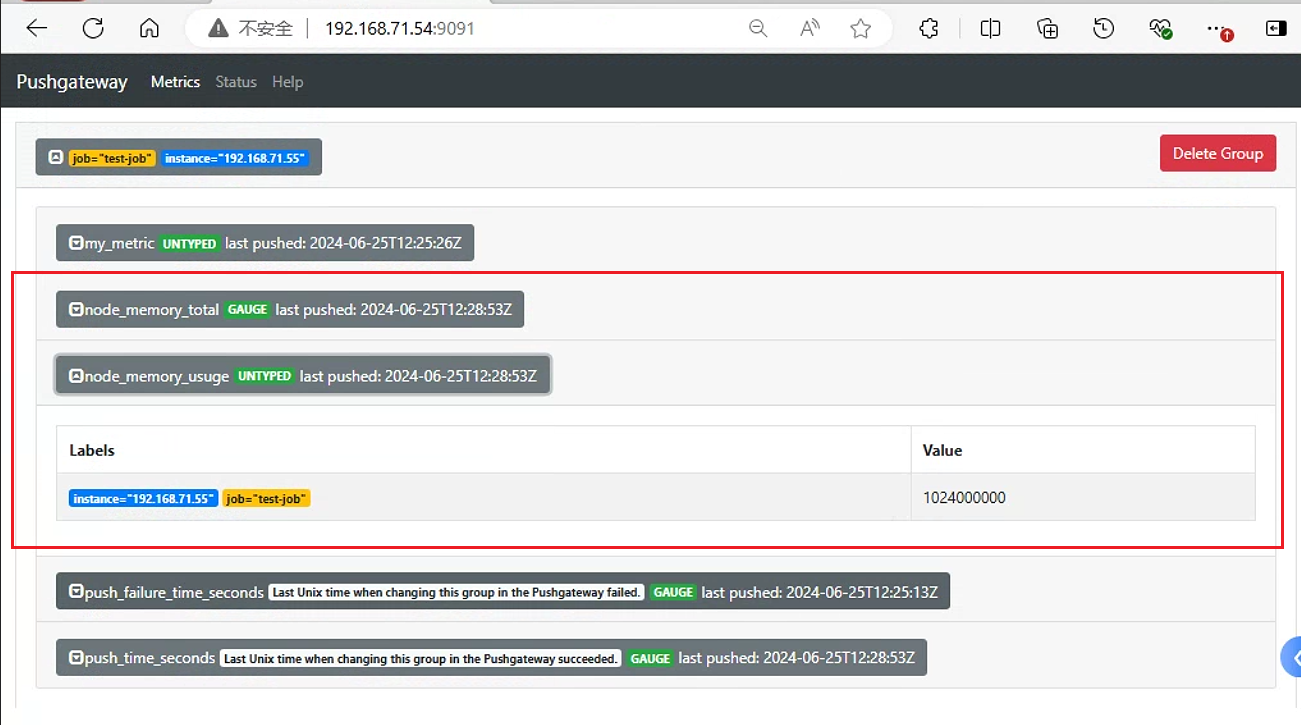
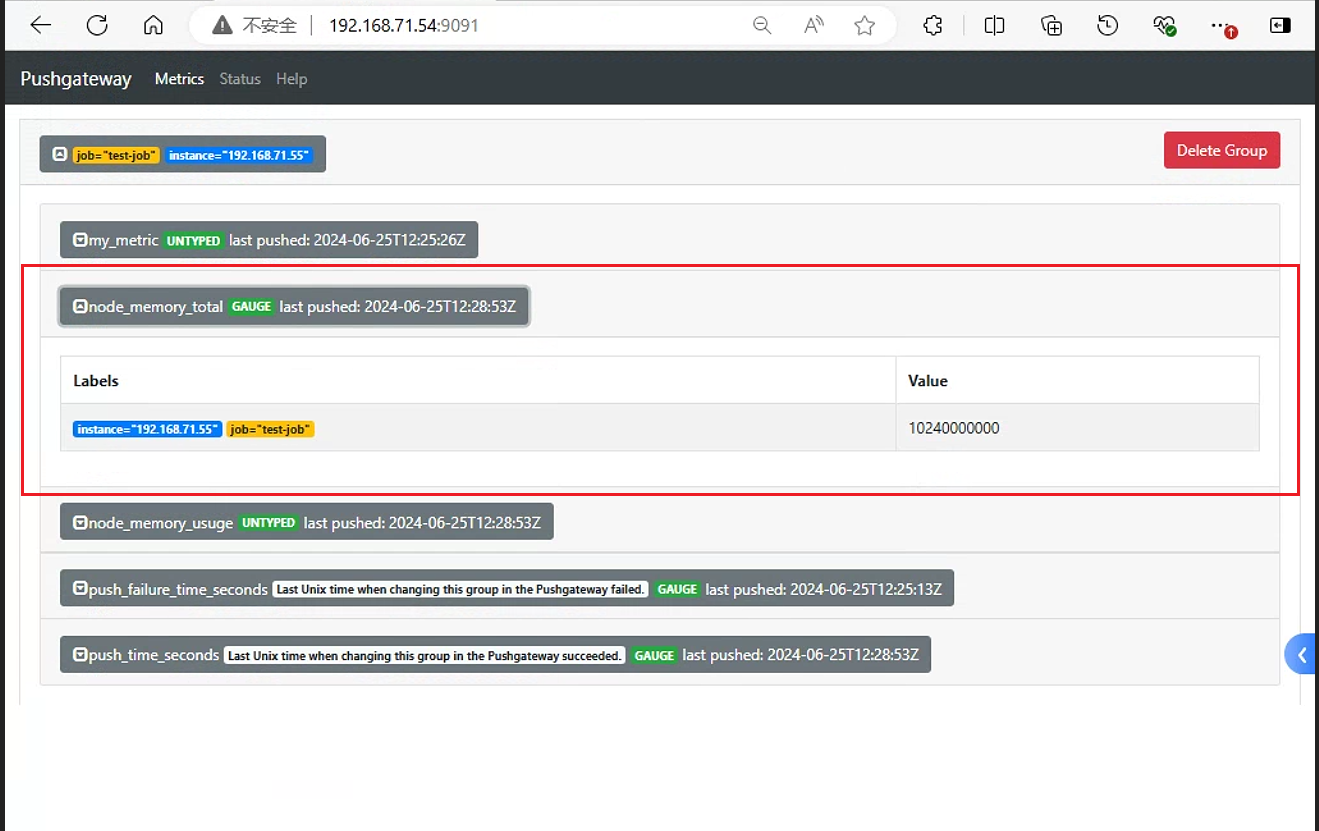
cat <<EOF | curl --data-binary @- http://192.168.71.54:9091/metrics/job/test-job/instance/192.168.71.55
#TYPE node_memory_total gauge
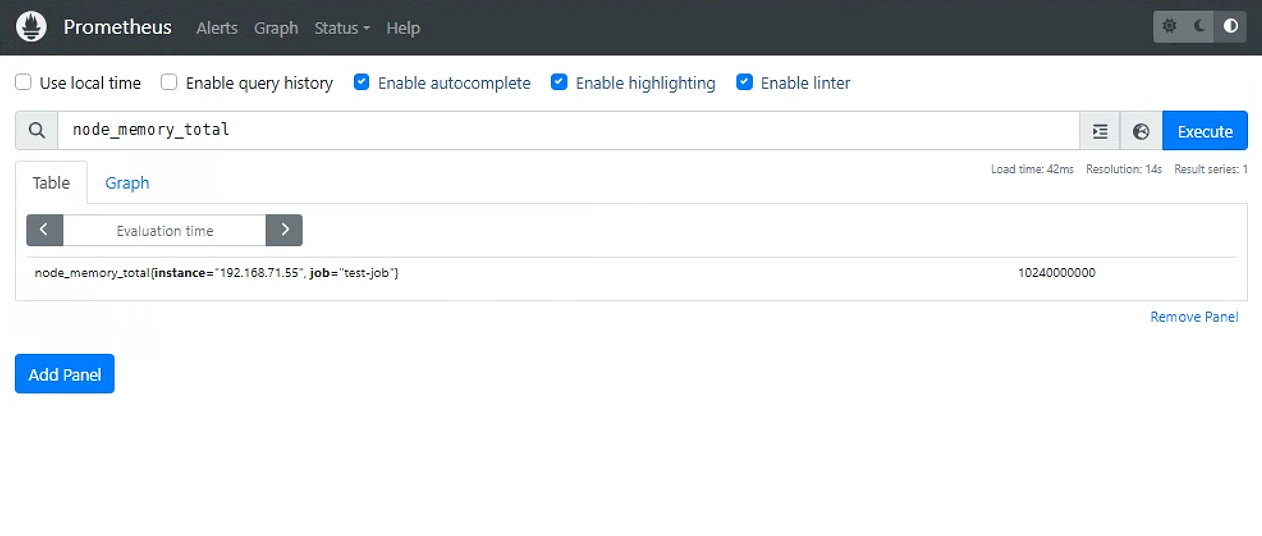
node_memory_total 10240000000
#TYPE node_memory_usage gauge
node_memory_usuge 1024000000
EOF在Pushgateway界面查看数据
在Prometheus中查询 , 验证是否获取到数据
5. 自定义收集数据
基于自定义脚本实现数据的收集和推送
5.1 自定义脚本
创建脚本
mem_monitor.sh#!/bin/bash total_memory=$(free |awk '/Mem/{print $2}') #总内存 used_memory=$(free |awk '/Mem/{print $3}') #已用内存 job_name="custom_memory_monitor" instance_name=`ifconfig ens33 | grep -w inet | awk '{print $2}'` pushgateway_server="http://192.168.71.54:9091/metrics/job" cat <<EOF | curl --data-binary @- ${pushgateway_server}/${job_name}/instance/${instance_name} #TYPE custom_memory_total gauge #上传监控项为custom_memory_total custom_memory_total $total_memory #TYPE custom_memory_used gauge #上传监控项为custom_memory_used custom_memory_used $used_memory EOF执行脚本上传数据 分别在
192.168.71.55、192.168.71.56、192.168.71.57上执行脚本:bash mem_montior.sh
5.2 验证
在
pushgateway控制台查看, 已经获取到数据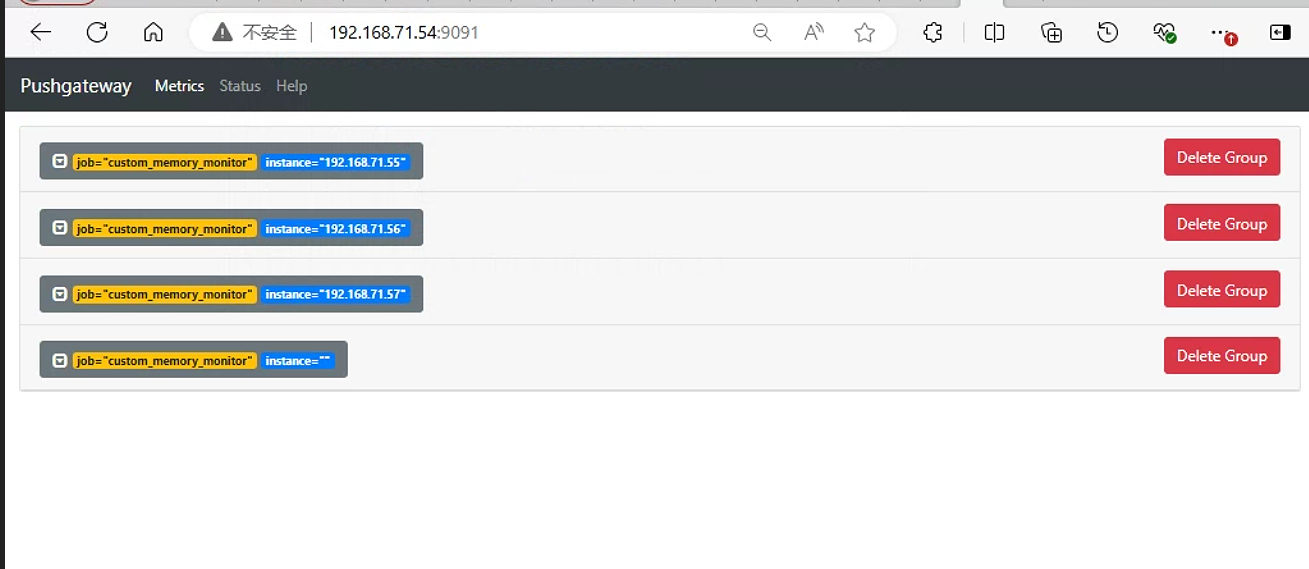
在
prometheus控制台查看custom_memory_total数据和custom_memory_used数据custom_memory_total数据(能看到三台主机的内存总量数据)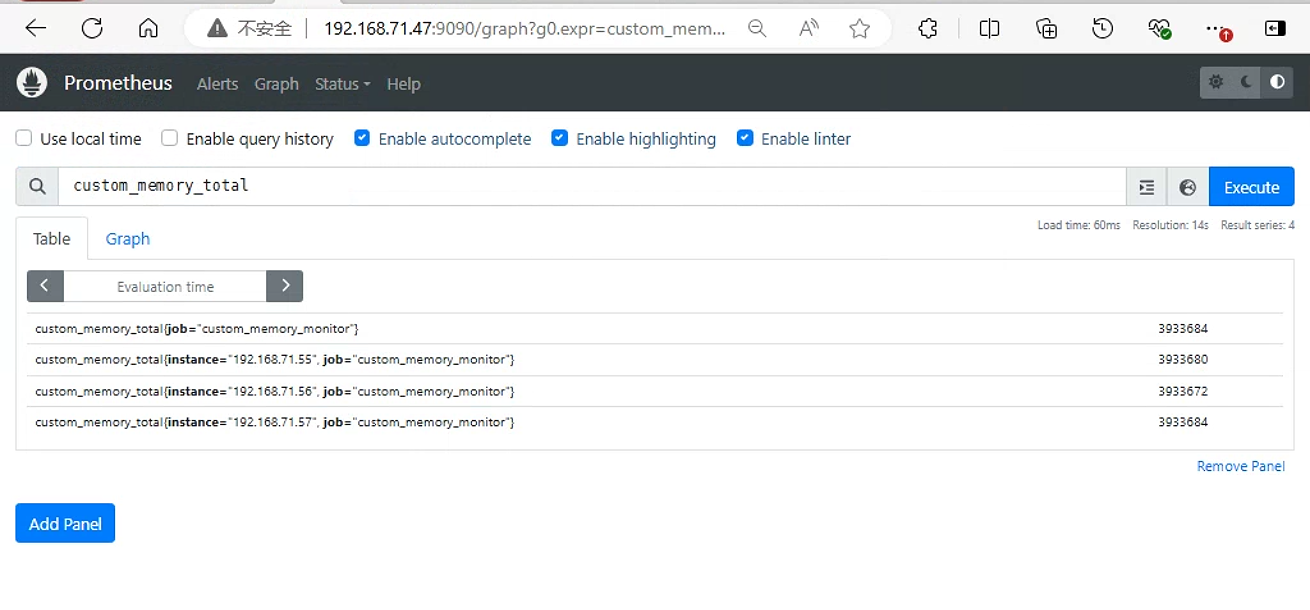
custom_memory_used数据(能看到三台主机的已用内存数据)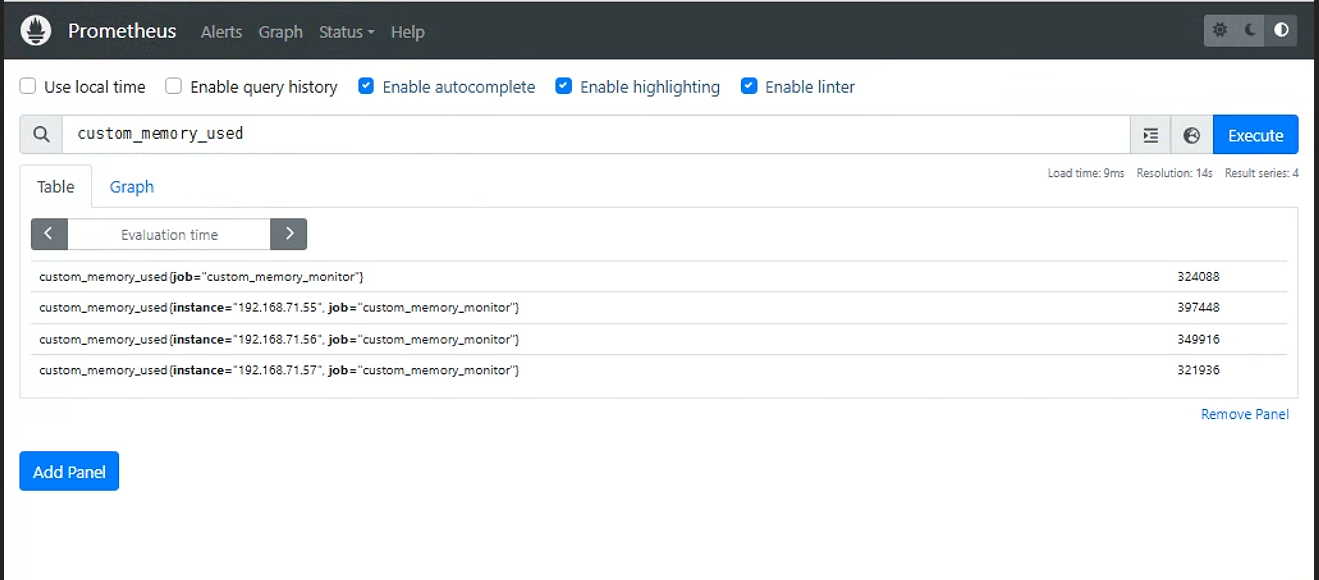
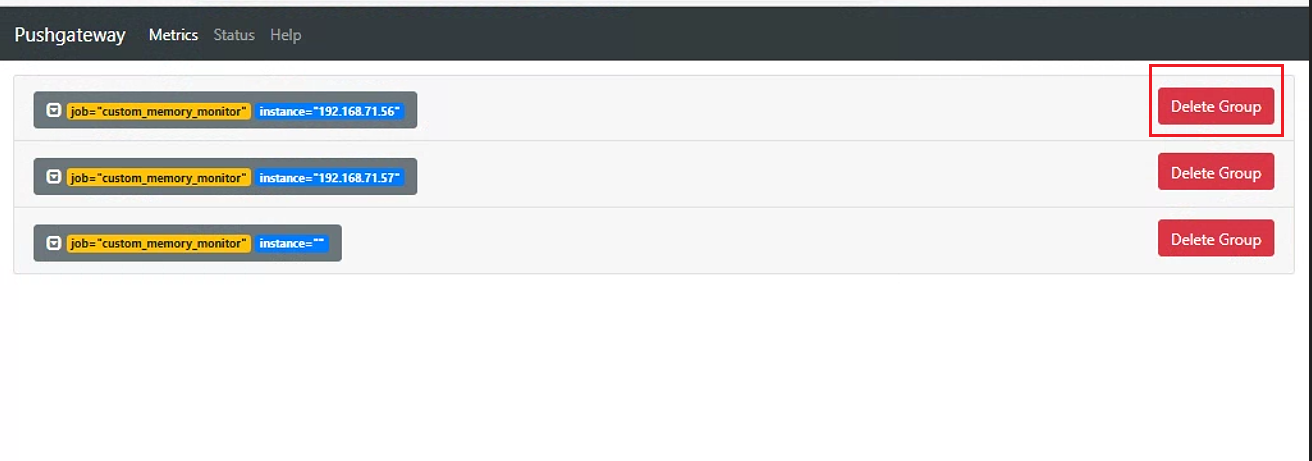
5.3 通过 API 删除指定实例的数据
通过命令删除
curl -X DELETE http://192.168.71.54:9091/metrics/job/custom_memory_monitor/instance/192.168.71.55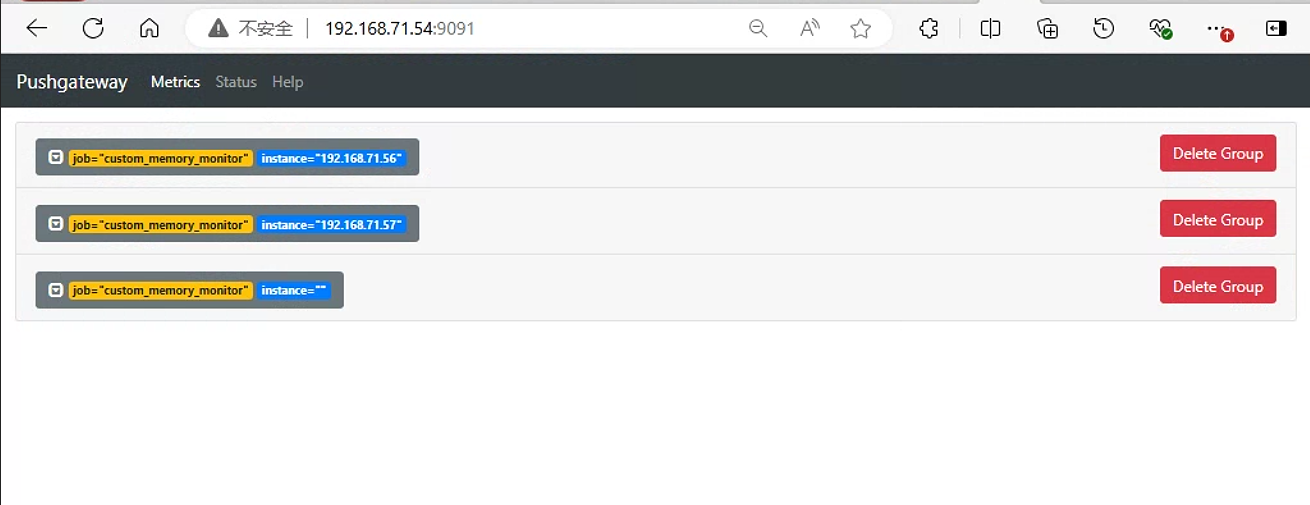
通过pushgateway控制台页面删除按钮删除监控项
6. 注意事项
通过Pushgateway方式 , Prometheus无法直接检测到监控源服务的状态 , 故此种方式不适用于监控服务的存活状态等场景。
Pushgateway属于静态代理 , 它接收的指标不存在过期时间 , 故会一直保留直到该指标被更新或删除。此种情况下 , 不再使用的指标可能存在于网关中。
如上所言 , Pushgateway并不算是完美的解决方案 , 在监控中更多做为辅助方案存在 , 用于解决Prometheus无法直接获取数据的场景。
参考链接
构建企业级监控平台系列(二十一):Prometheus Pushgateway 详解 (qq.com)
九、Pushgateway - 袁党生博客 (yuandangsheng.top)