
7-zabbix api使用
1. zabbix api简介
API ( Application Programming Interface,应用程序接口 ) 是一些预先定义的函数,或指软件系统不同组成部分衔接的约定。目的是提供应用程序与开发人员基于某软件或硬件得以访问一组例程的能力,而又无需访问原码,或理解内部工作机制的细节。
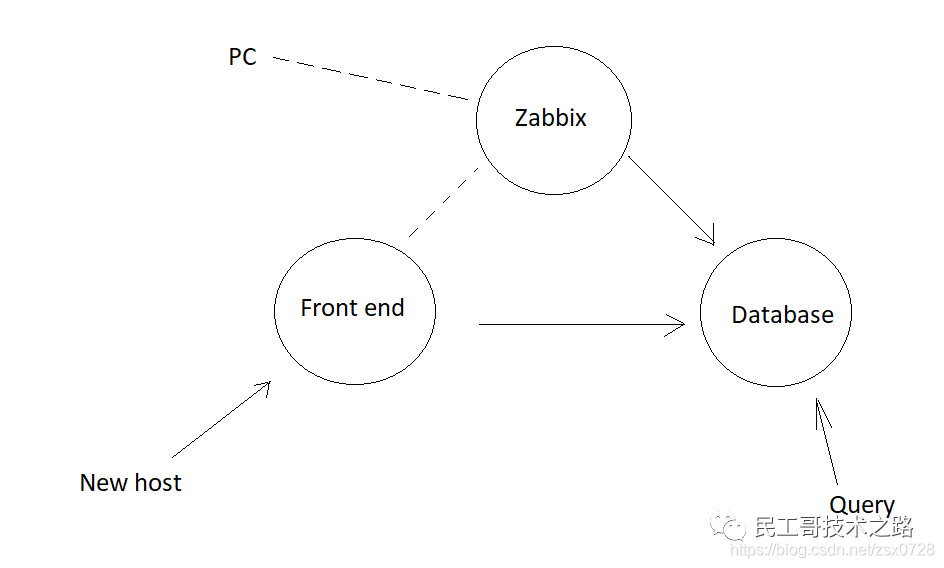
Zabbix分为Zabbix server、数据库和前端。Zabbix server和前端连接到数据库。当Zabbix server从PC或其他设备收集信息时,数据由二进制进程处理并写入数据库。每次打开前端并创建新主机时,相关信息也会写入数据库。
Zabbix API开始扮演着越来越重要的角色,尤其是在集成第三方软件和自动化日常任务时。很难想象管理数千台服务器而没有自动化是多么的困难。Zabbix API为批量操作、第三方软件集成以及其他作用提供可编程接口。
Zabbix API允许你以编程方式检索和修改Zabbix的配置,并提供对历史数据的访问。它广泛用于 :
创建新的应用程序以使用
Zabbix;将
Zabbix与第三方软件集成;自动执行常规任务。
Zabbix API是基于Web的API,作为Web前端的一部分提供。它使用JSON-RPC 2.0协议,这意味着两件事 :
该
API包含一组独立的方法;客户端和
API之间的请求和响应使用JSON格式进行编码。
大多数API至少包含四种方法 : get , create,update 和 delete ,分别是检索,创建,更新和删除数据。当完成了前端的安装配置后,你就可以使用远程HTTP请求来调用API。
API分类
根据单个或分布式平台上不同软件应用程序间的数据共享性能,可以将API分为四种类型 :
远程过程调用 (
RPC) : 通过作用在共享数据缓存器上的过程 ( 或任务 ) 实现程序间的通信。标准查询语言 (
SQL) : 是标准的访问数据的查询语言,通过通用数据库实现应用程序间的数据共享。文件传输 : 文件传输通过发送格式化文件实现应用程序间数据共享。
信息交付 : 指松耦合或紧耦合应用程序间的小型格式化信息,通过程序间的直接通信实现数据共享。
API常用接口
user.login  #用户登录
host.get(create|delete|update)  #主机操作
hostgroup.get(create|delete|update)  #主机组操作
item.get(create|delete|update)  #监控项目操作
history.get  #历史数据查询
event.get  #事件查询
trigger.get  #触发器查询
具体可以参考官方API文档: https://zabbix.com/documentation/current/zh/manual/api
2. JSON-RPC
JSON-RPC是基于JSON的跨语言远程调用协议,比XML-RPC、WebService等基于文本的协议传输数据量要小。目前主流语言都有JSON-RPC的实现框架。
JSON-RPC协议描述JSON-RPC协议非常简单,发起远程调用时向服务器传输数据的格式如下 :{"method": "getid", "params": ["arg"], "id": 1}参数说明如下 :
method: 调用的方法名。params: 方法传入的参数,若无参数,则传入[]。id: 调用标识符,用于标识一次远程调用过程。
服务器接收到
JSON-RPC的调用请求后,处理该请求的方法调用,然后将结果返回调用方。返回的数据格式如下 :{ "result": "id is 000", "error": null, "id": 1 }参数说明如下 :
result: 方法返回值,若无返回值或调用出错,则返回null。error: 调用时发生错误,若无错误则返回null。·id: 调用标识符,与调用方传入的标识符一致。
Zabbix API支持的数据类型Zabbix API支持的基本数据类型如表所示当使用查询操作 (
get方法) 时,可以使用更多的参数,查询操作支持的参数如表所示Zabbix API代码入口文件路径Zabbix API代码入口文件路径如下:/usr/share/zabbix/api_jsonrpc.phpAPI调用时的URL是:http://x.x.x.x/zabbix/api_jsonrpc.php
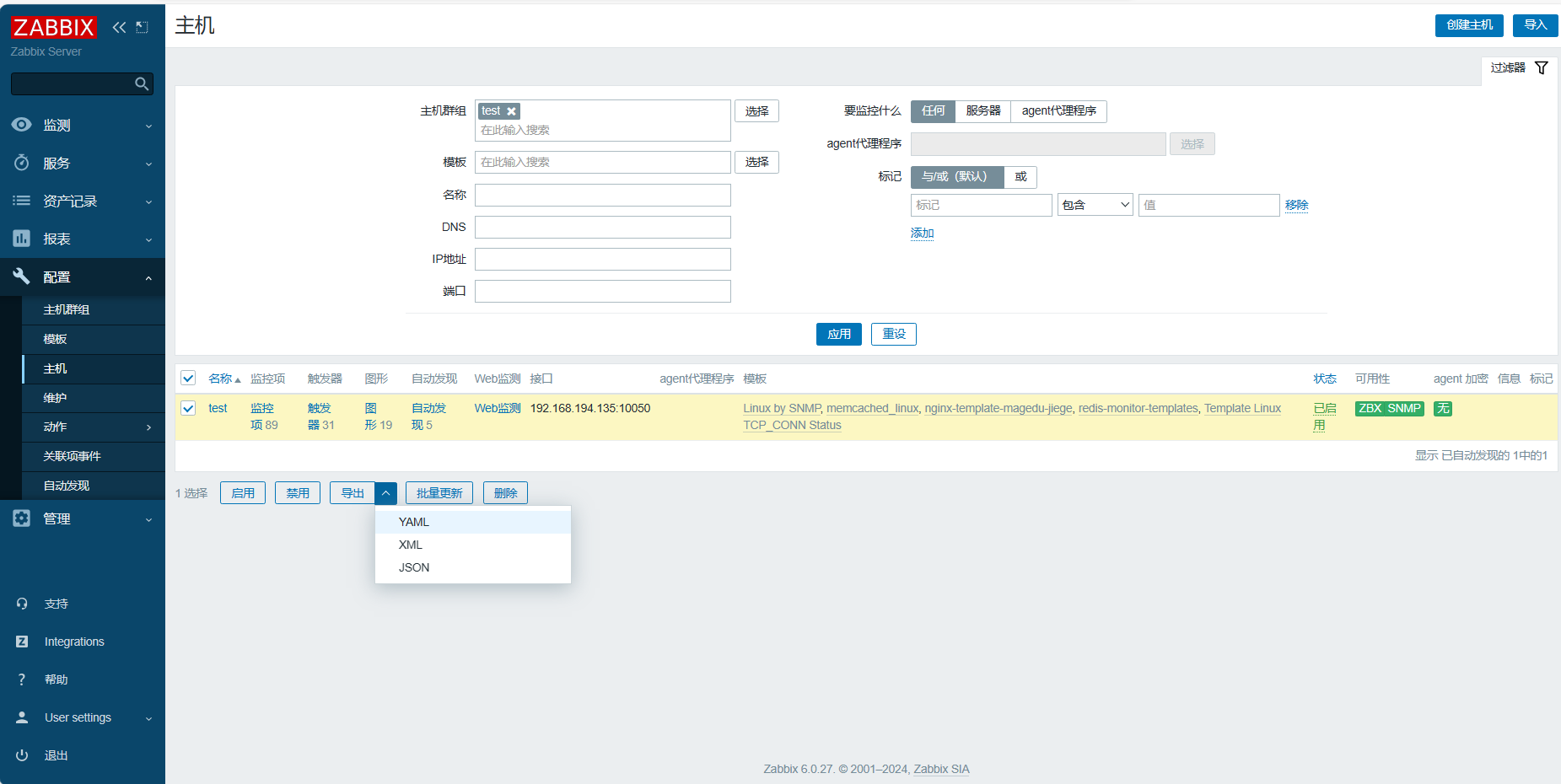
具体的API使用可以参考导出的主机列表里面的json参数
3. API使用示例
3.1 基础使用
curl命令: -s: 静默模式, -X:指定操作方法 , -H:自定义header内容 , -d:指定提交的http内容
获取身份令牌
curl -s -X POST -H 'Content-Type:application/json' -d ' { "jsonrpc": "2.0", "method": "user.login", "params": { "user": "Admin", #zabbix登录时用户名 "password": "zabbix" #zabbix页面登录密码 }, "id": 1 }' http://192.168.194.131/zabbix/api_jsonrpc.php | python -m json.tool # zabbix server服务器主机的IP地址 # 以下是获取的token值 { "jsonrpc": "2.0", "result": "c82bb7ef441ff674ffbd537cfd7f0299", # 获取的token值 "id": 1 } 获取所有主机信息
curl -s -X POST -H 'Content-Type:application/json' -d ' { "jsonrpc": "2.0", "method": "host.get", "params": { "output": ["host"] }, "auth": "c82bb7ef441ff674ffbd537cfd7f0299", "id": 1 }' http://192.168.194.131/zabbix/api_jsonrpc.php | python -m json.tool #以下为获取主机返回值 { "id": 1, "jsonrpc": "2.0", "result": [ { "host": "Zabbix server", "hostid": "10084" }, { "host": "192.168.194.135", "hostid": "10618" } ] }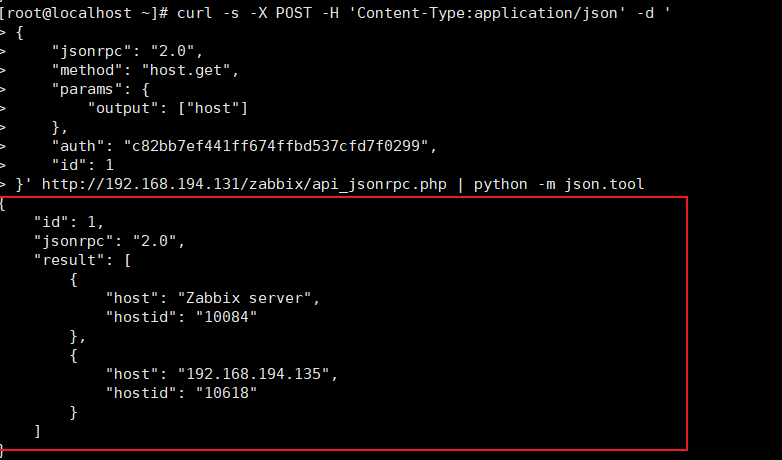
curl -XPOST -H "Content-Type: application/json-rpc" -d ' { "jsonrpc": "2.0", "method": "host.get", "params": { "output": [ "hostid", "host" ], "selectInterfaces": [ "interfaceid", "ip" ] }, "id": 2, "auth": "c82bb7ef441ff674ffbd537cfd7f0299" #刚获取的token值 }' http://192.168.194.131/zabbix/api_jsonrpc.php | python -m json.tool #以下为所有主机返回值 { "id": 2, "jsonrpc": "2.0", "result": [ { "host": "Zabbix server", "hostid": "10084", "interfaces": [ { "interfaceid": "1", "ip": "127.0.0.1" } ] }, { "host": "192.168.194.135", "hostid": "10618", "interfaces": [ { "interfaceid": "40", "ip": "192.168.194.135" }, { "interfaceid": "41", "ip": "192.168.194.135" } ] } ] } 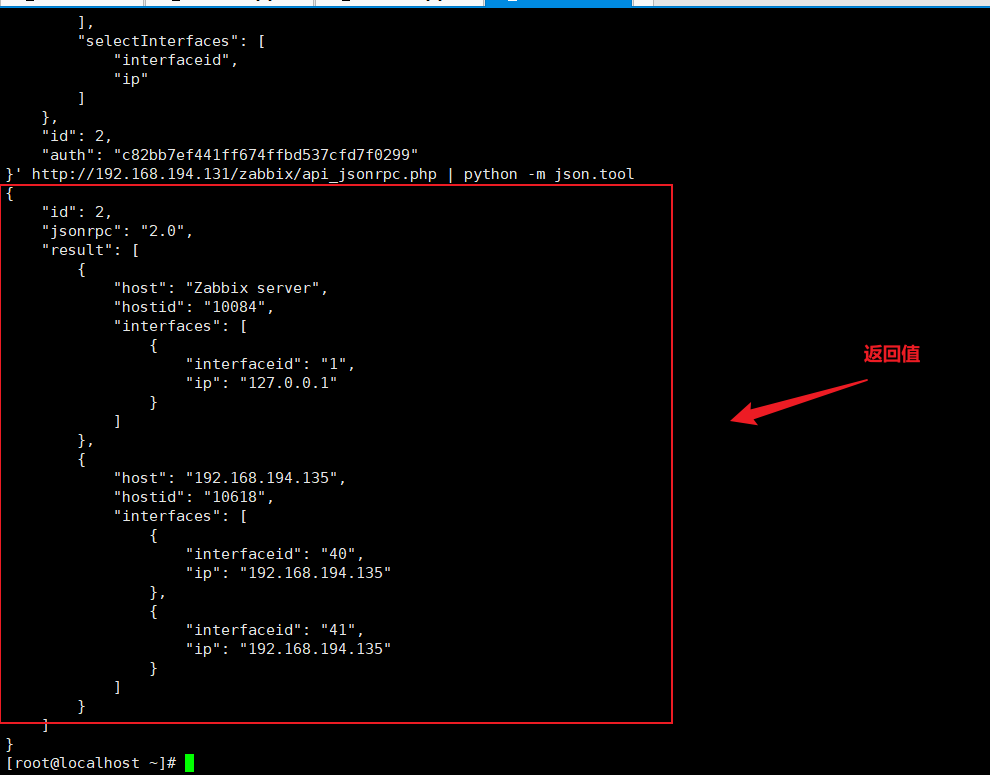
删除主机
curl -s -XPOST -H "Content-Type: application/json-rpc" -d '
{
    "jsonrpc": "2.0",
    "method": "host.delete",
    "params": [
        "10618"
    ],
    "auth": "c82bb7ef441ff674ffbd537cfd7f0299",     #这里填写上面获取到的主机id
    "id": 2
}' http://192.168.194.131/zabbix/api_jsonrpc.php | python -m json.tool      #这里填写之前我们获取到的身份令牌
获取所有用户信息
curl -s -X POST -H 'Content-Type:application/json' -d ' { "jsonrpc": "2.0", "method": "user.get", "params": { "output": "extend" }, "auth": "c82bb7ef441ff674ffbd537cfd7f0299", "id": 1 }' http://192.168.194.131/zabbix/api_jsonrpc.php | python -m json.tool { "id": 1, "jsonrpc": "2.0", "result": [ { "attempt_clock": "0", "attempt_failed": "0", "attempt_ip": "", "autologin": "1", "autologout": "0", "lang": "zh_CN", "name": "Zabbix", "refresh": "30s", "roleid": "3", "rows_per_page": "50", "surname": "Administrator", "theme": "default", "timezone": "default", "url": "", "userid": "1", "username": "Admin" }, { "attempt_clock": "0", "attempt_failed": "0", "attempt_ip": "", "autologin": "0", "autologout": "15m", "lang": "default", "name": "", "refresh": "30s", "roleid": "4", "rows_per_page": "50", "surname": "", "theme": "default", "timezone": "default", "url": "", "userid": "2", "username": "guest" }, { "attempt_clock": "0", "attempt_failed": "0", "attempt_ip": "", "autologin": "0", "autologout": "0", "lang": "zh_CN", "name": "", "refresh": "30s", "roleid": "3", "rows_per_page": "50", "surname": "", "theme": "default", "timezone": "default", "url": "", "userid": "4", "username": "wangyi" } ] } 获取单个模板信息
# curl -s -X POST -H 'Content-Type:application/json' -d '
{
    "jsonrpc": "2.0",
    "method": "template.get",
    "params": {
        "output": "extend",
        "filter": {
            "host": [
                "NGINX_Check_Statuc"                #模板名称
            ]
        }
    },
    "auth": "d22b88e46b411f3db0997d54afb06c0e",
    "id": 1
}'   http://192.168.7.100/zabbix/api_jsonrpc.php | python -m json.tool
#以下是返回值

{
    "id": 1,
    "jsonrpc": "2.0",
    "result": [
        {
            "auto_compress": "1",
            "available": "0",
            "description": "",
            "disable_until": "0",
            "error": "",
            "errors_from": "0",
            "flags": "0",
            "host": "NGINX_Check_Statuc",
            "ipmi_authtype": "-1",
            "ipmi_available": "0",
            "ipmi_disable_until": "0",
            "ipmi_error": "",
            "ipmi_errors_from": "0",
            "ipmi_password": "",
            "ipmi_privilege": "2",
            "ipmi_username": "",
            "jmx_available": "0",
            "jmx_disable_until": "0",
            "jmx_error": "",
            "jmx_errors_from": "0",
            "lastaccess": "0",
            "maintenance_from": "0",
            "maintenance_status": "0",
            "maintenance_type": "0",
            "maintenanceid": "0",
            "name": "NGINX_Check_Statuc",
            "proxy_address": "",
            "proxy_hostid": "0",
            "snmp_available": "0",
            "snmp_disable_until": "0",
            "snmp_error": "",
            "snmp_errors_from": "0",
            "status": "3",
            "templateid": "10284",
            "tls_accept": "1",
            "tls_connect": "1",
            "tls_issuer": "",
            "tls_psk": "",
            "tls_psk_identity": "",
            "tls_subject": ""
        }
    ]
}
获取多个模板信息
curl -s -X POST -H 'Content-Type:application/json' -d '
{
    "jsonrpc": "2.0",
    "method": "template.get",
    "params": {
        "output": "extend",
        "filter": {
            "host": [
                "NGINX_Check_Statuc",                #模板名称
                "new template name"
            ]
        }
    },
    "auth": "d22b88e46b411f3db0997d54afb06c0e",
    "id": 1
}'   http://192.168.7.100/zabbix/api_jsonrpc.php | python -m json.tool
3.2 API创建主机
创建主机
curl -s -XPOST -H "Content-Type: application/json-rpc" -d '
{
    "jsonrpc": "2.0",
    "method": "host.create",
    "params": {
        "host": "server3",
        "interfaces": [
            {
                "type": 1,
                "main": 1,
                "useip": 1,
                "ip": "172.25.1.3",
                "dns": "",
                "port": "10050"
            }
        ],
        "groups": [
            {
                "groupid": "2"   #可以在监控页面点击配置-->主机群组后,网址上看到groupid
            }
        ],
        "templates": [
            {
                "templateid": "10001" #可以在监控页面点击配置-->模板后,随便点击一个模板,在网址处可以看到templates
            }
        ]
    },
    "auth": "6fc9c0869a025ec464754ec7b5c955a1",
    "id": 2
}' http://172.25.1.1/zabbix/api_jsonrpc.php | python -m json.tool通过API添加主机命令格式:
API添加主机为预先知道要添加的主机IP、预先安装并配置好zabbix agent、预先知道要关联的模板ID/组ID等信息,然后同API提交请求添加
查看需要添加主机群组的
ID号,此时的ID号:2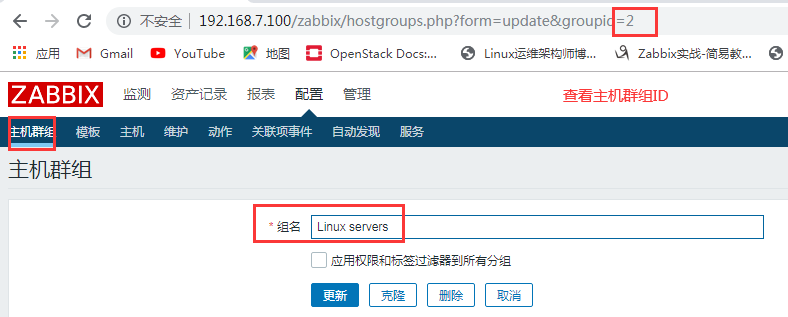
查看
NGINX_Check_Static模板的ID号是:10284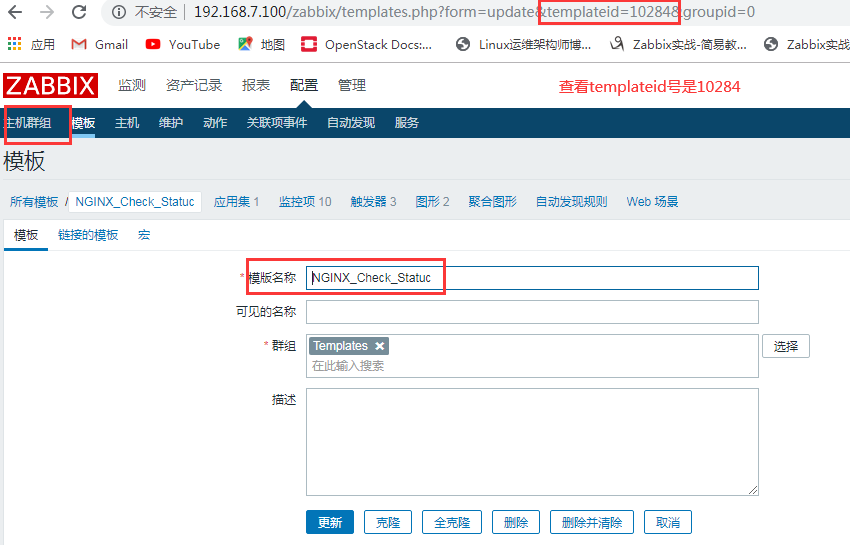
查看
proxy ID号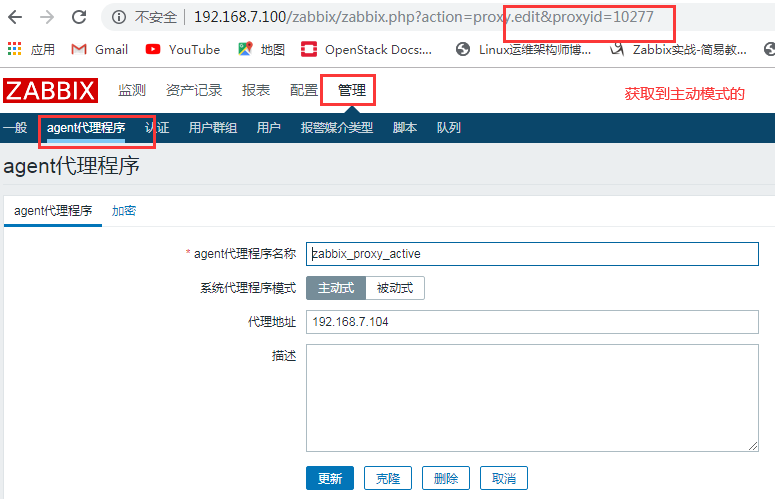
将要添加的模板都关联到
NGINX_Check_Status模板下,例如:proxy的主动模板以及agent的模板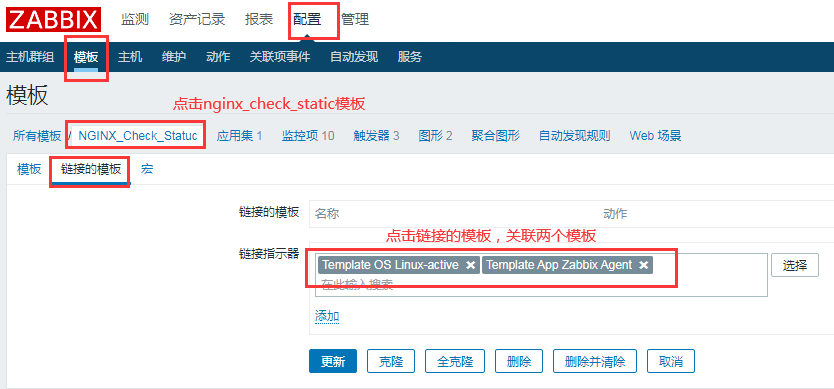
添加192.168.7.101主机(主动
proxy代理模式)# curl -s -X POST -H 'Content-Type:application/json' -d ' { "jsonrpc": "2.0", "method": "host.create", # 定义方法,N多种 "params": { "host": "API Add Host Test 192.168.7.101", # 添加显示的主机名称 "proxy_hostid": "10277", # 加上此行就是经过proxy进行主动模式代理,去掉就不需要proxy主机代理 "interfaces": [ { "type": 1, # 类型为1表示是agent,2是SNMP,3是IMPI,4是JMX "main": 1, # more是接口 "useip": 1, # 0是DNS地址,1是IP地址 "ip": "192.168.7.101", # 添加zabbix主机的IP地址 "dns": "", "port": "10050" # agent端口 } ], "groups": [ { "groupid": "2" # 查到的群组ID } ], "templates": [ { "templateid": "10284" # 关联的模板ID } ] }, "auth": "d22b88e46b411f3db0997d54afb06c0e", #token值 "id": 1 }' http://192.168.7.100/zabbix/api_jsonrpc.php | python -m json.tool # 192.168.7.100是zabbix server服务器的IP地址 # 返回值 { "id": 1, "jsonrpc": "2.0", "result": { "hostids": [ "10292" ] } }
需要注意的时zabbix6版本的时候API参数有变化
 curl -s -X POST -H 'Content-Type:application/json' -d '
 {
     "jsonrpc": "2.0",
     "method": "host.create",
     "params": {
         "host": "192.168.194.135",
         "name": "test",
         "templates": [
             {
                 "templateid": "10248"
             },
             {
                 "templateid": "10622"
             },
             {
                 "templateid": "10620"
             },
             {
                 "templateid": "10621"
             },
             {
                 "templateid": "10625"
             }
         ],
         "interfaces": [
             {
                 "type": 2,
                 "main": 1,
                 "useip": 1,
                 "ip": "192.168.194.135",
                 "dns": "",
                 "port": "161",
                 "details": {
                       "bulk": 1,
                       "community": "{$SNMP_COMMUNITY}",
                       "version": 2
                 }
             },
             {
                 "type": 1,
                 "main": 1,
                 "useip": 1,
                 "ip": "192.168.194.135",
                 "dns": "",
                 "port": "10050"

             }
         ],
         "groups": [
             {
                 "groupid": "22"
             }
         ]
     },
     "auth": "c82bb7ef441ff674ffbd537cfd7f0299",
     "id": 1
 }' http://192.168.194.131/zabbix/api_jsonrpc.php | python -m json.tool
3.3 批量创建主机
编辑一下添加的主机模板
[root@zabbix ~]# cat linux-zabbix-add.sh
#!/bin/bash

IP="
192.168.7.101
192.168.7.102
"

for node_ip in ${IP};do
 curl -s -X POST -H 'Content-Type:application/json' -d '
 {
     "jsonrpc": "2.0",
     "method": "host.create",
     "params": {
          "host": "'${node_ip}'",  # 主机的IP地址
          "name": "linux36-nginx-web_'${node_ip}'",  # 添加可见的主机名称
          "proxy_hostid": "10277",  # 主动模式proxy的ID号
         "interfaces": [
             {
                 "type": 1,
                 "main": 1,
                 "useip": 1,
                 "ip": "'${node_ip}'",
                 "dns": "",
                 "port": "10050"
             }
         ],
         "groups": [
             {
                 "groupid": "2"
             }
         ],
         "templates": [
             {
                 "templateid": "10284"
             }
         ]
     },
     "auth": "d22b88e46b411f3db0997d54afb06c0e",
     "id": 1
 }' http://192.168.7.100/zabbix/api_jsonrpc.php | python -m json.tool
done
在
zabbix网页上查看此时添加的主机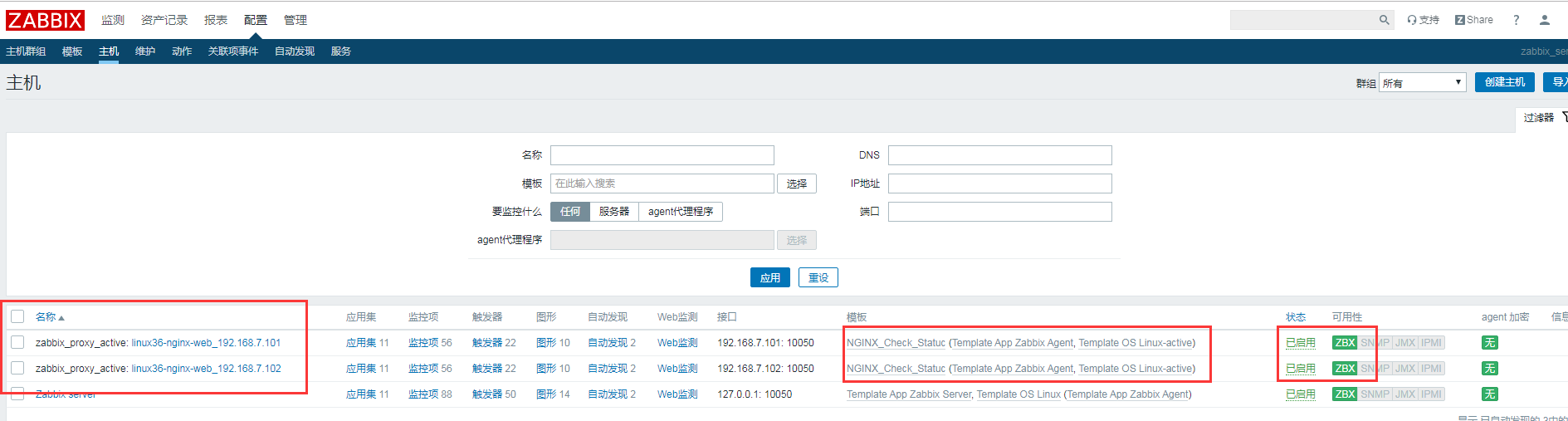
查看
192.168.7.101主机的数据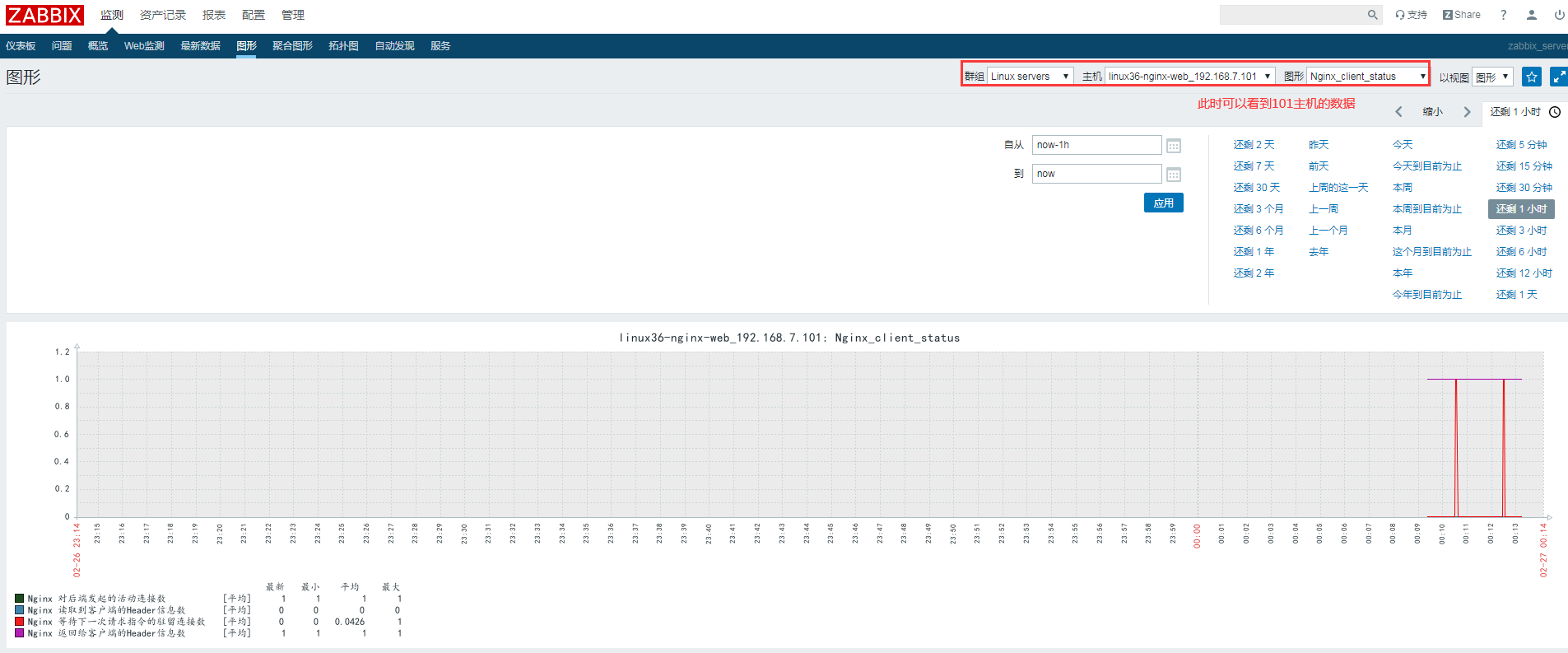
查看
192.168.7.102主机的数据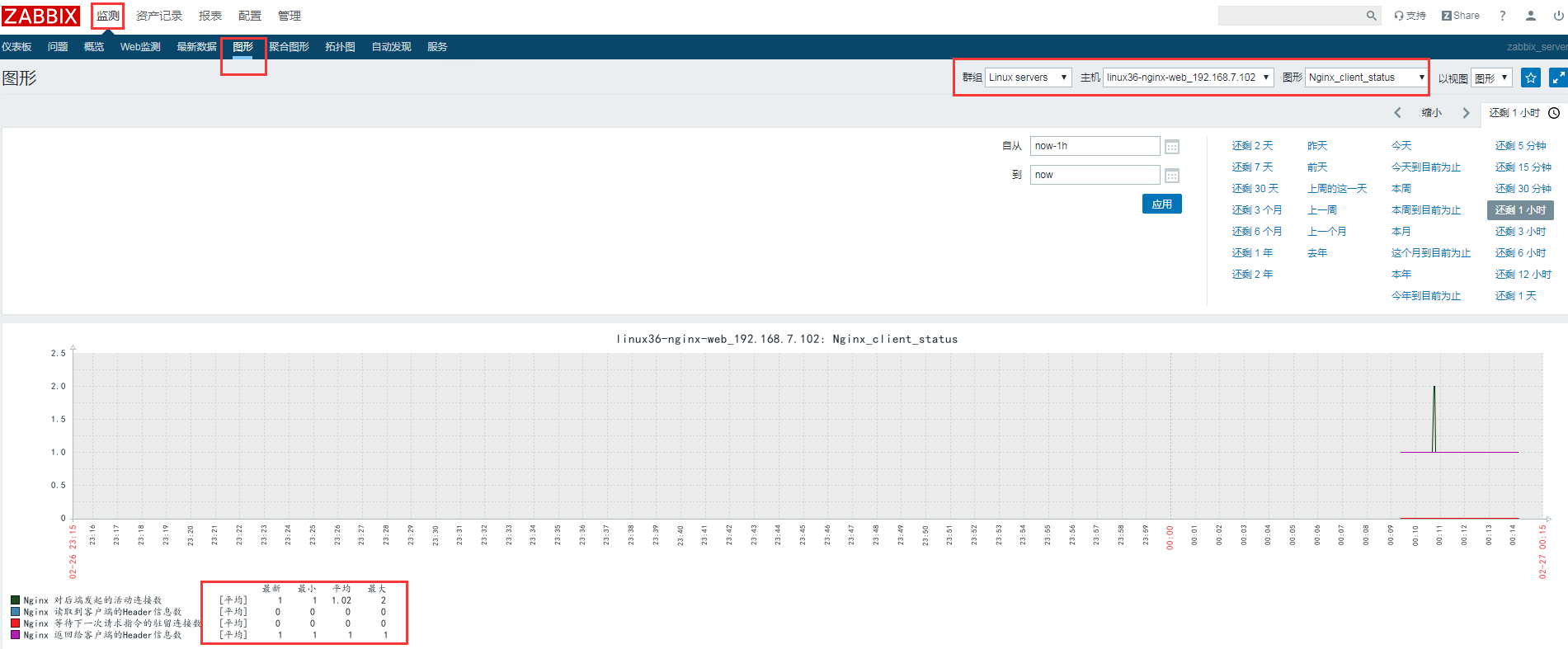
参考链接