


1. 安装
这里如果需要获取对应的安装包或者安装源, 可以直接通过访问链接Index of /pub/gluster/glusterfs/LATEST
glusterfs的github链接: gluster/glusterfs: Gluster Filesystem : Build your distributed storage in minutes
编译参考链接: Build and Install GlusterFS - Gluster Docs
1.1 CentOS安装
1.1.1 yum源安装
安装
epel源[root@gluster01 ~]# dnf -y install epel-release安装
GlusterFS源[root@gluster01 ~]# dnf -y install centos-release-gluster安装
GlusterFS软件包[root@gluster01 ~]# dnf -y install glusterfs-server
1.1.2 编译安装
安装依赖包
CentOS7#官方原文安装依赖 yum install autoconf automake bison cmockery2-devel dos2unix flex \ fuse-devel glib2-devel libacl-devel libaio-devel libattr-devel \ libcurl-devel libibverbs-devel librdmacm-devel libtirpc-devel \ libtool libxml2-devel lvm2-devel make openssl-devel pkgconfig \ pyliblzma python-devel python-eventlet python-netifaces \ python-paste-deploy python-simplejson python-sphinx python-webob \ pyxattr readline-devel rpm-build sqlite-devel systemtap-sdt-devel \ tar userspace-rcu-devel #测试成功命令, 这里需要激活CentOS SIG repos才能安装 userspace-rcu-devel yum install autoconf automake bison dos2unix flex \ fuse-devel glib2-devel libacl-devel libaio-devel libattr-devel \ libcurl-devel libibverbs-devel librdmacm-devel libtirpc-devel \ libtool libxml2-devel lvm2-devel make openssl-devel pkgconfig \ pyliblzma python-devel python-netifaces \ python-sphinx python-webob \ pyxattr readline-devel rpm-build sqlite-devel systemtap-sdt-devel \ tar userspace-rcu-devel gperftools gperftools-devel #这里需要注意之后编译的配置: ./configure --without-libtirpc --disable-linux-io_uringCentOS8yum --enablerepo=powertools --enablerepo=devel install autoconf automake bison dos2unix flex fuse-devel glib2-devel \ libacl-devel libaio-devel libattr-devel libcurl-devel libibverbs-devel \ librdmacm-devel libtirpc-devel libuuid-devel libtool libxml2-devel \ lvm2-devel make openssl-devel pkgconfig xz-devel python3-devel \ python3-netifaces python3-paste-deploy python3-simplejson python3-sphinx \ python3-webob python3-pyxattr readline-devel rpm-build sqlite-devel \ systemtap-sdt-devel tar userspace-rcu-devel rpcgen liburing-develCentOS9yum --enablerepo=crb --enablerepo=devel install autoconf automake bison dos2unix flex fuse3-devel glib2-devel \ libacl-devel libaio-devel libattr-devel libcurl-devel libibverbs-devel \ librdmacm-devel libtirpc-devel libuuid-devel libtool libxml2-devel \ lvm2-devel make openssl-devel pkgconfig xz-devel python3-devel \ python3-netifaces python3-paste-deploy python3-simplejson python3-sphinx \ python3-webob python3-pyxattr readline-devel rpm-build sqlite-devel \ systemtap-sdt-devel tar userspace-rcu-devel rpcgen liburing-devel gperftools-devel运行
autogen脚本以生成configure脚本[root@gluster01 glusterfs-10.5]# ./autogen.sh运行
configure脚本以生成Makefile文件。[root@gluster01 glusterfs-10.5]# ./configure --enable-gnfs --prefix=/opt/glusterfs --with-systemddir=/usr/lib/systemd/system --enable-metadisp --without-tcmalloc CFLAGS="-fcommon" .... GlusterFS configure summary =========================== FUSE client : yes epoll IO multiplex : yes fusermount : yes readline : yes georeplication : yes Linux-AIO : yes Linux io_uring : yes Use liburing : yes Enable Debug : no Run with Valgrind : no Sanitizer enabled : none XML output : yes Unit Tests : no Track priv ports : yes POSIX ACLs : yes SELinux features : yes firewalld-config : no Events : yes EC dynamic support : x64 sse avx Use memory pools : yes Nanosecond m/atimes : yes Server components : yes Legacy gNFS server : yes IPV6 default : no Use TIRPC : yes With Python : 3.9 Cloudsync : yes Metadata dispersal : yes Link with TCMALLOC : no Enable Brick Mux : no Building with LTO : yes 如果不加任何参数,编译结果如下,同时会将软件解压至
/usr/local目录下面,systemd的service文件默认安装路径为/usr/local/lib/systemd/system/GlusterFS configure summary =========================== FUSE client : yes epoll IO multiplex : yes fusermount : yes readline : yes georeplication : yes Linux-AIO : yes Linux io_uring : yes Use liburing : yes Enable Debug : no Run with Valgrind : no Sanitizer enabled : none XML output : yes Unit Tests : no Track priv ports : yes POSIX ACLs : yes SELinux features : yes firewalld-config : no Events : yes EC dynamic support : x64 sse avx Use memory pools : no Nanosecond m/atimes : yes Server components : yes Legacy gNFS server : no IPV6 default : no Use TIRPC : yes With Python : 3.9 Cloudsync : yes Metadata dispersal : no Link with TCMALLOC : yes Enable Brick Mux : no Building with LTO : yes 如果这里只需要
gluster客户端命令, 则按照以下方式编译[root@gluster03 glusterfs-10.5]# ./configure --without-server --prefix=/opt/glusterfs编译和安装
[root@gluster01 glusterfs-10.5]# make && make install之后软件便安装成功
1.2 ubuntu安装
1.2.1 apt安装
点击Launchpad 链接https://launchpad.net/~gluster 。选择对应的gluster版本
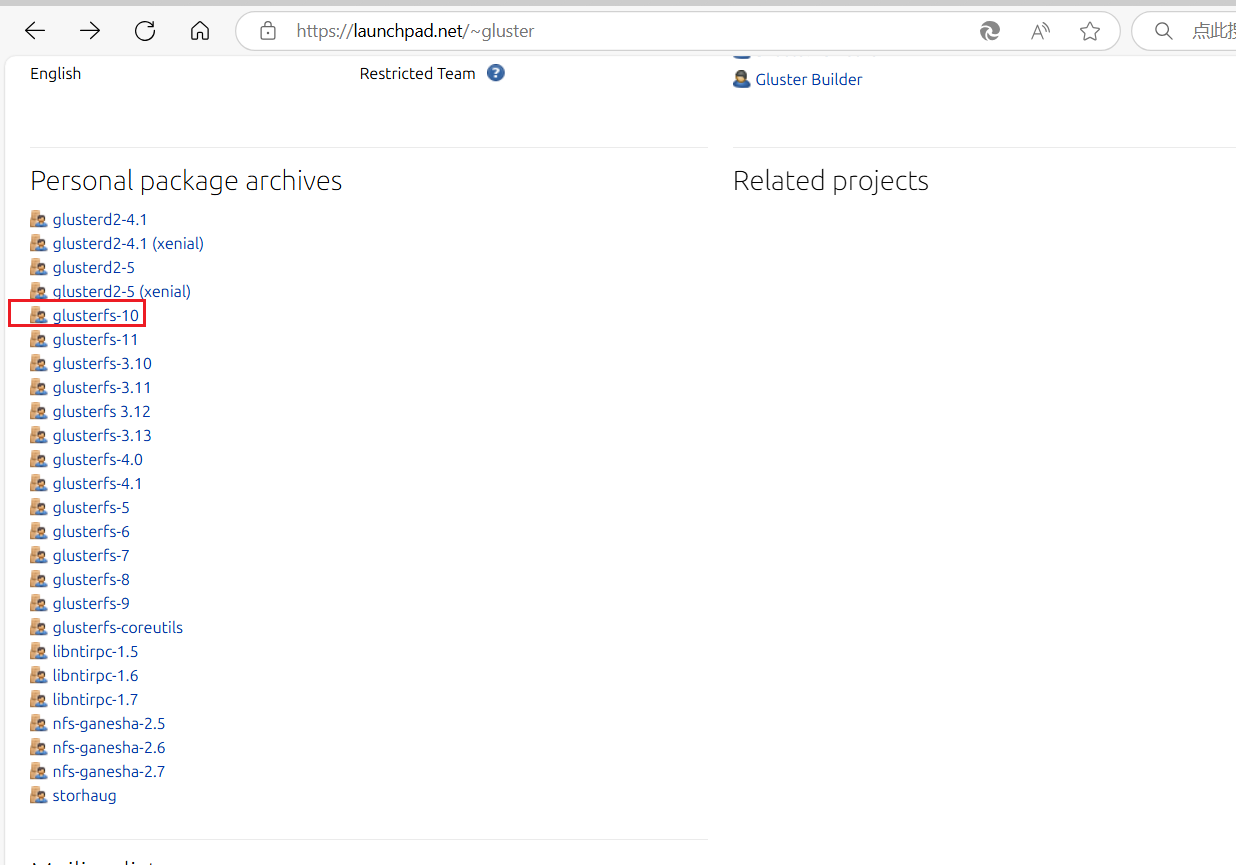
按照显示命令添加软件源
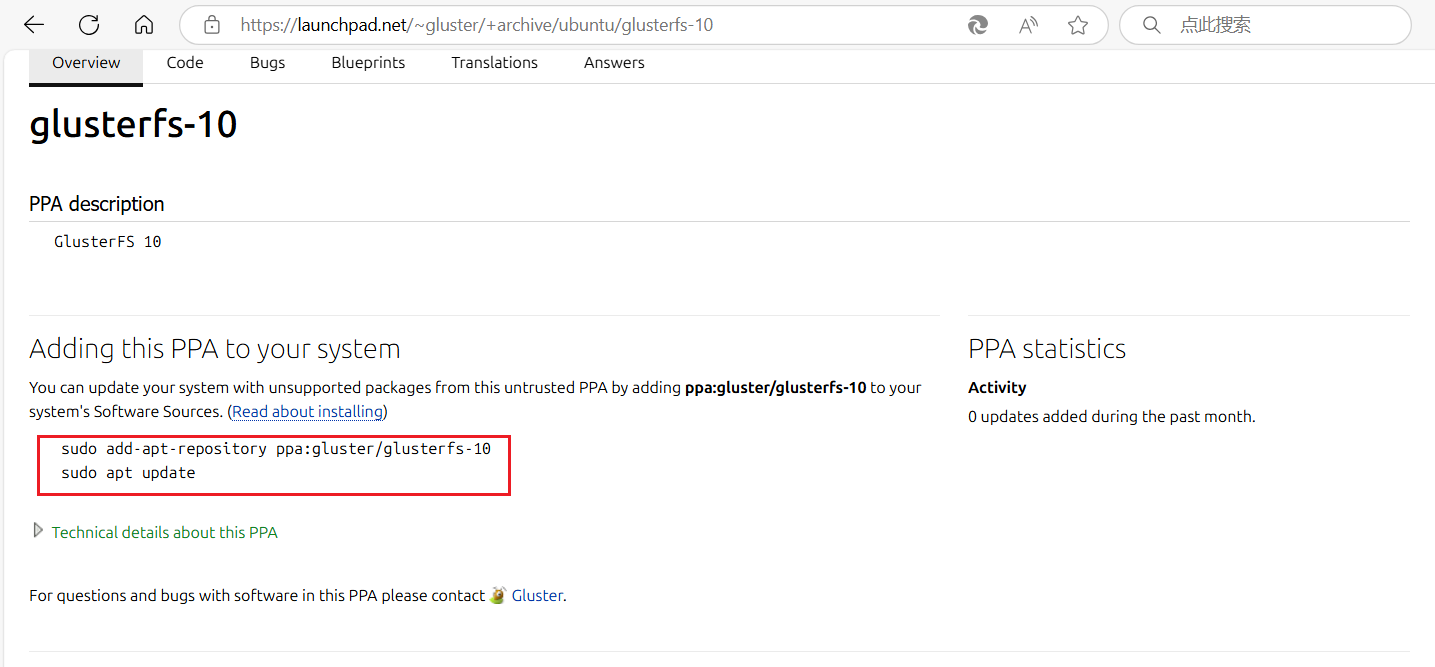
按照上面截图添加源信息
sudo add-apt-repository ppa:gluster/glusterfs-10
sudo apt update
安装服务器端软件
apt install glusterfs-server
1.2.2 编译安装
ubuntu2204安装依赖包apt-get install make automake autoconf libtool flex bison \ pkg-config libssl-dev libxml2-dev python3-dev libaio-dev \ libibverbs-dev librdmacm-dev libreadline-dev liblvm2-dev \ libglib2.0-dev liburcu-dev libcmocka-dev libsqlite3-dev \ libacl1-dev liburing-dev google-perftools运行
autogen脚本以生成configure脚本root@ubuntu2204:~/glusterfs-10.5# ./autogen.sh运行
configure脚本以生成Makefile文件。root@ubuntu2204:~/glusterfs-10.5# ./configure --enable-gnfs --prefix=/opt/glusterfs --with-systemddir=/usr/lib/systemd/system --enable-metadisp --without-tcmalloc CFLAGS="-fcommon"编译和编译安装
root@ubuntu2204:~/glusterfs-10.5# make && make install
通过上述所有的安装流程之后, 直接使用以下命令启动glusterfs服务
systemctl start glusterd2. 基础使用
环境
2.1 glusterfs-server端部署
修改所有节点的
/etc/hosts文件[root@glusterfs01 ~]# cat /etc/hosts 127.0.0.1 localhost localhost.localdomain localhost4 localhost4.localdomain4 ::1 localhost localhost.localdomain localhost6 localhost6.localdomain6 192.168.71.54 glusterfs01 192.168.71.55 glusterfs02 192.168.71.56 glusterfs03 192.168.71.59 glusterfs04 192.168.71.63 glusterfs05 192.168.71.64 client 启动所有节点的
glusterfs服务[root@glusterfs01 ~]# systemctl start glusterd在任意一台节点中,将另几个节点加入集群。这里在节点1上面操作
[root@glusterfs01 ~]# gluster peer probe glusterfs02
peer probe: success
[root@glusterfs01 ~]# gluster peer probe glusterfs03
peer probe: success
[root@glusterfs01 ~]# gluster peer probe glusterfs04
peer probe: success
[root@glusterfs01 ~]# gluster peer probe glusterfs05
peer probe: success
查看集群状态
[root@glusterfs01 ~]# gluster peer status Number of Peers: 4 Hostname: glusterfs02 Uuid: 4d845bc4-f60b-4e9e-8416-b0e559ed32a8 State: Peer in Cluster (Connected) Hostname: glusterfs03 Uuid: 3deea0ea-2712-493b-8558-392487958e44 State: Peer in Cluster (Connected) Hostname: glusterfs04 Uuid: cfc416ca-27a0-4bd4-9cee-de0ff3d65b4b State: Peer in Cluster (Connected) Hostname: glusterfs05 Uuid: bc440ee9-608f-4a4c-ad78-2fc5b5660c58 State: Peer in Cluster (Connected) 格式化集群中每个节点中多余的磁盘, 并将其挂载在
/data目录下面,以作为之后的卷使用[root@glusterfs01 ~]# mkfs.xfs /dev/vdb meta-data=/dev/vdb isize=512 agcount=4, agsize=6553600 blks = sectsz=512 attr=2, projid32bit=1 = crc=1 finobt=1, sparse=1, rmapbt=0 = reflink=1 bigtime=1 inobtcount=1 nrext64=0 data = bsize=4096 blocks=26214400, imaxpct=25 = sunit=0 swidth=0 blks naming =version 2 bsize=4096 ascii-ci=0, ftype=1 log =internal log bsize=4096 blocks=16384, version=2 = sectsz=512 sunit=0 blks, lazy-count=1 realtime =none extsz=4096 blocks=0, rtextents=0 [root@glusterfs01 ~]# mkdir /data [root@glusterfs01 ~]# mount /dev/vdb /data/ 创建分布式卷
在五个节点中创建文件存储目录
mkdir /data/gluster/dis -p在其中一个节点下创建分布式卷。
gluster默认情况下就是分布式卷,所以可以直接创建:[root@glusterfs05 ~]# gluster volume create distributeVolume glusterfs01:/data/gluster/dis glusterfs02:/data/gluster/dis glusterfs03:/data/gluster/dis glusterfs04:/data/gluster/dis glusterfs05:/data/gluster/dis volume create: distributeVolume: success: please start the volume to access data distributeVolume卷的名称glusterfs01:/data/gluster/dis glusterfs02:/data/gluster/dis glusterfs03:/data/gluster/dis glusterfs04:/data/gluster/dis glusterfs05:/data/gluster/disforce: 强制创建卷,即使存在相同名称的卷也会被覆盖。
启动改存储卷
[root@glusterfs05 ~]# gluster volume start distributeVolume volume start: distributeVolume: success 查看
volume状态:[root@glusterfs05 ~]# gluster volume info Volume Name: distributeVolume Type: Distribute Volume ID: 23d1c4fb-2eb7-414e-a687-358e16afdba3 Status: Started Snapshot Count: 0 Number of Bricks: 5 Transport-type: tcp Bricks: Brick1: glusterfs01:/data/gluster/dis Brick2: glusterfs02:/data/gluster/dis Brick3: glusterfs03:/data/gluster/dis Brick4: glusterfs04:/data/gluster/dis Brick5: glusterfs05:/data/gluster/dis Options Reconfigured: storage.fips-mode-rchecksum: on transport.address-family: inet nfs.disable: on
2.2 glusterfs-client端部署
安装客户端软件
[root@client ~]# dnf install glusterfs glusterfs-fuse修改客户端的hosts文件
[root@client ~]# cat /etc/hosts 127.0.0.1 localhost localhost.localdomain localhost4 localhost4.localdomain4 ::1 localhost localhost.localdomain localhost6 localhost6.localdomain6 192.168.71.54 glusterfs01 192.168.71.55 glusterfs02 192.168.71.56 glusterfs03 192.168.71.59 glusterfs04 192.168.71.63 glusterfs05 192.168.71.64 client 因为
server端使用的过程中直接使用别名的方式, 因此后续客户端挂载也需要使用别名。直接使用IP挂载会失败。如果创建volume的过程中使用的是IP,可以不用修改GlusterFS 的服务器标识(IP 或别名)在卷创建和客户端挂载时必须保持一致。如果创建卷时使用了别名,客户端挂载时也必须使用相同的别名,而不能直接使用 IP 地址。这是因为 GlusterFS 的元数据中记录了服务器标识,客户端需要根据这些标识解析 Brick 的位置。通过配置别名解析或重新创建卷,可以解决挂载失败的问题。理解这一原理有助于更好地管理和调试 GlusterFS。
创建挂载目录
[root@client ~]# mkdir /gluster/distest -pv
mkdir: created directory '/gluster'
mkdir: created directory '/gluster/distest'
挂载对应
glusterfs目录[root@client ~]# mount -t glusterfs glusterfs01:/distributeVolume /mnt [root@client ~]# df -hT Filesystem Type Size Used Avail Use% Mounted on devtmpfs devtmpfs 4.0M 0 4.0M 0% /dev tmpfs tmpfs 1.8G 0 1.8G 0% /dev/shm tmpfs tmpfs 732M 8.6M 724M 2% /run /dev/mapper/rl_host--192--168--71--7-root xfs 195G 3.0G 192G 2% / /dev/vda1 xfs 5.0G 289M 4.7G 6% /boot tmpfs tmpfs 162M 0 162M 0% /run/user/0 glusterfs01:/distributeVolume fuse.glusterfs 500G 8.7G 492G 2% /mnt 这里便可以进行读写了
3. 日志
相关日志,在/var/log/glusterfs/目录下,可根据需要查看 ;
如/var/log/glusterfs/brick/下是各brick创建的日志 ;
如/var/log/glusterfs/cmd_history.log是命令执行记录日志 ;
如/var/log/glusterfs/glusterd.log是glusterd守护进程日志。