


1. gluster集群命令
GlusterFS 的 Peer(对等节点) 命令用于管理 GlusterFS 集群中的节点。通过 Peer 命令 , 可以将多个服务器节点组成一个 GlusterFS 集群 , 从而实现分布式存储。
1.1 相关命令
1.1.1 查看节点状态
查看 GlusterFS 集群中所有节点的状态
语法 :
gluster peer status输出信息
[root@glusterfs01 ~]# gluster peer status Number of Peers: 4 Hostname: glusterfs02 Uuid: 4d845bc4-f60b-4e9e-8416-b0e559ed32a8 State: Peer in Cluster (Connected) Hostname: glusterfs03 Uuid: 3deea0ea-2712-493b-8558-392487958e44 State: Peer in Cluster (Connected) Hostname: glusterfs04 Uuid: cfc416ca-27a0-4bd4-9cee-de0ff3d65b4b State: Peer in Cluster (Connected) Hostname: glusterfs05 Uuid: bc440ee9-608f-4a4c-ad78-2fc5b5660c58 State: Peer in Cluster (Connected) [root@glusterfs03 dis]# gluster peer status Number of Peers: 4 Hostname: glusterfs01 Uuid: 8ee05265-4cd2-4520-8c88-d7806e29165a State: Peer in Cluster (Connected) Hostname: glusterfs02 Uuid: 4d845bc4-f60b-4e9e-8416-b0e559ed32a8 State: Peer in Cluster (Connected) Hostname: glusterfs04 Uuid: cfc416ca-27a0-4bd4-9cee-de0ff3d65b4b State: Peer in Cluster (Connected) Hostname: glusterfs05 Uuid: bc440ee9-608f-4a4c-ad78-2fc5b5660c58 State: Peer in Cluster (Connected) Hostname: 节点的主机名或IP地址。Uuid: 节点的唯一标识符。State: 节点的状态(如Connected表示已连接)。
1.1.2 添加节点
将指定节点添加到 GlusterFS 集群。
语法 :
gluster peer probe <HOSTNAME><HOSTNAME>: 要添加的节点的主机名或IP地址。需要注意,这里的主机名或者IP地址和后续客户端挂载相对应。
添加节点时的注意事项
确保目标节点的
GlusterFS服务 (glusterd) 已启动。确保目标节点与当前节点之间的网络连接正常。
添加节点后 , 目标节点会自动加入集群并同步配置。
1.1.3 移除节点
将指定节点从 GlusterFS 集群中移除。
语法 :
gluster peer detach <HOSTNAME><HOSTNAME>: 要移除的节点的主机名或IP地址。
移除节点时的注意事项
移除节点前 , 确保该节点上没有正在使用的
Brick。如果节点上有
Brick, 需要先移除Brick或迁移数据。
1.1.4 替换节点
如果需要替换集群中的某个节点 , 可以按照以下步骤操作 :
移除旧节点:
gluster peer detach old-server添加新节点 :
gluster peer probe new-server将旧节点上的 Brick 迁移到新节点 :
gluster volume replace-brick <VOLNAME> old-server:/brick new-server:/brick commit
1.1.5 查看集群拓扑信息
查看 GlusterFS 集群的拓扑信息(包括所有节点和卷的状态)
语法 :
gluster pool list输出示例
[root@glusterfs01 ~]# gluster pool list
UUID                    Hostname    State
4d845bc4-f60b-4e9e-8416-b0e559ed32a8    glusterfs02 Connected
3deea0ea-2712-493b-8558-392487958e44    glusterfs03 Connected
cfc416ca-27a0-4bd4-9cee-de0ff3d65b4b    glusterfs04 Connected
bc440ee9-608f-4a4c-ad78-2fc5b5660c58    glusterfs05 Connected
8ee05265-4cd2-4520-8c88-d7806e29165a    localhost   Connected
2. gluster 逻辑卷的创建和使用
2.1. 分布式卷
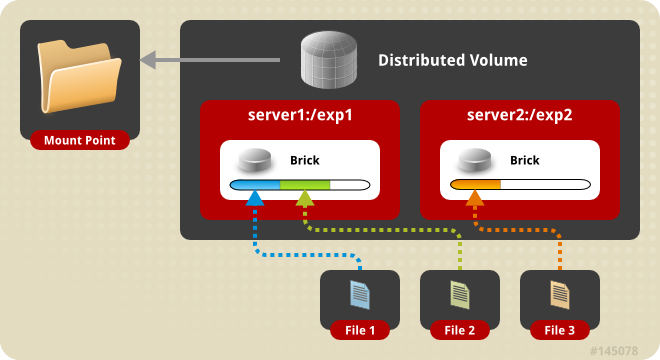
分布式卷 ( Distributed Glusterfs Volume , 又称DHT ) , glusterfs创建volume不指定卷类型时 , 默认即分布式卷 , 特点如下 :
根据
hash算法 , 将多个文件分布到卷中的多个brick server上 , 类似 ( 不是 )raid0, 但文件无分片 ;方便扩展空间 , 但无冗余保护 ;
由于使用本地文件系统进行存储 (
brick server的本地文件系统 ) , 存取效率不高 ;受限于本地文件系统对单文件容量的限制 , 支持超大型文件系统有问题。
创建存储目录
在
brick server节点创建存储目录 , 即brick所在 ;以
glusterfs01节点为例[root@glusterfs01 ~]# mkdir /data/dis_volume创建分布式卷
命令 :
gluster volume create NEW-VOLNAME [transport [tcp | rdma | tcp,rdma]] NEW-BRICK...[root@glusterfs01 ~]# gluster volume create distributed-volume glusterfs01:/data/dis_volume glusterfs02:/data/dis_volume glusterfs03:/data/dis_volume glusterfs04:/data/dis_volume glusterfs05:/data/dis_volume volume create: distributed-volume: success: please start the volume to access data 卷信息和状态
命令”
gluster volume list”可列出已创建的卷 ; 命令”gluster volume info”可不指定具体的卷 , 即列出所有卷信息 ;info中给出除卷名外 , 还有卷类型 , 状态 ,brick组成等信息 ; 其中状态为“Created” , 需要通过命令启动后才可被挂载使用 , 在创建成功后的提示信息中有提到”please start the volume to access data”[root@glusterfs01 ~]# gluster volume info distributed-volume Volume Name: distributed-volume Type: Distribute Volume ID: d14523b7-f8ad-4e4b-9770-a67189e13604 Status: Created Snapshot Count: 0 Number of Bricks: 5 Transport-type: tcp Bricks: Brick1: glusterfs01:/data/dis_volume Brick2: glusterfs02:/data/dis_volume Brick3: glusterfs03:/data/dis_volume Brick4: glusterfs04:/data/dis_volume Brick5: glusterfs05:/data/dis_volume Options Reconfigured: storage.fips-mode-rchecksum: on transport.address-family: inet nfs.disable: on查看卷状态 ;
展示卷中每个
brick的状态 , 以及每个brick服务的监听端口。查看volume状态需要先运行命令启动卷[root@glusterfs01 ~]# gluster volume status distributed-volume Status of volume: distributed-volume Gluster process TCP Port RDMA Port Online Pid ------------------------------------------------------------------------------ Brick glusterfs01:/data/dis_volume 50714 0 Y 153939 Brick glusterfs02:/data/dis_volume 55578 0 Y 153206 Brick glusterfs03:/data/dis_volume 49588 0 Y 154675 Brick glusterfs04:/data/dis_volume 56337 0 Y 153864 Brick glusterfs05:/data/dis_volume 59001 0 Y 154260 Task Status of Volume distributed-volume ------------------------------------------------------------------------------ There are no active volume tasks启动卷
[root@glusterfs01 ~]# gluster volume start distributed-volume volume start: distributed-volume: success # 再次查看卷信息 , 状态变为"Started" [root@glusterfs01 ~]# gluster volume info distributed-volume Volume Name: distributed-volume Type: Distribute Volume ID: d14523b7-f8ad-4e4b-9770-a67189e13604 Status: Started Snapshot Count: 0 Number of Bricks: 5 Transport-type: tcp Bricks: Brick1: glusterfs01:/data/dis_volume Brick2: glusterfs02:/data/dis_volume Brick3: glusterfs03:/data/dis_volume Brick4: glusterfs04:/data/dis_volume Brick5: glusterfs05:/data/dis_volume Options Reconfigured: storage.fips-mode-rchecksum: on transport.address-family: inet nfs.disable: onclient挂载# 在客户端创建挂载目录 [root@client ~]# mkdir /mnt/distributed # 挂载时 , 可使用任意1台已加入可信存储池并已创建对应卷类型的server节点 ; # brick以”SERVER:EXPORT”的形式标识 [root@client ~]# mount -t glusterfs glusterfs01:distributed-volume /mnt/distributed/查看
brick的监听端口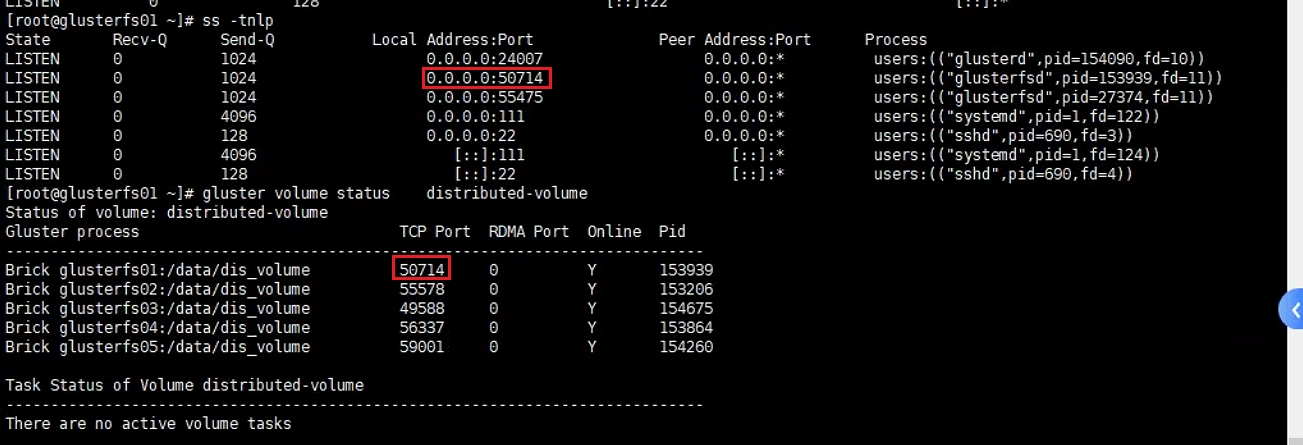
存储测试
[root@client ~]# cd /mnt/distributed/
[root@client distributed]# touch distributed{1..4}.txt
[root@client distributed]# touch distributed5.txt
在各个节点检查文件存放
[root@glusterfs01 ~]# tree /data/dis_volume/
/data/dis_volume/
└── distributed2.txt

[root@glusterfs02 ~]# tree /data/dis_volume/
/data/dis_volume/
└── distributed4.txt
分布式卷将多个文件分布存储在多个
brick server, 但并无副本。
2.2 条带卷(Deprecated)
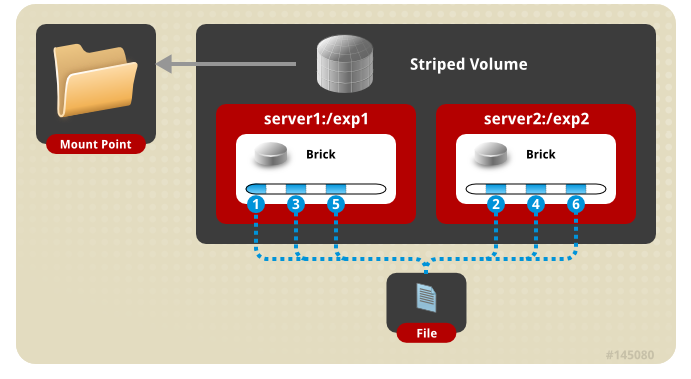
条带卷(Striped Glusterfs Volume) , 特点如下 :
每个文件被分片成等同于
brick数量的chunks, 然后以round robin的方式将每个chunk存储到1个brick, 相当于raid0;单一超大容量文件可被分片 , 不受
brick server本地文件系统的限制 ;文件分片后 , 并发粒度是
chunks, 分布式读写性能较高 , 但分片随机读写可能会导致硬盘iops较高 ;无冗余 ,
1个server节点故障会导致所有数据丢失。
创建条带卷
# 命令 : gluster volume create NEW-VOLNAME [stripe COUNT] [transport [tcp | dma | tcp,rdma]] NEW-BRICK...
# 以上命令在任意server节点操作均可 , 以glusterfs01节点为例 ;
# 创建名为”strsipe-volume”的逻辑卷 ;
# 必须指定卷类型 ( 默认为分布式卷 ) 与对应的条带数量 , 数量需要与后续使用brick server数量对等 ;
# “transport tcp”指定集群通信方式
[root@glusterfs01 ~]# gluster volume create stripe-volume stripe 3 transport tcp glusterfs01:/brick1/str_volume glusterfs02:/brick2/str_volume glusterfs03:/brick3/str_volume
启动卷
[root@glusterfs01 ~]# gluster volume start stripe-volume
client挂载[root@glusterfs-client ~]# mkdir /mnt/stripe [root@glusterfs-client ~]# mount.glusterfs 172.30.200.51:stripe-volume /mnt/stripe/查看挂载情况
# 已挂载卷的容量是3个brick容量之和
[root@glusterfs-client ~]# df -Th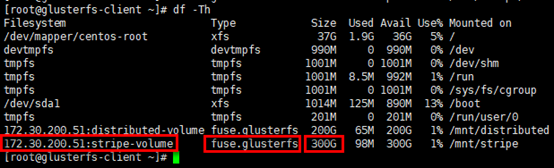
存储测试
# 在client的挂载目录下创建若干文件
[root@glusterfs-client ~]# cd /mnt/stripe/
[root@glusterfs-client stripe]# touch stripe{1..6}.txt

# 向strip1.txt文件写入内容
[root@glusterfs-client stripe]# echo "this is stripe1.txt" >> strip1.txt

# glusterfs01节点
[root@glusterfs01 ~]# tree /brick1/str_volume/
[root@glusterfs01 ~]# cat /brick1/str_volume/strip1.txt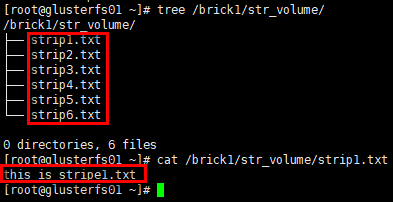
# glusterfs02节点
[root@glusterfs02 ~]# tree /brick2/str_volume/
[root@glusterfs02 ~]# cat /brick2/str_volume/strip1.txt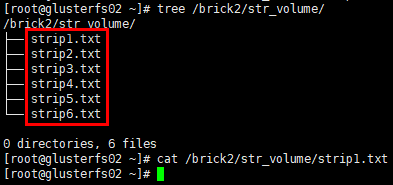
# glusterfs03节点
[root@glusterfs03 ~]# tree /brick3/str_volume/
[root@glusterfs03 ~]# cat /brick3/str_volume/strip1.txt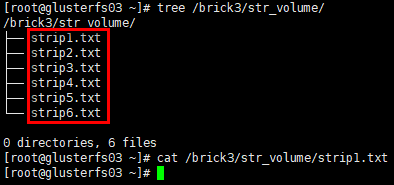
条带卷将1个文件分片存储在多个
brick server, 但并无副本。
2.3 复制卷
2.3.1 复制卷基础
复制卷 ( Replicated Glusterfs Volume , 又称AFR ( Auto File Replication ) ) , 特点如下 :
每个文件同步复制镜像到多个
brick, 相当于文件级raid1;副本数量通常设置为
2或3, 设置的副本数量需要是brick数量 ( 至少为2) 的倍数 ( 如2台brick server, 可设置副本数为2/4/6/…; 如3台brick server, 可设置副本数为3/6/9/…; 依次类推 ) , 且每个brick的容量相等 ;读性能提升 , 写性能下降 , 因为
glusterfs的复制是同步事务操作 , 即写文件时 , 先把这个文件锁住 , 然后同时写两个或多个副本 , 写完后解锁 , 操作结束 (ceph采用异步写副本 , 即写到一个主OSD便返回 , 这个OSD再通过内部网络异步写到其余OSD) ;通常与分布式卷或条带卷组合使用 , 解决前两者的冗余问题 ;
提升数据可靠性 , 但磁盘利用率低 ;
副本数设置为
2时 , 可能会有脑裂 (Split-brain) 的风险 ( 风险提示 , 但可配置 ) , 主要因在两个副本不一致时 , 无法仲裁以哪个副本为准 , 解决方案是加入仲裁或者设置3副本。
2.3.2 复制卷部署
准备复制卷目录
[root@glusterfs01 ~]# mkdir /data/repl_volume创建复制卷
命令 :
gluster volume create NEW-VOLNAME [replica COUNT] [transport [tcp | rdma | tcp,rdma]] NEW-BRICK...# 创建名为”replica-volume”的逻辑卷 ; # 必须指定卷类型(默认为分布式卷)与对应的副本数量 , 数量需要与后续使用brick server数量对等 ; # “transport tcp”指定集群通信方式 ; # 副本数为2时 , 有脑裂风险提示 , 提示采用3副本或仲裁机制 , 验证环境略过即可 [root@glusterfs01 ~]# gluster volume create replica-volume replica 5 transport tcp glusterfs01:/data/repl_volume glusterfs02:/data/repl_volume glusterfs03:/data/repl_volume glusterfs04:/data/repl_volume glusterfs05:/data/repl_volume volume create: replica-volume: success: please start the volume to access data启动卷
[root@glusterfs01 ~]# gluster volume start replica-volume volume start: replica-volume: success [root@glusterfs01 ~]# gluster volume info replica-volume Volume Name: replica-volume Type: Replicate Volume ID: 561133a7-00d2-463d-a8f3-e8351c8a6d33 Status: Started Snapshot Count: 0 Number of Bricks: 1 x 5 = 5 Transport-type: tcp Bricks: Brick1: glusterfs01:/data/repl_volume Brick2: glusterfs02:/data/repl_volume Brick3: glusterfs03:/data/repl_volume Brick4: glusterfs04:/data/repl_volume Brick5: glusterfs05:/data/repl_volume Options Reconfigured: cluster.granular-entry-heal: on storage.fips-mode-rchecksum: on transport.address-family: inet nfs.disable: on performance.client-io-threads: offclient挂载[root@client ~]# mkdir /mnt/replica [root@client ~]# mount -t glusterfs glusterfs01:replica-volume /mnt/replica [root@client ~]# df -hT Filesystem Type Size Used Avail Use% Mounted on devtmpfs devtmpfs 4.0M 0 4.0M 0% /dev tmpfs tmpfs 1.8G 0 1.8G 0% /dev/shm tmpfs tmpfs 732M 13M 720M 2% /run /dev/mapper/rl_host--192--168--71--7-root xfs 195G 3.0G 192G 2% / /dev/vda1 xfs 5.0G 289M 4.7G 6% /boot tmpfs tmpfs 162M 0 162M 0% /run/user/0 glusterfs01:distributed-volume fuse.glusterfs 500G 8.7G 492G 2% /mnt/distributed glusterfs01:replica-volume fuse.glusterfs 100G 1.8G 99G 2% /mnt/replica存储测试
# 在client的挂载目录下创建若干文件
[root@client ~]# cd /mnt/replica/
[root@client replica]# touch replica{1..4}.txt
[root@client replica]# echo "this is replica1.txt" >> replica1.txt

#glusterfs05节点
[root@glusterfs05 ~]# tree /data/repl_volume/
/data/repl_volume/
├── replica1.txt
├── replica2.txt
├── replica3.txt
└── replica4.txt

0 directories, 4 files
[root@glusterfs05 ~]# cat /data/repl_volume/replica1.txt
this is replica1.txt


#glusterfs04节点
[root@glusterfs04 ~]# tree /data/repl_volume/
/data/repl_volume/
├── replica1.txt
├── replica2.txt
├── replica3.txt
└── replica4.txt

0 directories, 4 files
[root@glusterfs04 ~]# cat /data/repl_volume/replica1.txt
this is replica1.txt
结论:复制卷将1个文件同步镜像到多个brick server , 数据有冗余备份。
2.3.3 AFR恢复原理
数据恢复只针对复制卷 , AFR数据修复主要涉及三个方面:ENTRY , META , DATA。
记录描述副本状态的称之为ChangeLog , 记录在每个副本文件扩展属性里 , 读入内存后以矩阵形式判断是否需要修复以及要以哪个副本为Source进行修复 ; 初始值以及正常值为0(注:ENTRY和META,DATA分布对应着一个数值)。
以冗余度为2 , 即含有2个副本A和B的DATA修复为例 , write的步骤分解为:
下发
Write操作 ;加锁
Lock;向
A,B副本的ChangeLog分别加1, 记录到各副本的扩展属性中 ;对
A,B副本进行写操作 ;若副本写成功则
ChangeLog减1, 若该副本写失败则ChangLog值不变 , 记录到各个副本的扩展属性中 ;解锁
UnLock;向上层返回 , 只要有一个副本写成功就返回成功。
上述操作在AFR中是完整的一个transaction动作 , 根据两个副本记录的ChangeLog的数值确定了副本的几种状态:
WISE:智慧的 , 即该副本的ChangeLog中对应的值是0, 而另一副本对应的数值大于0;INNOCENT:无辜的 , 即两副本的ChangeLog对应的值都是0;FOOL:愚蠢的 , 即该副本的ChangeLog对应的值大于是0, 而另一副本对应的数值是0;IGNORANT, 忽略的 , 即该副本的ChangeLog丢失。
恢复分以下场景:
1个节点changelog状态为WISE, 其余节点为FOOL或其他非WISE状态 , 以WISE节点去恢复其他节点 ;所有节点是
IGNORANT状态 , 手动触发heal, 通过命令以UID最小的文件作为source, 去恢复大小为0的其他文件 ;多个状态是
WISE时 , 即出现脑裂状态 , 脑裂的文件通常读不出来 , 报”Input/Output error” , 可查看日志/var/log/glusterfs/glustershd.log。
# 通过命令查看副本文件的扩展属性:getfattr -m . -d -e hex [filename]
# “trusted.afr.xxx”部分即扩展属性 , 值是24bit , 分3部分 , 依次标识DATA  , META ,  ENTRY 3者的changelog
[root@glusterfs01 ~]# getfattr -m . -d -e hex /data/repl_volume/replica1.txt
getfattr: Removing leading '/' from absolute path names
# file: data/repl_volume/replica1.txt
trusted.afr.dirty=0x000000000000000000000000
trusted.gfid=0x2dd52b98aefc4c499166ed64e0fa8caa
trusted.gfid2path.cfd2a226d4062a26=0x30303030303030302d303030302d303030302d303030302d3030303030303030303030312f7265706c696361312e747874
trusted.glusterfs.mdata=0x0100000000000000000000000067b3686a000000002a6e0a950000000067b3686a000000002a6e0a950000000067b3685c000000000c6a0d25
2.4 纠删卷
纠删卷(Dispersed Volumes)是v3.6版本后发布的一种volume特点如下:
基于纠删码(
erasure codes,EC)实现 , 类似于raid5/6(取决于redundancy等级) ;通过配置
redundancy(冗余)级别提高可靠性 , 在保证较高的可靠性同时 , 可以提升物理存储空间的利用率 ;文件被分割成大小相同的
chunk(块) , 每个chunk又被分割成fragment, 冗余信息的fragment随之生成 , 且同一个fragment只会保存一个brick上 ;redundancy均匀分布存储在所有的brick, 逻辑卷的有效空间是= * (#bricks - redundancy);在数据恢复时 , 只要
(#bricks - redundancy)个fragment(数据或冗余信息)可用 , 就能正常恢复数据 ;卷中所有
brick容量需要相同 , 否则最小的brick满容量时 , 数据无法写入 ;实际部署时 ,
redundancy < #bricks / 2 (or equivalently, redundancy * 2 < #bricks), 即brick至少是3个 ;redundancy设置为0时 ,DispersedVolume等同于分布式卷 ; 若redundancy设置为brick/2时 ,DispersedVolume等同于复制卷。
创建纠删码
语法 :
gluster volume create [disperse [<count>]] [redundancy <count>] [transport tcp | rdma | tcp,rdma]这里在
glusterfs01节点上面创建名为”disperse-volume”的逻辑卷, 必须指定卷类型(默认为分布式卷)与对应的brick server数量。冗余等级”
redundancy”需要根据使用brick server数量(“disperse conunt”) , 并结合期望的冗余度数综合考量。也可不设置冗余等级”
redundancy” , 系统会根据brick server数量(“disperse conunt”)自动计算最优值 , 确认即可。如disperse conunt=3, 则redundancy=1(无“warning message”) ;disperse count=6, 则redundancy=2(有“warning message”) ;但disperse conunt=4, 则无最优值 , 此时使用默认redundancy=1(有“warning message”)。“
transport tcp”指定集群通信方式 , 默认即tcp。[root@glusterfs01 ~]# gluster volume create disperse-volume disperse 5 transport tcp glusterfs01:/data/disperse_volume glusterfs02:/data/disperse_volume glusterfs03:/data/disperse_volume glusterfs04:/data/disperse_volume glusterfs05:/data/disperse_volume volume create: disperse-volume: success: please start the volume to access data启动卷
[root@glusterfs01 ~]# gluster volume start disperse-volume
volume start: disperse-volume: success
[root@glusterfs01 ~]# gluster volume info disperse-volume

Volume Name: disperse-volume
Type: Disperse
Volume ID: 71132f2e-3a06-498c-8e9f-c96d767ea043
Status: Started
Snapshot Count: 0
Number of Bricks: 1 x (4 + 1) = 5
Transport-type: tcp
Bricks:
Brick1: glusterfs01:/data/disperse_volume
Brick2: glusterfs02:/data/disperse_volume
Brick3: glusterfs03:/data/disperse_volume
Brick4: glusterfs04:/data/disperse_volume
Brick5: glusterfs05:/data/disperse_volume
Options Reconfigured:
storage.fips-mode-rchecksum: on
transport.address-family: inet
nfs.disable: on
client挂载
[root@client ~]# mkdir /mnt/disperse
[root@client ~]# mount -t glusterfs glusterfs01:disperse-volume /mnt/disperse
[root@client ~]# df -hT
Filesystem                                Type            Size  Used Avail Use% Mounted on
devtmpfs                                  devtmpfs        4.0M     0  4.0M   0% /dev
tmpfs                                     tmpfs           1.8G     0  1.8G   0% /dev/shm
tmpfs                                     tmpfs           732M   13M  720M   2% /run
/dev/mapper/rl_host--192--168--71--7-root xfs             195G  3.0G  192G   2% /
/dev/vda1                                 xfs             5.0G  289M  4.7G   6% /boot
tmpfs                                     tmpfs           162M     0  162M   0% /run/user/0
glusterfs01:distributed-volume            fuse.glusterfs  500G  8.7G  492G   2% /mnt/distributed
glusterfs01:replica-volume                fuse.glusterfs  100G  1.8G   99G   2% /mnt/replica
glusterfs01:disperse-volume               fuse.glusterfs  400G  7.0G  393G   2% /mnt/disperse
存储测试
[root@client disperse]# touch disperse{1..4}.txt
[root@client disperse]# echo "this is disperse1.txt" >> disperse1.txt
[root@client disperse]# tree /mnt/disperse/
/mnt/disperse/
├── disperse1.txt
├── disperse2.txt
├── disperse3.txt
└── disperse4.txt

0 directories, 4 files


#glusterfs01节点
[root@glusterfs01 ~]# tree /data/disperse_volume/
/data/disperse_volume/
├── disperse1.txt
├── disperse2.txt
├── disperse3.txt
└── disperse4.txt

0 directories, 4 files
[root@glusterfs01 ~]# cat /data/disperse_volume/disperse1.txt
this is disperse1.txt


#glusterfs02节点
[root@glusterfs02 ~]# tree /data/disperse_volume/
/data/disperse_volume/
├── disperse1.txt
├── disperse2.txt
├── disperse3.txt
└── disperse4.txt

0 directories, 4 files
[root@glusterfs02 ~]# cat /data/disperse_volume/disperse1.txt
this is disperse1.txt

#glusterfs05节点
[root@glusterfs05 ~]# tree /data/disperse_volume/
/data/disperse_volume/
├── disperse1.txt
├── disperse2.txt
├── disperse3.txt
└── disperse4.txt

0 directories, 4 files
[root@glusterfs05 ~]# cat /data/disperse_volume/disperse1.txt
this is disperse1.txt
this is disperse1.txt
this is disperse1.txt
this is disperse1.txt
结论:纠删卷将数据文件(含冗余信息)分布在多个brick中 , 数据有冗余。
2.5. 分布式复制卷
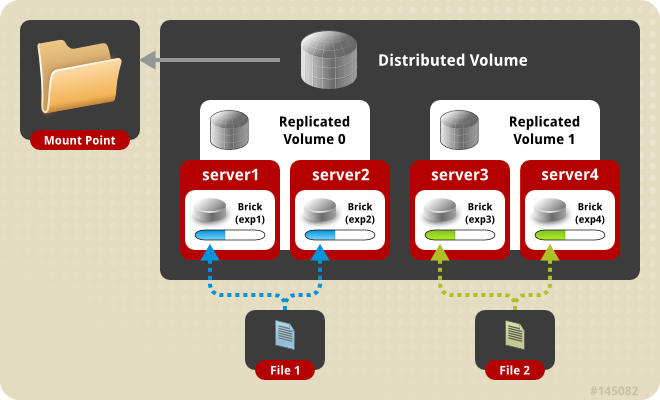
分布式复制卷(Distributed Replicated Glusterfs Volume) , 是分布式卷与复制卷的组合 , 兼具两者的功能 , 特点如下:
若干
brick组成1个复制卷 , 另外若干brick组成其他复制卷 ; 单个文件在复制卷内数据保持副本 , 不同文件在不同复制卷之间进行哈希分布 ; 即分布式卷跨复制卷集(replicated sets) ;brick server数量是副本数量的倍数 , 且>=2倍 , 即最少需要4台brick server, 同时组建复制卷集的brick容量相等。
创建分布式复制卷
语法 :
gluster volume create NEW-VOLNAME [replica COUNT] [transport [tcp | rdma | tcp,rdma]] NEW-BRICK...以上命令在任意
server节点操作均可 , 以glusterfs01节点为例。创建名为”
distributed-replica-volume”的逻辑卷。必须指定卷类型(默认为分布式卷)与对应的副本数量 ,brick server数量是副本数量的倍数 , 且>=2倍。不需要指出分布式卷类型 , 只要副本数量与brick server数量不等且符合倍数关系 , 即是分布式复制卷。“
transport tcp”指定集群通信方式 ;副本数为
2时 , 有脑裂风险提示 , 提示采用3副本或仲裁机制 , 验证环境略过即可[root@glusterfs01 ~]# gluster volume create distribute-replica-volume replica 2 transport tcp glusterfs01:/data/dis_repl_volume glusterfs02:/data/dis_repl_volume glusterfs03:/data/dis_repl_volume glusterfs04:/data/dis_repl_volume Replica 2 volumes are prone to split-brain. Use Arbiter or Replica 3 to avoid this. See: http://docs.gluster.org/en/latest/Administrator-Guide/Split-brain-and-ways-to-deal-with-it/. Do you still want to continue? (y/n) y volume create: distribute-replica-volume: success: please start the volume to access data启动卷
# 卷类型:分布式复制卷 # “Number of Bricks”:2副本 , 2个副本集(replicated sets ) , 4个brick server [root@glusterfs01 ~]# gluster volume start distribute-replica-volume volume start: distribute-replica-volume: success [root@glusterfs01 ~]# gluster volume info distribute-replica-volume Volume Name: distribute-replica-volume Type: Distributed-Replicate Volume ID: 0cc64c70-e2f8-4ae9-92cd-0325aa075e4e Status: Started Snapshot Count: 0 Number of Bricks: 2 x 2 = 4 Transport-type: tcp Bricks: Brick1: glusterfs01:/data/dis_repl_volume Brick2: glusterfs02:/data/dis_repl_volume Brick3: glusterfs03:/data/dis_repl_volume Brick4: glusterfs04:/data/dis_repl_volume Options Reconfigured: cluster.granular-entry-heal: on storage.fips-mode-rchecksum: on transport.address-family: inet nfs.disable: on performance.client-io-threads: offclient挂载[root@client disperse]# mkdir /mnt/distributed-replica [root@client disperse]# mount -t glusterfs glusterfs01:distribute-replica-volume /mnt/distributed-replica/ [root@client disperse]# df -hT Filesystem Type Size Used Avail Use% Mounted on devtmpfs devtmpfs 4.0M 0 4.0M 0% /dev tmpfs tmpfs 1.8G 0 1.8G 0% /dev/shm tmpfs tmpfs 732M 13M 720M 2% /run /dev/mapper/rl_host--192--168--71--7-root xfs 195G 3.0G 192G 2% / /dev/vda1 xfs 5.0G 289M 4.7G 6% /boot tmpfs tmpfs 162M 0 162M 0% /run/user/0 glusterfs01:distributed-volume fuse.glusterfs 500G 8.7G 492G 2% /mnt/distributed glusterfs01:replica-volume fuse.glusterfs 100G 1.8G 99G 2% /mnt/replica glusterfs01:disperse-volume fuse.glusterfs 400G 7.0G 393G 2% /mnt/disperse glusterfs01:distribute-replica-volume fuse.glusterfs 200G 3.5G 197G 2% /mnt/distributed-replica存储测试
# 在client的挂载目录下创建若干文件
[root@client ~]# cd /mnt/distributed-replica/
[root@client distributed-replica]# touch distributed-replica{1..6}.txt

# 向distributed-replica1.txt文件写入内容
[root@client distributed-replica]# echo "this is distributed-replica1.txt" >> distributed-replica1.txt

# glusterfs01节点

[root@glusterfs-client ~]# cd /mnt/distributed-replica/
[root@glusterfs-client distributed-replica]# touch distributed-replica{1..6}.txt

# 向distributed-replica1.txt文件写入内容
[root@glusterfs-client distributed-replica]# echo "this is distributed-replica1.txt" >> distributed-replica1.txt

#glusterfs01节点
[root@glusterfs01 ~]# tree /data/dis_repl_volume/
/data/dis_repl_volume/
├── distributed-replica4.txt
└── distributed-replica5.txt

0 directories, 2 files


# glusterfs02节点
[root@glusterfs02 ~]# tree /data/dis_repl_volume/
/data/dis_repl_volume/
├── distributed-replica4.txt
└── distributed-replica5.txt

0 directories, 2 files

#glusterfs03节点
[root@glusterfs03 ~]# tree /data/dis_repl_volume/
/data/dis_repl_volume/
├── distributed-replica1.txt
├── distributed-replica2.txt
├── distributed-replica3.txt
└── distributed-replica6.txt

0 directories, 4 files
[root@glusterfs03 ~]# cat /data/dis_repl_volume/distributed-replica1.txt
this is distributed-replica1.txt

#glusterfs04节点
[root@glusterfs04 ~]# tree /data/dis_repl_volume/
/data/dis_repl_volume/
├── distributed-replica1.txt
├── distributed-replica2.txt
├── distributed-replica3.txt
└── distributed-replica6.txt

0 directories, 4 files
[root@glusterfs04 ~]# cat /data/dis_repl_volume/distributed-replica1.txt
this is distributed-replica1.txt
结论:分布式复制卷将数据文件分布在多个复制集(replicated sets )中 , 每个复制集中数据有镜像冗余。
2.6. 分布式纠删卷
分布式纠删卷(Distributed Dispersed Volumes)等效于分布式复制卷 , 但使用的是纠删子卷 , 而非复制子卷。
2.7 分布式条带卷(Deprecated)
分布式条带卷(Distributed Striped Glusterfs Volume) , 是分布式卷与条带卷的组合 , 兼具两者的功能 , 特点如下:
若干
brick组成1个条带卷 , 另外若干brick组成其他条带卷 ; 单个文件在条带卷内数据以条带的形式存储 , 不同文件在不同条带卷之间进行哈希分布 ; 即分布式卷跨条带卷 ;brick server数量是条带数的倍数 , 且>=2倍 , 即最少需要4台brick server。
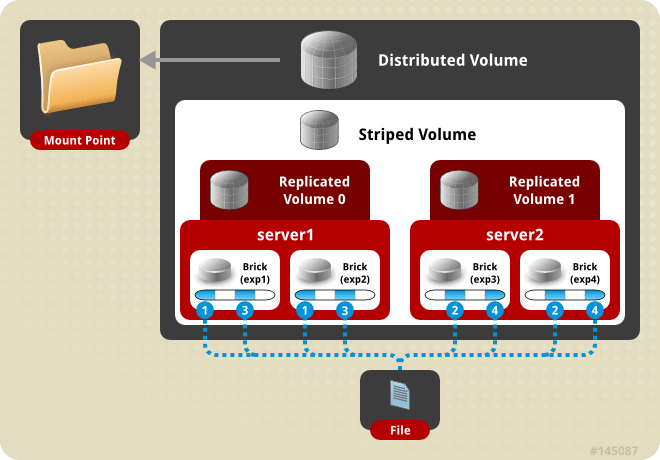
3. gluster卷管理
启动卷
gluster volume start test-volume停止卷
gluster volume stop test-volume删除卷
#先停止卷后才能删除
gluster volume delete test-volume
查看卷
#列出集群中的所有卷
gluster volume list
#查看集群中的卷信息
gluster volume info [all]
#查看集群中的卷状态
gluster volume status [all]

gluster volume status [detail| clients | mem | inode | fd]


#示例
[root@glusterfs04 ~]# gluster volume list
disperse-volume
distribute-replica-volume
distributeVolume
distributed-volume
replica-volume

#示例
[root@glusterfs04 ~]# gluster volume info replica-volume

Volume Name: replica-volume
Type: Replicate
Volume ID: 561133a7-00d2-463d-a8f3-e8351c8a6d33
Status: Started
Snapshot Count: 0
Number of Bricks: 1 x 5 = 5
Transport-type: tcp
Bricks:
Brick1: glusterfs01:/data/repl_volume
Brick2: glusterfs02:/data/repl_volume
Brick3: glusterfs03:/data/repl_volume
Brick4: glusterfs04:/data/repl_volume
Brick5: glusterfs05:/data/repl_volume
Options Reconfigured:
cluster.granular-entry-heal: on
storage.fips-mode-rchecksum: on
transport.address-family: inet
nfs.disable: on
performance.client-io-threads: off

#示例
[root@glusterfs04 ~]# gluster volume status replica-volume
Status of volume: replica-volume
Gluster process                             TCP Port  RDMA Port  Online  Pid
------------------------------------------------------------------------------
Brick glusterfs01:/data/repl_volume         54583     0          Y       164161
Brick glusterfs02:/data/repl_volume         57058     0          Y       163509
Brick glusterfs03:/data/repl_volume         57797     0          Y       164643
Brick glusterfs04:/data/repl_volume         50386     0          Y       163999
Brick glusterfs05:/data/repl_volume         51352     0          Y       164629
Self-heal Daemon on localhost               N/A       N/A        Y       164015
Self-heal Daemon on glusterfs05             N/A       N/A        Y       164645
Self-heal Daemon on glusterfs01             N/A       N/A        Y       164177
Self-heal Daemon on glusterfs03             N/A       N/A        Y       164659
Self-heal Daemon on glusterfs02             N/A       N/A        Y       163525

Task Status of Volume replica-volume
------------------------------------------------------------------------------
There are no active volume tasks

[root@glusterfs01 ~]#  gluster volume status replica-volume glusterfs01:/data/repl_volume/
Status of volume: replica-volume
Gluster process                             TCP Port  RDMA Port  Online  Pid
------------------------------------------------------------------------------
Brick glusterfs01:/data/repl_volume         54583     0          Y       164161

[root@glusterfs01 ~]#  gluster volume status replica-volume glusterfs02:/data/repl_volume/
Status of volume: replica-volume
Gluster process                             TCP Port  RDMA Port  Online  Pid
------------------------------------------------------------------------------
Brick glusterfs02:/data/repl_volume         57058     0          Y       163509
扩展卷
gluster volume add-brick <VOLNAME> <NEW-BRICK>
#注意 , 如果是复制卷或者条带卷 , 则每次添加的Brick数必须是replica或者stripe的整数倍。
收缩卷
#先将数据迁移到其它可用的Brick , 迁移结束后才将该Brick移除:
gluster volume remove-brick start
#在执行了start之后 , 可以使用status命令查看移除进度:
gluster volume remove-brick status
#不进行数据迁移 , 直接删除该Brick:
gluster volume remove-brick commit
#注意 , 如果是复制卷或者条带卷 , 则每次移除的Brick数必须是replica或者stripe的整数倍。
迁移卷
#使用start命令开始进行迁移:
gluster volume replace-brick start

#在数据迁移过程中 , 可以使用pause命令暂停迁移:
gluster volume replace-brick pause

#在数据迁移过程中 , 可以使用abort命令终止迁移:
gluster volume replace-brick abort

#在数据迁移过程中 , 可以使用status命令查看迁移进度:
gluster volume replace-brick status

#在数据迁移结束后 , 执行commit命令来进行Brick替换:
gluster volume replace-brick commit
重新均衡卷
#不迁移数据: gluster volume rebalance lay-outstart gluster volume rebalance start gluster volume rebalance startforce gluster volume rebalance status gluster volume rebalance stopBrick管理# 添加brick gluster volume add-brick VOLNAME NEW-BRICK # 移除brick gluster volume remove-brick VOLNAME BRICK [start | status | commit] # 替换brick gluster volume replace-brick VOLNAME BRICKNEW-BRICK [start | pause | sbortstatus | commit]添加
Brickgluster volume add-brick test-volume 192.168.1.{151,152}:/mnt/brick2删除
Brick#若是副本卷 , 则移除的Bricks数是replica的整数倍 gluster volume remove-brick test-volume 192.168.1.{151,152}:/mnt/brick2 start #在执行开始移除之后 , 可以使用status命令进行移除状态查看。 gluster volume remove-brick test-volume 192.168.1.{151,152}:/mnt/brick2 status #使用commit命令执行Brick移除 , 则不会进行数据迁移而直接删除Brick , 符合不需要数据迁移的用户需求。 gluster volume remove-brick test-volume 192.168.1.{151,152}:/mnt/brick2 commit替换
Brick把
192.168.1.151:/mnt/brick0替换为192.168.1.151:/mnt/brick2开始替换
gluster volume replace-brick test-volume 192.168.1.:/mnt/brick0 ..152:/mnt/brick2 start
异常信息:volume replace-brick: failed: /data/share2 or a prefix of it is already part of a volume

#说明 /mnt/brick2 曾经是一个Brick。具体解决方法
rm -rf /mnt/brick2/.glusterfs

setfattr -x trusted.glusterfs.volume-id /mnt/brick2
setfattr -x trusted.gfid /mnt/brick2

#如上 , 执行replcace-brick卷替换启动命令 , 使用start启动命令后 , 开始将原始Brick的数据迁移到即将需要替换的Brick上。
查看是否替换完
gluster volume replace-brick test-volume 192.168.1.151:/mnt/brick0 ..152:/mnt/brick2 status在数据迁移的过程中 , 可以执行abort命令终止Brick替换。
gluster volume replace-brick test-volume 192.168.1.151:/mnt/brick0 ..152:/mnt/brick2 abort在数据迁移结束之后 , 执行commit命令结束任务 , 则进行Brick替换。使用volume info命令可以查看到Brick已经被替换。
gluster volume replace-brick test-volume 192.168.1.151:/mnt/brick0 .152:/mnt/brick2 commit
#此时我们再往 /sf/data/vs/gfs/rep2上添加数据的话 , 数据会同步到 192.168.1.152:/mnt/brick0和192.168.1.152:/mnt/brick2上。而不会同步到192.168.1.151:/mnt/brick0 上。
文件系统扩展属性
#获取文件扩展属性
getfattr -d -m . -e hex filename
getfattr -d -m "trusted.afr.*" -e hex filename
4. 系统优化
这里GlusterFS通过使用命令volume get <VOLNAME|all> <key|all>获取对应卷的所有参数值的设置。通过命令volume set help可以查看所有参数的详细说明
启动元数据缓存
元数据缓存几乎可以提高所有工作负载的性能 , 这种场景除外:大多数工作负载是同时从多个客户端访问文件
执行以下命令启用元数据缓存和缓存失效
gluster volume set <volname> group metadata-cache此组命令允许缓存文件或目录的
stat和xattr信息。缓存每10分钟刷新一次 , 并启用缓存失效以保证缓存一致性。要增加可缓存的文件数量 , 请执行以下命令:
gluster volume set <volname> network.inode-lru-limit <n>n设置为50000。如果卷中的活动文件数量非常多 , 则可以增加该值。增加此数字会增加brick进程的内存占用量。默认情况下 , 一些
xattrs会被gluster缓存 , 例如:capability xattrs、ima xattrs ACL等。如果使用Gluster存储的应用程序使用了任何其他xattrs, 请执行以下命令将这些xattrs添加到元数据缓存列表中:gluster volume set <volname> xattr-cache-list "comma separated xattr list"一个具体的例子:
gluster volume set <volname> xattr-cache-list "user.org.netatalk.*,user.swift.metadata"
目录操作性能提升
在开启了元数据缓存的基础中 , 可以进行如下设置以提高目录操作的性能
目录list性能。开启
parallel-readdir#目录预读优化 gluster volume set <VOLNAME> performance.readdir-ahead on #目录并行读的优化 gluster volume set <VOLNAME> performance.parallel-readdir on #设置performance.readdir-ahead的内存,默认是10mb,可以适当调大,比如设置为128MB gluster volume set monitoring_vol performance.rda-cache-limit 60mb文件/目录创建性能。开启
nl-cachegluster volume set <volname> group nl-cache gluster volume set <volname> nl-cache-positive-entry on这个命令也同时启用了缓存失效,缓存失效时间
10分钟
小文件读性能提升
如果使用场景主要是小文件的读取,执行如下命令,命令启用在客户端缓存中缓存小文件的内容。启用缓存失效可确保缓存一致性。
gluster volume set <volname> performance.quick-read on #优化读取小文件的性能。
gluster volume set <volname> performance.cache-invalidation on
gluster volume set <volname> features.cache-invalidation on
gluster volume set <volname> performance.qr-cache-timeout 600 # 10 min recommended setting
gluster volume set <volname> cache-invalidation-timeout 600 # 10 min recommended setting
缓存相关设置
glusterfs开启IO缓存的功能gluster volume set <volname> performance.io-cache on数据读取的
cache的内存大小,总缓存大小可以使用命令设置。 按照业务特性和机器配置来设定这个值gluster volume set <volname> cache-size <size>设定缓存文件的最大尺寸 , 默认是
0。默认情况下 , 具有大小的文件<=64KB会被缓存。使用如下命令更改该值(注意单位,size填写64KB 2MB等):gluster volume set <volname> performance.cache-max-file-size <size>设置缓存文件的最小尺寸,默认是
0。gluster volume set <volname> performance.cache-min-file-size <size>进程IO相关
// 指定客户端网络请求的同时处理的个数,默认是2,这个参数不要超过cpu core的个数 gluster volume set <volname> client.event-threads 32 // 指定服务端网络请求的同时处理的个数,默认是2,这个参数值不要超过cpu core的个数 gluster volume set <volname> server.event-threads 32 // 在写数据时,先写入缓存内,再写入硬盘,以提高写入的性能。 gluster volume set <volname> write-behind on // 设置write-behind开启后,内部队列积累的数据量上线,默认是128KB,这个值视情况而定 gluster volume set <volname> aggregate-size 8mb // 在write-behind开启后,设置flush-behind开启后,用户数据写入到内部队列后直接返回给操作结果给用户。开启异步 gluster volume set <volname> flush-behind on // 这个选项仅仅是针对EC卷生效,并行读取EC卷数据的线程,因为EC数做分片的,所以提供整个参数的值可以提高读取数据的并发度 gluster volume set <volname> performance.client-io-threads on // 设置实际做IO操作线程的数量,建议不超过cpu core的数量 gluster volume set <volname> performance.io-thread-count 16 // 设定每个glusterfsd 处理请求的队列的上线,尽量让glusterfsd 进行处理,默认是64 gluster volume set <volname> server.outstanding-rpc-limit 2048 // performance.write-behind和performance.flush-behind开启情况下,设置write buffer,默认是1M。建议设计在32~64M,等buffer满了会把请求往服务端请求 gluster volume set <volname> performance.write-behind-window-size 64Mheal修复速度优化// 设置glusterfs shd修复IO线程数 gluster volume set <volname> cluster.shd-max-threads 64 //修复的数据快大小,默认是1(1*128k),默认是按照128K数据快修复,如果需要修复的数据很大,这个默认1太小,可以适当的调大,最大是128M gluster volume set <volname> cluster.self-heal-window-size 1024 // 取消修复速度(rate-limiting for self-heal)的限制,这个在修复速度上有非常大的提高 gluster volume set <volname> performance.enable-least-priority no三副本可用性能
//如果使用的是glusterfs三副本,默认其中2个副本所在节点宕机了,三副本卷是无法对外提供服务的,需要调整可用性,只要有一个副本能正常工作,就可以对外提供服务需要设定如下参数

// 比如使用gluster volume create rep-vol replica 3  node1:/brick node2:/brick node3:/brick,每个节点一个brick.

// 这个选项是调整卷对应节点 crash后,卷是否能被访问的策略;cluster.quorum-type有2个值,一个是fixed,另外一个是auto。如果设置为fixed, 只要节点的存活数量至少有参数cluster.quorum-count的数量, 则继续提供读写服务。值设置为auto时, 则仅当超过一半的存储节点存在,或者恰好一半(包括第一个节点)存在时,才允许写入。
gluster volume set rep-vol cluster.quorum-type fixed
gluster volume set rep-vol cluster.quorum-count 1
其余相关
// 默认值是1,设置每次读取数据选择subvolume的策略,1是根据文件的gfid选择子卷,2是根据客户端mount的pid和gfid选择子卷,3是根据最少请求读取子卷,4是选择网络延迟最小策略选择子卷
// 0 = first readable child of AFR, starting from 1st child.
// 1 = hash by GFID of file (all clients use same subvolume).
// 2 = hash by GFID of file and client PID.
// 3 = brick having the least outstanding read requests.
// 4 = brick having the least network ping latency.
gluster volume set <volname>   cluster.read-hash-mode 1

// 默认是10s,如果检测到10s,磁盘或者文件系统有问题会导致glusterfsd自杀,然后退出
gluster volume set <volname>  storage.health-check-timeout 0


#客户端等待检查服务器是否响应的持续时间,节点挂了数据不能写入
network.ping-timeout

#允许卷访问的客户端IP/拒绝卷访问的客户端IP
auth.allow/auth.reject

#磁盘剩余报警 默认10%
cluster.min-free-disk

#请求等待时间默认
network.frame-timeout

#是否关闭nfs服务
nfs.disabled
5. gluster quota相关命令
gluster volume quota 命令用于管理 GlusterFS 卷的磁盘配额。
目前
glusterfs支持quota,配额限制,默认是quota服务是关闭的.glusterfs支持基于目录级别的inode、entries数量和容量配额,这对于有些场景设计非常有必要的。Glusterfs-9版本quota的限制是通过设置hard-limit-timeout和soft-limit-timeout定期来检查的,开启后每个object的创建,都会进行quota的检查
// 开启volume的quota功能
# gluster volume quota {test-volume} enable

// 设置hard limit,hard limit是基于容量来限制目录使用上限,后面设置大小的单位可以使MB/GB/TB/PB
# gluster volume quota {test-volume}  limit-usage /data1 100GB
# gluster volume quota {test-volume}  limit-usage /data1 1TB

// 设置 soft limit,soft limit是目录属性用来指定或者说明目录能使用的hard limit的百分比。当目录使用超过了soft limit设定的百分比,用户仍然可以会继续写,但是会不断日志

// 如果用户的在/data1目录设置hard limit为1T,如果数据写入达到了1T会报错;如果没有达到1T,达到了1T * 0.5,会在所在的brick日志不断写日志,来告知已经达到了soft limit
# gluster volume quota {test-volume}  limit-usage /data1 1T 50%

// 显示quota限制的列表
# gluster volume quota {test-volume}  list

// 设置 soft-limit的检查的间隔时间,单位是秒。默认是60s,最大是1800s
gluster volume quota  {test-volume}  soft-timeout  100s

// 设置 hard-limit的检查的间隔时间,单位是秒.默认是5s,最大是60s
gluster volume quota  {test-volume}  hard-timeout  100s

// 设置根目录下data3,存储object上限为3个对象
gluster volume quota test1  limit-objects  /data3 3

// 当客户端挂载时候,用户使用df -h来看容量时候,这个设置开启hard limit体现在目录的容量上
# gluster volume quota  set {test-volume}  features.quota-deem-statfs on
参考链接
gluster性能调优_gluster 客户端参数如何优化提供读性能-CSDN博客
glusterfs-note/document/md/glusterfs/quota介绍.md at master · perrynzhou/glusterfs-note · GitHub