


S.M.A.R.T. , 全称为“Self-Monitoring Analysis and Reporting Technology “ , 即“自我监测、分析及报告技术 “ , 是一种自动的硬盘状态检测与预警系统和规范。通过在硬盘硬件内的检测指令对硬盘的硬件如磁头、盘片、马达、电路的运行情况进行监控、记录并与厂商所设定的预设安全值进行比较 , 若监控情况将或已超出预设安全值的安全范围 , 就可以通过主机的监控硬件或软件自动向用户作出警告并进行轻微的自动修复 , 以提前保障硬盘数据的安全。除一些出厂时间极早的硬盘外 , 现在大部分硬盘均配备该项技术。
所有现代硬盘都可通过SMART属性监视其当前状态。这些值提供有关硬盘各种参数的信息 , 并可提供有关磁盘剩余寿命或任何可能的错误的信息。此外 , 可以执行各种SMART测试 , 以确定磁盘上的任何硬件问题。本文介绍如何使用smartctl(Smartmontools)对Linux进行此类测试。
1. 使用smartctl进行SMART测试
1.1 安装Smartmontools
Smartmontools可以使用yum直接安装:
# yum install -y smartmontools要确保硬盘支持SMART并启用 , 请使用以下命令(本例中为硬盘/dev/sda) :
# smartctl -i /dev/sda
smartctl 6.4 2015-06-04 r4109 [x86_64-linux-3.10.0-514.el7.x86_64] (local build)
Copyright (C) 2002-15, Bruce Allen, Christian Franke, www.smartmontools.org
=== START OF INFORMATION SECTION ===
Device Model: HGST HUS726030ALE610
Serial Number: N8GH1H5Y
LU WWN Device Id: 5 000cca 244c6d728
Firmware Version: APBDT7JN
User Capacity: 3,000,592,982,016 bytes [3.00 TB]
Sector Sizes: 512 bytes logical, 4096 bytes physical
Rotation Rate: 7200 rpm
Form Factor: 3.5 inches
Device is: Not in smartctl database [for details use: -P showall]
ATA Version is: ACS-2, ATA8-ACS T13/1699-D revision 4
SATA Version is: SATA 3.1, 6.0 Gb/s (current: 6.0 Gb/s)
Local Time is: Wed Oct 11 07:09:17 2017 CST
SMART support is: Available - device has SMART capability.
SMART support is: Enabled1.2 使用示例
查看磁盘是否支持
smart[root@s186 /]# smartctl -i /dev/sda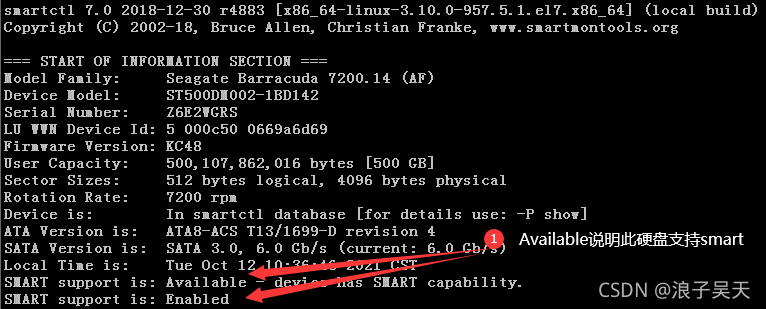
启用
smart[root@node01 ~]# smartctl --smart=on --offlineauto=on --saveauto=on /dev/sda smartctl 7.0 2018-12-30 r4883 [x86_64-linux-4.14.179-1.el7.x86_64] (local build) Copyright (C) 2002-18, Bruce Allen, Christian Franke, www.smartmontools.org === START OF ENABLE/DISABLE COMMANDS SECTION === SMART Enabled. SMART Attribute Autosave Enabled. SMART Automatic Timers not supported SMART Automatic Offline Testing Enabled every four hours.查看硬盘的所有SMART信息
[root@s210 ~]# smartctl -a /dev/sda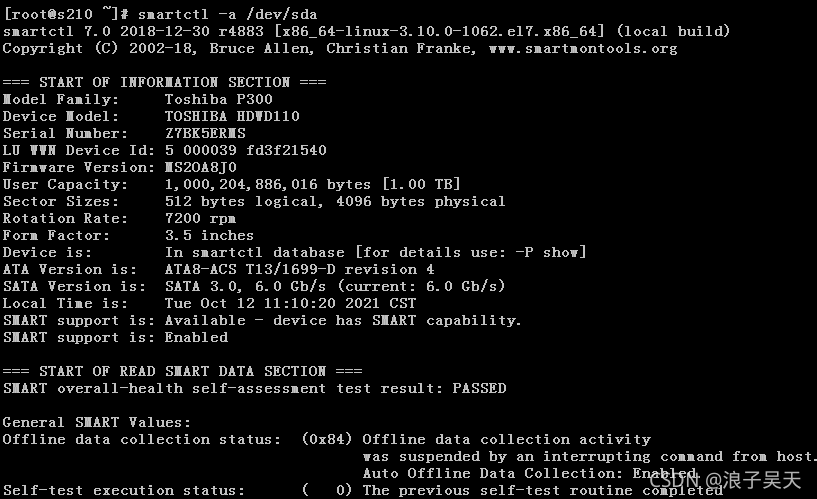
查看硬盘的健康状况
[root@s210 ~]# smartctl -H /dev/sda smartctl 7.0 2018-12-30 r4883 [x86_64-linux-3.10.0-1062.el7.x86_64] (local build) Copyright © 2002-18, Bruce Allen, Christian Franke, www.smartmontools.org === START OF READ SMART DATA SECTION === SMART overall-health self-assessment test result: PASSED #请注意result后边的结果 :PASSED , 这表示硬盘健康状态良好 , 如果这里显示Failure , 那么最好立刻给服务器更换硬盘。查看设备
SMART厂商属性和值[root@node01 ~]# smartctl -A /dev/sda smartctl 7.0 2018-12-30 r4883 [x86_64-linux-4.14.179-1.el7.x86_64] (local build) Copyright (C) 2002-18, Bruce Allen, Christian Franke, www.smartmontools.org === START OF READ SMART DATA SECTION === SMART Attributes Data Structure revision number: 1 Vendor Specific SMART Attributes with Thresholds: ID# ATTRIBUTE_NAME FLAG VALUE WORST THRESH TYPE UPDATED WHEN_FAILED RAW_VALUE 5 Reallocated_Sector_Ct 0x0032 100 100 000 Old_age Always - 0 9 Power_On_Hours 0x0032 100 100 000 Old_age Always - 38049 12 Power_Cycle_Count 0x0032 100 100 000 Old_age Always - 49 170 Available_Reservd_Space 0x0033 100 100 010 Pre-fail Always - 0 171 Program_Fail_Count 0x0032 100 100 000 Old_age Always - 0 172 Erase_Fail_Count 0x0032 100 100 000 Old_age Always - 0 174 Unsafe_Shutdown_Count 0x0032 100 100 000 Old_age Always - 38 175 Power_Loss_Cap_Test 0x0033 100 100 010 Pre-fail Always - 4620 (205 7512) 183 SATA_Downshift_Count 0x0032 100 100 000 Old_age Always - 0 184 End-to-End_Error 0x0033 100 100 090 Pre-fail Always - 0 187 Reported_Uncorrect 0x0032 100 100 000 Old_age Always - 0 190 Temperature_Case 0x0022 070 069 000 Old_age Always - 30 (Min/Max 26/31) 192 Unsafe_Shutdown_Count 0x0032 100 100 000 Old_age Always - 38 194 Temperature_Internal 0x0022 100 100 000 Old_age Always - 30 197 Current_Pending_Sector 0x0012 100 100 000 Old_age Always - 0 199 CRC_Error_Count 0x003e 100 100 000 Old_age Always - 0 225 Host_Writes_32MiB 0x0032 100 100 000 Old_age Always - 410955 226 Workld_Media_Wear_Indic 0x0032 100 100 000 Old_age Always - 4669 227 Workld_Host_Reads_Perc 0x0032 100 100 000 Old_age Always - 18 228 Workload_Minutes 0x0032 100 100 000 Old_age Always - 2282900 232 Available_Reservd_Space 0x0033 100 100 010 Pre-fail Always - 0 233 Media_Wearout_Indicator 0x0032 096 096 000 Old_age Always - 0 234 Thermal_Throttle 0x0032 100 100 000 Old_age Always - 0/0 241 Host_Writes_32MiB 0x0032 100 100 000 Old_age Always - 410955 242 Host_Reads_32MiB 0x0032 100 100 000 Old_age Always - 95082 243 NAND_Writes_32MiB 0x0032 100 100 000 Old_age Always - 633063显示硬盘历史错误信息
# smartctl -l error /dev/sdb Sample Output smartctl 6.2 2013-07-26 r3841 [x86_64-linux-3.13.0-32-generic] (local build) Copyright (C) 2002-13, Bruce Allen, Christian Franke, www.smartmontools.org === START OF READ SMART DATA SECTION === SMART Error Log Version: 1 ATA Error Count: 1 CR = Command Register [HEX] FR = Features Register [HEX] SC = Sector Count Register [HEX] SN = Sector Number Register [HEX] CL = Cylinder Low Register [HEX] CH = Cylinder High Register [HEX] DH = Device/Head Register [HEX] DC = Device Command Register [HEX] ER = Error register [HEX] ST = Status register [HEX] Powered_Up_Time is measured from power on, and printed as DDd+hh:mm:SS.sss where DD=days, hh=hours, mm=minutes, SS=sec, and sss=millisec. It "wraps" after 49.710 days. Error 1 occurred at disk power-on lifetime: 10042 hours (418 days + 10 hours) When the command that caused the error occurred, the device was active or idle. After command completion occurred, registers were: ER ST SC SN CL CH DH -- -- -- -- -- -- -- 84 51 00 00 00 00 a0 Commands leading to the command that caused the error were: CR FR SC SN CL CH DH DC Powered_Up_Time Command/Feature_Name -- -- -- -- -- -- -- -- ---------------- -------------------- ec 00 00 00 00 00 a0 08 35d+16:09:47.709 IDENTIFY DEVICE ec 00 00 00 00 00 a0 08 35d+16:09:42.437 IDENTIFY DEVICE ec 00 00 00 00 00 a0 08 35d+16:09:42.159 IDENTIFY DEVICE ef 03 46 00 00 00 a0 08 35d+16:09:42.159 SET FEATURES [Set transfer mode] ec 00 00 00 00 00 a0 08 35d+16:09:42.159 IDENTIFY DEVICE后台执行
smartctl测试[root@node01 ~]# smartctl --test=long /dev/sda smartctl 7.0 2018-12-30 r4883 [x86_64-linux-4.14.179-1.el7.x86_64] (local build) Copyright (C) 2002-18, Bruce Allen, Christian Franke, www.smartmontools.org === START OF OFFLINE IMMEDIATE AND SELF-TEST SECTION === Sending command: "Execute SMART Extended self-test routine immediately in off-line mode". Drive command "Execute SMART Extended self-test routine immediately in off-line mode" successful. Testing has begun. Please wait 2 minutes for test to complete. Test will complete after Sat Dec 9 01:23:46 2023 Use smartctl -X to abort test.前台执行
smart自测[root@node01 ~]# smartctl -C -t short /dev/sda smartctl 7.0 2018-12-30 r4883 [x86_64-linux-4.14.179-1.el7.x86_64] (local build) Copyright (C) 2002-18, Bruce Allen, Christian Franke, www.smartmontools.org === START OF OFFLINE IMMEDIATE AND SELF-TEST SECTION === Sending command: "Execute SMART Short self-test routine immediately in captive mode". Drive command "Execute SMART Short self-test routine immediately in captive mode" successful. Testing has begun. Please wait 1 minutes for test to complete. Test will complete after Sat Dec 9 01:24:28 2023中断
smart自测[root@node01 ~]# smartctl -X /dev/sda smartctl 7.0 2018-12-30 r4883 [x86_64-linux-4.14.179-1.el7.x86_64] (local build) Copyright (C) 2002-18, Bruce Allen, Christian Franke, www.smartmontools.org === START OF OFFLINE IMMEDIATE AND SELF-TEST SECTION === Sending command: "Abort SMART off-line mode self-test routine". Self-testing aborted!显示
smart自测日志[root@node01 ~]# smartctl -l selftest /dev/sda smartctl 7.0 2018-12-30 r4883 [x86_64-linux-4.14.179-1.el7.x86_64] (local build) Copyright (C) 2002-18, Bruce Allen, Christian Franke, www.smartmontools.org === START OF READ SMART DATA SECTION === SMART Self-test log structure revision number 1 Num Test_Description Status Remaining LifeTime(hours) LBA_of_first_error # 1 Short captive Completed without error 00% 38049 - # 2 Extended offline Completed without error 00% 38049 -
首先通过smartctl -H /dev/sda检查磁盘健康状态 , 然后smartctl -a /dev/sda查看磁盘详细情况 , 最后检查磁盘错误日志smartctl -l error /dev/sda
1.3 使用语法和参数说明
语法 :
smartctl [options] device参数说明
信息显示参数选项
-h,--help,--usage: 获取命令帮助-V,--version,--copyright,--license: 打印显示软件版本、授权等信息-i,--info: 显示指定设备的身份信息-g NAME,--get=NAME: 查看设备设置值 ,name可选值包括all,aam,apm,dsn,lookahead,security,wcache,rcache,wcreorder,wcache-sct。-a,--all: 打印显示设备的所有smart信息-x,--xall: 打印显示设备的所有信息–scan: 扫描磁盘设备–scan-open: 扫描磁盘设备并参数开启设备
smart运行参数选项-j,--json[=[cgiosuv]]: 打印输出为json格式-q TYPE,--quietmode=TYPE: 安静模式 ,TYPE可选值为eorsonly( 只打印错误日志)、slent( 有任何打印)、nserial( 不打印序列号)-d TYPE,--device=TYPE: 指定设备类型。如果没有指定 ,smartctl会根据磁盘的名字来猜测磁盘类型。TYPE可选值为ata,scsi[+TYPE],nvme[,NSID],sat[,auto][,N][+TYPE],usbcypress[,X],usbjmicron[,p][,x][,N],usbprolific,usbsunplus,sntjmicron[,NSID],intelliprop,N[+TYPE],marvell,areca,N/E,3ware,N,hpt,L/M/N,megaraid,N,aacraid,H,L,ID,cciss,N,auto,testauto: 尝试根据设备名称或操作系统提供的控制器类型信息或驱动器数据库中的匹配USBID条目猜测设备类型。默认参数test: 打印猜测的TYPE, 然后打开设备并打印(可能更改的)TYPE名称 , 然后退出而不执行任何进一步的命令。ata: 设备类型为ata。这将阻止smartctl向ATA设备发出SCSI命令。scsi: 设备类型为scsi。这将阻止smartctl向SCSI设备发出ATA命令。nvme[,NSID]: 设备类型为nvme(NVM Express)。可选参数NSID指定传递给驱动程序的命名空间id(十六进制)。使用0xffffffff作为广播命名空间id。NSID的默认值是由设备名寻址的命名空间id。sat[,auto][,N]: 设备类型为SCSI到ATA转换(sat)。这适用于在磁盘和操作系统之间具有SCSI到ATA转换层(SATL) 的ATA磁盘。SAT定义了两个ATA PASS THROUGH SCSI命令 , 一个12字节长 , 另一个16字节长。默认值是16字节的变体 , 它可以用“-d sat,12“ 或“-d sat,16“ 重写。megaraid,N: 设备由一个或多个连接到megaraid控制器的SCSI/SAS磁盘组成。非负整数N( 在0到127的范围内 , 包括0到127) 表示监视控制器上的哪个磁盘。此接口也适用于Dell PERC控制器。smartctl-a-d megaraid,2 /dev/sda smartctl-a-d megaraid,0 /dev/sdb smartctl-a-d megaraid,0 /dev/bus/0 #可以将RAID设备名称设置为/dev/bus/N , 其中N是SCSI总线号。aacraid,H,L,ID: 设备由一个或多个连接到aacraid控制器的SCSI/SAS或SATA硬盘组成。非负整数H,L,ID(Host number、Lun、ID)表示监控的是控制器上的哪个硬盘。smartctl -a -d aacraid,0,0,2 /dev/sda smartctl -a -d aacraid,1,0,4 /dev/sdb选项“
-d sat , auto+…”隐式启用以检测SATA磁盘。使用“-d scsi+aacraid,H,L,ID”禁用它。在
Linux上 ,/proc/devices中必须存在以下条目 :aac。如果需要 , 会创建字符设备节点/dev/aacH(H=主机号)
-T TYPE,--tolerance=TYPE: 指定当发生错误时 ,smartctl的容忍程度 , 是否继续运行。, 可选值为normal,conservative,permissive,verypermissive。conservative 一有错就会退出 normal 如果必须支持的SMART命令失败 , 则退出 permissive 忽略一次必须支持的SMART命令失败 verypermissive 忽略所有必须支持的SMART命令失败-b TYPE,--badsum=TYPE: 指定当发生校验错误时 ,smartctl的动作。 可选TYPE值有warn,exit,ignore。warn 发出警告 , 继续执行 exit 退出smartctl ignore 不发出告警 , 继续执行-r TYPE,--report=TYPE: 报告事务设置-n MODE[,STATUS],--nocheck=MODE[,STATUS]: 指定当磁盘处于节能模式时 ,smartctl是否继续检查 , 默认是不检查。检查介绍后的操作never,sleep,standby,idlenever 检查 sleep 除了sleep模式 , 检查。 standby 除了sleep或standby模式 , 检查。 idle 除了sleep或standby或idle模式 , 见车。
设备
smart功能启停参数选项-s VALUE,--smart=VALUE: 开启或禁用设备device功能 ,VALUE值为on/off-o VALUE,--offlineauto=VALUE: 开启或者禁用离线测试 ,VALUE值为on/off-S VALUE,--saveauto=VALUE: 开启或者禁用属性自动保存 ,VALUE值为on/off-s NAME[,VALUE],--set=NAME[,VALUE]: 开启或者关闭指定类型设备
读取和显示数据参数选项
-H,--health: 查看设备smart健康状况-c,--capabilities: 查看设备smart能力-A,--attributes: 查看生成厂商smart属性和属性值-f FORMAT,--format=FORMAT: 设置输出格式属性-l TYPE,--log=TYPE: 查看指定类型日志 , 常用日志类型error,selftest,selective,directory,background,scttemp[sts,hist]error 只显示error log。 selftest 只显示selftest log selective 只显示selective self-test log directory 只显示Log Directory-v N,OPTION,--vendorattribute=N,OPTION: 设置供应商属性N的显示选项
磁盘自测参数选项
-t TEST,--test=TEST TEST: 可选值包括offline,short,long,conveyance,force,vendor,N,select,M-N,pending,N,afterselect,[on|off]offline 离线测试。可以在挂载文件系统的磁盘上使用 short 短时间测试。可以在挂载文件系统的磁盘上使用。 long 长时间测试。可以在挂载文件系统的磁盘上使用。 conveyance [ATA only]传输zi测试。可以在挂载文件系统的磁盘上使用。 select, N-M select, N+SIZE [ATA only]有选择性测试 , 测试磁盘的部分LBA。N表示LBA编号 , M表示结束LBA编号 , SIZE表示测试的LBA范围。-C,--captive: 捕获模式下运行 , 即前台运行-t short:后台检测硬盘 , 消耗时间短-t long: 后台检测硬盘 , 消耗时间长-C -t short: 前台检测硬盘 , 消耗时间短-C -t long: 前台检测硬盘 , 消耗时间长
-X,--abort: 中断任何后台自测
2.不同阵列卡查看SMART信息
2.1 HBA卡
HBA卡环境下 , OS可直接对所有硬盘操作
[root@hyhive01 ~]# smartctl -aH /dev/sdd
smartctl 6.4 2015-06-04 r4109 [x86_64-linux-4.14.37-4.el7.x86_64] (local build)
Copyright (C) 2002-15, Bruce Allen, Christian Franke, www.smartmontools.org
=== START OF INFORMATION SECTION ===
Device Model: INTEL SSDSC2BB150G7
Serial Number: PHDV725101RL150MGN
LU WWN Device Id: 5 5cd2e4 14e0f4b17
Firmware Version: N2010112
User Capacity: 150,039,945,216 bytes [150 GB]
Sector Sizes: 512 bytes logical, 4096 bytes physical
Rotation Rate: Solid State Device
Form Factor: 2.5 inches
Device is: Not in smartctl database [for details use: -P showall]
ATA Version is: ACS-3 T13/2161-D revision 5
SATA Version is: SATA 3.1, 6.0 Gb/s (current: 6.0 Gb/s)
Local Time is: Mon Mar 18 17:49:00 2019 CST
SMART support is: Available - device has SMART capability.
SMART support is: Enabled
=== START OF READ SMART DATA SECTION ===
SMART overall-health self-assessment test result: PASSED
General SMART Values:
Offline data collection status: (0x00) Offline data collection activity
was never started.
Auto Offline Data Collection: Disabled.
Self-test execution status: ( 0) The previous self-test routine completed
without error or no self-test has ever
been run.
Total time to complete Offline
data collection: ( 0) seconds.
Offline data collection
capabilities: (0x79) SMART execute Offline immediate.
No Auto Offline data collection support.
Suspend Offline collection upon new
command.
Offline surface scan supported.
Self-test supported.
Conveyance Self-test supported.
Selective Self-test supported.
SMART capabilities: (0x0003) Saves SMART data before entering
power-saving mode.
Supports SMART auto save timer.
Error logging capability: (0x01) Error logging supported.
General Purpose Logging supported.
Short self-test routine
recommended polling time: ( 1) minutes.
Extended self-test routine
recommended polling time: ( 2) minutes.
Conveyance self-test routine
recommended polling time: ( 2) minutes.
SCT capabilities: (0x003d) SCT Status supported.
SCT Error Recovery Control supported.
SCT Feature Control supported.
SCT Data Table supported.
SMART Attributes Data Structure revision number: 1
Vendor Specific SMART Attributes with Thresholds:
ID# ATTRIBUTE_NAME FLAG VALUE WORST THRESH TYPE UPDATED WHEN_FAILED RAW_VALUE
5 Reallocated_Sector_Ct 0x0032 100 100 000 Old_age Always - 0
9 Power_On_Hours 0x0032 100 100 000 Old_age Always - 5238
12 Power_Cycle_Count 0x0032 100 100 000 Old_age Always - 85
170 Unknown_Attribute 0x0033 100 100 010 Pre-fail Always - 0
171 Unknown_Attribute 0x0032 100 100 000 Old_age Always - 0
172 Unknown_Attribute 0x0032 100 100 000 Old_age Always - 0
174 Unknown_Attribute 0x0032 100 100 000 Old_age Always - 69
175 Program_Fail_Count_Chip 0x0033 100 100 010 Pre-fail Always - 473021626182
183 Runtime_Bad_Block 0x0032 100 100 000 Old_age Always - 0
184 End-to-End_Error 0x0033 100 100 090 Pre-fail Always - 0
187 Reported_Uncorrect 0x0032 100 100 000 Old_age Always - 0
190 Airflow_Temperature_Cel 0x0022 067 066 000 Old_age Always - 33 (Min/Max 26/34)
192 Power-Off_Retract_Count 0x0032 100 100 000 Old_age Always - 69
194 Temperature_Celsius 0x0022 100 100 000 Old_age Always - 33
197 Current_Pending_Sector 0x0012 100 100 000 Old_age Always - 0
199 UDMA_CRC_Error_Count 0x003e 100 100 000 Old_age Always - 0
225 Unknown_SSD_Attribute 0x0032 100 100 000 Old_age Always - 1099703
226 Unknown_SSD_Attribute 0x0032 100 100 000 Old_age Always - 102400
227 Unknown_SSD_Attribute 0x0032 100 100 000 Old_age Always - 0
228 Power-off_Retract_Count 0x0032 100 100 000 Old_age Always - 361101583
232 Available_Reservd_Space 0x0033 100 100 010 Pre-fail Always - 0
233 Media_Wearout_Indicator 0x0032 095 095 000 Old_age Always - 0
234 Unknown_Attribute 0x0032 100 100 000 Old_age Always - 0
241 Total_LBAs_Written 0x0032 100 100 000 Old_age Always - 1099703
242 Total_LBAs_Read 0x0032 100 100 000 Old_age Always - 36652
243 Unknown_Attribute 0x0032 100 100 000 Old_age Always - 1610115
SMART Error Log Version: 1
No Errors Logged
SMART Self-test log structure revision number 1
No self-tests have been logged. [To run self-tests, use: smartctl -t]
SMART Selective self-test log data structure revision number 1
SPAN MIN_LBA MAX_LBA CURRENT_TEST_STATUS
1 0 0 Not_testing
2 0 0 Not_testing
3 0 0 Not_testing
4 0 0 Not_testing
5 0 0 Not_testing
Selective self-test flags (0x0):
After scanning selected spans, do NOT read-scan remainder of disk.
If Selective self-test is pending on power-up, resume after 0 minute delay.这个结果中 , 需要注意的有
Device Model:     INTEL SSDSC2BB150G7                                       磁盘型号
Serial Number:    PHDV725101RL150MGN                                        磁盘唯一识别码
User Capacity:    150,039,945,216 bytes [150 GB]                            磁盘大小
SMART overall-health self-assessment test result: PASSED                    SMART自检通过
其中 , 具体的SMART信息
ID# ATTRIBUTE_NAME          FLAG     VALUE WORST THRESH TYPE      UPDATED  WHEN_FAILED RAW_VALUE
  5 Reallocated_Sector_Ct   0x0032   100   100   000    Old_age   Always       -       0
  9 Power_On_Hours          0x0032   100   100   000    Old_age   Always       -       5238
 12 Power_Cycle_Count       0x0032   100   100   000    Old_age   Always       -       85
170 Unknown_Attribute       0x0033   100   100   010    Pre-fail  Always       -       0
171 Unknown_Attribute       0x0032   100   100   000    Old_age   Always       -       0
172 Unknown_Attribute       0x0032   100   100   000    Old_age   Always       -       0
174 Unknown_Attribute       0x0032   100   100   000    Old_age   Always       -       69
175 Program_Fail_Count_Chip 0x0033   100   100   010    Pre-fail  Always       -       473021757254
183 Runtime_Bad_Block       0x0032   100   100   000    Old_age   Always       -       0
184 End-to-End_Error        0x0033   100   100   090    Pre-fail  Always       -       0
187 Reported_Uncorrect      0x0032   100   100   000    Old_age   Always       -       0
190 Airflow_Temperature_Cel 0x0022   067   066   000    Old_age   Always       -       33 (Min/Max 26/34)
192 Power-Off_Retract_Count 0x0032   100   100   000    Old_age   Always       -       69
194 Temperature_Celsius     0x0022   100   100   000    Old_age   Always       -       33
197 Current_Pending_Sector  0x0012   100   100   000    Old_age   Always       -       0
199 UDMA_CRC_Error_Count    0x003e   100   100   000    Old_age   Always       -       0
225 Unknown_SSD_Attribute   0x0032   100   100   000    Old_age   Always       -       1099703
226 Unknown_SSD_Attribute   0x0032   100   100   000    Old_age   Always       -       102400
227 Unknown_SSD_Attribute   0x0032   100   100   000    Old_age   Always       -       0
228 Power-off_Retract_Count 0x0032   100   100   000    Old_age   Always       -       361101585
232 Available_Reservd_Space 0x0033   100   100   010    Pre-fail  Always       -       0
233 Media_Wearout_Indicator 0x0032   095   095   000    Old_age   Always       -       0
234 Unknown_Attribute       0x0032   100   100   000    Old_age   Always       -       0
241 Total_LBAs_Written      0x0032   100   100   000    Old_age   Always       -       1099703
242 Total_LBAs_Read         0x0032   100   100   000    Old_age   Always       -       36652
243 Unknown_Attribute       0x0032   100   100   000    Old_age   Always       -       1610115
2.2 Adaptec RAID卡
由于RAID卡在管理磁盘时 , 做了RAID的磁盘做成一个块设备 , 如果需要查看每块磁盘的SMART信息 , 过程如下 :
首先定位磁盘solt号 :
[root@node01 ~]# arcconf getconfig 1 ld
Controllers found: 1
----------------------------------------------------------------------
Logical device information
----------------------------------------------------------------------
Logical device number 0
Logical device name : diskarry
RAID level : 5
Status of logical device : Optimal
Size : 5720054 MB
Stripe-unit size : 256 KB
Read-cache setting : Enabled
Read-cache status : On
Write-cache setting : Enabled
Write-cache status : On
Partitioned : No
Protected by Hot-Spare : Yes
Global Hot-Spare : 0,26
Bootable : Yes
Failed stripes : No
Power settings : Disabled
--------------------------------------------------------
Logical device segment information
--------------------------------------------------------
Segment 0 : Present (Controller:1,Enclosure:0,Slot:0) WD-WCAW32103300
Segment 1 : Present (Controller:1,Enclosure:0,Slot:1) WD-WCAW32102580
Segment 2 : Present (Controller:1,Enclosure:0,Slot:2) WD-WCAW32109126
Segment 3 : Present (Controller:1,Enclosure:0,Slot:3) WD-WCAW32088280
Segment 4 : Present (Controller:1,Enclosure:0,Slot:4) WD-WCAW32103233
Segment 5 : Present (Controller:1,Enclosure:0,Slot:5) WD-WCAW32102652
Segment 6 : Present (Controller:1,Enclosure:0,Slot:7) WD-WCAW32093346
Command completed successfully.例如slot 0
查看对应slot 0对应磁盘
[root@node01 ~]# arcconf getconfig 1 pd | more
Controllers found: 1
----------------------------------------------------------------------
Physical Device information
----------------------------------------------------------------------
      Device #0
         Device is a Hard drive
         State                              : Online
         Supported                          : Yes
         Transfer Speed                     : SATA 3.0 Gb/s
         Reported Channel,Device(T:L)       : 0,20(20:0)
         Reported Location                  : Enclosure 0, Slot 0
         Reported ESD(T:L)                  : 2,0(0:0)
         Vendor                             : ATA
         Model                              : WDC WD1003FBYX-0
         Firmware                           : 01.01V01
         Serial number                      : WD-WCAW32103300
         Reserved Size                      : 538264 KB
         Used Size                          : 953344 MB
         Unused Size                        : 64 KB
         Total Size                         : 953869 MB
         Write Cache                        : Enabled (write-back)
         FRU                                : None
         S.M.A.R.T.                         : No
         S.M.A.R.T. warnings                : 0
         Power State                        : Full rpm
         Supported Power States             : Full rpm,Powered off,Reduced rpm
         SSD                                : No
NCQ status : Enabled通过slot之后 , 确定channel
         Reported Channel,Device(T:L)       : 0,20(20:0)
Reported Location : Enclosure 0, Slot 0通过channel定位disk的序号
[root@node01 ~]# lsscsi -g
[0:0:0:0]    disk    ASR7805  diskarry         V1.0  /dev/sda   /dev/sg0
[0:1:20:0]   disk    ATA      WDC WD1003FBYX-0 01.0  -         /dev/sg1
[0:1:21:0]   disk    ATA      WDC WD1003FBYX-0 01.0  -         /dev/sg2
[0:1:22:0]   disk    ATA      WDC WD1003FBYX-0 01.0  -         /dev/sg3
[0:1:23:0]   disk    ATA      WDC WD1003FBYX-0 01.0  -         /dev/sg4
[0:1:24:0]   disk    ATA      WDC WD1003FBYX-0 01.0  -         /dev/sg5
[0:1:25:0]   disk    ATA      WDC WD1003FBYX-0 01.0  -         /dev/sg6
[0:1:26:0]   disk    ATA      WDC WD1003FBYX-0 01.0  -         /dev/sg7
[0:1:27:0]   disk    ATA      WDC WD1003FBYX-0 01.0  -         /dev/sg8
[0:3:0:0]    enclosu 1401-02  80H10931304A0    1404  -         /dev/sg9
[9:0:0:0]    disk    ATA      128GB SATA Flash 004E  /dev/sdb   /dev/sg10
[10:0:0:0]   disk    ATA      128GB SATA Flash 004E  /dev/sdc   /dev/sg11
其中 , channel 20对应的磁盘为sg1
[0:1:20:0] disk ATA WDC WD1003FBYX-0 01.0 - /dev/sg1查看该磁盘的SMART信息
[root@node01 ~]# smartctl -aH /dev/sg1
smartctl 6.4 2015-06-04 r4109 [x86_64-linux-4.14.37-4.el7.x86_64] (local build)
Copyright (C) 2002-15, Bruce Allen, Christian Franke, www.smartmontools.org
=== START OF INFORMATION SECTION ===
Model Family: Western Digital RE4
Device Model: WDC WD1003FBYX-01Y7B0
Serial Number: WD-WCAW32103300
LU WWN Device Id: 5 0014ee 2b08d6e31
Firmware Version: 01.01V01
User Capacity: 1,000,204,886,016 bytes [1.00 TB]
Sector Size: 512 bytes logical/physical
Rotation Rate: 7200 rpm
Device is: In smartctl database [for details use: -P show]
ATA Version is: ATA8-ACS (minor revision not indicated)
SATA Version is: SATA 2.6, 3.0 Gb/s
Local Time is: Mon Mar 18 17:56:27 2019 CST
SMART support is: Available - device has SMART capability.
SMART support is: Enabled
=== START OF READ SMART DATA SECTION ===
SMART overall-health self-assessment test result: PASSED
General SMART Values:
Offline data collection status: (0x82) Offline data collection activity
was completed without error.
Auto Offline Data Collection: Enabled.
Self-test execution status: ( 25) The self-test routine was aborted by
the host.
Total time to complete Offline
data collection: (16380) seconds.
Offline data collection
capabilities: (0x7b) SMART execute Offline immediate.
Auto Offline data collection on/off support.
Suspend Offline collection upon new
command.
Offline surface scan supported.
Self-test supported.
Conveyance Self-test supported.
Selective Self-test supported.
SMART capabilities: (0x0003) Saves SMART data before entering
power-saving mode.
Supports SMART auto save timer.
Error logging capability: (0x01) Error logging supported.
General Purpose Logging supported.
Short self-test routine
recommended polling time: ( 2) minutes.
Extended self-test routine
recommended polling time: ( 169) minutes.
Conveyance self-test routine
recommended polling time: ( 5) minutes.
SCT capabilities: (0x303f) SCT Status supported.
SCT Error Recovery Control supported.
SCT Feature Control supported.
SCT Data Table supported.
SMART Attributes Data Structure revision number: 16
Vendor Specific SMART Attributes with Thresholds:
ID# ATTRIBUTE_NAME FLAG VALUE WORST THRESH TYPE UPDATED WHEN_FAILED RAW_VALUE
1 Raw_Read_Error_Rate 0x002f 200 200 051 Pre-fail Always - 1402
3 Spin_Up_Time 0x0027 173 170 021 Pre-fail Always - 4316
4 Start_Stop_Count 0x0032 099 099 000 Old_age Always - 1771
5 Reallocated_Sector_Ct 0x0033 200 200 140 Pre-fail Always - 0
7 Seek_Error_Rate 0x002e 100 253 000 Old_age Always - 0
9 Power_On_Hours 0x0032 037 037 000 Old_age Always - 46417
10 Spin_Retry_Count 0x0032 100 100 000 Old_age Always - 0
11 Calibration_Retry_Count 0x0032 100 100 000 Old_age Always - 0
12 Power_Cycle_Count 0x0032 099 099 000 Old_age Always - 1763
192 Power-Off_Retract_Count 0x0032 198 198 000 Old_age Always - 1753
193 Load_Cycle_Count 0x0032 200 200 000 Old_age Always - 17
194 Temperature_Celsius 0x0022 114 092 000 Old_age Always - 33
196 Reallocated_Event_Count 0x0032 200 200 000 Old_age Always - 0
197 Current_Pending_Sector 0x0032 200 200 000 Old_age Always - 0
198 Offline_Uncorrectable 0x0030 200 200 000 Old_age Offline - 0
199 UDMA_CRC_Error_Count 0x0032 200 200 000 Old_age Always - 0
200 Multi_Zone_Error_Rate 0x0008 200 177 000 Old_age Offline - 0
SMART Error Log Version: 1
No Errors Logged
SMART Self-test log structure revision number 1
Num Test_Description Status Remaining LifeTime(hours) LBA_of_first_error
# 1 Short offline Aborted by host 90% 46030 -
# 2 Short offline Aborted by host 20% 46030 -
SMART Selective self-test log data structure revision number 1
SPAN MIN_LBA MAX_LBA CURRENT_TEST_STATUS
1 0 0 Not_testing
2 0 0 Not_testing
3 0 0 Not_testing
4 0 0 Not_testing
5 0 0 Not_testing
Selective self-test flags (0x0):
After scanning selected spans, do NOT read-scan remainder of disk.
If Selective self-test is pending on power-up, resume after 0 minute delay.根据RAID卡命令和SMART命令对应的SN号 , 都是WD-WCAW32103300。
有的RAID卡在使用过程中 , 无法看到硬盘对应序号sg , 可通过smartctl命令直接查看
例如查看slot 0的磁盘 , 也就是0 20 , 其中 , 硬盘序号为RAID阵列序号 , 测试中是sda , 具体情况具体查看。
[root@node01 ~]# lsblk
NAME              MAJ:MIN RM   SIZE RO TYPE  MOUNTPOINT
sdb                 8:16   0 119.2G  0 disk
└─md126             9:126  0 113.3G  0 raid1
  ├─md126p3       259:2    0 107.6G  0 md
  │ ├─centos-swap 253:1    0    32G  0 lvm   [SWAP]
  │ └─centos-root 253:0    0  75.6G  0 lvm   /
  ├─md126p1       259:0    0     1M  0 md
  └─md126p2       259:1    0   475M  0 md    /boot
sdc                 8:32   0 119.2G  0 disk
└─md126             9:126  0 113.3G  0 raid1
  ├─md126p3       259:2    0 107.6G  0 md
  │ ├─centos-swap 253:1    0    32G  0 lvm   [SWAP]
  │ └─centos-root 253:0    0  75.6G  0 lvm   /
  ├─md126p1       259:0    0     1M  0 md
  └─md126p2       259:1    0   475M  0 md    /boot
sda                 8:0    1   5.5T  0 disk  /hyhive
[root@node01 ~]# smartctl -d aacraid,0,0,20 -a /dev/sda
smartctl 6.4 2015-06-04 r4109 [x86_64-linux-4.14.37-4.el7.x86_64] (local build)
Copyright (C) 2002-15, Bruce Allen, Christian Franke, www.smartmontools.org
/dev/sda [aacraid_disk_00_00_20] [SAT]: Device open changed type from 'sat,auto+aacraid,0,0,20' to 'sat'
=== START OF INFORMATION SECTION ===
Model Family: Western Digital RE4
Device Model: WDC WD1003FBYX-01Y7B0
Serial Number: WD-WCAW32103300
LU WWN Device Id: 5 0014ee 2b08d6e31
Firmware Version: 01.01V01
User Capacity: 1,000,204,886,016 bytes [1.00 TB]
Sector Size: 512 bytes logical/physical
Rotation Rate: 7200 rpm
Device is: In smartctl database [for details use: -P show]
ATA Version is: ATA8-ACS (minor revision not indicated)
SATA Version is: SATA 2.6, 3.0 Gb/s
Local Time is: Mon Mar 18 18:00:41 2019 CST
SMART support is: Available - device has SMART capability.
SMART support is: Enabled
=== START OF READ SMART DATA SECTION ===
SMART overall-health self-assessment test result: PASSED或者slot 1的磁盘
      Device #1
         Device is a Hard drive
         State                              : Online
         Supported                          : Yes
         Transfer Speed                     : SATA 3.0 Gb/s
         Reported Channel,Device(T:L)       : 0,21(21:0)
         Reported Location                  : Enclosure 0, Slot 1
         Reported ESD(T:L)                  : 2,0(0:0)
         Vendor                             : ATA
         Model                              : WDC WD1003FBYX-0
         Firmware                           : 01.01V01
         Serial number                      : WD-WCAW32102580
         Reserved Size                      : 538264 KB
         Used Size                          : 953344 MB
         Unused Size                        : 64 KB
         Total Size                         : 953869 MB
         Write Cache                        : Enabled (write-back)
         FRU                                : None
         S.M.A.R.T.                         : No
         S.M.A.R.T. warnings                : 0
         Power State                        : Full rpm
         Supported Power States             : Full rpm,Powered off,Reduced rpm
         SSD                                : No
NCQ status : Enabled查看channel 0 21
[root@node01 ~]# smartctl -d aacraid,0,0,21 -a /dev/sda
smartctl 6.4 2015-06-04 r4109 [x86_64-linux-4.14.37-4.el7.x86_64] (local build)
Copyright (C) 2002-15, Bruce Allen, Christian Franke, www.smartmontools.org
/dev/sda [aacraid_disk_00_00_21] [SAT]: Device open changed type from 'sat,auto+aacraid,0,0,21' to 'sat'
=== START OF INFORMATION SECTION ===
Model Family: Western Digital RE4
Device Model: WDC WD1003FBYX-01Y7B0
Serial Number: WD-WCAW32102580
LU WWN Device Id: 5 0014ee 205e28ad7
Firmware Version: 01.01V01
User Capacity: 1,000,204,886,016 bytes [1.00 TB]
Sector Size: 512 bytes logical/physical
Rotation Rate: 7200 rpm
Device is: In smartctl database [for details use: -P show]
ATA Version is: ATA8-ACS (minor revision not indicated)
SATA Version is: SATA 2.6, 3.0 Gb/s
Local Time is: Mon Mar 18 18:03:24 2019 CST
SMART support is: Available - device has SMART capability.
SMART support is: Enabled
=== START OF READ SMART DATA SECTION ===
SMART overall-health self-assessment test result: PASSED2.3 LSI RAID卡
查看所有磁盘
[root@dtos ~]# storcli64 /c0/v0 show all
···
PDs for VD 0 :
============
--------------------------------------------------------------------------------
EID:Slt DID State DG Size Intf Med SED PI SeSz Model Sp Type
--------------------------------------------------------------------------------
50:0 66 Onln 0 1.090 TB SAS HDD N N 512B ST1200MM0129 U -
50:1 65 Onln 0 1.090 TB SAS HDD N N 512B ST1200MM0129 U -
50:2 63 Onln 0 1.090 TB SAS HDD N N 512B ST1200MM0129 U -
50:3 64 Onln 0 1.090 TB SAS HDD N N 512B ST1200MM0129 U -
50:4 51 Onln 0 3.637 TB SATA HDD N N 512B HGST HUS726T4TALE6L4 U -
50:5 56 Onln 0 3.637 TB SATA HDD N N 512B HGST HUS726T4TALE6L4 U -
50:6 52 Onln 0 3.637 TB SATA HDD N N 512B HGST HUS726T4TALE6L4 U -
50:7 59 Onln 0 3.637 TB SATA HDD N N 512B HGST HUS726T4TALE6L4 U -
50:8 53 Onln 0 3.637 TB SATA HDD N N 512B HGST HUS726T4TALE6L4 U -
50:9 61 Onln 0 3.637 TB SATA HDD N N 512B HGST HUS726T4TALE6L4 U -
50:10 55 Onln 0 3.637 TB SATA HDD N N 512B HGST HUS726T4TALE6L4 U -
50:11 62 Onln 0 3.637 TB SATA HDD N N 512B HGST HUS726T4TALE6L4 U -
50:12 57 Onln 0 3.637 TB SATA HDD N N 512B HGST HUS726T4TALE6L4 U -
50:13 60 Onln 0 3.637 TB SATA HDD N N 512B HGST HUS726T4TALE6L4 U -
50:14 58 Onln 0 3.637 TB SATA HDD N N 512B HGST HUS726T4TALE6L4 U -
50:15 54 Onln 0 3.637 TB SATA HDD N N 512B HGST HUS726T4TALE6L4 U -
--------------------------------------------------------------------------------
···查看solt 2的磁盘 对应的Device ID 63 , 查看这块磁盘的具体信息
[root@dtos ~]# storcli64 /c0/e50/s2 show all
···
Drive /c0/e50/s2 - Detailed Information :
=======================================
Drive /c0/e50/s2 State :
======================
Shield Counter = 0
Media Error Count = 0
Other Error Count = 0
Drive Temperature = 27C (80.60 F)
Predictive Failure Count = 0
S.M.A.R.T alert flagged by drive = No
Drive /c0/e50/s2 Device attributes :
==================================
SN = WFK17RPG0000E8527M94
Manufacturer Id = SEAGATE
Model Number = ST1200MM0129
NAND Vendor = NA
WWN = 5000C500B8DA1FE0
Firmware Revision = C003
Firmware Release Number = 000D0003
Raw size = 1.090 TB [0x8bba0cb0 Sectors]
Coerced size = 1.090 TB [0x8baa0000 Sectors]
Non Coerced size = 1.090 TB [0x8baa0cb0 Sectors]
Device Speed = 12.0Gb/s
Link Speed = 12.0Gb/s
Write cache = N/A
Logical Sector Size = 512B
Physical Sector Size = 4 KB
Connector Name = Port 0 - 3
Drive /c0/e50/s2 Policies/Settings :
==================================
Drive position = DriveGroup:0, Span:0, Row:2
Enclosure position = 0
Connected Port Number = 0(path0)
Sequence Number = 2
Commissioned Spare = No
Emergency Spare = No
Last Predictive Failure Event Sequence Number = 0
Successful diagnostics completion on = N/A
SED Capable = No
SED Enabled = No
Secured = No
ISE Capable = No
Locked = No
Needs EKM Attention = No
PI Eligible = No
Certified = No
Wide Port Capable = No
Port Information :
================
-----------------------------------------
Port Status Linkspeed SAS address
-----------------------------------------
0 Active 12.0Gb/s 0x5000c500b8da1fe1
1 Active 12.0Gb/s 0x0
-----------------------------------------注意sn号 :WFK17RPG0000E8527M94
查看RAID的磁盘序号是sdb
[root@dtos ~]# lsblk
NAME                MAJ:MIN RM   SIZE RO TYPE MOUNTPOINT
sda                   8:0    0 119.2G  0 disk
├─sda1                8:1    0   753M  0 part
├─sda2                8:2    0   1.2G  0 part
├─sda3                8:3    0   118M  0 part /etc
└─sda4                8:4    0 117.2G  0 part /var
sdb                   8:16   0  16.4T  0 disk
└─p1-volume1 (dm-0) 253:0    0  16.4T  0 lvm  /usrvol/volume1
查看对应磁盘
[root@dtos ~]# smartctl -d megaraid,63 -a /dev/sdb -H
smartctl 6.5 2017-11-10 r4610 [x86_64-linux-2.6.32-358.el6.x86_64] (local build)
Copyright (C) 2002-16, Bruce Allen, Christian Franke, www.smartmontools.org
=== START OF INFORMATION SECTION ===
Vendor: SEAGATE
Product: ST1200MM0129
Revision: C003
Compliance: SPC-4
User Capacity: 1,200,243,695,616 bytes [1.20 TB]
Logical block size: 512 bytes
Physical block size: 4096 bytes
LU is fully provisioned
Rotation Rate: 10500 rpm
Form Factor: 2.5 inches
Logical Unit id: 0x5000c500b8da1fe3
Serial number: WFK17RPG0000E8527M94
Device type: disk
Transport protocol: SAS (SPL-3)
Local Time is: Mon Mar 18 18:13:52 2019 CST
SMART support is: Available - device has SMART capability.
SMART support is: Enabled
Temperature Warning: Enabled
=== START OF READ SMART DATA SECTION ===
SMART Health Status: OK
Current Drive Temperature: 27 C
Drive Trip Temperature: 60 C
Manufactured in week 26 of year 2018
Specified cycle count over device lifetime: 10000
Accumulated start-stop cycles: 13
Specified load-unload count over device lifetime: 300000
Accumulated load-unload cycles: 324
Elements in grown defect list: 0
Vendor (Seagate) cache information
Blocks sent to initiator = 1268534320
Blocks received from initiator = 1192377776
Blocks read from cache and sent to initiator = 16140461
Number of read and write commands whose size <= segment size = 18403
Number of read and write commands whose size > segment size = 4303
Vendor (Seagate/Hitachi) factory information
number of hours powered up = 2.65
number of minutes until next internal SMART test = 48
Error counter log:
Errors Corrected by Total Correction Gigabytes Total
ECC rereads/ errors algorithm processed uncorrected
fast | delayed rewrites corrected invocations [10^9 bytes] errors
read: 158417877 0 0 158417877 0 648.978 0
write: 0 0 0 0 0 610.512 0
verify: 126293 0 0 126293 0 0.512 0
Non-medium error count: 0
[GLTSD (Global Logging Target Save Disable) set. Enable Save with '-S on']
No self-tests have been logged对比sn号 , 可确定是同一块盘。
参考链接