


1. Megacli简介
MegaCli是由LSI原厂提供的cli命令
MegaRaid阵列卡管理工具。他可以查看当前RAID卡的所有信息 , 包括RAID卡型号、类型、磁盘状态、电池状态等等。学会了如何使用MegaCli , 我们可以在硬盘没有彻底嗝屁(Failed)之前 , 监测到是否已经出现预告警报错 , 不需要现场逐台巡检磁盘状态灯
2. 安装
安装包链接:
https://raw.githubusercontent.com/crazy-zhangcong/tools/master/MegaCli8.07.10.tar.gzftp://download2.boulder.ibm.com/ecc/sar/CMA/XSA/ibm_utl_sraidmr_megacli-8.00.48_linux_32-64.zip
解压过后有windows和linux两个目录
[root@localhost MegaCli8.07.10]# tree
├── Linux
│   ├── Lib_Utils-1.00-09.noarch.rpm
│   ├── MegaCli-8.02.21-1.noarch.rpm
│   ├── readme.txt
│   └── Run-Linux-PERC.sh
└── WINDOWS
    ├── MegaCli64.exe
    ├── MegaCli.exe
    ├── readme.txt
    ├── X64.bat
    └── X86.bat
[root@localhost Linux]# rpm -ivh Lib_Utils-1.00-09.noarch.rpm MegaCli-8.02.21-1.noarch.rpm
[root@localhost Linux]# ln -sv /opt/MegaRAID/MegaCli/MegaCli64 /usr/bin/
"/usr/bin/MegaCli64" -> "/opt/MegaRAID/MegaCli/MegaCli64"
rpm包
rpm地址: http://mirror.cogentco.com/pub/misc/MegaCli-8.07.14-1.noarch.rpm
安装
rpm -ivh MegaCli-8.07.14-1.noarch.rpm
安装完 , 就会在/opt/下创建个MegaRAID目录 , 文件都在里面
添加软连接
ln -s /opt/MegaRAID/MegaCli/MegaCli64 /usr/bin/MegaCli3. 硬盘命令使用
常用查询命令
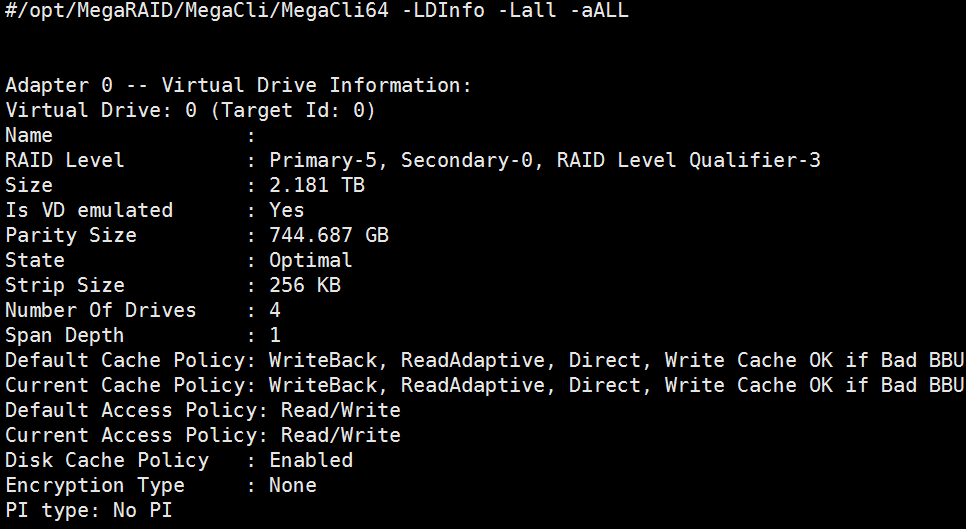
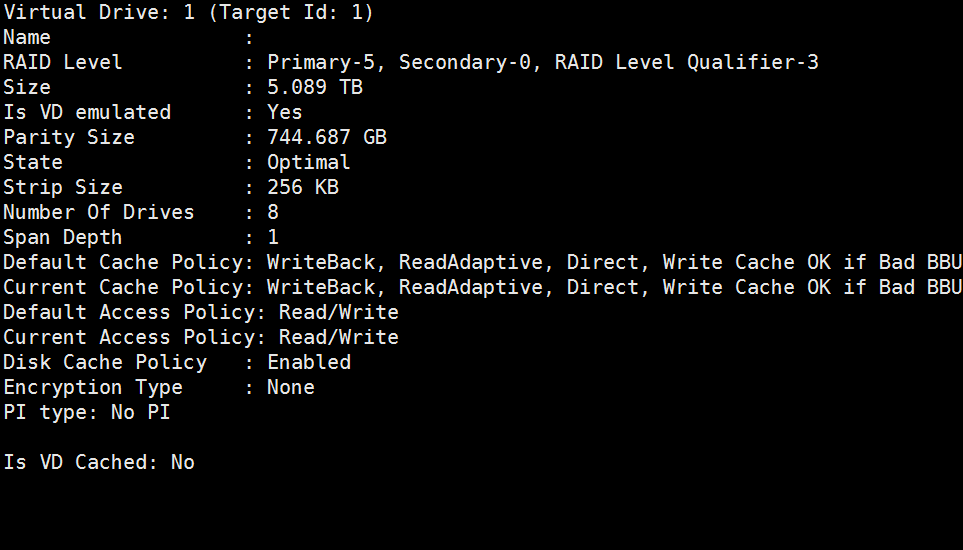
/opt/MegaRAID/MegaCli/MegaCli64 -LDInfo -Lall -aALL 【查raid级别】
/opt/MegaRAID/MegaCli/MegaCli64 -AdpAllInfo -aALL 【查raid卡信息】
/opt/MegaRAID/MegaCli/MegaCli64 -PDList -aALL 查看【硬盘信息】
/opt/MegaRAID/MegaCli/MegaCli64 -AdpBbuCmd -aAll 【查看电池信息】
/opt/MegaRAID/MegaCli/MegaCli64 -FwTermLog -Dsply -aALL 【查看raid卡日志】
/opt/MegaRAID/MegaCli/MegaCli64 -adpCount 【显示适配器个数】
/opt/MegaRAID/MegaCli/MegaCli64 -AdpGetTime –aALL 【显示适配器时间】
/opt/MegaRAID/MegaCli/MegaCli64 -AdpAllInfo -aAll 【显示所有适配器信息】
/opt/MegaRAID/MegaCli/MegaCli64 -LDInfo -LALL -aAll 【显示所有逻辑磁盘组信息】
/opt/MegaRAID/MegaCli/MegaCli64 -PDList -aAll 【显示所有的物理信息】
/opt/MegaRAID/MegaCli/MegaCli64 -AdpBbuCmd -GetBbuStatus -aALL |grep ‘Charger Status’ 【查看充电状态】
/opt/MegaRAID/MegaCli/MegaCli64 -AdpBbuCmd -GetBbuStatus -aALL【显示BBU状态信息】
/opt/MegaRAID/MegaCli/MegaCli64 -AdpBbuCmd -GetBbuCapacityInfo -aALL【显示BBU容量信息】
/opt/MegaRAID/MegaCli/MegaCli64 -AdpBbuCmd -GetBbuDesignInfo -aALL 【显示BBU设计参数】
/opt/MegaRAID/MegaCli/MegaCli64 -AdpBbuCmd -GetBbuProperties -aALL 【显示当前BBU属性】
/opt/MegaRAID/MegaCli/MegaCli64 -cfgdsply -aALL 【显示Raid卡型号 , Raid设置 , Disk相关信息】
/opt/MegaRAID/MegaCli/MegaCli64 -PdLocate -start -physdrv[E0:S0,E1,S1,...] -aAll|-aN|-a0,1,2 【点亮对应磁盘】
/opt/MegaRAID/MegaCli/MegaCli64 -PdLocate -stop -physdrv[E0:S0,E1,S1,...] -aAll|-aN|-a0,1,2 【关闭对应磁盘灯】
查看磁盘缓存策略
/opt/MegaRAID/MegaCli/MegaCli64 -LDGetProp -Cache -L0 -a0【显示0号RAID卡 0 RAID组的缓存策略
/opt/MegaRAID/MegaCli/MegaCli64 -LDGetProp -Cache -L1 -a0【显示1号RAID卡 0 RAID组的缓存策略】
/opt/MegaRAID/MegaCli/MegaCli64 -LDGetProp -Cache -LALL -a0【显示所有RAID卡 0 RAID组的缓存策略】
/opt/MegaRAID/MegaCli/MegaCli64 -LDGetProp -Cache -LALL –aALL【显示所有 RAID卡 所有 RAID组的缓存策略】
/opt/MegaRAID/MegaCli/MegaCli64 -LDGetProp -DskCache -LALL -aALL
设置磁盘的缓存模式和访问方式 (
Change Virtual Disk Cache and Access Parameters)Description Allows you to change the following virtual disk parameters: -WT (Write through), WB (Write back): Selects write policy. -NORA (No read ahead), RA (Read ahead), ADRA (Adaptive read ahead): Selects read policy. -Cached, -Direct: Selects cache policy. -RW, -RO, Blocked: Selects access policy. -EnDskCache: Enables disk cache. -DisDskCache: Disables disk cache. MegaCli -LDSetProp { WT | WB|NORA |RA | ADRA|-Cached|Direct} | {-RW|RO|Blocked} | {-Name[string]} | {-EnDskCache|DisDskCache} –Lx | -L0,1,2|-Lall -aN|-a0,1,2|-aALL MegaCli -LDSetProp WT -L0 -a0设置磁盘缓存策略
显示磁盘缓存和访问方式(
Display Virtual Disk Cache and Access Parameters)MegaCli -LDGetProp -Cache | -Access | -Name | -DskCache -Lx|-L0,1,2| -Lall -aN|-a0,1,2|-aALL Displays the cache and access policies of the virtual disk(s): -WT (Write through), WB (Write back): Selects write policy. -NORA (No read ahead), RA (Read ahead), ADRA (Adaptive read ahead): Selects read policy. -Cache, -Cached, Direct: Displays cache policy. -Access, -RW, -RO, Blocked: Displays access policy. -DskCache: Displays physical disk cache policy.缓存策略解释:
WT (Write through)
WB (Write back)
NORA (No read ahead)
RA (Read ahead)
ADRA (Adaptive read ahead)
C (Cached)
D (Direct)
例子:
/opt/MegaRAID/MegaCli/MegaCli64 -LDSetProp WT|WB|NORA|RA|ADRA -L0 -a0 /opt/MegaRAID/MegaCli/MegaCli64 -LDSetProp -Cached|-Direct -L0 -a0 enable / disable disk cache /opt/MegaRAID/MegaCli/MegaCli64 -LDSetProp -EnDskCache|-DisDskCache -L0 -a0创建阵列
创建一个
raid5阵列 , 由物理盘2、3、4构成 , 该阵列的热备盘是物理盘5/opt/MegaRAID/MegaCli/MegaCli64 -CfgLdAdd -r5 [1:2,1:3,1:4] WB Direct -Hsp[1:5] -a0创建阵列 , 不指定热备
/opt/MegaRAID/MegaCli/MegaCli64 -CfgLdAdd -r5 [1:2,1:3,1:4] WB Direct -a0创建一个raid10阵列 , 由物理盘2,3和4,5分别做raid1 , 在将两组raid1做raid0
/opt/MegaRAID/MegaCli/MegaCli64 –CfgSpanAdd –r10 –Array0[1:2,1:3] –Array1[1:4,1:5] WB Direct -a0删除阵列
/opt/MegaRAID/MegaCli/MegaCli64 -CfgLdDel -L1 -a0在线添加硬盘
/opt/MegaRAID/MegaCli/MegaCli64 -LDRecon -Start -r5 -Add -PhysDrv[1:4] -L1 -a0阵列创建完后 , 会有一个初始化同步块的过程 , 可以看看其进度。
/opt/MegaRAID/MegaCli/MegaCli64 -LDInit -ShowProg -LALL -aALL
或者以动态可视化文字界面显示
/opt/MegaRAID/MegaCli/MegaCli64 -LDInit -ProgDsply -LALL -aALL
查看阵列后台初始化进度
/opt/MegaRAID/MegaCli/MegaCli64 -LDBI -ShowProg -LALL -aALL
或者以动态可视化文字界面显示
/opt/MegaRAID/MegaCli/MegaCli64 -LDBI -ProgDsply -LALL -aALL
指定第5块盘作为全局热备
/opt/MegaRAID/MegaCli/MegaCli64 -PDHSP -Set [-EnclAffinity] [-nonRevertible] -PhysDrv[1:5] -a0指定为某个阵列的专用热备
/opt/MegaRAID/MegaCli/MegaCli64 -PDHSP -Set [-Dedicated [-Array1]] [-EnclAffinity] [-nonRevertible] -PhysDrv[1:5] -a0删除全局热备
/opt/MegaRAID/MegaCli/MegaCli64 -PDHSP -Rmv -PhysDrv[1:5] -a0将某块物理盘下线/上线
/opt/MegaRAID/MegaCli/MegaCli64 -PDOffline -PhysDrv [1:4] -a0
/opt/MegaRAID/MegaCli/MegaCli64 -PDOnline -PhysDrv [1:4] -a0
查看物理磁盘重建进度
/opt/MegaRAID/MegaCli/MegaCli64 -PDRbld -ShowProg -PhysDrv [1:5] -a0
或者以动态可视化文字界面显示
/opt/MegaRAID/MegaCli/MegaCli64 -PDRbld -ProgDsply -PhysDrv [1:5] -a0
磁盘状态的变化 , 从拔盘 , 到插盘过程中
Device |Normal|Damage|Rebuild|Normal
Virtual Drive |Optimal|Degraded|Degraded|Optimal
Physical Drive |Online|Failed –> Unconfigured|Rebuild|Online
4. 其他命令说明
当前
raid缓存状态 ,raid缓存状态设置为wb的话要注意电池放电事宜 , 设置电池放电模式为自动学习模式/opt/MegaRAID/MegaCli/MegaCli64 -ldgetprop -dskcache -lall -aall电池设置相关
查看电池状态信息(
Display BBU Status Information)MegaCli -AdpBbuCmd -GetBbuStatus -aN|-a0,1,2|-aALL MegaCli -AdpBbuCmd -GetBbuStatus -aALL查看电池容量(
Display BBU Capacity Information)MegaCli -AdpBbuCmd -GetBbuCapacityInfo -aN|-a0,1,2|-aALL MegaCli -AdpBbuCmd -GetBbuCapacityInfo –aALL查看电池设计参数(
Display BBU Design Parameters)MegaCli -AdpBbuCmd -GetBbuDesignInfo -aN|-a0,1,2|-aALL MegaCli -AdpBbuCmd -GetBbuDesignInfo –aALL查看电池属性 (
Display Current BBU Properties)MegaCli -AdpBbuCmd -GetBbuProperties -aN|-a0,1,2|-aALL MegaCli -AdpBbuCmd -GetBbuProperties –aALL设置电池为学习模式为循环模式 (
Start BBU Learning Cycle)Description Starts the learning cycle on the BBU. No parameter is needed for this option. MegaCli -AdpBbuCmd -BbuLearn -aN|-a0,1,2|-aALL通过脚本检测RAID磁盘状态
MEGACLI="/opt/MegaRAID/MegaCli/MegaCli64 "
$MEGACLI -pdlist -aALL  | grep "Firmware state" | awk -F : '{print $2}' | awk -F , '{print $1}'
$MEGACLI -pdlist -aALL  | grep -E "Media Error|Other Error" | awk -F : '{print $2}'
raid图解
参考链接
Megacli命令的使用总结 - yang-leo - 博客园 (cnblogs.com)
MegaCli命令详解 - 醒袭z - 博客园 (cnblogs.com)