


1. HBA卡查询信息命令
1.1 查看对应的PCI设备
# lspci | grep LSI如下 : 对应的HBA卡命令为sas3ircu

如下 : 对应的HBA卡使用sas2ircu

1.2 查看LSI控制器类型和型号
[root@node01 ~]# sas3ircu list
Avago Technologies SAS3 IR Configuration Utility.
Version 17.00.00.00 (2018.04.02)
Copyright (c) 2009-2018 Avago Technologies. All rights reserved.
Adapter Vendor Device SubSys SubSys
Index Type ID ID Pci Address Ven ID Dev ID
----- ------------ ------ ------ ----------------- ------ ------
0 SAS3008 1000h 97h 00h:3bh:00h:00h 1462h 101eh
SAS3IRCU: Utility Completed Successfully.
1.3 查看控制器、物理设备等信息
#命令中0代表index号
[root@node01 ~]# sas3ircu 0 display
Avago Technologies SAS3 IR Configuration Utility.
Version 17.00.00.00 (2018.04.02)
Copyright (c) 2009-2018 Avago Technologies. All rights reserved.
Read configuration has been initiated for controller 0
------------------------------------------------------------------------
Controller information
------------------------------------------------------------------------
Controller type : SAS3008
BIOS version : 8.33.00.00
Firmware version : 15.00.04.00
Channel description : 1 Serial Attached SCSI
Initiator ID : 0
Maximum physical devices : 383
Concurrent commands supported : 7680
Slot : 5
Segment : 0
Bus : 59
Device : 0
Function : 0
RAID Support : Yes
------------------------------------------------------------------------
IR Volume information
------------------------------------------------------------------------
IR volume 1
Volume ID : 605
Status of volume : Okay (OKY)
Volume wwid : 0672501d6d8dafa1
RAID level : RAID1
Size (in MB) : 227928
Physical hard disks :
PHY[0] Enclosure#/Slot# : 2:0
PHY[1] Enclosure#/Slot# : 2:1
------------------------------------------------------------------------
Physical device information
.....1.4 磁盘定位
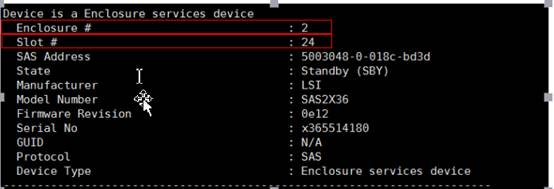
使用命令sas2ircu 0 display获得磁盘的Enclosure和Slot号
sas2ircu 0 locate 2:24 on/off 开启/关闭背板Enclosure 2 磁盘槽位号Slot为24的磁盘定位
2. RAID 相关命令
2.1 查看所有RAID信息
[root@node01 ~]# sas3ircu 0 status
Avago Technologies SAS3 IR Configuration Utility.
Version 17.00.00.00 (2018.04.02)
Copyright (c) 2009-2018 Avago Technologies. All rights reserved.
Background command progress status for controller 0...
IR Volume 1
Volume ID : 605
Current operation : None
Volume status : Enabled
Volume state : Optimal
Volume wwid : 0672501d6d8dafa1
Physical disk I/Os : Not quiesced
SAS3IRCU: Command STATUS Completed Successfully.
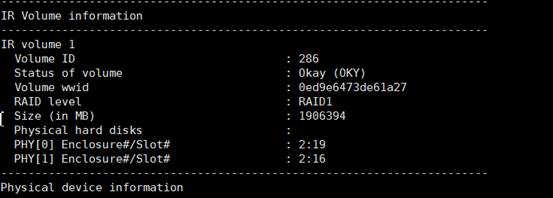
SAS3IRCU: Utility Completed Successfully.使用sas2ircu 0 display 可查看磁盘包含哪些磁盘
2.2 创建RAID
使用命令sas2ircu 0 create可查看到HBA支持的RAID类型和各个RAID类型至少需要多少块盘
语法 : sas3ircu <controller #> CREATE <volume type> <size> <Encl:Bay> [Volume Name] [noprompt]
Controller: HBA卡的index号
Volume type : 卡支持的RAID类型
Size : RAID 的大小 一般max为RAID的最大容量
Encl:Bay : Enclosure 背板号:slot槽位号
Volume Name : 卷名字
EnablePI : 可选参数 要创建一个支持PI的卷
Noprompt : 可选参数 消除了警告和提示
示例
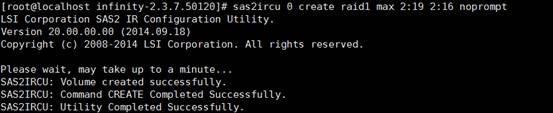
创建RAID1 :sas2ircu 0 create raid1 max 2:19 2:16 noprompt。
将背板Enclosure 2 Slot为16 和19的两块盘做RAID1
创建RAID10 : sas2ircu 0 create raid10 max 2:2 2:3 2:4 2:5 2:6 2:7 2:8 2:9 2:10 2:11 noprompt
2.3 删除RAID
删除HBA卡上的所有RAID :
sas2ircu 0 delete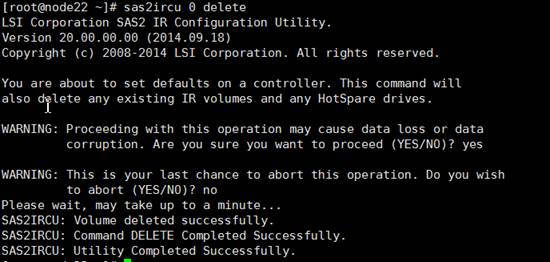
删除特定
RAID语法 :
sas3ircu <controller #> DELETE [noprompt]Controller: HBA卡的index号volumeID: RAID卷ID获得卷
ID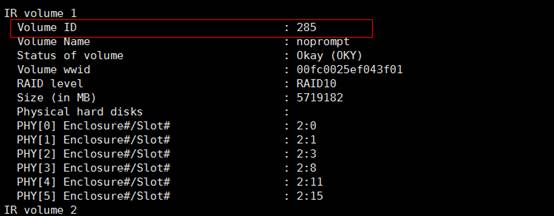
2.4 添加热备
sas2ircu 0 hotspare 2:10 : 添加Enclosure背板号为2,slot槽位号为10的磁盘为热备
2.5 删除热备
语法 : sas3ircu <controller #> HOTSPARE [delete] <Encl:Bay>
sas2ircu 0 hotspare delete 2:10 删除热备硬盘