


arcconf可对Adaptec-RAID卡基本操作进行管理。
命令参考链接: adaptec命令使用推荐网站
1. 工具功能
arcconf commands操作 , 如下图 , 不同arcconf工具版本可能略有差异。
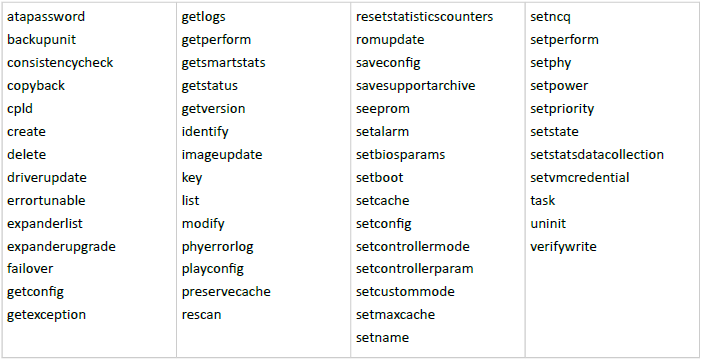
使用命令arcconf -h , 可查看到功能帮助文档 , 如下
[root@node24 ~]# arcconf -h
| UCLI | Adaptec by PMC uniform command line interface
| UCLI | Version 1.08 (B21375)
| UCLI | (C) Adaptec by PMCS 2003-2015
| UCLI | All Rights Reserved
ATAPASSWORD | setting password on a physical drive
BACKUPUNIT | Operations for Backup unit
CONSISTENCYCHECK | toggles the controller background consistency check mode
COPYBACK | toggles controller copy back mode
CPLD | performs operations regarding CPLD
CREATE | creates a logical device
DELETE | deletes one or more logical devices
ERRORTUNABLE | sets error tunable profiles on the controller
EXPANDERLIST | Lists the Expanders Connected to the Controller
EXPANDERUPGRADE | updates expander firmware
FAILOVER | toggles the controller automatic failover mode
GETCONFIG | prints controller information
GETLOGS | gets controller log information
GETPERFORM | gets the parameters for a performance mode
GETSMARTSTATS | gets the SMART statistics
GETSTATUS | displays the status of running tasks
GETVERSION | prints version information for all controllers
IDENTIFY | blinks LEDS on device(s) connected to a controller
IMAGEUPDATE | update physical device firmware
KEY | installs a Feature Key onto a controller
MODIFY | performs RAID Level Migration or Online Capacity Expansion
PHYERRORLOG | displays PHY error logs for controller or device or an expander PHY
PLAYCONFIG | Apply the configurations on controller(s) from input XML
PRESERVECACHE | changes the cache preservation settings on the controller
RESCAN | checks for new or removed drives
RESETSTATISTICSCOUNTERS | resets the controller statistics counters
ROMUPDATE | updates controller firmware
SAVECONFIG | saves the controller(s) information XML file
SAVESUPPORTARCHIVE | saves the support archive
SEEPROM | updates the SEEPROM on the controller
SETALARM | controls the controller alarm, if present
SETBIOSPARAMS | changes adapter BIOS settings
SETCACHE | adjusts physical or logical device cache mode
SETCONFIG | restores the default configuration
SETCONNECTORMODE | changes connector mode settings
SETCONTROLLERMODE | changes Controller mode settings
SETCUSTOMMODE | sets the parameters for user defined mode
SETMAXCACHE | adjusts maxCache settings for physical or logical device
SETNAME | renames a logical device given its logical device number
SETNCQ | toggles the controller NCQ status
SETPERFORM | changes adapter settings based on application
SETPHY | reconfigures the phy settings
SETPOWER | power settings for controller or logical device
SETPRIORITY | changes specific or global task priority
SETSTATE | manually sets the state of a physical or logical device
SETSTATSDATACOLLECTION | toggles the controller statistics data collection modes
SMP | Sends SMP Commands to Expander
TASK | performs a task such as build/verify on a physical or logical device
UNINIT | manually uninitializes the physical devices which are raw or ready在arcconf跟上功能 , 可查看到对应功能的帮助文档 , 如下
[root@node24 ~]# arcconf getconfig -h
Controllers found: 0
Invalid arguments.
Usage: GETCONFIG <Controller#> [AD | LD [LD#] | PD | MC | CN | [AL]] [nologs]
===================================================================================
Prints controller configuration information.
Option AD : Adapter information only
LD : Logical device information only
LD# : Optionally display information about the specified logical device
PD : Physical device information only
MC : maxCache 3.0 information only
CN : Connector information for smartHBA only
AL : All information (optional)如上 , 使用arcconf getconfig功能可以查看控制器的相关信息
<Controller#> : 控制器编号 , 如果该系统有多张raid卡 , 则编号从1开始往后排列
常用可选参数 :
AD : 仅显示控制器详细信息
LD : 仅显示逻辑设备(RAID)信息
PD : 仅显示物理设备(磁盘)信息
则arcconf getconfig功能示例如下:
查看控制器1的详细信息
# arcconf getconfig 1 ad
查看控制器1的逻辑设备信息
# arcconf getconfig 1 ld
查看控制器1的物理设备信息
# arcconf getconfig 1 pd2. 物理磁盘
2.1 磁盘基本信息
查看控制器1的物理磁盘信息 , channel id、slot、eid、SN , 等。
# arcconf getconfig 1 pd2.2 磁盘初始化
对物理磁盘相关操作:
操作语法
# arcconf task start <Controller#> device <Channel# ID#> <task>
<task>为可选参数 :
verify_fix----校验并修理磁盘
verify----校验磁盘
clear----清楚硬盘上所有数据
initialize----把硬盘设置成ready状态(会清楚所有的数据)
eg :
控制器1将channel ID为0 19的磁盘进行初始化
arcconf task start 1 device 0 19 initialize
控制器1将所有磁盘进行初始化
arcconf task start 1 device all Initialize
停止磁盘任务操作语法
# arcconf task stop <Controller#> device <Channel# ID#>
2.3 磁盘定位
控制器1定位channel id为0 19的磁盘
# arcconf identify 1 device 0 19
或
# arcconf identify 1 device 0 19 start
控制器1取消定位channel id为0 19的磁盘
# arcconf identify 1 device 0 19 stop
3. RAID 管理
3.1 新建RAID
语法 :
# arcconf create <Controller#> logicaldrive [Options] <Size> <RAID#> <Channel# ID#> [Channel# ID#] ... [noprompt]示例
控制器1创建raid , 条带大小256 , raid名diskarray05 , 快速初始化 , 开启读写缓存 , RAID模式5
使用磁盘channel id : 0 77 , 0 78 , 0 79创建。
# arcconf create 1 logicaldrive stripesize 256 name diskarray05 method quick rcache ron wcache wb max 5 0 77 0 78 0 79
控制器1创建简单卷 , 条带大小256 , 快速初始化 , 简单卷 , 使用磁盘channel id : 0 9创建
# arcconf creat 1 logicaldrive stripesize 256 method quick max simple_volume 0 9
Options参数 :
stripesize : 条带大小支持16 , 32 , 64 , 128 , 256 , 512和1024 , 默认256KB。
method : 初始化使用的方法 , build(完全初始化 , 可后台运行) , clear(初始化阵列 , 会将硬盘上的所有数据写零) , quick(快速初始化 , 只对写入的数据做保护) , skip(不初始化阵列 , 特殊情况使用)
rcache : 设置读缓存状态ron/roff
wcache : 设置写缓存为WT/WB/WBB
Size : max指使用所有硬盘上的值 , 以MB为单位获得空间。
Raid : 设置raid级别 , 支持0 , 1 , 1E , 10 , 5 , 5EE , 50 , 6 , 60和简单卷simple_volume。
Channel ID : 可使用arcconf getconfig 1 pd查看未使用磁盘对应ID号
Noprompt : 可选参数 , 加了这个参数会忽视用户的提示
3.2 热备
控制器1将channel id为0 19的磁盘设置为全局热备
# arcconf setstate 1 device 0 19 HSP

控制器1将channel id为0 19的磁盘设置为RAID组1的专属热备
RAID组编号1通过 arcconf getconfig 1 ld 确认
# arcconf setstate 1 device 0 19 HSP logicaldrive 1

控制器1将channel id为0 19的磁盘取消热备 , 即将热备盘重新设置为ready状态
# arcconf setstate 1 device 0 19 RDY
3.3 删除RAID
语法
# arcconf delete <Controller#> logicaldrive <ld#>

控制器1删除<ld#>为2的raid
RAID组编号2 , 通过命令 arcconf getconfig 1 ld 确认
# arcconf delete 1 logicaldrive 2
3.4 查看RAID
查看控制器1 RAID信息和RAID状态
# arcconf getconfig 1 ld

查看控制器1 RAID组正在执行的任务状态 , 如 : 一致性校验进度、初始化进度
# arcconf getstatus 1
3.5 设置缓存
语法
# arcconf setcache <Controller#> logicaldrive <LogicalDrive#> <logical mode>
<logical mode>参数 :
				ron  - read cache enabled
				roff - read cache disabled
				wt   - write through
				wb   - write back
				wbb  - write back with battery/ZMM

设置控制器1的RAID组2开启读缓存
# arcconf setcache 1 logicaldrive 2 ron

设置控制器1的RAID组2关闭写缓存
# arcconf setcache 1 logicaldrive 2 wt
3.6 RAID一致性校验
开启控制器1 RAID组2的单次一致性校验
# arcconf task start 1 logicaldrive 2 verify_fix

查看控制器1任务进度、任务id(tesk id)和优先级
# arcconf getstatus 1

根据上面查看到的<task id> , 修改任务优先级(LOW, MEDIUM, or HIGH)为低
# arcconf setpriority 1 <task id> low

停止控制器1 RAID组2正在进行的任务
# arcconf task stop 1 logicaldrive 2
周期性一致性校验 :
方案一 : 通过linux脚本定期执行 , 根据《低版本smartor raid一致性检测》操作
旧版本smartor推荐使用(方案一)

方案二 : 设置adaptec-raid卡自带定期一致性校验
开启控制器1定期一致性校验
# arcconf consistencycheck 1 on
控制器1设置周期30天
# arcconf consistencycheck 1 period 30
查看控制器1定期一致性校验配置
# arcconf getconfig 1 ad |grep -i consistency
4. 日志
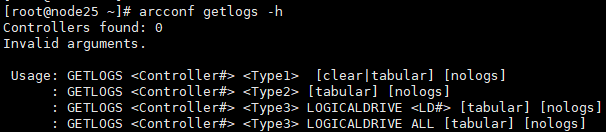
Type1 : device(设备错误信息)、dead(驱动失败日志)、event(控制器事件日志)
Type2 : stats(控制器数据)
Type3 : cache(缓存数据)

Eg : 查看设备错误日志信息并以列表显示
# arcconf getlogs 1 device tabular 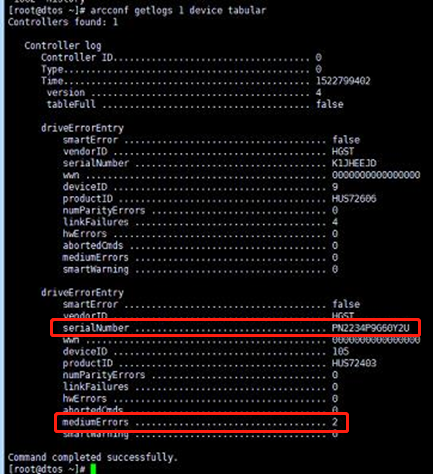
如上图 , 可看到某个磁盘出现过mediumErrors(介质错误、磁盘坏道)。
导出RAID相关日志 , 如下 :
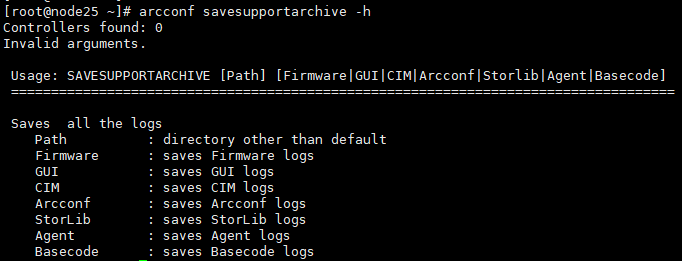
导出控制器1的所有support日志 , 生成到默认路径/var/log/support/下
# arcconf savesupportarchive
5. 异常情况
5.1 异常断电对初始化的影响
adaptec的raid完全初始化 , 是后台初始化 , 异常断电后开机依旧是后台初始化 , 但初始化进度会从新开始。
5.2 拔掉热备和1个数据盘恢复
先拔掉raid的热备盘 , 再拔掉1个数据盘 , 使存储处于降级状态。
而后开始恢复数据盘操作:
方法一:正常流程关机 , 插回拔掉的数据盘到原位置 , 开机 , 查看磁盘是否能自动恢复到raid组中。
方法二:初始化磁盘 , 设置为热备 , 开始重建 , 等待重建完成。