


1. 为什么要重写SQL语句
ProxySQL在收到前端发送来的SQL语句后 , 可以根据已定制的规则去匹配它 , 匹配到了还可以去重写这个语句 , 然后再路由到后端去。
什么时候需要重写SQL语句?
对于下面这种简单的读、写分离 , 当然用不上重写SQL语句。
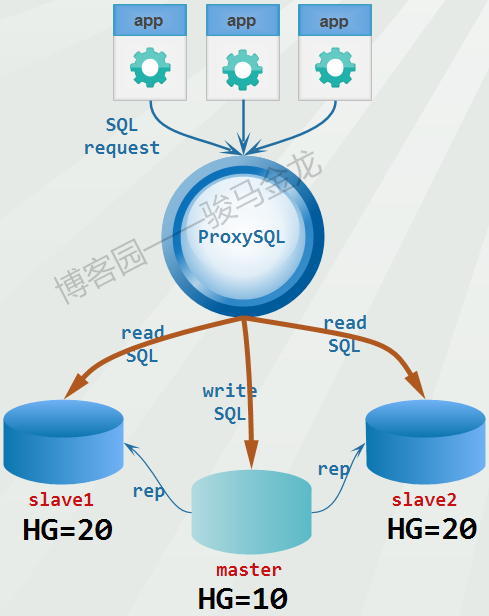
这样的读写分离 , 实现起来非常简单。如下 :
mysql_replication_hostgroups:
+------------------+------------------+----------+
| writer_hostgroup | reader_hostgroup | comment |
+------------------+------------------+----------+
| 10 | 20 | cluster1 |
+------------------+------------------+----------+
mysql_servers:
+--------------+----------+------+--------+--------+
| hostgroup_id | hostname | port | status | weight |
+--------------+----------+------+--------+--------+
| 10 | master | 3306 | ONLINE | 1 |
| 20 | slave1 | 3306 | ONLINE | 1 |
| 20 | slave2 | 3306 | ONLINE | 1 |
+--------------+----------+------+--------+--------+
mysql_query_rules:
+---------+-----------------------+----------------------+
| rule_id | destination_hostgroup | match_digest |
+---------+-----------------------+----------------------+
| 1 | 10 | ^SELECT.*FOR UPDATE$ |
| 2 | 20 | ^SELECT |
+---------+-----------------------+----------------------+
但是 , 复杂一点的 , 例如ProxySQL实现sharding功能。对db1库的select_1语句路由给hg=10的组 , 将db2库的select_2语句路由给hg=20的组 , 将db3库的select_3语句路由给hg=30的组。
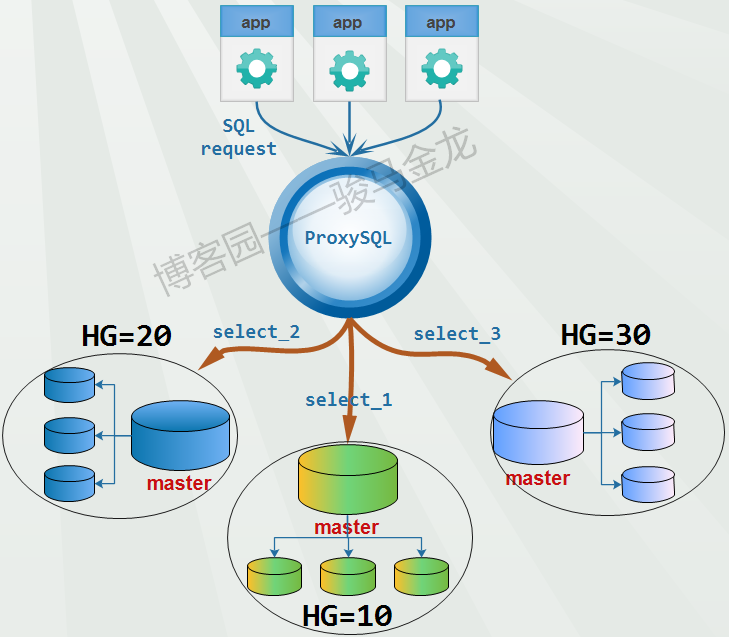
在ProxySQL实现sharding时 , 基本上都需要将SQL语句进行重写。这里用一个简单的例子来说明分库是如何进行的。
假如 , 计算机学院it_db占用一个数据库 , 里面有一张学生表stu , stu表中有代表专业的字段zhuanye(例子只是随便举的 , 请无视合理性)。
it_db库: stu表
+---------+----------+---------+
| stu_id | stu_name | zhuanye |
+---------+----------+---------+
| 1-99 | ... | Linux |
+---------+----------+---------+
| 100-150 | ... | MySQL |
+---------+----------+---------+
| 151-250 | ... | JAVA |
+---------+----------+---------+
| 251-550 | ... | Python |
+---------+----------+---------+
分库时 , 可以为各个专业创建库。于是 , 创建4个库 , 每个库中仍保留stu表 , 但只保留和库名对应的学生数据 :
Linux库 : stu表
+---------+----------+---------+
| stu_id | stu_name | zhuanye |
+---------+----------+---------+
| 1-99 | ... | Linux |
+---------+----------+---------+
MySQL库 : stu表
+---------+----------+---------+
| stu_id | stu_name | zhuanye |
+---------+----------+---------+
| 100-150 | ... | MySQL |
+---------+----------+---------+
JAVA库 : stu表
+---------+----------+---------+
| stu_id | stu_name | zhuanye |
+---------+----------+---------+
| 151-250 | ... | JAVA |
+---------+----------+---------+
Python库 : stu表
+---------+----------+---------+
| stu_id | stu_name | zhuanye |
+---------+----------+---------+
| 251-550 | ... | Python |
+---------+----------+---------+
于是 , 原来查询MySQL专业学生的SQL语句 :
select * from it_db.stu where zhuanye='MySQL' and xxx;分库后 , 该SQL语句需要重写为 :
select * from MySQL.stu where 1=1 and xxx;至于如何达到上述目标 , 本文结尾给出了一个参考规则。
sharding而重写只是一种情况 , 在很多使用复杂ProxySQL路由规则时可能都需要重写SQL语句。下面将简单介绍ProxySQL的语句重写。
2. SQL语句重写
在mysql_query_rules表中有match_pattern字段和replace_pattern字段 , 前者是匹配SQL语句的正则表达式 , 后者是匹配成功后(命中规则) , 将原SQL语句改写 , 改写后再路由给后端。
需要注意几点 :
如果不设置
replace_pattern字段 , 则不会重写。要重写
SQL语句 , 必须使用match_pattern的方式做正则匹配 , 不能使用match_digest。因为match_digest是对参数化后的语句进行匹配。ProxySQL支持两种正则引擎 :RE2和PCRE, 默认使用的引擎是PCRE。这两个引擎默认都设置了caseless修饰符(re_modifiers字段) , 表示匹配时忽略大小写。还可以设置其它修饰符 , 如global修饰符 ,global修饰符主要用于SQL语句重写 , 表示全局替换 , 而非首次替换。因为
SQL语句千变万化 , 在写正则语句的时候 , 一定要注意"贪婪匹配"和"非贪婪匹配"的问题。stats_mysql_query_digest表中的digest_text字段显示了替换后的语句。也就是真正路由出去的语句。
本文的替换规则出于入门的目的 , 很简单 , 只需掌握最基本的正则知识即可。
例如 , 将下面的语句1重写为语句2。
select * from test1.t1;
select * from test1.t2;
插入如下规则 :
delete from mysql_query_rules;
select * from stats_mysql_query_digest_reset where 1=0;
insert into mysql_query_rules(rule_id,active,match_pattern,replace_pattern,destination_hostgroup,apply)
values (1,1,"^(select.*from )test1.t1(.*)","\1test1.t2\2",20,1);
load mysql query rules to runtime;
save mysql query rules to disk;
select rule_id,destination_hostgroup,match_pattern,replace_pattern from mysql_query_rules;
+---------+-----------------------+------------------------------+-----------------+
| rule_id | destination_hostgroup | match_pattern | replace_pattern |
+---------+-----------------------+------------------------------+-----------------+
| 1 | 20 | ^(select.*from )test1.t1(.*) | \1test1.t2\2 |
+---------+-----------------------+------------------------------+-----------------+然后执行 :
$ proc="mysql -uroot -pP@ssword1! -h127.0.0.1 -P6033 -e"
$ $proc "select * from test1.t1;"
+------------------+
| name             |
+------------------+
| test1_t2_malong1 |
| test1_t2_malong2 |
| test1_t2_malong3 |
+------------------+
可见语句成功重写。
再看看规则的状态。
Admin> select rule_id,hits from stats_mysql_query_rules;
+---------+------+
| rule_id | hits |
+---------+------+
| 1       | 1    |
| 2       | 0    |
+---------+------+

Admin> select hostgroup,count_star,digest_text from stats_mysql_query_digest;
+-----------+------------+------------------------+
| hostgroup | count_star | digest_text            |
+-----------+------------+------------------------+
| 20        | 1          | select * from test1.t2 |  <--已替换
+-----------+------------+------------------------+
更简单的 , 还可以直接替换单词。例如 :
delete from mysql_query_rules;
select * from stats_mysql_query_digest_reset where 1=0;

insert into mysql_query_rules(rule_id,active,match_pattern,replace_pattern,destination_hostgroup,apply)
values (1,1,"test1.t1","test1.t2",20,1);

load mysql query rules to runtime;
save mysql query rules to disk;

select rule_id,destination_hostgroup,match_pattern,replace_pattern from mysql_query_rules;
+---------+-----------------------+---------------+-----------------+
| rule_id | destination_hostgroup | match_pattern | replace_pattern |
+---------+-----------------------+---------------+-----------------+
| 1       | 20                    | test1.t1      | test1.t2        |
+---------+-----------------------+---------------+-----------------+
3. sharding : 重写分库SQL语句
以本文前面sharding示例中的语句为例 , 简单演示下sharding时的分库语句怎么改写。更完整的sharding实现方法 , 见后面的文章。
#原来查询MySQL专业学生的SQL语句 :
select * from it_db.stu where zhuanye='MySQL' and xxx;
             |
             |
             |
            \|/
#改写为查询分库MySQL的SQL语句 :
select * from MySQL.stu where 1=1 and xxx;
以下是完整语句 : 关于这个规则中的正则部分 , 稍后会解释。
delete from mysql_query_rules;
select * from stats_mysql_query_digest_reset where 1=0;

insert into mysql_query_rules(rule_id,active,apply,destination_hostgroup,match_pattern,replace_pattern)
values (1,1,1,20,"^(select.*?from) it_db\.(.*?) where zhuanye=['""](.*?)['""] (.*)$","\1 \3.\2 where 1=1 \4");

load mysql query rules to runtime;
save mysql query rules to disk;

select rule_id,destination_hostgroup dest_hg,match_pattern,replace_pattern from mysql_query_rules;
+---------+---------+-----------------------------------------------------------------+-----------------------+
| rule_id | dest_hg | match_pattern                                                   | replace_pattern       |
+---------+---------+-----------------------------------------------------------------+-----------------------+
| 1       | 20      | ^(select.*?from) it_db\.(.*?) where zhuanye=['"](.*?)['"] (.*)$ | \1 \3.\2 where 1=1 \4 |
+---------+---------+-----------------------------------------------------------------+-----------------------+
然后执行分库查询语句 :
proc="mysql -uroot -pP@ssword1! -h127.0.0.1 -P6033 -e"
$proc "select * from it_db.stu where zhuanye='MySQL' and 1=1;"
看看是否命中规则 , 并成功改写SQL语句 :
Admin> select rule_id,hits from stats_mysql_query_rules;
+---------+------+
| rule_id | hits |
+---------+------+
| 1       | 1    |
+---------+------+

Admin> select hostgroup,count_star,digest_text from stats_mysql_query_digest;
+-----------+------------+-------------------------------------------+
| hostgroup | count_star | digest_text                               |
+-----------+------------+-------------------------------------------+
| 20        | 1          | select * from MySQL.stu where ?=? and ?=? |
| 10        | 1          | select @@version_comment limit ?          |
+-----------+------------+-------------------------------------------+
解释下前面的规则 :
match_pattern:"^(select.*?from) it_db\.(.*?) where zhuanye=['""](.*?)['""] (.*)$"replace_pattern:"\1 \3.\2 where 1=1 \4"
^(select.*?from) : 表示不贪婪匹配到from字符。之所以不贪婪匹配 , 是为了避免子查询或join子句出现多个from的情况。 it_db\.(.*?) : 这里的it_db是稍后要替换掉为"MySQL"字符的部分 , 而it_db后面的表稍后要附加在"MySQL"字符后 , 所以对其分组捕获。
zhuanye=['""](.*?)['""] :
这里的
zhuanye字段稍后是要删除的 , 但后面的字段值"MySQL"需要保留作为稍后的分库 , 因此对字段值分组捕获。同时 , 字段值前后的引号可能是单引号、双引号 , 所以两种情况都要考虑到。['""]: 要把引号保留下来 , 需要对额外的引号进行转义 : 双引号转义后成单个双引号。所以 , 真正插入到表中的结果是['"]。这里的语句并不健壮 , 因为如果是
zhuanye='MySQL"这样单双引号混用也能被匹配。如果要避免这种问题 , 需要使用PCRE的反向引用。例如 , 改写为 :zhuanye=(['""])(.*?)\g[N], 这里的[N]要替换为(['""])对应的分组号码 , 例如\g3。(.*)$: 匹配到结束。因为这里的测试语句简单 , 没有join和子查询什么的 , 所以直接匹配。"\1 \3.\2 where 1=1 \4": 这里加了1=1, 是为了防止出现and/or等运算符时前面缺少表达式。例如(.*)$捕获到的内容为and xxx=1, 不加上1=1的话 , 将替换为where and xxx=1, 这是错误的语句 , 所以1=1是个占位表达式。
可见 , 要想实现一些复杂的匹配目标 , 正则表达式是非常繁琐的。所以 , 很有必要去掌握PCRE正则表达式。
参考链接
MySQL中间件之ProxySQL(8) : SQL语句的重写规则 - 骏马金龙 - 博客园