


1. reqadd/rspadd
在http模式下 , 基于实际需求修改客户端的请求报文与响应报文 , 通过reqadd和reqdel在请求报文添加删除字段 , 通过rspadd与rspidel在响应报文中添加与删除字段。
reqadd <string> [{if | unless} <cond>]: 在请求报文尾部添加指定首部reqadd X-Via:\ HAProxy
reqdel <search> [{if | unless} <cond>]: 从请求报文中删除匹配正则表达式的首部reqidel <search> [{if | unless} <cond>]: 从请求报文中删除匹配正则表达式的首部(忽略大小写)。reqidel user-agent
rspadd <string> [{if | unless} <cond>]: 在响应报文尾部添加指定首部rspadd X-Via:\ HAPorxyrspadd Server:\ wanginx
rspdel <search> [{if | unless} <cond>]: 从响应报文中删除匹配正则表达式的首部rspidel <search> [{if | unless} <cond>]: 从响应报文中删除匹配正则表达式的首部(忽略大小写)。rspidel server.*: 从响应报文删除server信息rspidel X-Powered-By:.*: 从响应报文删除X-Powered-By信息, 一般此首部字段保存php版本信息
注意 : 此功能的以下相关指令在2.1版本中已经取消
2.1版本以上用下面指令http-request和http-response代替
2. http-request/http-response
使用http-request与http-response命令使用方式如下, 两者使用方式一样
http-request 语句定义了一组应用于第七层进程的规则。该语句主要应用于frontend、listen、backend。此处定义的所有规则都遵循ACL条件。
语法:
http-request <action> [options...] [ { if | unless } <condition> ]
每个实例的http请求语句数量没有限制。
该指令只能配置在含有name的default字段中, 而不是匿名的default字段。在匹配其他字段中,会重新评估Default字段中定义规则。为了避免歧义, listen、frontend、backend中不能使用相同的默认部分。
报文头部相关
http-request add-header <name> <fmt> [ { if | unless } <condition> ]http-request del-header <name> [ -m <meth> ] [ { if | unless } <condition> ]http-request replace-header <name> <match-regex> <replace-fmt> [ { if | unless } <condition> ]http-request replace-value <name> <match-regex> <replace-fmt> [ { if | unless } <condition> ]
IP 端口修改
http-request set-dst <expr> [ { if | unless } <condition> ]http-request set-dst-port <expr> [ { if | unless } <condition> ]http-request set-src <expr> [ { if | unless } <condition> ]http-request set-src-port <expr> [ { if | unless } <condition> ]
注 :
http-after-response包含http-response的功能,并且这个选项应用于所有响应 , 服务器响应 , 但也应用于HAProxy生成的所有响应。这些规则将在响应分析结束时、数据转发之前进行评估。
示例
listen web_port
bind 0.0.0.0:80
mode http
balance random
http-response del-header x-powered-by
http-response replace-header server .* test-server
http-response add-header via haproxy2.2.9
http-request add-header http_haproxy %T
server web1 192.168.194.136:8080 check inter 3000 fall 2 rise 5
server web2 192.168.194.128:8080 check inter 3000 fall 2 rise 5
#后端apache日志配置
LogFormat "\"%{X-Forwarded-For}i\" \"%{Cookie}i\" %h %l %u %t \"%r\" %>s %b \"%{Referer}i\" \"%{User-Agent}i\" %a \"%{http_haproxy}i\"" combined
#官网示例
http-request replace-header Cookie foo=([^;]*);(.*) foo=\1;ip=%bi;\2
# applied to:
Cookie: foo=foobar; expires=Tue, 14-Jun-2016 01:40:45 GMT;
# outputs:
Cookie: foo=foobar;ip=192.168.1.20; expires=Tue, 14-Jun-2016 01:40:45 GMT;
# assuming the backend IP is 192.168.1.20
http-request replace-header User-Agent curl foo
# applied to:
User-Agent: curl/7.47.0
# outputs:
User-Agent: foo
-------------
http-request replace-value X-Forwarded-For ^192\.168\.(.*)$ 172.16.\1
# applied to:
X-Forwarded-For: 192.168.10.1, 192.168.13.24, 10.0.0.37
# outputs:
X-Forwarded-For: 172.16.10.1, 172.16.13.24, 10.0.0.37
http-request set-dst hdr(x-dst)
http-request set-dst dst,ipmask(24)
----------------------------------------------------------------
http-request set-dst-port hdr(x-port)
http-request set-dst-port int(4000)
------------------------------------------------------------------
http-request set-src hdr(x-forwarded-for)
http-request set-src src,ipmask(24)
--------------------------------
http-request set-src-port hdr(x-port)
http-request set-src-port int(4000)前后截图对比
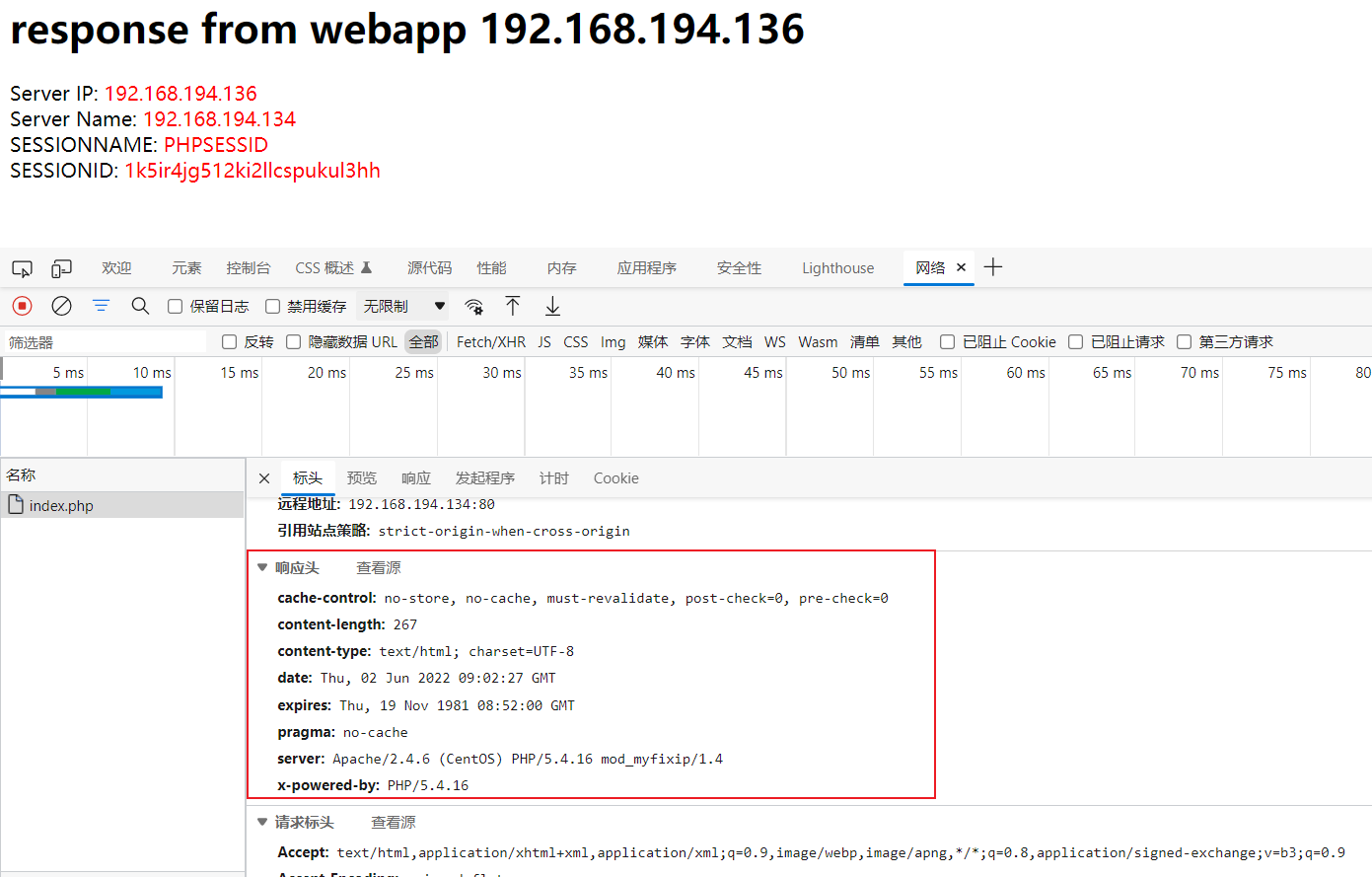
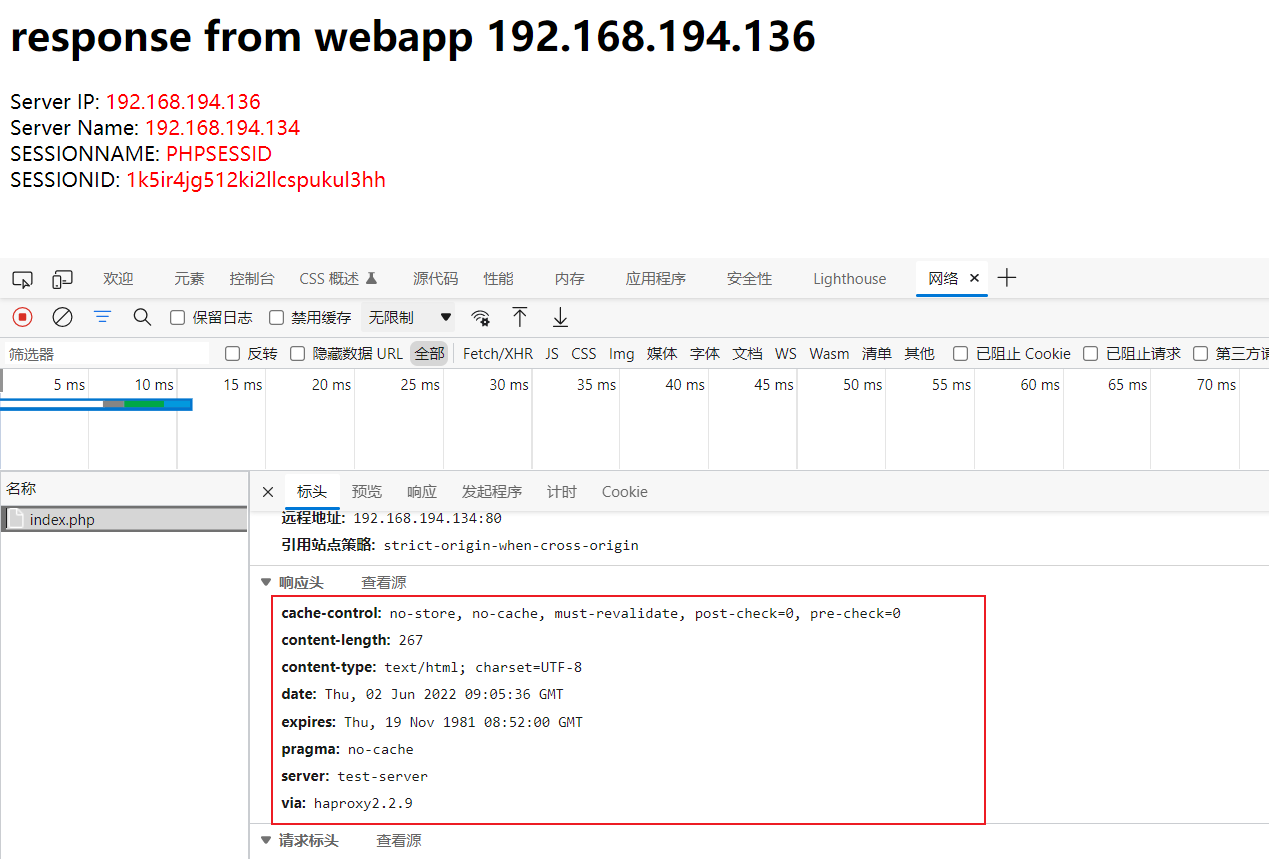
2.1 具体用法
语法 :
http-request <action> [options...] [ { if | unless } <condition> ]第7层请求的访问控制
http-request语句定义了一组适用于第7层处理的规则。当这些规则在frontend、listen或backend部分得到满足时 , 将按照其声明顺序进行评估。任何规则后面都可以有一个基于ACL的条件 , 在这种情况下 , 只有当条件为真时才会被评估。