


在HAproxy中,指明对后端服务器的调度算法。 使用调度算法时,主要时用balance命令调整后端real server服务器的调度算法。
sections : defaults,listen,backend。
haproxy可以使用socat命令通过调整socket文件,动态调整后端服务器的调度算法 , 获取haproxy的运行信息。
root@ubuntu2204:~# apt-get install socat
root@ubuntu2204:~# cat /etc/haproxy/haproxy.cfg
global
log /dev/log local0
log /dev/log local1 notice
chroot /var/lib/haproxy
stats socket /run/haproxy/admin.sock mode 660 level admin expose-fd listeners
stats timeout 30s
user haproxy
group haproxy
nbthread 3
daemon
defaults
log global
mode http
option httplog
option dontlognull
timeout connect 5000
timeout client 50000
timeout server 50000
listen stats
mode http
bind 0.0.0.0:9999
stats enable
log global
stats uri /haproxy-status
stats auth haadmin:123456
listen web_port
bind 0.0.0.0:80
mode http
log global
balance roundrobin
server web1 192.168.194.130:8080 check inter 3000 fall 2 rise 5
server web2 192.168.194.135:8080 check inter 3000 fall 2 rise 5
root@ubuntu2204:~# echo "show info " | socat stdio /run/haproxy/admin.sock
或
root@ubuntu2204:~# echo "show info " | socat - /run/haproxy/admin.sock
root@ubuntu2204:~# echo "show info " | socat stdio /run/haproxy/admin.sock
Name: HAProxy
Version: 2.5.6-1ppa1~jammy
Release_date: 2022/04/26
Nbthread: 3
Nbproc: 1
Process_num: 1
Pid: 2541
Uptime: 0d 1h34m25s
Uptime_sec: 5665
Memmax_MB: 0
PoolAlloc_MB: 0
PoolUsed_MB: 0
PoolFailed: 0
Ulimit-n: 524288
Maxsock: 524288
Maxconn: 262121
Hard_maxconn: 262121
CurrConns: 0
CumConns: 3778
CumReq: 16
MaxSslConns: 0
CurrSslConns: 0
CumSslConns: 0
Maxpipes: 0
PipesUsed: 0
PipesFree: 0
ConnRate: 0
ConnRateLimit: 0
MaxConnRate: 2
SessRate: 0
SessRateLimit: 0
MaxSessRate: 2
SslRate: 0
SslRateLimit: 0
MaxSslRate: 0
SslFrontendKeyRate: 0
SslFrontendMaxKeyRate: 0
SslFrontendSessionReuse_pct: 0
SslBackendKeyRate: 0
SslBackendMaxKeyRate: 0
SslCacheLookups: 0
SslCacheMisses: 0
CompressBpsIn: 0
CompressBpsOut: 0
CompressBpsRateLim: 0
Tasks: 17
Run_queue: 0
Idle_pct: 100
node: ubuntu2204
Stopping: 0
Jobs: 5
Unstoppable Jobs: 1
Listeners: 4
ActivePeers: 0
ConnectedPeers: 0
DroppedLogs: 0
BusyPolling: 0
FailedResolutions: 0
TotalBytesOut: 194071
TotalSplicdedBytesOut: 0
BytesOutRate: 0
DebugCommandsIssued: 0
CumRecvLogs: 0
Build info: 2.5.6-1ppa1~jammy
Memmax_bytes: 0
PoolAlloc_bytes: 130144
PoolUsed_bytes: 130144
Start_time_sec: 1651772340
Tainted: 0
#获取指定后端服务器的权重
root@ubuntu2204:~# echo "get weight web_port/web1 " | socat stdio /run/haproxy/admin.sock
1 (initial 1)
#临时设定后端服务器的权重
root@ubuntu2204:~# echo "set weight web_port/web1 2 " | socat stdio /run/haproxy/admin.sock
root@ubuntu2204:~# echo "get weight web_port/web1 " | socat stdio /run/haproxy/admin.sock
2 (initial 1)
#禁用指定的后端服务器
root@ubuntu2204:~# echo "disable server web-port/web2 " | socat stdio /run/haproxy/admin.sock
#重新启用指定的后端服务器
root@ubuntu2204:~# echo "enable server web_port/web2 " | socat stdio /run/haproxy/admin.sock
#将指定后端服务器的权重设置为0,设置为0之后该服务器被禁用
root@ubuntu2204:~# echo "set weight web_port/web2 0 " | socat stdio /run/haproxy/admin.sock
#当设置为静态算法时 , 无法调整权重 , 会出现如下报错
root@ubuntu2204:~# echo "set weight web_port/web1 2 " | socat stdio /run/haproxy/admin.sock
Backend is using a static LB algorithm and only accepts weights '0%' and '100%'.
root@ubuntu2204:~# echo "show servers state" | socat stdio /run/haproxy/admin.sock
1
# be_id be_name srv_id srv_name srv_addr srv_op_state srv_admin_state srv_uweight srv_iweight srv_time_since_last_change srv_check_status srv_check_result srv_check_health srv_check_state srv_agent_state bk_f_forced_id srv_f_forced_id srv_fqdn srv_port srvrecord srv_use_ssl srv_check_port srv_check_addr srv_agent_addr srv_agent_port
3 web_port 1 web1 192.168.194.130 2 0 1 1 130 6 3 6 6 0 0 0 - 8080 - 0 0 - - 0
3 web_port 2 web2 192.168.194.135 2 0 1 1 130 6 3 6 6 0 0 0 - 8080 - 0 0 - - 0
1. 静态算法
静态算法 : 按照事先定义好的规则轮询公平调度 , 不关心后端服务器的当前负载、链接数和相应速度等 , 且无法实时修改权重 , 只能靠重启HAProxy生效。
static-rr: 静态轮询调度策略 , 使用基于权重的轮询调度策略。权重在配置文件中指定后不可动态更改和后端服务器慢启动 , 此调度策略对后端服务器最大数量没有限制。相当于LVS中的wrr。listen web_port bind 0.0.0.0:80 mode http log global balance static-rr server web1 192.168.194.130:8080 weight 1 check inter 3000 fall 2 rise 5 server web2 192.168.194.135:8080 weight 2 check inter 3000 fall 2 rise 5first: 根据服务器在列表中的位置 , 自上而下进行调度(不人为的设定 , 从上到下各台服务器的id会自动增加 , 第一台服务器的id为 1) , 但是其只会当第一台服务器的连接数达到上限(maxconn参数) , 新请求才会分配给下一台服务 , 因此会忽略服务器的权重设置。不指定maxconn参数使用该调度策略是没有意义的。 实现该调度算法的实际用途是在比较空闲的时间段关闭某些服务器以使用最少的服务器提供服务,节约成本。如果需要人为指定
id, 则可以在server server_name ip:port指令后面加上id <idnumber>的id号必须是正整数。listen web_port bind 0.0.0.0:80 mode http log global balance first server web1 192.168.194.136:8080 check inter 3000 fall 2 rise 5 id 2 maxconn 2 server web2 192.168.194.128:8080 check inter 3000 fall 2 rise 5 id 1 maxconn 2
2. 动态算法
动态算法 : 基于后端服务器状态进行调度适当调整, 比如优先调度至当前负载较低的服务器 , 且权重可以在haproxy运行时动态调整无需重启。
roundrobin: 该算法是默认使用的调度策略。该算法会根据每个后端服务器的 权重weight依次将请求分发到后端服务器。当后端服务器的处理性能比较均 衡的分布时 , 使用该算法比较好。在该算法使用时 , 可以动态调整后端服务器 的权重 , 以便调整整个服务器组的性能。由于设计的限制 ,每个后端服务器组最多只能定义4095个活动服务器。该roudrobin算法支持慢启动(slow start) , 表示新加入的服务器会在一段时间内逐渐增加工作负载(转发量)。leastconn: 适用于长连接的会话 , 新的连接请求被派发至具有最少连接数目的后端服务器 ; 在有着较长时间会话的场景中推荐使用此算法。leastconn加权的最少连接的动态 , 支持权重的运行时调整和慢启动 , 即当前后端服务器连接最少的优先调度(新客户端连接) , 比较适合长连接的场景使用 ,比如MySQL等场景。random: 在1.9版本开始增加一个叫做random的负载平衡算法 , 其基于一个随机数作为一致性hash的key, 随机负载平衡对 于大型服务器场或经常添加或删除服务器非常有用。因为它可以避免 在这种情况下由roundrobin或leastconn导致的锤击效应。支持weight的动态调整 , weight较大的主机有更大概率获取新请求。支持慢启动。listen web_port bind 0.0.0.0:80 mode http log global balance random server web1 192.168.194.136:8080 weight 1 check inter 3000 fall 2 rise 5 server web2 192.168.194.128:8080 weight 2 check inter 3000 fall 2 rise 5
3. 其他算法
其他部分算法即可作为静态算法 , 又可以通过选项成为动态算法
source: 源地址hash, 基于用户源地址hash并将请求转发到后端服务器 ,默认为静态即取模方式 , 但是可以通过hash-type支持的选项更改 , 后续同一个源地址请求将被转发至同一个后端web服务器 , 比较适用于session保持/缓存业务等场景。源
IP地址被HASH并除以正在运行的服务器的总权重值 , 取其结果的摸 , 得到一个索引 , 以指定哪个服务器将接收请求。这确保了只要没有服务器宕机或恢复 , 相同的客户端IP地址将始终到达相同的服务器。运算结果会因运行的服务器数量的变化而发生变化 , 许多客户端请求将被定向到其它台服务器。该算法通常用于TCP模式 ,其中不可以插入cookie信息。它也可以在Internet上使用 , 为拒绝会话cookie的客户端提供最佳的粘性。默认情况下 , 这个算法是静态的 , 这意味着动态 地更改服务器的权重不会有任何影响 , 但是可以使用"hash-type"关键字来更改。源地址有两种转发客户端请求到后端服务器的服务器选取计算方式 , 分别是取模法和一致性
hash。map-base取模法 : 静态方法 , 在线调整服务器权重不能立即生效。hash表是一个包含了所有在线服务器的静态数组。取模法 , 基于服务器总权重的hash数组取模 , 该hash是静态的即不支持在线调整权重 , 不支持慢启动 , 其对后端服务器调度均衡 , 缺点是当服务器的总权重发生变化时 , 即有服务器上线或下线 , 都会因权重发生变化而导致调度结果整体改变。 简而言之 , 通过这种运算方式将请求调度至后端的某台服务器 , 当后端的服务器放生变动时(如某台服务器宕机或新添加了一台服务器) , 大部分的连接将会被重新调度至一个与之前不同的服务器上。所谓取模运算 , 就是计算两个数相除之后的余数 , 10%7=3, 7%4=3 , 基于权重取模:(2^32-1)%(1+1+2)
listen web_host bind 192.168.7.101:80,:8801-8810,192.168.7.101:9001-9010 mode tcp log global balance source server web1 192.168.7.103:80 weight 1 check inter 3000 fall 2 rise 5 server web2 192.168.7.104:80 weight 1 check inter 3000 fall 2 rise 5 consistent(一致性hash) : 动态发放 , 支持在线调整服务器权重。hash表是一个由各服务器填充而成的树状结构 , 使用此算法调度 , 当后端的服务器发生变动时 , 大分布的连接将依旧被调度至原本的服务器上。支持在线调整权重 , 支持慢启动 , 优点在于当服务器的总权重发生变化时, 对调度 结果影响是局部的 , 不会引起大的变动 。listen web_host bind 192.168.7.101:80,:8801-8810,192.168.7.101:9001-9010 mode tcp log global balance source hash-type consistent server web1 192.168.7.103:80 weight 1 check inter 3000 fall 2 rise 5 server web2 192.168.7.104:80 weight 1 check inter 3000 fall 2 rise 5
uri: 调度算法会对 URI 的左侧部分(问号前面的部分)或者对整个URI进行哈希 , 并使用活动服务器的总权重值除以该哈希值并进行取模 , 根据最终结果将请求转发到后端指定服务器 。该调度算法适用于后端是缓存服务器场景 ,默认是静态算法 ,也可以通过hash-type指定map-based和consistent, 来定义使用取模法还是一致性hash。主要用于代理缓存以及防病毒代理 , 以最大限度地提高缓存命中率。<scheme>://<user>:<password>@<host>:<port>/<path>;<params>?<query>#<frag> 左半部分:/<path>;<params> 整个uri:/<path>;<params>?<query>#<frag> #示例 http://example.org/absolute/URI/with/absolute/path/to/resource.txt #URI/URL ftp://example.org/resource.txt #URI/URL /relative/URI/with/absolute/path/to/resource.txt #URIurl_param:url_param对用户请求的url中的params部分中的一个参数key对应的value值作hash计算 ,并由服务器总权重相除以后派发至某挑出的服务器 ; 通常用于追踪用户 , 以确保来自同一个用户的请求始终发往同一个real server。其亦可以使用hash-type指定一致性哈希方法。另外 , 如果找不到URL中问号选项后的参数 , 则使用roundrobin算法。语法 :
balance url_param <param> [check_post [<max_wait>]]check_post:如果在URL问号(?)后面的查询串中找不到参数 ,就会搜索HTTPPOST请求实体。或者在指定的一些字节后面尝试搜索消息体。如果搜索不到实体 , 则使用roundrobin算法。url= http://www.cbears.top/foo/bar/index.php?k1=v1&k2=v2 host=www.cbears.top url_param="k1=v1&k2=v2"示例
listen web_port bind 0.0.0.0:80 mode http log global balance url_param age #这里其实仅支持一个url_param值hash hash-type consistent server web1 192.168.194.130:8080 check inter 3000 fall 2 rise 5 server web2 192.168.194.128:8080 check inter 3000 fall 2 rise 5 [root@centos7 ~]# curl 'http://192.168.194.128/index2.html?name=1&age=123' 192.168.194.130 /var/www/index2.html [root@centos7 ~]# curl 'http://192.168.194.128/index2.html?age=123' 192.168.194.130 /var/www/index2.html [root@centos7 ~]# curl 'http://192.168.194.128/index2.html?age=123&name=xiong' 192.168.194.130 /var/www/index2.html [root@centos7 ~]# curl 'http://192.168.194.128/index2.html?age=12&name=xiong' 192.168.194.128 /var/www/html/index2.html listen web_port bind 0.0.0.0:80 mode http log global balance url_param name,age server web1 192.168.194.130:8080 check inter 3000 fall 2 rise 5 server web2 192.168.194.128:8080 check inter 3000 fall 2 rise 5 [root@centos7 ~]# curl 'http://192.168.194.128/index2.html?name=test&age=123' 192.168.194.130 /var/www/index2.html [root@centos7 ~]# curl 'http://192.168.194.128/index2.html?name=test&age=123' 192.168.194.128 /var/www/html/index2.html [root@centos7 ~]# curl 'http://192.168.194.128/index2.html?name,age=123' 192.168.194.130 /var/www/index2.html [root@centos7 ~]# curl 'http://192.168.194.128/index2.html?name,age=123' 192.168.194.130 /var/www/index2.html [root@centos7 ~]# curl 'http://192.168.194.128/index2.html?name,age=123' 192.168.194.130 /var/www/index2.html [root@centos7 ~]# curl 'http://192.168.194.128/index2.html?age,name=123' 192.168.194.130 /var/www/index2.html [root@centos7 ~]# curl 'http://192.168.194.128/index2.html?age,name=123' 192.168.194.128 /var/www/html/index2.html [root@centos7 ~]# curl 'http://192.168.194.128/index2.html?age,name=123' 192.168.194.130 /var/www/index2.html #可以看到其中haproxy本身是依靠“name,age”整体当作一个paramershdr(<name>): 针对用户每个http头部(header)请求中的指定信息做hash, 此处由name指定的http首部将会被取出并做hash计算 , 然后由服务器总权重相除以后派发至某挑出的服务器 , 假如无有效的值 , 则会使用roundrobin调度算法。示例
listen web_port bind 0.0.0.0:80 mode http log global balance hdr(User-Agent) server web1 192.168.194.130:8080 check inter 3000 fall 2 rise 5 server web2 192.168.194.128:8080 check inter 3000 fall 2 rise 5 #测试 [root@centos7 ~]# curl -v -A "Chrome/101.0.4951.54" 192.168.194.128 * About to connect() to 192.168.194.128 port 80 (#0) * Trying 192.168.194.128... * Connected to 192.168.194.128 (192.168.194.128) port 80 (#0) > GET / HTTP/1.1 > User-Agent: Chrome/101.0.4951.54 > Host: 192.168.194.128 > Accept: */* > < HTTP/1.1 200 OK < date: Fri, 13 May 2022 11:18:51 GMT < server: Apache/2.4.52 (Ubuntu) < last-modified: Thu, 12 May 2022 15:13:36 GMT < etag: "29-5ded2007e6e0a" < accept-ranges: bytes < content-length: 41 < content-type: text/html < 192.168.194.128 /var/www/html/index.html * Connection #0 to host 192.168.194.128 left intact [root@centos7 ~]# curl -v --user-agent "Mozilla/5.0" 192.168.194.128 * About to connect() to 192.168.194.128 port 80 (#0) * Trying 192.168.194.128... * Connected to 192.168.194.128 (192.168.194.128) port 80 (#0) > GET / HTTP/1.1 > User-Agent: Mozilla/5.0 > Host: 192.168.194.128 > Accept: */* > < HTTP/1.1 200 OK < date: Fri, 13 May 2022 11:18:57 GMT < server: Apache/2.4.6 (CentOS) < last-modified: Thu, 12 May 2022 15:15:30 GMT < etag: "24-5ded2074819a0" < accept-ranges: bytes < content-length: 36 < content-type: text/html; charset=UTF-8 < 192.168.194.130 /var/www/index.html * Connection #0 to host 192.168.194.128 left intact [root@centos7 ~]# curl -v http://192.168.194.128 * About to connect() to 192.168.194.128 port 80 (#0) * Trying 192.168.194.128... * Connected to 192.168.194.128 (192.168.194.128) port 80 (#0) > GET / HTTP/1.1 > User-Agent: curl/7.29.0 > Host: 192.168.194.128 > Accept: */* > < HTTP/1.1 200 OK < date: Fri, 13 May 2022 11:18:59 GMT < server: Apache/2.4.52 (Ubuntu) < last-modified: Thu, 12 May 2022 15:13:36 GMT < etag: "29-5ded2007e6e0a" < accept-ranges: bytes < content-length: 41 < content-type: text/html < 192.168.194.128 /var/www/html/index.html * Connection #0 to host 192.168.194.128 left intactrdp-cookie:rdp-cookie对windows远程桌面的负载 , 使用cookie保持会话。此调度算法专门适用于windows远程桌面连接场景。当连接到后端服务器后 , 会生成一个cookie。下次相同的cookie连接时, 还会被调度到同一台后端服务器 , 适用于后端多服务器场景。通过查找每个TCP请求的RDPcookie并执行哈希计算除以所有正在运行的服务器的权重 , 将请求分发给服务器。此方法非常适合持久性 , 因为可以保持会话完整性。注 : 跨网段 , 需要开启路由器转发功能(
net.ipv4.ip_forward = 1) ; TCP是分析不到用户请求的应用层信息, 只分析到传输层 ,haproxy会基于端口号做转发 , 所以需要开启路由器转发功能 ;rdp-cookie也支持取模法。配置示例
listen RDP
        bind 0.0.0.0:3389
        mode tcp
        log global
        balance  rdp-cookie
        server rdp0 192.168.194.130:3389 check inter 3000 fall 2 rise 5
同样 , 这种方式可以通过
iptbales实现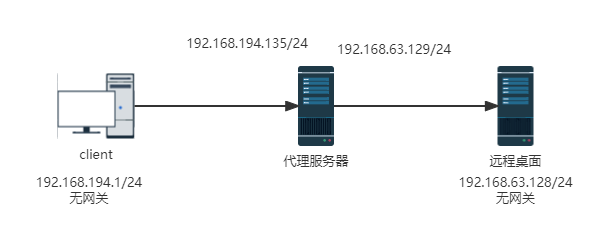
#代理服务器配置 [root@centos8 ~]# echo 1 > /proc/sys/net/ipv4/ip_forward [root@centos8 ~]# iptables -t nat -A PREROUTING -p tcp -d 192.168.194.135 --dport 3389 -j DNAT --to-destination 192.168.63.128:3389 [root@centos8 ~]# iptables -t nat -A POSTROUTING -s 192.168.194.0/24 -j SNAT --to-source 192.168.194.129 [root@centos8 ~]# iptables -vnL -t nat Chain PREROUTING (policy ACCEPT 0 packets, 0 bytes) pkts bytes target prot opt in out source destination 2 104 DNAT tcp -- * * 0.0.0.0/0 192.168.194.135 tcp dpt:3389 to:192.168.63.128:3389 Chain INPUT (policy ACCEPT 0 packets, 0 bytes) pkts bytes target prot opt in out source destination Chain POSTROUTING (policy ACCEPT 0 packets, 0 bytes) pkts bytes target prot opt in out source destination 7 1147 SNAT all -- * * 192.168.194.0/24 0.0.0.0/0 to:192.168.63.129 Chain OUTPUT (policy ACCEPT 0 packets, 0 bytes) pkts bytes target prot opt in out source destination
4. 算法总结
5. IP 透传
web服务器中需要记录客户端的真实IP地址 , 用于做访问统计、安全防护、行为分析、区域排行等场景。
5.1 四层IP透传
Haproxy配置
listen web_port
        bind 0.0.0.0:80
        mode http
        balance random
        server web1 192.168.194.136:8080  send-proxy check  inter 3000 fall 2 rise 5
        server web2 192.168.194.128:8080  send-proxy check  inter 3000 fall 2 rise 5
nginx配置
root@ubuntu2204:~# vim /etc/nginx/sites-available/default server { listen 8080 proxy_protocol default_server; ....nginx日志配置。
proxy_protocol_addr为haproxy传递给nginx的参数root@ubuntu2204:~# vim /etc/nginx/nginx.conf log_format access_json '{"@timestamp":"$time_iso8601",' '"host":"$server_addr",' '"clientip":"$remote_addr",' '"size":$body_bytes_sent,' '"responsetime":$request_time,' '"upstreamtime":"$upstream_response_time",' '"upstreamhost":"$upstream_addr",' '"http_host":"$host",' '"uri":"$uri",' '"domain":"$host",' '"xff":"$http_x_forwarded_for",' '"referer":"$http_referer",' '"tcp_xff":"$proxy_protocol_addr",' '"http_user_agent":"$http_user_agent",' '"status":"$status"}'; access_log /var/log/nginx/access.log access_json;
5.2 七层IP透传
当haproxy工作在七层的时候 , 如何透传客户端真实IP至后端服务器。
HAProxy通过使用option forwardfor选项,该选项主要是允许将X-Forwarded-For 标头插入到request中,并发送至servers。
语法 :
option forwardfor [ except <network> ] [ header <name> ] [ if-none ]except <network>: 可用选项,禁用源IP与<network>匹配的网络header <name>:重新定义命名传递IP参数X-Forwarded-For
sections:defaults、frontend、listen、backend
HAProxy配置如下
listen web_port
        bind 0.0.0.0:80
        mode http
        option forwardfor
        balance random
        server web1 192.168.194.136:8080  check  inter 3000 fall 2 rise 5
        server web2 192.168.194.128:8080  check  inter 3000 fall 2 rise 5
option forwardfor header X-Forwarded-xxx: 自定义传递IP参数,后端web服务器写X-Forwarded-xxx, 如果写option forwardfor则后端服务器web格式为X-Forwarded-For
WEB 服务器日志格式配置
配置web服务器 , 记录负载均衡透传的客户端IP地址
#apache 配置:
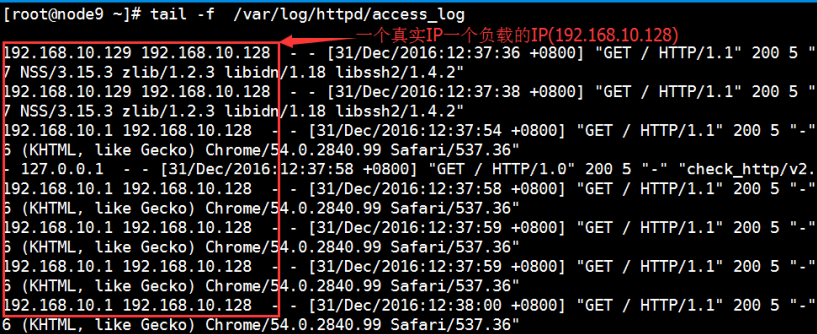
LogFormat "%{X-Forwarded-For}i %a %l %u %t \"%r\" %>s %b \"%{Referer}i\" \"%{UserAgent}i\"" combined
#tomcat 配置:
pattern='%{X-Forwarded-For}i %l %T %t "%r" %s %b "%{User-Agent}i"'/>
#nginx 日志格式:
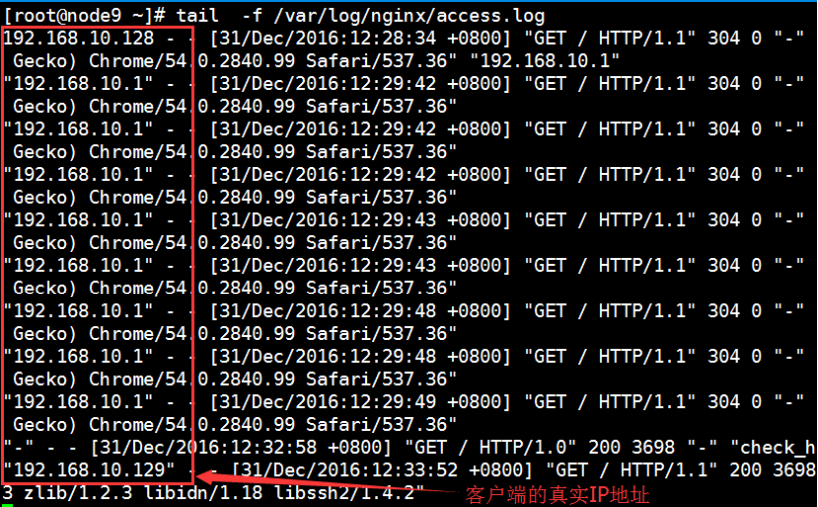
log_format main '"$http_x_forwarded_For" - $remote_user [$time_local] "$request" '
'$status $body_bytes_sent "$http_referer" '
'"$http_user_agent" ';
验证客户端IP地址
nginx访问地址
apache日志:
6. 动态调度HAproxy API
HAProxy的核心构件之一是Runtime API ,它提供了非常强大的动态配置能力 , 无需服务重载或重启。
HAProxy运行时API的起源是我们希望为HAProxy创建一个完整的配置和统计API , 其命令在运行时都会立即生效。我们在这个API中的早期功能之一当然是检索详细的实时统计数据的能力。另外 , 与典型的只支持HTTP的较新的API不同 , HAProxy运行时API总是可以通过TCP和Unix套接字访问。这就是为什么我们有时仍称它为HAProxy统计套接字或只是套接字 , 以及为什么启用Runtime API的配置指令有同样的名字。
在HAProxy配置中启用Runtime API的方法是使用下面的例子。
global
    stats socket ipv4@127.0.0.1:9999 level admin
    stats socket /var/run/hapee-lb.sock mode 666 level admin
stats timeout 2m如果你没有使用HAProxy企业版 , 在你的安装中默认的Unix套接字名称可能被命名为/var/run/haproxy.sock而不是/var/run/hapee-lb.sock 。
然后 , 为了测试或交互式地执行命令 , 可以使用socat提供的交互式命令提示符方便地访问Runtime API。
$ socat readline /var/run/hapee-lb.sock
$ socat readline tcp4-connect:127.0.0.1:9999
> help注意 : 要使上述方法奏效 , 你的
socat版本需要在编译时支持GNUReadline。这可以通过运行socat -V | grep READLINE来验证。如果socat -V的输出没有提到READLINE, 或者提到undefREADLINE, 或者运行实际命令产生一个错误未知设备/地址 "readline" , 这意味着你的版本没有readline支持。
对于从脚本访问Runtime API , 或者作为上述交互式使用的替代方法 ,可以使用以下命令 :
$ echo "help" | socat stdio /var/run/hapee-lb.sock
$ echo "help" | socat stdio tcp4-connect:127.0.0.1:9999
最后 , 作为对socat的完全替代 , 可以使用netcat软件包中的nc命令。在这种情况下 , 请使用netcat-openbsd版本的netcat ;它也支持nc -U选项 , 用于连接到Unix域套接字。
开始使用Runtime API的最好方法是执行一个简单的请求 , 返回一个所有可用命令的列表。这可以通过向API发送help或任何未知的命令来实现。下面是 "help "的实际输出 , 在HAProxy 1.8-dev2版本上执行。如果你的HAProxy缺少任何特定的命令或选项 , 请确保你使用的是最新的HAProxy或HAProxy企业版。
> help
    help                     : this message
    prompt                   : toggle interactive mode with prompt
    quit                     : disconnect
    show errors              : report last request and response errors for each proxy
    clear counters           : clear max statistics counters (add 'all' for all counters)
    show info                : report information about the running process
    show stat                : report counters for each proxy and server
    show schema json         : report schema used for stats
    disable agent            : disable agent checks (use 'set server' instead)
    disable health           : disable health checks (use 'set server' instead)
    disable server           : disable a server for maintenance (use 'set server' instead)
    enable agent             : enable agent checks (use 'set server' instead)
    enable health            : enable health checks (use 'set server' instead)
    enable server            : enable a disabled server (use 'set server' instead)
    set maxconn server       : change a server's maxconn setting
    set server               : change a server's state, weight or address
    get weight               : report a server's current weight
    set weight               : change a server's weight (deprecated)
    show sess [id]           : report the list of current sessions or dump this session
    shutdown session         : kill a specific session
    shutdown sessions server : kill sessions on a server
    clear table              : remove an entry from a table
    set table [id]           : update or create a table entry's data
    show table [id]          : report table usage stats or dump this table's contents
    disable frontend         : temporarily disable specific frontend
    enable frontend          : re-enable specific frontend
    set maxconn frontend     : change a frontend's maxconn setting
    show servers state [id]  : dump volatile server information (for backend )
    show backend             : list backends in the current running config
    shutdown frontend        : stop a specific frontend
    set dynamic-cookie-key backend : change a backend secret key for dynamic cookies
    enable dynamic-cookie backend  : enable dynamic cookies on a specific backend
    disable dynamic-cookie backend : disable dynamic cookies on a specific backend
    show stat resolvers [id] : dumps counters from all resolvers section and associated name servers
    set maxconn global       : change the per-process maxconn setting
    set rate-limit           : change a rate limiting value
    set timeout              : change a timeout setting
    show env [var]           : dump environment variables known to the process
    show cli sockets         : dump list of cli sockets
    add acl                  : add acl entry
    clear acl                : clear the content of this acl
    del acl                  : delete acl entry
    get acl                  : report the patterns matching a sample for an ACL
    show acl [id]            : report available acls or dump an acl's contents
    add map                  : add map entry
    clear map                : clear the content of this map
    del map                  : delete map entry
    get map                  : report the keys and values matching a sample for a map
    set map                  : modify map entry
    show map [id]            : report available maps or dump a map's contents
    show pools               : report information about the memory pools usage
6.1 检索统计数据
在进入Runtime API更强大的命令之前 , 作为一个简单的介绍 ,我们来演示一下从HAProxy获得实时统计数据的方法。
注 : 检索实时统计数据的一个已经很有名的方法是通过
HAProxy的内置、HTML网页。这些统计数据的格式简单明了 , 在HAProxy中配置了stats uri并访问了统计数据的URL后 , 就可以获得这些统计数据。
同样完整的原始信息也可以通过HAProxy Runtime API获得。该API命令被命名为show stat。
> show stat该命令的输出将以CSV格式提供。HAProxy 1.8版和HAProxy企业版1.7r2中已包含对JSON输出的支持。
统计输出包含80多个不同的指标。为了快速将其转换为更短的、人类可读的输出 ,我们可以使用标准的命令行工具。这里有一个例子 ,显示一个选定的数据子集 , 每两秒钟刷新一次。
$ watch 'echo "show stat" | socat stdio /var/run/hapee-lb.sock | cut -d "," -f 1-2,5-10,34-36 | column -s, -t'
  # pxname  svname    scur  smax  slim  stot  bin    bout   rate  rate_lim  rate_max
  fe_main   FRONTEND  10    10    7000  83    6347   15476  0     0         10
  be_stats  BACKEND   0     0     700   0     0      0      0     0
  be_app    websrv1   0     0     0     0     0      0      0
  be_app    websrv2   0     0     0     0     0      0      0
  be_app    BACKEND   0     0     700   0     0      0      0     0
  be_other  websrv1   0     10    322   6347  15476  14     20
  be_other BACKEND 10 10 700 83 6347 15476 0 10
通过使用上面的命令 , 我们将选择范围缩小到对快速和总结性监测有用的字段。
scur: 当前会话数smax: 自从HAProxy被重载/重启或重设统计后看到的最高会话数slim: 配置的会话数量上限stot: 到目前为止处理的会话的累积数量bin: 进入的字节数bout: 输出的字节数rate: 每秒的平均会话数 , 基于1秒的计算。rate_lim: 配置的每秒新会话的上限rate_max: 自从HAProxy被重新加载/重新启动或重新设置统计数据以来 , 每秒新会话的最高数量
关于show stat输出中所有字段的列表和描述 , 请参考: HAProxy version 2.6.3 - Management Guide
6.2 管理服务器和代理
使用Runtime API , 你能够禁用和启用服务器 , 或逐渐消耗它们的流量。你还可以启用和禁用健康检查 , 启用和禁用前端 , 并改变分配给服务器的负载平衡权重。让我们看一下几个例子。
如果你想从一个特定的服务器上逐渐耗尽流量 , 使用set server命令 , 将状态参数设置为drain。
# Drain traffic
> set server be_app/webserv1 state drain
# Allow server to accept traffic again
> set server be_app/webserv1 state ready当一个服务器处于耗尽模式时 , HAProxy仍然会定期向它发送健康检查。你也可以通过将服务器的状态设置为maint而不是drain来停止它们。耗尽一个服务器会使它逐渐脱离负载平衡的轮换 , 而把它放入维护模式则相当于立即停用它。
如果你只想停止健康检查 , 那就使用disable health命令 , 像这样。
# Disable health checks
> disable health be_app/webserv1
# Enable health checks
> enable health be_app/webserv1或者 , 如果你想向某个服务器发送更多或更少的流量 , 你可以改变其权重。使用带weight参数的set server命令。
# Change weight by percentage of its original value
> set server be_app/webserv1 weight 50%

# Change weight in proportion to other servers
> set server be_app/webserv1 weight 100你还可以做的是停止所有到前台代理的流量。使用disable frontend命令从一个frontend释放一个端口绑定。如果原来的端口有问题, 你可以用这个命令将该端口与另一个frontend联系起来。这里有一个例子。
# Disable a frontend
> disable frontend fe_main
# Enable frontend
> enable frontend fe_main还有更多可以操作 , 包括改变服务器的maxconn值, 改变服务器的分配IP地址 , 以及改变健康检查端口。
6.3 更新stick table
stick table是HAProxy中另一个非常强大、非常适用、但使用简单的功能。stick table允许在不同的请求中跟踪任意的客户信息 , 所以它们被用于创建 "粘性 "会话、实施安全保护、设置限制以及维护计数器和列表等目的。
stick table(以及计时器、调度器、ACL和许多其他功能和工具)是基于高性能的弹性二进制树。Ebtrees允许这些表包含数百万条记录, 同时保持极快的访问速度。关于stick table和它们的用途 , 包括
负载平衡、亲和力、持久性和粘性会话
微软远程桌面服务(
RDS)的负载平衡负载平衡作为对抗
DDoS的第一道防线使用
HAProxy对WordPressCMS进行暴力攻击保护
runtime API允许在运行时添加、删除、搜索和更新stick table条目。在下面的例子中 , 我们将创建一个有100万个条目的stick table , 以跟踪来自单个客户IP的请求率。我们将施加一个每秒最多5个请求的限制 , 在10秒内持续发送请求并超过该限制的IP地址将在15分钟内被拒绝进一步的请求。
frontend ft_web
    bind 0.0.0.0:8080

    # Stick table definition
    stick-table type ip size 1m expire 15m store gpt0,http_req_rate(10s)
    http-request allow if { src -f /etc/hapee/whitelist.lst }
    http-request track-sc0 src
    acl abuse src_http_req_rate ge 5
    http-request sc-set-gpt0(0) 1 if abuse
    http-request deny if { sc0_get_gpt0 ge 1 }
如前所述 , 上述stick table可以存储多达100万个条目 , 每个条目将包含3个值 : 一个IP地址 , 确定的10秒内的平均HTTP请求率 ,以及一个通用标签 "GPT0" , 如果要拒绝请求 , 该标签的值将为 "1"。如果客户端IP在配置的有效期内(在我们的例子中是15分钟)没有进一步的请求 , 表中的条目将被删除 , 以避免占用空间。来自白名单IP的请求将被通过 ,而不对其施加任何限制。
所有这些都将自动工作 , 不需要人工干预 , 这仅仅是由于上面的配置行。
然而 ,我们可能仍然希望能够在运行期间操纵stick table , 例如 , 改变条目的GPT0标志 , 完全删除条目 ,或者列出当前被阻止的IP。这也可以使用runtime API来完成。
# List the contents of the stick table
> show table ft_web
# table: ft_web, type: ip, size:1048576, used:2
0x1c1efe0: key=127.0.0.1 use=0 exp=5600 gpt0=1 http_req_rate(10000)=50
0x1c0d8e0: key=192.168.122.1 use=0 exp=7713 gpt0=0 http_req_rate(10000)=1
# Set an entry's GPT0 value to 0
> set table ft_web key 127.0.0.1 data.gpt0 0
# Delete the entry
> clear table ft_web key 127.0.0.1
# Verify successful deletion
> show table ft_web
# table: ft_web, type: ip, size:1048576, used:2
0x1c0d8e0: key=192.168.122.1 use=0 exp=7700 gpt0=0 http_req_rate(10000)=0
# List remaining blocked client IPs (those with tag GPT0 value greater than 0)
> show table ft_web data.gpt0 gt 06.4 更新ACL
为了扩展上述限制进入的HTTP请求的速率的例子 , 让我们假设我们现在想把现有的速率限制从每秒10个请求改为60个。
要做到这一点 , HAProxy运行时API当然允许我们在运行时改变ACL。我们将执行命令 "show acl "来查看配置的ACL , 然后确定我们要修改的ACL , 最后进行实际修改。修改将包括添加一个新的值 , 然后删除旧的值以完成过渡。
一个完整的会话可能看起来像下面这样。
> show acl
  # id (file) description
  0 () acl 'path_beg' file '/etc/hapee/hapee-lb.cfg' line 60
  1 () acl 'nbsrv' file '/etc/hapee/hapee-lb.cfg' line 61
  2 (/etc/hapee/whitelist.lst) pattern loaded from file '/etc/hapee/whitelist.lst' used by acl at file '/etc/hapee/hapee-lb.cfg' line 67
  3 () acl 'src' file '/etc/hapee/hapee-lb.cfg' line 67
  4 () acl 'src_http_req_rate' file '/etc/hapee/hapee-lb.cfg' line 69
  5 () acl 'sc0_get_gpt0' file '/etc/hapee/hapee-lb.cfg' line 71
  6 () acl 'path_beg' file '/etc/hapee/hapee-lb.cfg' line 80
  7 () acl 'always_true' file '/etc/hapee/hapee-lb.cfg' line 106

# We are interested in the 5th ACL (ID #4)
# Display the ACL's current settings
> show acl #4
  0xc9a3e0 10

# Add a new rate of 60
> add acl #4 60

# Verify that both values are now present
> show acl #4
  0xc9a3e0 10
  0xce8f10 60

# Delete the old value in any of the following two ways - by value, or by using the reference number
> del acl #4 10
> del acl #4 #0xc9a3e0

# Verify that only one value now remains in effect
> show acl #4
0xce8f10 60
6.5 更新白名单/黑名单
再次扩展我们原来的速率限制的例子 , 请注意我们使用了以下配置指令来规定白名单的IP地址。
http-request allow if { src -f /etc/hapee/whitelist.lst }这个配置行告诉HAProxy获取源IP , 将其与从whitelist.lst加载的IP地址列表进行核对 , 如果在列表中找到该IP地址 ,则无需进一步检查即可通过该请求。
在这个例子中 , 我们将通过使用runtime API来修改白名单的内容--我们将把一个IP地址条目从 "192.168.1.6"改为 "192.168.1.9" 。 像往常一样 , 为了做到这一点 , 我们将列出ACL , 确定我们要修改的条目 , 然后进行实际修改。修改将包括添加新的值 , 然后删除旧的值以完成过渡。
一个完整的会话可以是这样的。
> show acl
  # id (file) description
  0 () acl 'path_beg' file '/etc/hapee/hapee-lb.cfg' line 60
  1 () acl 'nbsrv' file '/etc/hapee/hapee-lb.cfg' line 61
  2 (/etc/hapee/whitelist.lst) pattern loaded from file '/etc/hapee/whitelist.lst' used by acl at file '/etc/hapee/hapee-lb.cfg' line 67
  3 () acl 'src' file '/etc/hapee/hapee-lb.cfg' line 67
  4 () acl 'src_http_req_rate' file '/etc/hapee/hapee-lb.cfg' line 69
  5 () acl 'sc0_get_gpt0' file '/etc/hapee/hapee-lb.cfg' line 71
  6 () acl 'path_beg' file '/etc/hapee/hapee-lb.cfg' line 80
  7 () acl 'always_true' file '/etc/hapee/hapee-lb.cfg' line 106

# We are interested in the third entry (ID #2)
# Display its content
> show acl #2
  0x24de920 191.168.1.1
  0x24de960 191.168.1.2
  0x24de9a0 191.168.1.3
  0x24de9e0 191.168.1.4
  0x24dcf10 191.168.1.5
  0x24de300 191.168.1.6
  0x24de340 191.168.1.7

# Add the new entry
> add acl #2 192.168.1.9

# Delete the old entry
> del acl #2 #0x24de300

# Verify the result
> show acl #2
  0x24de920 191.168.1.1
  0x24de960 191.168.1.2
  0x24de9a0 191.168.1.3
  0x24de9e0 191.168.1.4
  0x24dcf10 191.168.1.5
  0x24de340 191.168.1.7
  0x24de300 192.168.1.9
6.6 SSL/TLS
6.6.1 更新TLS凭证
HAProxy使用tls-ticket-keys来避免当一个现有的客户在关闭前一个会话后想开始一个新的会话时昂贵的密钥重新协商。如果一个客户支持会话票据 ,HAProxy将向它发送一个新的会话凭证记录 , 其中包含所有协商的会话数据(密码套件、主秘密等)。该记录将用只有HAProxy进程知道的私钥进行加密 , 确保数据不会被客户端读取或修改。
用于加密TLS凭据的秘钥是在HAProxy启动时产生的。如果建立了一个active-acive的HAProxy集群 , 并且客户端在节点之间移动 , 它将不得不经常重新协商密钥 ,因为用节点特定的密钥加密的凭据将不被集群中的其他节点理解。为了避免这种情况 , 可以将秘钥放在一个文件中 , 并定期轮换以保持完美的前向保密性。这样 , 集群中的所有节点将使用完全相同的秘钥集 , 客户将能够在HAProxy节点之间移动而不产生任何副作用。
这可以通过更新包含密钥的文件和手动重新加载HAProxy来完成, 但也可以在运行时通过使用HAProxy runtime API来完成。
一个完整的会话可以是这样的。
# List keys files
> show tls-keys
  # id (file)
  0 (/dev/shm/hapee_ticket_keys.txt)

# List keys in a particular file
> show tls-keys #0
  # id secret
  # 0 (/dev/shm/hapee_ticket_keys.txt)
  0.0 vaL65b3ns0mAJbiQRGiQZ84H4C9N1dZAyDYrHXVqG6KRDuXCo8mpwfk6+xPtlM1m
  0.1 fQxhSJT8sBKNb6JAFZT11UkzplfXEI1uUijPQUTBysZpNqzT26s2RVARxCoo5E52
  0.2 QtxrjBbPrX6z/PljdHIFqmHMH2/Rc5zZzIKklcfBPJa01G6PU9Dp9ixcibeisZxU

# Update key
> set ssl tls-keys #0 CaF7HpWr0gUByzxDqlbvYXCFT2zqmhnKFAdbM4MyQHfty974QO31Pn1OLJIR92rk
  TLS ticket key updated!

# Verify successful update
> show tls-keys #0
  # id secret
  # 0 (/dev/shm/hapee_ticket_keys.txt)
  0.0 fQxhSJT8sBKNb6JAFZT11UkzplfXEI1uUijPQUTBysZpNqzT26s2RVARxCoo5E52
  0.1 QtxrjBbPrX6z/PljdHIFqmHMH2/Rc5zZzIKklcfBPJa01G6PU9Dp9ixcibeisZxU
  0.2 CaF7HpWr0gUByzxDqlbvYXCFT2zqmhnKFAdbM4MyQHfty974QO31Pn1OLJIR92rk
6.6.2 配置OCSP响应
HAProxy还支持TLS证书状态请求扩展 , 也被称为 "OCSP主题"。关于配置OCSP响应的更多信息 , 请参见文件HAProxy version 2.6.3 - Configuration Manual。OCSP主题允许HAProxy向客户发送证书状态信息。该信息是一个经过签名的OCSP响应 , 将避免客户向发证机构托管的OCSP服务发送单独的请求。下面是一个用于显示服务器的OCSP响应的命令的例子:
$ openssl s_client -servername hapee-mh -connect 127.0.0.1:443 -tlsextdebug -status
  CONNECTED(00000003)
  TLS server extension "server name" (id=0), len=0
  TLS server extension "renegotiation info" (id=65281), len=1
  0001 - <SPACES/NULS>
  TLS server extension "EC point formats" (id=11), len=4
  0000 - 03 00 01 02                                       ....
  TLS server extension "session ticket" (id=35), len=0
  TLS server extension "status request" (id=5), len=0
  TLS server extension "heartbeat" (id=15), len=1
  0000 - 01                                                .
  depth=2 C = FR, ST = France, O = MMH-LAB, OU = SERVER, CN = MMH-CA
  verify error:num=19:self signed certificate in certificate chain
  verify return:0
  OCSP response:
  ======================================
  OCSP Response Data:
      OCSP Response Status: successful (0x0)
      Response Type: Basic OCSP Response
      Version: 1 (0x0)
      Responder Id: C = FR, ST = France, O = MMH-LAB, OU = SERVER, CN = MMH-OCSP
      Produced At: Nov 20 16:00:00 2017 GMT
      Responses:
      Certificate ID:
          Hash Algorithm: sha1
          Issuer Name Hash: 1A7A927EC43135F4B6FF62065A09E1C7FD02557B
          Issuer Key Hash: A45FE1C0DDC03B42C34306A08DF14ED33B74B86C
          Serial Number: 1000
      Cert Status: good
          This Update: Nov 20 16:00:00 2017 GMT
Next Update: Nov 30 16:00:00 2017 GMT
在输出的最后 , 我们可以看到信息 "Cert Status: good"。我们还可以在输出的最后一行看到 , 下一次更新预计在10天后。
现在 , 如果我们想更新OCSP响应 , 以便将下次更新时间从10天改为20天 , 我们可以准备响应 , 然后通过使用Runtime API将其加载到运行中的HAProxy实例中。
$ openssl ocsp -CAfile intermediate/certs/ca-chain.cert.pem -issuer intermediate/certs/intermediate.cert.pem -cert intermediate/certs/hapee-mmh.cert.pem -url http://localhost:8080 -respout  /tmp/ocsp-resp.der
  Response verify OK
  intermediate/certs/hapee-mmh.cert.pem: good
      This Update: Nov 20 16:00:00 2017 GMT
      Next Update: Dec 10 16:00:00 2017 GMT

$ echo "set ssl ocsp-response $(base64 -w 10000 /tmp/ocsp-resp.der)" | socat stdio /var/run/hapee-lb.sock
OCSP Response updated!
并使用与上述相同的方法 , 我们可以验证HAProxy现在正在提供更新的响应。
$ openssl s_client -servername hapee-mh -connect 127.0.0.1:443 -tlsextdebug -status
  CONNECTED(00000003)
   ...
   ...
  OCSP response:
  ======================================
   ...
   ...
  Cert Status: good
  This Update: Nov 20 16:00:00 2017 GMT
Next Update: Dec 10 16:00:00 2017 GMT
6.7 排错
当涉及到对配置或观察到的应用行为进行故障排除时 , 查看HAProxy的日志文件可能是最常见的行动方案之一。这当然也是一个好办法--HAProxy日志包含各种信息 , 包括关于计时器、大小、连接计数器等数据。但是 , 我们时常会遇到一些复杂的问题 , 甚至是需要更详细的调试输出的bug ,甚至是日志所能提供的。
6.7.1 显示错误
如前所述 , HAProxy将错误记录在日志文件中 , 这在HAProxy version 2.6.3 - Configuration Manual中有记载。响应行。例如 ,如果我们向它发送简单的、无效的流量 , 如以下内容。
$ echo "This is invalid traffic\n\nMore invalid traffic" | nc -v hapee-lab 80
  Connection to hapee-lab 80 port [tcp/http] succeeded!
  HTTP/1.0 400 Bad request
  Cache-Control: no-cache
  Connection: close
  Content-Type: text/html
  400 Bad Request
  Your browser sent an invalid request.
然后 , 日志将显示以下错误:
hapee-lab hapee-lb[17817]: 192.168.122.1:53918 [20/Nov/2017:13:29:11.305] fe_main fe_main/ -1/-1/-1/-1/+0 400 +187 - - PR-- 0/0/0/0/0 0/0 ""
但是为了获得有关请求的更多信息 ,甚至看到请求的内容 , 我们可以使用Runtime API命令 "show errors"。
> show errors
  Total events captured on [10/Nov/2017:13:41:58.421] : 3

  [10/Nov/2017:13:41:43.328] frontend fe_main (#2): invalid request
  backend  (#-1), server  (#-1), event #2
  src 192.168.122.1:54154, session #15, session flags 0x00000080
  HTTP msg state MSG_RQVER(6), msg flags 0x00000000, tx flags 0x00000000
  HTTP chunk len 0 bytes, HTTP body len 0 bytes
  buffer flags 0x00808002, out 0 bytes, total 46 bytes
  pending 46 bytes, wrapping at 16384, error at position 8:

  00000  This is invalid traffic\n
  00024  \n
  00025 More invalid traffic\n
6.7.2 导出会话
根据日志配置 , 所有的连接都可以被记录到HAProxy的日志文件中。但是 , 像往常一样 , 只有在HAProxy从后端服务器得到回复后 , 或者当它的一个定时器过期后 , 才会记录它们。在涉及长时间超时或会话需要很长时间才能完成的情况下 , 这可能导致日志似乎永远不会到达。在这种情况下 , 可以使用Runtime API命令 "show sess "来转储所有当前会话及其相关信息。
> show sess
0xd38210: proto=tcpv4 src=192.168.122.1:55234 fe=fe_main be= srv= ts=02 age=11s calls=1rq[f=400000h,i=0,an=34h,rx=,wx=,ax=] rp[f=80000000h,i=0,an=00h,rx=,wx=,ax=] s0=[7,8h,fd=1,ex=] s1=[0,10h,fd=-1,ex=] exp=
0xd24dd0: proto=unix_stream src=unix:1 fe=GLOBAL be= srv= ts=02 age=0s calls=1 rq[f=c08202h,i=0,an=00h,rx=10m,wx=,ax=] rp[f=80008002h,i=0,an=00h,rx=,wx=,ax=] s0=[7,8h,fd=2,ex=] s1=[7,4018h,fd=-1,ex=] exp=10m
在上面的例子中 , 我们可以看到两个会话 : 第一个是IPv4会话 ; 第二个是与我们调用Runtime API有关的会话。通过观察输出 , 我们可以发现 ,例如 , IPv4会话处于处理的早期阶段 , 因为还没有选择后端("be=")。此外, 为了帮助我们进一步排除复杂的问题 ,我们可以使用 "show sess "命令 , 并将会话ID作为一个参数("show sess ID"),以获得关于特定会话的更多细节。
6.7.3 关闭会话
除了使用 "show sess"显示活动的会话外 , 我们还可以使用Runtime API , 通过 "shutdown session"随意关闭会话。
> shutdown session 0xd38210这样的会话将出现在日志中 , 包含标志 "K" , 表明它们被关闭了。
6.8 更新GeoIP数据库
GeoIP数据库将IP地址范围映射到地理位置。这种数据库可以在HAProxy中用于不同的目的。通常情况下 , 它们被用来在HAProxy内部进行GeoIP查询 , 并将数据提供给后端服务器。然后 , 后端服务器可以依靠这些信息作为传入请求的一部分 , 不需要特定的GeoIP代码 , 也不会造成应用程序代码本身的缓慢。
GeoIP的另一个常见用例是在HAProxy的日志中包括客户的国家代码。这可以通过使用以下log-format指令来实现。
192.168.122.1:51000_FR [20/Nov/2017:19:34:11.688] fe_main be_app/websrv1 0/0/0/0/0 200 5720 - - --NI 1/1/0/1/0 0/0 "GET / HTTP/1.1"现在 , 就更新GeoIP数据库而言 , 我们假设在一个地图文件中拥有以下新的GeoIP条目。
2.0.0.0/12 FR
2.16.0.0/24 FR
2.16.2.0/23 FR
2.16.10.0/24 FR我们可以使用Runtime API命令add map轻松地将它们添加到运行配置中。另外 , 我们将使用一点bash shell脚本来自动导入数据,而不是一个一个的添加条目。
# Loop through the map entries on disk and add them to the running configuration
$ IFS=$'\n'
$ for ip_country in $(cat /tmp/more-ip-countries.lst); do
    echo "add map /tmp/ip-country.lst $ip_country"
done | socat stdio /var/run/hapee-lb.sock
参考链接
Haproxy基础知识 -运维小结 - 散尽浮华 - 博客园 (cnblogs.com)